
When it comes to PCIe Gen 5 SSDs, cooling is key to maintaining peak performance. Choosing the right heatsink kit can make a significant difference, especially under heavy workloads. With a range of options available, from sleek designs to robust materials, you’ll want to know what sets the best apart from the rest. Let’s explore the top contenders that can keep your drives cool and efficient during demanding tasks.
PNY CS3150 XLR8 Gaming 1TB NVMe M.2 SSD

If you’re a gamer or content creator looking to elevate your system’s performance, the PNY CS3150 XLR8 Gaming 1TB NVMe M.2 SSD is a standout choice with its impressive read speeds of up to 11,500 MB/s and write speeds reaching 8,500 MB/s. Its NVMe PCIe Gen5 x4 interface guarantees lightning-fast data transfer, perfect for demanding applications. Plus, the patent-pending quiet dual-fan heatsink maximizes heat dissipation, preventing performance throttling. You can also customize the RGB lighting and fan speeds using PNY’s VelocityX software. Backed by a 5-year warranty and 24/7 support, it’s a reliable option for any setup.
Best For: Gamers and content creators seeking high-speed storage solutions to enhance their system’s performance.
Pros:
- Outstanding read speeds of up to 11,500 MB/s and write speeds of 8,500 MB/s for rapid data access.
- Innovative quiet dual-fan heatsink design for effective cooling and prevention of performance throttling.
- Customizable RGB lighting and fan speed options through PNY’s VelocityX software for personalized aesthetics and performance.
Cons:
- Higher price point compared to standard SSDs, which may not be suitable for budget-conscious users.
- Requires a compatible motherboard with NVMe PCIe Gen5 x4 support to fully utilize its capabilities.
- The RGB lighting and fan customization features may not appeal to all users, particularly those preferring a minimalist setup.
M.2 Heatsink SSD Cooler for PS5 and PCIE NVME or SATA 2280 SSD (Black, 2 Pieces)

The M.2 Heatsink SSD Cooler for PS5 and PCIe NVME or SATA 2280 SSDs is an ideal choice for gamers and PC enthusiasts seeking to enhance their system’s thermal management. With a sleek black aluminum alloy design, this cooler effectively reduces temperatures by 10°C to 30°C using double-sided cooling. Weighing just 1 oz., it’s easy to install with included screws and thermal pads. Users have reported improved SSD performance, especially with single-sided drives. However, keep in mind potential compatibility issues with thicker double-sided drives. Overall, this kit offers excellent cooling solutions to keep your SSD running efficiently.
Best For: Gamers and PC enthusiasts looking to improve their system’s SSD thermal management and performance.
Pros:
- Comprehensive kit with all necessary components for easy installation.
- Effective heat management with temperature reductions of 10°C to 30°C.
- User-friendly assembly with included screws and thermal pads.
Cons:
- Lacks detailed installation instructions, which may lead to trial and error.
- Potential fitting issues in devices due to the added bulk of the heatsink.
- Compatibility challenges with thicker double-sided drives may require thinner thermal pads for optimal fit.
M.2 Heatsink Cooler for PS5/PC NVME SSD

For gamers and PC enthusiasts looking to maximize their SSD performance, the M.2 Heatsink Cooler offers impressive compatibility with a range of popular models, including Samsung’s 970 Pro and 980 Pro. Constructed from aluminum alloy with silver plating, this cooler effectively eliminates static electricity while enhancing heat dissipation. You can expect temperature drops of 10°C – 30°C, keeping your SSD cool during intense gaming sessions. Installation is a breeze, taking only about four minutes with provided thermal pads. Users rave about its cost-effectiveness and ability to reduce noise from overheating SSDs, making it a must-have for your setup.
Best For: Gamers and PC enthusiasts seeking effective cooling solutions for their NVMe SSDs to enhance performance and prevent overheating.
Pros:
- Easy installation within approximately four minutes using included thermal pads.
- Significant temperature reduction of 10°C – 30°C, improving SSD performance during gaming.
- Compatible with a variety of SSD models, including popular options like Samsung 970 Pro and 980 Pro.
Cons:
- May not fit all SSD configurations, especially some larger models.
- The effectiveness can vary depending on the specific SSD and usage conditions.
- Silver plating may wear over time, potentially affecting aesthetics.
Laptop NVMe M.2 Heatsink Kit for PC and PS5 (6pcs)

Looking to enhance your gaming or computing experience? The Laptop NVMe M.2 Heatsink Kit for PC and PS5 is your go-to solution. Compatible with various M.2 2280 SSDs, including popular models like the Samsung 970 EVO, it’s designed for compact spaces with just a 1.5mm height. Crafted from 100% copper, it effectively cools your SSD by 10-20°C, preventing overheating and throttling. Each kit includes a 0.5mm thermal pad for ideal heat transfer and comes with an installation guide and necessary accessories, making setup a breeze. Keep your performance high and your temperatures low with this essential heatsink kit!
Best For: Gamers and PC enthusiasts looking to optimize their system’s performance and prevent SSD overheating.
Pros:
- Effective Cooling: Reduces SSD temperatures by 10-20°C, enhancing performance and longevity.
- Versatile Compatibility: Works with a variety of M.2 2280 SSD models, including top brands like Samsung.
- Easy Installation: Comes with an installation guide and necessary accessories for hassle-free setup.
Cons:
- Height Limitations: Requires a minimum installation height of 1.5mm, which may not fit all devices.
- Material Weight: 100% copper construction may add extra weight to lightweight laptops.
- Thermal Pad Thickness: The 0.5mm thermal pad may not compensate for significant surface irregularities.
SABRENT M.2 NVMe SSD to PCIe x16 Adapter with Heatsink

Experience seamless performance with the SABRENT M.2 NVMe SSD to PCIe x16 Adapter, designed specifically for gamers and content creators seeking to maximize their data transfer speeds. This adapter supports up to 16GBps transfer speeds and is compatible with various NVMe M.2 SSDs. The built-in aluminum heatsink guarantees your drives stay cool without needing active cooling. Plus, its tool-free design allows for easy installation, although some users noted a few challenges with thermal pads. Weighing just 3.1 ounces, it’s both lightweight and efficient, making it a top choice among users who appreciate its sleek design and performance boost.
Best For: Gamers and content creators looking to enhance data transfer speeds and improve SSD cooling performance.
Pros:
- Supports up to 16GBps transfer speeds, ensuring fast data access and transfer.
- Tool-free installation design allows for easy setup without the need for additional tools.
- Built-in aluminum heatsink effectively prevents overheating, maintaining optimal performance during intensive tasks.
Cons:
- Installation challenges reported by some users, particularly regarding thermal pads and screws.
- Instructions could be clearer, leading to potential confusion during setup.
- Compatibility verification recommended for older systems to avoid potential issues.
GRAUGEAR Dual M.2 SSD Heatsink Kit for 2280 NVMe PCIe

The GRAUGEAR Dual M.2 SSD Heatsink Kit for 2280 NVMe PCIe stands out for its advanced dual-material cooling technology, making it perfect for gamers and high-performance users who demand superior SSD performance. With a 3mm thick copper heatsink and a 10mm aluminum alloy heatsink, it effectively reduces temperatures by 10°C–30°C, ensuring stability and longevity during intense gaming sessions. Its sleek, low-profile design fits seamlessly into most PC cases, while the complete kit includes two thermal pads for ideal heat transfer. Plus, installation is a breeze—no tools needed, making it compatible with single-sided M.2 2280 NVMe PCIe SSDs.
Best For: Gamers and high-performance users looking to enhance SSD performance and longevity through effective cooling solutions.
Pros:
- Advanced Cooling Technology: Combines copper and aluminum for superior heat dissipation, reducing temperatures by 10°C–30°C.
- Sleek Design: Low-profile construction fits most PC cases without obstruction, ideal for compact builds.
- Easy Installation: Tool-free setup with included thermal pads allows for quick and hassle-free installation.
Cons:
- Limited Compatibility: Designed specifically for single-sided M.2 2280 NVMe PCIe SSDs, which may not suit all users.
- Passive Cooling Only: Relies on passive cooling, which may not be sufficient for extreme overclocking scenarios.
- No RGB Lighting: Lacks aesthetic features like RGB lighting that some users may prefer for their builds.
ELUTENG M.2 SSD Heatsink (4PCS) with Thermal Pad

If you’re seeking an effective cooling solution for your M.2 PCIe NVMe SSDs or M.2 SATA SSDs, the ELUTENG M.2 SSD Heatsink (4PCS) with Thermal Pad stands out with its double-sided groove design. This design enhances heat dissipation, lowering temperatures by 10°C to 25°C, which keeps your SSDs running efficiently. Made from durable alloy aluminum, it resists corrosion and heat, ensuring longevity. With a dual installation method using metal clips and rubber bands, you can securely attach the heatsinks without worry. Plus, they’re compatible with various SSD types, making them a versatile choice for your setup.
Best For: Users seeking an effective cooling solution for their M.2 PCIe NVMe or M.2 SATA SSDs to enhance performance and longevity.
Pros:
- Enhanced Cooling: The double-sided groove design lowers temperatures by 10°C to 25°C, improving SSD efficiency.
- Durable Construction: Made from corrosion-resistant alloy aluminum, ensuring long-lasting performance.
- Flexible Installation: Dual installation options with metal clips and rubber bands for secure attachment.
Cons:
- Limited Size Compatibility: Designed specifically for 2280 SSDs, which may not fit other sizes.
- Installation Complexity: Some users may find the installation process challenging if unfamiliar with hardware.
- Potential for Overheating in Extreme Conditions: While it provides good cooling, extreme environmental temperatures may still affect performance.
GRAUGEAR Dual M.2 SSD Heatsink Kit for NVMe PCIe
For gamers and high-performance PC builders looking to enhance their M.2 SSD cooling, the GRAUGEAR Dual M.2 SSD Heatsink Kit is an excellent choice. With its advanced dual-material cooling, featuring a 3mm copper heatsink and a 10mm aluminum alloy heatsink, this kit effectively reduces temperatures by 10°C–30°C. You’ll enjoy improved drive stability and longevity, especially during intense gaming sessions. Its sleek, low-profile design fits seamlessly into most cases, while the included thermal pads guarantee ideal heat transfer. Plus, installation is a breeze with no tools required, making this kit perfect for single-sided M.2 2280 NVMe PCIe SSDs.
Best For: Gamers and high-performance PC builders seeking effective cooling solutions for their M.2 SSDs.
Pros:
- Advanced Cooling Technology: Reduces SSD temperatures by 10°C–30°C, enhancing stability and lifespan.
- Sleek Design: Low-profile heatsink fits most PC cases without interference.
- Easy Installation: Tool-free setup makes it accessible for users of all skill levels.
Cons:
- Compatibility Limitation: Designed specifically for single-sided M.2 2280 NVMe PCIe SSDs, which may not suit all SSD types.
- Passive Cooling Only: Relies on passive cooling, which may not be sufficient for extreme performance needs.
- Thermal Pad Sizes: Limited thermal pad sizes may not fit all setups perfectly, requiring additional purchases for some users.
MHQJRH M.2 2280 SSD Heatsink with Thermal Silicone Pad
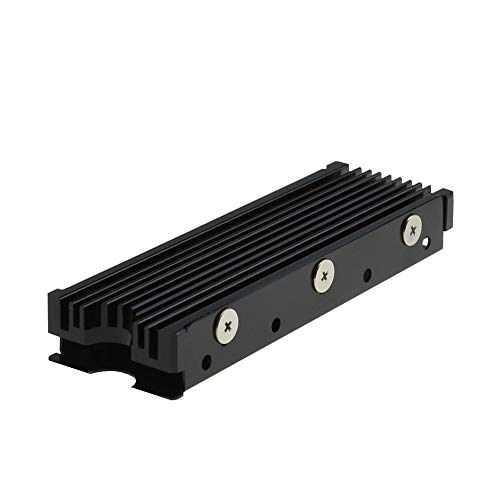
Designed specifically for M.2 2280mm SSDs, the MHQJRH heatsink kit is an ideal choice for gamers and PC enthusiasts looking to enhance their system’s performance. With a compact size and lightweight design, it fits effortlessly into your setup while providing double-sided cooling. The aluminum alloy construction features a unique groove design, increasing heat dissipation by 10°C to 30°C. Installation is a breeze, thanks to adjustable screws and a double-sided clip. Plus, the Nano Thermal Pad guarantees excellent thermal conductivity, protecting your SSD without damaging its warranty label. Upgrade your cooling game with this durable and efficient heatsink kit.
Best For: Gamers and PC enthusiasts looking to improve SSD performance and cooling efficiency.
Pros:
- Double-sided cooling design increases heat dissipation, reducing temperatures by 10°C to 30°C.
- Easy installation with adjustable screws and double-sided clip ensures a stable fit for various SSD heights.
- Nano Thermal Pad provides excellent thermal conductivity while protecting the SSD’s warranty label.
Cons:
- May not be compatible with SSDs other than M.2 2280mm format.
- Requires sufficient installation height of at least 12 mm, limiting compatibility with certain setups.
- Aluminum alloy construction, while durable, may be prone to scratches if not handled carefully.
M.2 Heatsink SSD Cooler for PS5 and PCIE NVME/SATA 2280 SSD (Black, 2 Pieces)
The M.2 Heatsink SSD Cooler for PS5 and PCIe NVME/SATA 2280 SSD is an excellent choice for gamers and PC enthusiasts looking to enhance their system’s performance. Made from durable aluminum alloy, it effectively reduces temperatures by 10°C to 30°C with its double-sided cooling design. Weighing just 1 oz., it’s lightweight and low-profile, ensuring GPU clearance. Installation is straightforward with included screws and thermal pads, although you might face some fitting challenges with thicker double-sided drives. Users rave about improved performance and cooler temps, making it a fantastic addition to your setup. Plus, it’s compatible with popular SSD models.
Best For: Gamers and PC enthusiasts looking to improve SSD performance and cooling efficiency.
Pros:
- Effective heat management with temperature reductions of 10°C to 30°C.
- Easy installation with all necessary components included.
- Lightweight, low-profile design allows for GPU clearance.
Cons:
- May require trial and error due to lack of detailed installation instructions.
- Potential fitting issues with thicker double-sided drives.
- Compatibility challenges may arise, necessitating thinner thermal pads for optimal fit.
Factors to Consider When Choosing Pcie Gen5 Ssd Heatsink Kits
When you’re choosing a PCIe Gen 5 SSD heatsink kit, you need to take into account several key factors. Cooling efficiency, material quality, and compatibility with your SSD type are essential for ideal performance. Don’t forget to reflect on the installation process and how the design fits your setup too.
Cooling Efficiency Levels
Choosing the right PCIe Gen5 SSD heatsink kit involves understanding various cooling efficiency levels, which can profoundly impact performance. These efficiency levels typically range from 10°C to 30°C, influenced by the heatsink’s design and materials. Advanced kits often combine copper and aluminum to enhance passive cooling, effectively lowering peak temperatures during demanding tasks. Look for double-sided cooling designs that increase contact area with the SSD, improving heat dissipation. Additionally, pay attention to the thickness and material of thermal pads, as they considerably affect thermal conductivity. Effective heatsink solutions can prevent performance throttling, ensuring your SSD stays within safe operating temperatures during intense gaming or data transfers, keeping your system running smoothly.
Material Quality and Durability
Cooling efficiency isn’t the only factor to keep in mind; material quality and durability play a significant role in the performance of PCIe Gen5 SSD heatsink kits. You’ll want to evaluate the materials used, as aluminum alloys and copper both offer different benefits. Aluminum heatsinks often come with anodic oxidation treatments for enhanced corrosion resistance, ensuring they last longer in various conditions. On the other hand, copper heatsinks excel in heat dissipation, potentially lowering SSD temperatures by 10°C to 30°C during peak workloads. Also, pay attention to the heatsink’s thickness and design, as low-profile options are better for fitting into compact spaces. Don’t forget to use quality thermal pads to maximize heat transfer without jeopardizing your SSD warranty.
Compatibility With SSD Types
Selecting the right heatsink kit for your PCIe Gen5 SSD hinges on compatibility with various SSD types. First, confirm the kit matches your M.2 SSD size, typically 2280, to avoid fitting issues. Look for heatsink kits that support both PCIe NVMe and SATA SSDs, giving you versatility for different models. It’s essential to check if the heatsink is suitable for single-sided or double-sided SSDs, as some kits might struggle with thicker drives. Also, verify that the thermal pads can handle uneven surfaces for effective heat transfer without risking warranty damage. Finally, consider the installation method—whether it uses screws or clips—to make certain it aligns with your technical comfort level.
Installation Process Complexity
When it comes to installing PCIe Gen5 SSD heatsink kits, simplicity is often a key factor. Many kits feature tool-free setups or straightforward attachment methods using screws or clips, making the process easier for you. However, some may lack clear instructions, leading to potential trial and error during installation. It’s crucial to pay attention to the thermal pads included, as they come in various thicknesses to fit different SSD heights. If you’re using a double-sided M.2 SSD, be aware that compatibility issues might arise with certain heatsink designs. Fortunately, many kits incorporate user-friendly features like double-sided clips or rubber bands, ensuring a secure attachment without needing extensive tools or technical skills.
Design and Aesthetics
Design and aesthetics play an essential role in choosing PCIe Gen5 SSD heatsink kits. A well-designed heatsink not only enhances cooling efficiency but also contributes to the overall look of your setup. Low-profile constructions can improve GPU clearance in compact builds, while sleek aluminum finishes and customizable RGB lighting elevate visual appeal. Materials like aluminum alloy or copper impact both thermal performance and durability, ensuring your heatsink lasts while looking good. Features such as double-sided cooling grooves enhance heat dissipation and add aesthetic complexity. Finally, ensuring compatibility with various SSD models and form factors allows the heatsink to fit seamlessly into your system, maintaining a cohesive design that reflects your style.
Thermal Management Features
Effective thermal management features are essential for maximizing the performance and longevity of your PCIe Gen5 SSD. Look for heatsinks made from high-quality materials like aluminum alloy or copper to enhance heat dissipation and prevent overheating during intensive tasks. Double-sided cooling designs can lower SSD temperatures by 10°C to 30°C, which boosts performance and extends lifespan. Make certain your heatsink kit includes thermal pads made from materials like Nano Silicon Grease for ideal contact with the SSD, facilitating better heat transfer and preventing thermal throttling. Additionally, kits with various thermal pad thicknesses make certain a proper fit without damaging warranty labels. Low-profile designs can also maintain compatibility with other components, maximizing cooling efficiency without interference.
Warranty and Support Options
Choosing the right PCIe Gen5 SSD heatsink kit involves more than just performance; warranty and support options are essential too. Start by checking the warranty coverage, as it can range from 5 years to a lifetime, depending on the manufacturer. Look for kits that offer 24/7 technical support to assist with troubleshooting and installation. Many kits encourage you to register your product, which can enhance your access to service and updates. Pay attention to the manufacturer’s reputation for support; positive customer feedback often indicates reliable service. Finally, verify the warranty terms align with your intended use, as certain installation conditions might void coverage. Prioritize these factors to safeguard your investment and guarantee smooth operation.
