
As you navigate the world of video editing in 2026, choosing the right storage solution is vital. PCIe Gen5 NVMe SSDs have transformed how we handle large files, offering speeds that can greatly enhance your workflow. With options like the WD_Black SN8100 and Samsung SSD 9100 PRO leading the pack, it’s essential to know what sets them apart. Let’s explore the top contenders and discover which SSD can elevate your editing experience.
WD_Black SN8100 1TB NVMe SSD

The WD_Black SN8100 1TB NVMe SSD stands out as a top choice for video editors and gamers who need lightning-fast performance, thanks to its impressive read speeds of up to 14,900MB/s. With write speeds reaching up to 11,000MB/s, you can manage large files effortlessly. Its PCIe 5.0×4 interface guarantees you’re equipped for demanding tasks, while the 3D TLC NAND technology enhances durability and efficiency. The SANDISK Dashboard lets you monitor performance, making sure you stay on top of updates. Whether you’re editing, gaming, or working with AI applications, this SSD optimizes your workflow and elevates your experience.
Best For: Video editors, gamers, and AI application developers seeking high-speed data transfer and reliable performance.
Pros:
- Impressive read speeds of up to 14,900MB/s facilitate quick file transfers and loading times.
- Durable 3D TLC NAND technology enhances reliability and endurance for intensive workloads.
- Power-efficient design provides over 100% more efficiency compared to PCIe Gen 4 drives, making it suitable for prolonged use.
Cons:
- Higher price point compared to standard SSDs may not be suitable for budget-conscious consumers.
- Limited software support as SANDISK Dashboard is only available for Windows users.
- Potential overkill for casual users who do not require such high-performance specifications.
Samsung SSD 9100 PRO 2TB, PCIe 5.0×4 M.2 2280

For video editors and content creators who demand exceptional performance, the Samsung SSD 9100 PRO 2TB stands out with its impressive PCIe 5.0 technology, delivering sequential read speeds of up to 14,700 MB/s. With write speeds up to 13,400 MB/s and random IOPS reaching 1,850K and 2,600K respectively, this SSD greatly enhances your productivity. It offers storage options up to 8TB, perfect for large projects and game libraries. The advanced thermal management guarantees reliability without overheating, while compatibility with various devices makes it versatile for any setup. Plus, Samsung’s Magician Software keeps your drive healthy and updated.
Best For: Video editors and content creators seeking high-performance storage solutions for demanding applications.
Pros:
- Unmatched Speed: Features PCIe 5.0 technology with read speeds up to 14,700 MB/s and write speeds of 13,400 MB/s.
- Large Storage Capacity: Available in sizes up to 8TB, accommodating extensive game libraries and large projects without compromise.
- Reliable Thermal Management: Advanced cooling systems ensure consistent performance and prevent overheating during intensive tasks.
Cons:
- Price Point: Higher cost compared to standard SSDs may be a barrier for some users.
- Limited Compatibility: Requires devices that support PCIe 5.0, which may not be available in older systems.
- Potential Overkill for Casual Users: Performance may be excessive for everyday tasks, making it less cost-effective for non-professional users.
WD_Black SN7100 1TB NVMe SSD

Serious on-the-go gamers will appreciate the WD_Black SN7100 1TB NVMe SSD, engineered for high-performance gaming and demanding applications. With a blistering read speed of up to 7,250 MB/s and write speed of 6,900 MB/s, it guarantees your games load faster than ever. This PCIe Gen4 NVMe drive is 35% quicker than previous generations, making it a top choice for efficiency. Its M.2 2280 form factor fits seamlessly into laptops and consoles, while the WD_BLACK Dashboard optimizes performance for you. Backed by a 3-year warranty, this SSD combines reliability with cutting-edge technology for a gaming experience like no other.
Best For: Serious on-the-go gamers seeking high-performance storage solutions for faster game loading and efficient performance.
Pros:
- Blistering read speed of up to 7,250 MB/s and write speed of 6,900 MB/s, ensuring quick data access.
- 35% faster than previous generation SSDs, providing a significant performance boost for demanding applications.
- Backed by a 3-year warranty, offering reliability and peace of mind for users.
Cons:
- Limited to Windows for performance optimization through the WD_BLACK Dashboard software.
- Higher price point compared to traditional SSDs, which may not appeal to budget-conscious consumers.
- Requires compatible devices (M.2 2280 slot) that may limit options for some users.
PNY CS3250 1TB Gen5 SSD PCIe NVMe M.2 2280

PNY’s CS3250 1TB Gen5 SSD is an exceptional choice for content creators and gamers who demand lightning-fast performance from their storage solutions. With a staggering sequential read speed of up to 14,900 MB/s and write speed of 13,500 MB/s, you’ll experience quick load times and smooth streaming. Its compact M.2 2280 form factor easily fits into laptops and desktops, expanding your storage by 1TB. Plus, the advanced thermal-coated controller keeps your drive cool during heavy multitasking. Backed by a 5-year warranty, this SSD’s AI-ready performance makes it perfect for modern applications. Upgrade your setup today and release its full potential!
Best For: Gamers and content creators looking for high-speed storage solutions to enhance performance and efficiency.
Pros:
- Exceptional Speed: Offers sequential read speeds up to 14,900 MB/s and write speeds up to 13,500 MB/s for rapid data access.
- Compact Design: M.2 2280 form factor allows for easy installation in a variety of devices, including laptops and desktops.
- AI-Ready Performance: Optimized for modern applications, making it suitable for real-time image generation and deep learning tasks.
Cons:
- Limited Compatibility: May not be compatible with older devices that do not support NVMe PCIe Gen5 technology.
- Price Point: Higher cost compared to traditional SSDs may be a consideration for budget-conscious consumers.
- Heat Management: While it has a thermal-coated controller, under extreme workloads, temperatures may still rise, potentially affecting performance.
Corsair MP700 PRO XT 2TB PCIe 5.0 NVMe M.2 SSD

The Corsair MP700 PRO XT 2TB PCIe 5.0 NVMe M.2 SSD stands out as an ideal choice for content creators who need lightning-fast data transfer speeds. With read speeds up to 14,900 MB/s and write speeds reaching 14,500 MB/s, your editing workflow will never be hindered. Its PCIe 5.0 x4 interface and NVMe 2.0 support guarantee top-tier performance, while the high-density 3D TLC NAND provides durability and endurance, rated for 5,600TB written. Plus, its power-efficient design reduces heat generation, keeping your system cool. This SSD combines performance, reliability, and value, making it a must-have for any serious editor.
Best For: Content creators and gamers seeking high-speed data transfer and reliable storage performance.
Pros:
- Ultra-fast read/write speeds of up to 14,900 MB/s and 14,500 MB/s enhance productivity and gaming experiences.
- High endurance rating of up to 5,600TB written ensures long-term reliability for heavy data usage.
- Power-efficient design helps reduce heat generation, maintaining optimal system performance.
Cons:
- Higher price point compared to standard SSDs may not be suitable for budget-conscious consumers.
- Requires a compatible motherboard to utilize PCIe 5.0 capabilities, limiting its use in older systems.
- Limited availability may make it harder to purchase compared to more common SSD models.
Corsair MP700 Micro 4TB PCIe 5.0 NVMe M.2 SSD
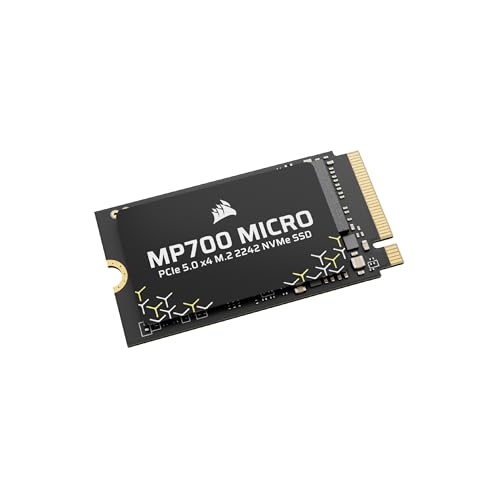
If you’re looking for a high-performance SSD designed specifically for laptops and mini PCs, the Corsair MP700 Micro 4TB PCIe 5.0 NVMe M.2 SSD is an excellent choice. With a compact M.2 2242 form factor, it fits seamlessly into slim devices. Experience blazing speeds with up to 9,400 MB/s read and 8,100 MB/s write, thanks to its PCIe 5.0 x4 interface. This SSD utilizes high-density 3D TLC NAND, balancing performance and endurance for long-lasting efficiency. It’s the ideal upgrade for compatible machines, making your editing tasks smoother and more efficient than ever. Get ready to release your creativity!
Best For: Users seeking a high-performance SSD to enhance the speed and efficiency of laptops and mini PCs.
Pros:
- Up to 9,400 MB/s read and 8,100 MB/s write speeds for exceptional performance.
- Compact M.2 2242 form factor ideal for thin and light devices.
- High-density 3D TLC NAND technology for a balance of performance and endurance.
Cons:
- Reduced performance when used with PCIe Gen4 and Gen3 interfaces.
- May not be compatible with all devices due to specific form factor requirements.
- Higher price point compared to traditional SSDs.
Samsung 990 PRO SSD 1TB PCIe 4.0 Internal Solid State Hard Drive

For content creators seeking lightning-fast performance in their editing workflow, the Samsung 990 PRO SSD 1TB PCIe 4.0 is an outstanding choice. With read speeds up to 7,450 MB/s and write speeds reaching 6,900 MB/s, this SSD guarantees your projects load and save in no time. Its compact M.2 2280 form factor fits most desktops and laptops, while the nickel-coated controller manages heat efficiently. You’ll enjoy a 40% boost in random read and a 55% increase in random write speeds compared to its predecessor. Plus, Samsung Magician software helps you optimize performance and protect your data effortlessly.
Best For: Content creators and gamers seeking high-performance storage solutions for fast load times and efficient workflow.
Pros:
- Ultra-fast read and write speeds (up to 7,450 MB/s and 6,900 MB/s) significantly reduce project loading and saving times.
- Improved random performance (40% better read and 55% better write) enhances overall system responsiveness.
- Efficient thermal management with a nickel-coated controller ensures reliable performance without overheating.
Cons:
- Higher price point compared to standard SSDs may not fit all budgets.
- Limited compatibility with older systems that do not support PCIe 4.0 technology.
- Potential overkill for casual users who do not require such high-speed performance for everyday tasks.
Samsung 990 EVO Plus SSD 1TB

With lightning-fast read speeds of up to 7,150 MB/s and write speeds reaching 6,300 MB/s, the Samsung 990 EVO Plus SSD 1TB stands out as an ideal choice for video editors and content creators. This M.2 2280 SSD, optimized for PCIe 4.0 x4 and PCIe 5.0 x2, delivers impressive performance through Intelligent TurboWrite 2.0. Its nickel-coated controller guarantees excellent thermal management, reducing overheating while improving power efficiency. Plus, with a solid 5-year warranty and a user-friendly Magician Software for monitoring, you can rely on the Samsung 990 EVO Plus to support your demanding workloads seamlessly.
Best For: Content creators and video editors seeking high-speed storage solutions for demanding workloads.
Pros:
- Exceptional Performance: Offers read speeds up to 7,150 MB/s and write speeds up to 6,300 MB/s, perfect for large file transfers.
- Efficient Thermal Management: The nickel-coated controller helps prevent overheating, ensuring consistent performance.
- User-Friendly Software: Magician Software allows for easy firmware updates and health monitoring of the drive.
Cons:
- Price Point: Higher cost compared to traditional SSDs may not be suitable for budget-conscious users.
- Compatibility Limitations: Optimized primarily for PCIe 4.0 and 5.0 systems, which may not be available in older setups.
- Performance Variability: Actual performance can differ based on system specifications and hardware configurations.
Lexar 1TB NM1090 PRO PCIe Gen5 NVMe M.2 Internal SSD

The Lexar 1TB NM1090 PRO PCIe Gen5 NVMe M.2 Internal SSD stands out as an exceptional choice for content creators and gamers seeking rapid performance. With blazing read speeds of up to 14,000 MB/s and write speeds reaching 10,000 MB/s, this SSD dramatically accelerates load times—up to 200% faster. Its advanced thermal control guarantees efficient heat dissipation, while DRAM and SLC Dynamic Cache enhance data transfer speeds. Plus, it’s compatible with desktops and PS5, making it versatile for various setups. With a five-year warranty and sturdy durability, this SSD is designed to meet your demanding needs.
Best For: Content creators and gamers seeking high-speed performance and efficient load times for their applications and games.
Pros:
- Blazing fast read speeds up to 14,000 MB/s and write speeds up to 10,000 MB/s.
- Advanced thermal control and efficient heat dissipation to prevent overheating.
- Compatible with both desktops and PS5, making it versatile for different setups.
Cons:
- Higher price point compared to traditional SSDs.
- May require additional cooling solutions for optimal performance during extended use.
- Limited to M.2 2280 form factor, which may not fit all systems.
Crucial T705 PCIe Gen5 NVMe 1TB SSD

Looking for an SSD that can handle intense workloads? The Vital T705 PCIe Gen5 NVMe 1TB SSD delivers outstanding performance with read speeds up to 13,600MB/s and write speeds reaching 10,200MB/s. Its spacious 1TB capacity is perfect for AAA games, 8K+ videos, and creative assets. Designed with PCIe 5.0 technology, it guarantees quicker game load times and smooth multitasking. Plus, its heatsink-compatible design keeps it cool during demanding tasks. Optimized for Intel 13th/14th Gen and AMD Ryzen 7000, you’ll also benefit from the included Acronis True Image and a one-month Adobe Creative Cloud subscription for your projects.
Best For: Hardcore gamers and creative professionals seeking high-speed storage for demanding applications and large files.
Pros:
- Incredible speeds: Achieves read speeds up to 13,600MB/s and write speeds of 10,200MB/s for rapid data access.
- Spacious storage: 1TB capacity accommodates AAA games, 8K+ videos, and extensive creative projects.
- Compatibility and optimization: Designed for Intel 13th/14th Gen and AMD Ryzen 7000 systems, ensuring peak performance.
Cons:
- Potential overheating: While heatsink-compatible, intensive use may still lead to thermal throttling without proper cooling solutions.
- Pricey for average users: Higher cost compared to standard SSDs may not be justified for casual users.
- Limited software bundle: The included Acronis True Image and Adobe Creative Cloud subscription may not be essential for all users.
Factors to Consider When Choosing Pcie Gen5 Nvme Ssds for Editing
When you’re choosing a PCIe Gen5 NVMe SSD for editing, you need to take into account several key factors. Pay attention to read and write speeds, storage capacity options, and thermal management features. Don’t forget about endurance, reliability, and compatibility with your devices to guarantee peak performance.
Read and Write Speeds
Choosing the right PCIe Gen5 NVMe SSD for editing hinges on understanding read and write speeds, as they directly impact your workflow. With read speeds reaching up to 14,900 MB/s, you’ll notice notably improved data access times when editing large files. Write speeds can hit 13,500 MB/s, allowing you to save and export high-resolution videos and images much faster. The enhanced bandwidth of PCIe Gen5 is essential for multitasking, especially when accessing multiple files simultaneously. Look for SSDs with random performance specifications over 2,300,000 IOPS to minimize lag while working on complex projects. Ultimately, faster read and write speeds mean quicker load times for software and assets, maintaining efficiency during your editing tasks.
Storage Capacity Options
As read and write speeds play a significant role in your editing efficiency, the next important factor to contemplate is storage capacity. PCIe Gen5 NVMe SSDs come in various sizes, typically ranging from 1TB to 8TB. A 1TB SSD works well for casual users and smaller projects, while 2TB or 4TB capacities are better suited for extensive video editing and high-resolution content. If you’re dealing with 8K video files or large datasets, consider opting for high-capacity SSDs up to 8TB. It’s vital to think about the size of your current and future projects to guarantee you have enough space for quick access and an efficient workflow. Larger SSDs also tend to offer better endurance, enhancing reliability during demanding editing tasks.
Thermal Management Features
Effective thermal management features are essential for maintaining peak performance in PCIe Gen5 NVMe SSDs, especially during intensive video editing tasks. Overheating can lead to throttling, greatly reducing performance. Look for SSDs that incorporate advanced thermal control mechanisms like heat spreaders, thermal pads, or coatings that efficiently dissipate heat. These features help guarantee consistent speeds under load. Additionally, SSDs designed for demanding applications often utilize thermal-coated controllers to keep temperatures down, maintaining peak speeds during heavy multitasking. Technologies such as DRAM cache and SLC dynamic caching also enhance thermal performance by enabling quicker data access and reducing heat generation. Finally, consider SSDs with monitoring software for real-time temperature readings, allowing you to manage thermal conditions effectively during long editing sessions.
Endurance and Reliability
When selecting a PCIe Gen5 NVMe SSD for video editing, endurance and reliability are essential factors to take into account. Look for endurance ratings measured in Terabytes Written (TBW); higher TBW values indicate better durability for your intensive editing tasks. Many of these SSDs use advanced NAND technologies, like TLC, which enhance both reliability and performance while boosting endurance compared to older models. A solid endurance rating guarantees your SSD can handle frequent read and write cycles, especially with large files. Also, consider thermal management features, such as heatsinks, to prevent overheating that could lead to data loss. Finally, check the manufacturer’s warranty, as it reflects the expected lifespan and reliability of the SSD for your editing projects.
Compatibility With Devices
Choosing the right PCIe Gen5 NVMe SSD for your video editing setup involves guaranteeing compatibility with your devices. First, check if your system supports PCIe Gen5 technology, as older devices may only work with Gen4 or Gen3. Next, confirm the physical form factor; M.2 drives vary in size, with M.2 2280 being the most common. You’ll also want to verify that your motherboard includes the necessary M.2 slot and supports the bandwidth to exploit Gen5’s high speeds fully. Don’t forget to take into account thermal management, as these high-performance SSDs can generate significant heat, necessitating effective cooling solutions. Finally, verify your system’s BIOS is updated to enhance compatibility and performance with Gen5 drives.
Software Support Availability
Ensuring compatibility with your devices is just the starting point; software support plays a significant role in getting the most out of your PCIe Gen5 NVMe SSD. Look for SSDs with proprietary software that offers tools for performance monitoring, encryption, and data migration. This software can help you manage your storage efficiently. Regular updates are essential, as they improve compatibility with new operating systems and applications, ensuring peak performance. Additionally, advanced features like thermal management controls and health monitoring are important during intensive editing tasks. Don’t overlook the importance of data recovery and backup software bundled with your SSD; it can safeguard your critical editing projects against potential data loss. Choose wisely to maximize your editing experience.
Power Efficiency Ratings
Although many factors influence your decision when selecting a PCIe Gen5 NVMe SSD for editing, power efficiency ratings should be at the top of your list. These ratings indicate performance per watt, with many Gen5 drives boasting over 100% more efficiency compared to PCIe Gen 4 models. Typically, an average operating power of around 7.5W or lower helps reduce overall system power consumption. Enhanced power efficiency also means less heat generation, allowing your SSD to maintain high performance during demanding tasks like video editing without thermal throttling. Additionally, advanced thermal control mechanisms improve both reliability and longevity. Choosing SSDs with superior power efficiency can lead to significant energy savings, especially in content creation and gaming setups with multiple drives.
Form Factor Considerations
When selecting a PCIe Gen5 NVMe SSD for editing, the form factor plays an important role in ensuring compatibility with your device. Most SSDs come in the M.2 2280 size, so check that your motherboard supports this dimension for ideal installation. If you’re using an ultra-thin laptop or mini PC, consider compact options like M.2 2242, which still deliver high performance in limited spaces. Remember, the physical size can affect thermal management; larger SSDs may provide better heat dissipation, vital for sustained editing tasks. Always assess your installation space, as some devices only accept specific lengths or widths, which may limit your upgrade choices. Align the SSD form factor with your system’s specs to avoid performance issues.
