
A Thunderbolt PCIe chassis can add a card slot to a laptop or compact desktop without opening the computer. The challenge is finding one that fits your card, powers it properly, and works with your host.
These 10 options range from compact single-slot Thunderbolt 3 enclosures to multi-slot designs and newer Thunderbolt 5 models. Start with your card’s requirements—not the chassis’s advertised slot width.
Best 10 Pcie Expansion Chassis Thunderbolt Picks for 2026
Best for Versatile Connectivity
StarTech Thunderbolt 3 PCIe Chassis

- One PCIe 3.0 x16 slot
- Fits single-width cards up to 8 inches
- Includes cable, fan, and DisplayPort
Best For: Single-card setups needing cooling and display connectivity
Best Quiet Single-Slot Pick

- One PCIe 3.0 x16 slot
- Silent passive cooling
- 36W PCIe slot power
Best For: Short PCIe cards in quiet workspaces
Best for Thunderbolt Daisy-Chaining

- One PCIe 3.0 x8 slot
- Fits cards up to 7.75 inches
- Second Thunderbolt 3 port
Best For: Single-card setups needing Thunderbolt daisy-chaining
Best for Two PCIe Cards
VIKINYEE VK-N2L Dual-Slot Chassis

- Two PCIe 3.0 x16 slots
- Built-in 60W card power supply
- Fanless aluminum enclosure
Best For: Two-card laptop or mini-PC expansion
Three-Slot Pick

- Three PCIe 3.0 slots
- Fits full-height cards up to 7.75 inches
- Up to 2750 MB/s shared PCIe bandwidth
Best For: Thunderbolt 3 Mac users with multiple PCIe cards
Silent Dual-Slot Pick
- Two external PCIe 3.0 x16 slots
- Fanless aluminum enclosure
- Thunderbolt 3/4 and USB4 support
Best For: Quiet two-card setups on laptops or mini PCs
Low-Profile Pick

- One low-profile PCIe slot
- Up to 2750 MB/s PCIe bandwidth
- Cable and connector retainer included
Best For: Adding one low-profile card to a Thunderbolt 3 computer
Best with Extra Features
Maskedfish MK-Q2L Thunderbolt 3 Chassis

- Two PCIe 3.0 x16 slots
- Silent passive-cooled aluminum case
- 60W adapter and 8-pin cable included
Best For: Quiet, compact two-card expansion
Best High-Bandwidth Dual-Slot Pick

- Dedicated Thunderbolt 5 link per slot
- Up to 6000 MB/s per card simultaneously
- 400W supply with dual auxiliary connectors
Best For: Two bandwidth-intensive, non-GPU cards
Best Compact Thunderbolt 5 Pick

- Single PCIe 4.0 x8 slot
- Up to 6000 MB/s bidirectional bandwidth
- Daisy-chain port with 15W output
Best For: Compact, high-bandwidth one-card expansion
Best for Versatile Connectivity – StarTech Thunderbolt 3 PCIe Chassis
This pcie expansion chassis thunderbolt option gives a Thunderbolt 3/4 laptop or desktop one external PCIe 3.0 x16 slot for cards such as capture, network, NVMe, or FireWire adapters. Its tool-free aluminum design makes card changes straightforward.
Best For: Users who want a single-slot enclosure with active cooling and display connectivity.
Pros:
- Accepts single-width cards up to 8 inches long.
- Includes a Thunderbolt 3 cable and universal power adapter.
- Built-in fan, DisplayPort output, and Thunderbolt daisy-chaining support.
Cons:
- Does not support graphics cards.
- PCIe slot power is limited to 25W; an LP4 connection supports additional power.
Choose this model if its card-size and power limits fit your hardware and you value the included accessories and extra connection options.
Best Quiet Single-Slot Pick – ANQUORA TD1 PCIe Card Dock
For a compact pcie expansion chassis thunderbolt setup, the ANQUORA TD1 adds one PCIe 3.0 x16 slot to a Thunderbolt 3/4 or USB4 computer. Its aluminum housing uses passive cooling, so there is no chassis fan noise.
Best For: A short capture, network, or storage card in a noise-sensitive workspace.
Pros:
- Fanless design operates silently.
- Supplies up to 36W through the PCIe slot.
- Chassis requires no drivers and supports Windows, Linux, and macOS.
Cons:
- Does not support GPU cards.
- Card-size limit is restrictive; check your card against the listed dimensions before buying.
The TD1 is a practical choice when quiet operation matters more than room for a longer card.
Best for Thunderbolt Daisy-Chaining – Sonnet Echo Express SE1
The Sonnet Echo Express SE1 is a pcie expansion chassis thunderbolt users can consider for a full-height, single-width card. Its PCIe 3.0 x8 slot accepts cards up to 7.75 inches long, with room for a daughter card.
Best For: Workstations that need one compatible PCIe card while retaining a Thunderbolt port for another device or display.
Pros:
- Two Thunderbolt 3 ports support a host connection plus daisy-chaining or display use.
- Supports one card and a daughter card.
- Specified PCIe bandwidth of up to 2,750 MB/s.
Cons:
- PCIe slot is x8 rather than x16.
- Not intended for use as a GPU chassis.
This is a strong fit when the second Thunderbolt port and daughter-card accommodation are useful; confirm your card’s compatibility and dimensions first.
Best for Two PCIe Cards – VIKINYEE VK-N2L Dual-Slot Chassis
If one card is not enough, this pcie expansion chassis thunderbolt model connects two external PCIe 3.0 x16 slots through a single Thunderbolt 3, Thunderbolt 4, or USB4 port. The fanless aluminum enclosure is suited to setups where chassis noise is a concern.
Best For: Laptop or mini-PC users who need two compatible PCIe cards, such as capture and networking adapters.
Pros:
- Houses two PCIe cards through one host connection.
- Built-in 60W power supply is dedicated to the cards.
- Passive cooling avoids fan noise.
Cons:
- Does not charge the host laptop.
- Cards must fit within the stated 205 × 145 × 25 mm limit.
Pick the VK-N2L for its two-card capacity, but check both cards’ dimensions and power needs before committing.
Three-Slot Pick – Sonnet Echo Express SE IIIe
If you need a pcie expansion chassis thunderbolt setup for several cards, the Sonnet Echo Express SE IIIe connects up to three compatible PCIe cards to a Thunderbolt 3 Mac. Its 40Gbps interface offers up to 2750 MB/s of shared PCIe bandwidth.
Best For: Thunderbolt 3 Mac users who need room for multiple full-height PCIe cards.
Pros:
- Three PCIe 3.0 slots support full-height, half-length+ cards up to 7.75 inches long.
- Accommodates three single-width cards or one double-width plus one single-width card.
- Temperature-controlled fan and up to 75W auxiliary power support demanding card setups.
Cons:
- Check computer and card compatibility before buying.
- One of its two Thunderbolt 3 ports is reserved for the computer connection.
This is the roomiest choice here for supported Mac workflows, provided your cards fit its slot and power limits.
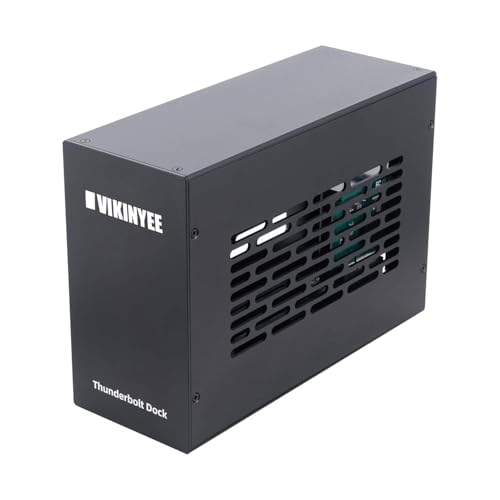
Silent Dual-Slot Pick – VIKINYEE VK-K2L
The VIKINYEE VK-K2L is a pcie expansion chassis thunderbolt option for laptops and mini PCs that need two external card slots without fan noise. It connects through Thunderbolt 3, Thunderbolt 4, or USB4 and supports Windows, macOS, and Linux.
Best For: Quiet workspaces needing two compatible PCIe cards on a Thunderbolt or USB4 computer.
Pros:
- Two PCIe 3.0 x16 slots accommodate supported half-length, full-height cards.
- Passive cooling keeps the aluminum enclosure silent.
- Includes a DisplayPort 1.4 output and a 60W internal power supply.
Cons:
- Cards must fit within 205 × 145 × 25 mm.
- Its 15W power delivery per Thunderbolt port is not a substitute for full-power laptop charging.
- PCIe cards may still require their own drivers.
It is a useful fit for noise-sensitive capture, networking, or audio setups; verify each card’s dimensions and power needs first.
Low-Profile Pick – Sonnet Echo Express SEL
Sonnet Echo Express SEL Thunderbolt 3-to-PCIe Expansion Chassis (1 Low Profile Slot)
Check Price On AmazonFor one compact card, the Sonnet Echo Express SEL is a pcie expansion chassis thunderbolt solution for a Mac or Windows PC with Thunderbolt 3. Its single slot accepts compatible low-profile PCIe cards, while the 40Gbps connection offers up to 2750 MB/s of PCIe bandwidth.
Best For: Mac or Windows users adding one low-profile PCIe card without an internal slot.
Pros:
- Compact enclosure is designed for one low-profile card.
- Second Thunderbolt 3 port supports compatible daisy-chained devices or displays.
- Includes a 0.7-meter Thunderbolt 3 cable and ThunderLok connector retainer.
Cons:
- Does not accept full-height PCIe cards.
- One Thunderbolt 3 port is reserved for the computer connection.
Choose this over a larger chassis when a single compatible low-profile card meets your needs and desk space matters.
Best with Extra Features – Maskedfish MK-Q2L Thunderbolt 3 Chassis
If you need a compact pcie expansion chassis thunderbolt setup for two cards, the Maskedfish MK-Q2L adds two PCIe 3.0 x16 slots through a 40Gbps Thunderbolt connection. Its passive-cooled aluminum enclosure suits a desk where fan noise matters.
Best For: Adding two compatible capture, networking, or storage cards to a Thunderbolt 3/4 or USB4 computer in a quiet workspace.
Pros:
- Two PCIe 3.0 x16 slots in a compact enclosure.
- Passive cooling runs silently.
- Includes a 60W adapter and an 8-pin auxiliary power cable.
Cons:
- Cards must fit within the stated 205 × 25 × 145 mm limits.
- PCIe slots provide up to 30W; check power needs before choosing cards.
The chassis itself is driverless on Windows, macOS, and Linux, but installed cards still need their own drivers. Check card dimensions, power, and software support before buying.
Best High-Bandwidth Dual-Slot Pick – Sonnet Echo II DV T5
The Sonnet Echo II DV T5 is a pcie expansion chassis thunderbolt option for workflows that need two demanding cards running together. Each PCIe 4.0 slot has its own Thunderbolt 5 interface, with up to 6000 MB/s of PCIe bandwidth per card simultaneously.
Best For: Professional video, audio, storage, or networking setups using two high-performance, non-GPU PCIe cards.
Pros:
- Dedicated Thunderbolt 5 interface and bandwidth for each slot.
- Supports single-width cards regardless of length or height.
- Integrated 400W power supply with two 75W auxiliary PCIe power connectors.
Cons:
- Not intended for GPU cards.
- At 18.4 pounds, it is less portable than a compact desktop chassis.
This is the strongest fit here when two cards need substantial bandwidth at the same time. Plan on a larger desktop footprint and confirm that your intended cards are Thunderbolt-compatible.
Best Compact Thunderbolt 5 Pick – Sonnet Echo SE I T5
For a one-card pcie expansion chassis thunderbolt setup, the Sonnet Echo SE I T5 pairs a PCIe 4.0 x8 slot with Thunderbolt 5 connectivity. It offers up to 6000 MB/s of bidirectional PCIe bandwidth in a compact aluminum desktop enclosure.
Best For: Adding one compatible pro audio, video, storage, or networking card to a Mac, Windows, or Linux system.
Pros:
- Supports full-height, single-width cards up to 7.75 inches long.
- Includes auxiliary PCIe power for cards that need it.
- Second Thunderbolt port supports daisy-chaining and provides 15W to a connected peripheral.
Cons:
- Only one PCIe slot.
- Cards longer than its stated 7.75-inch limit will not fit.
Its temperature-controlled fan aims to keep cooling quiet, while the second Thunderbolt port adds connection flexibility. Measure your card and check its power requirements before ordering.
How We Picked the Best Pcie Expansion Chassis Thunderbolt
This roundup covers single-, dual-, and three-slot enclosures across Thunderbolt 3, Thunderbolt 4/USB4, and Thunderbolt 5 listings. We prioritized the questions that determine whether a chassis is useful in practice: physical card fit, available power, host support, and the bandwidth shared by installed cards. A PCIe x16-shaped slot does not guarantee x16 electrical bandwidth or graphics-card support.
Quick Comparison: Which Format Fits?
One slot: Choose a compact chassis for a single capture, audio, network, or storage card when desk space matters. Check full-height versus low-profile support; the Sonnet Echo Express SEL, for example, is listed for a low-profile card.
Two slots: Consider a dual-slot enclosure if you need two separate cards, while checking that both fit with their cables attached and that the enclosure’s power supply covers both. Sonnet’s Echo II DV T5 is the Thunderbolt 5 option in this group.
Three slots: The Sonnet Echo Express SE IIIe is the option to investigate when a multi-card workflow calls for more slots. Confirm each card’s support before assuming all three can run together.
Key Buying Factors for a Pcie Expansion Chassis Thunderbolt Setup
Host Port and Operating-System Support
Match the chassis to a supported Thunderbolt or USB4 port on your computer, then check the manufacturer’s OS and driver requirements. A USB-C connector alone does not establish compatibility. If your host has an older port than the chassis, verify backward compatibility rather than assuming it.
Card Fit, Power, and Cooling
Compare card length, height, thickness, connector clearance, and bracket type against the enclosure’s internal dimensions. Check slot power and any auxiliary power connectors your card needs. Capture and high-speed storage cards can generate substantial heat, so leave room for chassis ventilation. Do not assume a general-purpose enclosure supports a GPU.
Bandwidth and Ports
Thunderbolt bandwidth is shared across the enclosure’s cards and other devices on the same connection. Thunderbolt 5 can offer more headroom on a compatible host, but performance still depends on the chassis design, card, and workload. If you need daisy-chaining, confirm the enclosure has an appropriate downstream Thunderbolt port; a second USB-C-shaped connector may serve another purpose.
Who Should Buy Which Pcie Expansion Chassis Thunderbolt?
Buy a single-slot Thunderbolt 3 chassis for one confirmed-compatible card and a host you already own. Pick a low-profile model only if your card fits that bracket and size limit. Choose a dual-slot model for two-card workflows after checking combined power and physical spacing; move to the three-slot Sonnet if you genuinely need a third card. Consider a Thunderbolt 5 chassis when you have a compatible host and a workload that may benefit from the extra bandwidth. For any Pcie Expansion Chassis Thunderbolt purchase, verify your exact card model against the enclosure maker’s compatibility information before ordering.
