
If you’re looking to elevate your computing performance, investing in a PCIe expansion chassis with Thunderbolt technology could be a game changer. These devices offer impressive bandwidth and seamless integration for various PCIe cards, making them ideal for creative professionals and gamers alike. But with so many options available, how do you choose the right one for your needs? Let’s explore the top contenders that can enhance your setup.
StarTech.com Thunderbolt 3 PCIe Expansion Chassis

If you’re a creative professional or gamer looking to enhance your system’s capabilities, the StarTech.com Thunderbolt 3 PCIe Expansion Chassis is an excellent choice. This external enclosure features a single PCI Express slot, supporting various cards such as video capture and NVMe drives. With a bandwidth of up to 40Gbps, you’ll experience lightning-fast data transfers. The toolless design makes it easy to integrate cards, while the dedicated DisplayPort output supports 4K/5K at 60Hz. Plus, its built-in fan guarantees peak cooling, making it ideal for multitasking and accessing large files seamlessly. You won’t regret this upgrade!
Best For: Creative professionals and gamers seeking to enhance system capabilities with high-speed data transfer and expandability options.
Pros:
- High Bandwidth: Offers up to 40Gbps for fast data transfers.
- Easy Integration: Toolless design allows for quick installation of PCIe cards.
- Multiple Display Support: Dedicated DisplayPort output supports 4K/5K at 60Hz.
Cons:
- Fan Noise: Some users report noise from the built-in cooling fan.
- Compatibility Issues: Potential concerns with certain USB-C host setups.
- Limited Features: Certain setups may not utilize all features effectively.
Sonnet Echo Express SE1 Thunderbolt 3 Expansion Chassis (Echo-EXP-SE!-T3)

The Sonnet Echo Express SE1 Thunderbolt 3 Expansion Chassis (Echo-EXP-SE1-T3) is perfect for professionals who need to connect high-performance PCIe cards to computers without expansion slots, especially in audio production or video editing. This compact chassis features a PCIe 3.0 x8 slot, supporting half-length cards and delivering 2750 MB/s bandwidth via its 40Gbps Thunderbolt 3 interface. It offers two Thunderbolt ports for daisy-chaining devices or connecting displays. While users appreciate its performance, some find the fan noisy. Without a manual power switch, consider using a power strip for easier control. Overall, it’s a reliable choice for enhancing your setup.
Best For: Professionals in audio production or video editing who need to connect high-performance PCIe cards to computers without expansion slots.
Pros:
- Compact design allows for easy desktop integration and portability.
- High bandwidth of 2750 MB/s enables efficient performance for various PCIe cards.
- Supports daisy-chaining of multiple Thunderbolt devices and connections for high-resolution displays.
Cons:
- The included fan can be noisy, which may require replacement for quieter operation.
- Lacks a manual power switch, making power management less convenient.
- Limited to one half-length PCIe card, which may restrict expansion options for some users.
RocketStor 6661B Dual 40Gb/s ThunderboltTM 3 PCIe Expansion Chassis

Designed for creative professionals and mobile users, the RocketStor 6661B Dual 40Gb/s Thunderbolt™ 3 PCIe Expansion Chassis offers seamless expansion capabilities for your setup. Weighing just 2.71 pounds and compact enough to fit in a laptop bag, this chassis is perfect for on-the-go use. It accommodates a full-height PCIe card while providing dual Thunderbolt 3 ports for high-speed connectivity. With dual cooling fans, it guarantees peak performance during intensive tasks. However, keep in mind the maximum PCIe card length is 7.87 inches, which might affect compatibility with some devices. Enjoy versatile expansion without sacrificing portability!
Best For: Creative professionals and mobile users seeking a lightweight and portable solution for PCIe expansion.
Pros:
- Compact design makes it easy to transport and fit into a laptop bag.
- High-speed connectivity with dual Thunderbolt 3 ports supporting up to 40Gb/s.
- Efficient cooling system with dual ultra-quiet fans ensures optimal performance during demanding tasks.
Cons:
- Limited PCIe card length compatibility, with a maximum of 7.87 inches, which may restrict options.
- Low customer rating indicating potential issues or dissatisfaction among users.
- Refund requests for fitting issues suggest possible design flaws impacting user experience.
Sonnet Echo Express SEL Thunderbolt 3-to-PCIe Expansion Chassis

For professionals in audio production or high-performance networking, the Sonnet Echo Express SEL Thunderbolt 3-to-PCIe Expansion Chassis stands out as a top choice. Its compact design measures just 8 x 4 x 3 inches and connects low-profile PCIe cards to your Thunderbolt 3-equipped Mac or Windows PC. With a blazing 40Gbps interface and 2750 MB/s bandwidth, you’ll experience impressive speed and reliability. It features two Thunderbolt 3 ports for daisy-chaining multiple devices. While some users note fan noise and power limitations, many appreciate its performance in connecting legacy audio interfaces and high-performance networking solutions.
Best For: Professionals in audio production or high-performance networking seeking a compact and efficient solution to connect low-profile PCIe cards to Thunderbolt 3-equipped computers.
Pros:
- Impressive Speed: Offers a 40Gbps Thunderbolt 3 interface with 2750 MB/s PCIe bandwidth, providing high performance for demanding applications.
- Compact Design: Smallest Thunderbolt 3-to-PCIe expansion chassis available, making it ideal for limited workspace environments.
- Versatile Connectivity: Features two Thunderbolt 3 ports for daisy-chaining multiple devices or connecting peripherals.
Cons:
- Power Limitations: Only delivers 15W power, which may not fully charge laptops during operation.
- Fan Noise: Some users report noticeable fan noise, especially when using low-power PCIe cards.
- Complex Setup: Requires knowledge of Thunderbolt 3 interfaces and PCIe compatibility, which may pose challenges for some users.
Dual PCI Express to Thunderbolt 3/4 USB4 Dock (MK-Q2L)
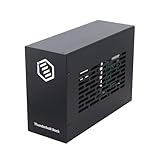
If you’re a professional seeking to enhance your workflow with powerful video capture or high-speed data transfer, the Dual PCI Express to Thunderbolt 3/4 USB4 Dock (MK-Q2L) is an ideal solution. This dock features dual PCIe 3.0 x16 slots, allowing for versatile expansion options. With a blazing 40Gbps Thunderbolt interface, it connects effortlessly to video capture cards, network adapters, and NVMe storage. The durable aluminum design guarantees silent operation and supports cards up to 205mm x 25mm x 145mm. Plus, it’s plug-and-play compatible with Windows, MacOS, and Linux, making setup a breeze.
Best For: Professionals looking to enhance their workflow with high-speed data transfer and video capture capabilities.
Pros:
- Dual PCIe expansion allows for versatile card options and easy upgrades.
- 40Gbps Thunderbolt interface ensures fast and reliable connections for demanding applications.
- Silent operation thanks to the all-aluminum design with passive cooling.
Cons:
- Requires specific drivers for installed PCIe cards, which may complicate setup for some users.
- Limited to PCIe cards that fit within the size specifications (up to 205mm x 25mm x 145mm).
- The weight of 1.9 pounds may be considered bulky for portable use.
ASUS ThunderboltEX 5 Expansion Card

The ASUS ThunderboltEX 5 Expansion Card is a game-changer for creative professionals and gamers seeking to elevate their setup. With dual Thunderbolt™ 5 USB-C ports and an impressive 120 Gbps bandwidth, this card delivers exceptional performance. You can daisy-chain up to five Thunderbolt devices and connect three 8K 60 Hz displays with DSC, making it perfect for multitasking. It supports USB4® and provides fast charging up to 130 watts. Designed for Intel 800 Series motherboards, installing this card is straightforward. However, be mindful of potential driver issues as some users have reported compatibility concerns.
Best For: Creative professionals and gamers looking to enhance their setup with Thunderbolt 5 connectivity and high-performance displays.
Pros:
- Easy installation on Intel 800 Series motherboards.
- Supports daisy-chaining of up to five Thunderbolt devices.
- Capable of connecting three 8K 60 Hz displays, ideal for multitasking.
Cons:
- Some users report driver issues and compatibility concerns.
- A few customers received open packages upon delivery.
- Average customer rating of 3.6 out of 5 stars indicates mixed feedback.
Compact eGPU Enclosure for Thunderbolt 3/4 USB4 External GPU Dock Station

Designed for gamers and creative professionals seeking to boost their laptop’s graphics performance, the Compact eGPU Enclosure for Thunderbolt 3/4 USB4 offers seamless compatibility with both Windows and Mac systems. With a robust internal 600W PSU, it supports powerful graphics cards while ensuring stable expansion via its certified JHL7440 controller. You’ll appreciate the additional USB A and Thunderbolt 3 ports for downstream devices. Its sleek aluminum chassis houses graphics cards up to 13.38 x 6 x 2.24 inches. Plus, the package includes everything you need to get started, making it a perfect addition to your setup.
Best For: Gamers and creative professionals looking to enhance their laptop’s graphical performance with a compact and powerful external GPU solution.
Pros:
- High compatibility with both Windows and Mac systems, supporting a wide range of graphics cards.
- Robust power supply with 600W capacity, allowing for the use of high-performance graphics cards.
- Compact and stylish design made of aluminum, ideal for space-saving setups.
Cons:
- Limited Mac compatibility; Nvidia cards are not supported on MacOS, which may restrict options for Mac users.
- Not officially compatible with MacBook Bootcamp, limiting functionality for certain users.
- Maximum graphics card size restrictions could limit options for those wanting to use larger, more powerful GPUs.
ASUS ThunderboltEX 4 Expansion Card
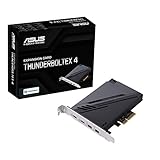
For creators and gamers seeking high-speed connectivity, the ASUS ThunderboltEX 4 Expansion Card is an excellent choice. With Intel’s Thunderbolt 4 controller, it offers two USB Type-C ports and two mini DisplayPort inputs, delivering up to 40Gb/s bi-directional bandwidth per port. You can enjoy stunning visuals with support for 8K resolution via DisplayPort 1.4. Plus, its 100W Quick Charge capability guarantees your devices stay powered. However, be aware that it only supports ASUS motherboards, and installation requires careful setup for peak performance. Despite some user challenges, it averages a solid 4.0-star rating from 411 reviews.
Best For: Creators and gamers seeking high-speed connectivity and stunning visuals on ASUS motherboards.
Pros:
- Supports up to 40Gb/s bi-directional bandwidth per port, ideal for high-performance devices.
- Compatible with 8K resolution via DisplayPort 1.4, perfect for detailed graphics and video output.
- Offers 100W Quick Charge capability, ensuring devices remain powered during use.
Cons:
- Only compatible with ASUS motherboards, limiting its usage for other systems.
- Installation can be complex and may require troubleshooting for optimal performance.
- Documentation may lack clarity, leading to potential setup challenges for users.
PCIe Express to Thunderbolt 3/4 USB4 Dock (MK-M1)

If you’re a creative professional or gamer in need of high-performance expansion options, the PCIe Express to Thunderbolt 3/4 USB4 Dock (MK-M1) is your ideal solution. This sleek dock supports PCI Express for laptops and desktops with Thunderbolt 3/4 or USB4 capability, featuring an external PCIe 3.0 x16 slot. You’ll enjoy lightning-fast 40Gbps bandwidth and compatibility with NVIDIA P600/T1000 GPUs. Designed for silent operation, it boasts an all-aluminum construction and passive cooling. Plus, with a universal power adapter providing 60W, you can seamlessly integrate various devices like NVMe drives and video capture cards into your setup.
Best For: Creative professionals and gamers seeking high-performance expansion options for their laptops or desktops.
Pros:
- Supports a wide range of PCIe cards including GPUs, NVMe drives, and video capture cards.
- Delivers exceptional bandwidth of up to 40Gbps through Thunderbolt 3, enhancing data transfer speeds.
- Silent operation due to all-aluminum construction and passive cooling design.
Cons:
- Limited compatibility as it requires devices to have Thunderbolt 3/4 or USB4 capability.
- Physical dimensions of supported PCIe cards are restricted to a maximum size of 180mm x 28mm x 75mm.
- Potentially higher cost compared to simpler USB docks without PCIe support.
FANBLACK PCIe to USB 3.2 Gen 2 Expansion Card for Desktop PC

Offering seven external USB 3.2 Gen 2 ports, the FANBLACK PCIe to USB 3.2 Gen 2 Expansion Card is ideal for users who need to connect multiple high-speed devices simultaneously. With four USB Type-A and three USB Type-C ports, you’ll enjoy a total bandwidth of 20Gbps. Each port can reach up to 10Gbps when used alone, ensuring speedy data transfers. It’s compatible with Windows and Mac systems, and installation is straightforward, requiring no external power supply. Just remember, achieving maximum speed needs a PCIe version 3.0 or higher. Customer support is reliable, making it a solid choice for your setup.
Best For: Users who require multiple high-speed USB connections for various devices simultaneously.
Pros:
- Supports a total bandwidth of 20Gbps, allowing for fast data transfers across multiple devices.
- Easy installation with no external power supply required.
- Compatible with both Windows and Mac systems, making it versatile for different users.
Cons:
- Maximum speed of 10Gbps requires a PCIe version 3.0 or higher.
- Some users may encounter issues with driver installation and device recognition.
- Performance may vary based on the quality of USB devices and cables used.
Factors to Consider When Choosing a Pcie Expansion Chassis Thunderbolt
When choosing a PCIe expansion chassis with Thunderbolt, you’ll want to take into account several key factors. Compatibility with your devices, performance specifications, and cooling efficiency are essential to guarantee ideal functionality. Additionally, think about power delivery capacity and the size of the chassis for portability.
Compatibility With Devices
Choosing a PCIe expansion chassis that works seamlessly with your devices requires careful consideration of various compatibility factors. First, make sure the chassis matches your computer’s Thunderbolt version; some only support Thunderbolt 3 or 4, which can impact performance. Next, check the dimensions and specifications of your PCIe cards, as different chassis accommodate full-height or low-profile cards differently. Don’t forget to verify the chassis’s power delivery capabilities, especially if you plan to use high-power cards that need more than the PCIe slot can provide. Additionally, consider the operating system compatibility, since some expansion chassis only work with specific versions of Windows or macOS. Finally, look for features like daisy-chaining support to enhance connectivity options with multiple devices.
Performance Specifications
Understanding the performance specifications of a PCIe expansion chassis is essential for maximizing your setup’s capabilities. Look for a chassis with Thunderbolt 3 or 4 interface, providing up to 40Gbps bandwidth for high-speed data transfer. Consider how many PCIe slots you need; some chassis support only one, while others allow for dual or multiple slots for added functionality. Evaluate PCIe lane support, which typically ranges from x16 to x4, impacting performance for demanding cards like GPUs or NVMe drives. Confirm compatibility with various PCIe card types, accommodating full-height, half-length, or low-profile cards as required. Finally, assess the power delivery options to support high-performance cards effectively, whether through PCIe slots or dedicated adapters.
Cooling and Noise Levels
While selecting a PCIe expansion chassis, it is vital to take into account the cooling and noise levels, as both can greatly influence your system’s performance and your overall experience. Many chassis come with built-in fans or passive cooling designs to maintain ideal temperatures, but fans can introduce noise, which might be a concern in quieter environments. The effectiveness of cooling varies by design; some models feature larger or multiple fans to enhance airflow while minimizing noise. Proper ventilation is important, as inadequate airflow can lead to overheating and throttling of your high-performance PCIe cards. Ultimately, you’ll want to strike a balance between cooling efficiency and noise levels when choosing an expansion chassis that suits your needs.
Power Delivery Capacity
When evaluating a PCIe expansion chassis, power delivery capacity is another key factor that can greatly impact your setup’s performance. Look for models that provide adequate power through the PCIe slot, typically up to 25W, along with additional power via dedicated ports for your connected devices, often around 30W. High-performance chassis often feature power management systems, ensuring efficient distribution to demanding components like GPUs or RAID controllers. Consider the total wattage capability; higher outputs can support more power-hungry devices without sacrificing efficiency. Some models come with power adapters offering 60W or more, making them ideal for multiple cards and peripherals. Additionally, a well-designed chassis can enhance power delivery while minimizing overall consumption.
Size and Portability
Choosing the right PCIe expansion chassis often hinges on size and portability, as these factors can greatly influence your workflow. You’ll notice that dimensions vary considerably; some models are compact at 8 x 4 x 2.8 inches, while others take up more desk space. If you need to transport your setup, lightweight designs, like those weighing around 2.6 pounds, make it easier. Many compact chassis fit into standard laptop bags, which is perfect for mobile users. Also, consider the maximum supported card length; some enclosures accommodate cards up to 8 inches, while others may allow longer ones. Finally, materials like aluminum or steel impact both durability and weight, affecting how portable your chassis will be.
