
In 2025, video editing will demand speed and reliability like never before. You need storage solutions that can keep up with your fast-paced workflow and handle large video files effortlessly. PCIe 5 SSDs are set to transform your editing experience, offering remarkable read and write speeds. But with so many options available, how do you choose the right one for your needs? Let’s explore the top contenders and what makes them stand out.
WD_BLACK 2TB SN8100 NVMe SSD Internal Solid State Drive

The WD_BLACK 2TB SN8100 NVMe SSD is an outstanding choice for video editors and content creators who demand high-quality performance. With blazing-fast sequential read speeds of up to 14,900 MB/s and write speeds reaching 14,000 MB/s, you won’t miss a beat while editing. Its PCIe Gen 5 technology guarantees you get over 100% more power efficiency compared to its predecessor, making it a smart investment. Plus, with an endurance rating of up to 2,400 TBW, you can trust this drive to handle your most intensive projects. It’s ideal for AI applications, gaming, and, of course, video editing.
Best For: The WD_BLACK 2TB SN8100 NVMe SSD is best for video editors, gamers, and AI application developers who require high-speed performance and reliability.
Pros:
- Blazing-fast sequential read speeds of up to 14,900 MB/s and write speeds of 14,000 MB/s enhance productivity and performance.
- PCIe Gen 5 technology provides over 100% greater power efficiency compared to PCIe Gen 4.
- High endurance rating of up to 2,400 TBW ensures durability for intensive workloads.
Cons:
- Higher price point compared to traditional SSDs may not fit all budgets.
- Requires compatible hardware to fully utilize the PCIe Gen 5 capabilities.
- May generate more heat during intensive tasks, necessitating adequate cooling solutions.
WD_BLACK 1TB SN8100 NVMe SSD Internal Solid State Drive
For video editors seeking blazing-fast performance, the WD_BLACK 1TB SN8100 NVMe SSD stands out with its impressive sequential read speeds of up to 14,900 MB/s. This Gen 5 PCIe 5.0×4 drive delivers exceptional sequential write speeds of up to 14,000 MB/s, ensuring your projects load and render quickly. With over 2,300,000 IOPS, it’s perfect for demanding tasks like professional content creation and gaming. Plus, its 7W average operating power makes it energy efficient. Weighing just 0.264 ounces and measuring 3.15 x 0.87 x 0.09 inches, it’s a compact powerhouse for your editing setup.
Best For: Video editors and gamers seeking high-speed performance for demanding applications and large project files.
Pros:
- Exceptional Speed: Offers sequential read speeds up to 14,900 MB/s and write speeds up to 14,000 MB/s, ideal for fast data transfer.
- High Endurance: With up to 2,400 TBW endurance (for the 4TB model), it can handle intensive workloads over time.
- Compact Design: Lightweight and small dimensions make it easy to integrate into various systems without taking up much space.
Cons:
- Price Point: May be more expensive compared to lower-performance SSDs, which could be a consideration for budget-conscious users.
- Power Consumption: While efficient, the average operating power of 7W may still be higher than some competitors, especially for extended use.
- Limited Capacity Options: Although it supports up to 4TB, some users may require larger capacities for extensive data storage.
Samsung SSD 9100 PRO 1TB M.2 2280

Experience lightning-fast performance with the Samsung SSD 9100 PRO 1TB M.2 2280, the perfect choice for video editors seeking efficiency and speed. With PCIe 5.0 speeds reaching up to 14,800 MB/s for reads and 13,400 MB/s for writes, you’ll breeze through large video files. Its impressive random IOPS enhances your workflow, while the advanced thermal management keeps things cool during intense editing sessions. Compatible with both laptops and desktops, this SSD is versatile enough for any project. Plus, Samsung’s Magician Software guarantees your drive stays optimized and reliable, making it a trusted choice for creative professionals.
Best For: Creative professionals and video editors seeking high-speed storage solutions for large files and efficient workflows.
Pros:
- High Performance: Achieves up to 14,800 MB/s sequential read and 13,400 MB/s write speeds, ideal for fast data access.
- Versatile Compatibility: Suitable for both laptops and desktops, accommodating various creative tasks.
- Advanced Thermal Management: Ensures sustained performance without overheating during intensive use.
Cons:
- Higher Price Point: Premium performance may come at a higher cost compared to standard SSDs.
- Limited Availability: May be harder to find in stock due to high demand.
- Potential Overkill for Casual Users: Features may exceed the needs of everyday users who require less speed and storage.
Samsung 990 EVO Plus SSD 2TB

When speed and efficiency are essential for video editing, the Samsung 990 EVO Plus SSD 2TB stands out as a top choice. With blistering read speeds of up to 7,250 MB/s and write speeds reaching 6,300 MB/s, it handles large file transfers effortlessly. Its intelligent TurboWrite 2.0 technology enhances performance further, ensuring smooth editing workflows. The nickel-coated controller effectively manages heat, promoting reliability during intense tasks. Plus, with Magician Software, you can monitor drive health and perform updates easily. Compatible with both PCIe 4.0 and PCIe 5.0, this SSD is perfect for your demanding editing needs.
Best For: Video editors and content creators who require high-speed data transfer and efficient performance for large files.
Pros:
- Blistering performance: Read speeds up to 7,250 MB/s and write speeds of 6,300 MB/s ensure fast file transfers.
- Enhanced durability: Nickel-coated controller aids in effective heat management, promoting reliability during intensive tasks.
- User-friendly software: Magician Software allows easy monitoring of drive health and firmware updates.
Cons:
- Higher price point: Premium performance may come with a higher cost compared to standard SSDs.
- Limited capacity options: Available in 2TB and 4TB, which may not meet the needs of all users requiring larger storage solutions.
- Compatibility concerns: While it supports PCIe 4.0 and 5.0, older systems may not take full advantage of its capabilities.
Samsung SSD 9100 PRO 2TB (MZ VAP2T0B/AM)
Designed for heavy-duty workstations and demanding tasks, the Samsung SSD 9100 PRO 2TB (MZ VAP2T0B/AM) stands out with its remarkable sequential read speeds of up to 14,800 MB/s. With write speeds reaching 13,400 MB/s, this drive excels in video editing and AI computing. It delivers impressive random read/write IOPS of up to 2,200K/2,600K, making it perfect for large projects. Its efficient 5nm controller enhances power efficiency by 49%, while advanced thermal management guarantees reliability during intensive workloads. Plus, with Samsung’s reputation for quality and the Magician Software for maintenance, you can trust this SSD to perform effectively over time.
Best For: Professionals in video editing, gaming, and AI computing who require high-speed storage solutions for demanding tasks.
Pros:
- Exceptional performance with sequential read speeds up to 14,800 MB/s and write speeds of 13,400 MB/s.
- Advanced thermal management ensures reliability during high-performance workloads.
- High brand reliability with a strong customer rating of 4.8 out of 5 stars.
Cons:
- Higher price point compared to standard SSDs, which may not suit budget-conscious consumers.
- Limited availability of larger storage options (up to 8TB) until 2025.
- Requires compatible hardware to fully utilize PCIe 5.0 speeds.
Samsung 990 EVO Plus SSD 1TB

The Samsung 990 EVO Plus SSD 1TB stands out as an exceptional choice for video editors who demand lightning-fast performance and reliability. With read speeds up to 7,250 MB/s and write speeds reaching 6,300 MB/s, it guarantees your editing workflow stays smooth. The PCIe Gen 4×4 and Gen 5×2 compatibility further enhance your system’s bandwidth. Its intelligent thermal management keeps temperatures in check, while the Magician Software helps maintain peak performance. Weighing just 0.317 ounces, this compact SSD fits seamlessly into your setup. With a 4.8-star rating from thousands of users, it’s a top contender for your editing needs.
Best For: Video editors and content creators who require high-speed data transfer and reliable performance for demanding workflows.
Pros:
- Exceptional Read and Write Speeds: Up to 7,250 MB/s read and 6,300 MB/s write speeds ensure efficient editing and file transfers.
- Advanced Thermal Management: Nickel-coated controller helps maintain optimal temperatures for consistent performance.
- User-Friendly Software: Magician Software simplifies firmware updates and health monitoring for the SSD.
Cons:
- Price Point: May be more expensive compared to traditional SSDs, which could be a consideration for budget-conscious users.
- Performance Variability: Actual speeds can vary based on system configuration and firmware.
- Limited to M.2 Slots: Requires compatible M.2 slots, which may not be available on all motherboards.
Addlink G55 2TB PCIe Gen5 NVMe M.2 SSD

For video editors seeking lightning-fast performance, the Addlink G55 2TB PCIe 5.0 Gen5 NVMe M.2 SSD stands out with its staggering sequential read speeds of up to 10,300 MB/s. This SSD not only delivers impressive read speeds but also offers write speeds of up to 9,000 MB/s, ensuring your editing workflow remains smooth. Utilizing advanced NVMe technology and 3D TLC NAND, it’s optimized for both Intel and AMD Gen5 platforms while being backward compatible with older PCIe versions. With a sleek 2.3mm design, you’ll want to pair it with a heatsink for peak performance. Plus, it comes with a 5-year warranty for peace of mind.
Best For: Video editors, gamers, and design professionals looking for high-speed storage solutions to enhance their workflow.
Pros:
- Exceptional sequential read speeds of up to 10,300 MB/s for rapid data access.
- Backward compatibility with PCIe 4.0/3.0 ensures versatility across different systems.
- 5-year warranty provides assurance of reliability and performance longevity.
Cons:
- Requires a heatsink for optimal performance, which may add to the overall cost.
- Performance may vary based on device and usage, potentially leading to less consistent speeds.
- The advanced features may be overkill for casual users with less demanding storage needs.
PNY CS2150 1TB Gen5 PCIe NVMe M.2 SSD

If you’re a content creator or gamer looking for high-performance storage, the PNY CS2150 1TB Gen5 PCIe NVMe M.2 SSD stands out with its impressive sequential read speeds of up to 10,200 MB/s. With sequential write speeds reaching 8,300 MB/s, you’ll experience minimal load times and enhanced gameplay. This SSD is AI-ready, supporting modern applications like real-time image generation. Plus, its integrated TCG Opal 2.0 encryption guarantees your data remains secure. Backed by a 5-year limited warranty and 24/7 US-based technical support, the PNY CS2150 is a reliable choice for anyone serious about performance.
Best For: PC enthusiasts, gamers, and content creators seeking high-performance storage solutions.
Pros:
- Exceptional sequential read speeds of up to 10,200 MB/s for fast data access.
- AI-ready performance supports modern applications and enhances creative workflows.
- Integrated TCG Opal 2.0 encryption provides robust data protection.
Cons:
- May be overkill for casual users with lower storage demands.
- Compatibility may vary with older systems not supporting Gen5 PCIe.
- Higher price point compared to standard SSDs.
ASUS Hyper M.2 x16 Gen5 Card (PCIe 5.0/4.0) for NVMe Devices

Designed for high-performance video editing, the ASUS Hyper M.2 x16 Gen5 Card lets you harness the full potential of PCIe 5.0 and 4.0 NVMe devices. Supporting up to four M.2 drives, it delivers an impressive 512 Gbps bandwidth for both AMD and Intel platforms. The server-grade PCB guarantees smooth data transfers, while the large heatsink and active fan keep temperatures in check, preventing throttling during intense workloads. With RAID functionality, you can create bootable arrays for enhanced performance and redundancy. Plus, the fan control features let you optimize cooling based on your system’s needs.
Best For: Content creators and gamers who require high-speed data transfer and reliable performance from multiple NVMe SSDs.
Pros:
- Supports up to four NVMe M.2 drives, maximizing storage and speed potential.
- Equipped with advanced thermal management features, including a large heatsink and active fan, to maintain optimal performance.
- Offers RAID functionality for improved data redundancy and performance enhancement.
Cons:
- Requires a 6-pin PCIe power connector, which may limit compatibility with certain setups.
- The active fan may introduce additional noise, which could be a concern for noise-sensitive environments.
- Higher initial investment compared to standard M.2 expansion cards.
Samsung 990 PRO 2TB SSD with Heatsink
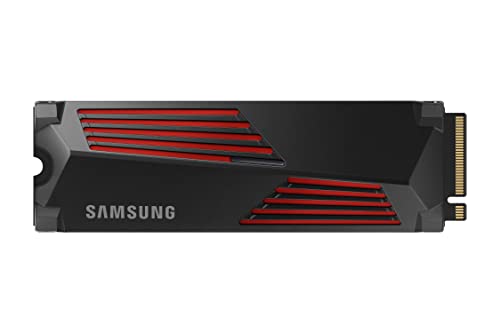
The Samsung 990 PRO 2TB SSD with Heatsink stands out as an exceptional choice for video editors seeking top-tier performance and reliability. With sequential read speeds up to 7,450 MB/s and write speeds at 6,900 MB/s, it greatly enhances your workflow. Its integrated heatsink effectively manages temperatures, ensuring consistent performance during intensive tasks. Weighing just 0.96 ounces and measuring 4.5 x 5.5 x 0.75 inches, it fits seamlessly into various systems, including PlayStation 5 and PCI-SIG D8 desktops. Backed by Samsung’s reputation, the 990 PRO boasts a 4.7-star rating, making it a trusted option for professionals.
Best For: Tech enthusiasts, hardcore gamers, and heavy-workload professionals looking for high-performance storage solutions.
Pros:
- Exceptional Speed: Sequential read speeds up to 7,450 MB/s and write speeds of 6,900 MB/s enhance workflow efficiency.
- Integrated Heatsink: Prevents overheating, ensuring consistent performance during intensive tasks.
- Compatibility: Fits seamlessly into various systems, including PlayStation 5 and PCI-SIG D8 desktops.
Cons:
- Price Point: May be more expensive compared to other SSD options in the market.
- Limited Capacity Options: Only available in higher capacities, which may not suit all users’ needs.
- Installation Complexity: M.2 installation may be challenging for less tech-savvy users.
Factors to Consider When Choosing PCIe 5 SSDs for Video Editing
When you’re choosing a PCIe 5 SSD for video editing, you’ll want to focus on several key factors. Look for high sequential read and write speeds to guarantee smooth performance, along with strong endurance and reliability for long-term use. Additionally, consider thermal management features and compatibility with your editing software to maximize efficiency.
Sequential Read Speeds
Sequential read speeds play an essential role in video editing, directly impacting how quickly you can load and access large video files. When you choose a PCIe 5 SSD with high sequential read speeds—up to 14,900 MB/s—you’ll greatly reduce loading times for high-resolution video files, enhancing your workflow efficiency. Faster read speeds also improve timeline scrubbing and playback performance, leading to a smoother editing experience. This is especially beneficial when working with demanding 4K or 8K formats. By opting for an SSD with excellent sequential read speeds, you minimize the risk of bottlenecks, ensuring your editing process remains fluid and responsive. Don’t underestimate the importance of this feature in optimizing your video editing tasks.
Sequential Write Speeds
While high sequential write speeds are essential for video editing, they greatly impact how quickly you can save large files, like high-resolution footage, to your SSD. To guarantee an efficient editing workflow, look for SSDs with sequential write speeds of at least 7,000 MB/s. This speed notably reduces bottlenecks during file transfers, allowing you to export your projects faster. With advanced PCIe 5.0 technology, you can find SSDs boasting speeds over 14,000 MB/s, which is a game-changer for handling intensive video projects. Consistent high sequential write speeds also maintain performance stability, preventing lag or delays when juggling multiple video streams or effects in your editing software. Choose wisely to enhance your editing experience!
Endurance and Reliability
Endurance and reliability are critical factors to evaluate when selecting a PCIe 5 SSD for video editing. Look for endurance ratings measured in Terabytes Written (TBW); higher TBW values indicate greater durability, which is essential for the frequent read and write operations involved in video editing. A robust endurance rating will help guarantee your SSD can handle demanding workloads without wearing down quickly. Additionally, consider reliability features like power loss protection, which can enhance the lifespan of your drive during intense sessions. While high-end PCIe 5 SSDs can last between 1 to 2 million hours, actual longevity will depend on your usage patterns. Warranties ranging from 3 to 5 years can also give you peace of mind regarding reliability.
Thermal Management Features
When selecting a PCIe 5 SSD for video editing, thermal management features play a significant role in ensuring your drive performs consistently under pressure. Effective thermal management is essential, especially during intensive tasks that generate substantial heat. Look for advanced solutions like heatsinks and active cooling systems to prevent thermal throttling, maintaining peak performance during high workloads. Many high-performance SSDs come equipped with thermal pads and larger heatsinks to enhance heat dissipation, preserving data integrity and extending the drive’s lifespan. Additionally, some models feature built-in thermal monitoring systems, allowing you to track temperatures and adjust cooling strategies as needed. Improved power efficiency technologies in newer PCIe 5 SSDs also contribute to reduced heat generation, enhancing overall thermal performance.
Compatibility With Software
Choosing the right PCIe 5 SSD for video editing hinges on its compatibility with your editing software. You’ll want to verify your chosen SSD meets the specific requirements of your applications, especially regarding hardware acceleration and storage speed. Check if your software supports PCIe 5.0 technology, as this can boost your data transfer rates and performance during demanding tasks. High sequential read and write speeds are essential for efficient loading, rendering, and exporting of video files. Additionally, confirm that the SSD is compatible with your operating system and hardware setup, including motherboard support for PCIe 5.0. Finally, consider how well your software utilizes NVMe drives, as this affects your overall workflow and responsiveness with large files and complex projects.
Storage Capacity Options
Storage capacity plays an essential role in selecting the right PCIe 5 SSD for video editing. Options typically range from 1TB to 8TB, so you can choose based on your specific needs and project sizes. If you’re dealing with extensive video libraries or high-resolution footage, consider larger capacities like 2TB or 4TB. These not only accommodate your current projects but also support future growth as file sizes increase. Larger SSDs also offer higher endurance, with some models providing up to 2,400 TBW, ensuring longevity during intensive editing tasks. High-capacity SSDs facilitate smoother workflows, allowing faster access to large files, reducing loading times, and ultimately improving your overall editing efficiency.
Power Efficiency Ratings
As you immerse yourself in video editing, understanding power efficiency ratings becomes essential for optimizing your workflow. These ratings show how much performance you can achieve per watt consumed, which is crucial for sustained energy use during editing tasks. PCIe 5.0 SSDs typically provide over 100% more power efficiency than PCIe 4.0 models, reducing energy costs and heat generation. With an average operating power around 7W, these SSDs handle demanding applications without excessive power draw. Better power efficiency not only boosts your system’s overall performance and stability but also extends the SSD’s lifespan by minimizing thermal stress during intense workloads like video rendering. Prioritizing higher power efficiency ratings can make a significant difference in your editing experience.
