
If you want a cleaner way to track thermals while gaming, a dedicated in-case display can make GPU monitoring much easier. These panels show temps, fan data, and system stats at a glance without opening your software every time.
Below, we focus on options that balance readability, installation ease, and compatibility so you can choose the right pc temperature monitoring display for gpu temps with confidence.
Best 10 PC Temperature Monitoring Display for GPU Temps Picks for 2026
Premium 8.8-inch Universal Screen

- USB-powered display keeps GPU ports free
- Adjustable mount with height and tilt control
- ARGB frame and L-Connect 3 customization
Best For: Builders wanting a flexible mini monitor for stats and visuals
Ultra-Wide Sensor Panel
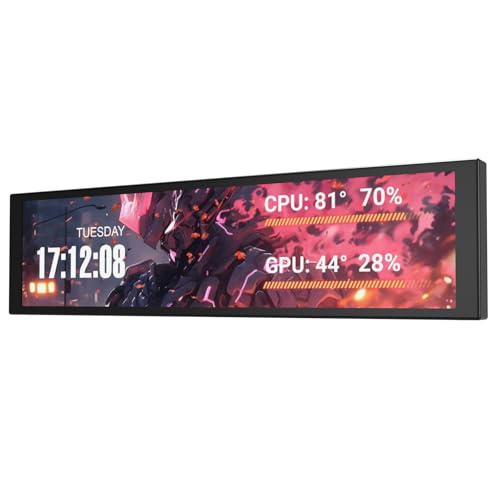
- USB-C or 9-pin connection keeps HDMI free
- 1920x462 IPS panel for sensor dashboards
- Shows CPU/GPU temps, clocks, RAM, and widgets
Best For: Internal telemetry dashboards in showcase PC builds
Compact 5-inch Temp Monitor
WOWNOVA 5" Computer Temp Monitor

- Single USB-C cable, no HDMI or power needed
- Shows CPU, GPU, RAM, FPS, and HDD data
- Compact aluminum housing with dynamic themes
Best For: Small PC builds needing a low-resource stats screen
Premium USB sensor panel
upHere 9.2'' Secondary Monitor

- 9.2-inch IPS panel with 1920×462 resolution
- USB plug-and-play avoids using a GPU output
- Metal body and flexible mounting options
Best For: Builders who want a larger, polished temperature display with custom visuals
Compact DIY dashboard

- Small 3.5-inch IPS screen for case installs
- Shows CPU/GPU temps, usage, time, and weather
- USB connection with customizable layouts
Best For: Users who want a small USB sensor display with flexible layouts
Internal hardware monitor

- Monitors CPU, GPU, and RAM temperatures
- Single USB connection with no GPU port needed
- Includes stand and custom theme support
Best For: Windows PC builders who want an internal hardware monitor with a clean one-cable setup
Larger smart case display
8-inch PC case screen with desktop mode

- 8-inch IPS display with 1280 x 800 resolution
- Shows CPU, GPU, RAM, FPS, and HDD data
- Single-cable USB-C or 9-pin setup
Best For: Builders wanting a larger internal monitor with desktop mode
Small no-install option

- USB-only screen with no AIDA64 installation needed
- 320 x 480 IPS panel with wide viewing angle
- Includes bracket, cable, manual, and tape
Best For: Users wanting a compact, simple monitoring display
Compact Windows temp screen
3.5-inch WOWNOVA computer temp monitor

- Shows CPU, GPU, RAM, and HDD data
- Includes three cable options for different headers
- IPS panel with 320 x 480 resolution
Best For: Windows builders needing a compact, flexible monitor
Premium 8.8-inch Universal Screen – Lian Li 8.8" Universal Screen
If you want a pc temperature monitoring display for gpu temps that also doubles as a polished mini monitor, the Lian Li 8.8-inch Universal Screen is built for flexible PC setups. It connects over USB or a 9-pin header, so it can show hardware stats, media, or custom visuals without using a GPU display output.
Best For: Builders who want a compact, customizable secondary display with strong mounting flexibility.
Pros:
- USB-powered secondary display that avoids using valuable GPU ports
- Adjustable mounting bracket supports height and tilt changes
- Customizable ARGB frame and L-Connect 3 theme support
- Can display hardware stats, media, photos, or uploaded videos
Cons:
- L-Connect 3 software is required for customization and monitoring features
- Linux is not supported by L-Connect 3
- Preset templates use a fixed temperature unit
Overall, this is a versatile pick if you want a clean, customizable internal screen with solid adjustment options and no need to sacrifice GPU ports. It fits especially well in builds where appearance and flexible placement matter as much as live monitoring.
Ultra-Wide Sensor Panel – darkFlash V92 9.2" Screen
The darkFlash V92 is a practical pc temperature monitoring display for gpu temps if you want an internal dashboard instead of a traditional HDMI mini monitor. Its 1920×462 IPS panel is made for AIDA64-style sensor layouts, so CPU/GPU temps, fan data, clocks, and widgets stay readable in a narrow, clean format.
Best For: Builders who want a no-HDMI internal sensor panel for live hardware telemetry.
Pros:
- No HDMI port needed; uses USB-C or internal 9-pin USB header
- Ultra-wide 1920×462 IPS display suits telemetry and theme layouts
- Can show CPU/GPU temps, usage, RAM, fan stats, clocks, and weather
- Aluminum body with mounting options for several case locations
Cons:
- Resolution is specialized for sensor panels rather than general media use
- Designed around compatible monitoring/theme software
- Best suited to internal case mounting, not a mainstream desk monitor role
The V92 makes sense when the goal is a tidy internal readout with minimal cable hassle. It is especially appealing for showcase or compact builds where keeping graphics ports free matters.
Magnetic 9.16-inch LCD – Thermalright Trofeo Vision 9.16
For a pc temperature monitoring display for gpu temps that prioritizes easy installation, the Thermalright Trofeo Vision 9.16 keeps things simple with a magnetic design and USB Type-C connectivity. It uses TRCC software to monitor system parameters, switch between static and dynamic content, and even play video or DIY theme displays.
Best For: Users who want a large magnetic display with software-driven monitoring and themes.
Pros:
- 9.16-inch IPS panel with 1920×480 resolution
- Magnetic mounting makes installation and removal easy
- TRCC software supports monitoring, image switching, and video playback
- Can be attached to a metal wall, desktop, or magnetic chassis
Cons:
- Monitoring and power functions are controlled through TRCC software
- Wiring must be complete before software installation
- Works best in metal-compatible mounting setups
This is a strong option if you want a larger sensor screen without dealing with screw-heavy mounting. Its magnetic approach and broad software controls make it a good fit for quick installs and frequent repositioning.
Compact 5-inch Temp Monitor – WOWNOVA 5" Computer Temp Monitor
The WOWNOVA 5-inch monitor is a compact pc temperature monitoring display for gpu temps when you want a small internal screen with broad system readouts. It works as a second monitor in the brand’s software and can show CPU, GPU, RAM, FPS, and HDD data while using a single USB-C cable.
Best For: Smaller builds that need a simple, low-resource monitoring screen.
Pros:
- Uses one USB-C cable with no HDMI or extra power required
- Supports CPU, GPU, RAM, FPS, and HDD data monitoring
- Includes dynamic video themes and a DIY theme option
- Compact aluminum housing fits neatly inside a build
Cons:
- 800×480 resolution is modest compared with larger sensor panels
- Display area is relatively small at 5 inches
- Designed around the brand’s English software for best results
For builders who want a practical monitoring panel without taking much space, this WOWNOVA model is easy to place and easy to live with. It is best viewed as a compact stats screen rather than a large visual centerpiece.
Premium USB sensor panel – upHere 9.2'' Secondary Monitor
If you want a pc temperature monitoring display for gpu temps that feels more like a premium mini monitor than a basic sensor panel, this upHere 9.2-inch screen is built for the job. Its 1920×462 IPS panel, 60Hz refresh rate, and USB plug-and-play setup make it a strong fit for showing temps, usage, and custom visuals without taking up a GPU output.
Best For: DIY builders who want a larger, polished internal or external monitor for temperature readouts and custom PC visuals.
Pros:
- 9.2-inch IPS display with 1920×462 resolution and 400-nit brightness
- USB 2.0 plug-and-play design that avoids using a GPU output
- All-metal casing with flexible mounting for fan brackets, panels, or desktop use
- Supports hardware monitoring plus custom MP4, GIF, JPG, and PNG themes
Cons:
- Requires upHere software for monitoring and customization
- Unusual 1920×462 aspect ratio may not suit every layout
Overall, this is a strong pick if you want a clean-looking PC dashboard with room for both live hardware stats and visual customization. The larger screen and metal build help it stand out in high-end or sea-view chassis builds.
Compact DIY dashboard – 3.5in Computer Temp Monitor
This compact pc temperature monitoring display for gpu temps is geared toward builders who want a small, easy-to-place sensor panel inside or outside the case. The 3.5-inch IPS screen focuses on core system data like CPU and GPU temperature, while also adding extras such as time, date, network speed, and weather.
Best For: Users who want a small USB sensor display with flexible layouts and broad status readouts.
Pros:
- Displays CPU and GPU temperatures plus usage, time, date, and more
- USB-only connection with no extra power supply or HDMI cable needed
- Supports horizontal/vertical switching and 360° rotation
- Custom theme editor lets you build a personalized layout
Cons:
- 3.5-inch size is much smaller than larger sensor panels
- Listed support is only for system use
If you mainly want a compact monitoring screen rather than a showpiece display, this model keeps setup simple and the information dense. It makes sense for tight builds where a small footprint matters more than size.
Internal hardware monitor – 9.2" PC Case LCD Display
For a pc temperature monitoring display for gpu temps that stays focused on hardware stats, this 9.2-inch PC case LCD is designed as a dedicated sensor panel rather than a general second screen. It supports CPU, GPU, and RAM monitoring, uses a single USB connection, and includes software for custom themes and sensor layouts.
Best For: Windows PC builders who want an internal hardware monitor with a clean one-cable setup.
Pros:
- Monitors CPU, GPU, and RAM usage and temperatures
- One-cable USB setup with no GPU port required
- Includes a multi-angle stand for landscape or portrait mounting
- Supports static wallpapers, video backgrounds, and theme switching
Cons:
- Windows 7 64-bit or above only
- Cannot be used as an extended screen
- Not compatible with Mac, Linux, or Chrome OS
This is a good fit if you want a purpose-built sensor display for a gaming PC and do not need secondary-monitor functionality. The included accessories and internal-mount-friendly design make it straightforward for tidy builds.
Larger smart case display – 8-inch PC case screen with desktop mode
If you want a pc temperature monitoring display for gpu temps that also acts like a true secondary screen, this 8-inch WOWNOVA panel is built for that job. It shows CPU, GPU, RAM, FPS, and HDD data through the included software, and it adds a desktop display mode if you want to use it as an extended screen inside the case.
Best For: Builders who want a larger internal display with flexible monitoring and desktop-style use.
Pros:
- 8-inch IPS panel with 1280 x 800 resolution for a larger, easy-to-read layout
- Shows CPU, GPU, RAM, FPS, and HDD data with English software support
- Supports desktop extended-screen mode plus image/video themes
- Single-cable setup via USB-C or 9-pin connection, with no HDMI or power required
Cons:
- Designed for Windows 10/11 only
- Large 8-inch size may not fit every case layout
- Premium feature set may be more than basic temp-only users need
This is the most versatile option in the group if you want both monitoring and display customization. The larger screen, easy one-cable hookup, and extended-desktop support make it a strong pick for a polished internal PC screen build.
Small no-install option – 3.5-inch IPS USB mini screen
This 3.5-inch unit is a straightforward pc temperature monitoring display for gpu temps when you want something small, simple, and low on cable clutter. It connects by USB only, does not require AIDA64 installation, and can show CPU, memory, hard drive, and other hardware data in a compact footprint.
Best For: Users who want a small, easy-to-run status screen with minimal setup.
Pros:
- No AIDA64 installation required, with USB-only operation
- IPS viewing angle and 320 x 480 resolution in a compact 3.5-inch size
- Supports horizontal and vertical screen switching, plus 0° and 180° display options
- Includes adjustable bracket, USB cable, manual, and acrylic double-sided tape
Cons:
- Smaller 3.5-inch screen gives less room for detailed layouts
- Resolution is limited to 320 x 480
- Hardware name on some themes may need manual modification
If you mainly care about quick status checks rather than a big visual centerpiece, this mini screen keeps things simple. Its tiny size, USB connection, and no-install approach make it a practical pick for basic monitoring builds.
Compact Windows temp screen – 3.5-inch WOWNOVA computer temp monitor
For a practical pc temperature monitoring display for gpu temps, this WOWNOVA 3.5-inch model focuses on clear system data in a compact desktop-friendly format. It works with English software to show CPU, GPU, RAM, and HDD information, while the included cable options help it fit different internal connection setups.
Best For: Windows users who want a small internal display with flexible cabling.
Pros:
- Displays CPU, GPU, RAM, and HDD data with English software support
- Three cable options included for broader interface compatibility
- IPS 178-degree viewing angle with 320 x 480 resolution
- Customizable layout, vertical/horizontal switching, and brightness control
Cons:
- Compatible with Windows only
- Small 3.5-inch display limits how much information fits at once
- No HDMI, so it is meant for USB-based internal use rather than a standard external monitor
This model makes sense if you want a compact screen that still covers the core performance metrics. The flexible cable package and clean software support make it an easy fit for a Windows gaming or showcase build.
How We Picked the Best PC Temperature Monitoring Display for GPU Temps
We focused on screens that are practical for everyday PC builds: clear visibility, useful monitoring layouts, straightforward setup, and reliable USB or internal connections. Size, resolution, aspect ratio, and mounting flexibility also mattered, since a PC Temperature Monitoring Display for GPU Temps should fit the case without creating cable clutter.
Quick Comparison
Larger 8-inch to 9.2-inch panels are best for legibility and more detailed sensor dashboards. Smaller 3.5-inch and 5-inch screens work better for compact cases or minimalist builds. If you want the easiest setup, look for models with simple USB power/data connections and broad software support.
Key Buying Factors for PC Temperature Monitoring Display for GPU Temps
Screen Size and Resolution
Choose a size that matches your case layout and viewing distance. Higher-resolution displays can show more sensor tiles, which is useful if you want GPU temperature, hotspot, fan speed, and usage data on one screen.
Mounting and Installation
Check whether the display uses magnetic mounting, adjustable brackets, or adhesive placement. A secure mount matters inside a case where vibration and airflow can affect long-term stability.
Connectivity and Software
Many panels rely on USB and monitoring software such as AIDA64 or custom dashboards. Make sure the display supports your preferred data source and that the setup does not require unnecessary adapters or extra HDMI routing.
Visibility and Layout
For a PC Temperature Monitoring Display for GPU Temps, readability is more important than flashy effects. Pick a panel with strong brightness, good viewing angles, and a layout that keeps GPU stats easy to read at a glance.
Who Should Buy Which PC Temperature Monitoring Display for GPU Temps?
Choose a larger 8-inch or 9.2-inch screen if you want the most readable temperature dashboard and have room in a mid-tower or full-tower case. Go with a 5-inch model if you want a balanced footprint with enough detail for core system stats. A 3.5-inch display makes sense for smaller builds, secondary monitors, or users who only need essential GPU and CPU temperatures. If you want the easiest upgrade, prioritize models with internal USB power, broad software support, and mounting hardware that matches your case.
Ultimately, the best option depends on whether you value screen size, setup simplicity, or a cleaner integrated look. For most builders, the right display is the one that gives fast GPU temperature feedback without adding maintenance or clutter.
