
A good PC temperature monitoring display keeps CPU, GPU, fan, and storage stats visible at a glance while you game, stream, or benchmark.
Below, we’ve rounded up 10 strong picks with different screen sizes, mounting options, and connection styles to help you choose the right fit for your build.
Best 10 PC Temperature Monitoring Display for Gaming Setup Picks for 2026
Quick Pick
WOWNOVA 8.8" Dynamic Theme Monitor

- Single-cable USB-C or 9-pin hookup
- Shows CPU, GPU, RAM, FPS, and HDD data
- Supports dynamic video themes and DIY content
Best For: Fast setup with animated themes and live hardware stats
Editor’s Choice
Lian Li Black 8.8" Universal Screen

- USB or 9-pin connection with no GPU-port use
- Adjustable mount with tilt and height control
- ARGB frame and L-Connect 3 customization
Best For: Showcase builds that want coordinated lighting and software control
Best Wide Panel
darkFlash V92 9.2" Wide Sensor Panel

- Ultra-wide 1920x462 IPS screen
- USB-C or 9-pin connection without HDMI
- Supports temps, widgets, and AIDA64-style dashboards
Best For: Wide telemetry layouts and flexible internal mounting
Premium Bright Pick
Lian Li White 8.8" Bright ARGB Screen

- 500-nit IPS panel for strong visibility
- USB-powered design keeps GPU ports open
- ARGB frame and adjustable mount
Best For: Bright, clean-looking builds with customizable lighting
Premium Large-Format Sensor Panel
9.2" PC Case LCD Hardware Monitor

- 9.2-inch IPS panel with 1920x462 resolution
- USB-only connection with no GPU port or HDMI needed
- Multi-angle stand plus internal mounting support
Best For: Gamers who want a large, clean internal monitor for temps and system stats
Easy-Setup Desktop Mode Pick
WOWNOVA 8" Inside PC Case Screen

- One-cable setup with USB-C or 9-pin connection
- Adds desktop extended-screen mode plus sensor monitoring
- Custom dynamic themes and wide-view IPS panel
Best For: Users who want a compact monitor with quick setup and extra display flexibility
High-Brightness DIY Dashboard
upHere 9.2'' Secondary Monitor

- 1920x462 IPS display with 400 nits brightness
- USB plug-and-play with no GPU port required
- All-metal body with flexible bracket and adhesive mounting
Best For: DIY builders who want a bright, durable internal monitor with customization
Animated compact sensor panel

- 5-inch IPS display with dynamic video themes
- Single USB-C cable, no HDMI or extra power
- Shows CPU, GPU, RAM, FPS, and HDD data
Best For: Compact gaming builds that want animated sensor-panel style
Wide bar-style monitoring screen
wisecoco 7.84" Stretched Display
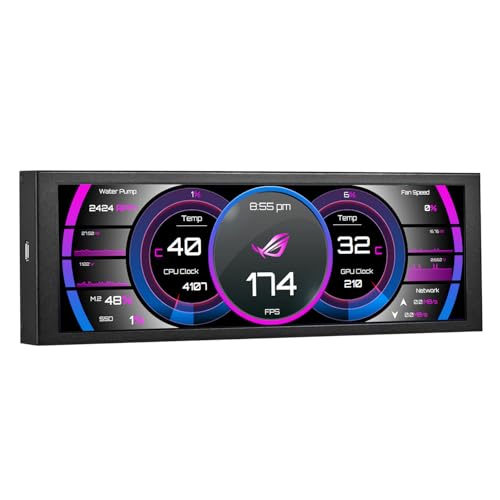
- 7.84-inch IPS screen with 1280x400 resolution
- One-cable USB setup with no HDMI needed
- Supports Aida64 sensor-panel use on Windows 10/11
Best For: Windows gaming rigs needing a wide secondary stats display
Compact Windows sensor display

- 3.5-inch IPS panel for CPU, GPU, RAM, and HDD data
- Includes three cable options for easier installation
- No HDMI or extra power required
Best For: Windows gaming PCs needing a very compact monitoring screen
Quick Pick – WOWNOVA 8.8" Dynamic Theme Monitor
If you want a pc temperature monitoring display for gaming setup that doubles as a small visual dashboard, the WOWNOVA 8.8″ monitor is built for quick setup and flexible customization. It works as a secondary screen for CPU, GPU, RAM, FPS, and HDD data, while keeping the install simple with a single USB-C or 9-pin connection and no HDMI requirement.
Best For: Builders who want a fast-to-install internal monitor with animated themes and broad system stat support.
Pros:
- One-cable setup via USB-C or internal 9-pin connection
- Displays CPU, GPU, RAM, FPS, and HDD data through included software
- Dynamic video themes supported, plus a 32GB flash card for DIY content
- IPS panel with 170-degree viewing angle and automatic startup features
Cons:
- Requires Windows 10/11 according to the supplied notes
- Resolution is 1920×480, so it is aimed at telemetry rather than full-screen media
Overall, this is a practical choice if you want a clean internal display that focuses on live PC stats and theme customization. Its biggest strength is the combination of easy wiring, theme support, and a wide-format panel that fits gaming builds well.
Editor’s Choice – Lian Li Black 8.8" Universal Screen
The Lian Li 8.8″ Universal Screen is a refined pc temperature monitoring display for gaming setup users who want a secondary screen that blends in cleanly with the rest of the build. It connects over USB or a 9-pin header, works with L-Connect 3 for custom layouts, and adds an ARGB frame for a more coordinated look inside the case.
Best For: PC builders who want an adjustable, software-driven sensor panel with integrated ARGB styling.
Pros:
- USB-powered design keeps GPU ports free
- Supports preset themes, modular info, photos, and videos in L-Connect 3
- Adjustable mounting bracket offers height and tilt flexibility
- Built-in diffused ARGB lighting can sync with the system
Cons:
- L-Connect 3 does not support Linux
- Preset templates use fixed temperature units, with unit switching limited to custom layouts
For users already in the Lian Li ecosystem, this screen is a strong match because it combines monitoring, media, and lighting control in one compact package. The adjustable mount and clean USB connection make it especially practical for tidy showcase builds.
Best Wide Panel – darkFlash V92 9.2" Wide Sensor Panel
The darkFlash V92 is a large-format pc temperature monitoring display for gaming setup owners who want a panoramic internal dashboard. Its 1920×462 IPS panel is designed for sensor panels, animated themes, and live widgets, while the USB-C or internal 9-pin connection avoids taking up HDMI ports on your graphics card.
Best For: Builders who want a wider telemetry screen with flexible placement and AIDA64-style monitoring.
Pros:
- 9.2-inch ultra-wide IPS display with 1920×462 resolution
- Shows CPU/GPU temps, usage, RAM, fan stats, clocks, weather, and custom widgets
- USB-C or internal 9-pin connection keeps the build HDMI-free
- Includes mounting accessories for PSU shroud, side panel, radiator area, tower, or desktop use
Cons:
- More of a telemetry panel than a general-purpose display
- Brightness is listed at 220 nits, which may be modest in very bright environments
If your priority is packing more information into a clean internal layout, the V92 stands out for its wide panel and flexible software support. It is especially appealing for showcase gaming PCs where stats visibility and cable simplicity both matter.
Premium Bright Pick – Lian Li White 8.8" Bright ARGB Screen
The Lian Li white 8.8″ Universal Screen is a polished pc temperature monitoring display for gaming setup users who want a bright, compact secondary screen with clean integration. It uses USB connectivity, supports L-Connect 3 customization, and combines hardware stats display with a diffused ARGB frame for a more finished look.
Best For: Builders who want a bright white sensor panel with adjustable mounting and ARGB accents.
Pros:
- 500-nit brightness helps the display stand out
- USB-powered secondary screen frees GPU ports
- Adjustable mounting bracket supports height and tilt changes
- Diffused ARGB frame can be customized through L-Connect 3
Cons:
- L-Connect 3 does not support Linux
- Some temperature unit options are limited depending on whether you use presets or custom layouts
This version is a good fit if you want the same compact monitoring concept with a brighter panel and white finish. It is practical for clean-themed builds where visibility and coordinated lighting both matter.
Premium Large-Format Sensor Panel – 9.2" PC Case LCD Hardware Monitor
If you’re looking for a pc temperature monitoring display for gaming setup use, this 9.2-inch internal LCD is built for a clean, dashboard-style readout inside or beside your rig. It focuses on CPU, GPU, RAM, time, and network stats, and it connects over a single USB cable with no GPU port required.
Best For: Builders who want a large, crisp sensor screen with flexible mounting and simple USB-only setup.
Pros:
- 1920×462 IPS panel with a 60Hz refresh rate for sharp monitoring visuals
- Single-cable USB connection with included adapters, no HDMI or extra power needed
- Includes a multi-angle stand for portrait or landscape placement
- Custom themes, static wallpapers, and dynamic video backgrounds via software
Cons:
- Windows 7 64-bit or above only; no Mac, Linux, or Chrome OS support
- Cannot be used as an extended desktop monitor
- Best suited to sensor-panel use rather than general display tasks
This is a strong choice if you want a bigger pc temperature monitoring display for gaming setup visibility and tidy cable routing. The included stand and internal mounting options make it especially flexible for custom builds.
Easy-Setup Desktop Mode Pick – WOWNOVA 8" Inside PC Case Screen
This pc temperature monitoring display for gaming setup use is designed to get you running quickly with one cable and self-developed software. It tracks CPU, GPU, RAM, FPS, and HDD data, and it now adds a desktop display mode if you want it to function as an extended screen.
Best For: PC builders who want a fast setup, flexible display modes, and a compact 8-inch sensor panel.
Pros:
- One-click setup with a single USB-C or 9-pin cable
- Supports both sensor-panel monitoring and desktop extended-screen mode
- IPS panel with wide viewing angles and customizable dynamic video themes
- Compact 8-inch size with aluminum housing for an internal PC case install
Cons:
- Compatibility is listed for Windows 10/11 only
- Smaller resolution than some larger 9.2-inch alternatives
- Software-based setup may be more feature-rich than minimal users need
For buyers who want a practical pc temperature monitoring display for gaming setup builds without a complicated install, this model is easy to recommend. The added desktop mode makes it more versatile than most basic sensor screens.
High-Brightness DIY Dashboard – upHere 9.2'' Secondary Monitor
If your pc temperature monitoring display for gaming setup needs to double as a polished dashboard, this 9.2-inch upHere screen leans into brightness, build quality, and flexible installation. It shows real-time CPU/GPU data through upHere software and supports custom media so you can turn a hardware monitor into a more personalized display.
Best For: DIY PC builders who want a bright, all-metal monitoring screen with lots of mounting options.
Pros:
- 9.2-inch IPS LCD with 1920×462 resolution and 400 nits brightness
- USB plug-and-play design with no GPU output required
- All-metal casing with support for brackets, 3M mounting, and vertical or horizontal use
- Custom theme support with MP4, GIF, JPG, and PNG uploads
Cons:
- Brightness is strong, but the native resolution is still a narrow sensor-panel format
- Uses its own software ecosystem for dashboards and customization
- Best suited to PC monitoring rather than general-purpose display use
This model stands out if you want a more premium-feeling pc temperature monitoring display for gaming setup builds and are planning a visible chassis install. The all-metal design and mounting flexibility make it a solid fit for custom and high-end rigs.
Animated compact sensor panel – WOWNOVA 5" Temp Monitor
If you want a pc temperature monitoring display for gaming setup that also doubles as a small visual centerpiece, this WOWNOVA 5-inch panel is built around that idea. It uses the brand’s English software to show CPU, GPU, RAM, FPS, and HDD data, while the dynamic theme support makes it easy to keep the screen looking more polished than a plain readout.
Best For: Gamers who want a compact internal display with animated themes and simple USB-C hookup.
Pros:
- 5-inch IPS screen with wide 178-degree viewing angles
- Single USB-C connection with no HDMI or extra power required
- Supports computer data monitoring plus custom dynamic video themes
- Includes layout, orientation, brightness, and auto-start options
Cons:
- Lower 800 x 480 resolution than larger mini monitors
- Best suited to Windows-based monitoring software use
- Small display area may limit how much data fits comfortably
Overall, this model is a strong pick if you want a tidy internal sensor panel with more personality than a basic stats screen. Its appeal is the mix of one-cable installation, theme customization, and straightforward system monitoring for a gaming build.
Wide bar-style monitoring screen – wisecoco 7.84" Stretched Display
This wisecoco option is a practical pc temperature monitoring display for gaming setup if you prefer a wider, more information-dense layout. The 7.84-inch stretched IPS panel uses a one-cable USB A-to-USB C connection, supports Windows 10/11, and is designed for secondary screen use or sensor panel setups with Aida64 or Wallpaper Engine.
Best For: Windows gamers who want a long, bar-style display for temperature and system stats.
Pros:
- Wide 1280×400 IPS screen with 178-degree viewing angles
- No HDMI needed; simple USB A to USB C connection
- Supports extend, duplicate, and secondary screen modes
- Designed for Aida64 and Wallpaper Engine sensor panel use
Cons:
- Windows 10/11 only
- It is only the screen, so software setup is required
- Stretched format may not suit every case or layout style
For a gaming build that needs a clean long-format monitor for temps and system stats, this is a very usable choice. The combination of a sharp IPS panel, one-cable setup, and broad display-mode support makes it easy to fit into a modern Windows rig.
Compact Windows sensor display – WOWNOVA 3.5" Temp Monitor
If you want a smaller pc temperature monitoring display for gaming setup, this WOWNOVA 3.5-inch model keeps the focus on system data instead of size. It works with the brand’s English software as a second monitor for CPU, GPU, RAM, and HDD status, and it includes multiple cable options to make installation easier in different desktop setups.
Best For: Gamers who want a compact, Windows-only monitoring screen with flexible cabling.
Pros:
- Small 3.5-inch IPS display with wide 178-degree viewing angles
- Shows CPU, GPU, RAM, and HDD data through English software
- Includes three cable types for different interface needs
- No HDMI required and no extra power required
Cons:
- Windows only
- 320 x 480 resolution is modest for a monitor display
- Smaller screen means less room for detailed layouts
This is a straightforward pick for builders who want a simple internal stats display without giving up much desk or case space. It is less flashy than the 5-inch version, but the flexible cabling and software-based monitoring make it practical for a compact gaming PC.
How We Picked the Best PC Temperature Monitoring Display for Gaming Setup
We focused on displays that are practical for a PC Temperature Monitoring Display for Gaming Setup: clear readability, sensible sizing, reliable hardware monitoring support, and installation that won’t turn into a weekend project. We also considered whether each screen suits compact cases, open-frame builds, or full showcase rigs.
Quick Comparison
The main decision is usually size versus simplicity. Smaller mini screens are easier to mount and can stay out of the way, while 8-inch and 9-inch panels deliver more legible data and room for custom layouts. Some models rely on a single USB-style connection, while others may need more setup but offer broader customization.
Key Buying Factors for PC Temperature Monitoring Display for Gaming Setup
Screen Size and Aspect Ratio
Choose a size that matches your case and viewing distance. A 5-inch panel works well for tight interiors, while 7.84-inch, 8.8-inch, and 9.2-inch displays are better if you want larger numbers, richer themes, or more sensors on screen at once.
Visibility and Panel Quality
Look for IPS panels when possible. They usually provide better color, wider viewing angles, and more consistent readability inside a dimly lit gaming PC.
Connection and Setup
If you want a low-friction install, prioritize one-cable or USB-based options. If you’re building a showcase system and want custom layouts, be sure the display supports the software or sensor ecosystem you plan to use.
Mounting Flexibility
Universal mounts, adjustable brackets, and slim profiles matter more than they first seem. A display that fits cleanly without blocking airflow or cables is usually the better long-term choice.
Monitoring Features
For most buyers, the essentials are CPU temperature, GPU temperature, RAM usage, storage data, and fan speeds. Extra theme support, ARGB framing, or desktop-mode features are nice, but only if they don’t complicate everyday use.
Who Should Buy Which PC Temperature Monitoring Display for Gaming Setup?
Pick a compact display if you want a simple status screen and minimal fuss. Choose a larger secondary monitor-style panel if you care about highly visible stats and a premium aesthetic. If your priority is quick installation, go with the one-cable or no-HDMI styles. If you’re chasing a clean showcase build, select a model with flexible mounting and strong customization support. The best PC Temperature Monitoring Display for Gaming Setup is the one that matches your case space, your monitoring needs, and how much time you want to spend on configuration.
