
A good pc temperature monitoring display for case turns your hardware data into an at-a-glance dashboard. Instead of alt-tabbing or opening software, you can keep CPU, GPU, and system stats visible right inside your build.
In this roundup, we focused on screens that are practical to mount, easy to power, and useful for everyday monitoring—not just flashy aesthetics.
Best 10 PC Temperature Monitoring Display for Case Picks for 2026
Universal Case Display
Lian Li 8.8" Universal PC Screen

- USB-powered display with no GPU port needed
- Adjustable mounting for case panels or fan frames
- Customizable ARGB frame and L-Connect 3 layouts
Best For: Builders who want a compact, customizable case monitor
Ultra-Wide Sensor Panel
darkFlash V92 9.2" Case Screen

- 1920x462 ultra-wide IPS panel for stats
- USB-C or 9-pin connection, no HDMI needed
- Aluminum body with flexible case mounting
Best For: Builders who want a slim HDMI-free sensor panel
Bright White Case Screen

- USB-powered 60Hz IPS display with 500 nits
- Height and tilt adjustable mounting bracket
- Diffused ARGB frame for synchronized lighting
Best For: White builds needing a bright, compact monitoring screen
Premium Large-Screen Pick

- 8-inch IPS display with 1280 x 800 resolution
- Shows CPU, GPU, RAM, FPS, and HDD stats
- Supports desktop mode plus one-cable setup
Best For: Builders who want a larger internal display with extended-screen support
Compact Budget-Friendly Pick
3.5 Inch Internal Temp Monitor
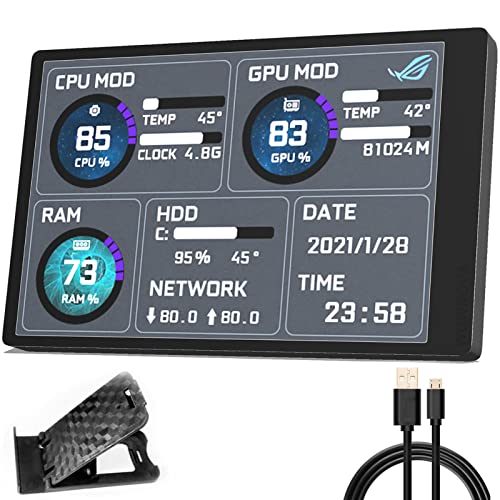
- 3.5-inch IPS screen with compact footprint
- Monitors CPU, GPU, RAM, and HDD data
- Single USB-C cable with no HDMI or power needed
Best For: Compact builds needing a small, simple internal monitor
Best High-Resolution Sensor Panel

- 1920 x 462 IPS display with 32:9 aspect ratio
- Real-time CPU, GPU, memory, and disk monitoring
- USB-C or 9-pin connection with custom themes
Best For: Windows builders who want a high-resolution customizable sensor panel
Compact USB PC Temp Monitor with English Software
3.5-inch USB PC temperature display with IPS panel

- English software with CPU, GPU, RAM, and HDD data
- No HDMI or external power required
- IPS screen with customizable layout and brightness
Best For: Windows PC builders who want a small internal monitoring screen
Flexible 3.5-Inch Case Screen with DIY Themes
3.5-inch USB mini screen with temperature and status data

- Displays CPU/GPU temps plus time, weather, and more
- USB-only setup with no HDMI or extra power
- DIY themes, rotation, and brightness adjustment
Best For: Windows builds needing a highly customizable case display
Large 5-Inch Dynamic PC Temp Monitor
5-inch USB-C case monitor with dynamic video themes

- Bigger 5-inch IPS panel with 800×480 resolution
- Monitors CPU, GPU, RAM, FPS, and HDD data
- Single USB-C cable with no HDMI or extra power
Best For: Users who want a larger, more customizable PC case screen
Universal Case Display – Lian Li 8.8" Universal PC Screen
If you want a pc temperature monitoring display for case that doubles as a flexible mini monitor, this Lian Li 8.8-inch screen is built for clean internal dashboards. It connects over USB or a 9-pin header, supports custom layouts in L-Connect 3, and can show temperatures in °C or °F with your own visuals.
Best For: Builders who want a compact, USB-powered case screen with customizable lighting and layout control.
Pros:
- USB-powered secondary display avoids using a GPU video port
- Adjustable mounting works on fan frames, case panels, or flat surfaces
- Custom layouts and media support through L-Connect 3
- Built-in diffused ARGB frame for matching system lighting
Cons:
- L-Connect 3 does not support Linux
- Preset templates display temperature in a fixed unit
- Requires correct screw selection during stand installation
This is a strong choice if you want a tidy case-mounted display with flexible placement and a polished look. It is especially useful for systems that need hardware stats and custom visuals without giving up GPU ports.
Ultra-Wide Sensor Panel – darkFlash V92 9.2" Case Screen
The darkFlash V92 is a practical pc temperature monitoring display for case installs when you want a slim internal dashboard instead of a full-size monitor. Its ultra-wide 1920×462 IPS panel is designed for live hardware stats, AIDA64 sensor layouts, widgets, and theme displays while keeping HDMI ports free.
Best For: PC builders who want an HDMI-free sensor panel with a narrow, modern look.
Pros:
- 1920×462 ultra-wide IPS screen makes telemetry easy to fit and read
- USB-C or internal 9-pin connection keeps GPU video ports available
- Supports real-time hardware monitoring, AIDA64 panels, and custom themes
- Flexible mounting options for PSU shrouds, side panels, radiators, or desktops
Cons:
- Resolution is optimized for stats rather than full-screen media
- Requires compatible monitoring/theme software for best results
- Shown with a glossy finish, which may reflect more than matte panels
For builders focused on system telemetry, the V92 is a smart fit because it is purpose-built for case monitoring rather than general entertainment. Its slim aluminum body and HDMI-free setup make it especially appealing in showcase and compact builds.
Bright White Case Screen – Lian Li 8.8" White PC Screen
This Lian Li model is a polished pc temperature monitoring display for case builds that need a bright, compact internal screen. It uses USB for power and display control, runs at 60Hz with a 1920×480 IPS panel, and can show stats, photos, or videos through L-Connect 3.
Best For: White-themed builds that want a compact, customizable case screen with a premium finish.
Pros:
- USB-powered secondary display frees GPU ports
- 60Hz IPS panel with 1920×480 resolution and 500-nit brightness
- Adjustable mounting bracket supports height and tilt changes
- Diffused ARGB frame adds coordinated lighting effects
Cons:
- L-Connect 3 does not support Linux
- Preset templates use a fixed temperature unit
- Requires proper screw choice for stand installation
If you want a brighter, more refined screen for a case window or showcase setup, this version stands out for its 500-nit panel and white finish. It is a good match when appearance matters as much as temperature monitoring.
Wide FHD Monitoring Bar – AISHICHEN 11.26" Case Monitor
The AISHICHEN 11.26-inch mini monitor is a straightforward pc temperature monitoring display for case setups that need more viewing area. It is designed for AIDA64 hardware tracking, showing CPU and GPU temperatures, clocks, and usage, while the 500-nit anti-glare screen helps keep the panel readable.
Best For: Builders who want a larger stretched display for AIDA64 sensor dashboards and bright-room visibility.
Pros:
- Built for AIDA64 temperature and hardware monitoring
- 500-nit brightness with anti-glare coating improves visibility
- HDMI or Type-C connection makes setup simple
- Works with Windows, Mac, laptops, and Raspberry Pi
Cons:
- Type-C is power only and does not carry data
- Not a touch screen and has no built-in speakers
- Apple devices need an HDMI port for video input
This option makes sense if you want a wider display that can show more sensor information at once. It is less about compact style and more about readable diagnostics and easy connectivity.
Premium Large-Screen Pick – 8 Inch Smart PC Sensor Panel
If you want a pc temperature monitoring display for case that doubles as a more flexible internal screen, this 8-inch WOWNOVA panel is built for exactly that. It shows CPU, GPU, RAM, FPS, and HDD data through the English software, and it also adds a desktop display mode if you want extended-screen use inside the case.
Best For: Builders who want a larger internal display with both sensor-panel and desktop-screen flexibility.
Pros:
- 8-inch IPS panel with a 1280 x 800 resolution and wide viewing angles.
- Supports CPU, GPU, RAM, FPS, and HDD monitoring through English software.
- Can run as an extended desktop display, not just a sensor panel.
- Single-cable setup via USB-C or 9-pin header, with no HDMI or extra power needed.
Cons:
- Larger size may be harder to fit in compact cases.
- Only works with Windows 10/11 based on the supplied notes.
- Advanced theme and desktop features may be more than some users need.
This is the most versatile option here if you want roomier visuals and extra display functionality. The tradeoff is size, but for showcase builds, it brings a strong mix of monitoring, customization, and internal installation convenience.
Compact Budget-Friendly Pick – 3.5 Inch Internal Temp Monitor
This smaller pc temperature monitoring display for case is aimed at builders who want basic system stats without taking up much space. The 3.5-inch IPS screen uses the English software to show temperature and usage data for CPU, GPU, RAM, and HDD, all through a simple single-cable USB-C connection.
Best For: Compact builds and users who want a minimal internal monitor for key system stats.
Pros:
- Very compact 3.5-inch form factor fits tight case layouts.
- English software monitors CPU, GPU, RAM, and HDD data.
- Single USB-C cable setup with no HDMI or separate power required.
- Includes customization options like layout editing, screen orientation changes, and brightness adjustment.
Cons:
- 320 x 480 resolution is modest compared with larger panels.
- Small screen area limits how much information can be shown at once.
- Designed as an internal monitor rather than a desktop-style extended display.
If space is the priority, this model keeps the setup simple and unobtrusive. It is best suited to practical monitoring over flashy presentation, especially in cases where every inch matters.
Best High-Resolution Sensor Panel – 9.2 Inch FHD Case Screen
For buyers who want a pc temperature monitoring display for case with a sharper, wider layout, this 9.2-inch Arvitek panel stands out. It uses a 1920 x 462 IPS display and Windows-only software to track CPU, GPU, memory, frame rate, and disk usage in real time, while also offering customizable themes and animated visuals.
Best For: Windows builders who want a high-resolution sensor panel with lots of visual customization.
Pros:
- High-resolution 1920 x 462 IPS display with a wide 32:9 aspect ratio.
- Real-time monitoring for CPU, GPU, memory, frame rate, and hard disk usage.
- Drag-and-drop theme editor plus preloaded dynamic video themes.
- Connects through USB-C or 9-pin and includes auto brightness and startup/shutdown features.
Cons:
- Windows-only support; no Mac, Linux, or Chrome OS compatibility.
- Cannot be used as an extended screen, only as a sensor display.
- Larger wide format may not suit every case layout.
This is a strong choice if display quality and customization matter more than extended-monitor functionality. It is especially appealing for clean Windows builds that want a polished internal dashboard with a cinematic wide-screen look.
Compact USB PC Temp Monitor with English Software – 3.5-inch USB PC temperature display with IPS panel
If you want a pc temperature monitoring display for case use that’s simple to install and easy to read, this 3.5-inch WOWNOVA screen is built around exactly that job. It works with English software as a second monitor for CPU, GPU, RAM, HDD, and other system data, and it skips HDMI and external power for a cleaner setup.
Best For: Windows users who want a compact internal monitor for real-time temperature and usage data.
Pros:
- English software supports second-monitor style system monitoring
- No HDMI or extra power required; includes multiple cable options
- IPS panel offers 178-degree viewing and 320×480 resolution
- Customizable layout, screen rotation, and brightness adjustment
Cons:
- Compatible with Windows only
- 3.5-inch display is fairly small if you want larger text
This is a practical pick if you want a small, low-cable sensor panel inside a case and value straightforward monitoring over flashy extras. The metal shell and adjustable screen behavior make it a neat fit for a tidy PC build.
Flexible 3.5-Inch Case Screen with DIY Themes – 3.5-inch USB mini screen with temperature and status data
This pc temperature monitoring display for case installations focuses on flexibility, letting you place the 3.5-inch IPS screen inside or outside the case. It shows CPU and GPU usage and temperature, plus extras like network speed, date, time, volume, and weather, so it can double as a compact status panel.
Best For: Windows users who want a customizable mini screen with broad system and desktop-style data.
Pros:
- Shows temperature plus network speed, date, time, volume, and weather
- Supports horizontal/vertical switching, 360° rotation, and DIY themes
- No HDMI or extra power supply needed; USB-only connection
- IPS display and adjustable brightness help with visibility
Cons:
- Only supports Windows systems
- Small 3.5-inch panel may limit how much data is readable at once
As a host extended display, it aims for convenience rather than complexity, and the software-driven customization is the main selling point. If you want a tidy sensor panel with lots of layout options, this is an appealing choice.
Large 5-Inch Dynamic PC Temp Monitor – 5-inch USB-C case monitor with dynamic video themes
For a pc temperature monitoring display for case builds where readability matters, this 5-inch WOWNOVA panel gives you a bigger IPS screen and 800×480 resolution. It’s designed to act as a second monitor for CPU, GPU, RAM, FPS, and HDD data, while also supporting dynamic video themes for a more polished look.
Best For: Builders who want a larger, more feature-rich internal monitor with video theme support.
Pros:
- 5-inch IPS panel with 800×480 resolution for better readability
- Supports CPU, GPU, RAM, FPS, and HDD monitoring
- Dynamic video themes plus DIY theme customization
- Single USB-C connection; no HDMI or extra power required
Cons:
- Requires compatible software and a USB-C setup
- Larger panel may take more room than 3.5-inch alternatives
This model stands out if you want a cleaner internal install and a display that feels more like a dedicated dashboard. The included flash card and ongoing theme support add extra value for users who like to customize their build’s look.
How We Picked the Best PC Temperature Monitoring Display for Case
We prioritized screens that make it easy to track temperatures, fan behavior, and other system data without cluttering your setup. That means strong panel quality, usable resolution, convenient connection options, and mounting approaches that work in real cases.
We also looked for models that balance software flexibility with low-friction setup, since the best PC Temperature Monitoring Display for Case use should be reliable enough to leave running all day.
Quick Comparison
Larger widescreen panels are best for detailed dashboards and multi-metric layouts. Mid-size screens are the sweet spot for most builders who want readable stats without taking over the side panel area. Smaller mini screens work well when you want a compact status view, especially in tighter cases or minimalist builds.
Connection style matters too. USB-powered sensor panels are often simpler to install, while HDMI or Type-C models can offer more display flexibility. Some systems rely on software integrations such as AIDA64 or manufacturer dashboards, so compatibility should be checked before buying.
Key Buying Factors for PC Temperature Monitoring Display for Case
Size and Aspect Ratio
Measure the available interior or side-panel space before choosing a display. Ultra-wide panels are excellent for graphs and sensor readouts, while smaller square or mini displays can fit more cleanly beside GPUs, radiators, or cable runs.
Resolution and Readability
Higher resolution is especially useful on stretched-format panels because it keeps text sharp. If you want large labels and simple metrics, a modest resolution can still be perfectly adequate. For detailed widgets or custom themes, prioritize clarity over raw screen size.
Mounting and Cable Routing
Look for a mounting method that matches your case layout. Adjustable brackets, adhesive mounts, and compact sensor panels all have different tradeoffs. A cleaner cable path improves the final result and makes the display feel like part of the build instead of an add-on.
Software and Data Sources
Some displays pull directly from monitoring software, while others use bundled tools or system sensors. Make sure your preferred stats—CPU package temperature, GPU hotspot, fan speed, RAM load, or storage data—are supported before you commit.
Who Should Buy Which PC Temperature Monitoring Display for Case?
If you want a premium-looking showcase build, choose a larger panel with strong resolution and flexible mounting. If you care more about simplicity and reliability, a USB sensor display or compact mini screen is usually the easiest path. Builders with limited space should lean toward smaller models, while enthusiasts who love custom dashboards should pick a wider screen with better layout freedom.
For most buyers, the best PC Temperature Monitoring Display for Case use is the one that matches your case size, connection preferences, and how much information you actually want to see every day.
