
When it comes to enhancing your gaming setup in 2025, choosing the right RGB PC fan hub can make all the difference. These hubs not only boost cooling efficiency but also add a striking visual element to your rig. With so many options available, it’s essential to identify which one suits your needs best. Let’s explore the top contenders and discover how they can transform your gaming experience.
ASUS TUF Gaming ARGB PWM Fan Hub

If you’re looking to enhance your gaming rig with efficient cooling and stunning lighting effects, the ASUS TUF Gaming ARGB PWM Fan Hub is an excellent choice. This hub connects up to six case fans and features PWM and RGB connections, ensuring your system runs cool while looking great. With dual SATA power connectors, you’ll enjoy stable performance even under full load. Plus, visible power indicators make it easy to check the status. The simple magnetic mounting allows for quick installation on metal surfaces, and safety features like overcurrent protection provide peace of mind during intense gaming sessions.
Best For: Gamers and PC enthusiasts seeking efficient cooling solutions and customizable RGB lighting effects for their setups.
Pros:
- Seamless integration of up to six fans, enhancing both cooling and aesthetics.
- Stable power supply with dual SATA connectors, ensuring reliable performance under full load.
- Easy installation with magnetic mounting, allowing for quick setup on metal surfaces.
Cons:
- Limited to six fans, which may not be sufficient for larger builds.
- Requires compatible RGB components to fully utilize lighting features.
- Magnetic mounting may not be secure on all case types, potentially leading to positioning issues.
Thermalright ARGB Fan HUB Controller (8-Port 4 Pin PC Fan Controller)

The Thermalright ARGB Fan HUB Controller is an ideal choice for gamers seeking to enhance their setup with a visually striking and efficient cooling solution. With support for up to eight ARGB fans, this 8-Port 4 Pin PC Fan Controller guarantees your system stays cool under pressure. Its strong paste installation and magnetic suction allow for easy mounting, while the SATA power line assures efficient power transmission. You’ll appreciate the fan speed reading and PWM regulation features, keeping your system’s performance in check. Plus, with a solid customer rating, Thermalright proves to be a reliable brand in the gaming market.
Best For: Gamers looking to upgrade their cooling system with visually appealing ARGB fans and efficient performance management.
Pros:
- Supports up to eight ARGB fans, enhancing both cooling and aesthetics.
- Easy installation with strong paste and magnetic suction for versatile mounting options.
- Includes fan speed reading and PWM regulation for optimal system performance.
Cons:
- Only recognizes the speed of a single fan connected to the red interface, which may limit monitoring capabilities.
- Does not support 12V 4-pin RGB connections, restricting compatibility with certain RGB setups.
- Operating temperature is fixed at 20°C, which may not suit all environments.
Thermalright ARGB Fan HUB Controller (8-Port 4 Pin)
For gamers looking to streamline their PC cooling setup, the Thermalright ARGB Fan HUB Controller is a standout choice with its ability to support up to eight ARGB fans. This 8-Port 4 Pin controller guarantees efficient cable management, keeping your build neat and organized. It’s compatible with 5V-3Pin ARGB fans, though you should avoid 12V 4-pin RGB devices to prevent damage. The controller features a strong double-sided sticker for easy chassis mounting and magnetic suction for added convenience. With a solid customer rating of 4.3 stars, it’s a reliable addition to elevate your gaming experience.
Best For: Gamers and PC builders looking for an efficient and organized cooling solution for their ARGB fan setups.
Pros:
- Supports up to 8 ARGB fans, allowing for extensive cooling options in larger builds.
- Efficient cable management keeps your PC build tidy and organized.
- Easy installation with strong double-sided stickers and magnetic suction for chassis mounting.
Cons:
- Not compatible with 12V 4-pin RGB devices, which may limit options for some users.
- Only recognizes single fan speed at the red interface, potentially reducing overall fan control capabilities.
- Customer rating of 4.3 stars suggests some users may have experienced issues or limitations.
RGB Fans 5 Pack with ARGB Controller Hub & Remote

Transform your gaming setup with the RGB Fans 5 Pack, tailored for enthusiasts who crave both performance and aesthetics. This pack includes five 120mm Air Series fans equipped with 8 ARGB LEDs, ensuring stunning visual appeal. With a 4-pin PWM connector, you enjoy efficient cooling at 1600 RPM while maintaining a silent operation at just 26.9 dBA. Plus, the ARGB controller hub and remote let you easily customize your lighting. Synchronize the RGB effects with your motherboard software for a cohesive look. Enjoy up to 70,000 hours of reliable performance, making this pack a must-have for any gaming rig.
Best For: Gamers and PC enthusiasts looking to enhance their system’s cooling performance while adding stunning RGB lighting effects.
Pros:
- High airflow: Max airflow of 35.49 CFM helps maintain optimal cooling during intense gaming sessions.
- Silent operation: Noise level of just 26.9 dBA ensures a quiet environment while gaming or working.
- Easy customization: Includes an ARGB controller hub and remote for effortless lighting adjustments and synchronization.
Cons:
- Limited compatibility: Requires a compatible motherboard for synchronization features, which may not suit all setups.
- Size constraint: The 120mm size may not fit in all cases, especially smaller form factors.
- Potential cable clutter: Multiple fans and a hub can lead to increased cable management requirements within the case.
ARCTIC Case Fan Hub – 10-fold PWM Fan Distributor with SATA Power – Black

Looking to enhance your gaming setup with efficient cooling? The ARCTIC Case Fan Hub is your solution. This 10-fold PWM fan distributor expands your system with nine additional fan slots, allowing synchronous fan control for peak performance. Powered directly via SATA, it eliminates voltage loss, ensuring smooth operation. You’ll love its cable management—just one cable connects to your motherboard, reducing clutter. With a compact design and lightweight build, it fits perfectly in your housing. Experience seamless cooling with up to 1 A per port and monitor fan RPM effectively. Elevate your setup today with the ARCTIC Case Fan Hub!
Best For: PC enthusiasts and gamers looking to enhance their cooling system with multiple fan connections and improved cable management.
Pros:
- Expands fan capacity: Provides nine additional fan slots for optimal airflow and cooling.
- Synchronous control: Ensures all connected fans operate simultaneously for consistent performance.
- Easy cable management: Reduces clutter with a single cable connection to the motherboard.
Cons:
- Limited to 1 A per port: May not support high-powered fans that require more current.
- Dependent on motherboard compatibility: Performance may vary based on motherboard PWM signal support.
- Requires SATA power connection: May limit placement options if SATA ports are scarce.
upHere PWM & 5V Addressable ARGB Magnetic Fan Hub (1 to 9-Port PC Case Splitter)

The upHere PWM & 5V Addressable ARGB Magnetic Fan Hub is an ideal choice for gamers and PC enthusiasts seeking to enhance their cooling and lighting setup without the hassle of tangled cables. With its ability to manage up to nine PWM fans and ARGB devices, you’ll streamline your system effortlessly. The built-in magnets allow for easy placement inside your case, maximizing space. Plus, the front-facing RGB panel syncs beautifully with your fans, letting you customize colors and effects via remote control. The SATA-powered design guarantees stable performance, ensuring your setup runs smoothly, even at full load.
Best For: Gamers and PC enthusiasts looking to optimize cooling and lighting in their custom builds while minimizing cable clutter.
Pros:
- Efficient Management: Can handle up to nine PWM fans and ARGB devices, simplifying system organization.
- Easy Installation: Built-in magnets make placement inside cases quick and hassle-free.
- Customizable Lighting: Front-facing RGB panel allows for dynamic color and effect customization via remote control.
Cons:
- Limited to SATA Power: Requires a SATA power connection, which may limit compatibility with certain systems.
- Dependent on Remote Control: Customization relies on a remote, which could be misplaced or require batteries.
- Potential Overload Risk: Running multiple devices simultaneously may stress the hub if not properly managed.
Thermalright ARGB Fan Hub Controller for 8 Fans
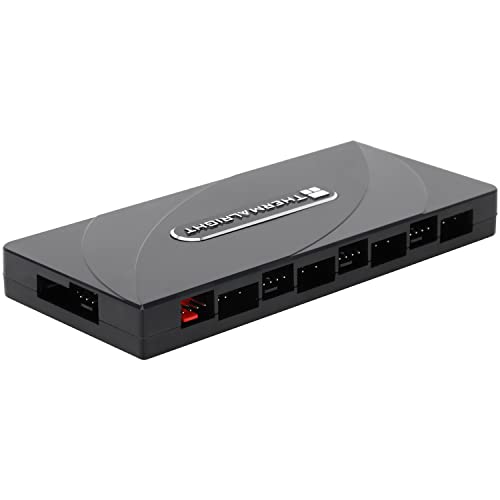
For gamers seeking to enhance their setup with efficient cooling and stunning visuals, the Thermalright ARGB Fan Hub Controller is an ideal choice. This hub supports up to eight fans and features a 3-pin PC ARGB Fan Controller alongside a PWM Fan Hub for peak performance. With direct SATA power input, you’ll experience stable functionality under heavy loads. Installation is a breeze with strong double-sided stickers, ensuring secure mounting. However, keep in mind that the hub can’t adjust fan speeds or light colors on its own. Connect it correctly to avoid any damage and enjoy synchronized lighting effects.
Best For: Gamers looking to enhance their PC cooling and aesthetics with synchronized lighting effects and efficient fan control.
Pros:
- Supports up to eight fans, allowing for extensive cooling options.
- Direct SATA power input ensures stable performance, even under high loads.
- Simple installation process with strong double-sided stickers for secure mounting.
Cons:
- Cannot adjust fan speeds or light colors independently.
- Requires correct connections to avoid potential damage to components.
- SATA cable not included, which may necessitate an additional purchase.
ARGB and PWM Hub – 9 Ports for Addressable RGB Lighting

Gamers seeking a streamlined and efficient way to manage their PC’s cooling and lighting will find the SHAKING TANK Addressable RGB controller incredibly beneficial. This 2-in-1 hub features 9 ports each for 5V ARGB and 4-pin PWM fans, allowing you to power up to 9 fans simultaneously. It’s compatible with various RGB software like ASUS Aura and MSI Mystic Light, ensuring stable performance for your lighting setup. The magnetic backplane simplifies cable management, while SATA power guarantees a reliable output. With easy installation and flexible placement, this hub elevates your gaming rig’s aesthetics and functionality seamlessly.
Best For: Gamers and PC builders looking for an efficient solution to manage both cooling and RGB lighting in their systems.
Pros:
- Versatile Compatibility: Works with various RGB software like ASUS Aura, GIGABYTE Fusion, and MSI Mystic Light.
- Efficient Power Management: Utilizes SATA power for stable performance even at full load.
- Easy Installation: Magnetic backplane and adhesive Velcro simplify cable management and placement.
Cons:
- Limited Fan Speed Feedback: Only the speed of Fan 1 is readable by the system, which may limit monitoring capabilities.
- No Support for 4-pin RGB Devices: The hub does not accommodate traditional 4-pin RGB fans or devices.
- Maximum RPM for 3-pin Fans: 3-pin fans run at max RPM without speed control options, which may not suit all users’ preferences.
AsiaHorse VE-HUB 2IN1 ARGB/PWM Hub for RGB Lighting
Looking to elevate your gaming setup with vibrant lighting and efficient fan control? The AsiaHorse VE-HUB 2IN1 ARGB/PWM Hub is your solution. It features nine 5V-3pin addressable RGB ports and nine 4-pin PWM ports, allowing you to connect and power multiple fans seamlessly. This hub simplifies cable management by utilizing just one RGB header, while supporting various lighting synchronization technologies like AURA SYNC. With the ability to control up to 180 RGB LEDs and customize fan speeds, you’ll achieve a stunning aesthetic and ideal airflow in your rig. Upgrade your setup effortlessly and enjoy the enhanced visual experience!
Best For: Gamers and PC builders seeking an organized, customizable RGB lighting and fan control solution.
Pros:
- Simplifies cable management by using a single RGB header for multiple connections.
- Supports multiple lighting synchronization technologies, ensuring compatibility with various motherboard brands.
- Allows for extensive customization options with the ability to control up to 180 RGB LEDs and adjust fan speeds.
Cons:
- Limited to 5V addressable RGB components, not compatible with 12V RGB headers.
- Requires correct connection of the red PWM port for optimal fan speed customization, which may be confusing for some users.
- May not support high-powered RGB devices if the total load exceeds the hub’s capacity.
ShakingTank ARGB and PWM Case Fan Hub with Controller
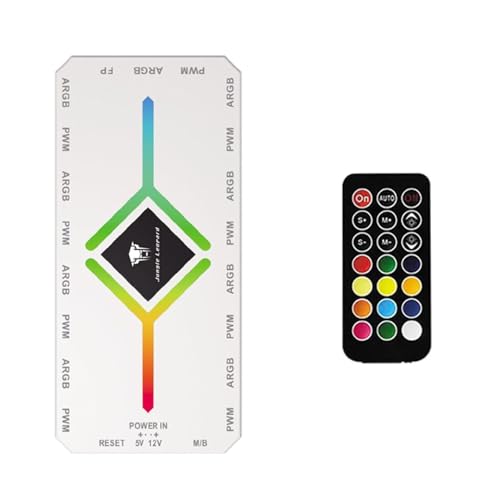
The ShakingTank ARGB and PWM Case Fan Hub with Controller is ideal for enthusiasts seeking a powerful cooling solution for their gaming rigs. With 9 ports for A-RGB and PWM fans, you can easily optimize cooling performance while maintaining an organized setup. Its magnetic back design allows for easy attachment to metal surfaces without adhesive mess, enhancing convenience. Supporting up to 9 fans and LED strips, the hub connects directly to your power supply via SATA, ensuring smooth operation. Just remember, for PWM functionality, connect to a 12V 4-pin motherboard interface while using the controller for light switching only.
Best For: Enthusiasts looking to optimize cooling performance in their gaming rigs with a convenient and organized fan hub solution.
Pros:
- Supports up to 9 fans and LED strips, allowing for extensive cooling options.
- Magnetic back design enables easy attachment to metal surfaces, simplifying installation.
- Direct SATA power connection ensures smooth fan operation without voltage loss.
Cons:
- PWM functionality requires a 12V 4-pin motherboard connection, which may limit compatibility with some systems.
- Controller only manages light switching, meaning additional setup is needed for fan speed control.
- Compact size may not accommodate larger fan connectors, potentially restricting fan choices.
Factors to Consider When Choosing PC Fan Hubs RGB
When choosing RGB fan hubs, you’ll want to think about several key factors. Consider the number of fan ports you need, the RGB compatibility standards, and how easy installation will be. Don’t forget to check power supply options and cable management features to keep your setup neat and efficient.
Number of Fan Ports
Choosing the right number of fan ports on a PC fan hub is essential for optimizing your gaming setup’s cooling capabilities. Typically, you’ll find hubs with 6 to 10 ports, allowing you to connect multiple fans simultaneously. If you have a larger case or need improved cooling, opt for a hub with more ports. Many models support both PWM and ARGB connections, letting you synchronize fan speeds and lighting effects seamlessly. Remember to balance the number of fans you need with your motherboard’s available headers, as some hubs can streamline connections and reduce clutter. Finally, verify that the total current draw of all connected fans stays within the hub’s power specifications for stable operation.
RGB Compatibility Standards
Understanding RGB compatibility standards is essential to maximizing the visual appeal of your gaming setup. RGB devices typically use 5V 3-pin ARGB interfaces for addressable lighting and 12V 4-pin interfaces for non-addressable options. Addressable RGB allows for individual LED control, creating stunning effects. Make sure any RGB fans or hubs you choose support synchronization protocols like ASUS Aura or MSI Mystic Light to achieve cohesive lighting across your components. It’s vital to check that your devices match the voltage requirements of your motherboard headers; connecting a 12V device to a 5V header can cause damage. Additionally, confirm the number of supported ARGB and PWM devices on your selected fan hub for peak performance and organization.
Power Supply Options
While selecting a PC fan hub, you should prioritize reliable power supply options to guarantee your system runs smoothly, especially during intense gaming sessions. Look for hubs with SATA power connectors, as they provide stable input during high load conditions. Check the maximum current output per port; this information is vital for ensuring you can safely connect and operate multiple fans simultaneously. Dual power connectors can enhance stability and minimize voltage loss, which is necessary for consistent fan speeds. Additionally, confirm that the hub supports the voltage and connection types of your fans, like 5V 3-pin ARGB or 12V 4-pin RGB. Making these considerations will help maintain ideal performance for your gaming setup.
Installation Ease
When you’re setting up your RGB fan hub, ease of installation can make all the difference in your overall experience. Look for fan hubs that offer simple installation methods, like magnetic mounting or strong adhesive backing, to speed up the setup in your PC case. Clear instructions are essential, so verify the hub is compatible with your existing hardware to avoid confusion. A single cable connection to the motherboard can greatly reduce cable clutter and simplify things further. Additionally, check if the hub supports SATA power connections for a more stable power supply. Finally, opt for hubs with built-in indicators for power and operation status, as they’ll help you troubleshoot and confirm everything’s functioning correctly after installation.
Cable Management Features
Efficient cable management is essential for a clean and functional PC setup, especially when it comes to RGB fan hubs. Look for hubs that consolidate multiple fan connections into a single unit, reducing cable clutter in your case. Many fan hubs offer magnetic or adhesive mounting options, enabling you to secure the hub without extra hardware, which helps maintain organization. Efficient placement enhances airflow by preventing cables from obstructing fans or airflow pathways, ultimately improving cooling performance. Integrated power connections, like SATA inputs, streamline power delivery, eliminating the need for separate cables. Additionally, design features such as built-in Velcro or strong double-sided stickers allow for flexible placement, keeping your cables tidy and your build looking sharp.
Control and Synchronization
A well-organized PC setup not only looks good but also enhances performance, especially when it comes to RGB fan hubs. When choosing a hub, consider effective control and synchronization features. Look for PWM support, which allows precise fan speed adjustments based on your system’s temperature, optimizing airflow and noise levels. If customization’s your goal, ARGB hubs enable individual lighting control for each fan, giving you creative freedom over effects and colors. Syncing capabilities with motherboard software like ASUS Aura or MSI Mystic Light guarantee unified control across your RGB components. Finally, opt for hubs with multiple port configurations to connect several fans and RGB devices while maintaining stable power output, even under heavy loads.
