
As you explore the landscape of Thunderbolt docks in 2025, you’ll find a range of options designed to elevate your connectivity experience. From eGPU enclosures to multi-port docking stations, each product brings unique features that cater to your professional and personal needs. With advancements in power delivery and data transfer speeds, these docks are becoming essential tools for any setup. Let’s uncover the top picks that could transform your workspace.
eGPU Enclosure Thunderbolt 3/4 External GPU Dock (MK-L18)

If you’re a gamer or a creative professional looking to boost your system’s graphics performance, the eGPU Enclosure Thunderbolt 3/4 (MK-L18) is an excellent choice. This versatile dock works with NUCs, laptops, and handheld consoles using Thunderbolt 3/4 USB4. You can easily install NVIDIA or AMD graphics cards, including the latest RTX 50 and RX 7000 series. With a PCIe 4.0 x16 interface, you’ll experience data transfer speeds of 32Gbps. Its sleek aluminum design is lightweight and durable, though it’s best placed on stable surfaces. Just remember, the right Thunderbolt cable can enhance your overall performance considerably.
Best For: Gamers and creative professionals seeking to enhance their system’s graphics performance with a versatile external GPU solution.
Pros:
- High data transfer speed: Supports PCIe 4.0 x16 with 32Gbps transfer speeds for optimal performance.
- Wide compatibility: Works seamlessly with various devices, including NUCs, laptops, and handheld game consoles using Thunderbolt 3/4 USB4.
- Durable design: Made of aluminum alloy, providing a lightweight and rust-resistant enclosure.
Cons:
- Setup issues: Some users report card recognition problems that may require system restarts.
- Performance variability: Results can fluctuate based on power profiles and the quality of the Thunderbolt cable used.
- Stability concerns: Minimalist design may feel delicate, necessitating placement on stable surfaces for optimal use.
UtechSmart 11 in 1 USB C Docking Station with Dual Monitor Support

The UtechSmart 11 in 1 USB C Docking Station is perfect for professionals who require robust connectivity and dual monitor support. With its two 4K HDMI ports and a VGA output, you can easily connect multiple displays. You’ll enjoy fast data transfer through the USB 3.0 ports and Gigabit Ethernet for seamless downloads. Its compact, durable design makes it portable, and the 100W PD3.0 technology guarantees your devices charge quickly. Compatible with various operating systems, this dock received high ratings for performance and reliability. Plus, it comes with 18 months of warranty and 24/7 customer support for peace of mind.
Best For: Professionals who need reliable multi-display support and high-speed connectivity for their laptops.
Pros:
- Supports dual HDMI monitors with high resolutions for enhanced productivity.
- Fast data transfer speeds through multiple USB 3.0 ports and Gigabit Ethernet.
- Lightweight and portable design with durable construction for on-the-go use.
Cons:
- Limited to one 4K display or two 1080p displays simultaneously due to bandwidth constraints.
- No extend mode for macOS, which may limit functionality for Mac users.
- Cannot power laptops, which may be a drawback for users looking for a complete charging solution.
OWC 11-Port Thunderbolt Dock

Designed for professionals and creatives who require robust connectivity, the OWC 11-Port Thunderbolt Dock stands out with its impressive 96W Power Delivery. You’ll enjoy seamless connectivity with a Thunderbolt 4 host port and three additional Thunderbolt 4 ports, all supporting blazing speeds up to 40 Gb/s. Whether you need to connect dual 5K displays or multiple peripherals, this dock has you covered. With various USB ports, Gigabit Ethernet, and an SD card slot, it’s perfect for your workflow. Plus, its solid build quality and ease of use make it a reliable choice for any setup.
Best For: Professionals and creatives who need extensive connectivity options and high-performance support for multiple displays and peripherals.
Pros:
- Robust connectivity with a variety of ports including Thunderbolt 4, USB 3.2, and Gigabit Ethernet.
- Seamless dual monitor support for high-resolution displays, enhancing productivity for creative tasks.
- Solid build quality and ease of use, making it a reliable choice for any workspace.
Cons:
- High price point compared to some other Thunderbolt docks, which may deter budget-conscious users.
- Power button functionality may be unreliable during power outages, leading to potential usability concerns.
- Performance may vary under heavy load or with multiple peripherals connected, affecting overall efficiency.
Plugable Thunderbolt 4 Dock with 100W Charging (TBT4-UD5)
For professionals seeking a powerful and versatile docking solution, the Plugable Thunderbolt 4 Dock (TBT4-UD5) stands out with its impressive 100W Power Delivery, ensuring your laptop stays charged while you multitask. With 13 high-performance ports, including dual 4K 60Hz HDMI and four USB connections, you’ll effortlessly connect multiple peripherals. It supports dual 4K or single 8K displays, making it ideal for demanding workflows. Weighing just 2.42 pounds, its sleek design complements any workspace. While some users report minor connectivity issues, the dock’s overall performance and support experience receive positive reviews, solidifying its place as a top choice in 2025.
Best For: Professionals and creatives who require a high-performance docking solution for multitasking with multiple displays and peripherals.
Pros:
- Versatile Connectivity: Offers 13 high-performance ports, including dual 4K HDMI and multiple USB connections for extensive peripheral support.
- Power Delivery: Provides 100W charging to ensure laptops remain powered during intensive tasks.
- Positive User Experience: Generally receives favorable reviews for performance and customer support, enhancing overall user satisfaction.
Cons:
- Inconsistent Connectivity: Some users have reported occasional issues with monitor recognition and connectivity, requiring troubleshooting.
- Front Port Design: The front-mounted Thunderbolt connection may be seen as inconvenient by some users.
- Concerns Over Long-Term Reliability: A few users expressed doubts about the product’s durability relative to its price point.
Anker Prime TB5 Docking Station (14-in-1 Thunderbolt 5)

With its impressive 120Gbps transfer speed and dual 8K display support, the Anker Prime TB5 Docking Station is perfect for creative professionals and power users who demand high performance and versatility from their tech. This 14-in-1 docking station features a robust array of ports, including Thunderbolt 5, USB-A, USB-C, and Ethernet, ensuring you can connect all your devices seamlessly. It delivers a powerful 140W charging capability, making it efficient for multiple devices. Plus, with advanced cooling and a sleek design, it fits any workspace. Enjoy user-friendly compatibility, though check your laptop’s specs for peak performance.
Best For: Creative professionals and power users seeking high performance and versatility in a docking station with extensive connectivity options.
Pros:
- High transfer speed of 120Gbps allows for quick file transfers, such as moving a 150GB file in just 25 seconds.
- Supports dual 8K displays for enhanced productivity and an immersive visual experience.
- 140W charging capability efficiently powers multiple devices simultaneously.
Cons:
- Compatibility issues may arise with certain laptops, particularly those not supporting multiple displays.
- SD and microSD slots are limited to UHS-I speeds, which are slower than UHS-II.
- Some design features, like ambient LED lights, may be considered gimmicky by users.
OWC 5 Port Thunderbolt Hub

The OWC 5 Port Thunderbolt Hub stands out as an ideal choice for users seeking a versatile and high-performance docking solution. With a Thunderbolt 4 host port delivering up to 60W power, you can efficiently charge your laptop while connecting multiple devices. It supports impressive display configurations, including one 8K display at 60Hz or two 4K displays at 60Hz, making it perfect for high-resolution tasks. You’ll find three Thunderbolt 4 ports and one USB 3.2 Gen 2 Type-A port for seamless connectivity. Compatible with both Macs and PCs, this hub is a reliable addition to your workspace, backed by a two-year warranty.
Best For: Users seeking a high-performance docking solution for connecting multiple devices and high-resolution displays with efficient power delivery.
Pros:
- Supports high-resolution displays, including up to one 8K display @ 60Hz or two 4K displays @ 60Hz.
- Multiple connectivity options with three Thunderbolt 4 ports and one USB 3.2 Gen 2 Type-A port for versatile device connections.
- Compatible with both Macs and PCs, making it a flexible solution for various users.
Cons:
- Limited functionality when connecting USB devices compared to Thunderbolt connections.
- Requires macOS 11.1 Big Sur or later for full compatibility with Macs.
- Higher price point compared to basic USB hubs, which may not be suitable for all budgets.
USB C Docking Station Dual Monitor Adapter (8 in 1)

Designed specifically for professionals and creatives who require versatile connectivity, the USB C Docking Station Dual Monitor Adapter (8 in 1) offers an impressive array of ports, including dual HDMI and a 4K DisplayPort. You can easily connect multiple monitors with support for up to 4K resolution. It features three USB 2.0 ports for peripherals, along with a USB C Power Charging Port that delivers up to 100W. Compatible with various laptops like Dell XPS and MacBook Pro, this dock streamlines your workspace. With a compact design and positive user feedback, it’s a reliable choice for enhanced productivity.
Best For: Professionals and creatives who need versatile connectivity and the ability to connect multiple monitors.
Pros:
- Compact design that enhances workspace organization.
- Supports up to 4K resolution on multiple displays for high-quality visuals.
- Quick and easy setup with compatibility for various laptops.
Cons:
- Requires a laptop with a full-featured USB Type-C port for optimal use.
- Limited to USB 2.0 ports, which may not meet the needs for high-speed data transfer.
- External monitors on MacOS may only display in mirror mode, limiting multi-display functionality.
Corsair TBT100 Thunderbolt 3 Dock
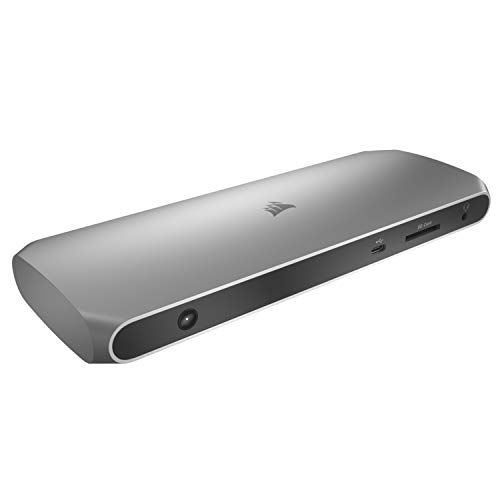
For professionals seeking a reliable and efficient docking solution, the Corsair TBT100 Thunderbolt 3 Dock stands out with its ability to support dual 4K displays at 60Hz, making it perfect for multitasking. With 85W charging, it keeps your laptop powered while you work. You’ll find multiple ports, including USB-C, USB-A, and a UHS-II SD card reader, ensuring all your devices connect easily. Its sleek aluminum design fits well in any professional setting. Users love the single cable solution and solid build, although some reported occasional compatibility issues. Overall, it’s a great choice for enhancing your workspace connectivity.
Best For: Professionals seeking a reliable docking solution for multitasking with dual 4K displays and efficient connectivity.
Pros:
- Supports dual 4K 60Hz displays, enhancing multitasking capabilities.
- Sleek aluminum design fits well in professional environments.
- Provides 85W charging to keep laptops powered during use.
Cons:
- Some users experienced compatibility issues with specific laptops and USB devices.
- The power adapter is bulky and may not be ideal for portability.
- Performance can vary depending on the laptop model and connected peripherals.
Cable Matters 14-in-1 Thunderbolt Dock with Dual 4K Display
![[Intel Certified] Cable Matters 14-in-1 Thunderbolt 3 Dock, 96W Charging | 40Gbps, 4K@60Hz, Dual HDMI or DisplayPort, Gigabit Ethernet, USB-C/USB-A Ports, SD/microSD, 3.5mm Audio, for Windows & Mac](https://m.media-amazon.com/images/I/41S-3RQEeyL._SL500_.jpg)
Engineered for professionals who demand seamless connectivity, the Cable Matters 14-in-1 Thunderbolt Dock stands out with its ability to support dual 4K displays at 60Hz. With 40 Gbps bandwidth, it effortlessly drives high-resolution displays, Gigabit Ethernet, and 10Gbps USB peripherals. This dock transforms your USB-C or Thunderbolt port, offering extensive connectivity options including five USB-A ports, audio jack, and built-in SD card slots. Its compact, durable design guarantees stability, while plug-and-play functionality makes setup a breeze. Rated 4.2 stars, users commend its performance and value, making it a smart choice for anyone needing reliable dual monitor support.
Best For: Professionals and users who require reliable dual monitor setups with extensive connectivity options and seamless performance.
Pros:
- Supports dual 4K displays at 60Hz, providing high-resolution output for enhanced productivity.
- Extensive port options, including multiple USB-A and USB-C ports, audio jack, and built-in SD card slots for versatile connectivity.
- Durable and compact design with a weighted base for stability and a vertical stand to save desk space.
Cons:
- Some users report minor connectivity issues that can be resolved by simply reconnecting the dock.
- Higher price point compared to basic docks, which may not be justified for casual users.
- Limited compatibility with non-Thunderbolt devices, potentially restricting usage options for some users.
Plugable 16-in-1 Thunderbolt 4 Dock for MacBook and Windows

The Plugable 16-in-1 Thunderbolt 4 Dock stands out as an excellent choice for multitaskers and professionals seeking robust connectivity options. With support for dual 4K 60Hz displays, it enhances your workflow greatly. You’ll appreciate the 100W charging capability, ensuring your laptop stays powered throughout the day. Featuring 2 HDMI, 2 DisplayPort, and 7 USB ports, this dock meets all your connectivity needs. It works seamlessly with both Mac and Windows systems, and its plug-and-play functionality makes setup a breeze. Users praise its solid build quality and responsive tech support, making it a worthwhile investment for any setup.
Best For: Professionals and multitaskers looking for extensive connectivity and dual display support to enhance their workflow.
Pros:
- Seamless plug-and-play setup for dual monitors without the need for additional drivers.
- 100W Power Delivery allows for all-day laptop charging, supporting lower power systems as well.
- Solid build quality and highly praised tech support, ensuring a reliable user experience.
Cons:
- Some users reported issues with mixed connections (HDMI vs. DisplayPort) that require consistent connection types.
- A few users expressed a desire for additional USB-C ports for more versatility.
- The dock’s weight may be a consideration for those seeking a more portable option.
Factors to Consider When Choosing PC Compatible Thunderbolt Docks
When choosing a PC-compatible Thunderbolt dock, you need to weigh key factors that can impact your setup. Think about the variety and types of ports, power delivery capacity, and display support options that best suit your needs. Also, verify compatibility with your devices and evaluate the build quality and design for durability and aesthetics.
Port Variety and Types
Choosing the right Thunderbolt dock hinges on understanding the variety of ports it offers, as each connection type serves different needs. Look for essential ports like USB-A, USB-C, HDMI, DisplayPort, and Ethernet to guarantee you can connect all your devices seamlessly. If multitasking is your goal, opt for a dock that supports dual or triple monitor setups, ideally capable of handling displays at resolutions up to 8K or multiple 4K outputs. Pay attention to data transfer speeds as well; USB 3.2 Gen 2 ports deliver up to 10Gbps, while Thunderbolt ports can reach 40Gbps. Additional features, like SD card slots and audio jacks, can also enhance your experience by reducing the need for extra adapters.
Power Delivery Capacity
Understanding the power delivery capacity of Thunderbolt docks is just as important as knowing the variety of ports they offer. Power delivery typically ranges from 60W to 140W, directly influencing how effectively your dock can charge connected devices, including laptops. If you have a laptop with higher power needs, a dock with a higher power rating will guarantee faster charging, especially during intensive tasks. Look for docks supporting Power Delivery 3.0 or higher, which allows efficient charging while transferring data. When choosing a dock, consider the total wattage required for your laptop and any additional peripherals, as some docks split power among multiple ports. Meeting or exceeding your laptop’s power requirements will help avoid performance throttling.
Display Support Options
Display support options are essential elements to evaluate for anyone looking to enhance their workspace with a Thunderbolt dock. First, check if the dock supports your desired display resolution and refresh rate, ranging from dual 4K at 60Hz to single 8K at 60Hz. Consider the number of HDMI, DisplayPort, or VGA outputs available, as this affects your multi-monitor setup. Also, verify compatibility with macOS and Windows, since some docks may limit display options on different systems. Be mindful of bandwidth constraints that could restrict high-resolution outputs when using multiple monitors. Finally, look for advanced features like HDR support or Display Stream Compression (DSC) for better visual quality, particularly if you’re into graphics work or gaming.
Compatibility With Devices
When enhancing your workspace, compatibility with your devices is key to maximizing the benefits of a Thunderbolt dock. First, verify the dock supports the specific Thunderbolt version—3, 4, or USB4—compatible with your device for peak performance. Next, check the dock’s compatibility with your operating system; some may have limitations or require specific settings for Windows, macOS, or Linux. Look for a range of port options, including HDMI, USB-A, USB-C, and Ethernet, to connect various peripherals. Verify that the dock provides adequate power delivery, typically between 60W and 140W, to charge your laptop. Finally, consider display capabilities, such as support for dual or triple monitors, to enhance your multitasking or professional workflow.
Build Quality and Design
Choosing a Thunderbolt dock isn’t just about functionality; the build quality and design greatly impact your overall experience. Look for docks made from durable materials like aluminum alloy, which resist rust and fading, guaranteeing longevity. The design should accommodate various device sizes, with open layouts allowing for larger graphics cards if needed. Consider the dock’s weight and dimensions; lightweight options offer portability, while compact designs help reduce desk clutter. A minimalist aesthetic can enhance your workspace, but confirm the dock remains stable to prevent tipping. Effective heat management is vital too; quality docks maintain ideal temperatures during use, preventing overheating and guaranteeing consistent performance. Prioritize these aspects to enhance your connectivity experience.
Data Transfer Speeds
Understanding data transfer speeds is essential because they directly impact how efficiently you can work with your devices. Thunderbolt 3 and Thunderbolt 4 docks both support impressive speeds of up to 40Gbps, allowing for rapid file transfers and smooth operation of high-bandwidth devices. If you’re connecting external drives or high-speed peripherals, look for docks with USB 3.2 Gen 2 ports, which offer speeds up to 10Gbps. For simpler peripherals like keyboards or mice, USB 3.0 ports provide up to 5Gbps. Keep in mind that the overall performance can vary based on cable quality, the number of devices connected, and the power profiles of your systems. Prioritizing speed guarantees you’re maximizing your dock’s capabilities.
Ease of Setup
Although many Thunderbolt docks promise a hassle-free setup, factors like device compatibility and cable quality can influence your experience. The initial setup time usually ranges from 10 minutes to a plug-and-play scenario, depending on the dock. Most docks are designed for straightforward integration, especially when it comes to network adapters. However, performance and connection stability can fluctuate based on power profiles and the quality of the Thunderbolt cables you use. Be aware that some users have encountered device recognition issues, necessitating system restarts or extra jumper installations. Ultimately, your success hinges on ensuring your host device supports the required Thunderbolt version and power delivery protocols for seamless operation.
