
Dust in a desktop, crumbs under keyboard keys, and fingerprints on a screen call for different tools. The best choice depends on what you need to clean—not the number of accessories in the box.
These 10 picks cover all-in-one kits, precision brushes, mini vacuums, and rechargeable air dusters. Use the guide below to match a tool to your PC, workspace, and cleaning routine.
Best 10 PC Cleaning Kits Picks for 2026
Best Lightweight Air Duster
WOLFBOX MF60 Cordless Air Duster
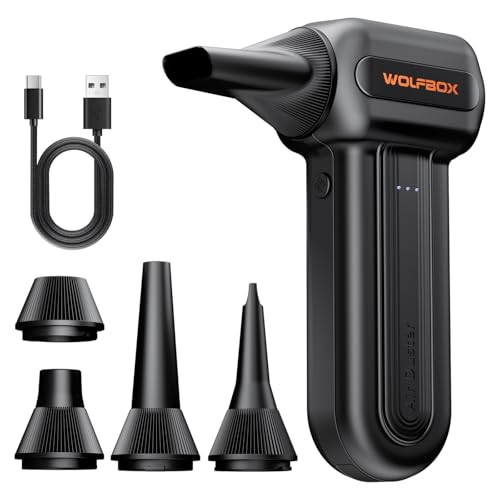
- Three speeds up to 110,000 RPM
- 0.5 lb body with five nozzles
- Up to 240 minutes on lowest speed
Best For: Portable, reusable PC dusting
Best for Detailed Air Dusting
FRESMOL Rechargeable Air Duster

- Three adjustable airflow settings
- Five nozzles and three brushes
- Battery display and built-in light
Best For: Detailing keyboards, vents, and dark corners
Best Vacuum-and-Blower Combo
Meudeen 3-in-1 Computer Cleaner

- Vacuum, blower, and air pump
- Three speeds and 14,500 Pa stated suction
- Washable HEPA-standard filter
Best For: Blowing out and collecting loose debris
Best Manual Detailing Kit
Ordilend All-in-1 Laptop Cleaning Kit

- Brushes and keycap puller for keyboards
- Cloths and spray for screens
- Compact, unpowered tool kit
Best For: Hands-on keyboard and screen care
Best for Keyboards
Tassmpitor All-in-One Cleaning Kit

- Keycap puller and retractable brush
- Cloths and tools for screens and earbuds
- Compact kit with 2 ml of spray listed
Best For: Mechanical-keyboard owners cleaning multiple small devices
Best for Laptop Upkeep

- Blower for keyboard and fan dust
- Screen supplies, wipes, and detail tools
- Pouch keeps components organized
Best For: Routine laptop cleaning at home or on the go
Best for Precision Work

- Spudgers, tweezers, brushes, and swabs
- Includes DeoxIT D100L and cleanroom wipes
- Reusable tools need cleaning between projects
Best For: Targeted cleaning of tight spaces and small components
Best Anti-Static Brush Set

- Ten brushes in varied sizes and firmness
- Anti-static bristles for electronics
- Zippered mesh storage pouch
Best For: Controlled cleaning around sensitive PC components
Best Long-Runtime Air Duster

- Up to 420 minutes at lowest speed
- Three airflow settings and five nozzles
- LED light for dark areas
Best For: Frequent light dusting with rechargeable airflow
Best Air Duster With Display

- Four speeds with LCD status display
- Four nozzles and two brushes
- LED light and Type-C charging
Best For: Combined airflow and brush cleaning with visible controls
Best Lightweight Air Duster – WOLFBOX MF60 Cordless Air Duster
Among pc cleaning kits, the WOLFBOX MF60 is a portable, air-only option for blowing dust from keyboards, computer cases, and fans. Its three speeds let you choose gentler airflow for delicate electronics or stronger airflow for stubborn debris.
Best For: People who want a lightweight, rechargeable alternative to canned air for routine PC dusting.
Pros:
- Three settings range from 25,000 to 110,000 RPM.
- Weighs 0.5 lb and includes five nozzles for different tasks.
- Rated for up to 240 minutes of runtime on its lowest setting.
Cons:
- Blows dust away rather than collecting it.
- The stated maximum runtime applies to the lowest speed, not the strongest setting.
Choose this if adjustable airflow and easy handling matter most; pair it with a cloth when surfaces need more than dust removal.
Best for Detailed Air Dusting – FRESMOL Rechargeable Air Duster
The FRESMOL adds detail tools to the air-duster side of pc cleaning kits. Three airflow settings, five nozzles, and three brushes help you work around keyboard gaps, vents, and other tight spaces.
Best For: Buyers who want adjustable airflow plus brushes and visibility aids for detailed cleaning.
Pros:
- Three speeds, with a motor rated up to 100,000 RPM.
- Five nozzles and three brushes expand its detailing options.
- LED display shows speed and battery level; a built-in light illuminates dark areas.
Cons:
- No vacuum function to capture loosened dust.
- The supplied specifications do not state a runtime.
This is a practical pick when you regularly clean poorly lit corners or want battery information at a glance, rather than just a basic blower.
Best Vacuum-and-Blower Combo – Meudeen 3-in-1 Computer Cleaner
If you are comparing pc cleaning kits that can both dislodge and collect debris, the Meudeen combines an air duster with a mini vacuum. Its attachments also let it work as an air pump, adding utility beyond the desk.
Best For: People who want one handheld device for blowing dust out of crevices and vacuuming up loose debris.
Pros:
- Combines vacuum, blower, and air-pump functions.
- Lists 14,500 Pa suction, a 110,000 RPM motor, and three speed settings.
- Includes a reusable, washable HEPA-standard filter.
Cons:
- Its dust container and filter require emptying and cleaning.
- Charging takes a stated three to four hours.
The combined suction and airflow make this more versatile than a blower alone, particularly when you would rather collect crumbs than scatter them.
Best Manual Detailing Kit – Ordilend All-in-1 Laptop Cleaning Kit
The Ordilend is the hands-on choice among these pc cleaning kits. Rather than using powered airflow, it supplies brushes, cloths, a keycap puller, and small detailing tools for keyboards, screens, and other electronics.
Best For: Anyone prioritizing screen wiping and careful keyboard or earbud detailing over powered dust removal.
Pros:
- Includes a keycap puller, retractable brush, thin brush, and detailing tips.
- Comes with polishing and microfiber cloths, replacement cloths, and cleaning spray.
- Compact design is convenient for a drawer, bag, or dorm room.
Cons:
- No electric blower or vacuum is listed.
- Manual cleaning takes more hands-on work than blowing out loose dust.
Pick this kit for targeted surface care and between-key cleaning; choose a powered option instead if clearing large amounts of loose dust is your main goal.
Best for Keyboards – Tassmpitor All-in-One Cleaning Kit
Among pc cleaning kits, this Tassmpitor set is a practical pick if keyboard debris is your main concern. Its retractable brush, keycap puller, and fine-detail tools help you reach between keys, while microfiber cloths cover screens and other smooth surfaces.
Best For: Mechanical-keyboard owners who also want tools for screens, earbuds, and other small electronics.
Pros:
- Keycap puller and retractable brush support a more thorough keyboard clean.
- Fine brush, metal tip, and flocking sponge reach small crevices and earbud cases.
- Includes polishing cloths and a compact design for storage or travel.
Cons:
- The listed spray volume is only 2 ml.
- Metal tip requires care around delicate surfaces.
Choose this kit for its range of small cleaning tools rather than for a large supply of cleaning liquid. Power devices off before cleaning, and use the gentler tools on sensitive areas.
Best for Laptop Upkeep – iFixit Laptop Cleaning Kit
If you want pc cleaning kits focused on routine laptop care, this iFixit kit brings together screen-cleaning supplies, a dust blower, an anti-static brush, wipes, and small detailing tools. A pouch keeps the components together when you take them on the go.
Best For: Laptop users who want one organized kit for screens, keyboards, cooling-fan dust, and hard-to-reach spots.
Pros:
- Dust blower helps clear loose debris from keyboards and cooling fans.
- Includes microfiber cloths, Screen Saver, and alcohol wipes for surface care.
- Swabs, picks, brushes, and a pouch make it useful for detail work and travel.
Cons:
- Geared toward laptops rather than specialized phone or console cleaning.
- Listing states it is sold as-is with no refunds or returns.
This is the straightforward choice for keeping a laptop and its accessories tidy. For cleaning very small internal contacts, the precision-focused iFixit kit below offers a different tool selection.
Best for Precision Work – iFixit Precision Cleaning Kit
This is the most detail-oriented option among these pc cleaning kits. The iFixit Precision Cleaning Kit combines spudgers, angled tweezers, brushes, foam-tipped swabs, cleanroom wipes, and DeoxIT D100L for targeted work on hard-to-reach areas.
Best For: People cleaning small components and tight spaces across phones, laptops, desktops, tablets, and other electronics.
Pros:
- Wide range of picks, brushes, swabs, and tweezers for detailed access.
- Includes lint-free cleanroom wipes and DeoxIT D100L.
- Listed for use across several device types, including consoles and cameras.
Cons:
- Less focused on quick screen polishing or blowing loose dust from a keyboard.
- Reusable tools need cleaning between projects.
- Listing states it is sold as-is with no refunds or returns.
Pick this kit when precision matters more than a simple wipe-down. Its small tools make the most sense for careful, targeted cleaning rather than everyday surface maintenance.
Best Anti-Static Brush Set – 10-Piece ESD Cleaning Kit
Among pc cleaning kits, this 10-brush set is a hands-on choice for detailing keyboards, computer fans, motherboards, and other electronics. The brushes vary in size and stiffness, and a zippered mesh pouch keeps them together.
Best For: People who want brushes for controlled dust removal around sensitive components and tight spaces.
Pros:
- Ten anti-static brushes offer different sizes and soft-to-medium firmness.
- Suitable for ports, fans, keyboards, and motherboards.
- Includes a zippered mesh storage pouch.
Cons:
- Brush-only set; no air duster is listed.
- Dust may need to be collected or blown away separately after brushing.
This is the pick for deliberate, close-up cleaning rather than quickly clearing an entire PC case. Its variety of brushes is most useful when different components call for different brush sizes.
Best Long-Runtime Air Duster – Rechargeable 3-Speed Blower
If you prefer airflow to brushes, this rechargeable blower is a useful alternative to the brush-heavy options among pc cleaning kits. It offers three speed settings, five nozzles, and an LED light for reaching dust in keyboards, computer fans, and narrow gaps.
Best For: Frequent light dusting with a reusable blower, plus occasional higher-speed cleaning.
Pros:
- Advertised runtime reaches up to 420 minutes on the lowest setting.
- Three speeds let you adjust airflow; the highest setting is rated for 30 minutes.
- Five nozzles and an LED light add flexibility for tight spaces.
Cons:
- The 420-minute figure applies to the lowest speed, not maximum airflow.
- No cleaning brushes are listed with this model.
Choose this model if extended low-speed use matters more than a brush assortment. For tougher dust, plan around the shorter stated runtime at its highest setting.
Best Air Duster With Display – MiaEpic Z3 Electric Blower
For shoppers comparing powered pc cleaning kits, the MiaEpic Z3 combines an adjustable electric blower with four nozzles and two brushes. Its LCD shows battery status and speed level, while an LED helps illuminate dark PC interiors.
Best For: Users who want blower and brush accessories together, with visible speed and battery information.
Pros:
- Four speed settings provide airflow control.
- LCD shows battery status and selected speed; LED lights the work area.
- Includes four nozzles and two cleaning brushes.
- Advertised runtime is 90–150 minutes, with Type-C charging in 2.5–3 hours.
Cons:
- Runtime is given as a range rather than a figure for each speed setting.
- The two included brushes offer less variety than a dedicated multi-brush set.
This is the more feature-focused blower option if you value on-device status information and a few brush attachments. A dedicated brush kit remains the better match when brush variety is the priority.
How We Picked These PC Cleaning Kits
We organized the selected products by the jobs they are designed to do: blow dust from vents and PC interiors, lift debris from keyboards, clean delicate surfaces, or provide several tools in one kit. We also considered whether a tool is practical for repeat use, easy to control around small components, and appropriate for the surfaces it targets. A high advertised RPM, suction figure, or runtime is not a substitute for checking the included attachments and instructions. The lineup spans different tool types rather than ten interchangeable kits.
Quick Comparison: Which Tool Type Fits?
- All-in-one cleaning kits: A convenient starting point for keyboards, laptop exteriors, and screens. Check whether the included cloths, brushes, and cleaning solution suit your devices.
- Electric air dusters: Useful for blowing loose dust from vents, fans, and hard-to-reach spaces. Variable speed and a suitable nozzle help you control airflow.
- Mini vacuum and blower combinations: Worth considering if you want to collect loose keyboard debris as well as dislodge dust. Look at the attachments for each function.
- ESD-labeled brush sets and precision kits: Better suited to controlled work around small crevices and components when broad airflow is not enough. Use them gently and follow device-specific guidance.
Key Buying Factors for PC Cleaning Kits
Match the Tool to the Surface
For a monitor, prioritize a clean microfiber cloth and a solution explicitly suitable for that screen; never assume a general-purpose cleaner is safe for coatings. For keyboards, a soft brush or appropriate vacuum attachment can help with crumbs before wiping exposed surfaces. For a dusty PC case, airflow is useful, but it can scatter dust into the room—work in a ventilated area and keep the nozzle from striking components.
Control, Power, and Upkeep
On an electric duster, adjustable airflow may be more useful than a headline speed because it lets you start gently near delicate parts. Compare charging method, usable runtime, weight, and nozzle options to your cleaning sessions. A mini vacuum also needs a bin or filter you can empty and maintain. For bundled kits, check replacement cloths and brush quality rather than buying on piece count alone.
Clean Safely
Shut down and unplug a PC before cleaning it, and let hot components cool. If blowing dust near fans, prevent the blades from spinning freely. Avoid spraying liquid directly onto electronics or using a damp tool inside a powered device. An ESD-labeled brush can be useful for precision work, but it does not replace sensible static precautions or your device manufacturer’s cleaning instructions.
Who Should Buy Which PC Cleaning Kits?
Choose an all-in-one kit if routine keyboard, screen, and exterior cleaning is your main goal. Pick a rechargeable air duster if you regularly clear dust from desktop cases or vents and want an alternative to disposable canned air. Consider a vacuum-and-blower tool for messy keyboards when collecting debris matters. If you repair electronics or clean around tight internal spaces, add a precision or ESD-labeled brush set. Many people will get the most useful setup by pairing a soft cloth and brush with an air duster, rather than expecting one tool to handle every surface.
