
A tidy PC setup is easier to clean, troubleshoot, and adjust. The right cable management depends on where the clutter is: loose cords behind the monitor, a bundle running down a desk leg, or a power strip hanging beneath the desktop.
These 10 options cover reusable ties, protective sleeves, under-desk trays, and mixed kits. Use the guide below to match the organizer to your cable load, desk, and installation preferences.
Best 10 PC Cable Management Solutions Picks for 2026
Best Adhesive Raceway
YECAYE 6-Pack J-Channel Organizers

- Six 15.7-inch PVC channels
- Outward-facing openings ease cable changes
- Adhesive mounting needs a smooth surface
Best For: Accessible cord runs along desks or walls
Best Flexible Sleeve
AGPTEK White Self-Closing Cable Sleeve

- Two 5-foot cuttable lengths
- Self-closing design bundles loose cords
- Flexible enough for corners
Best For: Covering exposed cable bundles without rigid channels
Best Adjustable Straps
fansto 20-Pair Under-Desk Cable Organizers

- 20 reusable hook-and-loop straps
- Adhesive pads mount to smooth surfaces
- Extended straps hold up to 15 cables each
Best For: Adjustable under-desk cable routing
Best Clamp-On Tray
Mzmaxy 25-Inch Under-Desk Cable Tray

- 25-inch metal mesh tray
- No-drill clamps fit 0.4–2-inch desk edges
- Approximately 15-pound stated capacity
Best For: Storing cords and sockets beneath a compatible desk
Best Split Sleeve
Alex Tech 10-Foot Cord Protector

- 10 feet of 1/2-inch black sleeving
- Split design simplifies cable loading
- Covers cords exposed to pets
Best For: Bundling and covering loose cable runs
Best Under-Desk Trays

- Two adhesive-mounted 17-inch trays
- 3.5-inch interior fits power gear
- No drilling required
Best For: Hiding power strips and chargers under a desk
Best All-in-One Kit
N NOROCME 192-Piece Cable Organizer

- 192 pieces for varied routing tasks
- Includes four 20-inch split sleeves
- Adhesive clips and holders need no drilling
Best For: Organizing multiple cables around a workstation
Best Reusable Ties
VELCRO Brand 6-Inch Cable Ties

- Adjustable, reusable hook-and-loop wraps
- Pre-cut 6-inch ties
- Useful at desks and in travel bags
Best For: Frequently rearranged cable bundles
Most Versatile Kit
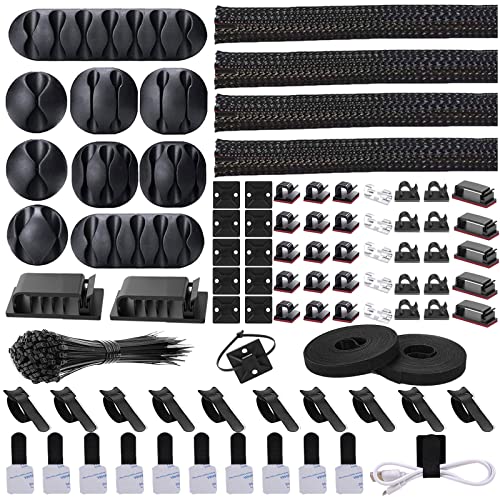
- Sleeves, clips, and ties in one kit
- Split sleeves simplify cable loading
- Adhesive clips route individual cords
Best For: Mixed cable clutter across a desk setup
Best Under-Desk Raceway
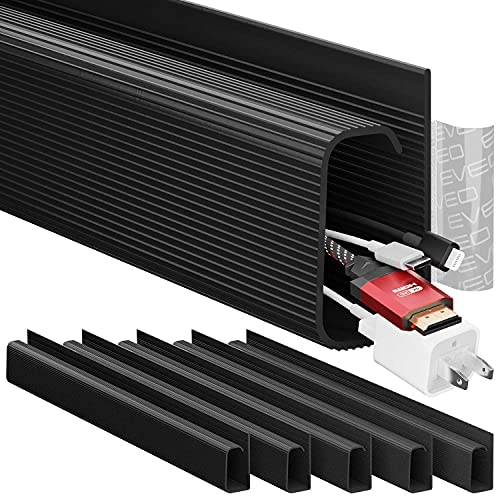
- Six sections totaling 96 inches
- Tool-free adhesive mounting
- Non-locking channels allow cable changes
Best For: Concealing multiple cables beneath a desk
Best Adhesive Raceway – YECAYE 6-Pack J-Channel Organizers
For pc cable management solutions that keep cords along a desk edge or wall, this YECAYE set provides six 15.7-inch PVC J-channels. Their outward-facing openings make it easy to add or remove cables as your setup changes.
Best For: Routing multiple computer and peripheral cords along smooth desk or wall surfaces without drilling.
Pros:
- Six channels offer flexible placement across a workstation.
- Open J-channel design gives you easy access to cables.
- Pre-applied adhesive makes installation straightforward.
Cons:
- Adhesive may not hold well on powdery walls or uneven surfaces.
- Requires a 24-hour wait after mounting for a strong bond.
Choose these when you want accessible cable runs rather than a fully enclosed cover. Check the channel dimensions against your cable bundle and mounting space before buying.
Best Flexible Sleeve – AGPTEK White Self-Closing Cable Sleeve
If your pc cable management solutions need to follow bends or corners, the AGPTEK sleeve offers two 5-foot lengths of flexible, self-closing cable cover. You can cut it to fit a run and bundle several cords together.
Best For: Grouping exposed desk, computer, or TV cables where a rigid channel would be awkward.
Pros:
- Self-closing design lets you bundle cables without mounting hardware.
- Two cuttable lengths provide 10 feet of coverage.
- Flexible sleeve can follow corners and help shield cords from pet chewing.
Cons:
- Does not attach cables to a desk or wall.
- Cut ends may need finishing to help prevent fraying, as the product notes recommend.
This is a practical pick for tidying a loose bundle while preserving flexibility. For cables that must stay fixed under a desktop, pair a sleeve with a separate mounting method.
Best Adjustable Straps – fansto 20-Pair Under-Desk Cable Organizers
For pc cable management solutions that can adapt as devices move, the fansto kit supplies 20 hook-and-loop straps with adhesive mounting pads. Its segmented, low-profile approach is useful for securing separate cable groups in tight spaces beneath a desk.
Best For: Keeping multiple under-desk cable runs adjustable and easy to rearrange.
Pros:
- Includes 20 straps and adhesive pads for several mounting points.
- Reusable hook-and-loop straps allow cable changes without replacing ties.
- Each extended strap is specified to hold up to 15 cables.
Cons:
- Adhesive pads work best on smooth surfaces.
- Manufacturer recommends waiting two hours after applying pads before loading cables.
This kit favors flexible routing over concealment: it holds cords in place but does not cover them. It makes the most sense when you expect to add or swap peripherals regularly.
Best Clamp-On Tray – Mzmaxy 25-Inch Under-Desk Cable Tray
Among pc cable management solutions for a desk crowded with cords and sockets, this Mzmaxy metal mesh tray offers 25 inches of under-desk storage. It clamps to the desk edge without drilling and can be installed facing inward or outward.
Best For: Lifting a power strip and cable bundle off the floor beneath a compatible desk.
Pros:
- Clamp mounting avoids drilling into the desktop.
- Fits desk edges 0.4 to 2 inches thick.
- Open metal mesh allows ventilation and cable access.
Cons:
- Requires a compatible desk edge for the clamps.
- Its two tray sections must be screwed together before mounting.
With an approximately 15-pound stated capacity, this tray is the option here for holding both cords and sockets. Measure your desk edge and check the weight of what you plan to store before choosing it.
Best Split Sleeve – Alex Tech 10-Foot Cord Protector
For pc cable management solutions that bundle loose cords into a cleaner run, this Alex Tech split sleeve is a straightforward option. The 10-foot black sleeve has a 1/2-inch diameter and opens along its length so you can load cables without threading them through an end.
Best For: Bundling and covering PC, USB, power, or audio/video cables in one flexible sleeve.
Pros:
- Split design makes cables easy to insert, then closes around them.
- 10-foot length can be cut to suit multiple cable runs.
- Provides a protective covering where pets may chew exposed cords.
Cons:
- The 1/2-inch diameter may not fit larger bundles.
- Does not include clips or a tray to secure cables to the desk.
Choose this sleeve when the main job is containing and covering a cable bundle; pair it with separate mounting hardware if you also need to route that bundle out of sight.
Best Under-Desk Trays – Scanfield 17-Inch 2-Pack
If your pc cable management solutions need to hide more than cords, this two-pack of 17-inch Scanfield trays gives power strips, chargers, and bundled cables a place beneath the desk. The trays use adhesive backing, so installation does not require drilling.
Best For: Keeping power strips and cable bundles off the floor and out of sight beneath a desk.
Pros:
- Two 17-inch trays offer space for separate groups of equipment.
- 3.5-inch interior accommodates power strips, chargers, and bundled cords.
- Adhesive mounting avoids screws and drilling.
Cons:
- Adhesive requires a 24-hour cure, so setup is not immediate.
- Under-desk mounting is less suitable if you need to move the organizer frequently.
This is the most direct choice of the three for concealing bulky desk power gear. Check that your mounting surface and available clearance suit adhesive-backed 17-inch trays before installing.
Best All-in-One Kit – N NOROCME 192-Piece Cable Organizer
For pc cable management solutions across a whole workstation, this 192-piece N NOROCME kit supplies sleeves, reusable ties, clips, holders, adhesive tie rolls, mounts, and fastening ties. It is useful when cables need both bundling and routing at different points around a desk.
Best For: Organizing several cable runs with a mix of sleeves, ties, and stick-on routing accessories.
Pros:
- Varied components support bundling, fastening, and surface routing.
- Includes four split sleeves that are 20 inches long.
- Adhesive clips and holders install without drilling.
Cons:
- The 20-inch sleeves may be too short for a long continuous cable run.
- Adhesive accessories need clean surfaces for placement.
Pick this kit when you are organizing multiple cables in different ways rather than solving one specific routing problem. For a single long bundle or a dedicated power-strip shelf, a standalone sleeve or tray is more focused.
Best Reusable Ties – VELCRO Brand 6-Inch Cable Ties
For adjustable pc cable management solutions, these pre-cut, 6-inch VELCRO Brand ties bundle loose cords without committing to a permanent layout. Thread the end through the slot, pull it snug, and reopen it when you need to change your setup.
Best For: Bundling PC cables, chargers, and accessories that you rearrange regularly.
Pros:
- Reusable hook-and-loop fastening makes adjustments straightforward.
- Pre-cut ties are ready to use without trimming a roll.
- Flexible wraps work at a desk or in a travel bag.
Cons:
- Six-inch length may be too short for large cable bundles.
- Ties bundle cables but do not conceal them under a desk.
Choose these when easy changes matter more than hiding wires. They are a simple complement to a raceway or sleeve if you also want cables out of sight.
Most Versatile Kit – Cord Management Organizer Kit
If your pc cable management solutions need to cover more than one kind of clutter, this kit offers split sleeves, adhesive clips, reusable ties, tie rolls, and nylon ties. That mix lets you group a run of wires, route individual cables along a surface, and fasten smaller bundles.
Best For: A desk or home-office setup that needs several cable-organizing methods in one purchase.
Pros:
- Includes four split sleeves for loading and grouping wires.
- Adhesive clips can guide cables along clean desks, walls, or cabinets.
- Reusable ties and tie rolls provide adjustable bundling options.
Cons:
- Adhesive clips need a clean mounting surface.
- The assortment may be more than you need for a few loose cords.
This is the flexible pick when you have different cable paths to tackle. Plan where the adhesive pieces will go before mounting them, and use the sleeves where several wires share a route.
Best Under-Desk Raceway – EVEO 96-Inch J-Channel Kit
Among pc cable management solutions for a crowded workstation, this EVEO kit focuses on getting cords off the desktop and into under-desk channels. It includes six black, self-adhesive J-channel sections totaling 96 inches, with a non-locking design that lets you place or remove cables.
Best For: Routing multiple PC and power cables beneath a desk without drilling.
Pros:
- Self-adhesive installation requires no tools.
- Six sections provide flexibility for positioning under a desk.
- Open, non-locking channels make cable changes accessible.
Cons:
- Adhesive mounting is less suited to setups where you do not want anything attached to the desk.
- Designed for indoor under-desk routing, not bundling cables for travel.
Pick this kit when your main goal is a cleaner view around your PC and easy access for later cable changes. For loose cords away from the desk, pair a raceway with separate ties.
How We Picked the Best PC Cable Management Solutions
We focused on practical formats that solve different parts of a PC setup rather than treating every organizer as interchangeable. The selection includes ties for small bundles, sleeves for visible cable runs, under-desk options for larger groups of cords, and kits for setups that need several approaches. We also considered stated dimensions, pack quantities, and installation style. Those details are a starting point, not proof that a product will fit every desk or hold every cable load; check the current listing before buying.
Quick Comparison of PC Cable Management Solutions
Reusable ties are the simplest choice for grouping cables you may need to swap. Split sleeves and wire loom cover a longer visible run while allowing cables to branch off. Under-desk trays move excess length and accessories out of sight, provided the tray fits your desk and can support what you place in it. Adhesive cord hiders and organizer kits can help route cables along a chosen path or tackle several small problem areas at once.
A useful setup often combines formats: a tray beneath the desk for excess length, ties around individual bundles, and a sleeve only where cords remain visible.
Key Buying Factors for PC Cable Management Solutions
Measure the Route and the Bundle
Count the cables you need to contain and note their thickest plugs. Measure the intended run before choosing a sleeve or channel; its listed length may not cover bends, branches, and the path down to an outlet. For a tray, check its length, depth, and clearance around desk frames, drawers, and monitor-arm clamps.
Choose an Installation Method That Fits Your Desk
Clamp-on or other no-screw designs may appeal to renters and anyone who changes desks frequently, but they still need a compatible desktop edge and thickness. Adhesive routes need a clean, suitable surface and may leave residue when removed. Screw-mounted hardware calls for a desk you are willing and able to drill. Confirm the actual mounting method in the product listing.
Plan for Access and Safety
Leave enough slack to raise a sit-stand desk, pull out a PC, or unplug equipment without straining connectors. Keep power supplies and strips accessible and follow their instructions for mounting and ventilation. Do not tightly compress cords, run them through pinch points, or assume a sleeve is a substitute for a properly rated extension cord.
Who Should Buy Which PC Cable Management Solutions?
For a few loose leads: Start with reusable ties. They are easy to reopen when peripherals change. For one visible bundle: Look at a split sleeve or wire loom, sized to the bundle rather than just the cable count. For clutter beneath the desk: Consider a tray, then verify mounting clearance and the stated load limit. For a setup with several trouble spots: A mixed kit may provide useful flexibility, though it is worth checking that you will use its included parts. Choose the smallest combination that addresses your actual cable routes; extra accessories alone will not make the setup tidier.
