
Dust collects quickly in keyboards, vents, fans, and around PC components. A suitable air duster can help clear loose debris without pressing a cloth into hard-to-reach areas.
These 10 picks include reusable electric blowers and familiar canned-air options. The right choice depends on how often you clean, where you need airflow, and whether you value portability or simple, occasional use.
Best 10 PC Air Dusters Picks for 2026
High-Power Pick
WOLFBOX MF100 Turbo Air Duster

- Up to 150,000 RPM and 45 m/s airflow
- Three speeds; five nozzles and two brushes
- 0.66 lb; USB-C charging
Best For: Strong, adjustable airflow for PCs and keyboards
Long-Runtime Pick
WOLFBOX MF70 Cordless Air Duster

- Up to 300 minutes on the lowest setting
- Three speeds, up to 110,000 RPM
- About 0.5 lb; five nozzles
Best For: Routine PC cleaning with long low-speed sessions
Detail-Cleaning Pick
FRESMOL Air Duster with LED Display

- Display shows speed and battery level
- Built-in light for dark areas
- Five nozzles and three brushes
Best For: Detail cleaning in ports, vents, and dim spaces
Multiuse Blower Pick

- Three settings; stated 110,000 RPM maximum
- USB-C charging
- Five replacement nozzles listed
Best For: PC cleaning plus occasional car and outdoor use
Best Canned-Air Multipack
Office Depot Cleaning Duster 6-Pack

- Six 10-ounce aerosol cans
- Moisture-free equipment-cleaning formula
- Bitterant included
Best For: Keeping canned duster stocked for office electronics
Best Accessory Kit
130,000 RPM Electric Air Duster

- Four adjustable airflow settings
- Six nozzles and 10 detail brushes
- Up to 120 minutes on Speed 1
Best For: Detailed, reusable cleaning across multiple surfaces
Best Built-In Light
CAGIWIRU W20F Cordless Air Duster

- LED light and three speeds
- Five included nozzles
- Up to 240 minutes on lowest speed
Best For: Dusting dim, hard-to-see spaces
Best Corded Option
AirTec Ultra Type 3 Electric Air Duster

- 350W corded motor for continuous airflow
- Six interchangeable nozzles
- 6.5-foot cord; about 1.5 pounds
Best For: Repeat electronics cleaning near an outlet
Best Single-Can Pick
Staples Compressed Air Duster, 10 oz
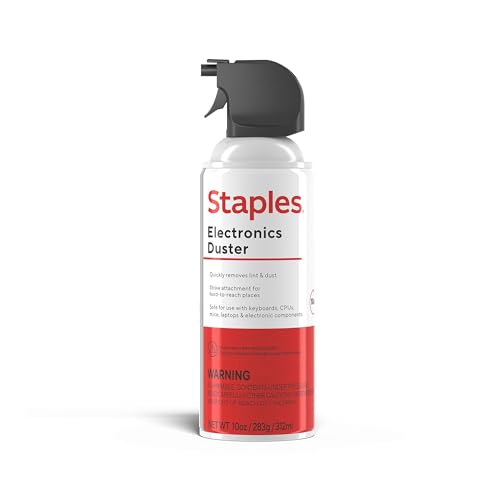
- Precision nozzle for vents and keyboard gaps
- Ready to use without charging
- Single 10 oz can requires replacement
Best For: Occasional keyboard and office-equipment cleaning
Best Portable Rechargeable Pick
Foretoo W20A Electric Air Duster

- Cordless, rechargeable design
- 8-ounce body with LED display and light
- Charging cable included; adapter sold separately
Best For: Cleaning electronics and other surfaces away from outlets
High-Power Pick – WOLFBOX MF100 Turbo Air Duster
Among rechargeable pc air dusters, the WOLFBOX MF100 stands out for its stated 150,000 RPM maximum speed and 45 m/s airflow. Three settings let you reduce the blast for lighter cleaning, while the included attachments help reach different parts of a PC setup.
Best For: Buyers who want strong adjustable airflow for PCs, keyboards, and other household cleaning jobs.
Pros:
- Three speed settings and a stated maximum airflow of 45 m/s.
- Includes five nozzles and two brushes.
- Weighs 0.66 lb and charges via USB-C in about 2.5 hours.
Cons:
- The stated runtime of up to 100 minutes applies to the lowest setting, not maximum power.
The MF100 is a versatile choice if airflow and attachment variety matter most. Plan on shorter sessions when using its higher speeds.
Long-Runtime Pick – WOLFBOX MF70 Cordless Air Duster
The WOLFBOX MF70 is worth a look if you compare pc air dusters by runtime and portability. Its three stated motor-speed settings range from 25,000 to 110,000 RPM, giving you a lower setting for delicate electronics and a higher one for stubborn debris.
Best For: Regular desk and PC maintenance when long low-speed runtime is a priority.
Pros:
- Up to 300 minutes of stated runtime on the first speed setting.
- Three selectable speeds for different cleaning tasks.
- Approximately 0.5 lb, with five interchangeable nozzles.
Cons:
- The 300-minute runtime figure applies only to the lowest setting.
- No brushes are listed among the included attachments.
Choose the MF70 for lightweight, cordless cleaning across multiple sessions. Its runtime advantage should not be taken as a high-speed runtime estimate.
Detail-Cleaning Pick – FRESMOL Air Duster with LED Display
The FRESMOL adds useful visibility features to the usual lineup of rechargeable pc air dusters. Its LED display shows the selected speed and battery level, while a built-in light helps you spot dust inside darker PC cases and other tight spaces.
Best For: Cleaning ports, vents, and other hard-to-see areas with a choice of brushes and nozzles.
Pros:
- LED display shows speed mode and battery level.
- Built-in light helps illuminate dark cleaning areas.
- Includes five nozzles and three brushes, with three adjustable speeds.
Cons:
- At a listed 1.2 lb, it is heavier than the other lightweight models in this roundup.
- The supplied notes do not specify charging time or runtime.
This is a practical pick when seeing your settings and illuminating cramped areas matters more than minimizing weight.
Multiuse Blower Pick – W15 Cordless Turbo Air Duster
For shoppers considering pc air dusters that can also handle jobs beyond the desk, this cordless W15 blower offers three airflow settings and a stated top motor speed of 110,000 RPM. Its replaceable nozzles are intended for computer crevices as well as car and outdoor use.
Best For: Buyers seeking one adjustable blower for PC cleaning and occasional car or outdoor tasks.
Pros:
- Three adjustable airflow settings and a brushless motor.
- USB-C charging supports use with compatible car or portable power sources.
- The package list specifies five replacement nozzles.
Cons:
- The supplied notes give conflicting weight figures: about 280 g in the description and 0.49 kg in the details.
- No specific charging time or battery runtime is provided.
The W15 has a flexible feature set, but the inconsistent weight information makes it harder to judge portability from the supplied specifications alone.
Best Canned-Air Multipack – Office Depot Cleaning Duster 6-Pack
If you prefer disposable pc air dusters, this six-pack gives you 10-ounce cans for clearing dust, dirt, and lint from keyboards, printers, and other office electronics. Its moisture-free formula and aerosol format make it a straightforward choice for occasional equipment cleaning.
Best For: Offices or households that want several ready-to-use cans for electronics cleaning.
Pros:
- Six 10-ounce cans provide a supply for multiple cleanups.
- Compressed gas reaches fine debris in hard-to-access spots.
- Moisture-free formula is intended for equipment cleaning.
- Contains a bitterant as an added safety measure.
Cons:
- Disposable cans need replacing when empty.
- The six-pack weighs 5.4 pounds, making it less convenient to carry than a single compact duster.
Choose this pack if familiar canned-air application matters more to you than a rechargeable blower; its main advantage is having several cans on hand.
Best Accessory Kit – 130,000 RPM Electric Air Duster
Among rechargeable pc air dusters, this handheld model stands out for its four airflow settings and generous accessory kit. The maker specifies a brushless motor rated up to 130,000 RPM and includes six nozzles plus 10 detail brushes for keyboards, computers, and other cleaning tasks.
Best For: Buyers who want adjustable airflow and attachments for detailed cleaning across several surfaces.
Pros:
- Four speed settings cover gentler dusting through heavier cleaning.
- Six nozzles and 10 brushes help tackle different spaces and surfaces.
- Rechargeable 8,000mAh battery is rated for up to 120 minutes on Speed 1.
- USB-C charging is specified at 2.5 hours; a storage bag and lanyard are included.
Cons:
- The stated 120-minute runtime applies specifically to the lowest speed.
- It needs charging, unlike a ready-to-use aerosol can.
This is the more versatile pick when you expect to clean beyond a PC. Match the speed and attachment to the task rather than relying on the highest setting for everything.
Best Built-In Light – CAGIWIRU W20F Cordless Air Duster
For rechargeable pc air dusters suited to dim corners, the CAGIWIRU W20F pairs a built-in LED light with three airflow settings. Its five included nozzles offer options for cleaning computers and keyboards as well as household and car spaces.
Best For: Cleaning dusty electronics or other tight areas where extra visibility helps.
Pros:
- LED light helps illuminate the area being cleaned.
- Three speeds and five nozzles add flexibility for different jobs.
- Rechargeable battery is rated for up to 240 minutes on the lowest setting.
- Compact, cordless handheld design is easy to store.
Cons:
- Runtime drops to a stated 25 minutes on the third speed.
- The maker reports operating noise of 73.2 to 82.5 dB across its three modes.
- Instructions say to let the unit cool for 10 minutes after use before charging.
The light is the clearest reason to choose this model. If you plan to use maximum airflow often, weigh its shorter stated high-speed runtime against its long low-speed rating.
Best Corded Option – AirTec Ultra Type 3 Electric Air Duster
Among pc air dusters, the AirTec Ultra Type 3 is a practical choice if you want continuous airflow without charging or replacing cans. Its 350W motor runs from a 6.5-foot power cord, and six interchangeable nozzles let you switch between focused and broader cleaning.
Best For: Cleaning PCs and other electronics near a power outlet.
Pros:
- Continuous airflow with no battery to recharge or can to replace.
- Six nozzles offer different levels of precision and coverage.
- Weighs about 1.5 pounds and uses a simple one-button control.
Cons:
- Requires an outlet and is limited by its 6.5-foot cord.
- Not as portable as a cordless duster.
The Type 3 makes the most sense for repeat cleaning at a desk or workbench, especially when uninterrupted use matters more than cordless convenience.
Best Single-Can Pick – Staples Compressed Air Duster, 10 oz
If you only need a familiar, ready-to-use option among pc air dusters, this Staples 10 oz compressed-air can fits occasional electronics cleaning. Its precision nozzle directs airflow into keyboard gaps, vents, and ports without requiring a charger or outlet.
Best For: Occasional dust removal from keyboards and office electronics.
Pros:
- Precision nozzle helps target tight spaces.
- Suitable for computers, printers, gaming consoles, and other electronics.
- Contains a bitterant to discourage inhalant misuse.
Cons:
- A single disposable can will need replacing when empty.
- Does not offer the reusable operation of an electric duster.
Choose this can for quick, infrequent cleanups; frequent users may prefer a reusable electric model to avoid buying replacements.
Best Portable Rechargeable Pick – Foretoo W20A Electric Air Duster
The Foretoo W20A is a cordless choice among pc air dusters for cleaning away from an outlet. This rechargeable model has an LED display and light, weighs 8 ounces, and comes with nozzles and brushes for different cleaning tasks.
Best For: Portable cleaning of computers, keyboards, cars, and household surfaces.
Pros:
- Rechargeable design avoids disposable air cans.
- Compact, 8-ounce body is easy to carry between cleaning spots.
- Includes a USB-C charging cable, nozzles, and brushes.
Cons:
- A 5V/2A charging adapter is not included.
- Requires charging; the supplied instructions advise a 10-minute cooldown after use before charging.
This is the more flexible choice when you clean in several locations, provided you are comfortable managing battery charging. The product notes conflict on the exact nozzle count, so check the listing if specific attachments matter.
How We Picked These PC Air Dusters
We considered the practical differences among the selected products: electric versus canned air, adjustable airflow, cordless convenience, stated motor speeds, and features such as lights or displays. We also weighed how those features fit common jobs, from clearing a keyboard to blowing loose dust from a PC case. Advertised RPM and airflow figures are useful context, but they are not directly comparable across every listing and do not guarantee better cleaning.
Quick Comparison: Electric Blowers Vs. Canned Air
Rechargeable blowers are the more practical choice for frequent cleaning. They can be used repeatedly after charging and often offer multiple speeds, but they cost more upfront, make motor noise, and need storage and charging. Models in this roundup range from straightforward three-speed cordless dusters to higher-speed options such as the WOLFBOX MF100; the Foretoo also lists an LED display.
The Office Depot and Staples 10 oz cans are simpler choices for occasional touch-ups. They require no charging and are easy to keep on hand, but each can has a limited supply. Follow the label’s directions, keep the can upright as directed, and avoid spraying liquid propellant onto electronics.
Key Buying Factors for PC Air Dusters
Airflow Control and Attachments
Variable speeds help you use gentler airflow around delicate areas and more force for loose dust in vents or an empty case. A narrow nozzle can improve reach, but confirm which attachments are included rather than assuming every electric blower has the same set.
Runtime, Charging, and Handling
If you clean several devices at once, check the stated runtime at the speed you expect to use; maximum-speed operation may shorten it. Consider charging time, grip, size, and whether a cord or charging requirement would interrupt your routine. For infrequent jobs, a can may be more convenient than maintaining a charged blower.
Safe Cleaning Habits
Power off and unplug equipment before cleaning, and follow its manufacturer’s guidance. Keep the nozzle a sensible distance from components, use short bursts, and stop fans from free-spinning while directing air at them. Air moves dust rather than capturing it, so work where displaced debris will not settle back into the machine.
Who Should Buy Which PC Air Dusters?
Choose a rechargeable electric duster if you regularly clean a desktop, gaming setup, or several household devices. Look for adjustable speeds if you alternate between keyboards and PC interiors; consider a model with a light if visibility inside a case matters. Choose canned air if you need a simple option for rare keyboard or electronics cleanups and do not want another device to charge. If you are deciding between electric models, prioritize usable airflow control, comfortable handling, and credible runtime information over the biggest advertised RPM number.
