
Mac Studio buyers often want one thing from a dock: more capability without clutter. The right setup can add fast storage, better networking, extra displays, and easier access to everyday ports.
This roundup highlights the best options for users comparing OWC docks for Mac Studio, plus a few strong alternatives when you need more bays, more bandwidth, or a better desk-friendly design.
Best 8 Owc Docks for Mac Studio Picks for 2026
Best for Storage Expansion
OWC miniStack STX Thunderbolt Hub

- Adds Thunderbolt ports and built-in storage expansion
- Supports SSD, HDD, and M.2 NVMe upgrades
- Up to 96W charging with quiet cooling
Best For: Mac Studio users who want a dock and upgradable storage in one compact unit.
Best for Dual 10GbE Workflows
OWC Thunderbolt 5 Dual 10GbE Network Dock

- Dual 10GbE plus front 2.5GbE networking
- Thunderbolt 5 dock with multiple expansion ports
- Strong multi-display support for pro setups
Best For: Mac Studio users who need high-speed networking and a full-featured desktop dock.
Best for Built-In SSD Expansion

- Adds internal SSD storage support up to 10Gbps
- Includes USB-C, USB-A, SD, microSD, and audio ports
- Clean aluminum stand helps with airflow and desk setup
Best For: Mac mini or Mac Studio users who want compact expansion plus an SSD enclosure.
Best for Mac Studio Expansion

- 96W charging for supported hosts
- 3 TB ports, 4 USB ports, GbE, SD
- Up to 8K or dual 5K display support
Best For: Mac Studio users building a high-connectivity, multi-monitor workstation.
Best for Pro Mac Studio Expansion

- Dual NVMe SSD bays support up to 16TB with RAID options.
- Offers HDMI 2.1 and DisplayPort 2.1 for multi-display workflows.
- Adds CFexpress readers, USB-A, and Hi-Fi audio in an aluminum build.
Best For: Mac Studio users who need fast storage, pro media access, and flexible external display support.
Best for Thunderbolt Expansion
OWC Thunderbolt 5 Hub for Mac & PC

- 80Gb/s Thunderbolt 5 bandwidth
- Up to three 8K displays supported
- 140W charging in a fanless design
Best For: Mac Studio owners who need extra Thunderbolt ports, strong charging, and flexible display support.
Best for Drive Swapping

- Dual-bay access for two drives at once
- USB-C with up to 522MB/s speeds
- Independent power switches for each bay
Best For: Mac Studio users who need quick access to bare SATA drives for cloning, transfers, or recovery.
Best for Dual-Drive Expansion
Mate Studio Stand-A 80Gbps SSD Dock
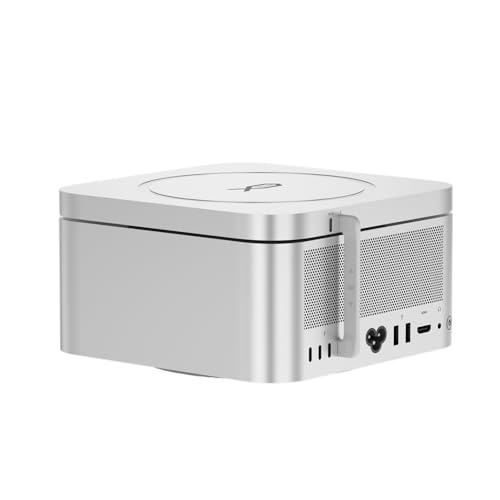
- Dual NVMe slots with up to 16TB total capacity
- 80Gbps USB-C and PD 3.0 support
- Aluminum Mac Studio-style stand with cooling
Best For: Users who want a compact Mac Studio dock focused on fast, scalable SSD storage.
Best for Storage Expansion – OWC miniStack STX Thunderbolt Hub
If you want one of the more versatile owc docks for mac studio setups, the OWC miniStack STX stands out for adding both high-speed ports and real storage expansion in a compact desktop footprint. It is a practical choice when you need a dock that can also act as an upgradable drive enclosure for backups, media libraries, and day-to-day work.
Best For: Mac Studio users who want a Thunderbolt hub plus expandable internal storage in one neat unit.
Pros:
- Combines a Thunderbolt hub with upgradable SSD/HDD/NVMe storage
- Supports multiple Thunderbolt devices and dual displays
- Delivers up to 96W charging and fast real-world transfer speeds
- Quiet aluminum build with active cooling for long sessions
Cons:
- More expensive than a basic dock
- Storage drive upgrades add to the total cost
For Mac Studio owners who are short on desk space but need a cleaner, more expandable workflow, this is a strong middle ground between a simple hub and a full storage enclosure. Among owc docks for mac studio buyers, it makes the most sense when flexibility and onboard storage matter more than a bare-minimum port extender.
Best for Dual 10GbE Workflows – OWC Thunderbolt 5 Dual 10GbE Network Dock
If you want one of the most capable owc docks for mac studio setups, this OWC Thunderbolt 5 dock is built for fast networking, plenty of expansion, and modern display support. It’s a strong fit for creators and power users who need both high-speed Ethernet and multiple high-bandwidth ports in a single desktop hub.
Best For: Mac Studio owners who need dual 10GbE connectivity, extra Thunderbolt ports, and a serious all-in-one dock for demanding workflows.
Pros:
- Dual 10GbE ports plus a front 2.5GbE port for flexible networking
- Thunderbolt 5 connectivity with multiple high-speed expansion ports
- Strong display support for multi-monitor, high-resolution setups
- Includes 90W external power supply and charging for bus-powered devices
Cons:
- Requires compatible Thunderbolt 4/5, USB4, or supported Mac systems
- More dock than most casual users need
- Premium feature set comes with a higher-end price tier
For a Mac Studio desk setup that needs serious wired networking and room to grow, this dock is a standout. Among owc docks for mac studio buyers, it makes the most sense if your workflow benefits from dual 10GbE and Thunderbolt 5 expansion instead of a basic USB hub.
Best for Built-In SSD Expansion – Satechi Mac mini Hub & Stand
If you want one of the more practical alternatives to owc docks for mac studio, this Satechi hub adds both a stand and an SSD enclosure to the base of your Mac mini or Mac Studio setup. It’s a good fit if you need extra ports, easy-access card slots, and room to expand storage without adding a full-size dock.
Best For: Mac mini or Mac Studio users who want a compact hub with internal SSD expansion and everyday connectivity.
Pros:
- Built-in M.2 SSD enclosure supports NVMe and SATA drives up to 10Gbps.
- Useful port mix includes USB-C, three USB-A ports, SD/microSD readers, and a 3.5mm jack.
- Matches Mac mini and Mac Studio nicely with a clean aluminum design.
- Integrated venting helps improve airflow while the system is in use.
Cons:
- Not compatible with Mac mini M4 models.
- SSD is sold separately, and pre-installed heatsinks may not fit.
- USB-A ports have some device and charging limitations.
For buyers comparing owc docks for mac studio, this Satechi option stands out less as a traditional dock and more as a space-saving storage upgrade with decent expansion. It’s especially appealing if you’d rather combine a hub, stand, and SSD enclosure into one tidy accessory.
Best for Mac Studio Expansion – OWC 11-Port Thunderbolt Dock
If you want one of the more capable owc docks for mac studio, this OWC Thunderbolt dock is built for turning a single USB-C/Thunderbolt connection into a full desktop hub. It adds plenty of high-speed ports, wired networking, SD card access, and enough display support for a serious multi-monitor setup.
Best For: Mac Studio users who want a high-port-count dock for monitors, fast accessories, and cleaner cable management.
Pros:
- 96W host charging keeps compatible laptops and USB-C systems powered while docked.
- Three Thunderbolt 4 ports plus four USB ports give you lots of room for drives and peripherals.
- Supports up to one 8K display or dual 5K displays, depending on your Mac and monitor setup.
- Includes GbE, SD UHS-II, and audio for a more complete workstation setup.
Cons:
- Display support varies by host, so not every Mac will get the same monitor configuration.
- It is more dock than casual users need, especially if you only want a few basic ports.
- Heavy peripheral loads may reduce power delivery performance in some setups.
For buyers comparing owc docks for mac studio, this model stands out as a versatile desk hub rather than a bare-bones adapter. It makes the most sense if you need a cleaner one-cable workflow and plan to use several peripherals or external displays at once.
Best for Pro Mac Studio Expansion – RayCue 10-in-1 80Gbps Dock
If you want a high-end hub that feels built specifically for Apple desktops, this is one of the most capable owc docks for mac studio alternatives to consider. It combines 80Gbps expansion, dual SSD bays, and pro display outputs in a clean aluminum design that fits a Mac Studio setup well.
Best For: Creators and power users who need fast storage expansion, multi-display support, and media card access in a Mac Studio dock.
Pros:
- Dual NVMe bays support up to 16TB, with RAID 0/1 options for speed or redundancy.
- 2x HDMI 2.1 plus DisplayPort 2.1 make it flexible for high-resolution multi-monitor setups.
- Includes CFexpress Type A/B readers, dual 10Gbps USB-A ports, and a 3.5mm Hi-Fi audio jack.
- Precision aluminum body matches the Mac Studio and helps keep the desk tidy.
Cons:
- Requires SSDs and cards to unlock the full storage and media workflow benefits.
- More specialized than a basic USB-C dock, so casual users may not need all the features.
This is a strong pick if you want a dock that does more than just add ports. For buyers comparing owc docks for mac studio, RayCue stands out for its blend of storage expansion, display flexibility, and pro workflow features in one enclosure.
Best for Thunderbolt Expansion – OWC Thunderbolt 5 Hub for Mac & PC
If you want a fast, future-ready pick among owc docks for mac studio, this OWC Thunderbolt 5 Hub is a simple way to add more high-speed USB-C/Thunderbolt connections without cluttering your setup. It stands out for its 80Gb/s bandwidth, 140W charging, and support for demanding multi-display workflows.
Best For: Mac Studio owners who need extra Thunderbolt ports, strong charging, and flexible display support in a compact hub.
Pros:
- Thunderbolt 5 performance with up to 80Gb/s data bandwidth
- Supports up to three 8K displays for advanced creative setups
- 140W power delivery helps keep connected laptops charged
- Fanless aluminum design keeps operation silent on the desk
Cons:
- No built-in Ethernet port for wired networking
- Only three USB ports, so some users may still need extra peripherals support
- Premium capability comes at a higher price than basic hubs
For users comparing owc docks for mac studio, this model makes the most sense if speed, display headroom, and clean expansion matter more than having every possible port built in. It is a strong fit for modern Mac workflows that need a compact, quiet hub rather than a full-featured dock.
Best for Drive Swapping – OWC Drive Dock USB-C Dual Bay
If you need straightforward, high-speed bare-drive access, this is one of the more practical owc docks for mac studio users who move data between multiple 2.5-inch or 3.5-inch drives. The dual-bay design lets you read two drives at once, and USB-C connectivity keeps the setup simple for modern Mac workflows.
Best For: Mac Studio owners who regularly clone, recover, or transfer data from bare SATA drives and want independent bay control.
Pros:
- Dual-bay design supports simultaneous access to two drives
- USB-C connection with up to 522MB/s speeds
- Independent power switches for each bay
- Mac and PC compatible with included cables
Cons:
- Made for bare SATA drives, not NVMe
- Bulkier than a single-drive adapter
- Not ideal if you only need occasional drive access
For Mac Studio buyers who work with lots of legacy SSDs or HDDs, this dock is a reliable utility tool rather than an all-purpose storage hub. Among owc docks for mac studio, it stands out for simple drive handling and simultaneous bay operation.
Best for Dual-Drive Expansion – Mate Studio Stand-A 80Gbps SSD Dock
If you’re comparing owc docks for mac studio and want a more storage-focused setup, the Mate Studio Stand-A is built for users who need fast, expandable SSD capacity in a Mac Studio-friendly form factor. It combines a compact aluminum stand with dual M.2 slots, making it a practical way to add high-speed workspace storage without cluttering your desk.
Best For: Creators, editors, and power users who want a clean Mac Studio dock with dual NVMe expansion for large files and project libraries.
Pros:
- Dual M.2 2280 slots support up to 16TB total storage
- Up to 80Gbps USB-C connectivity and strong SSD performance potential
- Aluminum stand design helps match Mac Studio setups and improve cooling
- PD 3.0 support adds flexible power for higher-demand drives
Cons:
- Requires you to supply your own NVMe SSDs
- Real-world speeds depend on SSD type, host support, and workload
- Not a full port hub; it’s primarily a storage expansion dock
For buyers focused on storage expansion first, this is a smart alternative to more general owc docks for mac studio options. It’s especially appealing if you need a compact, desk-friendly way to add fast, scalable SSD space for video, design, or AI work.
How We Picked the Best Owc Docks for Mac Studio
We focused on docks and expansion solutions that make sense for Mac Studio workflows: high-speed connectivity, reliable Mac compatibility, useful port variety, and practical upgrades like SSD expansion or dual-drive support. We also weighed real-world desk use, since many buyers want a compact setup that reduces cable clutter without sacrificing performance.
Quick Comparison
Among these 8 picks, the main differences come down to bandwidth, storage expansion, and display support. Some models are best for adding a simple set of ports, while others are designed for serious workstation use with dual SSD bays, 10GbE networking, or multiple external displays. If your priorities are speed and future-proofing, look first at the Thunderbolt 5 options. If you want a simpler, lower-cost expansion, a USB-C or Thunderbolt 3/4 dock may be enough.
Key Buying Factors for Owc Docks for Mac Studio
Bandwidth and Port Standard
For demanding creative work, bandwidth matters. Thunderbolt 5 brings the most headroom for fast storage, networking, and display pipelines, while Thunderbolt 4 and USB-C remain solid choices for everyday peripherals. Make sure the dock matches how you actually work, not just the biggest spec on the page.
Storage Expansion
If you edit video, manage large photo libraries, or want local scratch storage, look for built-in NVMe or dual-drive support. Some options function as dock-and-enclosure hybrids, which can be more efficient than buying separate gear.
Display Needs
Check whether the dock supports a single high-resolution display or multiple monitors. Mac Studio users with dual 5K, 8K, or HDMI 2.1 setups should verify monitor counts, refresh rates, and port type compatibility before buying.
Networking and Workflow Extras
10GbE can be a major upgrade for shared storage and pro workflows. Card readers, front-facing USB ports, and audio jacks are also worth considering if you want fewer adapters on your desk.
Who Should Buy Which Owc Docks for Mac Studio?
If you want the most future-ready expansion, choose a Thunderbolt 5 dock or hub. If your setup centers on fast local storage, the dual-SSD and enclosure-style models are the most compelling. If you mainly need ports and charging, a simpler OWC dock will be the cleanest fit. For buyers comparing Owc Docks for Mac Studio, the best choice is usually the one that matches your display setup, storage needs, and networking demands first.
