
The best overhead camera rigs for remote work make it easier to show documents, sketches, products, and hands-on demonstrations without rearranging your entire desk. A stable mount can also improve webcam placement and free valuable workspace.
We selected 10 options ranging from simple phone holders with lighting to articulated, heavy-duty camera arms. Use the guide below to match load capacity, reach, adjustability, and mounting style to your setup.
Best 10 Overhead Camera Rigs for Remote Work Picks for 2026
Heavy-Duty Pick
NEEWER NK002 Dual Ball Head Rig

- Supports up to 26.5 pounds
- Adjustable height and width
- Includes phone holder and dual ball head
Best For: Heavy-duty, expandable remote-work camera setups
Lighting Pick
AIXPI Overhead Phone Mount with LED Light

- Integrated 64-LED rechargeable light
- Flexible arm and rotating phone holder
- Bluetooth shutter remote included
Best For: Phone-based calls, demonstrations, and recording with built-in lighting
Stable Platform
NEEWER ST100 Tabletop Overhead Rig

- Steel frame supports up to 10 pounds
- Height adjusts from 24 to 39 inches
- 12 crossbar mounting points
Best For: Large desks and dedicated overhead demonstration setups
Compact Desk Arm

- Adjustable pole and extension arm
- Supports up to 2 kilograms
- Multiple threads and detachable ball head
Best For: Compact home-office setups needing flexible camera positioning
Best for Easy Setup
EMART Adjustable Overhead Camera Rig

- Supports up to 26.5 pounds
- Height and width are telescopically adjustable
- C-clamp fits desks up to 3.5 inches thick
Best For: Remote educators, streamers, and creators needing a stable, expandable rig
Best Compact Articulating Arm
DImotliyor 3-Section Desk Mount
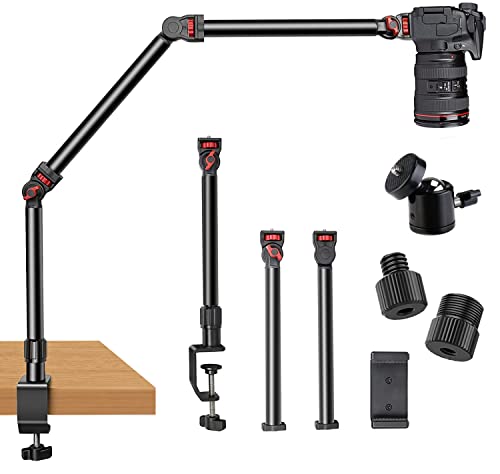
- Three detachable sections offer flexible positioning
- Supports up to 6 pounds
- Includes multiple screw sizes and a ball head
Best For: Remote meetings, online lessons, and mobile creator setups
Best Gear-Locked Stability
TARION TKA01-L Overhead Desk Mount

- Three locking gear joints resist position changes
- Supports up to 8.8 pounds vertically
- Includes extra mounting threads for accessories
Best For: Solo creators and educators using heavier cameras or multiple accessories
Best Flexible Desk Mount
SMALLRIG 22-Inch Magic Arm Clamp

- 22-inch articulating arm for flexible positioning
- Protective clamp pads help prevent scratches and slipping
- Includes phone holder and 1/4-inch-to-3/8-inch adapter
Best For: Lightweight phones, webcams, lights, and compact cameras
Best Heavy-Duty Overhead Arm
UBeesize 360-Degree Camera Mount

- Supports up to 5.5 pounds of gear
- 15- to 35-inch height adjustment
- Rubber-padded C-clamp requires no drilling
Best For: Heavier cameras, webcams, ring lights, and small home studios
Best Lighted Setup
Pozliv Overhead Mount with Ring Light

- Six-inch USB ring light with adjustable brightness
- Flexible arm supports overhead and angled shots
- Extra clip arm enables multiple lightweight devices
Best For: Video meetings, teaching, livestreams, and close-up demonstrations
Heavy-Duty Pick – NEEWER NK002 Dual Ball Head Rig
For shoppers comparing overhead camera rigs for remote work, the NEEWER NK002 stands out as a sturdy, expandable desktop platform. Its C-clamp setup, adjustable crossbar, dual ball head, and included phone holder make it suitable for webcam positioning, online meetings, product demonstrations, and overhead presentations.
Best For: Remote workers who need a heavy-duty, multi-device overhead rig with flexible camera angles.
Pros:
- Supports up to 26.5 pounds with a secure, rubber-padded C-clamp.
- Height adjusts from 27.2 to 48 inches and width from 25.2 to 47.2 inches.
- Dual 360-degree ball heads and a phone holder support varied shooting angles.
- Additional 1/4-inch mounts can accommodate lights and other accessories.
Cons:
- Crossarms and some expansion accessories are sold separately.
- The dual ball head has a 3.3-pound maximum load.
The NK002 is a strong choice when stability and expandability matter more than a minimal footprint. It is especially useful for a permanent or semi-permanent desk setup with cameras, phones, lights, and microphones.
Lighting Pick – AIXPI Overhead Phone Mount with LED Light
The AIXPI mount is a practical option among overhead camera rigs for remote work when built-in lighting and hands-free phone control are priorities. Its flexible metal arm, rechargeable LED light, rotating phone holder, and Bluetooth shutter remote simplify video calls, demonstrations, and content recording from a desk.
Best For: Phone-first remote workers and creators who want an overhead mount with integrated fill lighting.
Pros:
- Built-in 64-LED light offers adjustable brightness and 2500K to 6500K color temperature.
- Rechargeable 2000mAh battery provides up to two hours at maximum brightness.
- Phone holder rotates 360 degrees and flips 180 degrees for portrait or landscape use.
- Standard 1/4-inch mount also supports cameras, webcams, microphones, and lights.
Cons:
- The clamp fits surfaces up to 2.1 inches thick.
- The Bluetooth remote controls the camera shutter, not the light settings.
- Its maximum-brightness battery runtime is limited to about two hours.
This is the most convenient all-in-one choice for phone-based work and recording. Choose it when integrated lighting and quick capture are more important than the heavier support of a full tabletop rig.
Stable Platform – NEEWER ST100 Tabletop Overhead Rig
The NEEWER ST100 is a freestanding tabletop platform for shoppers seeking overhead camera rigs for remote work, flat-lay presentations, tutorials, or desk-based demonstrations. Its steel construction, T-base, adjustable columns, and accessory mounting points prioritize stability across a broad workspace.
Best For: Users who have a large desk and want a stable freestanding platform for cameras and accessories.
Pros:
- Steel construction supports up to 10 pounds.
- Spring-loaded columns adjust from 24 to 39 inches with 14 positioning points per side.
- The crossbar has 12 mounting points for accessory expansion.
- Rubberized bases help stabilize the stand and protect the desk surface.
Cons:
- Requires a desk at least 39.4 inches wide for tabletop placement.
- Super clamps, phone clamp, backdrop, and other accessories are sold separately.
- At 5.7 kilograms, it is less convenient to move frequently.
The ST100 makes sense for a dedicated workstation where a broad, stable base is preferable to a clamp-mounted arm. It is a capable platform for overhead webcam work, but its size and accessory requirements deserve attention before buying.
Compact Desk Arm – SMALLRIG DTCK001 Camera Mount
The SMALLRIG DTCK001 offers a compact, adjustable approach to overhead camera rigs for remote work. Its desk-mounted arm supports cameras, phones, lights, and microphones, while the adjustable main pole, extension arm, and ball head make it easier to position equipment for video conferences or tabletop shooting.
Best For: Remote workers who want a compact desk arm with flexible positioning and dual-device support.
Pros:
- Main pole adjusts from 30 to 73 centimeters and the secondary arm from 30 to 50 centimeters.
- 360-degree angle adjustment allows flexible positioning without removing the arm.
- Supports up to 2 kilograms with a widened base and gear structure.
- Includes 1/4-20 and 3/8-16 mounting options plus a detachable ball head.
Cons:
- Its 2-kilogram capacity is lower than the heavier NEEWER rigs in this roundup.
- The base fits surfaces from 1 to 6 centimeters thick.
- The compact arm may offer less workspace coverage than a full crossbar platform.
The DTCK001 is a sensible middle ground for a home office that needs flexibility without a large freestanding frame. Its multiple threads and dual-device capability are useful for pairing a camera with a light or microphone within a modest load limit.
Best for Easy Setup – EMART Adjustable Overhead Camera Rig
If you need overhead camera rigs for remote work that can support more than a phone or lightweight webcam, the EMART mount offers a strong, expandable setup. Its telescoping frame adjusts in both height and width, while the edge-mounted C-clamp helps preserve desk space for a camera, lights, or other work equipment.
Best For: Remote educators, streamers, and creators who need a stable overhead setup with room for additional gear.
Pros:
- Supports up to 26.5 pounds with an aluminum alloy frame.
- Adjusts from 27.2 to 48 inches in height and 25.2 to 47.2 inches in width.
- Includes a phone holder, dual 1/4-inch screws, and a 5/8-inch stud.
- C-clamp fits desks up to 3.5 inches thick and includes protective rubber pads.
Cons:
- The larger frame may require more storage space than a simple desk arm.
- Additional magic arms and tablet holders are sold separately.
Choose this EMART rig if maximum load capacity and flexible workspace coverage matter most. It is especially useful when your remote-work setup needs to accommodate a camera plus lighting or other accessories.
Best Compact Articulating Arm – DImotliyor 3-Section Desk Mount
For overhead camera rigs for remote work with a smaller footprint, this DImotliyor desktop mount uses three detachable sections and multiple adjustment points. Its rotating base, 180-degree rod adjustments, and included phone holder make it a flexible choice for webcams, phones, lights, and compact cameras.
Best For: Remote meetings, online lessons, and creators who want a travel-friendly articulating arm.
Pros:
- Three-section arm provides flexible positioning with a 360-degree rotating base.
- Supports up to 4.5 pounds horizontally and 6 pounds at maximum load.
- Includes 1/4-inch, 3/8-inch, and 5/8-inch screw options plus a 360-degree ball head.
- Padded clamp helps protect the desk from scratches.
Cons:
- Its load capacity is lower than heavy-duty overhead frames.
- The clamp extends up to 2.4 inches, which may limit compatibility with thicker desks.
This model is a practical middle ground when adjustability and portability are more important than maximum payload. Its detachable design can also make transport and storage easier for mobile remote-work setups.
Best Gear-Locked Stability – TARION TKA01-L Overhead Desk Mount
The TARION TKA01-L is one of the more stability-focused overhead camera rigs for remote work, using three locking gear joints rather than simple friction adjustments. Its steel-tube construction, dual-slot clamp, and detachable ball head suit workstations that need a camera, monitor, light, or projector positioned securely above the desk.
Best For: Solo creators, podcasters, and remote educators using heavier cameras or multiple mounted accessories.
Pros:
- Locking gear joints provide 180-degree tilting and 360-degree rotation.
- Supports up to 8.8 pounds vertically and 6.6 pounds in horizontal extension.
- Extends up to 38 inches across larger workspaces.
- Extra 1/4-inch and 3/8-inch threads allow mounting microphones, monitors, or lights.
Cons:
- The steel-tube design may be less portable than a lightweight arm.
- The dual-slot clamp opens to 2.36 inches, limiting some thick-desk applications.
Pick the TARION when repeatable positioning and locked joints are priorities. It offers a sturdy, production-oriented approach for remote workstations that need more than a basic webcam mount without sacrificing desk space.
Best Flexible Desk Mount – SMALLRIG 22-Inch Magic Arm Clamp
For remote workers seeking overhead camera rigs for remote work, the SMALLRIG 22-inch Magic Arm Clamp offers a compact, articulating setup for phones, webcams, lights, microphones, and lightweight cameras. Its clamp-based design suits desks and round tubes, while the adjustable joints help position equipment for video calls, demonstrations, or overhead content.
Best For: Remote workers and creators who want a flexible, space-saving desk mount for phones, webcams, lights, or other lightweight gear.
Pros:
- 22-inch arm provides extended reach and flexible positioning.
- Clamp opens to 63.5 mm and includes protective anti-slip pads and rubber rings.
- Includes a phone holder, 1/4-inch screws, and a 1/4-inch-to-3/8-inch adapter.
Cons:
- Recommended load capacity is limited to 600 g, and the listed maximum weight recommendation is 250 g.
- Heavy phones or extended arm positions may cause ball-head slippage if not balanced carefully.
This is a versatile choice when adjustability and a small desktop footprint matter more than supporting heavy camera equipment.
Best Heavy-Duty Overhead Arm – UBeesize 360-Degree Camera Mount
The UBeesize mount is a strong contender among overhead camera rigs for remote work, particularly for users who need to support more substantial equipment. Its reinforced aluminum arm, 360-degree ball head, and height adjustment provide flexible positioning for webcams, cameras, ring lights, and overhead demonstrations.
Best For: Home-office users and creators who need a higher-capacity overhead mount with adjustable height and broad device compatibility.
Pros:
- Supports up to 5.5 pounds according to the supplied specifications.
- Adjusts from 15 to 35 inches and provides 360-degree positioning.
- Tool-free, rubber-padded C-clamp fits tables up to 2.6 inches thick.
Cons:
- At 0.95 kg, it is heavier than more compact desktop mounts.
- The supplied notes do not specify a lighting system or included camera.
Choose this model if stability and load capacity are priorities, especially for a desk setup that needs to handle a camera and accessories without drilling.
Best Lighted Setup – Pozliv Overhead Mount with Ring Light
For remote workers who need both camera positioning and illumination, this Pozliv model combines an overhead mount with a USB-powered six-inch ring light. It is designed for phones, compatible Logitech webcams, compact cameras, and action cameras, making it useful for video meetings, teaching, and top-down demonstrations.
Best For: Remote meetings, online teaching, livestreams, and close-up demonstrations where adjustable lighting is useful.
Pros:
- Six-inch USB-powered ring light offers three lighting modes and ten brightness levels per mode.
- Flexible arm, ball head, and base support overhead and angled positioning.
- Includes an extra flexible clip arm for combining multiple lightweight devices.
Cons:
- Maximum load is 3 pounds, so it is not intended for heavy-duty cameras or devices.
- Jaw clamp fits surfaces up to approximately 2 inches thick.
- USB power is required for the ring light.
This is a practical all-in-one option when lighting is as important as camera placement, though users with heavier equipment should look for a higher-capacity arm.
How We Picked the Best Overhead Camera Rigs for Remote Work
We evaluated these rigs by focusing on the factors that matter during video calls, tutorials, livestreams, and desk demonstrations: stability, adjustability, usable reach, mounting security, device compatibility, and ease of repositioning. We also considered whether each design is better suited to a smartphone, webcam, mirrorless camera, or heavier DSLR.
A good overhead mount should hold its device without noticeable sagging or vibration. Clamp quality, arm construction, joint design, and the actual rated load are especially important when the camera will remain above a keyboard or other equipment.
Quick Comparison
- Best for flexible camera setups: NEEWER and TARION articulated rigs with multiple adjustment points.
- Best for heavier cameras: Heavy-duty NEEWER and EMART-style desk mounts with higher stated load capacities.
- Best for phones and simple calls: UBeesize, SMALLRIG Magic Arm, and ring-light phone mounts.
- Best for built-in lighting: Overhead phone mounts that combine a flexible arm with an LED or ring light.
- Best for compact desks: Single-arm clamp mounts with a small footprint and detachable sections.
Key Buying Factors for Overhead Camera Rigs for Remote Work
Device Weight and Compatibility
Check the mount’s maximum load against your complete setup, including the camera, lens, adapter, microphone, and cable. A phone holder may not safely support a dedicated camera, while a stronger rig can be unnecessary for a lightweight smartphone.
Desk Clamp and Stability
Measure your desk thickness and inspect the clamp’s contact surface. Wide, padded clamps generally distribute pressure better. If your desk is shallow, lightweight, or prone to wobbling, choose the shortest practical arm and avoid extending it farther than necessary.
Reach, Height, and Articulation
Look for enough vertical clearance to frame your workspace without blocking your monitor. Articulated arms offer flexible positioning, while gear-jointed designs can provide more controlled adjustments. A detachable or folding arm is useful when the rig must be stored between meetings.
Lighting, Cables, and Camera Movement
Built-in lighting is convenient for phone-based calls, but it may add weight and require charging. Confirm that the mount leaves room for charging cables and that repositioning the arm will not pull on them. For overhead demonstrations, test the framing at the widest and narrowest angles you expect to use.
Who Should Buy Which Overhead Camera Rigs for Remote Work?
Choose a phone-first mount if you mainly join calls, record quick videos, or want a simple document camera. Models with a ring light are practical for users who also need consistent face lighting.
Choose a flexible articulated arm if you switch between a phone, webcam, and compact camera or frequently change angles. These are well suited to creators and remote workers who demonstrate physical objects.
Choose a heavy-duty desk rig if you use a DSLR, mirrorless camera, long lens, or multiple accessories. Prioritize a strong clamp, high load rating, and minimal arm flex over the smallest footprint.
Before buying, confirm your desk dimensions, camera thread or holder type, available clearance, and return policy. Those checks help ensure your chosen overhead camera rig remains stable and useful for everyday remote work.
