
The Intel Core i9-14900K can draw substantial power under sustained loads, so a motherboard needs more than an overclocking-friendly chipset. Power delivery, VRM cooling, BIOS controls, and case airflow all matter when you push beyond stock settings.
These five picks span value-focused Z790 boards, feature-rich gaming options, an enthusiast Z690 board, and a CPU-and-motherboard bundle. Use the guide below to match the board to your cooling setup and budget.
Best 5 Overclocking Motherboards for I9 14900k Picks for 2026
Modern Connectivity Pick
MSI MAG Z790 Tomahawk MAX WiFi

- 16+1+1 mirrored power design
- DDR5 up to 7800+ MHz (OC)
- Wi-Fi 7 and Gen 5 M.2
Best For: Z790 builds prioritizing modern connectivity
Custom-Loop Feature Pick
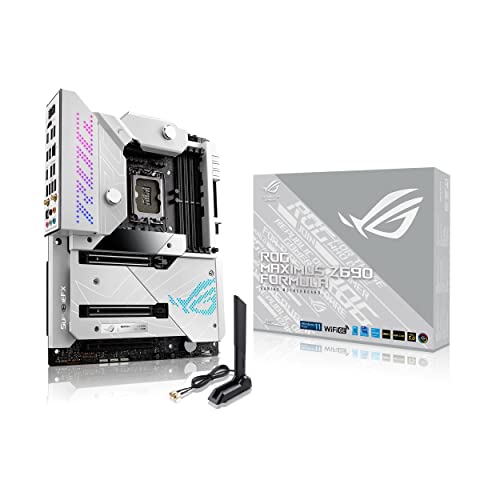
- 20+1 power stages rated for 105 A
- EK CrossChill III VRM solution
- Verify i9-14900K BIOS support
Best For: Custom-cooled builds with confirmed CPU compatibility
CPU-and-Board Bundle Pick
i9-14900K + TUF Gaming Z790-Plus WiFi

- Includes 24-core i9-14900K
- 16+1 DrMOS motherboard power design
- Four M.2 slots and Wi-Fi 6
Best For: Buyers needing both CPU and Z790 motherboard
VRM Cooling Pick
ASUS ROG Strix Z790-H Gaming WiFi

- 16+1 power stages rated at 80A
- Heatpipe-linked VRM heatsinks
- Four heatsink-equipped PCIe 4.0 M.2 slots
Best For: Builders prioritizing VRM cooling and M.2 capacity
Connectivity-Focused Pick

- Twin 12+1+1-phase digital VRM
- Wi-Fi 6E and 2.5GbE
- Three M.2 slots with Thermal Guard
Best For: DDR5 builds needing onboard networking and setup features
Modern Connectivity Pick – MSI MAG Z790 Tomahawk MAX WiFi
Among overclocking motherboards for i9 14900k builds, the MSI MAG Z790 Tomahawk MAX WiFi is a practical choice if you want stated 14th-gen support and current-generation connectivity. Its 16+1+1 mirrored power arrangement and dual 8-pin CPU connectors provide a substantial foundation for a high-end build.
Best For: Builders who want a Z790 board with DDR5 overclocking support, Wi-Fi 7, and PCIe 5.0 connectivity.
Pros:
- Explicit support for 14th-gen Intel Core processors on LGA 1700.
- DDR5 support rated up to 7800+ MHz (OC).
- PCIe 5.0 slot, Gen 5 M.2 support, Wi-Fi 7, and 2.5Gbps LAN.
- Extended heatsink design and M.2 Shield Frozr help address component cooling.
Cons:
- Reaching the advertised DDR5 overclocking speed depends on the memory kit and system configuration.
- It is a motherboard-only purchase; the i9-14900K is not included.
Choose this board if you value a well-rounded mix of power delivery, cooling hardware, and newer networking. The listed overclocked memory ceiling is a capability target, not a guarantee for every build.
Custom-Loop Feature Pick – ASUS ROG Maximus Z690 Formula
The ASUS ROG Maximus Z690 Formula stands out among overclocking motherboards for i9 14900k shoppers interested in extensive tuning and liquid-cooling features. However, its supplied specifications explicitly state readiness for 12th-gen processors, not the i9-14900K, so verify 14th-gen CPU support and the required BIOS before buying.
Best For: Experienced builders who can confirm CPU compatibility and want a feature-rich board for a custom-cooled setup.
Pros:
- 20+1 teamed power stages rated for 105 A, with ProCool II connectors.
- AI Overclocking and AI Cooling tools offer configuration assistance.
- EK CrossChill III VRM cooling solution and ROG Water-Cooling Zone cater to liquid-cooled builds.
- Wi-Fi 6E, 10Gb Ethernet, DDR5, and PCIe 5.0 support.
Cons:
- The provided notes do not confirm i9-14900K support or the BIOS version needed for it.
- Its specialized water-cooling features may be unnecessary for a simpler air-cooled build.
This is the most specialized option here for builders drawn to onboard tuning tools and water-cooling hardware. Treat compatibility confirmation as a prerequisite, rather than assuming that an LGA 1700 socket alone establishes 14900K readiness.
CPU-and-Board Bundle Pick – i9-14900K + TUF Gaming Z790-Plus WiFi
If you are comparing overclocking motherboards for i9 14900k and still need the processor, this Micro Center bundle pairs the i9-14900K with an ASUS TUF Gaming Z790-Plus WiFi. The board’s 16+1 DrMOS power design, VRM heatsink, and Fan Xpert 4 utility give you a documented starting point for configuring a high-performance system.
Best For: Buyers who need both the i9-14900K and a matching Z790 motherboard in one purchase.
Pros:
- Includes the 24-core, 32-thread i9-14900K and a Z790 DDR5 motherboard.
- 16+1 DrMOS, ProCool sockets, and a VRM heatsink support the board’s power and thermal design.
- Four M.2 slots and a PCIe 5.0 SafeSlot provide expansion options.
- Wi-Fi 6 and 2.5Gb LAN cover wireless and wired networking.
Cons:
- The bundle fixes your motherboard choice if you would rather select a different board.
- Wi-Fi 6 is an older wireless standard than the Wi-Fi 7 listed for the MSI board above.
The main appeal is straightforward: the processor and motherboard are packaged together. Compare the bundle against buying the components separately, and plan adequate cooling for the i9-14900K.
VRM Cooling Pick – ASUS ROG Strix Z790-H Gaming WiFi
Among overclocking motherboards for i9 14900k builds, the ASUS ROG Strix Z790-H stands out for its 16+1 power stages rated at 80A and substantial VRM cooling. Its LGA 1700 socket supports 14th-generation Intel Core processors, while four DDR5 slots leave room to configure your memory.
Best For: Builders prioritizing power delivery, VRM cooling, and multiple cooled M.2 slots.
Pros:
- 16+1 80A power stages and dual ProCool II power connectors.
- Large VRM heatsinks linked by a heatpipe.
- Four PCIe 4.0 M.2 slots with heatsinks; the top slot adds a backplate.
- PCIe 5.0 x16 slot and rear and front USB 3.2 Gen 2×2 Type-C connections.
Cons:
- Its four M.2 slots are PCIe 4.0, not PCIe 5.0.
- Maximum memory capacity is listed as 128GB.
This is the stronger fit of the two if power-stage specifications and heatsink coverage drive your choice. The supplied specifications do not establish a guaranteed CPU overclock, so plan your cooling and settings accordingly.
Connectivity-Focused Pick – GIGABYTE Z790 Eagle AX
The GIGABYTE Z790 Eagle AX is an option among overclocking motherboards for i9 14900k builds when you want a Z790 board with DDR5, a digital VRM design, and built-in networking. Its LGA 1700 socket supports 14th-generation Intel Core processors, and the listed features include Wi-Fi 6E and 2.5GbE.
Best For: Builders seeking a DDR5 Z790 board with onboard networking and straightforward installation features.
Pros:
- Twin 12+1+1-phase digital VRM design with enlarged MOSFET heatsinks.
- Three M.2 slots and an M.2 Thermal Guard.
- PCIe 5.0 support, Wi-Fi 6E, and 2.5GbE.
- Q-Flash and EZ-Latch features are listed for setup and installation.
Cons:
- Has three M.2 slots rather than the ASUS board’s four.
- The supplied specifications do not state a CPU overclocking result.
Choose this board if its networking and setup features matter alongside the VRM specifications. For an i9-14900K overclock, treat the listed phase design as a starting point—not a promise of a particular clock speed.
How We Picked the Best Overclocking Motherboards for I9 14900k
We focused on LGA 1700 boards with Z-series chipsets, which allow CPU multiplier overclocking on the unlocked i9-14900K. Our priorities were power delivery and VRM cooling, BIOS and memory-tuning options, connectivity, and overall value. The selection includes one CPU-and-motherboard bundle; compare its total price against buying the same parts separately. Motherboard specifications alone cannot guarantee a particular clock speed.
Quick Comparison
- MSI MAG Z790 Tomahawk MAX WiFi: A balanced standalone Z790 choice for buyers who want strong everyday features without moving to a flagship board.
- ASUS ROG Maximus Formula Z690: An enthusiast option with extensive tuning features; check its BIOS revision for 14th-gen support before installation.
- Micro Center i9-14900K + TUF Gaming Z790-Plus WiFi bundle: Best considered when the combined price beats separate purchases.
- ASUS ROG Strix Z790-H Gaming WiFi: A gaming-focused Z790 alternative for buyers who value ASUS tuning controls and DDR5 support.
- GIGABYTE Z790 Eagle AX: A more budget-conscious entry point for moderate overclocking and core connectivity.
Key Buying Factors for Overclocking Motherboards for I9 14900k
Power Delivery and Cooling
A capable VRM and adequate heatsinks matter most during long, power-heavy workloads. Phase counts alone do not establish VRM quality: component design, heatsink size, and airflow matter too. Plan for a high-performance CPU cooler and good case ventilation, especially if you intend to raise power limits. The board cannot compensate for inadequate CPU cooling.
BIOS Support and Tuning
Z790 boards are the more straightforward starting point, but verify that the specific board and BIOS revision support the i9-14900K. This is especially important for the Z690 Formula, which may require a BIOS update. Check the manufacturer’s CPU support list and whether BIOS FlashBack or an equivalent feature is available if an update is needed before the CPU can boot. Look for accessible voltage, power-limit, and load-line settings if you plan to tune manually.
Memory, Expansion, and Price
All five choices target DDR5 systems, but advertised peak memory speeds are not guaranteed with every kit. Check the board’s memory compatibility list and prioritize a stable kit over a headline frequency. Confirm M.2 slot placement, PCIe lane sharing, rear USB, networking, and case clearance against your build. Spend extra on features you will use rather than an overbuilt specification sheet.
Who Should Buy Which Overclocking Motherboards for I9 14900k?
Choose the Tomahawk MAX WiFi for a balanced build or the Z790-H if you prefer its ASUS feature set. Consider the Z790 Eagle AX when cost is the priority and your overclocking goals are modest. The Z690 Formula suits enthusiasts willing to verify BIOS support and pay for its premium platform features. Pick the Micro Center bundle only after checking its current price and the exact included board. For any of these Overclocking Motherboards for I9 14900k, set realistic expectations: cooling, chip variation, and power limits will shape your results as much as the motherboard.
