
OLED reference monitors deliver exceptional contrast, near-instant response times, and rich color, but the right model depends on your workflow, resolution needs, connectivity, and tolerance for burn-in risk.
Our 2026 shortlist covers professional 4K displays, high-refresh QD-OLED gaming monitors, ultrawide screens, and a portable OLED option so you can match performance to your desk and budget.
Best 10 OLED Reference Monitors Picks for 2026
Best Professional 32-Inch Pick

- 31.5-inch 4K QD-OLED with 240Hz refresh
- Delta E < 1 accuracy and true 10-bit color
- Thunderbolt 4 and five-year warranty
Best For: Professional creators needing a large, accurate 4K OLED display
Best Curved Gaming Value

- 32-inch 4K QD-OLED with 165Hz refresh
- 0.03ms response time and G-SYNC compatibility
- HDMI 2.1 plus USB-C connectivity
Best For: Gamers wanting immersive 4K OLED performance and flexible inputs
Best Compact ProArt Display

- 26.5-inch 4K QD-OLED at 240Hz
- Delta E < 1 accuracy and wide gamut coverage
- Thunderbolt 4 with up to 96W power delivery
Best For: Mac-based creators needing a compact, accurate professional monitor
Best QHD High-Refresh Option

- 27-inch QHD QD-OLED with 240Hz refresh
- 0.03ms response time and FreeSync Premium
- Glare Free screen with OLED Safeguard
Best For: Competitive gamers seeking fast, compact QD-OLED performance
Balanced QD-OLED Pick
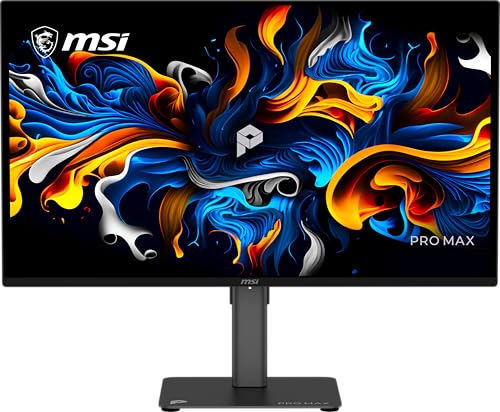
- 27-inch QHD QD-OLED panel with 144Hz refresh rate
- PANTONE Validated with Delta E≤2 color performance
- 3-year burn-in warranty and adjustable stand
Best For: Color-conscious work, gaming, and general desktop use
Portable 4K OLED Choice

- 16-inch 4K OLED display for sharp mobile viewing
- 1.5-pound, 0.6-inch-thick portable design
- USB-C connectivity with 60W two-way power
Best For: Traveling professionals and laptop-based creative work
High-Refresh Gaming Reference

- 27-inch QHD OLED panel with 240Hz refresh rate
- 0.03ms response time and adaptive-sync support
- HDMI 2.1, DisplayPort, and OLED care features
Best For: Competitive gaming on PC or next-generation consoles
Best Ultrawide OLED Reference Monitor

- 49-inch 5120 x 1440 QD-OLED display
- 144Hz refresh rate with 32:9 ultrawide format
- 90W USB-C power delivery and PIP/PBP
Best For: Creators and multitaskers who want a single expansive display
Best High-Refresh OLED Reference Monitor

- 27-inch WQHD QD-OLED with 240Hz refresh
- 0.03ms response time and 99% DCI-P3 coverage
- HDMI 2.1, OLED Care 2.0, and three-year warranty
Best For: Competitive gamers seeking fast, color-rich OLED performance
Best Value OLED Reference Monitor

- 27-inch QHD QD-OLED with HDR400 True Black
- 240Hz refresh rate and 0.03ms response time
- G-SYNC Compatible Adaptive-Sync and three-year warranty
Best For: Gamers and editors wanting compact high-speed OLED performance
Best Professional 32-Inch Pick – ASUS ProArt PA32UCDM
The ASUS ProArt PA32UCDM is a strong choice for OLED reference monitors when accurate color, HDR support, and high-speed performance matter. Its 31.5-inch 4K QD-OLED panel combines 240Hz refresh, 0.1ms response time, true 10-bit color, and Delta E < 1 accuracy for demanding creative and visual workflows.
Best For: Professional photo and video editing, Mac users, and creators who want a large 4K OLED display with extensive calibration and HDR support.
Pros:
- 4K QD-OLED panel with 240Hz refresh rate and 0.1ms response time
- 100% sRGB, 99% DCI-P3, and BT.2020 coverage with true 10-bit color
- Thunderbolt 4 connectivity, Calman Ready certification, and hardware calibration
- Five-year warranty with online registration
Cons:
- Its professional feature set may be more than needed for basic office use
- Only one HDMI port is listed
Choose this model if color accuracy and workflow integration take priority over simplicity. Dolby Vision, HLG, and HDR10 support further broaden its usefulness for professional HDR work.
Best Curved Gaming Value – MSI MAG 321CUP QD-OLED
The MSI MAG 321CUP QD-OLED brings OLED reference monitors into a more gaming-focused setup, pairing a 32-inch 4K curved panel with 165Hz refresh and an exceptionally fast 0.03ms response time. Its 10-bit color, 99% DCI-P3 coverage, and DisplayHDR True Black 400 certification add useful visual depth beyond speed alone.
Best For: PC and console gamers who want 4K QD-OLED contrast, high refresh performance, and flexible modern connectivity.
Pros:
- 32-inch 4K QD-OLED display with 165Hz refresh rate
- 0.03ms response time, ClearMR 9000 rating, and G-SYNC compatibility
- HDMI 2.1, DisplayPort 1.4a, and USB-C with 15W power delivery
- OLED Care 2.0 and fanless graphene heatsink support panel durability
Cons:
- Curved screen may not suit users who prefer a flat reference display
- USB-C power delivery is limited to 15W
- Its gaming-oriented design is less focused on professional calibration tools
This is a practical pick for buyers who want OLED contrast and wide-gamut color without giving up gaming responsiveness. The 1700R curve and gaming software make it especially suited to immersive play.
Best Compact ProArt Display – ASUS ProArt PA27UCDMR
The ASUS ProArt PA27UCDMR is a compact option among OLED reference monitors, delivering 4K resolution and 240Hz performance on a 26.5-inch QD-OLED panel. It combines Delta E < 1 color accuracy, true 10-bit color, broad gamut coverage, and professional connectivity in a desk-friendly format.
Best For: Mac-compatible creative setups, photo and video editors, and professionals who need accurate 4K OLED performance in a smaller footprint.
Pros:
- 4K QD-OLED panel with 240Hz refresh and 0.1ms response time
- 100% sRGB, 99% DCI-P3, and Rec. 2020 coverage with true 10-bit color
- Dual Thunderbolt 4 ports with up to 96W power delivery
- Height, tilt, and pivot adjustment plus a five-year warranty
Cons:
- Smaller screen size may be less comfortable for expansive timelines
- Dolby Vision support is scheduled for a 2026 Q2 firmware update
Its combination of compact dimensions, calibration support, and Thunderbolt connectivity makes it particularly appealing for Mac-centered workstations. It also includes a pre-calibration report and useful cables for a more complete professional setup.
Best QHD High-Refresh Option – Samsung Odyssey OLED G6
The Samsung Odyssey OLED G6 offers a more accessible gaming format for shoppers comparing OLED reference monitors, using a 27-inch QD-OLED panel with QHD resolution, 240Hz refresh, and a 0.03ms response time. Glare Free technology, HDR10, and Pantone Validation support a clear and colorful gaming image.
Best For: Competitive gamers who prioritize very high refresh rates, fast response, and a compact 27-inch display over 4K resolution.
Pros:
- 240Hz refresh rate and 0.03ms response time
- QD-OLED contrast with HDR10 and a 1,000,000:1 contrast ratio
- Glare Free screen and OLED Safeguard technology
- Height-adjustable stand with pivot, tilt, and swivel movement
Cons:
- QHD resolution is lower than the 4K models in this roundup
- Connectivity is limited to DisplayPort and HDMI in the supplied specifications
- Designed primarily for gaming rather than professional color calibration
The Odyssey OLED G6 makes sense when motion clarity and competitive responsiveness matter more than maximum pixel density. Its ergonomic stand and reduced glare add practical value for long gaming sessions.
Balanced QD-OLED Pick – MSI PRO MAX 271QPX14G
For shoppers comparing OLED reference monitors, the MSI PRO MAX 271QPX14G combines a 27-inch QHD QD-OLED panel with a 144Hz refresh rate, adaptive sync, and color validation. Its matte finish and adjustable stand make it a practical choice for mixed work, creative, and gaming setups.
Best For: Users seeking a color-focused QD-OLED monitor with strong everyday versatility.
Pros:
- QD-OLED technology delivers high-contrast imagery and a 0.03ms response time.
- PANTONE Validated color performance with Delta E≤2 helps support color-conscious work.
- HDR curve customization and Uniform Luminance support a more consistent HDR experience.
- Includes a 3-year burn-in warranty and height-adjustable stand.
Cons:
- Its 2560 x 1440 resolution is lower than 4K alternatives.
- The 144Hz refresh rate is less suited to buyers prioritizing the highest gaming refresh rates.
The MSI stands out as a well-rounded OLED reference monitor for buyers who value validated color, HDR controls, and burn-in coverage without moving to a 4K panel.
Portable 4K OLED Choice – ViewSonic VX1655-4K-OLED
The ViewSonic VX1655-4K-OLED brings OLED contrast and 4K detail to a lightweight mobile format. Among OLED reference monitors, it is especially useful when you need a second screen for a laptop, creative work, or travel without carrying a full-size desktop display.
Best For: Remote workers, creators, and travelers who need a compact 4K OLED display.
Pros:
- 3840 x 2160 resolution provides sharp 4K UHD detail on a 16-inch screen.
- At 1.5 pounds and 0.6 inches thick, it is easy to carry.
- USB-C supports single-cable connectivity with 60W two-way power.
- Integrated stand supports portrait and landscape orientations, and a protective cover is included.
Cons:
- The 60Hz refresh rate is not designed for high-refresh competitive gaming.
- The 16-inch workspace is smaller than conventional desktop monitors.
- Its compact format may require USB-C or mini-HDMI adapters depending on the device.
This ViewSonic is a strong portability-first option: it trades desktop scale and refresh rate for 4K OLED clarity, low weight, and flexible laptop connectivity.
High-Refresh Gaming Reference – LG 27GX704A-B UltraGear OLED
For buyers who want OLED reference monitors with gaming-first speed, the LG 27GX704A-B pairs a glossy 27-inch QHD OLED panel with a 240Hz refresh rate and 0.03ms response time. It also adds HDR True Black 400, broad adaptive-sync support, and HDMI 2.1 connectivity.
Best For: Competitive PC and console gamers who prioritize motion clarity and OLED contrast.
Pros:
- 240Hz refresh rate and 0.03ms response time support fast, smooth gameplay.
- OLED contrast reaches a listed 1.5M:1 ratio, with VESA DisplayHDR True Black 400.
- Supports NVIDIA G-SYNC Compatible and AMD FreeSync Premium Pro.
- Dual HDMI 2.1 ports, DisplayPort, USB connectivity, and adjustable height, tilt, swivel, and pivot.
Cons:
- The glossy finish may reflect more ambient light than a matte display.
- Its QHD resolution is below 4K.
- Brightness is listed at 275 nits standard, despite higher peak HDR output.
The LG is the most gaming-oriented option here, offering the fastest refresh rate and extensive gaming connectivity while retaining OLED blacks and HDR detail.
Best Ultrawide OLED Reference Monitor – INNOCN 49Q1R QD-OLED
For creators who need substantial screen space, the INNOCN 49Q1R is a compelling option among OLED reference monitors. Its 49-inch QD-OLED panel combines a 5120 x 1440 resolution, 32:9 aspect ratio, 144Hz refresh rate, and 1800R curve, making it suited to wide timelines, multitasking, and immersive entertainment.
Best For: Content creators, multitaskers, and users who want one ultrawide display for work and gaming.
Pros:
- Large 49-inch 5120 x 1440 QD-OLED display with a 32:9 aspect ratio
- USB-C connectivity with 90W power delivery, plus HDMI 2.1 and DisplayPort 1.4
- PIP/PBP support helps display content from two input sources
- Height, tilt, and swivel adjustments support flexible positioning
Cons:
- Its very wide footprint may not suit smaller desks
- 144Hz refresh rate is lower than the 240Hz rate offered by the 27-inch alternatives
- HDR brightness is listed at 250 cd/m², with DisplayHDR 400 support
The INNOCN stands out when workspace and connectivity matter more than compact size or the fastest gaming refresh rate. Its dual-QHD canvas and split-screen features make it especially practical for demanding desktop workflows.
Best High-Refresh OLED Reference Monitor – MSI MAG 274QP QD-OLED X24
The MSI MAG 274QP QD-OLED X24 is aimed at buyers who want fast gaming performance without giving up OLED contrast and broad color coverage. Its 27-inch WQHD Quantum Dot OLED panel delivers 240Hz, a listed 0.03ms response time, 10-bit color, and 99% DCI-P3 coverage.
Best For: Competitive gamers and users who prioritize motion clarity, accurate color, and modern PC or console connectivity.
Pros:
- 240Hz refresh rate and 0.03ms response time support responsive gameplay
- 10-bit Quantum Dot OLED panel supports 1.07 billion colors and 99% DCI-P3 coverage
- HDMI 2.1 and DisplayPort 1.4a support WQHD at 240Hz
- OLED Care 2.0, a graphene heatsink, and a three-year warranty add practical protection features
Cons:
- Its 27-inch 16:9 format provides less workspace than the ultrawide model
- Designed primarily for gaming rather than broad business or productivity use
- The glossy finish may be less suitable for brightly lit rooms
With its combination of QD-OLED color, very high refresh rate, and adaptive-sync support, the MSI is the strongest fit here for speed-focused users. Its built-in OLED care tools also make it a more considered choice for frequent gaming use.
Best Value OLED Reference Monitor – AOC Q27GAZD QD-OLED
The AOC Q27GAZD offers a focused mix of QHD resolution, QD-OLED contrast, and high-speed performance. As OLED reference monitors go, its 27-inch panel is well suited to gaming and photo or video editing, with 240Hz refresh, a listed 0.03ms response time, HDR400 True Black, and broad stated color coverage.
Best For: Gamers and editing-focused users who want a compact QHD QD-OLED display with strong color and motion performance.
Pros:
- QHD QD-OLED panel provides deep blacks and HDR400 True Black support
- 240Hz refresh rate and 0.03ms response time are suited to fast gameplay
- Stated color coverage reaches 147.6% sRGB and 110.2% DCI-P3
- G-SYNC Compatible Adaptive-Sync helps reduce tearing and stuttering
Cons:
- Only one HDMI port is listed in the supplied specifications
- Its 27-inch 16:9 screen offers less multitasking room than a 49-inch ultrawide
- The glossy finish can reflect ambient light
The AOC is a practical choice for buyers who want the core benefits of QD-OLED in a conventional 27-inch format. It balances high refresh performance with strong stated color coverage and includes a three-year manufacturer warranty.
How We Picked These OLED Reference Monitors
We selected models across professional content creation, gaming, hybrid work, and mobile use. Our evaluation focuses on panel type, resolution, refresh rate, HDR capability, response time, adaptive sync, connectivity, ergonomics, and compatibility with modern PCs and Macs. We also considered practical differences between 4K OLED, QHD OLED, QD-OLED, ultrawide, and portable designs.
Specifications can vary by region or firmware, so verify the manufacturer’s current listing before purchasing. OLED displays can also require sensible brightness management and pixel-care features during long desktop sessions.
Quick Comparison
| Best For | Recommended Type | What to Prioritize |
|---|---|---|
| Color-critical 4K production | Professional 4K OLED | Accurate factory calibration, HDR performance, connectivity |
| Competitive gaming | High-refresh QHD OLED | 240Hz refresh rate, low latency, adaptive sync |
| Premium gaming and creative work | 4K QD-OLED | Sharpness, contrast, HDMI 2.1, wide color gamut |
| Multitasking | 49-inch ultrawide OLED | Workspace width, curvature, split-screen support |
| Travel or laptop use | Portable 4K OLED | Weight, USB-C power and video, protective design |
Key Buying Factors for OLED Reference Monitors
Resolution and Screen Size
Choose 4K when you need a detailed editing workspace, crisp text, or accurate inspection of high-resolution footage. QHD is easier to drive at very high frame rates and often offers better value for gaming. A 27-inch QHD panel is compact and sharp enough for most desks, while 32-inch 4K models provide more room for timelines, palettes, and full-resolution previews.
Color, HDR, and Calibration
For professional work, look beyond contrast. Check factory calibration, color-space coverage, Delta E claims, bit depth, HDR certification, and whether the monitor provides useful picture modes or hardware calibration. QD-OLED panels can offer especially vivid wide-gamut color, but accurate workflow settings still matter.
Refresh Rate and Motion
Refresh rates from 144Hz to 240Hz make scrolling and games noticeably smoother. A high refresh rate is valuable for gaming and responsive creative interfaces, but it should not outweigh color accuracy or resolution if your main work is photography, video, or design.
Ports, Ergonomics, and OLED Care
USB-C with power delivery is particularly useful for MacBooks and laptops. HDMI 2.1 matters for newer consoles and high-refresh 4K sources, while DisplayPort is important for desktop PCs. Look for height, tilt, swivel, and VESA support. To reduce burn-in risk, enable pixel-shift and panel-care features, avoid leaving static elements at maximum brightness, and use sleep timers.
Who Should Buy Which OLED Reference Monitors?
Choose a Professional 4K OLED If…
You edit photos or video, design for HDR, or need a display built around color accuracy and detailed 4K work. The ASUS ProArt options are the most workflow-focused choices in this group.
Choose a QHD QD-OLED If…
You primarily game but still want outstanding contrast and color. The Samsung, MSI, LG, and AOC models suit fast-paced play, with refresh rates and adaptive-sync support taking priority over maximum pixel density.
Choose a 4K QD-OLED If…
You want one premium display for PC gaming, console use, and general creative work. A 32-inch 4K model offers a strong balance of sharpness, immersive size, and high-end HDR potential.
Choose an Ultrawide or Portable OLED If…
Pick the 49-inch ultrawide for side-by-side applications and expansive gaming views. Choose the portable 16-inch display when laptop mobility, USB-C convenience, and a compact 4K workspace matter most.
