
The best OLED reference monitors for home offices combine deep contrast, accurate color, sharp resolution, and the connectivity needed for modern desks. This roundup includes professional displays alongside gaming-focused OLED monitors that can also handle demanding creative and productivity work.
Because “reference” can mean different things across editing, design, coding, and gaming, compare panel resolution, calibration, brightness, text clarity, burn-in protections, and ergonomics before choosing.
Best 10 OLED Reference Monitors for Home Offices Picks for 2026
Best Overall
ASUS ProArt Display 27-inch 4K QD-OLED

- 4K QD-OLED with 100% sRGB and 99% DCI-P3
- Calman Verified, Delta E below 1.5
- USB-C with 96W charging and Auto KVM
Best For: Creative home-office setups needing accurate color and flexible connectivity
Best for Gaming
Samsung Odyssey OLED G6 27-inch QHD

- 240Hz refresh rate with 0.03ms response time
- QD-OLED panel with HDR10 and Pantone Validation
- OLED Safeguard and Glare Free technology
Best For: Gaming-focused home offices that also need a capable everyday display
Best 4K Value
MSI PRO MAX 27-inch 4K QD-OLED
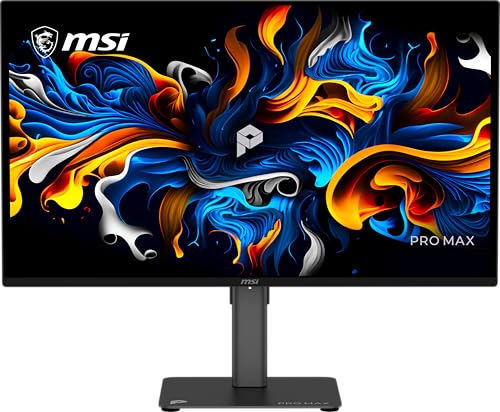
- 4K QD-OLED with Delta E below 2
- 120Hz refresh rate with Adaptive-Sync
- USB-C, built-in speakers, and height adjustment
Best For: Mixed productivity and creative work where 4K detail matters
Best Ultrawide
Samsung Odyssey OLED G9 49-inch Dual QHD

- 49-inch 32:9 screen with 5120 × 1440 resolution
- QD-OLED contrast with 144Hz and 0.03ms response
- Picture-in-Picture and burn-in-focused safeguards
Best For: Large desks needing one display for multitasking, editing, and gaming
Balanced Desk Upgrade
Dell 32 Plus 4K QD-OLED Monitor

- 31.6-inch 4K QD-OLED with 99% DCI-P3
- USB-C power delivery up to 90W
- Built-in spatial-audio speaker system
Best For: Large, color-rich home-office setups
Professional Color Control

- True 10-bit color and 99% DCI-P3 coverage
- Integrated colorimeter for hardware calibration
- Thunderbolt 4 and 12G SDI connectivity
Best For: Color-critical creative professionals
High-Speed Hybrid Setup

- 27-inch 4K QD-OLED with 240Hz refresh
- USB-C power delivery up to 98W
- Glare Free viewing and OLED Safeguard+
Best For: Home offices that double as gaming setups
Best Ultrawide HDR Pick

- 34-inch UWQHD QD-OLED display
- 280Hz refresh and 0.03ms response
- DisplayHDR True Black 500 with 1300-nit peak brightness
Best For: Ultrawide multitasking, gaming, and HDR media
Best Compact QD-OLED Value

- 27-inch WQHD QD-OLED panel
- 10-bit color with 99% DCI-P3 coverage
- 240Hz refresh and adjustable stand
Best For: Compact home-office setups needing color and speed
Best 4K Dual-Mode Option

- 32-inch 4K OLED display
- 4K 240Hz or Full HD 480Hz dual mode
- 1300-nit peak brightness and USB-C
Best For: Detailed office work plus competitive gaming
Best Overall – ASUS ProArt Display 27-inch 4K QD-OLED
For home offices that combine creative work, productivity, and occasional gaming, the ASUS ProArt Display PA279CDV is a strong choice among OLED reference monitors for home offices. Its 4K QD-OLED panel, factory calibration, wide color coverage, and USB-C connectivity make it especially practical for photo and video workflows.
Best For: Creative professionals who want accurate color, high resolution, and one-cable laptop connectivity.
Pros:
- 4K QD-OLED panel with 100% sRGB, 99% DCI-P3, and true 10-bit color
- Calman Verified factory calibration with Delta E below 1.5
- USB-C provides up to 96W Power Delivery, with Auto KVM for two computers
- 120Hz refresh rate, HDR10, and a fully adjustable ergonomic stand
Cons:
- Its professional feature set may be more than basic office users need
- 27-inch screen size offers less workspace than an ultrawide display
The PA279CDV is the most reference-oriented option in this group, pairing detailed 4K output with strong color credentials and useful home-office features. It is a particularly well-rounded fit for Mac users and anyone switching between a work laptop and desktop.
Best for Gaming – Samsung Odyssey OLED G6 27-inch QHD
The Samsung Odyssey OLED G6 is a gaming-first pick for home offices where fast play matters as much as everyday screen quality. As OLED reference monitors for home offices go, it emphasizes smooth motion with a 240Hz refresh rate while retaining QD-OLED contrast, HDR10 support, and Pantone Validated color.
Best For: Home-office users who want a high-refresh gaming monitor that can also handle general desktop work.
Pros:
- 240Hz refresh rate and 0.03ms response time for responsive gameplay
- QD-OLED contrast with HDR10 and a wide color range
- Pantone Validated reproduction of more than 2,100 colors and 110 skin tones
- OLED Safeguard, Glare Free technology, and an adjustable stand
Cons:
- QHD resolution provides less workspace detail than the 4K options
- Its gaming-focused design may be less suitable for color-critical professional work
The G6 makes the most sense when gaming performance is a priority. Its QHD resolution is less demanding than 4K, while 240Hz motion and adaptive sync provide a clear advantage for fast games.
Best 4K Value – MSI PRO MAX 27-inch 4K QD-OLED
The MSI PRO MAX 271UPX12G delivers a practical mix of 4K sharpness, OLED contrast, and productivity-friendly ergonomics. For shoppers comparing OLED reference monitors for home offices, its Delta E below 2 rating, DisplayHDR True Black 400 certification, and Mac optimization make it a versatile choice for desktop and creative use.
Best For: Users seeking a sharp 4K OLED monitor for productivity, editing, and entertainment without prioritizing maximum refresh rate.
Pros:
- 3840 × 2160 QD-OLED resolution with deep blacks and high contrast
- Delta E below 2 and DisplayHDR True Black 400 for color-conscious work
- 120Hz refresh rate with Adaptive-Sync and FreeSync Premium Pro
- USB-C, height adjustment, built-in speakers, and eye-care features
Cons:
- USB-C Power Delivery is limited to 15W
- It offers fewer high-end workflow features than the ASUS, such as Auto KVM
This MSI is a balanced 4K option for a home office that serves several roles. It provides useful color accuracy and modern connectivity, though laptop users should not expect USB-C to replace a full-power charger.
Best Ultrawide – Samsung Odyssey OLED G9 49-inch Dual QHD
The Samsung Odyssey OLED G9 is built for users who want one expansive screen instead of a multi-monitor setup. Its 49-inch 32:9 curved panel gives home offices an unusually broad workspace, making it a distinctive option among OLED reference monitors for home offices, especially for multitasking and timeline-based work.
Best For: Multitaskers, editors, and gamers who want a very wide desktop with room for multiple applications.
Pros:
- 49-inch Dual QHD resolution provides a broad 5120 × 1440 workspace
- QD-OLED delivers deep blacks, vivid color, and a 1,000,000:1 contrast ratio
- 144Hz refresh rate and 0.03ms response time support smooth gaming
- Picture-in-Picture, adaptive sync, and burn-in-focused safeguards add flexibility
Cons:
- Its 49-inch footprint requires substantial desk space
- High power consumption is listed at 220W
- It is less conventionally suited to reference work than the 4K professional models
The G9 is a workspace replacement rather than a typical monitor. Choose it when side-by-side windows, immersive gaming, or a single-screen setup matter more than compact dimensions and conventional 4K density.
Balanced Desk Upgrade – Dell 32 Plus 4K QD-OLED Monitor
For home offices that need vivid color, sharp text, and convenient connectivity, the Dell 32 Plus is a strong option among OLED reference monitors for home offices. Its 31.6-inch 4K QD-OLED panel pairs a 120Hz refresh rate with a matte finish, while USB-C connectivity can deliver up to 90W of power to a compatible laptop.
Best For: Home-office users who want a large, color-rich display with built-in audio and one-cable USB-C connectivity.
Pros:
- 4K QD-OLED image with 99% DCI-P3 coverage, Dolby Vision, and DisplayHDR True Black 400.
- USB-C supports up to 90W power delivery for a cleaner laptop setup.
- Height, tilt, swivel, and slant adjustments support flexible desk positioning.
- Five 5W speakers add AI-enhanced spatial audio with head tracking.
Cons:
- Its 120Hz refresh rate is lower than the 240Hz rate offered by the other monitors here.
- The 31.6-inch footprint may require a larger desk.
The Dell is the practical all-rounder in this group. It emphasizes comfortable everyday productivity, strong HDR-capable color, integrated sound, and a simple USB-C desk connection rather than specialized professional calibration features.
Professional Color Control – ASUS ProArt PA27USD 4K OLED
The ASUS ProArt PA27USD is the most specialized choice among OLED reference monitors for home offices. Its 26.5-inch 4K QD-OLED panel combines true 10-bit color, broad gamut coverage, hardware calibration, and an integrated colorimeter for users who need repeatable color performance.
Best For: Color-critical creative work, Mac-based workflows, and professionals who need calibration tools and extensive connectivity.
Pros:
- True 10-bit color with 99% DCI-P3 and BT.2020 gamut support.
- Integrated colorimeter enables self and automatic calibration, with profile write-back.
- 4K QD-OLED panel offers up to 240Hz, 0.1ms GTG response, and 1000-nit peak brightness.
- Includes Thunderbolt 4, HDMI 2.1, DisplayPort 2.1, USB, and professional 12G SDI connectivity.
Cons:
- Its professional feature set may be excessive for general office tasks.
- The 26.5-inch screen is smaller than Dell’s 31.6-inch display.
Choose the ProArt when color consistency matters more than simplicity. The integrated calibration hardware, supplied hood, broad HDR support, and five-year warranty make it particularly compelling for editing and production work performed at home.
High-Speed Hybrid Setup – Samsung Odyssey OLED G8 4K
The Samsung Odyssey OLED G8 brings gaming-oriented speed to the category of OLED reference monitors for home offices. Its 27-inch 4K QD-OLED panel delivers 240Hz motion, a 0.03ms response time, glare-free viewing, and USB-C power delivery of up to 98W for a high-performance desk setup.
Best For: Home-office users who split their time between demanding productivity, gaming, and fast-moving visual content.
Pros:
- 4K QD-OLED resolution with 166 PPI for detailed images and text.
- 240Hz refresh rate and 0.03ms response time support exceptionally fluid motion.
- USB-C can provide up to 98W, while DisplayPort 2.1 offers high-bandwidth connectivity.
- Glare Free technology, OLED Safeguard+, and a height-adjustable pivoting stand suit extended desk use.
Cons:
- Its listed intended use is gaming, so it offers fewer dedicated calibration features than the ASUS ProArt.
- The 27-inch panel is less expansive than the Dell’s larger screen.
The Odyssey OLED G8 is the performance-focused pick. It combines sharp 4K output and Pantone Validated color with the fastest refresh rate in this roundup, making it a good fit for a home office that also serves as a gaming station.
Best Ultrawide HDR Pick – MSI MAG 341CQP QD-OLED X28
For home offices that double as entertainment or gaming spaces, the MSI MAG 341CQP QD-OLED X28 is a strong OLED reference monitors for home offices candidate. Its 34-inch ultrawide UWQHD panel, 280Hz refresh rate, and QD-OLED contrast provide an expansive, highly responsive workspace with vivid HDR performance.
Best For: Users who want an ultrawide OLED for multitasking, gaming, and HDR media.
Pros:
- 34-inch 3440 x 1440 ultrawide format supports side-by-side windows.
- 5th-generation QD-OLED panel with RGB Stripe layout is designed for sharper visuals.
- 280Hz refresh rate and 0.03ms response time support exceptionally fluid motion.
- DisplayHDR True Black 500 and up to 1300 nits provide strong HDR capability.
Cons:
- Curved 21:9 design may not suit users who prefer a conventional flat office monitor.
- At 27.6 pounds, it requires a sturdy desk or mounting setup.
- Its gaming-focused specifications may be more than a basic office workflow needs.
The combination of ultrawide workspace, QD-OLED contrast, USB-C connectivity, and adaptive-sync support makes this a versatile premium display. It is especially compelling when one monitor needs to handle productivity and fast-paced gaming.
Best Compact QD-OLED Value – MSI MAG 274QP QD-OLED X24
The MSI MAG 274QP QD-OLED X24 offers a practical 27-inch size for home offices while retaining the deep contrast and rapid response expected from OLED reference monitors for home offices. Its 2560 x 1440 resolution, 10-bit color support, and adjustable stand suit both daily productivity and high-refresh gaming.
Best For: Home-office users seeking a compact QD-OLED display with strong color and gaming performance.
Pros:
- 27-inch WQHD resolution provides a useful balance of workspace and pixel density.
- 10-bit color, 99% DCI-P3 coverage, and Delta E ≤2 support color-focused work.
- 240Hz refresh rate and 0.03ms response time deliver smooth, low-latency motion.
- Height, tilt, swivel, and VESA mounting options improve setup flexibility.
Cons:
- Its 400-nit listed peak brightness is less HDR-oriented than some larger alternatives.
- The 16:9 panel offers less horizontal workspace than an ultrawide monitor.
- Its feature set is heavily oriented toward gaming.
With a manageable footprint and useful ergonomic adjustments, this model is an approachable choice for a mixed work-and-play desk. OLED Care 2.0 and its fanless graphene heatsink add practical durability-focused features for regular use.
Best 4K Dual-Mode Option – LG UltraGear 32GX870A-B
The LG UltraGear 32GX870A-B is a flexible choice for home offices that also serve as gaming rooms. Among OLED reference monitors for home offices, it stands out with a 32-inch 4K panel, a dual-mode option for 240Hz 4K or 480Hz Full HD, USB-C connectivity, and built-in multitasking tools.
Best For: Users who want a large 4K OLED that can switch between detailed work and competitive gaming.
Pros:
- 4K UHD resolution provides a detailed 32-inch workspace.
- Dual-mode operation supports 4K at 240Hz or Full HD at 480Hz.
- Micro Lens Array+ reaches up to 1300 nits peak brightness.
- Adjustable stand, anti-glare finish, USB-C, speakers, and screen-splitting software support versatile setups.
Cons:
- The 32-inch size may require more desk depth than a 27-inch monitor.
- The display is designed primarily as a gaming monitor rather than a dedicated professional reference display.
- The supplied notes specify a 2-year limited warranty, shorter than some competing coverage periods.
This LG is the most adaptable option of the group for users who move between detailed office work, streaming, and fast competitive games. Its OLED Care tools, pixel cleaning, and anti-glare coating also make it easier to integrate into a busy home-office environment.
How We Picked the Best OLED Reference Monitors for Home Offices
We focused on models that offer meaningful advantages for a home-office setup: OLED or QD-OLED contrast, strong resolution, wide-gamut color, useful HDR performance, high refresh rates where relevant, and practical desktop connectivity. Professional models with factory calibration and verification received particular attention, while gaming monitors were included when their image quality, resolution, USB-C support, or multitasking features make them suitable for serious work.
We also considered desk fit, panel size, aspect ratio, stand flexibility, connectivity, and the trade-offs of OLED technology. OLED monitors can deliver outstanding image quality, but static desktop elements make features such as pixel shifting, screen savers, panel maintenance, and warranty coverage especially important.
Quick Comparison
- Best for color-critical work: ASUS ProArt Display PA279CDV and ASUS ProArt PA27USD.
- Best 4K all-rounders: MSI PRO MAX 271UPX12G, Dell S3225QC, Samsung Odyssey OLED G8, and LG 32GX870A-B.
- Best for ultrawide multitasking: Samsung Odyssey OLED G9 or MSI MAG 341CQP.
- Best for fast gaming alongside work: Samsung Odyssey OLED G6, MSI MAG 274QP, Samsung Odyssey OLED G8, and LG UltraGear.
Key Buying Factors for OLED Reference Monitors for Home Offices
Resolution and Text Clarity
For a 27-inch desk monitor, 4K generally produces sharper text and finer interface detail than QHD. A 32-inch 4K display offers more comfortable scaling and workspace, while ultrawide screens are better for side-by-side windows than for maximum pixel density. Check operating-system scaling and your computer’s graphics output before buying.
Color Accuracy and HDR
Look for wide-gamut coverage, low Delta E claims, factory calibration, and professional verification when editing photos, video, or design work. HDR certification and OLED contrast improve highlights and shadows, but sustained brightness can vary by scene and picture mode. If color matching is business-critical, plan to use a colorimeter and a controlled viewing environment.
Connectivity and Ergonomics
USB-C is especially valuable for laptops, but confirm whether it supports video, charging, and the required power level. A 96W connection is more useful for demanding laptops than a lower-wattage port. Also check HDMI and DisplayPort versions, hub features, height adjustment, tilt, swivel, VESA support, and whether the stand fits your desk.
Refresh Rate, Burn-In, and Daily Use
High refresh rates make scrolling and gaming smoother, although they are not essential for office work. OLED buyers should enable automatic protection features, avoid leaving static content onscreen unnecessarily, and review the manufacturer’s burn-in policy. For long daily sessions, glare handling and text rendering may matter as much as contrast.
Who Should Buy Which OLED Reference Monitors for Home Offices?
Choose an ASUS ProArt model if accurate color, calibration, and professional creative workflows are your priorities. Choose the Dell, MSI PRO MAX, Samsung OLED G8, or LG UltraGear for a balanced 4K work-and-play setup. Choose the Odyssey G9 or MSI 34-inch ultrawide if you frequently manage timelines, spreadsheets, research, or multiple applications at once. Choose a QHD gaming model if fast competitive play matters more than maximum desktop sharpness. Whichever display you select, match its resolution and refresh rate to your computer, desk depth, and preferred viewing distance.
