
Choosing among OLED reference monitors for content creators means balancing color accuracy, HDR performance, resolution, connectivity, and workflow speed. The right display can make editing, grading, compositing, and delivery more predictable.
This roundup compares 10 professional and prosumer OLED monitors, including calibrated 4K displays, high-refresh QD-OLED models, and compact broadcast-ready options.
Best 10 OLED Reference Monitors for Content Creators Picks for 2026
Best All-Around Creator Monitor

- 4K QD-OLED with 99% DCI-P3 and Delta E < 1.5
- 120Hz refresh and 0.1ms response time
- 96W USB-C, Auto KVM, and ergonomic stand
Best For: Color-conscious creators using laptops or Macs
Best On-Set Reference Monitor

- Portable 13.3-inch 4K OLED display
- 100% DCI-P3 and 100,000:1 contrast
- 3G-SDI, four HDMI inputs, DP, and quad-split
Best For: Film crews and field production monitoring
Best for Color-Critical Work

- 4K RGB OLED with true 10-bit color
- 99% DCI-P3 and stated E < 1 accuracy
- Includes X-Rite calibrator and five-year warranty
Best For: Professional photo and video color grading
Best High-Refresh Hybrid

- 32-inch 4K QD-OLED with 165Hz refresh
- 0.03ms response and adaptive-sync support
- 98W USB-C and three-year burn-in warranty
Best For: Creators who edit, game, and work on a large screen
Best Overall

- 32-inch 4K QD-OLED with 240Hz refresh
- Delta E < 1 color accuracy and hardware calibration
- Thunderbolt 4, HDR support, and five-year warranty
Best For: Professional photo, video, and HDR content creation
Best for Desk-Friendly Workflows

- 31.6-inch 4K QD-OLED with 120Hz refresh
- USB-C supports up to 90W power delivery
- Built-in AI-enhanced spatial audio and ergonomic stand
Best For: Editing and productivity in a streamlined desktop setup
Best for Broadcast Workflows

- 26.5-inch 4K QD-OLED with 240Hz refresh
- Integrated colorimeter and Delta E < 1 accuracy
- 12G SDI plus dual Thunderbolt 4 connectivity
Best For: Broadcast, video production, and calibration-focused work
Balanced 4K OLED Pick
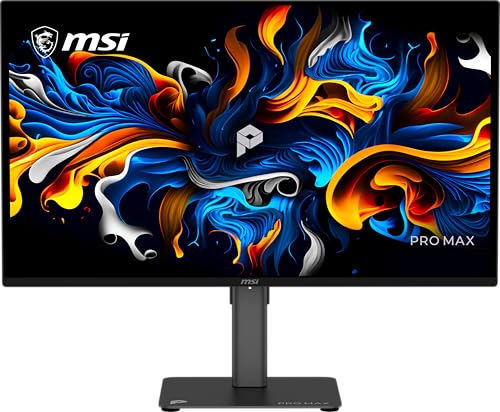
- 27-inch 4K QD-OLED panel with deep blacks
- Delta E < 2 and DisplayHDR True Black 400
- USB-C, HDMI, DisplayPort, and 120Hz refresh rate
Best For: Compact creative desks and mixed editing/productivity use
Professional Calibration Choice

- 31.5-inch 4K OLED panel with true 10-bit color
- Built-in motorized colorimeter and Auto Calibration
- Delta E < 1 target and 99% DCI-P3 coverage
Best For: Color-critical photo, video, and post-production work
Best All-Around Creator Monitor – ASUS ProArt PA279CDV
For creators seeking OLED reference monitors for content creators, the ASUS ProArt PA279CDV combines 4K resolution, 120Hz performance, wide-gamut color, and extensive laptop connectivity in a practical 27-inch design. Its factory calibration and Calman Verified certification make it especially suitable for color-conscious photo and video work.
Best For: Content creators who want accurate 4K OLED color, fast refresh, and a USB-C workstation hub.
Pros:
- 4K QD-OLED panel with 99% DCI-P3, 100% sRGB, true 10-bit color, and Delta E < 1.5.
- 120Hz refresh rate and 0.1ms response time support smooth editing and playback.
- USB-C offers up to 96W Power Delivery, while Auto KVM simplifies switching between computers.
- Ergonomic stand and DisplayPort daisy-chaining add workspace flexibility.
Cons:
- Its 27-inch workspace may feel limited for users who prefer larger timelines or multitasking layouts.
- DisplayHDR True Black 400 is capable, but not positioned as a high-brightness HDR reference display.
The PA279CDV is a strong balance of creator-focused accuracy, modern connectivity, and responsive OLED performance. It is a particularly practical choice for Mac and laptop-based workflows.
Best On-Set Reference Monitor – LILLIPUT A13 OLED 4K
The LILLIPUT A13 is a compact option among OLED reference monitors for content creators, designed around production and broadcast workflows rather than a conventional desktop setup. Its 13.3-inch 4K OLED panel, 100% DCI-P3 coverage, and SDI connectivity make it useful for checking camera feeds on location.
Best For: Film crews, photographers, and video professionals needing a portable on-set or field monitor.
Pros:
- Compact 13.3-inch 4K OLED display with a stated 100,000:1 contrast ratio.
- 100% DCI-P3 color coverage supports wide-gamut video monitoring.
- Includes 3G-SDI input and output, four HDMI inputs, and DisplayPort.
- Quad-split support is useful for viewing multiple sources.
Cons:
- Its small screen is less suitable for a primary desktop editing workspace.
- Listed brightness is 300 nits, which may limit bright-environment HDR monitoring.
- The feature set is production-focused and may be excessive for general office or photo use.
The A13 stands out for connectivity and portability. Choose it when SDI, multi-source monitoring, and field use matter more than a large ergonomic desktop display.
Best for Color-Critical Work – ASUS ProArt PA27DCE-K
For creators prioritizing calibration and tonal precision, the ASUS ProArt PA27DCE-K is one of the more specialized OLED reference monitors for content creators. Its 4K RGB OLED panel delivers true 10-bit color, 99% DCI-P3 coverage, and a stated Delta E below 1, while the included calibrator supports a more controlled color-management workflow.
Best For: Professional photo and video editors who need hardware calibration and accurate HDR-capable color.
Pros:
- 4K RGB OLED panel with 1,000,000:1 contrast and true 10-bit color.
- 99% DCI-P3 coverage and stated E < 1 color performance target color-critical work.
- Includes an X-Rite i1 Display Pro calibrator and supports ASUS hardware calibration.
- USB-C provides DisplayPort, data transfer, and up to 80W Power Delivery.
Cons:
- 60Hz refresh rate is less fluid than newer high-refresh creator and gaming displays.
- The professional calibration package may be more than casual editors need.
- USB-C Power Delivery is lower than the 96W offered by some competing creator monitors.
The PA27DCE-K favors dependable color control over speed. Its included calibrator, RGB OLED design, and extended five-year warranty make it compelling for serious desktop post-production.
Best High-Refresh Hybrid – MSI MAG 322UP QD-OLED E16
The MSI MAG 322UP QD-OLED E16 brings a larger 32-inch canvas and gaming-class speed to the category of OLED reference monitors for content creators. Its 4K QD-OLED panel pairs 165Hz performance with DisplayHDR True Black 400, QD Premium Color, and Delta E ≤ 2, making it a flexible choice for editing, previewing motion, and gaming.
Best For: Creators who want a large 4K OLED workspace that also excels at high-refresh gaming and motion work.
Pros:
- 32-inch 4K QD-OLED panel with 165Hz refresh and 0.03ms response time.
- QD Premium Color targets Delta E ≤ 2, with DisplayHDR True Black 400 for HDR viewing.
- Supports AMD FreeSync Premium Pro and NVIDIA G-SYNC Compatible features.
- USB-C offers up to 98W, and MSI OLED Care 2.0 plus a three-year burn-in warranty add reassurance.
Cons:
- Its stated 98% color gamut and Delta E ≤ 2 are less precision-focused than the most specialized ProArt option here.
- The glossy finish may produce reflections in bright rooms.
- It is marketed primarily for gaming, so some professional calibration features may be less comprehensive.
The MAG 322UP is a strong hybrid display for creators who refuse to choose between a spacious editing canvas and fast gaming performance. Its burn-in coverage and OLED care features further support long-term use.
Best Overall – ASUS ProArt PA32UCDM
For creators seeking OLED reference monitors for content creators, the ASUS ProArt PA32UCDM combines a large 32-inch 4K QD-OLED panel with 240Hz motion performance and professional color tools. Its 1000-nit peak brightness, Dolby Vision support, and Thunderbolt 4 connectivity make it well suited to demanding photo, video, and HDR workflows.
Best For: Content creators who want high-end color accuracy, HDR capability, and fast performance in one 4K display.
Pros:
- True 10-bit color, 100% sRGB, 99% DCI-P3, and BT.2020 coverage
- Delta E < 1 accuracy with hardware calibration and color-profile write-back
- 240Hz refresh rate, 0.1ms response time, and 1000-nit peak brightness
- Thunderbolt 4, Calman Ready support, and a five-year warranty with registration
Cons:
- Its professional feature set may be more than casual creators need
- Only one HDMI port is listed
The PA32UCDM is the strongest all-around choice here for creators who prioritize accurate color and HDR work without giving up exceptionally smooth motion. The included calibration features and extended warranty further support long-term professional use.
Best for Desk-Friendly Workflows – Dell 32 Plus S3225QC
The Dell 32 Plus S3225QC is a practical option among OLED reference monitors for content creators who want strong 4K image quality alongside convenient desktop features. Its QD-OLED panel supports Dolby Vision, 99% DCI-P3 coverage, and 120Hz motion, while USB-C connectivity and built-in spatial audio help reduce desk clutter.
Best For: Creators who value an integrated, comfortable workstation for editing, productivity, and multimedia.
Pros:
- 4K QD-OLED display with Dolby Vision and DisplayHDR True Black 400
- 99% DCI-P3 coverage, 120Hz refresh rate, and 0.03ms response time
- USB-C connection with up to 90W power delivery
- Built-in five-speaker AI-enhanced spatial audio system
Cons:
- It offers a 120Hz refresh rate rather than the 240Hz found on the ASUS models
- The listed warranty is one year with Advanced Exchange and Premium Panel Exchange
This Dell is less focused on calibration-oriented studio features and more focused on an efficient all-in-one desk setup. Choose it if built-in audio, USB-C charging, and ergonomic adjustments are as important as its OLED picture quality.
Best for Broadcast Workflows – ASUS ProArt PA27USD
The ASUS ProArt PA27USD stands out among OLED reference monitors for content creators with its compact 26.5-inch 4K QD-OLED panel and unusually broad professional connectivity. It pairs Delta E < 1 accuracy and self-calibration with 12G SDI, dual Thunderbolt 4, HDMI 2.1, and DisplayPort 2.1 for advanced production environments.
Best For: Video professionals and broadcast-oriented creators who need SDI connectivity, calibration tools, and a smaller 4K reference display.
Pros:
- 4K QD-OLED panel with 240Hz refresh rate and 0.1ms response time
- Delta E < 1 accuracy with integrated colorimeter for self and auto calibration
- 12G SDI supports uncompressed 4K at 60Hz and backward compatibility with 6G and 3G
- Dual Thunderbolt 4 with up to 96W power delivery plus HDMI 2.1 and DisplayPort 2.1
Cons:
- The 26.5-inch screen is smaller than the 32-inch alternatives
- Its specialized SDI and calibration features may be unnecessary for general desktop use
The PA27USD is the most purpose-built option for creators working with professional video signals. Its integrated colorimeter, hood, and 12G SDI make it particularly compelling when accurate monitoring and broadcast connectivity matter more than screen size.
Balanced 4K OLED Pick – MSI PRO MAX 271UPX12G
For creators seeking OLED reference monitors for content creators, the MSI PRO MAX 271UPX12G offers a practical mix of 4K sharpness, QD-OLED contrast, and color-focused features in a compact 27-inch format. Its Delta E < 2 rating, DisplayHDR True Black 400 certification, and USB-C connectivity suit editing, design, and modern laptop-based workflows.
Best For: Content creators who want a compact 4K OLED monitor for photo editing, video work, and everyday productivity.
Pros:
- 4K QD-OLED panel delivers deep blacks, vivid color, and a 1,500,000:1 contrast ratio.
- Delta E < 2 color accuracy and DisplayHDR True Black 400 support creative workflows.
- USB-C, HDMI, and DisplayPort provide flexible connectivity, with 15W USB-C power delivery.
- Height adjustment, built-in speakers, flicker-free technology, and blue-light reduction add everyday convenience.
Cons:
- USB-C power delivery is limited to 15W, so it may not fully power larger laptops.
- The 27-inch screen provides less workspace than larger 32-inch alternatives.
The MSI is a well-rounded option when you want accurate-looking 4K OLED visuals without moving to a larger professional display. Its 120Hz refresh rate also keeps scrolling and motion smooth, while the ergonomic stand supports longer sessions.
Best Heavy-Duty Pick – ASUS ROG XG32UCWMG
The ASUS ROG XG32UCWMG combines a 32-inch 4K OLED display with a dual-mode design, making it an unusual choice among OLED reference monitors for content creators. It offers 4K at 240Hz for detailed work and gaming, or Full HD at 480Hz when speed matters, while its Delta E < 2 rating and 99% DCI-P3 coverage support photo and video editing.
Best For: Creators who want one monitor for color-conscious editing, high-refresh gaming, and flexible workstation use.
Pros:
- 32-inch 4K TrueBlack Glossy WOLED panel provides a large, sharp working canvas.
- Professional color features include true 10-bit color, 99% DCI-P3 coverage, and Delta E < 2.
- Dual-mode operation supports 4K at 240Hz or Full HD at 480Hz.
- OLED Care Pro, a proximity sensor, and three-year burn-in coverage add protection and reassurance.
Cons:
- The glossy finish can be less forgiving in brightly lit rooms than a matte screen.
- Its gaming-oriented feature set may be more than a strictly editing-focused workflow requires.
This ASUS is a strong hybrid display for creators who also value fast gaming performance. The large 4K canvas, wide color coverage, and hardware-based OLED care features make it versatile, though the glossy surface should be matched with controlled lighting.
Professional Calibration Choice – ASUS ProArt PA32DC
For creators comparing OLED reference monitors for content creators, the ASUS ProArt Display PA32DC is the most purpose-built calibration option in this group. Its 31.5-inch 4K RGB-stripe OLED panel includes a built-in motorized colorimeter, Auto Calibration, true 10-bit color, and 99% DCI-P3 coverage for demanding photo and video workflows.
Best For: Professional editors, colorists, and photographers who need integrated calibration and a large 4K OLED workspace.
Pros:
- Built-in motorized colorimeter supports automated calibration with ASUS ProArt Calibration software.
- True 10-bit color, 99% DCI-P3 coverage, and Delta E < 1 target professional accuracy.
- Supports HDR10 and HLG, with a 1,000,000:1 contrast ratio for deep OLED blacks.
- Full-function USB-C, DisplayPort, three HDMI ports, and USB hub functionality support complex setups.
Cons:
- The 60Hz refresh rate is better suited to editing than high-refresh gaming.
- Its 250-nit brightness may be limiting for especially bright HDR mastering environments.
- The 31.5-inch professional design is heavier and less compact than smaller alternatives.
The PA32DC stands out when calibration consistency matters more than gaming speed. Its integrated colorimeter, broad connectivity, and professional software support make it the clearest fit for color-critical production, while the five-year warranty adds useful long-term coverage.
How We Picked These OLED Reference Monitors for Content Creators
We focused on specifications that directly affect professional image work: panel type, resolution, color-gamut coverage, factory calibration, HDR support, refresh rate, response time, connectivity, and compatibility with modern editing systems. Displays with features such as Calman verification, low Delta E ratings, built-in colorimeters, USB-C, and professional video inputs received particular attention.
OLED can deliver excellent black levels and strong contrast, but creators should still verify calibration practices, brightness behavior, warranty coverage, and any panel-care features before buying. A gaming-oriented display may be fast and visually impressive without offering the same color-management controls as a dedicated reference monitor.
Quick Comparison
For the most color-focused workflow, look first at the ASUS ProArt PA32DC, PA27DCE-K, PA27USD, and PA32UCDM. These models are designed around professional imaging needs and offer high-resolution OLED panels. The ASUS PA279CDV adds USB-C convenience and Calman verification in a smaller 27-inch format.
For fast editing, motion graphics, and mixed work, the 32-inch ASUS PA32UCDM, ROG XG32UCWMG, and MSI MAG 322UP QD-OLED E16 stand out with high refresh rates. The Dell S3225QC and MSI PRO MAX 271UPX12G are practical alternatives for creators who want QD-OLED contrast with general-purpose connectivity. LILLIPUT’s 13.3-inch A13 is the specialist choice for mobile, broadcast, or multi-input monitoring.
Key Buying Factors for OLED Reference Monitors
Color Accuracy and Coverage
Look for wide DCI-P3 coverage, dependable sRGB performance, and a published Delta E result or calibration certificate. For grading and delivery work, hardware calibration or a built-in colorimeter can be more valuable than a high refresh rate.
HDR and Black-Level Performance
OLED’s pixel-level control makes it well suited to dark scenes and HDR review. Check the monitor’s HDR standard, sustained brightness, tone-mapping behavior, and whether your software and operating system support the intended color-management workflow.
Resolution, Size, and Pixel Density
4K is a strong fit for detailed video, photography, and design work. A 27-inch panel provides high pixel density in a compact workspace, while 32 inches offers more comfortable timelines and larger previews. Consider desk depth and viewing distance before choosing the larger format.
Connectivity and Workflow
USB-C with power delivery can simplify laptop-based editing, while DisplayPort and HDMI provide flexibility for desktop systems and reference devices. Broadcast users may need SDI, multiple inputs, or split-screen monitoring instead of conventional office connectivity.
Refresh Rate and Panel Care
High refresh rates improve timeline scrubbing, interface motion, and gaming, but they are not substitutes for calibration. Confirm that the display includes pixel shifting, panel refresh, screen-saver, and warranty provisions appropriate for long editing sessions and static interfaces.
Who Should Buy Which OLED Reference Monitors for Content Creators?
Colorists and finishing artists: Prioritize the ASUS PA32DC, PA27DCE-K, PA27USD, or PA32UCDM for their professional positioning and color-focused features.
Video editors and motion designers: Choose a 32-inch 4K OLED with a high refresh rate, such as the PA32UCDM, MSI MAG 322UP QD-OLED E16, or ROG XG32UCWMG, when smooth interaction matters.
Laptop-based creators: The PA279CDV and other USB-C-equipped ProArt models can reduce cable clutter and simplify one-display workflows.
Broadcast and mobile production teams: The LILLIPUT A13 is the specialized option when SDI, quad-split viewing, and portability are more important than a large desktop panel.
Mixed creative and everyday users: The Dell S3225QC or MSI PRO MAX 271UPX12G can offer an appealing balance of OLED contrast, speed, and practical connectivity. Whichever model you choose, pair it with a controlled viewing environment and a reliable calibration routine.
