
If you want one display that feels premium for both play and productivity, OLED gaming monitors for remote work are hard to beat. They deliver rich contrast, fast motion handling, and a cleaner overall look for mixed-use setups.
This roundup focuses on models that make sense for a desk that has to do double duty, with a close eye on resolution, refresh rate, text clarity, connectivity, and long-session comfort.
Best 10 OLED Gaming Monitors for Remote Work Picks for 2026
Speed-First OLED Pick
LG 27GX704A-B 27-inch Ultragear QHD OLED Gaming Monitor

- 240Hz refresh rate with 0.03ms response time
- QHD OLED brightness peaks at 1300 nits
- UL anti-glare, flicker-free, low blue light
Best For: Gamers who want a bright, ergonomic OLED for remote work
Premium Large-Screen Choice
Samsung 32-inch Odyssey OLED G8 G80SH 4K

- 32-inch 4K QD-OLED with 140 PPI clarity
- 240Hz refresh and 0.03ms response time
- USB-C with up to 98W plus ergonomic stand
Best For: Remote workers and gamers wanting a sharp 32-inch 4K OLED
Value-Minded QD-OLED Pick
MSI MAG 274QP QD-OLED X24 27-Inch

- 10-bit QD-OLED with 99% DCI-P3 color
- 240Hz refresh and 0.03ms response time
- OLED Care 2.0 with adjustable stand
Best For: Shoppers wanting a flexible 27-inch QD-OLED for work and gaming
MSI Speed-and-Color Choice
MSI MAG 271QP QD-OLED X28 27-Inch QHD Monitor

- 280Hz refresh and 0.03ms response
- USB-C with 15W power delivery
- 99% DCI-P3 and OLED Care 2.0
Best For: Remote workers and gamers who want a fast QD-OLED display with USB-C
ASUS OLED Work-Play Upgrade
ASUS ROG XG27AQDMGR 27 Inch 1440p OLED Monitor

- 1440p WOLED with 240Hz refresh
- OLED Care Pro with Neo Proximity Sensor
- DisplayWidget Center for easy adjustments
Best For: Remote professionals who want premium OLED protection and fast gaming performance
Editor Pick
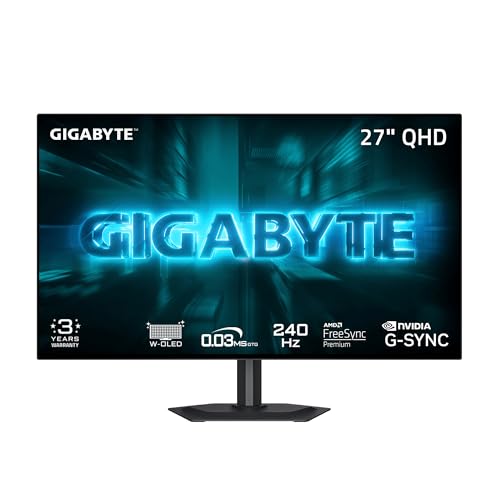
- 27-inch WOLED with MLA+ brightness boost
- 240Hz refresh rate and 0.03ms response time
- AI-based OLED Care and borderless design
Best For: Hybrid workers wanting a bright, fast OLED for work and play
Premium Multitasker

- 32-inch 4K OLED with Dual Mode up to 480Hz
- USB-C, speakers, and ergonomic stand for desk use
- Switch app adds split-screen multitasking tools
Best For: Remote workers who want a large, flexible OLED for productivity and gaming
Value QD-OLED

- QD-OLED panel with vivid color and deep blacks
- 240Hz refresh rate with 0.03ms response time
- Height-adjustable stand plus USB 3.2 hub
Best For: Buyers wanting a compact QD-OLED with ergonomic adjustments and gaming speed
Speed-First OLED Pick – LG 27GX704A-B 27-inch Ultragear QHD OLED Gaming Monitor
For OLED gaming monitors for remote work, the LG 27GX704A-B is a strong choice if you want a sharp 27-inch QHD panel that can pull double duty for fast gaming and everyday desk use. Its glossy OLED screen, 240Hz refresh rate, and 0.03ms response time are built for smooth motion, while the UL-certified anti-glare, flicker-free, and low blue light features help keep long work sessions more comfortable.
Best For: Gamers who also want a bright, comfortable OLED for remote work and all-day desktop use.
Pros:
- 240Hz refresh rate and 0.03ms response time for very fluid gameplay
- QHD OLED panel with up to 1300 nits peak brightness and 98.5% DCI-P3
- UL-certified anti-glare, flicker-free, and low blue light support
- Height, tilt, swivel, and pivot adjustments make it easy to set up for work
Cons:
- 27-inch 1440p screen may feel smaller than a 32-inch office display
- Glossy finish may reflect more light than matte alternatives
This model stands out as a balanced pick when you want gaming speed without giving up workday comfort. It is best suited to users who value a responsive OLED and ergonomic flexibility over maximum screen size.
Premium Large-Screen Choice – Samsung 32-inch Odyssey OLED G8 G80SH 4K
If you are comparing OLED gaming monitors for remote work, the Samsung 32-inch Odyssey OLED G8 is the pick here for users who want a larger 4K canvas for both productivity and play. The 32-inch QD-OLED panel offers 3840 x 2160 resolution, 140 PPI sharpness, and a matte, glare-free finish, which makes it a practical option for multitasking, content work, and high-detail games.
Best For: Remote workers and gamers who want a larger 4K OLED with strong clarity and an easy-to-place stand.
Pros:
- 32-inch 4K QD-OLED panel with 140 PPI for crisp text and imagery
- 240Hz refresh rate and 0.03ms response time for fast motion
- Matte, glare-free screen helps reduce reflections from external light
- USB-C with up to 98W power delivery plus ergonomic height, tilt, swivel, and pivot
Cons:
- Larger size and 4K resolution may require more desk space and stronger hardware
- Peak brightness is listed at 100 nits in the supplied notes, which is modest for very bright rooms
This monitor is the most workstation-friendly option in the group if your priority is screen real estate and sharp 4K detail. It suits buyers who want one display for spreadsheets, creative work, and fast-paced gaming.
Brightest 27-Inch Upgrade – LG 27GX700A-B 27-inch Ultragear QHD OLED Monitor
For OLED gaming monitors for remote work, the LG 27GX700A-B is aimed at buyers who want a smaller 27-inch setup with extra brightness and very fast refresh. Its QHD 4th Gen OLED panel reaches up to 1500 nits, includes DisplayHDR True Black 500, and combines that with 280Hz performance, making it a compelling choice if you split time between office tasks and competitive gaming.
Best For: Users who want a very bright 27-inch OLED that can handle work by day and high-refresh gaming by night.
Pros:
- 280Hz refresh rate and 0.03ms response time for ultra-smooth motion
- Up to 1500 nits brightness with True Black 500 and UL verified perfect black
- LG Switch app supports brightness control, hotkeys, screen splitting, and video calls
- Height, tilt, swivel, and pivot adjustments improve desk ergonomics
Cons:
- 27-inch 1440p panel may not offer as much workspace as a 32-inch 4K display
- Matte finish may not appeal if you prefer the glossy look of some OLED monitors
This model is a strong fit if brightness and refresh rate matter more than sheer screen size. It gives you a versatile OLED option for remote work, with tools that make it easier to manage both productivity and entertainment on one display.
Value-Minded QD-OLED Pick – MSI MAG 274QP QD-OLED X24 27-Inch
The MSI MAG 274QP QD-OLED X24 fits well in OLED gaming monitors for remote work when you want a sharp 27-inch screen with strong color and practical extras. Its 2560 x 1440 QD-OLED panel, 240Hz refresh rate, and 0.03ms response time give you the speed and clarity needed for gaming, while the 10-bit color, 99% DCI-P3 coverage, and 4-way adjustable stand make it useful for everyday desk work too.
Best For: Buyers who want a feature-rich 27-inch QD-OLED for gaming, work, and flexible desk setups.
Pros:
- QD-OLED panel with 10-bit color, 99% DCI-P3, and strong dark levels
- 240Hz refresh rate and 0.03ms response time for responsive gameplay
- OLED Care 2.0 and graphene heatsink help support panel longevity
- 4-way adjustable stand plus HDMI 2.1 and DisplayPort 1.4a connectivity
Cons:
- Peak brightness is listed at up to 400 nits in the supplied notes, lower than some rivals
- 27-inch 1440p size may be less ideal for heavy multitasking than a larger 4K screen
This MSI is a practical all-rounder if you want QD-OLED color and gaming speed without moving up to a larger, pricier panel. It is especially appealing for users who want a flexible stand and built-in care features for long-term use.
Samsung OLED Clarity Pick – Samsung 27” Odyssey OLED G5 QHD Gaming Monitor
If you want one of the more balanced OLED gaming monitors for remote work, the Samsung 27” Odyssey OLED G5 is built around sharp QHD detail, strong color performance, and a glare-free screen finish that helps in bright home offices. Its QD-OLED panel, 180Hz refresh rate, and 0.03ms response time make it a solid fit when you move between spreadsheets, video calls, and fast-paced games on the same desk.
Best For: Remote workers who want a color-rich QD-OLED display that also handles gaming well.
Pros:
- QD-OLED panel with QHD resolution for vivid image quality and crisp desktop text
- Glare Free matte screen helps reduce reflections during daytime work
- 180Hz refresh rate and 0.03ms response time support smooth gaming performance
- Auto Source Switch+ makes it easier to move between connected devices
Cons:
- Only 27 inches, so it may not suit users who want a larger work canvas
- Brightness is listed at 280 cd/m², which may be modest for very bright rooms
- Built-in focus is still clearly on gaming rather than office-first ergonomics
This is a practical pick if you want OLED contrast and color accuracy without giving up fast gaming responsiveness. The burn-in reduction features and matte finish also make it easier to justify as an everyday remote-work monitor.
MSI Speed-and-Color Choice – MSI MAG 271QP QD-OLED X28 27-Inch QHD Monitor
For buyers comparing OLED gaming monitors for remote work, the MSI MAG 271QP QD-OLED X28 stands out for its mix of 280Hz speed, QHD resolution, and 10-bit Quantum Dot color. It also adds USB-C with 15W power delivery, which can simplify laptop setups when you are switching between work apps, calls, and gaming sessions.
Best For: Remote workers and gamers who want a fast QD-OLED monitor with USB-C connectivity.
Pros:
- 280Hz refresh rate and 0.03ms response time for very smooth motion
- 10-bit color with 99% DCI-P3 and Delta E ≤2 for accurate-looking visuals
- USB-C with 15W power delivery helps with laptop-friendly desk setups
- OLED Care 2.0 and fanless graphene heatsink are designed to support panel longevity
Cons:
- Glossy screen finish may reflect more light than matte alternatives
- Gaming-first features may be more than some remote workers need
- Heavy 24-pound build makes it less convenient to move around
This is a strong choice if speed is your priority and you also want a monitor that can serve as a daily work display. The USB-C port and adjustable stand add practicality, while the OLED panel keeps the experience premium.
ASUS OLED Work-Play Upgrade – ASUS ROG XG27AQDMGR 27 Inch 1440p OLED Monitor
If you want OLED gaming monitors for remote work with a strong mix of protection features and high-end image quality, the ASUS ROG XG27AQDMGR is easy to place on a shortlist. Its 1440p WOLED panel, 240Hz refresh rate, and 0.03ms response time suit users who spend the day working and still want a responsive gaming display after hours.
Best For: Remote professionals who want a premium OLED monitor with advanced burn-in protection.
Pros:
- TrueBlack glossy WOLED panel with 1440p resolution for sharp, detailed visuals
- 240Hz refresh rate and 0.03ms response time for fluid gaming
- ASUS OLED Care Pro with Neo Proximity Sensor helps reduce burn-in risk
- DisplayWidget Center makes it easier to adjust OLED care and monitor settings
Cons:
- Glossy finish can be more reflective than matte screens
- Gaming-focused feature set may be more than basic office users need
- Premium pricing is likely a consideration, given the feature set and warranty coverage
This ASUS model is the most protection-minded of the group, which can matter if you keep static work windows on-screen for long stretches. It combines that safety focus with excellent refresh performance, making it a compelling hybrid monitor.
Editor Pick – GIGABYTE 27" WOLED 240Hz QHD
If you want an OLED gaming monitor for remote work that still feels fast after hours, the GIGABYTE GO27Q24G is a strong all-around pick. Its 27-inch WOLED panel with MLA+ aims for brighter imagery, while the 4-sided borderless design makes it easy to build a clean dual-monitor desk setup.
Best For: Hybrid workers who want a bright 27-inch OLED with a minimal bezel and strong gaming speed.
Pros:
- 240Hz refresh rate and 0.03ms response time for very smooth gaming
- MLA+ WOLED panel with up to 1300 nits peak brightness
- 4-sided borderless design works well in multi-monitor setups
- GIGABYTE OLED Care uses AI-based burn-in protection tools
Cons:
- 27-inch QHD resolution may feel less spacious than 32-inch 4K alternatives
- Glossy RealBlack finish can still be more reflective than matte screens
This monitor leans hard into speed and desktop polish, which makes it appealing if your day mixes spreadsheets, calls, and competitive play. The USB-C, HDMI, and DisplayPort inputs also make it easy to slot into a practical work-and-game setup.
Premium Multitasker – LG 32" Dual-Mode 4K OLED
The LG 32GX870A-B fits OLED gaming monitors for remote work especially well if you want one screen that can handle both serious productivity and high-end gaming. Its 32-inch 4K OLED panel gives you more room for documents and windows, and the Dual Mode feature lets you switch between 4K 240Hz and Full HD 480Hz depending on the job.
Best For: Remote workers who want a larger 4K OLED with flexible refresh-rate options and strong ergonomics.
Pros:
- Dual Mode supports 4K 240Hz or Full HD 480Hz
- 32-inch 4K panel offers extra space for work and multitasking
- Micro Lens Array+ boosts brightness up to 1300 nits peak
- Height, tilt, swivel, and pivot adjustments help tune the desk setup
Cons:
- Matte finish may not deliver the same glossy punch as some OLED rivals
- Premium feature set likely makes it a bigger investment than smaller QHD models
This is the most workstation-friendly option in the group if you value screen space and flexibility. Between the USB-C connection, ergonomic stand, built-in speakers, and Switch app multitasking tools, it is built to feel useful beyond gaming alone.
Value QD-OLED – AOC 27" QHD 240Hz QD-OLED
The AOC Q27GAZDV is a practical choice if you are shopping OLED gaming monitors for remote work and want strong image quality without going overboard on size. Its 27-inch QD-OLED panel brings deep blacks, wide color, and 240Hz speed, while the height-adjustable stand and USB hub make it easier to live with on a daily desk.
Best For: Buyers who want a 27-inch QD-OLED with ergonomic adjustments and straightforward high-speed gaming support.
Pros:
- QD-OLED panel with true blacks and vivid color coverage
- 240Hz refresh rate and 0.03ms response time
- Height, tilt, swivel, and pivot adjustments improve comfort
- USB 3.2 hub adds useful desk connectivity
Cons:
- 200-nit brightness is lower than some brighter OLED alternatives
- 27-inch QHD resolution may feel cramped for heavy multitasking compared with 32-inch 4K screens
For a smaller OLED workstation, this model covers the essentials well: fast gaming performance, flexible ergonomics, and ports for a cleaner desk. HDMI 2.1 and DisplayPort also make it easy to use across PC and consoles.
How We Picked the Best OLED Gaming Monitors for Remote Work
We prioritized OLED Gaming Monitors for Remote Work that combine strong gaming performance with practical day-to-day usability. That means a balance of panel quality, pixel density, refresh rate, HDR support, and features that matter at a home office desk, such as USB-C or flexible connectivity, accurate color, and ergonomic stands.
We also considered whether each monitor is better suited to fast-paced gaming, content creation, or all-day mixed use, since not every high-refresh OLED is the same fit for work.
Quick Comparison
For most buyers, 27-inch 1440p models are the sweet spot because they offer sharp enough text for work without demanding as much GPU power as 4K. If you want the most desktop space and the cleanest multitasking experience, a 32-inch 4K option can be more comfortable. If gaming is the top priority, higher refresh rates like 280Hz may be the edge you want; if work and media matter more, 240Hz is already excellent.
Key Buying Factors for OLED Gaming Monitors for Remote Work
Screen Size and Resolution
For most hybrid setups, 27 inches at 1440p is the most balanced choice. It keeps text crisp enough for spreadsheets, docs, and browser work while staying responsive for games. A 32-inch 4K OLED is better if you want more room for windows and a sharper desktop at normal viewing distance.
Refresh Rate and Response Time
OLED’s instant pixel response is a major advantage for gaming, but refresh rate still matters. A 240Hz panel is already very fast and smooth for work and play. Higher refresh rates are nice for competitive gaming, but they are less important if you spend more time in email, creative apps, or video calls.
Text Clarity and Subpixel Layout
Some OLED panels can show slight text fringing, especially if you sit close or use smaller fonts. If remote work is a major priority, favor models known for better desktop readability and consider 1440p or 4K resolutions for cleaner text rendering.
Burn-In Protection and Brightness Behavior
Because these displays may show static taskbars, toolbars, and office windows for hours, look for strong panel care features such as pixel shift, logo dimming, and refresh cycles. These protections help, but they do not replace smart habits like hiding static UI when possible.
Ports and Workflow Convenience
For OLED Gaming Monitors for Remote Work, connectivity can be just as important as panel specs. Check for HDMI 2.1, DisplayPort, and if you use a laptop, USB-C support can simplify cable management and docking.
Who Should Buy Which OLED Gaming Monitors for Remote Work?
Choose a 27-inch 1440p OLED if you want the best all-around balance for gaming and office work. Pick a 32-inch 4K model if multitasking, sharper text, and a more spacious desktop matter most. Go for the highest refresh-rate option if competitive gaming is your main focus. If your desk use leans heavily toward work, prioritize comfort features, resolution, and connectivity over chasing the absolute fastest panel.
In short, the best OLED gaming monitor for remote work is the one that fits your desk space, your GPU, and the amount of time you spend in productivity apps versus games.
