
Your first OLED gaming monitor should make your favorite games look better without demanding a graphics card upgrade or a complicated setup. The biggest decisions are straightforward: 27-inch QHD for versatility, 32-inch 4K for detail, or a 34-inch ultrawide for immersion.
These 10 options span those formats, with refresh rates up to 240Hz. Use the buying guide after the product picks to narrow your choice by hardware, desk space, and the games you play.
Best 10 Oled Gaming Monitors for Beginners Picks for 2026
Best for 4K Immersion

- 32-inch curved 4K QD-OLED
- 165Hz refresh rate and HDMI 2.1
- USB-C charging limited to 15W
Best For: Beginners seeking a large, detailed 4K gaming screen
Best for Flexible Positioning

- 26.5-inch 1440p QD-OLED
- 240Hz with FreeSync Premium
- Height, pivot, swivel, and tilt adjustments
Best For: New competitive players who value ergonomic adjustment
Best for Console-Friendly 1440p

- 27-inch-class 1440p QD-OLED
- 240Hz and HDMI 2.1
- OLED Care 2.0 and adjustable stand
Best For: Beginners splitting gaming time between PC and console
Best for Bright Rooms

- 27-inch 1440p QD-OLED
- Glare Free matte screen
- 240Hz with FreeSync Premium
Best For: Beginners gaming near distracting light sources
Best Ultrawide
Alienware AW3425DW 34-Inch QD-OLED

- 34.2-inch curved 21:9 display
- 3440 x 1440 resolution at 240Hz
- DisplayHDR TrueBlack 400
Best For: Immersive ultrawide gaming
Best Standard-Screen QD-OLED

- 27-inch 2560 x 1440 QD-OLED
- 240Hz with 0.03ms response time
- HDR400 True Black
Best For: A familiar 16:9 OLED setup
Best OLED Care Features
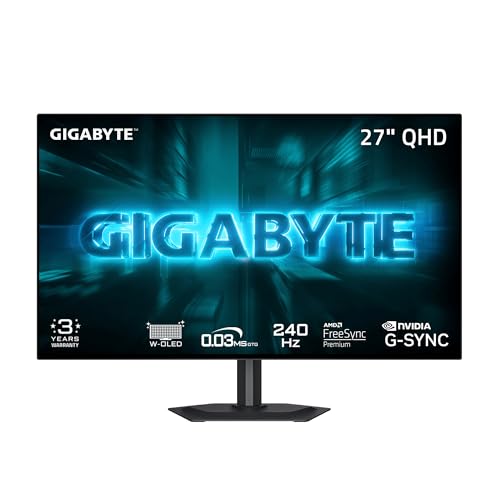
- 27-inch QHD WOLED at 240Hz
- Adjustable AI-based OLED Care
- DisplayPort, HDMI, and USB-C
Best For: Beginners prioritizing panel-care controls
Best All-Around QHD Pick

- 27-inch glossy QHD OLED at 240Hz
- G-SYNC Compatible and FreeSync Premium Pro
- Dual HDMI 2.1 and fully adjustable stand
Best For: Versatile PC and console gaming at QHD
Best QD-OLED QHD Option

- 27-inch QHD QD-OLED at 240Hz
- 0.03ms response and G-SYNC Compatible
- Adjustable stand and USB 3.2 hub
Best For: Smooth 1440p gaming with QD-OLED color
Best 4K Upgrade

- 32-inch 4K QD-OLED at 240Hz
- 90W USB-C power delivery
- Three-year warranty includes burn-in coverage
Best For: Larger 4K gaming and creative use
Best for 4K Immersion – MSI MAG 321CUP QD-OLED
Among OLED gaming monitors for beginners, the MSI MAG 321CUP QD-OLED suits buyers who want a large, sharp screen for both PC and console gaming. Its 32-inch 4K panel has a gentle 1700R curve, a 165Hz refresh rate, and HDMI 2.1.
Best For: Beginners who prioritize 4K detail and a curved, 32-inch display over a 240Hz refresh rate.
Pros:
- 4K QD-OLED panel delivers deep blacks and 10-bit color.
- 165Hz refresh rate and 0.03ms rated response time support clear motion.
- OLED Care 2.0, HDMI 2.1, and an adjustable stand add practical flexibility.
Cons:
- USB-C Power Delivery is limited to 15W.
- The 32-inch curved screen may be more than a compact desk needs.
Choose this model if screen size and 4K detail matter most. Its OLED-care features are useful, but they do not eliminate the need for sensible OLED upkeep.
Best for Flexible Positioning – Acer Predator X27U W1
The Acer Predator X27U W1 is a compact choice among OLED gaming monitors for beginners who want fast 1440p gaming without a 32-inch screen. Its 26.5-inch QD-OLED panel pairs a 240Hz refresh rate with AMD FreeSync Premium.
Best For: New competitive players who want a fast display and plenty of stand adjustment.
Pros:
- 240Hz refresh rate and 0.03ms rated response time suit fast-paced games.
- QD-OLED panel offers deep contrast and 99% DCI-P3 color coverage.
- Stand supports height, pivot, swivel, and tilt adjustments.
Cons:
- 1440p resolution provides less detail than a 4K display.
- Its 26.5-inch screen may feel small if you prefer a more expansive view.
This is a practical fit when speed, ergonomics, and a manageable screen size matter more than maximum resolution. The listed image-retention refresh is a helpful OLED-care feature, not a guarantee against retention.
Best for Console-Friendly 1440p – MSI MAG 274QP QD-OLED X24
For shoppers comparing OLED gaming monitors for beginners, the MSI MAG 274QP QD-OLED X24 combines a 27-inch-class 1440p panel with a 240Hz refresh rate. HDMI 2.1, console modes, and OLED Care 2.0 make its feature set especially relevant to mixed PC and console setups.
Best For: Beginners who want fast 1440p gaming with HDMI 2.1 and built-in OLED-care tools.
Pros:
- QD-OLED panel supports 10-bit color and deep blacks.
- 240Hz refresh rate and 0.03ms rated response time favor smooth motion.
- Includes HDMI 2.1, OLED Care 2.0, and a four-way adjustable stand.
Cons:
- 1440p is less detailed than 4K.
- The supplied specifications do not list USB-C connectivity.
This is a strong option if you want high refresh rates without moving to a larger 4K screen. Its care software can help manage OLED wear, though normal precautions still apply.
Best for Bright Rooms – Samsung Odyssey OLED G6 G61SH
The Samsung Odyssey OLED G6 G61SH stands out among OLED gaming monitors for beginners who play in rooms with distracting reflections. Its 27-inch 1440p QD-OLED screen uses Glare Free Technology and pairs a 240Hz refresh rate with AMD FreeSync Premium.
Best For: Beginners who want OLED contrast and fast gaming with reduced screen glare.
Pros:
- Matte, Glare Free screen helps limit reflections from external light.
- 240Hz refresh rate and 0.03ms rated response time support responsive play.
- OLED Safeguard and a height-, pivot-, tilt-, and swivel-adjustable stand add convenience.
Cons:
- 1440p resolution is less detailed than 4K.
- The listed connectivity includes only one HDMI port.
Pick this Samsung if reflections are a recurring problem at your desk. OLED Safeguard helps address burn-in risk, but it should not be treated as complete protection.
Best Ultrawide – Alienware AW3425DW 34-Inch QD-OLED
Among oled gaming monitors for beginners, the Alienware AW3425DW is the pick if you already know you want an ultrawide view. Its 34.2-inch, 3440 x 1440 QD-OLED screen pairs an 1800R curve with a 240Hz refresh rate.
Best For: New OLED buyers who want an immersive, curved ultrawide for gaming.
Pros:
- 21:9 screen and 1800R curve provide a wider field of view.
- 240Hz refresh rate, 0.03ms response time, and adaptive-sync support suit fast games.
- DisplayHDR TrueBlack 400 and 99.3% DCI-P3 coverage support vivid visuals.
Cons:
- Its 34.2-inch ultrawide format needs more desk space than a 27-inch display.
- 3440 x 1440 has more pixels to drive than standard 2560 x 1440.
Choose this model for the wider, curved experience; if you prefer a conventional 16:9 screen, one of the 27-inch options is a more straightforward fit.
Best Standard-Screen QD-OLED – AOC Q27GAZD 27-Inch
For shoppers comparing oled gaming monitors for beginners, the AOC Q27GAZD keeps things familiar with a flat-format 27-inch, 16:9 QHD display. Its QD-OLED panel, 240Hz refresh rate, and 0.03ms response time give you a clear set of gaming-focused features.
Best For: Beginners who want QD-OLED color and speed in a conventional 27-inch screen size.
Pros:
- 2560 x 1440 resolution offers a familiar QHD desktop layout.
- 240Hz refresh rate and 0.03ms response time support smooth, responsive play.
- HDR400 True Black certification and G-SYNC Compatible adaptive sync add useful gaming features.
Cons:
- One listed HDMI port may be limiting for multiple HDMI devices.
- The glossy finish may not suit everyone’s lighting setup.
This is the straightforward choice if you want OLED without switching to an ultrawide aspect ratio; check whether its HDMI and DisplayPort connections cover your devices.
Best OLED Care Features – GIGABYTE GO27Q24G 27-Inch
Among oled gaming monitors for beginners, the GIGABYTE GO27Q24G is worth a look if panel-care settings are high on your checklist. This 27-inch QHD WOLED monitor combines a 240Hz refresh rate with GIGABYTE’s adjustable OLED Care features.
Best For: First-time OLED buyers who want built-in panel-care tools and a standard 27-inch gaming display.
Pros:
- AI-based OLED Care offers adjustable settings intended to help minimize burn-in risk.
- 240Hz refresh rate and 0.03ms response time suit fast-paced gaming.
- Glossy, anti-reflective WOLED panel uses MLA+ technology and has a stated 1300-nit peak brightness.
- DisplayPort, HDMI, and USB-C connectivity provide connection options.
Cons:
- OLED Care minimizes risk; it does not eliminate the possibility of burn-in.
- The glossy screen finish may not match every viewing preference.
The GO27Q24G stands out for its combination of OLED Care and a conventional QHD layout. It is a sensible option if you want those controls alongside 240Hz gaming performance.
Best All-Around QHD Pick – LG UltraGear 27GX704A-B
For shoppers comparing oled gaming monitors for beginners, this 27-inch LG offers a manageable QHD resolution, a fast 240Hz refresh rate, and a glossy OLED screen. Its adjustable stand and on-screen OLED Care controls make it a practical starting point for PC or console gaming.
Best For: New OLED buyers who want a versatile 27-inch QHD monitor with strong gaming connectivity.
Pros:
- 240Hz refresh rate, 0.03ms response time, and support for both G-SYNC Compatible and FreeSync Premium Pro.
- DisplayHDR True Black 400, 98.5% DCI-P3 coverage, and glossy OLED contrast.
- Dual HDMI 2.1, DisplayPort 1.4, USB ports, and height, tilt, swivel, and pivot adjustments.
Cons:
- QHD resolution provides fewer pixels than a 4K display.
- OLED protection features and automatic pixel-care cycles are part of ownership.
The LG balances speed, display quality, and everyday setup flexibility. Choose it if you want a well-equipped QHD OLED without stepping up to a larger 4K screen.
Best QD-OLED QHD Option – AOC Q27GAZDV
Among oled gaming monitors for beginners, the AOC Q27GAZDV is a straightforward way to get a 27-inch QD-OLED panel with QHD resolution and 240Hz gaming. HDMI 2.1, DisplayPort 1.4, and an adjustable stand cover the essentials for a flexible desk setup.
Best For: First-time QD-OLED buyers who prioritize smooth 1440p gaming and ergonomic adjustment.
Pros:
- 240Hz refresh rate and 0.03ms response time for clear, responsive motion.
- QD-OLED panel delivers deep blacks and vivid color.
- G-SYNC Compatible support, a USB 3.2 hub, and height, tilt, swivel, and pivot adjustments.
Cons:
- Listed brightness is 200 nits.
- QHD resolution is less detailed than 4K for buyers seeking maximum desktop sharpness.
This AOC keeps the decision focused: choose it for QD-OLED color and competitive 240Hz QHD performance, while checking whether its listed brightness suits your room.
Best 4K Upgrade – ASUS ROG PG32UCDM
If your search for oled gaming monitors for beginners extends to a more ambitious setup, the ASUS ROG PG32UCDM pairs a 32-inch 4K QD-OLED panel with a 240Hz refresh rate. It also adds convenient monitor controls and 90W USB-C power delivery for compatible devices.
Best For: Buyers ready for a larger 4K gaming display that can also serve creative work and a USB-C-equipped setup.
Pros:
- 32-inch 4K QD-OLED with 240Hz refresh rate and 0.03ms response time.
- DisplayHDR 400 True Black, 99% DCI-P3 coverage, and a true 10-bit panel.
- DisplayWidget Center provides access to OLED Care; the three-year warranty includes burn-in coverage.
- 90W USB-C power delivery supports compatible devices.
Cons:
- Its 32-inch size needs more desk space than a 27-inch monitor.
- Running games at 4K and high frame rates is a more demanding goal than QHD gaming.
The PG32UCDM is the feature-rich choice here. Its 4K sharpness and connectivity make the most sense if your space and gaming hardware are suited to a larger display.
How We Picked the Best Oled Gaming Monitors for Beginners
We focused on OLED models with gaming-ready refresh rates and a useful spread of screen sizes and resolutions. The selection includes 27-inch QHD displays, 32-inch 4K choices, and a curved 34-inch ultrawide, giving first-time OLED buyers meaningful trade-offs rather than ten versions of the same setup. We also considered the stated connectivity and adaptive-sync features, while treating specifications such as response time as starting points—not guarantees of how a monitor will feel in every game.
Quick Comparison: Which Format Fits?
- 27-inch QHD, 240Hz: The easiest starting point for most PC gamers. It balances sharpness and smooth motion without the graphics demands of 4K. Most picks here fit this category, including models from Acer, MSI, Samsung, AOC, GIGABYTE, and LG.
- 32-inch 4K: Choose the MSI MAG 321CUP for its listed 165Hz refresh rate or the ASUS ROG PG32UCDM for its listed 240Hz if you want extra detail and have a PC capable of taking advantage of it.
- 34-inch ultrawide: The Alienware AW3425DW offers a wider, curved 3440 × 1440 view. Check that your favorite games support ultrawide resolutions and that your desk has room.
Key Buying Factors for Oled Gaming Monitors for Beginners
Match Resolution to Your PC
QHD is a practical default if you want high frame rates without building around 4K. A 4K OLED can deliver finer detail, but reaching high frame rates at that resolution takes substantially more graphics power. Ultrawide falls between QHD and 4K in pixel count and needs game support for the full-screen experience.
Pick a Refresh Rate You Can Use
A 240Hz monitor gives fast-paced games plenty of headroom, but you do not need to reach 240 frames per second to enjoy it. If you mainly play cinematic or slower games, screen size and resolution may matter more than the difference between 165Hz and 240Hz. Confirm that your PC or console and the monitor’s relevant input support your intended resolution and refresh rate.
Plan for OLED Ownership
OLED’s per-pixel lighting produces deep blacks and strong contrast, but persistent static elements can contribute to image retention over time. Review each model’s warranty and OLED-care settings, keep firmware current, and use sensible habits such as sleep timers and auto-hiding static desktop elements. Also check return policies if you work with small text: text clarity can vary with panel design and personal sensitivity. Bright-room performance and screen reflections are worth considering if you cannot control nearby light.
Who Should Buy Which Oled Gaming Monitors for Beginners?
Most first-time buyers: Start with a 27-inch QHD 240Hz model, then compare price, ports, warranty terms, and stand adjustability. Detail-focused players: Consider a 32-inch 4K option if your graphics card and desk can support it. Competitive players: Prioritize a 240Hz choice and a comfortable screen size over maximum resolution. Immersion seekers: Consider the Alienware ultrawide if your preferred games work well at 21:9. Whichever format you choose, verify the exact model’s current specifications before buying—similarly named variants can differ.
