
Fast, dependable networking can make a major difference when creators move large video files, edit from NAS storage, stream, or connect multiple high-speed devices.
These 10 network switches cover practical setups ranging from affordable gigabit expansion to multi-gigabit, 10GbE, managed, and PoE connectivity.
Best 10 Network Switches for Content Creators Picks for 2026
Best 10G Value
NICGIGA 6-Port 10G Ethernet Switch

- Two 10Gb RJ45 ports plus four 2.5Gb ports
- Fanless metal design with desktop/wall mounting
- 60Gbps switching capacity and plug-and-play setup
Best For: Small creator studios with a 10G NAS or workstation
Best Managed Upgrade
TP-Link Omada ES210X-M2 2.5G Switch

- Eight 2.5Gb RJ45 ports for multi-gig devices
- Two 10G SFP+ uplinks for servers or core switches
- VLAN, IGMP Snooping, loop prevention, and Omada support
Best For: Growing creator networks needing segmentation and management
Best Plug-and-Play 2.5G

- Eight 2.5Gb ports with 40Gbps switching capacity
- Supports 100Mb, 1Gb, and 2.5Gb auto-negotiation
- Fanless, plug-and-play desktop or wall-mount design
Best For: Quiet creator studios built around 2.5Gb devices
Best High-Speed Media Hub

- Six 10Gb multi-gig RJ45 ports and two combo ports
- 160Gbps switching capacity with 80Gbps throughput
- Lite-managed controls and 12K jumbo-frame support
Best For: Video editors and teams moving large projects over 10GbE
Best for Easy Setup

- 8× 2.5Gbps RJ45 ports
- 2× 10Gbps SFP+ slots
- Cloud management and QoS
Best For: Growing creator networks needing management and expansion
Best Silent Budget Upgrade
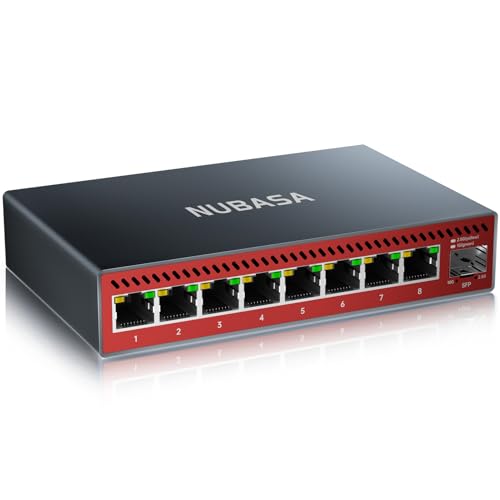
- 8× 2.5Gbps RJ45 ports
- 10Gbps SFP+ uplink
- Fanless aluminum housing
Best For: Quiet creator studios needing simple multigigabit expansion
Best Value Managed Pick

- Eight Gigabit ports for expanding a wired creator setup
- VLAN, QoS, IGMP snooping, and monitoring features
- Sturdy, compact metal design for desktop or wall mounting
Best For: Budget-conscious creators who want smart network controls
Best Silent Smart Switch

- Eight 1Gbps ports with plug-and-play connectivity
- Cross-platform web management and up to 64 VLANs
- Fanless 0 dBA metal housing for quiet studios
Best For: Creators who prioritize silent operation and easy management
Best PoE Pick for Live Setups

- Eight Gigabit PoE+ ports with a 120W total budget
- Two non-PoE Gigabit uplink ports for network expansion
- Fanless metal design with VLAN mode and protection features
Best For: Creators running powered cameras, access points, or live-streaming gear
Best 10G Value – NICGIGA 6-Port 10G Ethernet Switch
For content creators building a fast home studio, the NICGIGA combines two 10Gb RJ45 ports with four 2.5Gb ports. It is a practical choice among network switches for content creators who need quick transfers between a NAS, workstation, Wi-Fi router, and other production devices without configuring a managed network.
Best For: Creators who need a compact, quiet switch for 10G storage, editing PCs, Wi-Fi 7 equipment, and large media files.
Pros:
- Two 10Gb RJ45 ports support high-speed connections for a NAS or editing workstation.
- Four 2.5Gb ports provide flexible connections for additional devices.
- Fanless metal design, desktop/wall mounting, and 60Gbps switching capacity.
Cons:
- Unmanaged design does not provide VLAN, QoS, or other traffic-management controls.
- Only two ports support 10Gb speeds.
This is a straightforward upgrade for creators who want faster wired transfers without adding network-management complexity. Its silent operation also suits recording rooms and shared workspaces.
Best Managed Upgrade – TP-Link Omada ES210X-M2 2.5G Switch
The TP-Link Omada ES210X-M2 adds simple network management to an eight-port 2.5Gb switch. For content creators, it pairs multi-gig connections with VLAN support, IGMP Snooping, loop prevention, and two 10G SFP+ uplinks for connecting a faster core switch or server.
Best For: Creators who want segmented, centrally managed networks for editing systems, NAS devices, access points, and other studio equipment.
Pros:
- Eight 2.5Gb RJ45 ports support multiple high-speed wired devices.
- Two 10G SFP+ uplinks help reduce bottlenecks to a server or core switch.
- VLAN, IGMP Snooping, Auto Loop Prevention, and Omada cloud management.
- Fanless operation and durable metal construction suit quiet workspaces.
Cons:
- SFP+ uplinks may require compatible transceivers or cabling.
- Management features add complexity compared with a plug-and-play unmanaged switch.
This is a strong choice when a creator’s network is expanding beyond a few devices. It offers useful control for separating traffic while preserving silent operation at the desk.
Best Plug-and-Play 2.5G – TP-Link TL-SG108S-M2
The TP-Link TL-SG108S-M2 is a simple eight-port way to add 2.5Gb wired networking to a creator workspace. Its auto-negotiating ports work with 100Mb, 1Gb, and 2.5Gb devices, making it useful for connecting compatible editing computers, NAS storage, access points, and other production gear.
Best For: Creators who want an affordable, silent multi-gig switch without VLANs or software configuration.
Pros:
- Eight 2.5Gb ports provide up to 40Gbps of switching capacity.
- Auto-negotiation supports 100Mb, 1Gb, and 2.5Gb devices.
- Fanless design keeps operation quiet in studios and home offices.
- Desktop/wall mounting and plug-and-play setup simplify installation.
Cons:
- Unmanaged design offers no VLAN or advanced traffic controls.
- It does not provide 10Gb ports for the fastest storage or workstation links.
For creators whose equipment is primarily 2.5Gb, this switch keeps the setup uncomplicated while offering more headroom than standard Gigabit Ethernet. It is best suited to a focused local network rather than a managed production infrastructure.
Best High-Speed Media Hub – QNAP QSW-L3208-2C6T-US
The QNAP QSW-L3208-2C6T-US is designed for demanding media networks, with six multi-gig 10Gb RJ45 ports and two combo 10Gb SFP+/RJ45 ports. It stands out among network switches for content creators by combining high-capacity links with lite-managed controls for large file transfers, streaming, and shared storage.
Best For: Video editors and production teams moving large projects between 10Gb workstations, NAS systems, servers, and network equipment.
Pros:
- Six RJ45 ports support 10G, 5G, 2.5G, 1G, and 100M connections.
- Two combo ports accept either 10Gb SFP+ or RJ45 connections.
- 160Gbps switching capacity and 80Gbps non-blocking throughput.
- VLAN, QoS, LACP, IGMP Snooping, loop detection, and 12K jumbo-frame support.
Cons:
- Its advanced capabilities may be excessive for a small basic network.
- Lite-managed features require more setup than an unmanaged switch.
- The unit weighs 2.8 pounds, making it less lightweight than compact desktop models.
This is the most capable option here for a creator handling frequent high-volume media transfers. Its mix of copper and combo connectivity also gives a studio more flexibility as storage and network infrastructure evolve.
Best for Easy Setup – TP-Link Omada SG3210X-M2
For content creators building a fast, expandable wired workspace, the TP-Link Omada SG3210X-M2 combines eight 2.5Gbps RJ45 ports with two 10Gbps SFP+ slots. Its managed features and Omada cloud tools make it a strong choice when your network needs more control than a plug-and-play switch.
Best For: Creators with NAS storage, multiple workstations, and a need for centralized network management.
Pros:
- Eight 2.5Gbps RJ45 ports support fast connections to compatible devices.
- Two 10Gbps SFP+ slots provide high-bandwidth uplink options.
- Offers centralized cloud management, Omada app access, QoS, and IGMP snooping.
Cons:
- Managed features may be more involved than necessary for a basic home setup.
- SFP+ connectivity may require separately selected compatible modules or cables.
- Its 40°C upper temperature rating may limit placement in warmer areas.
The SG3210X-M2 is the most feature-rich option here for creators who expect their network to grow. Choose it when traffic control, monitoring, and 10Gbps expansion matter more than minimal setup.
Best Easy-Setup Option – ASUS QG-U1080
The ASUS QG-U1080 is a straightforward pick for content creators who want faster wired networking without configuring a managed switch. It combines 2.5G ports with two 10G SFP+ connections and adds four intelligent modes for basic traffic optimization.
Best For: Home studios and small offices connecting NAS devices, gaming PCs, access points, and 4K streaming equipment.
Pros:
- Plug-and-play setup avoids complicated network configuration.
- Supports 2.5G connections over standard CAT5e Ethernet cables.
- Includes priority, energy-efficient Ethernet, port isolation, and static trunk modes.
- Silent desktop design weighs just 14.4 ounces.
Cons:
- As an unmanaged switch, it offers less detailed control than a managed model.
- The supplied details list seven ports, while the title identifies eight 2.5G ports plus two SFP+ ports; verify the current configuration before buying.
- SFP+ modules or compatible cabling may be needed for 10G connections.
The QG-U1080 suits creators who value speed and simplicity. Its intelligent modes add useful flexibility, but users needing advanced VLAN or cloud administration should consider a managed alternative.
Best Silent Budget Upgrade – NUBASA 8-Port 2.5G Switch
The NUBASA 8-port 2.5G switch is a practical option for content creators who want to upgrade a wired network quickly. Its eight 2.5Gbps RJ45 ports and 10Gbps SFP+ uplink can connect PCs, NAS devices, consoles, and workstations without requiring software configuration.
Best For: Quiet home studios and workspaces that need multiple 2.5Gbps connections with a flexible uplink.
Pros:
- Eight 2.5Gbps RJ45 ports support modern multigigabit devices.
- A 10Gbps SFP+ port supports compatible optical or copper modules.
- Fanless aluminum housing helps provide silent operation and heat dissipation.
- Plug-and-play auto-negotiation supports 10M through 2.5G connections.
Cons:
- As an unmanaged switch, it does not provide advanced configuration features.
- The SFP+ module is sold separately unless selecting a bundle option.
- Its 12W maximum power rating and 122°F upper temperature rating should be considered when planning placement.
For a no-fuss creator setup, the NUBASA offers a useful balance of multigigabit ports, silent cooling, and a 10G uplink. It is best suited to users who want straightforward expansion rather than detailed traffic management.
Best Value Managed Pick – TP-Link TL-SG108E
For content creators building a dependable wired workspace, the TP-Link TL-SG108E is a practical choice among network switches for content creators. Its eight Gigabit ports provide room for computers, storage, cameras, and other Ethernet devices, while Easy Smart management adds useful control without requiring enterprise-level networking expertise.
Best For: Creators who want affordable traffic management, VLAN support, and a sturdy switch for a desktop or wall-mounted setup.
Pros:
- Eight 10/100/1000Mbps Gigabit Ethernet ports
- Supports VLANs, QoS, IGMP snooping, port mirroring, and link aggregation
- Compact metal housing with desktop or wall-mount installation
- Includes a three-year warranty and technical support
Cons:
- Requires configuration through a web interface or free software for smart features
- Does not provide PoE power for compatible devices
The TL-SG108E is a well-rounded option for a creator’s wired network when you need more ports and useful Layer 2 controls without moving to a larger rack-mounted switch.
Best Silent Smart Switch – NETGEAR GS308E
The NETGEAR GS308E combines plug-and-play convenience with smart management, making it a strong fit among network switches for content creators. Its eight Gigabit ports can connect a workstation and peripherals, while the web-based interface works across Windows, Mac, and Linux for flexible setup.
Best For: Home studios, offices, and editing spaces that need silent operation, VLAN support, and simple cross-platform management.
Pros:
- Eight auto-negotiating 1Gbps Ethernet ports
- Web GUI supports Windows, Mac, and Linux
- Up to 64 VLANs plus QoS, IGMP snooping, and port mirroring
- Fanless 0 dBA metal housing with desktop or wall-mount flexibility
Cons:
- Gigabit ports may be limiting for workflows that require speeds beyond 1Gbps
- Advanced features require management setup rather than pure plug-and-play use
With silent cooling and built-in protections such as loop detection, broadcast storm control, and cable testing, the GS308E is a sensible low-noise backbone for a creator’s network.
Best PoE Pick for Live Setups – Tenveo 8-Port PoE+ Switch
The Tenveo 8-Port PoE+ Switch is designed for creator networks that include powered cameras, wireless access points, or other PoE equipment. With eight Gigabit PoE+ ports, a 120W total power budget, and two additional non-PoE uplink ports, it stands out among network switches for content creators building live-streaming or video-focused systems.
Best For: Live-streaming setups, multi-camera systems, wireless access points, and small production or studio networks that need Ethernet power.
Pros:
- Eight PoE+ ports provide up to 30W per port, with a 120W total budget
- Two additional Gigabit uplink ports connect to a router or another switch
- Supports VLAN mode and plug-and-play basic operation
- Fanless metal housing with overload and short-circuit protection
Cons:
- PoE features may be unnecessary for creators using only non-PoE equipment
- Supplied notes do not specify a detailed web-management feature set beyond VLAN mode
The Tenveo is the most specialized option here: choose it when powering network devices is central to your workflow, rather than simply adding more Ethernet ports.
How We Picked the Best Network Switches for Content Creators
We focused on the features that matter in creator-focused networks: port speed, uplink capacity, management options, reliability, installation flexibility, and compatibility with computers, NAS devices, access points, cameras, and streaming hardware. The selection includes unmanaged switches for simple plug-and-play setups, easy-managed models for VLAN and traffic controls, and higher-speed options for large file transfers.
We also considered the balance between current needs and upgrade potential. A switch with several 2.5GbE ports can be a sensible middle ground, while 10GbE models are better suited to demanding shared-storage or workstation workflows. PoE models are included for creators running powered cameras, access points, phones, or other compatible devices.
Quick Comparison
| Switch type | Best for | What to prioritize |
|---|---|---|
| Gigabit unmanaged | Basic device expansion | Port count, build quality, and low setup effort |
| Gigabit managed | Home studios and small offices | VLAN, QoS, monitoring, and configuration controls |
| 2.5GbE | Modern creator workstations and NAS devices | Multi-gig compatibility and sufficient backhaul capacity |
| 10GbE | Large media libraries and shared editing | 10GbE ports, cooling, cabling, and network-wide support |
| PoE | Powered cameras and access points | PoE standard, total wattage, and uplink ports |
Key Buying Factors for Network Switches for Content Creators
Port Speed and Real-World Throughput
Gigabit Ethernet is adequate for internet access, office devices, and many streaming setups, but 2.5GbE or 10GbE can significantly reduce transfer times for high-resolution footage. Remember that every device, cable, router, and NAS connection must support the target speed to achieve multi-gig performance.
Managed Versus Unmanaged Operation
Unmanaged switches require almost no configuration and are ideal when you simply need more ports. Managed or easy-managed models add features such as VLANs, QoS, link monitoring, and traffic control. These tools are useful for separating production systems, guest devices, security cameras, and general home traffic.
Uplinks, Cabling, and Layout
Check whether the switch has enough high-speed uplinks for your router, NAS, and primary workstation. Cat5e may support some 2.5GbE installations, while 10GbE performance commonly benefits from suitable Cat6 or better cabling. Desktop and wall-mount designs can also affect studio placement and cable organization.
PoE Needs and Power Budget
If you plan to power cameras or access points, verify the PoE standard and total wattage rather than relying only on the number of PoE ports. Leave capacity for startup draw and future devices.
Who Should Buy Which Network Switches for Content Creators?
Choose an unmanaged gigabit model for basic connectivity on a budget. Pick an easy-managed gigabit switch if you need VLANs or QoS without enterprise-level complexity. A 2.5GbE switch is the strongest general choice for creators with newer computers or NAS hardware, while a 10GbE model makes the most sense for heavy video workflows and fast shared storage. Choose a PoE switch when powered network devices are part of the studio, and confirm that its power budget and uplinks match your equipment.
