
When you’re diving into 8K workflows, picking the right Network Attached Storage (NAS) can make all the difference in your creative process. With so many options available, it’s essential to evaluate performance, capacity, and features that suit your needs. From high-speed transfers to robust security, the right NAS can enhance efficiency and reliability. Curious about which solutions stand out in this competitive landscape? Let’s explore the top contenders.
UGREEN NAS DXP8800 Plus 8-Bay Desktop NASync

If you’re a content creator working with 8K video, the UGREEN NAS DXP8800 Plus 8-Bay Desktop NASync is the perfect solution for your high-performance storage needs. With its Intel i5 1235u processor and 8GB DDR5 RAM, you’ll experience lightning-fast data transfer rates up to 2500MB/s. It supports multiple RAID configurations for ideal redundancy and performance, ensuring your valuable footage is safe. Plus, it connects seamlessly with various operating systems and third-party drives. The built-in security features, including encryption and multi-factor authentication, keep your data secure. With a 3-year warranty, you can trust in its reliability for your creative projects.
Best For: Content creators and professionals working with high-resolution video who require fast, reliable, and secure storage solutions.
Pros:
- High performance with Intel i5 1235u processor and up to 2500MB/s data transfer rates.
- Flexible storage options with support for multiple RAID configurations ensuring data redundancy.
- Robust security features including encryption and multi-factor authentication to protect sensitive data.
Cons:
- Diskless design means you need to purchase compatible hard drives separately.
- Initial setup may be complex for users unfamiliar with NAS systems and RAID configurations.
- Higher price point compared to simpler storage solutions may not suit all budgets.
Seagate IronWolf 12TB NAS Internal Hard Drive
The Seagate IronWolf 12TB NAS Internal Hard Drive is an ideal choice for content creators and businesses managing 8K workflows, thanks to its impressive capacity and performance. Designed for multi-user NAS environments, it supports up to 8-bay systems, making it perfect for collaborative projects. With a SATA 6Gb/s interface, 7200 RPM speed, and 256MB cache, you’ll enjoy rapid data transfers of up to 6Gbps. Plus, the integrated IronWolf Health Management system guarantees reliability, while the five-year warranty and data recovery services provide peace of mind. Rated 4.5 stars, it’s a top choice among users seeking performance and durability.
Best For: Content creators and businesses managing multi-user NAS environments with high-capacity needs.
Pros:
- High Capacity: Offers 12TB of storage ideal for large files and 8K workflows.
- Performance: Features a fast SATA 6Gb/s interface with data transfer speeds up to 6Gbps.
- Reliability: Integrated IronWolf Health Management and a five-year warranty ensure long-term dependability.
Cons:
- Price: May be more expensive compared to lower-capacity drives.
- Weight: At 1.4 pounds, it might be heavier than some users prefer for portable setups.
- Noise: While designed for minimal noise, some users may still experience noise during intensive operations.
MINISFORUM Desktop NAS N5 Pro 5 Bay
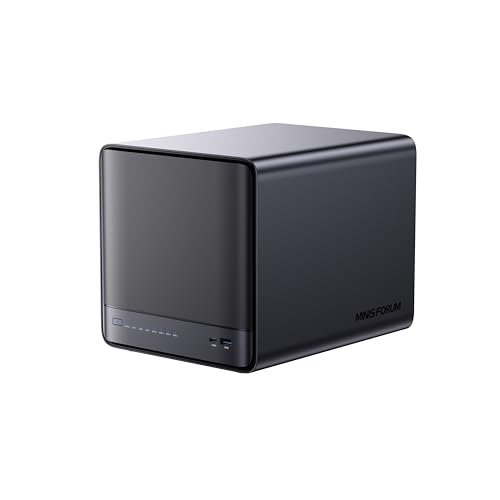
For professionals working with 8K video content, the MINISFORUM Desktop NAS N5 Pro 5 Bay stands out with its powerful AMD Ryzen AI 9 HX Pro 370 processor, delivering exceptional performance with a 12-core architecture that boosts single-thread speeds up to 5.1GHz. You’ll appreciate the ECC DDR5 memory, expandable to 96GB, ensuring data integrity. With a staggering 188TB storage capacity and multiple connectivity options, including 10Gbps LAN and HDMI 8K, it’s perfect for any workflow. Plus, its modular design allows for easy upgrades, while centralized storage and cloud capabilities streamline your data management process and enhance collaboration.
Best For: Professionals and creatives working with 8K video content who require high-performance processing and extensive storage solutions.
Pros:
- Powerful Performance: Features a 12-core AMD Ryzen AI 9 HX Pro 370 processor with speeds up to 5.1GHz for demanding applications.
- Large Storage Capacity: Supports up to 188TB of storage, accommodating multiple drives and providing ample space for large files.
- Modular Design: Easy upgrades for RAM and SSDs with a slide-out motherboard for convenient maintenance.
Cons:
- Higher Initial Cost: Premium features may come with a higher price tag compared to basic NAS solutions.
- Complex Setup: Advanced features may require a learning curve for users unfamiliar with NAS systems.
- Cooling Noise: Active cooling system may produce noticeable noise, which could be a concern in quiet environments.
MINISFORUM N5 Pro 5-Bay Desktop AI NAS

Designed for content creators and professionals working with 8K video, the MINISFORUM N5 Pro 5-Bay Desktop AI NAS delivers exceptional performance and expandability. With its powerful AMD Ryzen AI 9 processor and support for up to 144TB of storage, you can manage extensive media libraries effortlessly. The dual 10GbE and 5GbE ports guarantee rapid data transfer speeds, while the modular design allows easy upgrades. Plus, built-in AI technology enhances tasks like media decoding. The user-friendly MinisCloud OS comes ready to use, so you can focus on your creative process without any hassle. Experience reliable performance with this cutting-edge NAS solution.
Best For: Content creators and professionals working with high-resolution media, particularly those managing extensive 8K video libraries.
Pros:
- High performance: Equipped with a powerful AMD Ryzen AI 9 processor and support for up to 144TB of storage.
- Fast data transfer: Dual 10GbE and 5GbE ports enable rapid data transfer speeds for efficient workflow.
- User-friendly: Comes with the MinisCloud OS, ready to use with zero learning curve for seamless operation.
Cons:
- Initial cost: The investment for high-performance features may be substantial for some users.
- Limited warranty details: Warranty information is not clearly specified and requires a request for further details.
- Potential overkill for casual users: Features may be excessive for users with basic storage needs or less demanding applications.
BUFFALO TeraStation Essentials 2025 4-Bay Desktop NAS (32TB)

Looking for a reliable yet affordable NAS solution for your 8K workflows? The BUFFALO TeraStation Essentials 2025 4-Bay Desktop NAS (32TB) is a perfect fit. With its 32TB capacity and included hard drives, you’ll have ample space for all your files. The native 2.5GbE port guarantees fast data transfers, while RAID configuration offers out-of-the-box protection. Plus, its 256-bit drive encryption and cloud integration with services like Amazon S3 and Dropbox keep your data secure. With a 3-year warranty and 24/7 US-based support, you can trust this robust solution for your creative projects.
Best For: Creative professionals and small offices looking for an affordable, reliable NAS solution to manage their data securely and efficiently.
Pros:
- Fast data transfers with a native 2.5GbE port for high-speed file sharing.
- Built-in RAID configuration provides out-of-the-box data protection.
- Comprehensive support with a 3-year warranty and 24/7 US-based assistance.
Cons:
- Rotational speed of 5400 RPM may be slower compared to higher RPM models for intensive tasks.
- Limited to 32TB total capacity, which may not suffice for larger data needs.
- RAID configuration options may require additional setup knowledge for optimal use.
UGREEN NAS DH4300 Plus 4-Bay Desktop NASync (Diskless)

The UGREEN NAS DH4300 Plus 4-Bay Desktop NASync stands out as an ideal choice for home media enthusiasts and small businesses seeking robust storage solutions without the complexities of high-end systems. With a massive capacity of 128TB, it can store millions of photos and thousands of movies. Enjoy quick NFC connectivity, easy setup, and remote access across multiple devices. The AI photo management feature helps organize your files intelligently, while local storage guarantees your data remains secure. At a competitive price, it’s a cost-effective alternative to cloud storage, saving you thousands over a decade.
Best For: Home media enthusiasts and small businesses looking for a reliable and cost-effective storage solution.
Pros:
- Supports massive storage capacity of up to 128TB, accommodating millions of files.
- User-friendly features including quick NFC connectivity and easy setup for remote access.
- Advanced AI photo management for intelligent organization and real-time backups.
Cons:
- Does not support virtual machines, limiting advanced use cases.
- Actual transfer speeds may vary due to wired Ethernet-only connectivity, lacking Wi-Fi support.
- Initial purchase cost may be higher compared to some cloud storage options.
UGREEN NAS DXP480T Plus 4-Bay SSD NAS

For creators working with 8K video, the UGREEN NAS DXP480T Plus 4-Bay SSD NAS stands out with its blazing fast read/write speeds and robust processing power. Featuring a powerful Intel i5 1235u 10-Core CPU and 8GB DDR5 RAM, it delivers peak speeds of 1250MB/s through its 10GbE network port. The diskless design allows you to customize storage up to 32TB, and the built-in Wi-Fi 6 enhances connectivity. With advanced data management tools and security features like encryption and multi-factor authentication, you’ll keep your projects safe. Plus, you can easily manage everything through one app, streamlining your workflow.
Best For: Creators working with 8K video and those needing high-speed data access for demanding applications.
Pros:
- Blazing fast read/write speeds of up to 1250MB/s due to SSD-only design.
- Robust processing power with Intel i5 1235u 10-Core CPU and 8GB DDR5 RAM.
- Advanced data management and security features, including encryption and multi-factor authentication.
Cons:
- Drives not included; requires separate purchase of HDDs/SSDs.
- Actual transfer speeds may vary based on various factors such as router and file size.
- Limited to diskless design, which may not suit users looking for pre-configured solutions.
UGREEN NAS DXP6800 Pro 6-Bay Desktop NAS

Designed for professionals handling demanding 8K workflows, the UGREEN NAS DXP6800 Pro 6-Bay Desktop NAS stands out with its powerful Intel i5 1235u 10-Core CPU and dual 10GbE network ports, which deliver an impressive 20G bandwidth. With 8GB DDR5 RAM and a built-in 128G SSD for the system, it offers exceptional speed, achieving download rates up to 2500MB/s. Supporting six SATA and two M.2 NVMe drive bays, you can maximize storage up to 208TB. Enhanced data security features like encryption guarantee your files remain safe, while the user-friendly app simplifies management, making it a top choice for creatives.
Best For: Professionals handling demanding 8K workflows who require high-speed data transfer and robust storage solutions.
Pros:
- High-performance Intel i5 1235u 10-Core CPU and dual 10GbE ports for exceptional speed and bandwidth.
- Supports a large maximum storage capacity of 208TB with multiple drive bays for flexibility.
- Enhanced data security features including encryption and multi-factor authentication to protect sensitive files.
Cons:
- Diskless design requires purchasing drives separately, which may increase initial setup costs.
- May be overkill for casual users or those with less demanding storage needs.
- Firmware upgrades are recommended, which could be a hassle for less tech-savvy users.
BUFFALO LinkStation 710 8TB NAS Network Attached Storage

If you’re looking for a reliable storage solution that seamlessly supports 8K workflows, the BUFFALO LinkStation 710 8TB NAS is an excellent choice. This 1-bay NAS offers substantial storage and connects effortlessly to your router, allowing multiple devices to access files simultaneously. With its up to 7x faster performance compared to previous models, it’s compatible with both Windows and MacOS. The built-in SSL encryption guarantees your data’s security, while the personal cloud capabilities let you manage and back up your media without any subscription fees. Plus, you’ll benefit from 24/7 customer support, making it a smart investment for your creative projects.
Best For: Individuals and small businesses looking for a reliable, high-capacity storage solution that supports multiple devices and provides secure cloud access.
Pros:
- Up to 7x faster performance than previous models, enhancing workflow efficiency.
- Built-in SSL encryption ensures data security during file transfers.
- Subscription-free personal cloud capabilities for easy media management and backups.
Cons:
- Limited to 1 drive bay, which may restrict storage expansion options.
- The average customer rating of 3.9 out of 5 stars suggests mixed user satisfaction.
- Some users may find the initial setup process complicated without prior experience with NAS devices.
Synology BeeStation Plus 8TB Personal Cloud Storage Device (BST170-8T)

The Synology BeeStation Plus 8TB Personal Cloud Storage Device (BST170-8T) is an ideal choice for data-intensive professionals and small studios looking to streamline their workflows while maintaining control over their data. With 8TB of built-in storage, you can efficiently manage large volumes of content-heavy files and back up thousands of mobile photos. Setting up your personal cloud takes just minutes, allowing you to access data from multiple devices anytime, anywhere. You can share storage with family or team members, and the local AI feature helps you back up and locate specific content effortlessly. Plus, it comes with a 3-year warranty.
Best For: Data-intensive professionals, households, and small studios looking for a personal cloud storage solution that ensures privacy and control over their data.
Pros:
- Quick and easy setup for a personal cloud in just minutes.
- High capacity of 8TB for managing large volumes of data and backing up mobile photos.
- Local AI functionality for seamless backup and content organization.
Cons:
- Limited to 8TB of storage, which may not be sufficient for larger data needs.
- Requires internet access for remote data access, which may be a limitation in some areas.
- Customer service response times may vary based on support requests.
Factors to Consider When Choosing Network Attached Storage for 8k Workflows
When choosing Network Attached Storage for 8K workflows, you’ll need to contemplate several key factors. Storage capacity, data transfer speeds, and RAID configurations play essential roles in ensuring seamless performance. Additionally, processing power and connectivity features can greatly impact your workflow efficiency.
Storage Capacity Requirements
As you plunge into 8K workflows, understanding storage capacity requirements is essential, given the immense file sizes associated with this high-resolution format. 8K video can consume up to 1GB per minute or more, which means you’ll need several terabytes just for short projects. For serious production needs, aim for a minimum of 48TB to accommodate multiple files, backups, and raw footage. Keep future expansion in mind; choose a NAS that supports high-capacity drives or additional bays as your storage demands grow. Utilizing RAID configurations can enhance efficiency and redundancy, so consider the total usable capacity versus raw capacity when planning. Prioritize systems that allow for smooth editing and playback without lag, ensuring your creative process remains uninterrupted.
Data Transfer Speeds
Choosing the right data transfer speeds is essential for optimizing your 8K workflows since large file sizes demand swift access and transfers. Ideally, you want speeds exceeding 2000MB/s to handle high-resolution video effectively. Consider NAS systems with dual 10GbE network ports; they can aggregate bandwidth, potentially reaching 20Gbps, which greatly enhances data access during editing. The connectivity type matters too—10GbE connections offer a major performance boost over traditional 1GbE. Opt for SSD-based NAS solutions for quicker read/write speeds that cater specifically to 8K files. Remember, the internal hardware capabilities and supported RAID configurations also impact transfer efficiency, so choose wisely to guarantee your creative process runs smoothly.
RAID Configuration Options
To guarantee your 8K workflows run smoothly, selecting the right RAID configuration is key. RAID 0 boosts performance by striping data across multiple drives, but it lacks redundancy, risking data loss. For added security, RAID 1 mirrors data, guaranteeing accessibility if a drive fails—essential for valuable 8K content. If you need both performance and reliability, consider RAID 5 or RAID 6, which distribute parity across drives, improving read speeds while providing redundancy. RAID 10 combines the advantages of RAID 0 and RAID 1, offering high performance and redundancy, perfect for intensive 8K editing. Always factor in the maximum storage capacity and number of drives supported by your chosen RAID configuration to guarantee your NAS system meets your 8K demands.
Processor Performance
When managing 8K workflows, processor performance plays a pivotal role in ensuring efficient video rendering and transcoding. You’ll want to prioritize multi-core CPUs, as they provide superior multitasking capabilities essential for handling high-resolution tasks. Look for processors with higher clock speeds and more cores to take advantage of multi-threading, which can greatly enhance efficiency during 8K video editing. Intel’s 12th generation processors are a great option, featuring architectural advancements that boost processing power. Additionally, a CPU with integrated graphics can accelerate video processing, reducing the load on the main processor. This choice directly impacts data transfer speeds when accessing large 8K files on your NAS, influencing the efficiency of your entire production pipeline.
Connectivity Features
Processor performance is only part of the equation for optimizing 8K workflows; connectivity features also play a significant role in guaranteeing smooth operation. Look for NAS devices with dual 10GbE ports to achieve an aggregated bandwidth of up to 20Gbps, which is vital for seamless 8K video editing and streaming. Verify the NAS supports 8K HDMI output for direct connections to displays, enhancing high-resolution content playback. Check for compatibility with high-speed interfaces like Thunderbolt 4 or USB4 to connect additional peripherals and boost data transfer rates. Opt for NAS units with multiple M.2 NVMe slots for faster caching and improved read/write speeds. Finally, consider devices with robust network protocols and link aggregation capabilities to maximize data throughput and minimize latency.
Software Compatibility
Choosing the right NAS for 8K workflows hinges on software compatibility, which guarantees your editing tools integrate smoothly with the storage solution. First, verify the NAS supports operating systems like Windows, macOS, and Linux to facilitate seamless integration. Look for devices that are compatible with popular applications such as Adobe Premiere Pro, Final Cut Pro, and DaVinci Resolve. Confirm that the NAS can run virtualization software or Docker containers to enhance application performance. Additionally, check for built-in multimedia support, including transcoding capabilities, optimizing 8K video playback and editing. Finally, make sure the NAS offers robust data management tools, like snapshot capabilities and file versioning, ensuring data integrity and easy recovery during intensive workflows.
