
When it comes to multi-user streaming, having the right NAS system can make all the difference. You need a solution that balances performance, storage capacity, and ease of use for everyone in your household or team. With so many options available, choosing the best one might feel overwhelming. But don’t worry; we’ve narrowed it down to the top 10 NAS systems that cater to your streaming needs. Let’s explore what sets them apart.
UGREEN NAS DXP4800 Pro 4-Bay Desktop NAS

If you’re a video editor or developer looking for a powerful solution to handle demanding workflows, the UGREEN NAS DXP4800 Pro 4-Bay Desktop NAS is tailored for you. With an Intel® Core™ i3-1315U 6-Core CPU and expandable 8GB DDR5 RAM, it delivers the performance you need. You can store up to 144TB, supporting multiple RAID configurations for data protection. Dual high-speed network ports guarantee transfer speeds up to 1.25GB/s, ideal for streaming or virtualization tasks. Plus, the intuitive UGOS Pro system simplifies media management and cloud sync, making it a versatile choice for your multi-user streaming needs.
Best For: Video editors, developers, and users requiring a powerful and versatile solution for demanding workflows and multi-user environments.
Pros:
- High-performance Intel® Core™ i3-1315U CPU and expandable 8GB DDR5 RAM for efficient processing.
- Supports up to 144TB of storage with flexible RAID configurations for data protection and management.
- Dual high-speed network ports enable transfer speeds of up to 1.25GB/s, ideal for streaming and virtualization tasks.
Cons:
- Drives are not included, requiring additional investment for complete setup.
- Actual transfer speeds may vary based on various factors, potentially affecting performance.
- May be more complex to set up for users unfamiliar with NAS systems and configurations.
Synology 2-Bay DiskStation DS225+ (Diskless)

The Synology 2-Bay DiskStation DS225+ (Diskless) is an ideal choice for families or small teams looking for a reliable and compact NAS solution for multi-user streaming. It supports up to 40 TB of data and boasts impressive sequential read/write speeds of up to 282/217 MB/s. You can easily manage and share files across various platforms, including Android and iPhone. With built-in tools for file and photo management, plus robust data protection, this NAS serves as an excellent core for smart surveillance systems. Plus, it comes with a 3-year limited hardware warranty, ensuring peace of mind.
Best For: Families or small teams seeking a reliable and compact NAS solution for multi-user streaming and data management.
Pros:
- High Performance: Offers impressive sequential read/write speeds of up to 282/217 MB/s for efficient data transfer.
- Large Storage Capacity: Supports up to 40 TB of data, providing ample space for files and media.
- Multi-Platform Compatibility: Easily accessible on various devices including Android, iPhone, desktops, and laptops.
Cons:
- Diskless Design: Requires separate purchase of compatible drives, which may increase overall cost.
- Limited Warranty: Comes with a 3-year limited hardware warranty, which may not be sufficient for some users.
- Heavy Weight: Weighs 1300 grams, which may not be ideal for those looking for a lightweight option.
UGREEN NAS DH4300 Plus 4-Bay Desktop NASync

Designed for families and media enthusiasts, the UGREEN NAS DH4300 Plus 4-Bay Desktop NASync offers a robust solution for multi-user streaming and storage. With a capacity of up to 128TB, it can hold an enormous amount of data, making it perfect for your photos, movies, and files. Its 2.5GbE network port guarantees fast access, while the 4K HDMI output enhances your viewing experience. You’ll appreciate the user-friendly setup and remote access across devices. Plus, local storage means your data stays secure from third-party access, giving you peace of mind as you manage and share your media effortlessly.
Best For: Families and media enthusiasts looking for a high-capacity, secure storage solution for streaming and managing their digital media.
Pros:
- Supports massive storage capacity of up to 128TB, accommodating vast amounts of data.
- User-friendly setup with remote access across multiple devices for convenient file sharing.
- Enhanced security with local storage and advanced encryption, keeping data safe from third-party access.
Cons:
- Does not support virtual machines, limiting certain advanced functionalities.
- Actual transfer speeds may vary due to reliance on wired Ethernet with no Wi-Fi support.
- Initial investment may be higher compared to subscription-based cloud storage options.
UGREEN NAS DXP4800 Plus 4-Bay Desktop NAS

For small offices or creative teams looking to optimize their multi-user streaming experience, the UGREEN NAS DXP4800 Plus 4-Bay Desktop NAS stands out with its impressive Intel Pentium Gold 8505 CPU and lightning-fast transfer rates of up to 1250 MB/s. With 8GB DDR5 RAM and built-in 128GB SSD, it offers seamless compatibility across various platforms, including Windows, macOS, and Android. You can store up to 144TB, making it perfect for extensive media libraries. Plus, its user-friendly app simplifies setup and file sharing. Enjoy secure, centralized storage with advanced encryption, ensuring your data remains protected and easily accessible.
Best For: Small offices and creative teams seeking high-performance, centralized storage solutions for multi-user streaming and extensive media libraries.
Pros:
- High-speed transfer rates of up to 1250 MB/s for efficient data transfers.
- Supports a large storage capacity of up to 144TB, ideal for extensive media collections.
- User-friendly app simplifies setup and file sharing across multiple devices.
Cons:
- Storage hard drives are not included, requiring additional purchases.
- Heavier item weight of 3.79 kilograms may limit portability.
- Potential speed variations depending on specific hardware configurations and RAID setups.
Synology 2-Bay DiskStation DS223j (Diskless)

Looking for a reliable solution to manage your media and documents? The Synology 2-Bay DiskStation DS223j (Diskless) is perfect for you. With its secure private cloud, you’ll enjoy 100% data ownership and multi-platform access from anywhere. It simplifies file sharing and collaboration, allowing you to sync and share files effortlessly with clients and colleagues. Plus, it offers extensive data protection, making it easy to back up your media library or document repository. For setup help, check out the Synology knowledge center and their YouTube channel for additional resources. Experience seamless storage solutions with the DS223j!
Best For: Individuals and small businesses looking for a secure and user-friendly solution to manage and back up their media and documents.
Pros:
- Secure private cloud ensures 100% data ownership and peace of mind.
- Multi-platform access allows users to manage files from anywhere, enhancing flexibility.
- Comprehensive data protection features provide reliable backup options for important files.
Cons:
- Diskless design means users need to purchase hard drives separately.
- Initial setup may require technical knowledge or assistance for some users.
- Limited processing power compared to more advanced Synology models, which may affect performance with heavy workloads.
MINISFORUM Desktop NAS N5 Pro 5 Bay
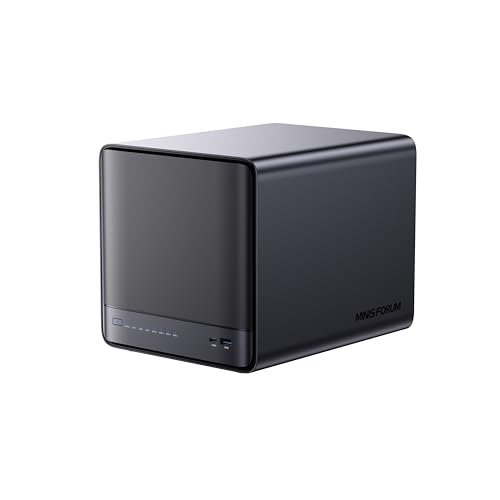
The MINISFORUM Desktop NAS N5 Pro 5 Bay is an exceptional choice for families or small businesses needing robust multi-user streaming capabilities. With its powerful AMD Ryzen AI 9 HX Pro processor and up to 96GB ECC DDR5 memory, it guarantees first-rate performance. The 188TB storage capacity allows you to store plenty of media across five drives, while dual LAN ports enable up to 15Gbps speeds for smooth streaming. Plus, its compact design and modular upgrades make maintenance a breeze. With advanced multimedia features and easy file management through MinisCloud OS, you’ll enjoy a seamless streaming experience for everyone.
Best For: Families or small businesses needing robust multi-user streaming capabilities and extensive storage options.
Pros:
- Powerful performance with AMD Ryzen AI 9 HX Pro processor and up to 96GB ECC DDR5 memory.
- Large storage capacity of 188TB across five drives, suitable for extensive media libraries.
- Seamless multimedia features including AI photo organization and real-time transcoding for an enhanced streaming experience.
Cons:
- Higher initial investment compared to basic NAS solutions due to advanced features and capabilities.
- Potential complexity in setup and management for users unfamiliar with NAS systems.
- Limited expandability in terms of drive support, as it is designed for specific configurations (5 drives max).
BUFFALO TeraStation Essentials 2025 4-Bay Desktop NAS (32TB)

If you’re seeking a reliable and cost-effective solution for managing multiple users’ streaming needs, the BUFFALO TeraStation Essentials 2025 4-Bay Desktop NAS (32TB) stands out as an excellent choice. With its 32TB capacity and included hard drives, you’ll efficiently organize, store, and share files. The native 2.5GbE port guarantees fast data transfers, while RAID pre-configuration provides out-of-the-box protection. Plus, you can easily customize your RAID settings for added flexibility. Enhanced security features like 256-bit drive encryption and cloud integration with services like Amazon S3 make it perfect for seamless data management. Enjoy solid support with a three-year warranty!
Best For: The BUFFALO TeraStation Essentials 2025 is best for small to medium-sized businesses that require a reliable and efficient network storage solution for multiple users.
Pros:
- Cost-effective professional-grade NAS with included hard drives.
- Fast data transfers with 2.5GbE port for high-speed connectivity.
- Robust security features including 256-bit drive encryption and cloud integration.
Cons:
- Limited customization options for RAID configurations out of the box.
- 5400 RPM rotational speed may not be ideal for high-intensity applications.
- Cloud integration features may require additional setup and management.
BUFFALO LinkStation 720 16TB 2-Bay Home Office NAS Storage

For home office users seeking a reliable and efficient storage solution, the BUFFALO LinkStation 720 offers a robust 16TB capacity with dual-bay functionality. You can configure it in RAID 1 for 8TB of usable space or switch to RAID 0 for the full 16TB. This NAS serves as a private cloud, media server, and file server, all while ensuring data security with SSL encryption. Sync with Dropbox and OneDrive for seamless backups, and enjoy automated backup features through the NAS Navigator utility. Plus, you’ll have access to 24/7 US-based support, ensuring you’re never left in the dark.
Best For: Home office users seeking a reliable and efficient storage solution with robust data security and cloud capabilities.
Pros:
- High capacity: Offers a total of 16TB with the option to configure in RAID 1 for data redundancy or RAID 0 for maximum storage.
- Data security: Features SSL encryption and individual access restrictions for secure file sharing.
- Cloud integration: Allows syncing with popular cloud services like Dropbox and OneDrive for seamless backups.
Cons:
- Weight: At 5.9 pounds, it may be heavier than some users prefer for portability.
- Limited warranty: Comes with a 2-year limited warranty, which may be shorter than some competitors.
- Mixed reviews: Customer ratings average 3.9 out of 5 stars, indicating some users may have had issues.
TERRAMASTER F4-425 4-Bay NAS Storage

Designed to meet the demands of families or small teams, the TERRAMASTER F4-425 4-Bay NAS Storage excels in multi-user streaming environments. With its Intel x86 Quad-Core CPU and 4GB of RAM, you’ll enjoy smooth 4K transcoding and fast file transfers via the 2.5GbE port. Supporting up to 120TB of storage, it easily accommodates your growing media library. The NAS works seamlessly with Plex, Emby, and Jellyfin, ensuring high-quality playback across devices. Plus, the TNAS Mobile app simplifies setup and synchronization, while its quiet operation makes it perfect for any space. Enjoy efficient, organized multimedia access with the F4-425.
Best For: Families or small teams looking for a reliable and efficient NAS solution for multimedia storage and streaming.
Pros:
- Fast File Transfers: The 2.5GbE port enables ultra-fast file transfer speeds, enhancing productivity.
- 4K Transcoding: Supports seamless 4K transcoding, providing high-quality video playback across devices.
- User Management: Allows for over 50 independent user accounts, making it ideal for multi-user access.
Cons:
- Diskless Design: Requires users to purchase hard drives separately, adding to initial setup costs.
- Plastic Build: The plastic material may not be as durable as metal alternatives.
- Limited RAM: The 4GB RAM may be insufficient for heavy multitasking in larger environments.
Yxk Zero1 Pro 4-Bay Desktop NAS

The Yxk Zero1 Pro 4-Bay Desktop NAS stands out as an ideal choice for families or small teams who need reliable, high-performance streaming. Powered by a 12th Gen Intel N100 quad-core CPU and equipped with 8GB of RAM, it delivers blazing speeds for 4K streaming and file transfers. With dual 2.5GbE ports, you’ll enjoy faster connectivity. Its diskless design grants you control over storage expansion, and advanced encryption guarantees your data stays private. Plus, the whisper-quiet operation and compact size make it easy to fit seamlessly into any room. Enjoy hassle-free backups with its flexible RAID modes and intelligent thermal control.
Best For: The Yxk Zero1 Pro 4-Bay Desktop NAS is best for families or small teams seeking a reliable and high-performance solution for 4K streaming and data management.
Pros:
- Blazing speeds for file transfers and 4K streaming due to the powerful Intel N100 CPU and dual 2.5GbE ports.
- Flexible RAID modes and automated backups ensure data protection and easy recovery.
- Whisper-quiet operation and compact design allow for seamless integration into any space.
Cons:
- Diskless design requires separate purchase of hard drives, which adds to initial setup costs.
- No built-in storage means that users must manage and expand their own storage solutions.
- Limited to specific operating systems, which may restrict compatibility for some users.
Factors to Consider When Choosing NAS Systems for Multi User Streaming
When you’re choosing a NAS system for multi-user streaming, you’ll want to contemplate several key factors. Think about your storage capacity needs, the speed of your network, and how well the system manages multiple users. Don’t forget to check its media streaming compatibility and data security features to guarantee a smooth experience for everyone.
Storage Capacity Requirements
Choosing the right NAS system for multi-user streaming hinges on understanding your storage capacity needs. High-definition media files can range from 1GB for compressed videos to over 40GB for 4K movies, so you’ll need a NAS that can handle large data sets. For a household with multiple users streaming at once, aim for at least 120TB of storage to accommodate extensive libraries of movies, music, and photos. Keep in mind that an average high-resolution photo is around 35MB, meaning a capable NAS can store approximately 4.2 million RAW photos. Also, look for systems that allow for storage expansion as your needs grow, and efficient file management features to optimize usage across devices.
Network Speed Considerations
Understanding storage capacity is only part of the equation; network speed plays a pivotal role in ensuring a smooth streaming experience for multiple users. For standard use, you’ll need at least 1GbE, but for seamless 4K playback, consider 2.5GbE or even 10GbE connections. High-speed interfaces can reach transfer rates of up to 1.25GB/s, greatly enhancing performance during concurrent streams. When selecting a NAS, assess your total available bandwidth; a 10GbE connection can easily support multiple streams without lag, while slower speeds risk buffering. Link aggregation can further improve throughput, enabling faster data transfers for everyone. Finally, make sure your NAS efficiently handles transcoding, as this affects streaming quality and speed across various devices and network conditions.
Multi-User Access Management
As you explore NAS systems for multi-user streaming, effective access management becomes vital to guarantee smooth and simultaneous media enjoyment for everyone. Look for systems that support multiple user accounts, allowing you to set personalized permissions for specific folders and files while ensuring data security. Advanced RAID configurations can offer data redundancy, so if one user’s data is compromised, others remain unaffected. Speed and bandwidth allocation are important too; systems with higher network speeds like 2.5GbE or 10GbE can better handle concurrent access for streaming high-definition content. Finally, choose a NAS with a user-friendly management interface, making it easy to monitor and control user access, ensuring peak performance in your multi-user environment.
Media Streaming Compatibility
What factors should you consider when evaluating NAS systems for multi-user streaming? First, verify the NAS supports essential streaming protocols like DLNA, Plex, or Emby. This compatibility makes media playback seamless across various devices. Next, look for hardware transcoding capabilities, which allow on-the-fly video format conversions for smoother streaming experiences without buffering. A minimum of 2.5GbE LAN connectivity is also essential, as it boosts file transfer speeds considerably compared to standard 1GbE connections. Additionally, choose a NAS that can handle multiple concurrent streams, backed by a robust CPU and ample RAM. Finally, check for compatibility with operating systems like Windows, macOS, Android, and iOS to verify easy access for all users.
Data Security Features
Data security is vital when selecting NAS systems for multi-user streaming. Look for systems that offer various RAID configurations like RAID 0, 1, 5, and 10 to balance performance and data redundancy according to your needs. It’s essential to guarantee the NAS provides granular user permission controls, allowing you to manage access for thousands of accounts securely. Advanced encryption methods are also a must, as they protect sensitive data from unauthorized access, maintaining privacy and compliance. Verify that the NAS includes built-in data protection features, such as automatic backups and snapshot recovery, to safeguard against data loss. Finally, consider systems with certifications from organizations like TÜV SÜD and TRUSTe, which confirm adherence to industry standards for data protection and privacy.
