
If you’re looking to elevate your media streaming experience, choosing the right NAS can make all the difference. From seamless 4K transcoding to efficient storage management, the best options on the market cater to your needs. With various features and capacities available, it’s essential to identify what fits your setup best. Let’s explore the top contenders that could transform how you enjoy your entertainment.
UGREEN NAS DXP4800 Pro 4-Bay Desktop NAS

If you’re a video editor or developer looking for a powerful media server, the UGREEN NAS DXP4800 Pro 4-Bay Desktop NAS stands out with its Intel® Core™ i3-1315U 6-Core CPU and 8GB DDR5 RAM, which is expandable up to 96GB. This NAS supports a staggering 144TB storage capacity and dual high-speed network ports for lightning-fast data transfers. You can effortlessly manage your media with its intuitive UGOS Pro operating system. Plus, the built-in security features, including multiple RAID configurations, guarantee your data remains safe. With reliable performance and expert support, this NAS is perfect for your demanding workflows.
Best For: Video editors, developers, and users with demanding workflows seeking a high-performance media server with extensive storage capabilities.
Pros:
- High-performance hardware with Intel® Core™ i3-1315U CPU and expandable RAM up to 96GB for efficient multitasking.
- Massive storage capacity of 144TB and support for various file types, making it ideal for media-heavy projects.
- Robust data security features including multiple RAID configurations and user permission controls to protect sensitive information.
Cons:
- Drives are not included, requiring additional investment for users to set up the system.
- Actual speeds may vary based on various factors, potentially affecting performance expectations.
- Initial learning curve with the UGOS Pro operating system for users unfamiliar with NAS management.
Synology 2-Bay DiskStation DS225+ (Diskless)

The Synology 2-Bay DiskStation DS225+ (Diskless) stands out as an ideal choice for media enthusiasts who prioritize centralized data management and multi-platform accessibility. This compact NAS solution supports drives from the official compatibility list, allowing you to store up to 40 TB of data while ensuring 100% ownership. With impressive sequential read/write speeds of up to 282/217 MB/s, you’ll enjoy seamless file management. Its built-in tools simplify file, photo management, and surveillance integration. Plus, it’s compatible with various devices, including Android and iPhone, making it easy to access your media anytime, anywhere, all while backed by a 3-year warranty.
Best For: Media enthusiasts and professionals seeking a compact NAS solution for centralized data management and multi-platform access.
Pros:
- Supports up to 40 TB of data, ensuring complete ownership and flexibility.
- Offers impressive sequential read/write speeds of up to 282/217 MB/s for efficient file management.
- Comes with built-in tools for file management, photo organization, and surveillance integration.
Cons:
- Diskless device requires separate purchase of compatible hard drives.
- Limited to the official compatibility list for drives, which may restrict options.
- Tabletop mounting may not suit all setups or space constraints.
UGREEN NAS DH4300 Plus 4-Bay Desktop Network Attached Storage (Diskless)

For those seeking a robust yet budget-friendly solution for home media storage, the UGREEN NAS DH4300 Plus stands out with its impressive 128TB capacity and user-friendly design. This 4-bay desktop NAS is perfect for private storage and remote access, making it easy to share files across platforms like Windows, macOS, and smart TVs. With 8GB of RAM and 2.5GbE networking, you’ll enjoy fast performance. Plus, it features AI photo management to organize your memories efficiently. Best of all, local storage guarantees your data stays secure, eliminating third-party access concerns. It’s an excellent investment for long-term savings and peace of mind.
Best For: Those looking for an affordable and efficient solution for home media storage and private data management.
Pros:
- Easy setup with quick NFC connection and user-friendly interface suitable for beginners.
- Impressive 128TB capacity allowing for extensive media storage and remote access capabilities.
- Advanced AI photo management features for efficient organization and duplicate removal.
Cons:
- No Wi-Fi support, requiring a wired Ethernet connection for network access.
- Limited to Docker support, without the ability to run virtual machines.
- Initial cost for the NAS and necessary HDD may be higher compared to subscription-based cloud storage.
TERRAMASTER F4-425 4-Bay NAS Storage

Looking for a powerful media server solution? The TERRAMASTER F4-425 4-Bay NAS Storage is your answer. With an Intel x86 Quad-Core CPU and 4GB RAM, it effortlessly handles 4K transcoding and multitasking. The 2.5GbE port guarantees ultra-fast file transfers, making it perfect for multi-user access. You can store up to 120TB across four bays while enjoying seamless streaming through Plex, Emby, or Jellyfin. Its mobile app simplifies setup and backups, and the quiet operation at 21dB makes it ideal for any environment. With flexible storage management and cloud sync options, it’s a smart choice for your media needs.
Best For: Those seeking a powerful and efficient media server for seamless 4K streaming and multi-user access.
Pros:
- Supports up to 120TB of storage across four bays, allowing for extensive media libraries.
- Ultra-fast file transfers with a 2.5GbE port, enhancing user experience during concurrent access.
- Quiet operation at 21dB, making it suitable for use in noise-sensitive environments.
Cons:
- Diskless design requires additional investment in hard drives for complete functionality.
- Limited built-in RAM (4GB) may not be sufficient for extremely demanding multitasking scenarios.
- Some users may find the setup process complicated without prior NAS experience.
BUFFALO LinkStation 720 16TB 2-Bay Home Office Private Cloud Data Storage

If you’re seeking a robust NAS solution tailored for home offices, the BUFFALO LinkStation 720 stands out with its impressive 16TB capacity. This 2-bay NAS, shipping in RAID 1 for 8TB usable space, offers the option to switch to RAID 0 for full capacity. Weighing just 5.9 pounds, it features enhanced cloud capabilities and is compatible with MacOS. You’ll enjoy up to 7x faster performance than its predecessor, and enjoy secure file transfers with SSL encryption. Plus, its subscription-free personal cloud makes storing and managing your media effortless. With 24/7 US-based support, help is always available.
Best For: Individuals or small businesses looking for a reliable, high-capacity NAS solution with cloud integration for secure data storage and management.
Pros:
- High Capacity: Offers 16TB of storage, ideal for large media libraries and backups.
- Fast Performance: Up to 7x faster than previous models, enhancing data access and transfer speeds.
- Secure and Private: Data security features, including SSL encryption and individual access restrictions, ensure privacy and secure file sharing.
Cons:
- Limited Usable Space in RAID 1: Default RAID 1 configuration only provides 8TB of usable storage.
- Weight and Size: At 5.9 pounds and the dimensions of 8.1D x 3.6W x 5H inches, it may take up more space compared to smaller options.
- Average Customer Ratings: 3.9 out of 5 stars from 3,250 reviews indicates mixed customer satisfaction.
UGREEN NAS DXP4800 Plus 4-Bay Desktop NAS

The UGREEN NAS DXP4800 Plus 4-Bay Desktop NAS shines as an ideal choice for small offices and media enthusiasts seeking robust performance and versatility. With its Intel Pentium Gold 8505 CPU and 8GB DDR5 RAM, it handles demanding tasks effortlessly. You can store an impressive 144TB of data, making it perfect for your photo, movie, and music collections. Its 10GbE connectivity allows lightning-fast transfers, while the AI-powered photo album organizes your memories seamlessly. Plus, enjoy secure centralized storage with RAID options for data recovery. Setup is easy, and it works across all your favorite devices, ensuring a smooth user experience.
Best For: Small offices and media enthusiasts looking for high-performance, versatile storage solutions.
Pros:
- High-capacity storage of up to 144TB, suitable for extensive media libraries.
- Fast transfer speeds of 1250 MB/s via 10GbE connectivity.
- User-friendly setup and compatibility with various devices and operating systems.
Cons:
- Storage hard drives must be purchased separately, adding to the overall cost.
- The weight of 3.79 kilograms may make it less portable for some users.
- Advanced features like Docker and virtual machines may require technical knowledge to fully utilize.
ZimaBlade 7700 x86 DIY NAS Kit – 2-Bay Mini Home Server
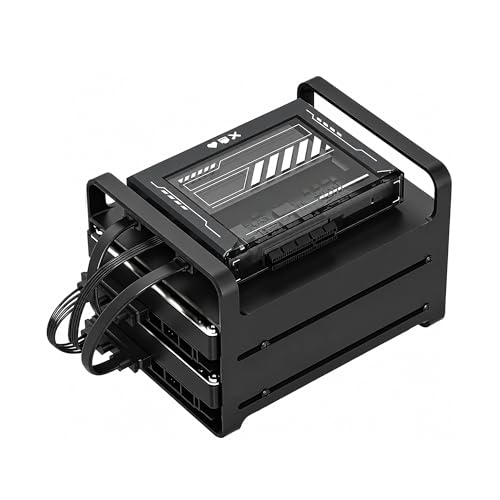
For those seeking a powerful yet customizable solution for their media streaming needs, the ZimaBlade 7700 x86 DIY NAS Kit stands out as an excellent choice. With its Intel quad-core processor and 16GB RAM, you’ll enjoy smooth 4K playback without heavy transcoding. This 2-bay mini home server supports various operating systems like Linux and Docker, making it perfect for DIY enthusiasts. Plus, it’s equipped with PCIe expansion for future upgrades. The complete kit includes everything you need to get started, allowing you to build your personal cloud or homelab effortlessly. Customize it to suit your unique needs and preferences!
Best For: The ZimaBlade 7700 x86 DIY NAS Kit is best for DIY enthusiasts and home users looking for a powerful, customizable solution for media streaming and self-hosting applications.
Pros:
- Smooth 4K media streaming capabilities with minimal transcoding, providing an excellent home media experience.
- High customization potential with PCIe expansion options for future upgrades and diverse use cases.
- Complete kit includes everything needed to get started, making it user-friendly for building personal clouds or homelabs.
Cons:
- Requires some technical knowledge for optimal setup and customization, which may not be suitable for all users.
- Limited to 2-bay configuration, which may restrict storage capacity for users with larger data needs.
- Power consumption could be higher compared to typical ARM-based NAS devices, depending on the workload.
Synology 2-Bay DiskStation DS223j (Diskless)

Looking for a reliable media server solution? The Synology 2-Bay DiskStation DS223j (Diskless) offers a secure private cloud, ensuring you maintain 100% ownership of your data. You can access your files and media from any device, making sharing and syncing a breeze. Whether you’re collaborating with colleagues or managing a media library, this NAS has you covered with extensive data protection and multiple backup options. Plus, with a 2-year warranty, you’ll have peace of mind. For setup help and additional resources, check out the Synology knowledge center and their YouTube channel. Streamline your entertainment experience today!
Best For: Individuals and small businesses looking for a reliable and secure media server solution with complete data ownership.
Pros:
- Secure private cloud ensures 100% data ownership and safe access to files.
- Multi-platform access allows users to share and sync files easily from any device.
- Comprehensive data protection with various backup options for peace of mind.
Cons:
- Diskless design means users need to purchase hard drives separately.
- Setup may require technical knowledge, which could be challenging for some users.
- Limited advanced features compared to higher-end NAS models.
BUFFALO TeraStation Essentials 2025 4-Bay Desktop NAS (32TB)

Designed with small offices and media enthusiasts in mind, the BUFFALO TeraStation Essentials 2025 4-Bay Desktop NAS delivers robust storage and fast data transfers. With a total capacity of 32TB, it’s perfect for organizing, storing, and sharing files. The native 2.5GbE port guarantees high-speed transfers, while the pre-configured RAID offers out-of-the-box data protection. You’ll appreciate the 256-bit drive encryption and flexible cloud integration options with services like Amazon S3 and OneDrive. Plus, enjoy peace of mind with a 3-year warranty and 24/7 US-based support. This NAS truly combines affordability with professional-grade features.
Best For: Small offices and media enthusiasts looking for affordable, reliable, and high-capacity network storage solutions.
Pros:
- Affordable professional-grade storage with a total capacity of 32TB.
- Fast data transfers supported by a native 2.5GbE port.
- Comprehensive data protection features including RAID configuration and 256-bit drive encryption.
Cons:
- 5400 RPM rotational speed may be slower compared to other high-performance NAS options.
- Limited to 4-bay configuration, which may not meet the needs of users requiring more extensive storage.
- Cloud integration may require additional setup, which could be complex for less tech-savvy users.
Yxk Zero1 Pro 4-Bay Desktop NAS

The Yxk Zero1 Pro 4-Bay Desktop NAS stands out as an ideal choice for media enthusiasts who crave seamless 4K streaming and efficient file transfers. Powered by the Intel N100 Quad-Core CPU and equipped with 8GB RAM, it delivers blazing speeds through its dual 2.5GbE ports. This diskless design allows for flexible storage expansion without recurring fees, giving you full control over your data. With advanced encryption and intelligent thermal management, your files are secure and the NAS operates quietly. Enjoy easy access across various devices, making it a perfect central hub for all your media needs.
Best For: Media enthusiasts and professionals seeking a reliable solution for seamless 4K streaming and efficient file management.
Pros:
- Blazing speeds with dual 2.5GbE ports for rapid file transfers and streaming.
- Flexible storage options with a diskless design that allows users to purchase hard drives separately.
- Advanced security features including encryption and user permissions to protect sensitive data.
Cons:
- Diskless design means users must invest in hard drives separately, which can add to initial costs.
- Limited built-in storage as it requires users to supply their own drives, potentially complicating setup.
- May require technical knowledge for optimal configuration and setup, which could be challenging for less experienced users.
Factors to Consider When Choosing Nas for Media Server Automation
When picking a NAS for your media server, you’ll want to take into account several key factors. Think about your storage capacity needs, processing power, and the connectivity options that will best suit your setup. Don’t forget to evaluate RAID configurations and multimedia support features to guarantee seamless automation.
Storage Capacity Requirements
Choosing the right NAS for your media server requires careful consideration of your storage capacity needs. Start by estimating how much storage you’ll need; for basic home use, around 16TB might suffice, while extensive libraries could exceed 144TB. Think about the number of files you plan to store—whether it’s millions of photos or thousands of HD movies. Check how many drives your NAS can hold, as this affects your expansion options. Also, consider the RAID configurations available; RAID 0 maximizes storage, while RAID 1 offers data protection through mirroring. Finally, factor in the growth of your media library to guarantee your NAS solution remains scalable and flexible for future demands.
Processing Power Needs
Processing power plays an essential role in ensuring your NAS can handle the demands of a media server effectively. If you plan to stream 4K media, you’ll need a robust CPU for smooth playback without buffering. Opt for multi-core processors to run multiple applications simultaneously, like managing file transfers while streaming to different devices. Consider NAS units with Intel x86 architecture, as they offer better compatibility with various operating systems and applications compared to ARM-based processors. Additionally, RAM capacity matters; a NAS with 8GB or more allows for improved multitasking, especially when running virtual machines or Docker containers. Pairing a powerful CPU with high-speed network interfaces, like 10GbE ports, enhances data transfer rates and overall responsiveness for media automation.
Connectivity Options Available
Connectivity options are vital for optimizing your NAS’s performance as a media server. High-speed options like 10GbE and 2.5GbE ports enable faster data transfer rates, essential for seamless media streaming and file sharing. If your NAS has multiple Ethernet ports, you can utilize link aggregation for improved bandwidth and redundancy, boosting overall network performance. Support for HDMI output allows for direct playback on compatible displays, simplifying your media experience. Confirm compatibility with various operating systems and protocols, so you can easily connect your NAS with PCs, mobile devices, and smart TVs. While wireless options offer flexibility and reduce cable clutter, remember that wired connections typically provide more reliable performance for high-bandwidth applications like media streaming.
RAID Configuration Flexibility
When setting up a NAS for your media server, understanding RAID configuration flexibility is essential. RAID setups let you balance data redundancy, performance, and storage capacity. If you want maximum capacity, RAID 0 is a great choice, while RAID 1 offers better data protection. Many NAS systems support various RAID levels like RAID 5 and RAID 10, providing fault tolerance alongside improved read/write speeds. Keep in mind that RAID 5 requires at least three drives, using one for parity, which affects your total usable storage. Fortunately, most NAS devices allow RAID reconfiguration without data loss, though this can depend on specific technology. Advanced options may even offer hybrid configurations for enhanced data management and protection.
Multimedia Support Features
Choosing the right NAS for your media server hinges on its multimedia support features. Look for systems that include hardware-level 4K H.265 decoding, guaranteeing seamless streaming of high-definition media without heavy transcoding. Built-in media server capabilities compatible with platforms like Plex, Emby, or Jellyfin are essential for efficient playback. You should also consider NAS devices with AI-powered photo management, which automatically organizes and categorizes your photos based on recognized faces, objects, and scenes. Opt for models that offer transcoding capabilities for on-the-fly conversion of media files to formats compatible with different devices. Finally, verify the NAS has sufficient RAM and CPU power for multitasking and simultaneous access, providing smooth streaming and file sharing experiences.
User Management Capabilities
While multimedia support features are essential for an enjoyable streaming experience, effective user management capabilities are equally important for maintaining organization and security within your NAS. Look for a system that allows granular permission controls, enabling you to set access levels for up to 2048 different user accounts. Advanced features like dedicated user spaces guarantee privacy while facilitating easy access to shared resources. Additionally, consider NAS systems that offer multiple RAID configurations for enhanced data protection tailored to your needs. User management tools with detailed logs and monitoring help you track user activity and data access patterns, improving security. A robust user management system promotes collaboration, allowing seamless file sharing and syncing across devices, keeping everyone connected.
