
Looking for a NAS that does more than just hold drives? The right model can use M.2 cache to speed up file access, improve responsiveness, and make shared storage feel much smoother.
In this roundup, we focus on NAS enclosures with M.2 cache that balance performance, expandability, and value for home labs, media libraries, and small teams.
Best 9 Nas Enclosures with M2 Cache Picks for 2026
Best for M.2 Expansion

- Four M.2 NVMe slots for cache or full flash storage
- Dual 2.5GbE networking for faster transfers
- Intel N5105 CPU handles streaming and multitasking
Best For: Power users who want a 2-bay NAS with standout NVMe expansion and fast networking.
Best for High-Speed Expansion
MINISFORUM N5 Air 5-Bay Desktop NAS
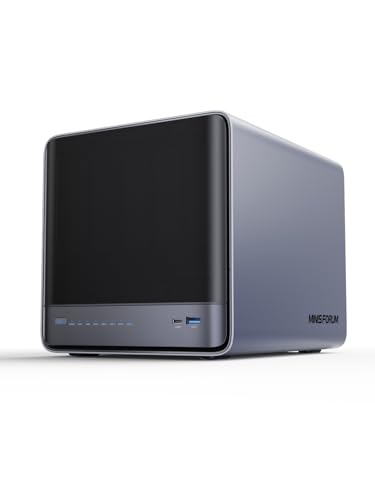
- 3x M.2 NVMe slots for cache or fast tiered storage
- 10GbE + 5GbE networking for faster transfers
- PCIe x16, USB4, and OCuLink expansion options
Best For: Power users and home lab builders who want a fast, expandable diskless NAS.
Best for Performance

- Dual M.2 NVMe cache slots for faster access
- Dual 2.5GbE connectivity and USB 3.2 ports
- Upgradable DDR5 memory with an N95 CPU
Best For: Power users and small teams wanting a fast, cache-ready 6-bay NAS enclosure.
Best for M.2 Cache Performance
Asustor Lockerstor 2 Gen2+ AS6702T v2
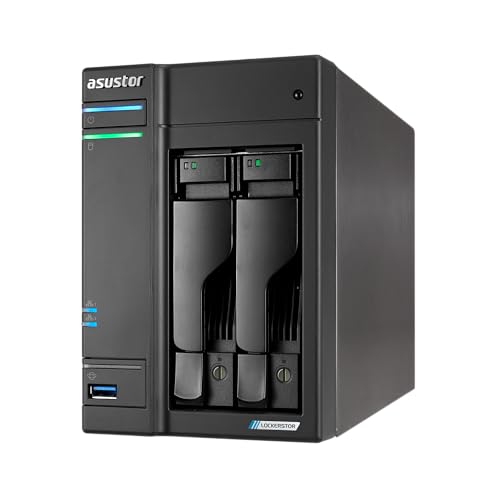
- Four M.2 NVMe slots for cache acceleration or fast storage pools
- Dual 5GbE ports for higher transfer speeds and lower bottlenecks
- Intel quad-core CPU with expandable DDR4 for creator workloads
Best For: Creators and small teams that want fast cache acceleration and dual 5GbE networking.
Best for M.2 Cache Expansion
TERRAMASTER F2-425 Plus 2-Bay NAS

- Triple M.2 slots for cache or SSD pools
- Dual 5GbE ports for faster transfers
- 8GB DDR5 and Intel N150 for multitasking
Best For: People who want a compact 2-bay NAS with extra SSD acceleration and fast networking.
Best for High-Speed Caching
Asustor Lockerstor 2 Gen2 AS6702T
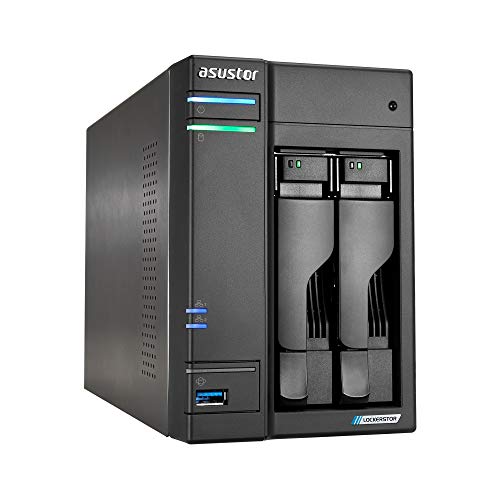
- Four M.2 NVMe slots for cache or fast storage pools
- Dual 2.5GbE for quicker transfers and smoother sharing
- Intel Celeron N5105 with expandable DDR4 RAM
Best For: Home users and small teams that want a fast, flexible NAS with SSD caching.
Best for High-Speed M.2 Expansion
TerraMaster F4-425 Plus 4-Bay NAS

- Triple M.2 slots for cache or SSD pools
- Dual 5GbE with link aggregation and SMB Multichannel
- 16GB DDR5 RAM and Intel N150 CPU
Best For: Small teams and power users needing fast networking with flexible SSD acceleration.
Best for Creators
UGREEN DXP2800 2-Bay NAS with M.2 Cache

- Dual M.2 NVMe slots for cache or fast storage
- 2.5GbE and 8GB DDR5 support snappy transfers
- 4K HDMI and AI photo tools suit media workflows
Best For: Content creators and enthusiasts who want a user-friendly 2-bay NAS with NVMe cache support.
Best for Quiet Home Media

- Intel x86 quad-core CPU for smoother multitasking
- 2.5GbE LAN for faster transfers and sharing
- Ultra-quiet 21dB(A) design suits home spaces
Best For: Home users who want a quiet, diskless 4-bay NAS for streaming and backups.
Best for M.2 Expansion – Asustor AS5402T 2-Bay NAS
If you want one of the more flexible nas enclosures with m2 cache, the Asustor AS5402T stands out with four M.2 NVMe slots, dual 2.5GbE networking, and an Intel N5105 CPU that handles everyday file serving and media tasks with ease. It is a strong fit for buyers who want faster responsiveness now and room to scale later.
Best For: Power users, gamers, and small teams who want a 2-bay NAS with aggressive NVMe expansion and fast networking.
Pros:
- Four M.2 NVMe slots for cache or full flash storage
- Dual 2.5GbE ports improve transfer speeds and link aggregation
- Intel quad-core CPU is well-suited for multitasking and streaming
- HDMI 2.0b and USB 3.2 Gen2 add useful connectivity options
Cons:
- Diskless model means you still need to buy drives and SSDs separately
- Only 4GB RAM out of the box, so heavy users may want an upgrade
For shoppers comparing nas enclosures with m2 cache, this model is especially appealing if you want more than basic caching and value a NAS that can support faster all-flash or hybrid setups. It is not the cheapest route, but the expandability is a real advantage.
Best for High-Speed Expansion – MINISFORUM N5 Air 5-Bay Desktop NAS
If you want one of the most flexible nas enclosures with m2 cache, the MINISFORUM N5 Air stands out for its mix of 5-bay SATA storage, three M.2 NVMe slots, and high-end networking. It is built for users who need fast local access, lots of expansion headroom, and more than the basics from a desktop NAS chassis.
Best For: Power users, small teams, and home lab builders who want a diskless NAS with strong cache, networking, and expansion options.
Pros:
- 3x M.2 NVMe slots for cache or fast tiered storage
- 10GbE + 5GbE networking for faster transfers and link aggregation
- PCIe x16, USB4, and OCuLink add unusually broad expansion
- Ryzen 7 255 platform offers strong multitasking and media performance
Cons:
- Diskless design means you still need to buy all drives separately
- Advanced features may be more than casual users need
- SSD cache and expansion add cost quickly if you fully build it out
For buyers comparing nas enclosures with m2 cache, this model is especially appealing if you care about speed, future upgrades, and heavier workloads rather than just basic file storage. It is a strong fit when you want a NAS platform that can grow with your storage and performance needs.
Best for Performance – TerraMaster F6-424 6-Bay NAS
If you want one of the faster nas enclosures with m2 cache for a small office or power-user home setup, the TerraMaster F6-424 is built around speed. Its N95 CPU, DDR5 memory, dual 2.5GbE, and dual M.2 NVMe cache slots make it a strong fit when you need quick app loading, responsive file access, and room to grow.
Best For: Users who want a high-speed 6-bay NAS enclosure with SSD cache support, modern networking, and easy upgrade paths.
Pros:
- Dual M.2 NVMe slots add SSD cache support for faster everyday access.
- Dual 2.5GbE and USB 3.2 ports improve network and external transfer speed.
- Upgradable DDR5 memory and a capable N95 CPU suit heavier multitasking.
- Tool-free trays and easy M.2 access make setup and expansion simpler.
Cons:
- Diskless design means you still need to buy drives separately.
- Performance benefits depend on pairing it with SSD cache and fast HDDs.
For buyers comparing nas enclosures with m2 cache, this model stands out for blending practical 6-bay storage with strong connectivity and cache-ready hardware. It’s a sensible choice if you care more about overall responsiveness than chasing the absolute lowest price.
Best for M.2 Cache Performance – Asustor Lockerstor 2 Gen2+ AS6702T v2
If you want one of the more capable nas enclosures with m2 cache for creator workflows, the Asustor Lockerstor 2 Gen2+ stands out with a quad-core Intel processor, dual 5GbE networking, and four M.2 NVMe slots. That combination makes it a strong fit for speeding up shared files, editing projects, and heavy multitasking without moving to a full all-flash setup.
Best For: Content creators, small teams, and power users who need fast caching, strong networking, and 24/7 NAS reliability.
Pros:
- Four M.2 NVMe slots for aggressive cache acceleration or high-speed storage use
- Dual 5GbE ports deliver much faster transfer speeds than standard Gigabit NAS boxes
- Intel Celeron N5105 and expandable DDR4 memory handle multitasking well
- Hardware transcoding support is useful for Plex and 4K media streaming
Cons:
- Diskless design means you must buy your own drives and SSDs
- Four M.2 slots add cost if you want to fully populate the cache
For buyers comparing nas enclosures with m2 cache, this model is especially appealing when network speed and SSD acceleration matter more than raw bay count. It is a practical pick for creators who want responsive storage, remote access, and room to grow.
Best for M.2 Cache Expansion – TERRAMASTER F2-425 Plus 2-Bay NAS
The TERRAMASTER F2-425 Plus is a strong pick if you want one of the more flexible nas enclosures with m2 cache for a small team, media workflow, or fast home server. Its 2-bay HDD layout plus triple M.2 support gives you room to balance bulk storage and SSD acceleration, while dual 5GbE networking helps it move data much faster than basic entry-level NAS units.
Best For: Users who want a compact 2-bay NAS with triple M.2 slots, fast networking, and room for caching or SSD pools.
Pros:
- Triple M.2 slots add unusual flexibility for cache or separate SSD storage pools
- Dual 5GbE ports support link aggregation and high-speed file transfers
- 8GB DDR5 memory and Intel N150 CPU handle multi-user tasks well
- Useful app and sync support for backup, media, Docker, and remote access
Cons:
- Diskless design means you still need to buy HDDs and SSDs separately
- Two-bay capacity may feel limited for larger long-term storage libraries
- Advanced features may be more than casual users need
Overall, this is a smart option if you want a compact NAS that goes beyond basic storage and gives you serious SSD acceleration potential. Among nas enclosures with m2 cache, it stands out for combining triple M.2 expansion, dual 5GbE, and broad software features in one small chassis.
Best for High-Speed Caching – Asustor Lockerstor 2 Gen2 AS6702T
The Asustor Lockerstor 2 Gen2 is a strong fit for shoppers comparing nas enclosures with m2 cache, especially if you want fast network transfers and flexible SSD caching in a compact 2-bay setup. Its dual 2.5GbE ports and four M.2 NVMe slots give it more performance headroom than typical entry-level NAS boxes.
Best For: Home users, power users, and small teams that want a responsive NAS for backups, Plex, and multi-user file access.
Pros:
- Four M.2 NVMe slots for cache acceleration or fast storage pools
- Dual 2.5GbE helps unlock faster file transfers and better sharing performance
- Intel Celeron N5105 CPU supports backups, streaming, and light virtualization
- Expandable DDR4 memory adds room for heavier multitasking
Cons:
- Diskless model means you must buy your own drives and SSDs
- Only two drive bays, so raw HDD capacity is more limited than larger NAS units
- Best features cost more once you add NVMe cache and upgraded RAM
Overall, this is one of the more capable nas enclosures with m2 cache if speed matters as much as storage. It’s a practical pick for buyers who want strong responsiveness today and enough expansion to keep the system useful as needs grow.
Best for High-Speed M.2 Expansion – TerraMaster F4-425 Plus 4-Bay NAS
If you want one of the more flexible nas enclosures with m2 cache, the TerraMaster F4-425 Plus stands out with a 4-bay design, dual 5GbE networking, and triple M.2 slots that can be used for cache or separate SSD storage pools. It’s a strong fit for users who need fast file sharing, media streaming, or a compact team NAS with room to grow.
Best For: Small teams, content creators, and power users who want fast networking plus flexible M.2 acceleration.
Pros:
- Triple M.2 slots for cache or independent SSD pools
- Dual 5GbE ports with link aggregation and SMB Multichannel
- 16GB DDR5 RAM and Intel N150 for solid everyday performance
- Supports large-capacity storage with 4 HDD bays plus SSD expansion
Cons:
- Diskless, so you’ll need to buy drives separately
- Advanced features may be more than casual home users need
For buyers comparing nas enclosures with m2 cache, this model is especially compelling because it combines fast dual 5GbE connectivity with unusually flexible triple M.2 support in a relatively compact 4-bay chassis. That makes it a practical pick when speed, expansion, and workload versatility all matter.
Best for Creators – UGREEN DXP2800 2-Bay NAS with M.2 Cache
If you want one of the more approachable nas enclosures with m2 cache, the UGREEN DXP2800 brings a strong mix of speed, expandability, and user-friendly software. Its Intel N100 CPU, 8GB DDR5 RAM, 2.5GbE networking, and dual M.2 NVMe slots make it a practical pick for creators who want fast local storage without jumping straight to a high-end rack setup.
Best For: Content creators, enthusiasts, and small teams that want a fast, easy-to-manage 2-bay NAS with NVMe cache support.
Pros:
- Dual M.2 NVMe slots add cache or fast storage flexibility.
- 2.5GbE and 8GB DDR5 help keep transfers responsive.
- 4K HDMI output is handy for direct media playback and setup.
- Up to 80TB capacity gives plenty of room for backups and media.
Cons:
- Diskless model means you still need to buy drives separately.
- Only two drive bays, so growth is more limited than larger NAS units.
For buyers comparing nas enclosures with m2 cache, this model stands out for balancing creator-friendly features with straightforward day-to-day use. It is not the cheapest route, but it offers a compelling feature set for local backups, media libraries, and shared project files.
Best for Quiet Home Media – TERRAMASTER F4-425 4-Bay NAS
If you want one of the more approachable nas enclosures with m2 cache-style performance for home media and backup use, the TERRAMASTER F4-425 is a practical pick thanks to its Intel x86 quad-core CPU, 4GB RAM, and 2.5GbE networking. It’s aimed at users who want smooth Plex-style streaming, fast file transfers, and easy mobile management without a lot of setup friction.
Best For: Home users who want a quiet, diskless 4-bay NAS for streaming, backups, and everyday file sharing.
Pros:
- Intel x86 quad-core processor handles multitasking and 4K transcoding better than basic ARM units
- 2.5GbE LAN helps speed up large transfers and multi-user access
- Very quiet 21dB(A) operation is ideal for bedrooms and living spaces
- Tool-free trays and mobile setup make it easy to get started
Cons:
- Diskless, so you’ll need to buy drives separately
- No explicit M.2 cache slot is listed in the product details
- 4GB RAM may feel limiting for heavier app loads or advanced virtualization
Overall, the F4-425 makes more sense as a quiet multimedia NAS than a tuning-focused cache machine, but it still fits well in a roundup of nas enclosures with m2 cache if you’re prioritizing home performance, easy management, and strong streaming support over expansion depth.
How We Picked the Best Nas Enclosures with M2 Cache
We prioritized hardware that makes a real difference in day-to-day use: M.2 cache support, modern CPU platforms, faster networking, and enough memory headroom for multitasking. We also favored enclosures that offer practical expansion without pushing buyers into unnecessary complexity.
Quick Comparison
Among Nas Enclosures with M2 Cache, the main differences usually come down to bay count, cache slot count, and network speed. Two-bay models are easier to start with and fit smaller budgets, while four- and six-bay units offer better long-term storage growth. Models with 5GbE or 10GbE are better suited to users moving large files, editing media over the network, or serving multiple devices at once.
Key Buying Factors for NAS Enclosures with M.2 Cache
Cache Vs. Storage
M.2 slots can be used for cache, storage, or both depending on the system. If your workload includes lots of small files, frequent app use, or repeated access to the same data, cache can help most. If you need raw capacity first, make sure the drive bays still match your storage plan.
Network Speed Matters
A fast cache setup can be held back by slow networking. For many buyers, 2.5GbE is the baseline worth considering, while 5GbE and 10GbE make more sense for larger media projects, virtual machines, or multi-user access.
CPU and RAM Headroom
Cache helps, but the processor and memory still drive overall responsiveness. Look for newer Intel or AMD chips and enough RAM to handle file services, backups, and any extra apps you plan to run.
Thermals and Drive Layout
Multiple M.2 drives can add heat, so cooling design matters. Also consider whether the enclosure leaves room for future expansion, such as more bays, faster ports, or extra memory upgrades.
Who Should Buy Which Nas Enclosures with M2 Cache?
If you want a compact starter system, a two-bay unit with M.2 cache is usually the simplest choice. If you expect your storage needs to grow, step up to a four- or six-bay enclosure for better scalability. Power users, media creators, and small offices should look closely at models with 5GbE or 10GbE, since those features help you get more from the cache and reduce bottlenecks.
In short, the best choice depends on whether you value low upfront cost, faster shared access, or long-term expansion. For most buyers, the sweet spot is a NAS that combines strong M.2 support with modern networking and enough CPU performance to keep everything responsive.
