
Choosing the right storage for continuous camera recording is about more than raw capacity. You need a system that can handle constant writes, protect footage, and stay reliable under 24/7 use.
This guide highlights the best options for homeowners, small businesses, and anyone building practical nas enclosures for surveillance recording in 2026.
Best 10 Nas Enclosures for Surveillance Recording Picks for 2026
Best for Small-Scale Surveillance

- Quad-core Intel Celeron with 8GB DDR4
- Dual 2.5GbE for faster footage transfers
- Dual M.2 NVMe slots for cache or SSD pools
Best For: Small businesses and installers needing a dependable 4-bay NAS for multi-camera recording.
Best for High-End NVR Workloads
WD Purple Pro 8TB Surveillance HDD

- Built for 24/7 surveillance recording
- High workload rating up to 550 TB/yr
- Good fit for multi-bay AI/NVR systems
Best For: Multi-bay NAS and NVR users recording many cameras around the clock.
Best for Home Surveillance
Synology DS223 2-Bay Backup Hub

- Built-in tools for motion alerts, schedules, and remote camera viewing
- 2-bay NAS offers flexible storage and basic redundancy
- Also works well for backups, file sharing, and a private cloud
Best For: Home and small office buyers who want a simple NAS for surveillance recording plus everyday storage.
Best for High-Write Surveillance
WD Purple Pro 10TB Surveillance HDD

- Up to 550 TB/yr workload rating
- Built for multi-bay surveillance enclosures
- 10TB capacity for long retention
Best For: Surveillance-focused NAS and NVR setups that record continuously and handle analytics.
Best Hybrid NAS for Cameras
LincStation N1 6-Bay NAS Storage
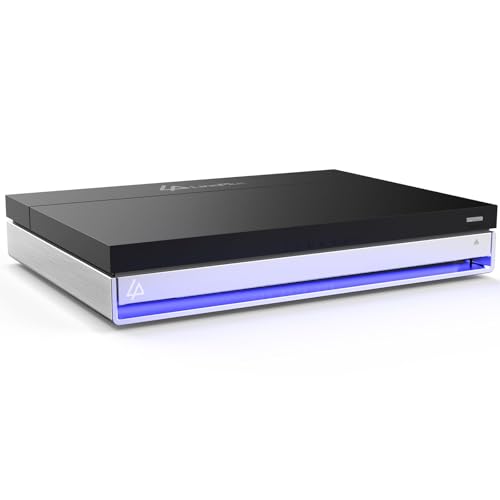
- 2.5" SATA + 4x M.2 NVMe hybrid design
- Included Unraid license for flexible storage management
- 2.5GbE, HDMI, and 16GB RAM for multi-purpose use
Best For: Home users and small offices that want one NAS for surveillance recording, streaming, and Docker apps.
Best for AI Video Storage
WD Purple Pro 18TB Surveillance HDD

- Supports heavy 24/7 surveillance workloads
- AllFrame AI helps protect video stream integrity
- 18TB capacity suits larger multi-camera systems
Best For: Large surveillance NAS builds and AI-enabled recorders that need dependable, high-capacity storage.
Best Value for Home Surveillance
BUFFALO LinkStation 220 12TB 2-Bay NAS
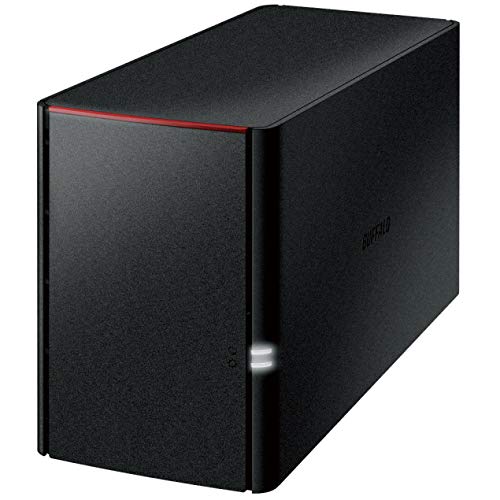
- 12TB included, with RAID 1 or RAID 0 options
- Subscription-free local storage for a home network
- Good fit for backups and light surveillance recording
Best For: Home users who want affordable network storage for backups, shared files, or light surveillance recording.
Best for 24/7 Surveillance
Toshiba S300 4TB Surveillance HDD

- Built for continuous surveillance recording
- Supports up to 64 HD camera streams
- RV sensors improve stability in multi-drive setups
Best For: Home and small-business surveillance systems that need dependable 24/7 recording.
Best Simple Home NAS
BUFFALO LinkStation 210 6TB 1-Bay NAS

- Includes 6TB of storage ready to use
- Simple 1-bay design for easy setup
- Works well for light home surveillance and backups
Best For: Home users who need a simple, ready-made NAS for light surveillance and everyday storage.
Best Value Surveillance Drive
WL 3TB 7200RPM SATA III 3.5" HDD
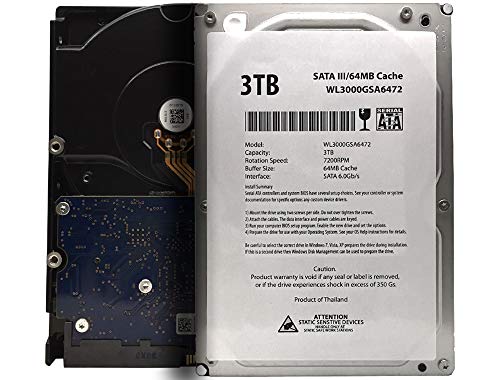
- 3TB capacity for video, backups, and everyday storage
- Works with many 3.5-inch SATA NAS and DVR setups
- Strong budget-friendly option for basic storage expansion
Best For: Budget-minded users who need a compatible 3.5-inch SATA drive for NAS, DVR, or desktop storage.
Best for Small-Scale Surveillance – QNAP TS-453E 4-Bay 8GB NAS
QNAP TS-453E-8G-US 4 Bay Desktop NAS | Intel Quad-core CPU burst up to 2.9 GHz with 8GB RAM
Check Price On AmazonIf you want one of the more practical nas enclosures for surveillance recording, the QNAP TS-453E brings a good mix of camera-friendly performance, long-term availability, and expandability. Its quad-core Intel Celeron, dual 2.5GbE ports, and 4-bay design make it a sensible fit for small offices, retail spaces, or home security setups that need steady recording and easy management.
Best For: Small businesses and pros who need a reliable 4-bay NAS for multi-camera recording, with room to add SSD cache for smoother surveillance workloads.
Pros:
- Quad-core Intel Celeron and 8GB DDR4 provide solid everyday recording performance.
- Dual 2.5GbE helps move footage faster and supports smoother network access.
- Dual M.2 NVMe slots let you add cache or SSD storage for better responsiveness.
- Long-term model availability is useful for repeat deployments and matching hardware.
Cons:
- Diskless, so total cost rises once you add drives.
- Overkill if you only need a basic file-share NAS with light camera use.
Overall, the TS-453E is a smart middle-ground choice among nas enclosures for surveillance recording: capable enough for multi-camera duty, but still compact and office-friendly. If you want a dependable 4-bay platform with room to grow, this one fits the brief well.
Best for High-End NVR Workloads – WD Purple Pro 8TB Surveillance HDD
If you need storage built for demanding nas enclosures for surveillance recording, this WD Purple Pro drive is aimed at always-on systems with many cameras, analytics, and heavy write activity. It’s a better fit than a generic desktop drive when uptime, workload endurance, and multi-bay reliability matter.
Best For: Multi-bay NAS or NVR setups that need dependable 24/7 recording performance for advanced surveillance workloads.
Pros:
- Designed for high-end smart video and AI-enabled recording systems
- Supports up to 550 TB/yr workload rate for heavy surveillance use
- Tarnish-resistant components add durability in harsher environments
- Built for multi-bay enclosures and always-on operation
Cons:
- More specialized than a general-purpose storage drive
- Overkill for light home NAS file storage
- Higher cost than basic desktop or entry-level NAS drives
This is a strong fit when your nas enclosures for surveillance recording need a drive that can handle sustained writes, multiple streams, and long-term reliability without being treated like ordinary PC storage.
Best for Home Surveillance – Synology DS223 2-Bay Backup Hub
If you want one of the more approachable nas enclosures for surveillance recording, the Synology DS223 is a practical entry-level option that also doubles as a file hub and backup target. It’s a diskless 2-bay NAS, so you’ll need to add drives, but Synology’s DSM software makes setup, file access, and camera monitoring relatively straightforward for home and small office use.
Best For: Home users and small offices that want a simple NAS for shared storage, automated backups, and basic IP camera recording.
Pros:
- Built-in surveillance tools support motion alerts, recording schedules, and remote viewing
- 2-bay design gives you flexible storage and room for redundancy
- Useful as an all-in-one hub for files, backups, and collaboration
- License-free DSM software reduces ongoing platform costs
Cons:
- Diskless bundle means extra cost for hard drives
- 2-bay hardware is better for light-duty surveillance than larger multi-camera setups
- Not the fastest choice if you need a more powerful recording server
For buyers comparing nas enclosures for surveillance recording, the DS223 stands out more for simplicity and software than raw expandability. It’s a smart fit if you want dependable recording for a modest camera setup while also keeping backups and shared files in one place.
Best for High-Write Surveillance – WD Purple Pro 10TB Surveillance HDD
If you’re building nas enclosures for surveillance recording, the WD Purple Pro 10TB is a strong fit for heavier-duty setups that run around the clock. It’s tuned for high workload rates, multi-bay enclosures, and AI-enabled video systems, so it’s better suited to serious recording environments than a standard desktop drive.
Best For: NVRs, multi-bay NAS systems, and surveillance installs that need dependable 24/7 recording with analytics support.
Pros:
- Designed for surveillance workloads with up to 550 TB/yr endurance
- Built for multi-bay enclosures and harsh operating environments
- Strong choice for AI-enabled recorders and video analytics systems
- 10TB capacity helps support longer retention windows for footage
Cons:
- Overkill for light home NAS file storage
- Pricier than general-purpose hard drives
- Optimized for surveillance, not everyday desktop performance
For buyers comparing nas enclosures for surveillance recording, this drive stands out when uptime, workload tolerance, and multi-drive reliability matter more than raw speed. It’s a practical pick if your system is expected to record continuously and handle advanced video features without missing a beat.
Best Hybrid NAS for Cameras – LincStation N1 6-Bay NAS Storage
If you want one of the more flexible nas enclosures for surveillance recording, the LincStation N1 stands out for mixing 2.5″ HDD bays with four M.2 NVMe slots, giving you room to separate camera storage, cache, and apps. The included Intel x86 processor, 16GB of RAM, and Unraid support make it a practical pick for a home lab or small office that also needs media streaming, backups, and remote access.
Best For: Buyers who want a compact hybrid NAS that can handle surveillance recording plus Plex, Docker apps, and fast network storage in one box.
Pros:
- Hybrid 6-bay design combines 2.5″ SATA bays with 4 M.2 NVMe slots for flexible storage layouts.
- Included Unraid license adds drive-failure protection and easy expansion without strict RAID limits.
- 2.5GbE, HDMI 2.0, and multiple USB ports make it well suited to multi-purpose home server setups.
- 16GB RAM and Intel x86 CPU help with transcoding, backups, and always-on services.
Cons:
- Diskless configuration means you still need to buy all storage drives separately.
- Two 2.5″ SATA bays may feel limited if you want mostly large-capacity hard drives for cameras.
- More advanced than a basic plug-and-play NAS, so setup may take some tuning.
Overall, the N1 is a strong fit if you want nas enclosures for surveillance recording that can do more than just store footage. Its hybrid drive layout and Unraid flexibility make it especially appealing for users who want surveillance storage, app hosting, and media playback in a single compact system.
Best for AI Video Storage – WD Purple Pro 18TB Surveillance HDD
If you’re building nas enclosures for surveillance recording, the WD Purple Pro 18TB is made for the kind of nonstop, write-heavy duty these systems demand. It is tuned for high-end recorders, multi-bay enclosures, and AI-assisted video setups where capacity, reliability, and consistent playback matter more than desktop-style speed claims.
Best For: Large surveillance NAS builds, AI-enabled recorders, and multi-drive enclosures that need 24/7 video retention.
Pros:
- Built for surveillance workloads with up to 550 TB/yr rated workload support
- AllFrame AI helps reduce frame loss and supports multiple video and AI streams
- Enterprise-class reliability suits multi-bay enclosures with vibration present
- 18TB capacity is ideal for longer retention and higher camera counts
Cons:
- Overkill for basic home NAS file storage or light camera use
- Higher-capacity surveillance drives typically cost more per drive
- 3.5-inch SATA design requires a compatible bay and power setup
For buyers comparing nas enclosures for surveillance recording, this drive stands out when the priority is dependable 24/7 capture rather than general-purpose storage. It is a strong match for larger systems that need high capacity, sustained workload handling, and video-focused firmware features.
Best Value for Home Surveillance – BUFFALO LinkStation 220 12TB 2-Bay NAS
If you want a straightforward, subscription-free option among nas enclosures for surveillance recording, the BUFFALO LinkStation 220 offers a simple 2-bay setup with RAID support and included drives. It’s geared more toward dependable shared storage and backup than advanced camera-management features, but it can be a practical fit for home users who want centralized recording storage without ongoing fees.
Best For: Home users who need affordable, always-on network storage for backups, shared files, or light surveillance recording.
Pros:
- 12TB total capacity with 2-bay RAID 1 or RAID 0 flexibility
- Subscription-free storage with built-in drive protection and SSL encryption
- Included software makes backups and basic file sharing easy to manage
Cons:
- Not a high-performance NAS for demanding multi-camera workloads
- Mac support is limited on newer macOS versions
- Fewer advanced features than newer LinkStation models
For buyers comparing nas enclosures for surveillance recording, this LinkStation 220 makes the case for simple, low-maintenance storage rather than premium speed or expansion. It’s a solid value pick if your priority is keeping recordings centralized, protected, and accessible on a home network.
Best for 24/7 Surveillance – Toshiba S300 4TB Surveillance HDD
If you’re comparing NAS enclosures for surveillance recording, the Toshiba S300 is built for the nonstop write workloads that security cameras create. With support for up to 64 HD cameras, 24/7 operation, and RV sensors to reduce vibration issues, it’s a practical drive for DVRs, NVRs, and surveillance-focused NAS setups.
Best For: Home or small-business security systems that need a surveillance-tuned hard drive for continuous recording.
Pros:
- Designed for surveillance workloads with 24/7 operation support
- Handles multiple camera streams, up to 64 HD cameras
- RV sensors help maintain stability in multi-drive or vibration-prone setups
- Compatible with a wide range of DVR and NVR systems
Cons:
- Not as fast as SSD-based storage for general-purpose use
- Single-drive capacity may be limiting for longer retention windows
For surveillance-focused storage, this drive makes sense when reliability matters more than peak desktop performance. It’s a strong fit for nas enclosures for surveillance recording because it’s tuned for constant writes, vibration resistance, and long runtimes rather than mixed-use workloads.
Best Simple Home NAS – BUFFALO LinkStation 210 6TB 1-Bay NAS
If you want a straightforward entry-level option for nas enclosures for surveillance recording, the BUFFALO LinkStation 210 keeps things simple with included storage and a one-bay design. It is a practical fit for small home setups where you need basic network storage without paying for a larger multi-bay system.
Best For: Home users who want an easy, all-in-one NAS for light surveillance storage, backups, and everyday file sharing.
Pros:
- Includes 6TB of storage, so it is ready to use out of the box
- Compact 1-bay design keeps setup simple and space requirements low
- Good fit for basic home cloud and network storage tasks
Cons:
- Single-bay design limits redundancy and expansion options
- Not ideal for larger camera systems or heavier surveillance workloads
Overall, this is a no-frills choice for shoppers comparing nas enclosures for surveillance recording and wanting an inexpensive, ready-made storage solution rather than a more advanced NAS platform.
Best Value Surveillance Drive – WL 3TB 7200RPM SATA III 3.5" HDD
If you need a straightforward, affordable drive for nas enclosures for surveillance recording, this 3TB 3.5-inch SATA hard drive offers the capacity and compatibility to handle everyday storage duties without adding complexity.
Best For: Budget-conscious buyers who want a 3.5-inch SATA drive for DVRs, NAS units, desktop upgrades, or basic surveillance storage.
Pros:
- 3TB capacity gives you room for video archives, backups, and general file storage
- Standard 3.5-inch SATA III design fits many desktop PCs, NAS enclosures, and DVR setups
- 7200RPM performance can help with responsive everyday read/write tasks
- Good value for users replacing or expanding a basic storage drive
Cons:
- Not a dedicated surveillance-class drive with advanced firmware features
- 1-year warranty is shorter than many higher-end storage options
- May be overkill for very light backup-only use
For buyers comparing nas enclosures for surveillance recording, this drive is mainly a value pick: it delivers broad compatibility and solid capacity, but it is better suited to lighter-duty recording or general-purpose storage than round-the-clock enterprise monitoring.
How We Picked the Best Nas Enclosures for Surveillance Recording
We focused on storage systems and surveillance-oriented drives that make sense for always-on video capture. Priority went to drive reliability, workload suitability, bay count, expansion flexibility, and networking features that help keep recordings accessible when you need them.
For Nas Enclosures for Surveillance Recording, the main goal is dependable storage first and convenience second. That means looking for hardware that can sustain repeated writes, support multiple cameras, and offer straightforward management for backup and retention.
Quick Comparison
Use the product list in this roundup to separate full NAS units from purpose-built surveillance drives. NAS enclosures and bundled systems are best when you want centralized recording, remote access, and room to grow. Surveillance HDDs are the better choice when you are upgrading an existing enclosure or DVR/NVR and need drives built for high-write workloads.
Key Buying Factors for Nas Enclosures for Surveillance Recording
Bay Count and Expansion
More bays usually mean more storage capacity, better redundancy options, and easier upgrades later. Two-bay models fit small installs, while four-bay and larger setups are better for growing camera counts or longer retention periods.
Drive Type and Workload Rating
Surveillance drives are tuned for continuous writing and long recording schedules. Look for models designed for 24/7 use rather than general desktop storage. If you are choosing a NAS enclosure, confirm drive compatibility and avoid mixing mismatched drive types when possible.
Reliability and Redundancy
Video evidence is only useful if it stays intact. RAID support, backup options, and stable firmware matter more than peak speed for most surveillance setups. For critical locations, redundancy can be worth the extra drive cost.
Network Speed and Access
Dual 2.5GbE or similar higher-speed networking can help with multi-camera ingest, remote review, and faster file transfers. If your camera load is modest, standard gigabit may be enough, but faster networking offers more headroom.
Capacity Planning
Estimate how many days of footage you need to keep, how many cameras you will run, and whether motion recording will be used. Higher-capacity drives are often the simplest way to extend retention without adding complexity.
Who Should Buy Which Nas Enclosures for Surveillance Recording?
Choose a compact 2-bay NAS if you want an easy, lower-cost setup for a few cameras and basic remote access. Go with a 4-bay or higher-capacity enclosure if you need longer retention, more users, or expansion room.
If you already have a compatible NAS or recorder, surveillance HDDs are the most practical upgrade. They are also the right pick when you want to maximize recording time without replacing the entire system. For most buyers, the best choice among Nas Enclosures for Surveillance Recording is the one that matches your camera count, retention target, and upgrade path today.
