
Choosing the right NAS enclosure for home office video editing can make a major difference in speed, storage growth, and day-to-day workflow. The best picks balance network performance, drive capacity, and reliability.
Below, we focus on options that fit real editing needs, from compact two-bay units to scalable multi-bay systems built for larger projects and multi-user access.
Best 10 Nas Enclosure for Home Office Video Editing Picks for 2026
Best for 10GbE Speed

- 10GbE networking for faster media transfers
- Two NVMe slots and 8GB DDR5 for responsive performance
- 4 bays and up to 144TB potential capacity
Best For: Editors and small teams building a fast, expandable storage hub for active media projects.
Best for Shared Storage
Synology DS223 Home & Office NAS

- Centralizes project files and backups in one hub
- Synology software adds syncing and version control
- Diskless two-bay design lets you choose your own drives
Best For: Home offices and small creator teams that want organized shared storage with dependable backup features.
Best for High-Capacity DIY Builds
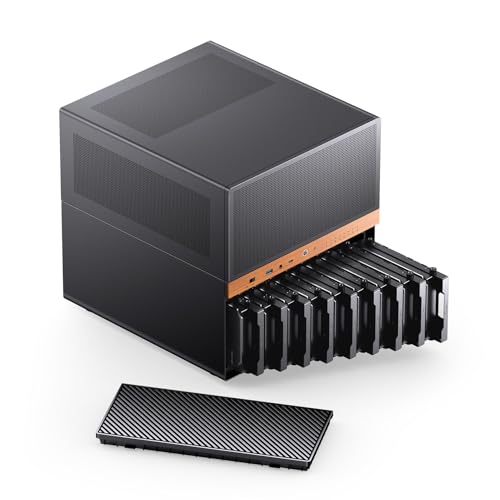
- 9 hot-swap bays for high-capacity storage
- Micro ATX support with room for a GPU
- Flexible cooling and ATX/SFX PSU support
Best For: Home-office editors and DIY NAS builders who need lots of storage and upgrade flexibility.
Best for 10GbE Video Workflows

- Dual 10GbE for fast editing and backups
- Expandable RAM plus M.2 NVMe slots
- Docker, VMs, Plex, and HDMI support
Best For: Creators and home-office users who need fast shared storage for editing, backups, and self-hosted apps.
Best for Hardware Transcoding
Synology DS225+ Private Cloud Media Server

- Intel CPU with hardware transcoding
- Fast 282 MB/s transfer speeds
- RAID, snapshots, and cloud backup support
Best For: Creators who want a compact NAS for media streaming, backups, and shared storage in a home office.
Best for Easy Setup
UGREEN NAS DH4300 Plus 4-Bay NAS

- 4-bay, diskless design with up to 128TB capacity
- 2.5GbE, 8GB RAM, and 4K HDMI support
- Beginner-friendly app setup with remote access
Best For: Home office users who want simple NAS storage for media, backups, and private cloud access.
Best for High-Capacity Builds

- 12 hot-swap 3.5-inch bays plus 4 SSD mounts
- Supports E-ATX boards and multiple GPUs
- Built-in fans and AIO support aid cooling
Best For: Creators who need a high-capacity NAS-style case for editing storage and server builds.
Best for Heavy-Duty Creative Teams

- 50+ concurrent user support for shared editing
- Expands from 160TB to 360TB with add-ons
- 10GbE/25GbE networking for faster workflows
Best For: Small studios and advanced home-office teams that need scalable, high-speed shared storage.
Best for Creators

- 2.5GbE plus Intel N100 for solid everyday creator performance
- Two M.2 NVMe slots add upgrade and caching flexibility
- Up to 80TB capacity suits growing video and backup libraries
Best For: Home-office creators who want a compact, local NAS for editing and media storage.
Best for Multi-User 10GbE Workflows
Synology DS1525+ 5-Bay Video Editing NAS

- 10GbE-ready for fast shared editing and media transfers
- Expands with DX525 units up to massive project storage
- Great for multi-user workflows, backups, and asset management
Best For: Home office editors and small production teams that need scalable shared storage.
Best for 10GbE Speed – UGREEN DXP4800 Plus 4-Bay NAS
If you want a nas enclosure for home office video editing that can keep up with large project files, the UGREEN DXP4800 Plus brings serious network speed, NVMe cache slots, and enough bay flexibility to build a fast shared storage setup. It is diskless, so you can tailor capacity and RAID protection to your workflow.
Best For: Editors and small teams who need fast file transfers, private cloud access, and expandable storage for active media projects.
Pros:
- 10GbE plus 2.5GbE networking for fast transfers and smoother collaboration
- Two M.2 NVMe slots and 8GB DDR5 RAM for responsive day-to-day performance
- 4-bay design with up to 144TB potential storage for growing video libraries
- Docker, virtual machine, and 4K HDMI support add extra flexibility
Cons:
- Drives are not included, so total cost rises once you add NAS HDDs or SSDs
- Setup is more advanced than a simple external drive
- Video editors will need to budget for compatible high-capacity drives and possibly SSD cache
For a nas enclosure for home office video editing, this model stands out most when speed and expandability matter more than simplicity. If you want a private, upgradeable storage hub that can handle large media projects and remote access, it is a strong fit.
Best for Shared Storage – Synology DS223 Home & Office NAS
If you want a practical nas enclosure for home office video editing, the Synology DS223 is a simple two-bay hub for centralizing project files, backups, and shared access across multiple devices. It is diskless, so you can choose the drives and capacity that fit your workflow, while Synology’s software adds easy file syncing, version control, and remote access.
Best For: Home offices, solo creators, and small teams that need centralized storage with reliable backup tools more than raw editing-performance features.
Pros:
- Centralizes files from computers, phones, and external drives in one accessible location
- Supports automated backups for Macs, PCs, mobile devices, cloud, and external drives
- Useful collaboration tools for sharing projects and keeping versions organized
- Can double as a basic surveillance hub with IP camera support
Cons:
- Diskless model means you must buy drives separately
- Two-bay design limits expansion compared with larger NAS units
- Not aimed at users who need maximum multi-user editing throughput
The DS223 makes sense if your priority is dependable file management, backup protection, and easy sharing instead of a high-performance workstation replacement. For a nas enclosure for home office video editing, it is a solid choice when you want organized storage and straightforward workflow management without overcomplicating setup.
Best for High-Capacity DIY Builds – JONSBO N6 NAS Case
If you want a flexible nas enclosure for home office video editing, the JONSBO N6 stands out for its 9-bay hot-swap layout, Micro ATX support, and room for multiple cooling and PSU configurations. It is geared toward users who want a compact server-style case that can still handle storage-heavy workflows and a GPU for editing tasks.
Best For: Home-office editors and DIY NAS builders who need lots of drive bays, hot-swap convenience, and broad hardware compatibility in one enclosure.
Pros:
- 9 hot-swap drive bays for large media libraries and backups
- Supports Micro ATX, a 240mm AIO, and GPUs up to 305mm
- Multiple fan mounts and dual PSU format support for flexible builds
Cons:
- Not ideal if you want a simple plug-and-play NAS setup
- Can be overkill for small storage needs
- Build planning is important because of the power and cable-routing layout
The JONSBO N6 is a strong fit if your nas enclosure for home office video editing needs to balance storage density, upgrade room, and cooling flexibility. It is especially appealing for users building a personal media server that also doubles as an editing workstation base.
Best for 10GbE Video Workflows – UGREEN DXP4800 GT 4-Bay NAS
If you want a nas enclosure for home office video editing that can move large media files quickly and still double as a flexible home server, the UGREEN DXP4800 GT is a strong fit. Its dual 10GbE ports, AMD Ryzen Embedded CPU, and M.2 NVMe support give it the speed headroom needed for editing, backups, and everyday team storage.
Best For: Creators and home-office users who need fast shared storage for editing, backups, and self-hosted apps.
Pros:
- Dual 10GbE networking for high-speed transfers and smoother 4K/8K workflows
- Expandable RAM and NVMe slots add flexibility for heavier multitasking
- UGOS Pro supports Docker, VMs, Plex, and other creator-friendly apps
- Built-in SD, USB-C, and HDMI make media ingest and local playback easier
Cons:
- Diskless system, so total cost rises once you add drives and SSDs
- Full speed benefits depend on a 10GbE-capable network setup
- More features than casual users may actually need
For a nas enclosure for home office video editing, the DXP4800 GT stands out by combining fast networking, expandable hardware, and broad app support in one desktop box. It is especially appealing if you want local storage that can also handle backup, media serving, and smart-home tasks without leaning on the cloud.
Best for Hardware Transcoding – Synology DS225+ Private Cloud Media Server
If you want a nas enclosure for home office video editing that can also double as a media hub and backup box, the Synology DS225+ is a strong all-around pick. Its Intel CPU and hardware transcoding make it easier to stream and handle mixed media workloads, while the 2-bay design keeps it compact for a desk or shelf.
Best For: Creators who need a compact NAS for editing-adjacent storage, media streaming, and dependable backup in a home office.
Pros:
- Intel CPU with hardware transcoding for smoother media playback and streaming
- Up to 282 MB/s transfer speeds for fast file access and backups
- RAID, snapshots, and cloud backup options for stronger data protection
- Compact 2-bay layout fits easily into a home office setup
Cons:
- Diskless, so you’ll need to buy drives separately
- 2-bay capacity limits future storage expansion versus larger NAS units
- Not a full workstation replacement for heavy local video editing
For buyers comparing a nas enclosure for home office video editing, the DS225+ stands out more for fast shared storage, backups, and media serving than for raw editing performance. It makes the most sense if you want one reliable central box for projects, photos, and streaming without taking up much room.
Best for Easy Setup – UGREEN NAS DH4300 Plus 4-Bay NAS
If you want a nas enclosure for home office video editing that doubles as a simple private cloud, the UGREEN NAS DH4300 Plus is a practical entry-level pick. It offers 4-bay expansion, remote access, and enough performance for everyday file storage, backups, and light multitasking without the complexity of a more advanced NAS platform.
Best For: Home office users who want beginner-friendly NAS storage for media files, backups, and straightforward remote access.
Pros:
- 4-bay design with up to 128TB capacity for large project libraries and archives
- 2.5GbE, 8GB RAM, and 4K HDMI support make it more capable than basic storage boxes
- Beginner-friendly setup with NFC, guided app access, and cross-platform file sharing
- Useful extras like AI photo management, remote access, and automatic backups
Cons:
- Diskless model means you must buy drives separately
- Supports Docker, but not virtual machines
- Not the fastest choice for demanding professional edit-to-storage workflows
For shoppers comparing a nas enclosure for home office video editing, this UGREEN model stands out for ease of use, capacity, and private-cloud convenience rather than raw workstation performance. It makes the most sense if you want organized, accessible storage for footage, backups, and family media without paying ongoing cloud fees.
Best for High-Capacity Builds – JONSBO N5 NAS Case
If you need a nas enclosure for home office video editing, the JONSBO N5 stands out for sheer storage flexibility and expansion room. It combines 12 hot-swap 3.5-inch bays, 4 SSD positions, E-ATX support, and space for serious cooling, making it a practical pick for a large media library, scratch storage, or a DIY home server.
Best For: Creators and power users who want a large-capacity NAS-style case with room for multiple drives, big boards, and GPU-based workflows.
Pros:
- 12 hot-swap 3.5-inch drive bays plus 4 SSD mounts for high-capacity storage
- Supports E-ATX boards and multiple GPUs for advanced builds
- Built-in fans and broad AIO/cooling support help with heavier editing loads
- Wood veneer styling gives it a more refined home-office look
Cons:
- Large footprint may be overkill for compact desks or small rooms
- Drive count and GPU support can make cable management more involved
- Full 12-drive setups may require careful PSU sizing and planning
For a nas enclosure for home office video editing, the N5 makes the most sense when storage density and expandability matter more than minimal size. It is a strong fit if you want a case that can grow with your editing library, cache drives, and future upgrade plans.
Best for Heavy-Duty Creative Teams – Synology DS1825+ 8-Bay NAS
If you need a nas enclosure for home office video editing that can also scale into serious post-production work, the Synology DS1825+ is built for far more than basic file storage. Its 8-bay design, expansion support, and high-speed networking options make it a strong fit for shared 4K/8K projects, large media libraries, and always-on backup workflows.
Best For: Small studios, content creators, and advanced home-office teams that need fast shared storage with room to grow.
Pros:
- Supports 50+ concurrent users for collaborative 4K/8K editing
- Scales from 160TB up to 360TB with expansion units
- 10GbE and 25GbE upgrade options for faster transfers
- Enterprise-style redundancy, failover, and backup features
Cons:
- Diskless, so drives must be purchased separately
- Overkill for simple backups or light single-user storage
- Enterprise features may be more than most home users need
The DS1825+ stands out when your nas enclosure for home office video editing needs to handle growth, speed, and reliability at the same time. It is a smart pick if you want a future-proof storage platform instead of a short-term consumer NAS.
Best for Creators – UGREEN DXP2800 2-Bay NAS
If you want a practical nas enclosure for home office video editing, the UGREEN DXP2800 hits a smart middle ground: fast enough for everyday project work, expandable enough for growing media libraries, and simple enough to replace scattered external drives and cloud subscriptions.
Best For: Home-office creators who need a compact NAS for editing footage, backing up project files, and sharing media across devices.
Pros:
- Intel N100, 8GB DDR5 RAM, and 2.5GbE give it a solid baseline for creator workflows
- Two M.2 NVMe slots add flexibility for caching or faster storage configurations
- 4K HDMI output makes it easier to use as a small media hub at home
- Up to 80TB capacity is plenty for growing video libraries and backups
Cons:
- Diskless model means you still need to buy your own drives
- 2-bay design is good for small setups, but limited for larger RAID needs
- Best performance depends on matching it with fast drives and a proper network setup
For creators who need a dependable nas enclosure for home office video editing without paying recurring cloud fees, the DXP2800 offers a strong mix of ease of use, expandability, and local data control.
Best for Multi-User 10GbE Workflows – Synology DS1525+ 5-Bay Video Editing NAS
If you want a nas enclosure for home office video editing that can grow into a serious shared-storage setup, the Synology DS1525+ is built for that job. It combines fast out-of-box networking, expansion support, and Synology’s DSM software so you can centralize footage, backups, and project files in one place.
Best For: Editors and small teams that need a scalable NAS for 4K/8K media, shared project folders, and smooth multi-user access.
Pros:
- 10GbE-ready and capable of very high transfer speeds for editing directly off the NAS
- Scales from a 5-bay chassis to massive storage with DX525 expansion units
- Strong fit for shared libraries, version control, and multi-editor workflows
- Built-in 2.5GbE plus SSD caching support for flexible performance tuning
Cons:
- Diskless purchase means you still need to budget for drives
- 10GbE performance may require additional network upgrades
- More NAS than a casual solo editor likely needs
For a nas enclosure for home office video editing, the DS1525+ makes sense when your library is growing and you want room for collaborators, backups, and archived projects. It is especially compelling if you expect to move beyond a simple personal setup and need a storage platform that can scale with your production needs.
How We Picked the Best Nas Enclosure for Home Office Video Editing
For a Nas Enclosure for Home Office Video Editing, the most important factors are not just total capacity, but how well the system handles large media files, caching, backups, and shared access. We prioritized models with strong CPU support, faster Ethernet options, NVMe caching where available, and enough bay count to grow over time.
We also considered ease of setup, software maturity, and whether the enclosure is better suited for a solo editor, a small team, or a more demanding production workflow.
Quick Comparison
In simple terms: two-bay models are best for compact, lower-cost setups; four-bay systems offer the best balance for most home editors; and five- to eight-bay platforms are better if you expect expanding projects, multiple editors, or heavier 4K/8K workloads. For DIY NAS cases, focus on drive support, cooling, and PSU compatibility before choosing hardware.
Key Buying Factors for a Nas Enclosure for Home Office Video Editing
Network Speed
Fast networking matters as much as drive speed. 2.5GbE is a solid entry point for single-editor workflows, while 10GbE is a better fit if you move large video files often or work directly from the NAS.
Drive Bays and Expansion
More bays mean better flexibility for RAID, larger pools, and easier future growth. If you keep growing raw footage, a four-bay or larger enclosure is usually the smarter long-term choice.
Cache and SSD Support
M.2 NVMe slots and SSD cache can improve responsiveness when browsing thumbnails, scrubbing timelines, or handling multiple small project files. They are especially useful in shared media libraries.
CPU and Transcoding
If you also stream previews, use remote access, or rely on media apps, a stronger CPU and hardware transcoding can help. For pure storage, CPU needs are lower, but editing performance still benefits from a capable processor.
Noise, Cooling, and Reliability
Home office setups need stable cooling without excessive fan noise. Look for good thermal design, dependable software updates, and a warranty that fits how critical your media archive is.
Who Should Buy Which Nas Enclosure for Home Office Video Editing?
Solo editors and smaller home offices should look at compact two-bay units if budget and footprint matter most. If you want the best all-around Nas Enclosure for Home Office Video Editing, a four-bay model with 2.5GbE or 10GbE usually offers the best mix of speed, value, and room to grow.
Larger households, freelance studios, and multi-user teams should consider five-bay or eight-bay systems for better scaling, more resilient RAID options, and smoother collaboration. DIY builders who want maximum control should choose a NAS case with strong drive support, airflow, and upgrade-friendly layout.
