
Choosing the right NAS enclosure for a home office media server comes down to storage growth, noise, networking, and how much control you want over your data.
Below, we focus on options that fit real-world setups: compact desktop NAS units, DIY cases, and rackmount enclosures for larger home lab or media needs.
Best 10 Nas Enclosure for Home Office Media Server Picks for 2026
Best for Backup & Surveillance

- Centralizes files from multiple devices
- Automated backups to cloud or external drives
- Works as a simple IP camera hub
Best For: Home offices and small teams that want centralized storage, backups, and basic monitoring.
Best for Multi-User Sharing
Synology DS425+ 4-Bay Private Cloud NAS

- 2.5GbE networking with up to 278 MB/s speeds
- Supports 10+ concurrent users for shared workflows
- RAID, snapshots, and backups for better data protection
Best For: Home offices and small teams that need a private cloud NAS for media, backups, and shared files.
Best for High-Capacity Home Labs
27U 35" Deep Server Rack Cabinet

- 27U rack with 35-inch depth for larger gear
- 1600 lb static load capacity for heavy installs
- Includes fans, PDU, shelf, and locking door
Best For: Home office users building a deep, secure rack for a NAS and full network stack.
Best for Power Users

- Dual 10GbE for fast transfers and smooth streaming
- Expandable RAM and SSD support for heavier multitasking
- Good fit for media servers, Docker, and smart-home apps
Best For: Home offices and creators who want a fast, expandable NAS that can handle media and apps.
Best for DIY Home Server
ZimaBlade 7700 x86 2-Bay NAS Kit
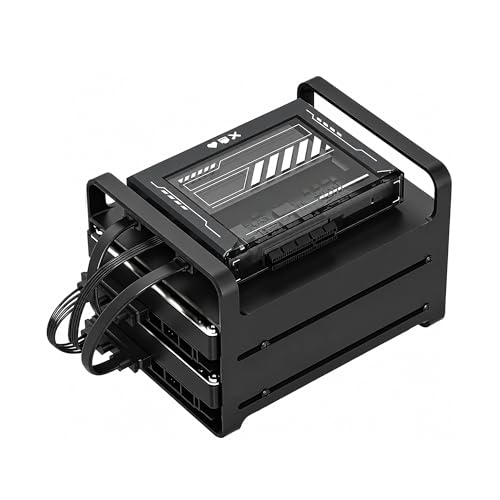
- x86 Intel quad-core for broad software compatibility
- Includes 16GB RAM, dual SATA, and a 2-bay drive cage
- Good for Plex direct play, Docker, and Home Assistant
Best For: Home lab builders and DIY users who want a flexible NAS/server platform for media and self-hosting.
Best for High-Bay DIY Builds
8+1 Bay DIY NAS Case for mATX/ITX

- Eight drive trays plus one internal 2.5-inch bay
- Supports mATX/ITX boards and full-height PCIe cards
- Includes front USB 3.0 and four 80 mm fans
Best For: Home-office users who want a high-capacity DIY NAS chassis with hot-swap convenience.
Best for Huge Drive Counts

- 12 hot-swap 3.5-inch bays plus 4 SSD mounts
- E-ATX support, 8 PCI slots, and room for a GPU
- Wood veneer finish suits a home office setup
Best For: Users building a high-capacity home office NAS with room for expansion.
Best Value NAS for Simple Home Storage
BUFFALO LinkStation 210 2TB 1-Bay NAS

- 2TB HDD included for immediate setup
- Subscription-free personal cloud and backup tools
- Simple shared storage for Windows and older macOS
Best For: Home users who want an affordable starter NAS for backups, file sharing, and light media storage.
Best for 8-Bay DIY Storage Builds

- Supports up to 8 drives for high-capacity storage
- Fits Micro-ATX and Mini-ITX builds
- Includes 3 fans for improved cooling
Best For: DIY users building a high-capacity NAS for home media and backups.
Best for Backup & Surveillance – Synology DS223 Backup Hub
If you want a practical nas enclosure for home office media server duties, the Synology DS223 is a strong two-bay option for central file storage, automatic backups, and light-duty surveillance. It focuses on dependable organization and data protection rather than flashy extras, making it a solid fit for households and small offices that want one shared place for files and media.
Best For: Home offices, solo users, and small teams that need centralized storage, automated backups, and simple camera monitoring.
Pros:
- Centralizes files from PCs, Macs, phones, and external drives in one location
- Supports automated backups to multiple destinations, including cloud and external drives
- Can also serve as a basic IP camera monitoring hub with alerts and remote viewing
- Includes a 2-year warranty and ongoing Synology software support
Cons:
- Diskless design means you must buy drives separately
- Two-bay capacity is limited for larger media libraries or heavier RAID needs
- Not the fastest choice if you want advanced media-server performance
Overall, the DS223 is a sensible pick if you need a reliable nas enclosure for home office media server use with backup-first priorities. It is especially appealing when data safety, easy sharing, and light surveillance matter more than raw speed or expansion.
Best for Full-Rack NAS – 22U Wall Mount Server Rack Cabinet
If you want a sturdy nas enclosure for home office media server gear, this 22U wall-mount rack gives you enough depth, airflow, and lockable storage to organize NAS units, switches, patch panels, and AV components in one place. The included fan, shelves, PDU, and cable-entry features make it a practical all-in-one cabinet for a cleaner home lab setup.
Best For: Home office users who need a lockable, ventilated enclosure for a NAS, networking gear, and media server components with room to grow.
Pros:
- 24-inch depth and 19-inch compatibility work well for NAS, switches, and rack-mounted AV gear
- Includes fan, PDU, two shelves, and cable-entry panels for a more complete setup
- Locking tempered glass door and removable side panels improve security and access
- Strong load ratings support heavier home lab installations
Cons:
- Much larger than a basic desktop NAS cabinet, so it needs dedicated wall or floor space
- Assembly and mounting may be overkill for users with only a single NAS device
This is a strong choice if you want a more serious nas enclosure for home office media server use and prefer an integrated rack solution over stacking devices on a shelf. It’s especially appealing when you need ventilation, security, and expansion room in a single cabinet.
Best for Multi-User Sharing – Synology DS425+ 4-Bay Private Cloud NAS
Synology DS425+ Private Cloud Media Server - Stream, Back Up & Share Files (4-Bay Diskless NAS)
Check Price On AmazonIf you need a nas enclosure for home office media server duties, the Synology DS425+ is a strong fit thanks to its 4-bay design, 2.5GbE networking, and DSM software. It’s built to handle shared files, media streaming, backups, and even light surveillance without feeling like a one-trick device.
Best For: Home offices, small teams, and power users who want a secure private cloud with room to grow.
Pros:
- Fast 2.5GbE connectivity with up to 278 MB/s throughput for smooth file sharing and streaming
- Supports concurrent access for 10+ users, making it useful for collaborative home office setups
- RAID, snapshots, and automated backups add solid protection against drive failure and data loss
- Can also serve as a surveillance hub with support for up to 30 IP cameras
Cons:
- Diskless, so you’ll need to buy drives separately
- More capability than casual users may need for simple file storage
Overall, the DS425+ stands out as a flexible nas enclosure for home office media server use when you want reliable sharing, backup, and streaming in one desktop-friendly box. It’s a practical choice if you value Synology’s software ecosystem and expect your storage needs to grow.
Best for High-Capacity Home Labs – 27U 35" Deep Server Rack Cabinet
If you need a sturdy nas enclosure for home office media server duties, this 27U floor-standing cabinet gives you far more room than a typical desktop rack. Its 35-inch depth, 1600 lb static load rating, and included cooling fans make it a strong fit for heavier servers, switches, patch panels, and storage gear in one organized footprint.
Best For: Home office users or small labs that want a lockable, deep rack enclosure with built-in airflow and power distribution for a growing NAS and network stack.
Pros:
- 27U capacity and deep interior space for servers, NAS units, switches, and patch panels
- Heavy-duty steel frame with up to 1600 lb static load capacity
- Includes 4 cooling fans, 8-outlet PDU, fixed shelf, and cable management hardware
- Locking glass door plus leveling feet and locking casters for safer placement
Cons:
- Too large for most apartments or casual desktop setups
- Assembly and cable routing take more effort than a smaller open-frame rack
- Overkill if you only need space for a single compact NAS
This is a practical pick if your nas enclosure for home office media server setup is growing into a full rack-based system. It’s less about minimalism and more about expansion room, cooling, and physical security for a serious always-on setup.
Best for Power Users – UGREEN DXP4800 GT 4-Bay NAS
If you want a nas enclosure for home office media server use with room to grow, the UGREEN DXP4800 GT stands out for its fast dual 10GbE networking, expandable RAM, and strong app support. It’s built to handle file sharing, backups, Plex-style media tasks, Docker workflows, and even light surveillance without feeling cramped.
Best For: Home offices, creators, and smart-home users who want a high-speed NAS that can double as a media server and app host.
Pros:
- Dual 10GbE ports and SSD expansion make transfers and streaming feel fast.
- Expandable 8GB DDR4 RAM helps with multitasking, Docker, and virtual machines.
- UGOS Pro supports media apps, backups, and self-hosted tools in one place.
- Built-in HDMI, SD, and USB options are useful for creator workflows.
Cons:
- Drives are not included, so total cost rises quickly.
- It may be more NAS than casual users need for basic file backup.
- Full performance depends on compatible networking and SSD setup.
For buyers comparing a nas enclosure for home office media server duties, this model is compelling because it combines speed, expansion, and local-first storage with enough headroom for long-term use. It makes the most sense if you want one box to cover work files, media playback, and smart-home services.
Best for DIY Home Server – ZimaBlade 7700 x86 2-Bay NAS Kit
If you want a nas enclosure for home office media server use that does more than basic file storage, the ZimaBlade 7700 stands out as a flexible x86 kit. It is built for DIY users who want to run Plex, Docker, Home Assistant, backups, and self-hosted services from a low-power box that can grow with their setup.
Best For: Home lab builders and power users who want a compact, customizable NAS/server platform instead of a locked-down appliance.
Pros:
- x86 Intel quad-core platform offers broad Linux and Docker compatibility.
- Includes 16GB RAM, dual SATA, and a metal 2-bay drive cage for a ready-to-build setup.
- Good fit for Plex direct play, home automation, and always-on self-hosting.
- PCIe expansion adds room for future networking or storage upgrades.
Cons:
- Requires more hands-on setup than a typical plug-and-play NAS.
- Best for direct play rather than heavy 4K transcoding workloads.
Overall, this is a smart pick if you want a nas enclosure for home office media server duties and also plan to experiment with apps, containers, or automation. It trades simplicity for flexibility, which is exactly what many DIY buyers want.
Best for High-Bay DIY Builds – 8+1 Bay DIY NAS Case for mATX/ITX
If you want a roomy nas enclosure for home office media server builds, this 8+1 bay DIY case gives you plenty of drive capacity without forcing you into a full tower. It supports micro-ATX or ITX boards, a Flex PSU, front USB 3.0, and hot-swap backplane hardware, making it a practical base for a storage-heavy private cloud or Plex-style setup.
Best For: Builders who want lots of 2.5/3.5-inch drive bays in a compact NAS chassis with straightforward expansion.
Pros:
- Eight main drive trays plus one internal 2.5-inch bay for flexible storage layouts
- Supports mATX and ITX boards, plus a full-height PCIe expansion card
- Includes front USB 3.0 and four pre-installed 80 mm chassis fans
- Hot-swap backplane design suits always-on file and media server use
Cons:
- Flex PSU requirement limits power supply choices
- DIY-focused layout may be less convenient than a turnkey NAS
- Cooling and cable management will depend on your build planning
For a builder-friendly nas enclosure for home office media server duties, this case stands out more for drive count and upgrade flexibility than for polish. It makes the most sense if you value storage density, expandability, and hot-swap convenience over a finished appliance-style experience.
Best for Huge Drive Counts – JONSBO N5 NAS Pc Case
If you want a nas enclosure for home office media server duties with serious storage room, the JONSBO N5 stands out for its 12 hot-swap 3.5-inch bays plus 4 SSD mounts. It also adds E-ATX support, multiple fan positions, and room for a large GPU, making it a flexible chassis for a mixed media, backup, or light compute setup.
Best For: Home office builders who need a high-capacity NAS-style case that can also handle a GPU and expansion cards.
Pros:
- Huge 12x 3.5-inch hot-swap drive capacity plus 4 SSD mounts
- E-ATX/ATX support with 8 PCI slots for expansion flexibility
- Built-in fan layout and AIO support for cooling a loaded system
- Wood veneer finish gives it a more furniture-like home office look
Cons:
- Large footprint, so it needs more desk or floor space than compact NAS cases
- Full drive setups may require careful PSU and cable planning
- Best results depend on choosing short PSU and cooling components
This is a strong pick if your nas enclosure for home office media server needs prioritize drive count first and aesthetics second. It’s not the smallest or simplest case, but for users who want lots of local storage in one chassis, it offers an uncommon mix of capacity, expandability, and home-friendly styling.
Best Value NAS for Simple Home Storage – BUFFALO LinkStation 210 2TB 1-Bay NAS
If you want a straightforward nas enclosure for home office media server use, the BUFFALO LinkStation 210 is a simple entry point with a drive included, shared network storage, and built-in backup tools. It is aimed at users who mainly want centralized file access, basic media storage, and automatic backups without paying monthly fees.
Best For: Home users who want an affordable, no-frills NAS for shared storage, backups, and personal cloud access.
Pros:
- 2TB HDD included, so you can get started without buying a separate drive
- Closed-system design with SSL encryption helps keep file transfers more secure
- Supports Windows and macOS, plus automated backup tools for multiple devices
- Subscription-free personal cloud access for photos, music, videos, and files
Cons:
- Single-bay design limits expansion and redundancy options compared with multi-bay NAS units
- Performance is basic, so it is not the best fit for heavier media-server workloads
- macOS support is limited to earlier versions, with newer Macs directed to other models
For a budget-minded nas enclosure for home office media server duties, this LinkStation 210 makes sense when simplicity matters more than speed or advanced features. It is best viewed as a dependable starter NAS for backups, light sharing, and personal cloud storage.
Best for 8-Bay DIY Storage Builds – K7 8-Bay NAS Case
If you want a flexible nas enclosure for home office media server duties without paying for a fully built NAS, the K7 8 Bay NAS Case gives you a roomy starting point. It supports Micro-ATX and Mini-ITX boards, includes multiple quiet fans, and has space for up to eight 3.5-inch drives, making it a practical chassis for high-capacity DIY storage.
Best For: DIY builders who want an 8-bay, diskless NAS chassis for home media streaming, backups, and private file sharing.
Pros:
- Holds up to 8 x 3.5″ drives, with 2.5″ SSD compatibility too
- Works with Micro-ATX and Mini-ITX motherboards for more build options
- Includes 3 preinstalled fans for better airflow and quieter operation
- Supports hot-swap-style storage expansion for easier drive management
Cons:
- Diskless design means you must supply your own motherboard, CPU, RAM, and PSU
- Requires a standard 1U/FLEX power setup, which may limit some builds
For buyers comparing options, this is a good fit if storage density matters more than plug-and-play simplicity. As a nas enclosure for home office media server use, it stands out for capacity, cooling, and DIY upgrade potential rather than turnkey convenience.
How We Picked the Best Nas Enclosure for Home Office Media Server
We focused on enclosures and NAS systems that make sense for home office and media server use, with attention to drive capacity, expandability, cooling, network speed, and ease of setup. We also considered whether a model is better for plug-and-play use or a more customizable DIY build.
Quick Comparison
For simple file backup and family sharing, smaller two-bay systems are usually the easiest starting point. If you want smoother 4K streaming, faster transfers, or room to grow, four-bay and multi-bay options are more flexible. Rackmount enclosures make sense when you need to consolidate networking and storage in a dedicated space, while DIY NAS cases are best for users who want to choose their own motherboard, drives, and operating system.
Key Buying Factors for a Nas Enclosure for Home Office Media Server
Drive Bays and Expansion
More bays generally mean better storage scaling and more options for RAID protection. For a media server, four bays is often the sweet spot; for large archives or multiple users, eight bays or more can be worth it.
Networking and Performance
Look for at least 1GbE, with 2.5GbE or 10GbE if you move large video files or want faster multi-device access. Faster CPUs and more memory also help with transcoding, Docker apps, and backup tasks.
Noise, Cooling, and Placement
A Nas Enclosure for Home Office Media Server use should stay cool without becoming distracting. Desktop units are usually better near living spaces, while rackmount options are better in closets, labs, or utility rooms where fan noise is less of a concern.
Software and Ease of Use
Prebuilt NAS systems are the easiest choice if you want cloud-like file access, mobile apps, and backup tools with minimal setup. DIY enclosures offer more flexibility, but they require more hands-on configuration.
Who Should Buy Which Nas Enclosure for Home Office Media Server?
If you want the simplest path, choose a turnkey NAS with included software and an easy admin interface. If your priority is media streaming and storage growth, pick a four-bay or larger unit with stronger networking. If you are building a custom server for a homelab, a DIY NAS case or rackmount enclosure gives you the most control over components and future upgrades.
For most buyers, the best choice is the enclosure that matches today’s storage needs while leaving room for tomorrow’s backups, media libraries, and shared office files.
