
In 2026, enhancing your workspace with the right multi-monitor dock can greatly boost your productivity. With options featuring Ethernet connectivity, these devices provide seamless performance for multitasking professionals. From the versatile Anker 13-in-1 Dock to the powerful Plugable Thunderbolt 4 Dock, each model offers unique features tailored to various needs. As you explore these top picks, consider what truly matters for your setup and how these tools can transform your work environment.
Anker Laptop Docking Station Dual Monitor (8-in-1 USB C Hub)

If you’re a professional or content creator who needs to boost productivity with multiple displays, the Anker Laptop Docking Station Dual Monitor (8-in-1 USB C Hub) is an excellent choice. This hub supports 4K dual displays via two HDMI ports, allowing you to mirror or extend your workspace effortlessly. With 85W Power Delivery, you can charge your laptop while using it, ensuring uninterrupted work. It also features two USB-A data ports, an Ethernet port, and an SD/microSD card reader for added convenience. Compatible with various devices, it’s perfect for Windows and ChromeOS users seeking efficient multi-monitor setups.
Best For: Professionals and content creators looking to enhance productivity with a dual monitor setup.
Pros:
- Supports 4K dual displays for an immersive and expansive workspace.
- 85W Power Delivery allows for high-speed charging while using the hub.
- Versatile connectivity options include USB-A data ports, Ethernet, and SD/microSD card reader.
Cons:
- Limited to macOS identical display functionality on external monitors.
- Not compatible with Linux, which may restrict usage for some users.
- Charger not included, requiring a separate purchase for optimal performance.
Anker Nano Laptop Docking Station with Detachable Hub (13-in-1 USB-C)

The Anker Nano Laptop Docking Station with Detachable Hub is an ideal solution for professionals who need a versatile and efficient multi-monitor setup. With its 13-in-1 USB-C design, you can easily connect multiple devices, including Dell, Lenovo, and HP laptops. The detachable 6-in-1 hub allows mobile access, while the dock supports triple-screen workstations, delivering stunning 4K resolution on external displays. Enjoy fast data transfers at 10 Gbps via USB-C and power delivery up to 100W. Compact and stylish, it measures just 3.74 x 1.57 x 5.51 inches, making it perfect for any workspace.
Best For: Professionals seeking a versatile and efficient multi-monitor setup for their laptops.
Pros:
- Versatile connectivity with 13 ports including USB-C, HDMI, and Ethernet for multiple device compatibility.
- Supports triple displays with up to 4K resolution, enhancing productivity and visual clarity.
- Compact design measuring just 3.74 x 1.57 x 5.51 inches, making it suitable for any workspace.
Cons:
- Limited compatibility with certain operating systems, as macOS mirrors content instead of extending displays.
- Requires adequate power supply to maximize power delivery capabilities, which may necessitate carrying an additional adapter.
- Customer service response times may vary, potentially leading to delays in support for issues.
Anker Prime Docking Station, 14-Port with 160W Max Output

For professionals and tech enthusiasts seeking a robust multi-monitor solution, the Anker Prime Docking Station stands out with its impressive 14-port configuration and 160W max output. You’ll appreciate the versatility of USB-C, USB4, and Thunderbolt connections, making it compatible with Windows 10, 11, and ChromeOS. With dual HDMI ports, you can easily connect two 4K displays for enhanced productivity. The dock supports charging four devices simultaneously, with three USB-C ports offering up to 100W each. Plus, you can enjoy high-speed data transfers up to 10Gbps. Anker’s customer service is always ready to help, ensuring a seamless experience.
Best For: Professionals and tech enthusiasts who require a powerful multi-monitor docking solution with extensive connectivity options.
Pros:
- Supports dual 4K displays for enhanced productivity.
- Charges up to four devices simultaneously with high output.
- Offers high-speed data transfer rates up to 10Gbps across multiple ports.
Cons:
- Not compatible with Linux operating systems.
- External monitors on macOS display identical images rather than extending the desktop.
- Does not support 5120*1440 monitors, limiting some ultra-wide display options.
Anker Prime Docking Station (DL7400) – 14-Port Triple Display

Designed for power users and multitaskers, the Anker Prime Docking Station (DL7400) stands out with its ability to support triple displays, including one in stunning 8K resolution. With 14 ports, including two HDMI and one DisplayPort, you’ll enjoy seamless connectivity. The 140W Max Power guarantees your devices stay charged while you work. Plus, the 2.5Gbps Ethernet port provides reliable internet access. Use the USB-A ports for peripherals, and the built-in fan keeps everything cool. Just remember to install the latest DisplayLink driver for peak performance. This dock’s versatility makes it a must-have for boosting your productivity!
Best For: Power users and multitaskers who require extensive connectivity and support for multiple displays.
Pros:
- Supports triple external monitors, including one in 8K resolution for enhanced multitasking.
- 140W Max Power ensures reliable charging for connected devices while in use.
- Built-in fan and ActiveShield 3.0 technology provide efficient cooling and stability during heavy workloads.
Cons:
- Requires the latest DisplayLink driver for optimal performance, which may require additional setup.
- DRM-protected streaming may not work properly, potentially resulting in a black screen unless hardware acceleration is disabled.
- Front USB-C ports do not support media display, which could limit some users’ connectivity options.
Acer 13-in-1 Docking Station with 110W PD & Triple Monitor Support
Acer’s Premium 13-in-1 Docking Station stands out as the ultimate solution for professionals seeking seamless multi-monitor setups. With 110W Power Delivery, you can easily power your devices while enjoying triple monitor support—two HDMI and one DisplayPort. Enjoy fast data transfer through its 5Gbps USB A/C and four USB ports. The Gigabit Ethernet guarantees stable internet connectivity, while the sleek aluminum design promotes efficient heat dissipation. Plus, the integrated security lock keeps your dock and laptop safe. Compatible with major brands like Dell, HP, and Lenovo, this docking station is perfect for boosting your productivity in today’s dynamic work environment.
Best For: Professionals and creatives seeking an efficient docking solution for multi-monitor setups and versatile connectivity options.
Pros:
- Triple monitor support allows for enhanced multitasking capabilities with two HDMI and one DisplayPort.
- High power delivery of 110W ensures your laptop stays charged while in use.
- Sleek aluminum design provides durability and effective heat dissipation.
Cons:
- MacOS limitations restrict triple display functionality to mirroring only, not extended desktop mode.
- Requires compatible laptop/GPU for optimal performance and triple 4K output.
- Limited USB ports (only four) may be insufficient for users with multiple peripherals.
Acer 11-in-1 USB C Docking Station for Laptops
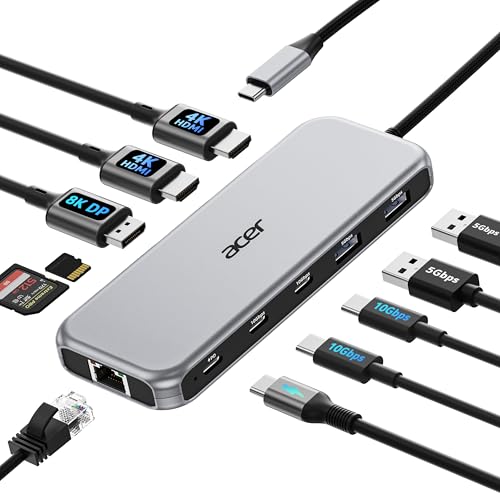
The Acer 11-in-1 USB C Docking Station is perfect for professionals and enthusiasts seeking to enhance their workspace with seamless multi-monitor support. It effortlessly connects up to three displays, offering stunning resolutions of 8K@30Hz on DisplayPort and 4K@60Hz on HDMI. With two USB-C ports for rapid data transfer at 10Gbps and a reliable 1 Gbps Ethernet connection, your productivity will soar. Plus, the 100W power delivery guarantees your laptop stays charged while you work. Compatible with various brands, this dock’s versatility makes it a top choice for anyone looking to maximize their setup efficiently.
Best For: Professionals and enthusiasts looking to enhance their workspace with seamless multi-monitor support and rapid data transfer capabilities.
Pros:
- Supports multiple high-resolution displays with up to 8K@30Hz on DisplayPort and dual 4K@60Hz on HDMI.
- Offers rapid data transfer speeds with 10Gbps USB-C and a reliable 1 Gbps Ethernet connection.
- Provides 100W power delivery, ensuring your laptop stays charged during use.
Cons:
- Requires a laptop with USB-C port that supports DisplayPort Alt Mode for full functionality.
- Limited to certain brands and models, which may restrict compatibility for some users.
- May not support all features if HDMI version is below 2.0, potentially affecting performance.
Anker 13-in-1 USB-C Laptop Docking Station

If you’re a professional who needs to connect multiple monitors for enhanced productivity, the Anker 13-in-1 USB-C Laptop Docking Station is an excellent choice. With its triple display capability, you can easily connect two HDMI and one DisplayPort monitor, all at 1080p@60Hz. This dock offers 13 ports, including four USB ports, Ethernet, and SD/microSD card slots, ensuring you have everything you need at your fingertips. It’s compatible with various operating systems, including Windows and macOS. Plus, the 85W charging capability keeps your devices powered. With Anker’s friendly support and an 18-month warranty, you’re well-covered.
Best For: Professionals needing to connect multiple monitors for enhanced productivity and efficient multitasking.
Pros:
- Supports triple display with dual HDMI and one DisplayPort, allowing for seamless multitasking.
- Offers a variety of ports including USB, Ethernet, and SD/microSD slots, catering to diverse connectivity needs.
- Includes 85W charging capability, providing power to your devices while in use.
Cons:
- Limited to Single-Stream Transport (SST) on macOS/iPadOS, resulting in identical content across external monitors.
- Slightly heavier than some other docking stations, which may affect portability.
- The dimensions may require additional space on your desk compared to smaller docking options.
Plugable Thunderbolt 4 Dock with 100W Charging (TBT4-UD5)

For professionals seeking powerful connectivity and charging capabilities, the Plugable Thunderbolt 4 Dock with 100W Charging (TBT4-UD5) stands out as an exceptional choice. It offers dual 4K 60Hz HDMI or a stunning single 8K display, ensuring crisp visuals for your workflow. With 40Gbps Thunderbolt 4 speeds and an extensive 13-port design, you can connect multiple devices seamlessly. Compatible with a range of laptops, it provides robust performance for USB-C peripherals and high-speed storage. Plus, its 100W Power Delivery means you can keep your devices charged without hassle. Experience efficiency and reliability with this award-winning dock.
Best For: Professionals seeking powerful connectivity and high-performance charging capabilities for multiple devices.
Pros:
- Supports dual 4K 60Hz or single 8K displays, providing exceptional visual quality for demanding workflows.
- Comprehensive 13-port design allows for extensive connectivity options, accommodating various peripherals and devices.
- 100W Power Delivery ensures devices stay charged without the need for additional power adapters.
Cons:
- Limited compatibility with base M1 and M2 Macs, as they only support a single display.
- Higher price point compared to standard USB hubs or docks, which may not be justified for casual users.
- Bulky design may not be suitable for those with limited desk space or for portable use.
Plugable USB C Triple Display Docking Station

Designed for professionals needing enhanced productivity, the Plugable USB C Triple Display Docking Station supports up to three HDMI monitors, ensuring you can multitask efficiently. With features like 100W Power Delivery and six USB 5Gbps ports, you’ll stay charged and connected. It handles up to one 4K display at 30Hz and two 1080p displays at 60Hz, perfect for bypassing single-display limitations of Apple M1/M2/M3/M4/M5. Compatible with Windows, macOS, and ChromeOS, it’s optimized for enterprise use cases like data analysis and conferencing. Plus, the 2-year warranty and North American-based support provide peace of mind for your investment.
Best For: Professionals who require enhanced productivity through multi-monitor setups and seamless connectivity.
Pros:
- Supports up to three HDMI monitors, allowing for efficient multitasking and improved workflow.
- 100W Power Delivery ensures devices stay charged while connected.
- Universal compatibility with various operating systems and brands, making it versatile for different work environments.
Cons:
- Limited to HDMI outputs, which may not suit users needing DisplayPort connections.
- Requires USB-C or Thunderbolt ports, potentially excluding some older devices.
- Weight and size may not be ideal for mobile users seeking a lightweight docking solution.
Anker USB C Hub, 11-in-1 Docking Station

The Anker USB C Hub, 11-in-1 Docking Station is an ideal choice for professionals who rely on multiple displays and fast data transfer. It transforms a single USB-C port into 11 versatile ports, including dual monitor support via 4K HDMI and DisplayPort. With 10 Gbps data speeds on USB-C and USB-A ports, you can transfer files quickly. The hub also provides 85W power delivery, ensuring your devices stay charged while you work. Compatible with macOS, Windows, and ChromeOS, this compact hub weighs just 0.3 pounds, making it a practical addition to your workspace for enhanced productivity.
Best For: Professionals who require multiple display capabilities and fast data transfer in a compact and portable solution.
Pros:
- 10 Gbps data transfer speeds on USB-C and USB-A ports for quick file transfers.
- Dual monitor support with 4K HDMI and DisplayPort for enhanced productivity.
- 85W power delivery allows charging of devices while using the hub’s functions.
Cons:
- Requires a separate charger for the power delivery feature (not included).
- Not compatible with Linux, limiting use for some users.
- macOS mirrors displays on both external monitors, which may not be ideal for all users.
Factors to Consider When Choosing Multi Monitor Docks With Ethernet
When choosing a multi-monitor dock with Ethernet, you need to take into account several key factors. Think about port availability and types, display resolution support, and power delivery capabilities. Compatibility with your devices and data transfer speeds are also essential to guarantee a seamless experience.
Port Availability and Types
Choosing a multi-monitor dock with Ethernet involves careful consideration of port availability and types to guarantee seamless connectivity. First, check the number and type of display ports like HDMI and DisplayPort; these need to match your monitors for compatibility. Look for USB ports that support high-speed data transfer, such as USB 3.0 or USB-C, to efficiently connect peripherals and storage devices. Ascertain the dock includes Gigabit Ethernet for stable internet connections. Additionally, check for USB-C Power Delivery ports, allowing you to charge your laptop while transferring data. Finally, consider extra ports like SD/microSD card slots and audio jacks for enhanced functionality, making your setup even more versatile.
Display Resolution Support
Understanding display resolution support is essential for maximizing your multi-monitor setup’s potential. When selecting a multi-monitor dock, pay attention to the maximum resolution it can handle. Some docks support up to 8K, while others may only manage 1080p or 4K. Many docking stations allow for dual displays, typically supporting 4K at 30Hz or 60Hz, depending on the ports and cables used. The type of connection matters too; for instance, HDMI 2.0 can deliver 4K at 60Hz, but older versions won’t. Verify the dock is compatible with your laptop’s graphics capabilities, and check that it utilizes DisplayPort Alternate Mode (DP Alt Mode) for peak video output and higher resolutions. This guarantees you get the best visual experience.
Power Delivery Capabilities
Power Delivery capabilities in multi-monitor docks can greatly enhance your setup by allowing you to charge connected devices while using them. When choosing a dock, look for higher wattage ratings, like 85W or 100W, which can charge laptops quickly without compromising performance. A dock with a total power output of 160W can often charge multiple devices at higher speeds, making it ideal for busy workstations. Verify the power adapter matches the dock’s required wattage for maximum efficiency; using a lower-wattage adapter might slow down charging or lead to power shortages during heavy use. Plus, Power Delivery lets you use a single power source for both the dock and your laptop, reducing cable clutter and simplifying your workspace.
Compatibility With Devices
When evaluating multi-monitor docks with Ethernet, it’s important to take into account compatibility with your devices. First, check if the dock works well with your operating system, whether that’s Windows 10/11 or macOS, as some docks may struggle with certain versions. Next, verify it supports USB-C, USB4, or Thunderbolt connections, which are vital for compatibility with various laptops. Verify that it supports DisplayPort Alternate Mode for proper video output. Additionally, consider if the dock is optimized for specific laptop brands, as this can enhance performance. Finally, review the specifications to confirm it supports the desired number of external displays, since some docks may only mirror screens on macOS instead of extending them.
Data Transfer Speeds
While selecting a multi-monitor dock with Ethernet, data transfer speeds should be a top consideration, as they can greatly influence your efficiency, especially with large files. Speeds can vary markedly; for instance, USB 2.0 offers just 480 Mbps, while Thunderbolt 4 can reach an impressive 40 Gbps. If you opt for USB-C or USB4 docks, expect speeds up to 10 Gbps, perfect for high-speed data transfers. Docks with multiple USB-A and USB-C ports often provide flexibility, with speeds ranging from 5 Gbps for USB 3.0 to 10 Gbps for USB 3.1/3.2. Don’t overlook Ethernet ports either; they typically support stable connections up to 1 Gbps, essential for tasks needing reliable internet access.
Size and Design Features
Choosing the right size and design for your multi-monitor dock with Ethernet is essential for creating an efficient workspace. Confirm the dock fits comfortably on your desk without overcrowding or blocking other equipment. A sleek aluminum body not only enhances aesthetics but also aids in heat dissipation during extended use. Pay attention to port arrangement; some docks have rear ports for a cleaner look, while front ports offer easier access to frequently used connections. If you’re often on the go, consider compact designs with detachable components for portability. Finally, weigh your options—lighter docks are easier to transport, but heavier models can provide better stability and durability on your desk. Make an informed choice to enhance your productivity!
Cooling and Stability
A well-designed multi-monitor dock not only enhances your workspace but also plays a vital role in maintaining cooling and stability during use. Effective cooling mechanisms, like built-in fans or ventilation systems, are necessary to prevent overheating, especially when powering multiple displays and devices. Look for docks featuring ActiveShield technology, which monitors temperature and adjusts power distribution to avoid thermal throttling. A robust construction guarantees physical stability, keeping the dock securely connected to your laptop and peripherals. By minimizing heat-related damage, effective cooling can extend your hardware’s lifespan and improve overall system performance. This means you can maintain high data transfer rates without interruptions, guaranteeing smooth operation during intensive tasks.
Warranty and Support Options
When it comes to selecting a multi-monitor dock with Ethernet, warranty and support options are essential factors that can greatly impact your experience. Check the warranty duration; some devices offer coverage from one year up to 24 months, giving you peace of mind against defects. Support options vary, so look for manufacturers that provide dedicated customer service via email, chat, and phone. A solid return policy, like a 30-day satisfaction guarantee, allows you to test the product and return it if it doesn’t meet your needs. Additionally, consider the availability of online resources, such as user manuals and FAQs, which can help resolve issues quickly. Don’t forget to review any registration requirements for warranty activation.
