
A good dock can turn your ThinkPad into a multi-screen workstation with one laptop connection. The hard part is knowing whether a dock actually supports your monitors at the resolution and refresh rate you want.
These 10 listings include Lenovo USB-C and Thunderbolt docks, a third-party triple-monitor option, and several bundles or repeat listings of the same hardware. Start with your ThinkPad’s ports and display needs, then check what each package includes.
Best 10 Multi Monitor Docking Stations for Thinkpad Picks for 2026
Best Accessory Bundle
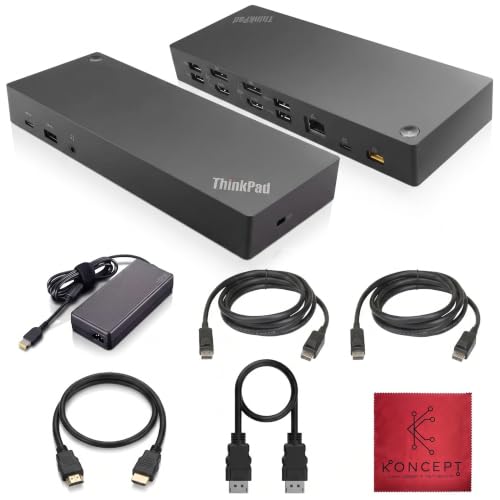
- Two HDMI and two DisplayPort outputs
- Display and host cables included
- Ethernet and USB-A/USB-C expansion
Best For: Compatible ThinkPads needing a dock-and-cables package
Best Thunderbolt 3 Option

- Advertised dual 4K support
- Thunderbolt 3 and USB 3.1 Gen 2
- Ethernet, audio, and lock slot
Best For: Compatible Thunderbolt 3 ThinkPads with two 4K monitors
Best Triple-HDMI Expansion

- Three HDMI outputs
- Nine USB ports plus card readers
- Power supply sold separately
Best For: Full-featured USB-C ThinkPads needing three HDMI connections
Best for Older ThinkPads
Lenovo Hybrid USB-C with USB-A Dock
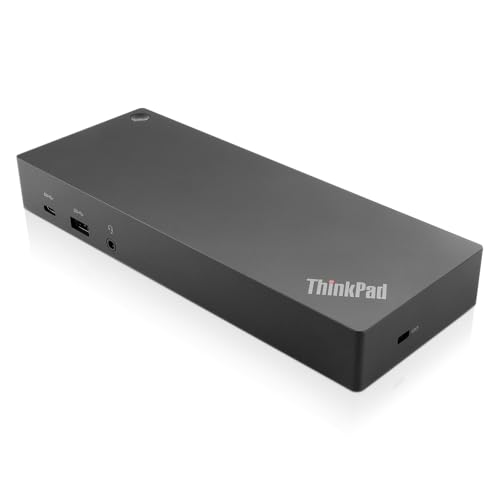
- USB-C cable and USB-A dongle
- Two HDMI and two DisplayPort outputs
- Three-year limited warranty listed
Best For: Compatible older ThinkPads needing flexible host connections
Renewed Cable Bundle

- Renewed dock with 90W adapter
- HDMI and DisplayPort cables included
- USB-C compatibility needs checking
Best For: ThinkPad users seeking a bundled USB-C dock and display cables
Thunderbolt 3 Port Pick

- Two HDMI and two DisplayPort connectors
- Listed dual UHD 4K capability
- Includes 135W adapter and Thunderbolt 3 cable
Best For: Compatible Thunderbolt 3 ThinkPads using two external displays
Three-Display Windows Pick

- Up to three external monitors on Windows
- Two 4K displays at 60Hz; one at 30Hz
- HDMI and DisplayPort cables included
Best For: Windows users who prioritize three external displays
Most Flexible Host Connection
Lenovo 40AF0135US Dual-Monitor Dock
- Two HDMI and two DisplayPort outputs
- Includes USB-C-to-C and USB-C-to-A cables
- Seven USB ports and Gigabit Ethernet
Best For: Dual-monitor desks needing USB-C or USB-A host options
Renewed Value Option
Lenovo 40AS0090US USB-C Gen 2 Dock
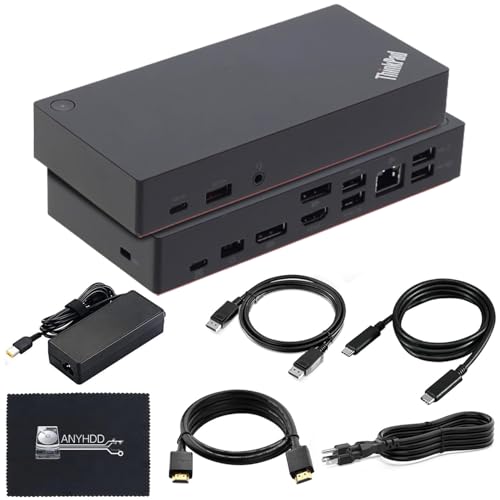
- Renewed dock with one-year warranty
- Two DisplayPort outputs and one HDMI output
- Single-display 4K at 60Hz depends on host
Best For: Buyers open to a renewed dock with bundled cables
Ready-to-Connect Bundle
Lenovo 40AY0090US ThinkPad Dock

- HDMI and DisplayPort connections
- Includes USB-C and display cables
- 90W adapter and six USB ports
Best For: ThinkPad setups that benefit from bundled display cables
Best Accessory Bundle – 40AF0135US Dual-Monitor Dock
Among multi monitor docking stations for ThinkPad laptops, this 40AF0135US package stands out for its included HDMI and DisplayPort cables, USB-C connection cables, and 135W Lenovo adapter. The dock provides two HDMI and two DisplayPort outputs, plus Ethernet, audio, and USB connections.
Best For: Owners of a listed compatible ThinkPad who want a dual-monitor dock with display cables included.
Pros:
- Two HDMI and two DisplayPort outputs offer flexible monitor connections.
- Includes HDMI, DisplayPort, USB-C-to-A, and USB-C-to-C cables.
- Provides Gigabit Ethernet and a mix of USB-A and USB-C ports.
Cons:
- Confirm compatibility with your exact ThinkPad model before buying.
- The included 135W adapter rating does not establish how much power reaches the laptop.
This is a convenient package if you need the dock and display cables together. Check your laptop’s charging requirements and monitor configuration separately rather than assuming every listed output can be used at once.
Best Thunderbolt 3 Option – 40AN0135US Dock Gen 2
If your ThinkPad supports Thunderbolt 3, this is one of the multi monitor docking stations for ThinkPad setups worth considering. The 40AN0135US listing advertises dual 4K displays and provides HDMI, DisplayPort, Thunderbolt 3, USB, Gigabit Ethernet, and audio connections.
Best For: Owners of a listed compatible Thunderbolt 3 ThinkPad who want two high-resolution external displays.
Pros:
- Advertised support for dual 4K displays.
- Thunderbolt 3 and USB 3.1 Gen 2 connections accommodate fast peripherals.
- Includes Gigabit Ethernet, audio, and a security-lock slot.
Cons:
- Thunderbolt 3 compatibility should be verified for your specific laptop.
- The supplied listing conflicts on HDMI count, so confirm the physical port layout before ordering.
The Thunderbolt connection makes this a more targeted choice than a general USB dock. Verify its exact ports and your ThinkPad’s display support, particularly because the listing’s port counts are inconsistent.
Best Triple-HDMI Expansion – TobenONE 18-in-1 Dock
For shoppers comparing multi monitor docking stations for ThinkPad laptops, the TobenONE 18-in-1 is a triple-HDMI option rather than a ThinkPad-specific dock. Its listed connections include nine USB ports, Ethernet, SD and microSD readers, and audio, with advertised support for up to three 4K-at-60Hz displays on compatible systems.
Best For: A compatible ThinkPad with a full-featured USB-C port when three HDMI monitors and many peripherals are priorities.
Pros:
- Three HDMI outputs for a triple-monitor setup on supported laptops.
- Nine USB ports and card readers provide substantial peripheral expansion.
- Advertises up to 100W USB-C Power Delivery charging.
Cons:
- No power supply is included; the listing calls for an additional supply rated above 65W.
- Display and charging capabilities depend on the host laptop’s USB-C features and the power supply used.
This is the pick for connection variety, provided your ThinkPad supports the required USB-C video features. Budget for a suitable power supply and check your laptop’s external-display limits before planning around three 4K screens.
Best for Older ThinkPads – Lenovo Hybrid USB-C with USB-A Dock
The Lenovo ThinkPad Hybrid USB-C with USB-A Dock is a practical entry among multi monitor docking stations for ThinkPad owners mixing older and newer laptops. Its included USB-C cable and USB-A dongle provide connection flexibility, while two HDMI and two DisplayPort outputs accommodate different monitor inputs.
Best For: Owners of listed compatible older ThinkPads who need both USB-A and USB-C host-connection options.
Pros:
- USB-C cable with a USB-A dongle accommodates different laptop ports.
- Two HDMI and two DisplayPort outputs simplify monitor matching.
- Includes Gigabit Ethernet, USB expansion, and a listed three-year limited warranty.
Cons:
- USB-A and USB-C connections may differ in charging and display behavior; check your laptop’s compatibility.
- The 15W figure in the supplied details does not establish laptop charging capacity.
This is the more clearly Lenovo-branded choice for a mixed-generation ThinkPad desk. Confirm the exact laptop model and required monitor arrangement before relying on it for a particular display or charging setup.
Renewed Cable Bundle – Lenovo 40AY0090US USB-C Dock
For shoppers comparing multi monitor docking stations for thinkpad laptops, this renewed 40AY0090US bundle includes the dock, a 90W adapter, and USB-C, HDMI, and DisplayPort cables. It is a practical option if you want the display cables in the box rather than shopping for them separately.
Best For: ThinkPad users who want a renewed USB-C dock bundled with HDMI and DisplayPort cables.
Pros:
- Includes HDMI, DisplayPort, and USB-C cables.
- Offers HDMI, DisplayPort, Ethernet, and USB connectivity.
- Lists support for numerous ThinkPad models, including the T480 and T490.
Cons:
- Renewed rather than new.
- Host USB-C compatibility should be checked before purchase.
The bundle simplifies setup, but confirm your ThinkPad’s compatibility and the display modes you need before ordering; the supplied notes do not specify a dual-monitor resolution and refresh-rate combination.
Thunderbolt 3 Port Pick – ThinkPad Dock Gen 2 135W
Among multi monitor docking stations for thinkpad laptops, the ThinkPad Thunderbolt 3 Dock Gen 2 stands out for its two HDMI and two DisplayPort connectors. Its listing specifies dual UHD 4K display capability and includes a Thunderbolt 3 cable and 135W power adapter.
Best For: Owners of compatible Thunderbolt 3 ThinkPads who want a choice of HDMI and DisplayPort connections for two displays.
Pros:
- Provides two HDMI and two DisplayPort connectors.
- Lists dual UHD 4K display capability.
- Includes Ethernet, USB ports, a Thunderbolt 3 cable, and a 135W adapter.
Cons:
- Listed operating-system support covers Windows 7 and Windows 10.
- The supplied warranty description states 30 days.
This is the connector-rich choice for a compatible ThinkPad, but check your laptop model and OS before buying rather than assuming every ThinkPad will support the listed display setup.
Three-Display Windows Pick – ThinkPad 40AY0090 Hybrid Dock
If your search for multi monitor docking stations for thinkpad centers on screen count, this 40AY0090 hybrid USB-C/USB-A dock lists support for up to three external monitors on Windows. It provides two DisplayPort connections and one HDMI connection, with an HDMI cable and a DisplayPort cable included in the bundle.
Best For: Windows laptop users seeking up to three external displays through a USB-C/USB-A dock.
Pros:
- Lists support for up to three external monitors on Windows.
- Specifies two 3840 × 2160 displays at 60Hz and one at 30Hz.
- Includes HDMI and DisplayPort cables, plus Ethernet and six USB ports.
Cons:
- Three-monitor support is specified for Windows only.
- The third listed 4K display runs at 30Hz, not 60Hz.
The stated three-display configuration makes this a strong fit when desktop space matters most. Check your laptop’s connection and Windows setup against the dock’s requirements before relying on all three outputs.
Most Flexible Host Connection – Lenovo 40AF0135US Dual-Monitor Dock
Among multi monitor docking stations for ThinkPad laptops, the 40AF0135US stands out for its included USB-C-to-C and USB-C-to-A cables. Its two HDMI and two DisplayPort outputs offer useful connection choices for a dual-monitor desk.
Best For: ThinkPad users who want a dual-monitor dock with both USB-C and USB-A host connection options.
Pros:
- Two HDMI and two DisplayPort outputs provide flexibility when connecting monitors.
- Includes USB-C-to-C and USB-C-to-A cables, plus HDMI and DisplayPort cables.
- Offers Gigabit Ethernet, audio, and seven USB ports.
Cons:
- DisplayPort outputs are specified as version 1.2; the notes do not state supported monitor resolutions or refresh rates.
- Check your exact ThinkPad model against the listed compatibility information before buying.
This is a practical pick when cable and port flexibility matter most, but confirm that your intended display setup is supported.
Renewed Value Option – Lenovo 40AS0090US USB-C Gen 2 Dock
For shoppers comparing multi monitor docking stations for ThinkPad laptops, this renewed 40AS0090US offers two DisplayPort connections and one HDMI connection, along with a 90W adapter and display cables. Its listing specifies up to one 4K display at 60Hz, with actual video output dependent on the computer.
Best For: Buyers comfortable with a renewed dock who want bundled cables and a clearly stated single-display 4K capability.
Pros:
- Provides two DisplayPort outputs, one HDMI output, and Gigabit Ethernet.
- Includes a 90W adapter, USB-C cable, HDMI cable, and DisplayPort cable.
- Comes with a stated one-year warranty.
Cons:
- Sold as renewed rather than new.
- The stated 4K-at-60Hz maximum is for one external monitor; multi-monitor resolution and refresh-rate limits are not specified.
- Requires a compatible USB-C or Thunderbolt computer; check your exact model.
The port selection makes it worth considering for a multi-display workspace, but verify your ThinkPad’s video output before planning a particular monitor arrangement.
Ready-to-Connect Bundle – Lenovo 40AY0090US ThinkPad Dock
If you are shopping for multi monitor docking stations for ThinkPad laptops, the 40AY0090US listing offers a dual-monitor-oriented dock with HDMI and DisplayPort connections. It also includes a USB-C cable, an HDMI cable, a DisplayPort cable, and a 90W AC adapter.
Best For: ThinkPad users who want a dock packaged with the main cables needed to start connecting external displays.
Pros:
- Includes HDMI, DisplayPort, and USB-C cables.
- Comes with a 90W AC adapter.
- Lists six USB ports and an Ethernet interface.
Cons:
- The notes do not specify dual-monitor resolution or refresh-rate limits.
- Check USB-C or Thunderbolt compatibility with your exact computer before purchasing.
The bundled cables simplify initial setup, but confirm your ThinkPad’s display capabilities if you need a specific two-monitor resolution or refresh rate.
How We Picked the Best Multi Monitor Docking Stations for Thinkpad
We focused on the decisions that affect everyday use: laptop connection, external-display capability, charging, monitor ports, USB connectivity, and what comes in the box. The list includes multiple offers for the same Lenovo model numbers—notably 40AF0135US, 40AN0135US, and 40AY0090US. Treat those as package and seller choices rather than ten distinct dock designs. Product titles can overstate display support, so confirm the manufacturer’s specifications for your exact ThinkPad before buying.
Quick Comparison: Match the Dock to Your Setup
- Older or mixed USB-A/USB-C laptops: The ThinkPad Hybrid USB-C with USB-A Dock (40AF0135US) is worth considering when one dock needs to serve different connection types. Check how its display technology fits your workload.
- Thunderbolt 3 ThinkPads: The Thunderbolt 3 Dock Gen 2 (40AN0135US) suits buyers whose laptops support Thunderbolt and who need its higher-bandwidth connection. Compare the listed 135W package with your laptop’s power requirements.
- USB-C ThinkPads: The USB-C Dock Gen 2 (40AS0090US) and 40AY0090US listings offer alternatives for compatible laptops. Verify each model’s monitor limits rather than assuming that a shared USB-C connector means shared capabilities.
- Three-monitor ambitions: The TobenONE listing advertises triple-monitor support, while one 40AY0090 listing claims three external displays. Check the supported resolution, refresh rate, laptop operating system, and display mode for all three screens simultaneously.
Key Buying Factors for Multi-Monitor Docking Stations for ThinkPad
Laptop and Display Compatibility
Find your exact ThinkPad model in Lenovo’s dock compatibility information. A USB-C-shaped port may support data only, USB-C video, or Thunderbolt; those differences determine which docks and displays will work. Also check whether the stated screen count includes the laptop’s built-in display. For each external monitor, verify the combined resolution and refresh-rate limits—not just a headline such as “4K.” On non-Windows systems, check support for the dock’s display technology before assuming multiple independent desktops will work.
Power, Ports, and Package Contents
Compare the dock’s laptop charging output with your ThinkPad’s adapter rating. A dock may run accessories but charge a power-hungry laptop slowly or require a separate charger. Count the HDMI and DisplayPort connections you can use at once, then check USB speeds, Ethernet, and any adapters your monitors require. Several listings add a 90W adapter or video cables; others describe a 135W package. Confirm the actual adapter, cables, warranty, and return terms for the specific offer.
Who Should Buy Which Multi Monitor Docking Stations for Thinkpad?
Choose a hybrid USB-A/USB-C dock if you regularly swap among older and newer laptops and can accept its display-method requirements. Choose the Thunderbolt 3 model if your ThinkPad has Thunderbolt 3 and you need a compatible, higher-bandwidth desk setup. A compatible USB-C dock is the simpler starting point for a single USB-C ThinkPad with conventional office monitors. For three external screens, buy only after confirming that the complete laptop-and-dock combination supports your exact layout. If two listings share a Lenovo part number, prioritize the better-supported offer and useful included accessories over a different-sounding title.
