
As you gear up for 2026, it’s essential to understand the impact of PCIe Gen5 motherboards on your gaming and content creation experiences. With options like the MSI MAG B850 Tomahawk MAX WiFi and GIGABYTE B850 AORUS Elite WIFI7, you’ll find models that promise exceptional performance and future-proofing. But what features should you prioritize when selecting the best motherboard for your needs? Let’s explore the top contenders and what makes them stand out.
MSI MAG B850 Tomahawk MAX WiFi Motherboard

If you’re looking for a high-performance motherboard that supports the latest AMD Ryzen processors, the MSI MAG B850 Tomahawk MAX WiFi is an excellent choice. This ATX motherboard features a robust 14 Duet Rail Power System and utilizes Core Boost architecture for superior performance. With DDR5 memory support up to 8400+ MT/s and multiple M.2 storage options, you’ll enjoy lightning-fast data transfer. Premium cooling solutions keep your system running smoothly, while the full-speed Wi-Fi 7 and USB 20G Type-C connectivity options guarantee you stay connected. Plus, with a 4.5-star rating, it’s a trusted choice among users.
Best For: Enthusiasts and gamers looking for a high-performance motherboard that supports the latest AMD Ryzen processors and offers advanced connectivity options.
Pros:
- Supports DDR5 memory with speeds up to 8400+ MT/s for enhanced performance.
- Equipped with premium cooling features to maintain optimal system temperatures.
- Includes full-speed Wi-Fi 7 and USB 20G Type-C connectivity for fast and reliable connections.
Cons:
- Limited to ATX form factor, which may not fit in smaller cases.
- Higher price point compared to entry-level motherboards.
- Some advanced features may require additional configuration for optimal use.
GIGABYTE B850 AORUS Elite WIFI7 Motherboard

The GIGABYTE B850 AORUS Elite WIFI7 Motherboard is an excellent choice for gamers and content creators seeking high-performance hardware. It supports AMD Ryzen 9000/8000/7000 Series processors and features DDR5 memory with a remarkable capacity of up to 256 GB. With PCIe 5.0 support and three M.2 slots, you’ll experience lightning-fast data transfer. The 14+2+2 power phase design and VRM thermal guard guarantee peak performance under load. Additionally, you’ll enjoy 12 USB ports, 2.5GbE LAN, and WIFI7 connectivity. Backed by a 5-year warranty and impressive customer ratings, this motherboard stands out as a top-tier option.
Best For: Gamers and content creators looking for high-performance hardware with advanced features.
Pros:
- Supports AMD Ryzen 9000/8000/7000 Series processors for top-tier performance.
- Equipped with PCIe 5.0 and three M.2 slots for lightning-fast data transfer.
- Comes with a 5-year warranty and high customer ratings (4.6 out of 5 stars).
Cons:
- Relatively heavy at 1990 grams, which may affect installation in some cases.
- Limited to ATX form factor, which may not fit in smaller cases.
- Higher price point compared to entry-level motherboards.
MSI MPG X870E Carbon WiFi Gaming Motherboard

For gamers and content creators seeking cutting-edge performance, the MSI MPG X870E Carbon WiFi Gaming Motherboard stands out with its support for PCIe 5.0 technology, allowing for a staggering bandwidth of up to 128GB/s. Compatible with AMD Ryzen 9000/8000/7000 Series processors, it features an ATX form factor and DDR5 memory support, reaching speeds of 7800 MHz. You’ll appreciate the premium thermal design with a heavy plated MOSFET heatsink and M.2 Shield Frozr. With 13 USB ports, dual LAN, and advanced connectivity options like Wi-Fi 7 and Bluetooth 5.4, this motherboard guarantees ultimate performance for your gaming rig.
Best For: Gamers and content creators seeking high-performance capabilities with advanced connectivity features.
Pros:
- Supports PCIe 5.0 technology, offering up to 128GB/s bandwidth for enhanced data transfer.
- Premium thermal design ensures efficient cooling with heavy plated MOSFET heatsinks and M.2 Shield Frozr.
- Advanced connectivity options including Wi-Fi 7, Bluetooth 5.4, and dual LAN for superior network performance.
Cons:
- Limited to AMD Ryzen processors, which may restrict options for users preferring Intel CPUs.
- Requires high-quality DDR5 RAM, which can be more expensive than older memory technologies.
- Larger ATX form factor may not fit in smaller cases, limiting compatibility with compact builds.
MSI MAG X870E Tomahawk MAX WiFi PZ Motherboard

Designed for gamers and content creators seeking top-tier performance, the MSI MAG X870E Tomahawk MAX WiFi PZ motherboard stands out with its robust support for AMD Ryzen 9000/8000/7000 processors. Its 14 Duet Rail Power Phase with 80A SPS guarantees exceptional power delivery, while the Core Boost architecture enhances performance. With four DDR5 DIMM slots, you can overclock beyond 8400 MT/s. The PCIe 5.0 x16 slot is perfect for high-speed graphics cards. Storage options include two M.2 Gen5 slots, and cooling features like extended heatsinks keep your system running smoothly. Plus, you’ll enjoy full-speed Wi-Fi 7 and versatile connectivity options.
Best For: Gamers and content creators seeking high-performance computing with advanced features and excellent connectivity options.
Pros:
- Supports the latest AMD Ryzen processors, ensuring powerful performance.
- Extensive memory and expansion capabilities with DDR5 and PCIe 5.0 support.
- Advanced cooling features to maintain optimal system temperatures during intense workloads.
Cons:
- May be overkill for casual users or basic computing tasks.
- Higher price point compared to entry-level motherboards.
- Limited availability of compatible components may affect build options.
MSI PRO B850-P WiFi Motherboard (Supports AMD Ryzen 9000/8000/7000 Processors)

Experience cutting-edge performance with the MSI PRO B850-P WiFi Motherboard, a top choice for gamers and content creators using AMD Ryzen 9000, 8000, or 7000 processors. This ATX motherboard features PCIe 5.0 x16 slots and DDR5 memory support, allowing for extreme overclocking speeds of 8200+ MT/s. With a robust 12 Duet Rail Power System, you’ll enjoy stable power delivery during intense tasks. Plus, enhanced cooling solutions keep your system running smoothly. You’ll appreciate the connectivity options, including Wi-Fi 7 and USB 10Gbps Type-C ports. Backed by a 3-year warranty, this motherboard combines performance and reliability effortlessly.
Best For: Gamers and content creators seeking high-performance computing with advanced connectivity features.
Pros:
- Supports extreme memory overclocking speeds of 8200+ MT/s for enhanced performance.
- Equipped with robust cooling solutions and a stable power delivery system for demanding tasks.
- Offers comprehensive connectivity options including Wi-Fi 7 and USB 10Gbps Type-C.
Cons:
- May be overkill for casual users or those with less intensive computing needs.
- Limited to AMD Ryzen processors, excluding Intel options.
- Potentially higher price point compared to basic motherboards.
MSI PRO B850-S WIFI6E Motherboard (Supports AMD Ryzen Processors)

The MSI PRO B850-S WIFI6E motherboard stands out as an excellent choice for gamers and content creators who want to harness the full potential of AMD Ryzen processors. With support for Ryzen 9000, 8000, and 7000 series, it delivers impressive performance through its 12 Duet Rail Power System and Core Boost architecture. You’ll enjoy extreme memory overclocking with DDR5 speeds of 8200+ MT/s and the fast M.2 Gen5 slot for storage. Connectivity options, including Wi-Fi 6E and 2.5G LAN, guarantee seamless online experiences. Plus, its robust cooling features keep your system running smoothly, making it a solid investment for your build.
Best For: Gamers and content creators looking for a high-performance motherboard to maximize the capabilities of AMD Ryzen processors.
Pros:
- Excellent power delivery system with 12 Duet Rail Power System for stable performance.
- Supports extreme memory overclocking with DDR5 speeds of 8200+ MT/s.
- Comprehensive connectivity options including Wi-Fi 6E and 2.5G LAN for fast online experiences.
Cons:
- May be more expensive compared to entry-level motherboards.
- Large ATX form factor may not fit in smaller cases.
- Limited to AMD Ryzen processors, restricting options for users preferring Intel.
MSI PRO B860M-A WiFi Motherboard (mATX)

For gamers and content creators seeking cutting-edge performance, the MSI PRO B860M-A WiFi Motherboard (mATX) stands out with its robust support for Intel Core Ultra Processors and PCIe 5.0 technology. With a powerful 12 Duet Rail Power System and Core Boost architecture, it guarantees efficient power delivery. You’ll appreciate the DDR5 Memory Boost, which supports up to 128GB and extreme overclocking. Expansion is seamless with a PCIe 5.0 x16 slot and triple M.2 connectors for lightning-fast storage. Plus, enjoy high-speed networking with Wi-Fi 7 and Thunderbolt 4, assuring you’re always connected and ready to create or compete.
Best For: Gamers and content creators seeking high-performance capabilities and cutting-edge technology in their motherboard.
Pros:
- Supports Intel Core Ultra Processors for enhanced computing power and efficiency.
- DDR5 Memory Boost allows for extreme overclocking and a maximum capacity of 128GB, catering to demanding applications.
- High-speed networking options including Wi-Fi 7 and Thunderbolt 4 ensure seamless connectivity for online gaming and data transfer.
Cons:
- Limited to mATX form factor, which may restrict compatibility with larger cases and additional features.
- Requires compatible DDR5 RAM, which could be more expensive compared to DDR4 options.
- Potential overclocking risks may require advanced knowledge and cooling solutions to prevent system instability.
GIGABYTE Z790 AORUS Elite AX Motherboard
Designed for gamers and content creators alike, the GIGABYTE Z790 AORUS Elite AX Motherboard boasts PCIe Gen5 support, ensuring lightning-fast data transfer rates that elevate your system’s performance. With an LGA 1700 socket, it’s compatible with Intel Core 14th/13th/12th Gen processors and supports up to 128 GB of DDR5 RAM at speeds of 4400 MHz. The robust power design features a Twin 16+1+2 Phases Digital VRM Solution, while the M.2 Thermal Guard III keeps your components cool. With ample connectivity options, including ten USB ports and a 2.5GbE Ethernet port, you’re set for ultimate performance.
Best For: Gamers and content creators seeking high performance and advanced connectivity options in their motherboard.
Pros:
- Robust power design with Twin 16+1+2 Phases Digital VRM Solution for enhanced stability and performance.
- Supports up to 128 GB of DDR5 RAM at speeds of 4400 MHz, allowing for high-speed multitasking and demanding applications.
- Ample connectivity options including ten USB ports and a 2.5GbE Ethernet port, ensuring versatile device connections.
Cons:
- Limited to LGA 1700 socket, which restricts compatibility to specific Intel Core processors.
- Relatively heavy at 4.4 pounds, which may impact portability in compact builds.
- Higher price point compared to some other motherboards, which could be a consideration for budget-conscious users.
GIGABYTE X870E AORUS Elite WIFI7 Motherboard

If you’re an enthusiast looking to build a high-performance gaming or workstation setup, the GIGABYTE X870E AORUS Elite WIFI7 Motherboard stands out with its robust PCIe 5.0 support. Compatible with AMD Ryzen 7000, 8000, and 9000 series processors, it boasts an ATX form factor and a maximum RAM capacity of 256 GB with DDR5 technology. The board features four M.2 slots, dual USB4 ports, and a total of ten USB ports for versatile connectivity. With a solid 16+2+2 power design and efficient thermal solutions, this motherboard guarantees peak performance for your demanding tasks.
Best For: Enthusiasts seeking a high-performance motherboard for gaming or workstation setups with advanced connectivity and support for the latest AMD processors.
Pros:
- Robust PCIe 5.0 support for enhanced graphics and storage performance.
- High memory capacity of up to 256 GB with DDR5 technology, ideal for demanding applications.
- Versatile connectivity options including four M.2 slots and dual USB4 ports for fast data transfer.
Cons:
- Higher price point compared to entry-level motherboards, which may not be suitable for budget builds.
- Size and weight may require a larger case and careful planning for installation.
- Limited support for older processor generations, restricting upgrade options for users with previous AMD models.
MSI PRO Z890-S WiFi PZ Motherboard
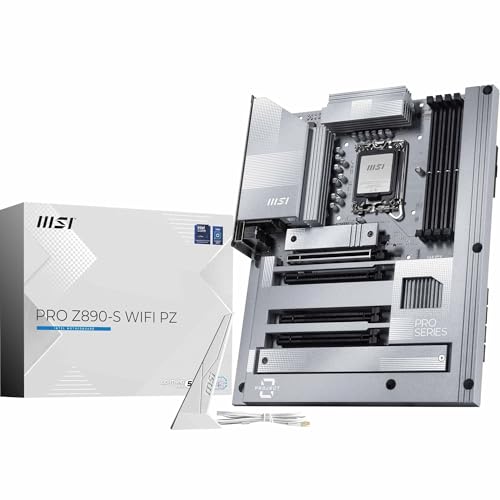
The MSI PRO Z890-S WiFi PZ Motherboard stands out as an ideal choice for gamers and content creators seeking top-tier performance with its support for Intel Core Ultra Processors and PCIe 5.0 technology. You’ll appreciate the DDR5 Memory Boost, reaching speeds over 8600 MT/s, and the advanced cooling features, including an Extended Heatsink and M.2 Shield Frozr. With four DDR5 DIMM slots and multiple M.2 storage options, data access is lightning-fast. Plus, full-speed Wi-Fi 7 and Thunderbolt 4 connectivity guarantee seamless performance for your peripherals. Backed by a three-year warranty, it’s a reliable investment for your build.
Best For: Gamers and content creators seeking high-performance computing with advanced connectivity options.
Pros:
- Supports DDR5 memory with extreme overclocking capabilities (8600+ MT/s) for enhanced performance.
- Equipped with advanced cooling solutions to prevent thermal throttling during intense usage.
- Includes versatile connectivity options such as Wi-Fi 7, Thunderbolt 4, and 2.5G LAN for seamless data transfer.
Cons:
- Limited to LGA 1851 socket, restricting processor compatibility.
- Higher price point compared to entry-level motherboards, which may not suit budget builds.
- Size may be challenging for compact cases due to its larger dimensions (11.3L x 13.8W x 3H inches).
Factors to Consider When Choosing Motherboards With PCIe Gen5 Support
When you’re choosing a motherboard with PCIe Gen5 support, there are several key factors to keep in mind. You’ll want to take into account compatibility with your processor, memory capacity and speed, and thermal management solutions. Additionally, think about the available connectivity options and expansion slot configuration to guarantee your system meets your needs.
Compatibility With Processors
Choosing a motherboard with PCIe Gen5 support requires careful consideration of processor compatibility, as mismatched socket types can lead to frustrating compatibility issues. Make certain the motherboard matches your processor’s socket type—like AM5 for AMD Ryzen or LGA 1851 for Intel Core Ultra. Additionally, check the chipset compatibility; certain chipsets like AMD B850 or X870E are tailored for specific Ryzen generations. Don’t overlook the maximum RAM capacity, as this can greatly affect your system’s performance. Also, evaluate the power delivery system, particularly the VRM design, to guarantee it meets the demands of high-end processors. Finally, verify that the firmware and BIOS are updated to avoid boot or performance problems with the latest CPUs.
Memory Capacity and Speed
A solid understanding of memory capacity and speed is crucial for maximizing your motherboard’s performance with PCIe Gen5 support. Look for motherboards that support a maximum memory capacity of up to 256 GB, which allows extensive multitasking and application performance. Pay attention to memory speed, as high-performance boards can achieve overclocking speeds of 8400 MT/s or more, enhancing data transfer rates. The number of DIMM slots matters too; many motherboards offer four slots for dual-channel configurations, boosting performance. Verify compatibility with DDR5 memory technology, as it greatly improves bandwidth and efficiency. Remember, a robust power delivery system also helps maintain stable performance during high memory usage, especially when overclocking to reach those maximum speeds.
Thermal Management Solutions
Effective thermal management solutions are essential for keeping your motherboard running smoothly, especially with the high data transfer speeds of PCIe Gen5 support. High data rates generate considerable heat, so look for motherboards that incorporate 7W/mK MOSFET thermal pads and extended heatsinks. These features help dissipate heat from critical components, ensuring stable performance during intense workloads. Advanced cooling solutions, like EZ M.2 Shield Frozr, provide dedicated cooling for M.2 storage devices, preventing thermal throttling. Additionally, extra choke thermal pads and chipset heatsinks enhance thermal performance, improving power delivery and overall system efficiency. A combo-fan header can also be integrated to manage additional cooling solutions, optimizing airflow and boosting cooling efficiency across your motherboard.
Connectivity Options Available
With efficient thermal management in place, it’s time to explore the connectivity options that come with motherboards supporting PCIe Gen5. These motherboards typically feature multiple PCIe 5.0 x16 slots, allowing you to connect high-speed graphics cards and expansion cards with a whopping bandwidth of up to 128GB/s. You’ll also find several M.2 slots supporting Gen5, boosting NVMe SSD data transfer speeds to 128Gbps for exceptional storage performance. Additionally, advanced USB ports like USB 20G Type-C enable rapid data transfers and versatile peripheral connections. Integrated networking features, such as 5GbE or 2.5GbE LAN, enhance your online gaming or streaming experiences. Plus, support for Wi-Fi 6E or Wi-Fi 7 guarantees improved wireless connectivity for your modern devices.
Expansion Slot Configuration
When choosing a motherboard with PCIe Gen5 support, the expansion slot configuration plays an essential role in your system’s performance. You’ll want to look for multiple PCIe 5.0 x16 slots to maximize bandwidth and support high-performance components like graphics cards and storage devices. Consider the spacing and layout of these slots, as they can impact airflow and cooling in your build, which is crucial for thermal performance. Some motherboards feature reinforced designs, such as Steel Armor, to prevent GPU sag and enhance durability with heavy cards. Additionally, understanding the total number of available M.2 slots for NVMe SSDs and their corresponding PCIe lanes will help you maximize storage performance in your high-speed setup.
Power Delivery Systems
A strong power delivery system is essential for any motherboard supporting PCIe Gen5, as it guarantees stable operation under high-performance conditions. You’ll want to look for motherboards featuring advanced VRM designs, ideally 14-phase or more, to provide efficient power delivery while minimizing voltage fluctuations during heavy workloads. High-quality components, like 70A power stages and thermal pads rated at 7W/mK, enhance thermal management and efficiency. These systems can also enable extreme overclocking capabilities, allowing you to maximize your CPU and memory’s potential when using PCIe Gen5 technology. Additionally, consider motherboards with dual 8-pin CPU power connectors to ascertain sufficient power supply for high-demand systems that effectively utilize PCIe Gen5 slots.
Warranty and Support Policies
Choosing a motherboard with PCIe Gen5 support involves more than just checking power delivery systems; warranty and support policies play a significant role too. Start by reviewing the manufacturer’s warranty duration—some offer 3 years, while others extend to 5 years for select models. Check the return policy, as most allow a full refund within 30 days for defective items, though restocking fees may apply for misrepresented returns. Customer service support can also be vital for facilitating warranty claims, so consider this when choosing. Finally, assess customer feedback ratings, which typically range from 4.3 to 4.7 stars, to gauge reliability and support experiences. Understanding warranty terms and exclusions is essential before making your purchase.
