
When setting up your workspace, choosing the right monitor can make a significant difference in your productivity. Monitors with USB-C docking support not only provide high-quality visuals but also streamline your connectivity. From stunning ultrawide displays to compact options, there’s a variety that can meet your needs. Let’s explore the top contenders that can elevate your workspace without the clutter. You might just find the perfect fit for your setup.
ASUS 34” Curved USB-C Docking Monitor (VA34VCPSR)

If you’re a creative professional or a gamer looking for an immersive viewing experience, the ASUS 34” Curved USB-C Docking Monitor (VA34VCPSR) is an excellent choice. With its stunning WQHD resolution (3440×1440) and 1500R curvature, you’ll enjoy vibrant visuals and an expansive 21:9 aspect ratio. The monitor supports up to 100Hz refresh rate with Adaptive-Sync technology, ensuring smooth gameplay. Its USB-C connectivity simplifies your workspace, allowing for data transmission and charging up to 96W. Plus, ergonomic adjustments and TÜV Rheinland-certified eye care features make it comfortable for long hours. It’s perfect for enhancing your productivity and enjoyment.
Best For: Creative professionals and gamers seeking an immersive and high-quality visual experience.
Pros:
- Stunning WQHD resolution (3440×1440) and 1500R curvature for enhanced immersion.
- USB-C connectivity allows for one-cable docking with data transmission and charging up to 96W.
- Ergonomic adjustments and TÜV Rheinland-certified eye care features for comfortable extended use.
Cons:
- Relatively heavy at 20.6 pounds, which may make it less portable.
- Limited to a maximum refresh rate of 100Hz, which may not satisfy hardcore gamers seeking higher rates.
- Higher price point compared to standard monitors could be a barrier for some users.
ASUS 27” 1080P Docking Monitor (VA27ECPSN)

The ASUS 27” 1080P Docking Monitor (VA27ECPSN) is an excellent choice for creative professionals and gamers alike, thanks to its vibrant IPS display and impressive 75Hz refresh rate. With its 178° wide viewing angle, you’ll enjoy stunning visuals from any position. The extensive connectivity options, including USB-C for data, video, and 65W laptop charging, make it incredibly versatile. Its ergonomic design allows for tilt, swivel, pivot, and height adjustments, ensuring comfort during long hours. Plus, TÜV Rheinland-certified Eye Care technologies offer a flicker-free experience, making it great for your eyes. You’ll also get a month of Adobe Creative Cloud with your purchase!
Best For: Creative professionals and gamers seeking a versatile monitor with vibrant visuals and ergonomic design.
Pros:
- Vibrant IPS display with Full HD resolution and a 75Hz refresh rate for smooth visuals.
- Extensive connectivity options including HDMI, DisplayPort, and USB-C for versatility and convenience.
- Ergonomic design allows for multiple adjustments, ensuring comfortable viewing during long hours.
Cons:
- Limited resolution at 1080p may not satisfy users looking for 4K displays.
- 75Hz refresh rate may not be sufficient for competitive gamers who prefer higher rates.
- Additional features such as built-in speakers are not included, which may require external audio solutions.
ASUS 27” 1440P USB-C Docking Monitor (BE27ACGN)

For professionals seeking a versatile and high-performance display, the ASUS 27” 1440P USB-C Docking Monitor (BE27ACGN) stands out with its impressive 120Hz refresh rate and QHD resolution. This 27-inch IPS monitor offers a frameless design, built-in speakers, and ergonomic height adjustment, ensuring comfort during long work hours. With multiple connectivity options, including USB-C, HDMI, and DisplayPort, you can easily connect your devices. Plus, it supports 96W power delivery and features TÜV Rheinland-certified eye care technologies. Enjoy a vibrant display with a 99% sRGB color gamut and a 5ms response time, making your workspace seamless and efficient.
Best For: Professionals seeking a high-performance, versatile monitor for productivity and creative work.
Pros:
- High 120Hz refresh rate for smooth visuals and gaming experiences.
- Ergonomic design with multiple adjustments for maximum comfort during extended use.
- Extensive connectivity options including USB-C with 96W power delivery, allowing for simplified device connection and charging.
Cons:
- Limited to a 27-inch screen size, which may not suit users preferring larger displays.
- Higher price point compared to standard monitors of similar size and resolution.
- Built-in speakers might not provide the best audio quality for audiophiles or multimedia professionals.
LG 27UP850K-W 27-inch Ultrafine 4K UHD Computer Monitor

Looking for a monitor that seamlessly integrates with your modern workspace? The LG 27UP850K-W 27-inch Ultrafine 4K UHD Monitor delivers stunning visuals with its 3840 x 2160 resolution and supports up to 95% DCI-P3 color gamut. Its USB Type-C connectivity offers 90W power delivery, making it a perfect hub for your devices. With built-in stereo speakers and ergonomic adjustments, you’ll enjoy both comfort and quality. Plus, gaming features like Black Stabilizer and Dynamic Action Sync guarantee an immersive experience. Elevate your workspace with this versatile monitor that combines beauty and functionality effortlessly.
Best For: Professionals and gamers seeking a high-quality monitor that offers exceptional color accuracy and versatile connectivity options.
Pros:
- Stunning 4K UHD resolution provides clear images and vibrant colors, ideal for graphic design and multimedia tasks.
- Ergonomic stand allows for tilt, height, and pivot adjustments, enhancing user comfort during long hours of work or gaming.
- Multiple connectivity options, including USB Type-C with power delivery, simplify device connections and reduce cable clutter.
Cons:
- Limited refresh rate of 60Hz may not be ideal for competitive gamers seeking higher frame rates.
- Built-in speakers may not provide the best audio quality compared to dedicated external speakers.
- Price point may be higher than basic monitors, making it a more significant investment for budget-conscious consumers.
SAMSUNG 32″ ViewFinity S6 QHD High Resolution Computer Monitor
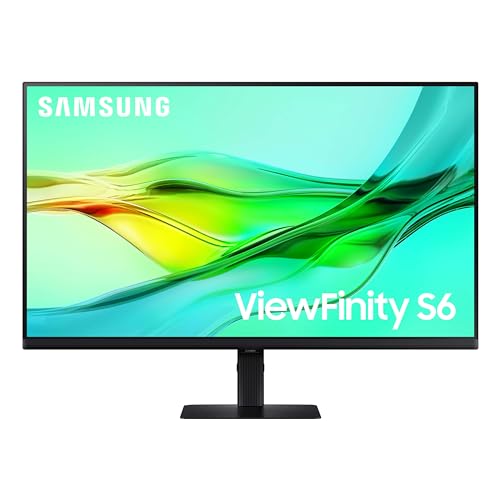
Samsung’s 32″ ViewFinity S6 QHD High Resolution Computer Monitor stands out as an excellent choice for creatives and professionals seeking vibrant visuals and seamless connectivity. With a stunning QHD resolution of 2560 x 1440 and a 100Hz refresh rate, you’ll enjoy crisp images and smooth motion. Its USB-C port allows simultaneous 90W charging and data transfer, while the built-in LAN port guarantees reliable internet access. The monitor’s HDR10 support delivers over a billion colors, enhancing your viewing experience. Plus, the adjustable stand and TÜV-certified eye care features make long hours at your desk comfortable and easy on the eyes.
Best For: Creatives and professionals seeking vibrant visuals and seamless connectivity in their workspace.
Pros:
- High Resolution: QHD (2560 x 1440) display for sharp, detailed images.
- Versatile Connectivity: USB-C port with 90W charging, built-in LAN, and KVM switch functionality.
- Ergonomic Design: Adjustable stand and eye care features for comfortable long-term use.
Cons:
- Weight: At 15.9 pounds, it may be cumbersome to move or adjust.
- Limited Refresh Rate: While 100Hz is good, it may not satisfy hardcore gamers seeking higher rates.
- Restocking Fees: Return policy includes fees for misrepresented conditions, which may deter some customers.
BenQ MA270UP 27” 4K Monitor for MacBook Pro/Air

The BenQ MA270UP 27” 4K Monitor stands out as an ideal choice for MacBook Pro and Air users who crave stunning visuals and seamless connectivity. With a 3840×2160 resolution and IPS technology, you’ll enjoy vibrant colors and sharp details. Its dual USB-C ports provide 90W power delivery, making charging your devices a breeze. Plus, the monitor’s P3 wide color gamut guarantees accurate hues, perfect for creative work. Adjustable features enhance your comfort, while eye care technologies protect your vision. With a 3-year warranty and a 4.9-star rating, this monitor is a reliable companion for your Mac setup.
Best For: Creative professionals and MacBook users seeking high-resolution displays with seamless connectivity and advanced color accuracy.
Pros:
- Exceptional 4K UHD resolution for sharp and vibrant visuals, ideal for design and multimedia tasks.
- Dual USB-C ports offer convenient charging and connectivity for MacBook Pro and Air users.
- Customizable ergonomic features such as height, tilt, swivel, and pivot for comfortable viewing.
Cons:
- Limited refresh rate at 60 Hz may not be ideal for high-action gaming.
- Higher price point compared to standard monitors without specialized features.
- Size may be cumbersome for smaller workspaces, requiring ample desk space for setup.
Philips 346E2CUAE 34” Curved UltraWide Monitor

For professionals and gamers seeking an immersive experience, the Philips 346E2CUAE 34” Curved UltraWide Monitor stands out with its stunning UltraWide Quad HD resolution of 3440 x 1440. Its 1500 curvature enhances your viewing experience, while the curved VA panel guarantees wide viewing angles. Thanks to Philips Ultra Wide-Color technology, you’ll enjoy life-like images with a 121.3% sRGB and 99.5% NTSC color gamut. With a 1ms MPRT response time and 100Hz refresh rate, gaming is fluid and artifact-free. Plus, the single USB-C cable simplifies connectivity, providing power and recharge for your devices effortlessly.
Best For: Professionals and gamers seeking an immersive viewing experience with high color accuracy and fast performance.
Pros:
- Stunning UltraWide Quad HD resolution (3440 x 1440) for enhanced productivity and gaming.
- Ultra-fast 1ms MPRT response time and 100Hz refresh rate for smooth gameplay.
- Single USB-C cable for easy connectivity and power delivery to devices.
Cons:
- Curved design may not be suitable for all users or desk setups.
- Limited built-in speakers may not meet high audio expectations.
- Higher price point compared to standard monitors in the same size range.
PHILIPS 27-inch 4K UHD IPS Monitor
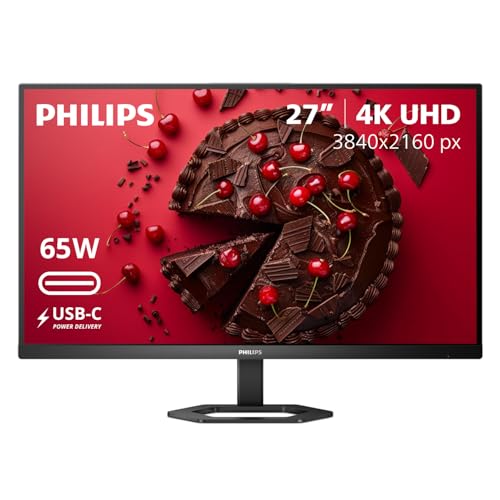
Looking for a monitor that perfectly balances stunning visuals and seamless connectivity? The PHILIPS 27E1N5900R is your ideal choice. With a 27-inch 4K UHD IPS display, it delivers ultra-clear resolution for precise details. Enjoy enhanced brightness and contrast with VESA-certified DisplayHDR 400. Its USB-C connectivity supports data, video, and power delivery up to 65W, making it perfect for a streamlined setup. Plus, the ergonomic design offers tilt, pivot, and height adjustments for comfort. With features like MultiView and SmartImage Game Mode, this monitor enhances both productivity and gaming. Experience a clutter-free workspace with built-in cable management!
Best For: Those who seek a high-quality monitor for gaming, photo/video editing, and multitasking with simultaneous device display capabilities.
Pros:
- UltraClear 4K UHD resolution provides exceptional detail and clarity.
- Ergonomic design with adjustable height, tilt, and pivot for comfortable viewing.
- USB-C connectivity allows for data, video transmission, and power delivery, simplifying setup.
Cons:
- Weight of 13.68 kg may make it less portable.
- Refresh rate of 60 Hz may not satisfy hardcore gamers seeking higher rates.
- Best Sellers Rank indicates it’s not the top choice in the monitor category.
ViewSonic VG3456CA 34 Inch Ultrawide Docking Monitor
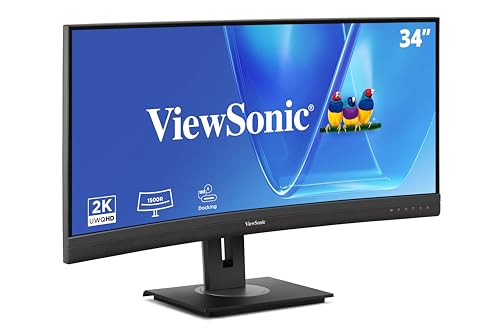
Experience seamless multitasking and immersive visuals with the ViewSonic VG3456CA, a 34-inch ultrawide monitor that’s perfect for professionals who demand both performance and connectivity. With a stunning 3440 x 1440 resolution and a 1500R curvature, you’ll enjoy vibrant colors and reduced visual discomfort. The built-in docking station provides 100W power delivery and multiple ports, including USB-C, HDMI, and RJ45 Ethernet, for effortless connectivity. Plus, its ergonomic stand allows for height adjustment and tilting, ensuring comfort during long work sessions. With a 3-year warranty, this monitor offers reliability alongside exceptional features.
Best For: Professionals and creatives who require an immersive ultrawide monitor for multitasking and enhanced productivity.
Pros:
- Exceptional 3440 x 1440 resolution for vibrant and detailed visuals.
- Built-in docking station with 100W power delivery for streamlined connectivity.
- Ergonomic design with adjustable height, tilt, and swivel for user comfort.
Cons:
- Larger footprint may require more desk space.
- The weight of 20.7 pounds could make it less portable.
- Limited refresh rate of 100Hz may not satisfy high-end gamers.
Samsung 49” Business Curved Ultrawide Dual QHD Computer Monitor (LS49C954UANXZA)

The Samsung 49” Business Curved Ultrawide Dual QHD Computer Monitor (LS49C954UANXZA) stands out as an exceptional choice for professionals immersed in video and design work. With its 49-inch 1000R curved display and 32:9 aspect ratio, you’ll enjoy an immersive visual experience. The monitor combines a docking station with multiple connectivity options, including USB Type-C for 90W charging, reducing desk clutter. Its 120Hz refresh rate guarantees smooth visuals, enhancing both productivity and gaming. Plus, built-in speakers minimize the need for extra peripherals, making your workspace efficient and streamlined. This monitor truly elevates your work environment.
Best For: Professionals involved in video and design work who seek an immersive and efficient workspace.
Pros:
- Immersive 49-inch curved display enhances visual experience for design and video projects.
- Multiple connectivity options including USB Type-C with 90W charging reduce desk clutter.
- 120Hz refresh rate ensures smoother scrolling and improved gaming experience.
Cons:
- Large size may require significant desk space.
- Built-in speakers might not meet the audio quality expectations of audiophiles.
- Higher price point compared to standard monitors could be a barrier for some users.
Factors to Consider When Choosing Monitors With USB-C Docking Support
When you’re choosing a monitor with USB-C docking support, several key factors can impact your experience. You’ll want to take into account display resolution quality, connectivity options, and ergonomic design features to guarantee it fits your needs. Don’t forget to check the refresh rate capabilities and eye care technologies for added comfort during long sessions.
Display Resolution Quality
Choosing a monitor with USB-C docking support means you’ll want to pay close attention to display resolution quality. Higher resolutions, like 4K UHD (3840×2160), deliver clearer images and more detail than Full HD (1920×1080). If you’re looking for a balance between clarity and performance, QHD (2560×1440) is a great option for both work and entertainment. Don’t forget about refresh rates; monitors with 100Hz or higher offer smoother visuals, especially for gaming or video editing. A contrast ratio of 2000:1 or more enhances color depth, essential for tasks like graphic design. Finally, consider IPS panels for superior color accuracy and wider viewing angles, making them perfect for collaborative environments.
Connectivity Options Available
While display resolution quality plays a significant role in your monitor selection, connectivity options are just as important. USB-C docking monitors typically offer multiple connectivity options, such as HDMI, DisplayPort, and RJ45 LAN ports, making it easy to integrate with various devices. Many of these monitors also provide power delivery capabilities, allowing you to charge your laptop while transmitting data and video through a single cable. The inclusion of USB hubs expands connectivity, giving you additional USB ports for peripherals. Some models support daisy chaining, enabling you to connect multiple monitors with one DisplayPort connection, reducing cable clutter. Plus, compatibility with Adaptive-Sync technology enhances your visual experience by minimizing screen tearing during gaming or video playback.
Ergonomic Design Features
Ergonomic design features play an essential role in enhancing your overall experience with monitors that offer USB-C docking support. Look for monitors with adjustable height, tilt, swivel, and pivot capabilities, as these allow you to find the most comfortable viewing angles, reducing strain during long hours of use. TÜV Rheinland-certified Flicker-free and Low Blue Light technologies can also minimize eye strain, promoting healthier viewing habits. Additionally, a curved screen design may provide a more immersive experience while aligning with the natural curvature of your eyes. Built-in cable management solutions help keep your workspace organized and clutter-free, further contributing to an ergonomic environment. Prioritizing these features can greatly improve your posture and overall comfort.
Refresh Rate Capabilities
When enhancing your workspace with a monitor that supports USB-C docking, refresh rate capabilities are key to optimizing your visual experience. Refresh rates indicate how often a display redraws the image, with higher rates providing smoother motion and less motion blur. Common refresh rates for these monitors include 60Hz, 75Hz, 100Hz, and even 120Hz. If you’re into gaming or multimedia, aim for at least 100Hz for a more responsive and enjoyable experience. Pairing higher refresh rates with Adaptive-Sync technologies like FreeSync or G-Sync can further reduce screen tearing and improve fluidity. Just remember, a higher refresh rate may require a more powerful graphics card to fully realize the monitor’s potential.
Eye Care Technologies
As you consider monitors with USB-C docking support, eye care technologies play an essential role in ensuring a comfortable viewing experience. Look for TÜV Rheinland-certified Flicker-free and Low Blue Light features, which help reduce eye strain during prolonged use by minimizing flicker and harmful blue light emissions. These technologies allow you to work or game for extended periods without discomfort. Low Blue Light can also improve your sleep quality by lowering exposure to blue light wavelengths, especially in the evening. Additionally, ergonomic designs with adjustable features promote healthier viewing angles, reducing neck and back strain. Finally, Adaptive Sync technologies enhance visual performance, providing smoother motion and reducing screen tearing for a more enjoyable experience.
Warranty and Support Options
Selecting a monitor with USB-C docking support isn’t just about features; warranty and support options are vital too. Look for a manufacturer that offers a warranty of at least 3 to 4 years for parts and labor. This coverage can provide peace of mind. You’ll also want to check return policies that allow for full refunds within 30 days for defective or damaged items. Efficient customer service for warranty inquiries is essential for resolving issues quickly. Some monitors even come with additional perks like complimentary software access, adding value to your purchase. Finally, consider whether advanced replacement options are available under warranty, as this can greatly reduce downtime in case of product failure.
