
If you need a monitor arm for heavy dual monitors, strength and stability matter more than flashy extras. The right mount should handle your screen weight, match your VESA pattern, and keep your desk setup steady.
Below, we focus on heavy-duty options built for larger, wider, and more demanding monitor pairs, including ultrawide and stacked configurations.
Best 10 Monitor Arm for Heavy Dual Monitors Picks for 2026
Best for Heavy Loads
Dual Monitor Arm Stand for 35 Inch Screens

- Holds up to 26.4 lbs per arm
- Fits 17- to 35-inch monitors
- All-metal build with clamp or grommet mounting
Best For: People with two large monitors who want a sturdy, adjustable desk mount.
Best for Heavy Ultrawide Screens
WALI Dual Monitor Arm for 49 Inch

- Up to 44 lbs per arm for large displays
- Fits ultrawide and curved monitors up to 49 inches
- Tilt, swivel, rotation, and height adjustment for flexible layouts
Best For: People mounting two large ultrawide or curved monitors who want a stable, heavy-duty arm.
Best for Heavy Ultrawides
HUANUO Dual Monitor Stand for 13″–40″

- Supports two heavy monitors up to 26.4 lbs per arm
- Full-motion arms with swivel, tilt, and 360° rotation
- Clamp/grommet mounting plus built-in USB charging
Best For: Users with two large or ultrawide monitors who want a sturdier, highly adjustable desk mount.
Best for Ultrawide Vertical Stacks
Dual Monitor Arm for 17-49-Inch Screens

- Holds up to 44 lbs per arm for large ultrawides
- Tall pole supports clean vertical stacking
- Full-motion adjustments for flexible positioning
Best For: Users stacking two large monitors who want a heavy-duty, adjustable mount.
Best for Heavy Ultrawide Setups
FlexiSpot Heavy Duty Dual Monitor Arm

- Supports ultrawide screens up to 39" and 44 lbs per arm
- Smooth gas spring adjustment with tilt, swivel, and extension
- C-clamp or grommet mounting for flexible installation
Best For: Gamers, coders, and office users with heavy ultrawide monitor setups.
Best for Ultra-Wide Heavy Loads
VIVO Heavy Duty Dual Ultra-Wide Arm

- Holds two ultrawides up to 45" and 44 lbs per arm
- Spring-assist arms make heavy screens easier to position
- Cable management and detachable VESA plates simplify setup
Best For: Dual ultrawide setups that need strong support, smooth adjustment, and a tidy desk.
Best for 49-Inch Ultrawides
ARES WING Dual Monitor Arm for Heavy Screens
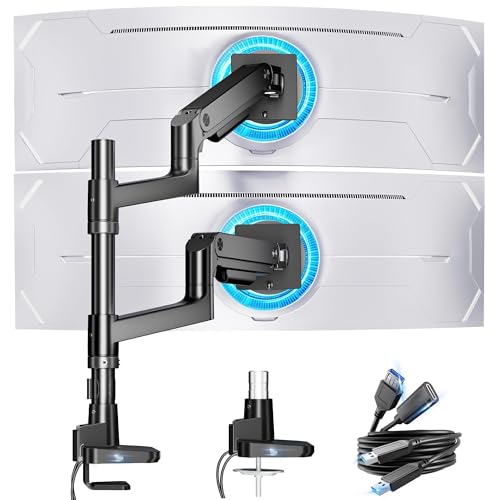
- Holds up to 44 lbs per arm
- Fits 17-49 inch flat or curved monitors
- Includes USB-C and USB-A charging ports
Best For: People mounting two large ultrawide or curved monitors who need strong support and flexible stacking.
Best with Extra Features
MOUNTUP Dual Monitor Stand for 43" Screens

- Supports up to 33 lbs per arm
- Fits 17" to 43" ultrawide, curved, or flat displays
- Anti-sag locking screws improve long-term stability
Best For: Large dual-monitor setups with heavy ultrawide or curved screens.
Best Heavy-Duty Pick
VIVO Pneumatic Dual Ultrawide Mount

- Holds two ultrawides up to 49" stacked
- 5.5 to 44 lb per arm capacity
- Pneumatic adjustment with sturdy cast aluminum build
Best For: People running two heavy ultrawide monitors who need a stable, highly adjustable desk mount.
Best for Ultrawide Screens
Heavy Duty Dual Monitor Arm for 43-inch Displays
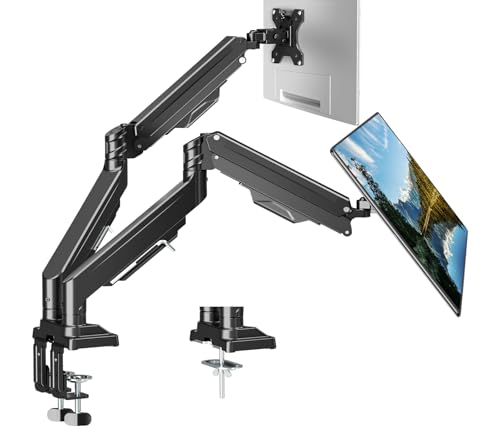
- Fits 13" to 43" monitors, including ultrawides and curved screens
- Holds up to 33.1 lbs per arm for heavier setups
- Gas spring movement with tilt, swivel, and rotation
Best For: People mounting two large or ultrawide monitors who want strong support and flexible positioning.
Best for Heavy Loads – Dual Monitor Arm Stand for 35 Inch Screens
If you need a monitor arm for heavy dual monitors, this QUARX dual arm stand is built around stability first. It supports 17- to 35-inch displays, includes both C-clamp and grommet mounting options, and uses an all-metal structure with adjustable tension to help keep larger screens steady.
Best For: Users with two large or ultrawide monitors who want a sturdy, highly adjustable desk mount for everyday office or home workstation use.
Pros:
- Supports monitors up to 35 inches and 26.4 lbs per arm
- All-metal construction with a secure base for better stability
- Works with both C-clamp and grommet installation
- Includes cable management and VESA compatibility for most setups
Cons:
- Requires careful setup and tension adjustment to stay balanced
- May be too large for compact desks or very tight spaces
For buyers prioritizing load capacity and desk stability, this is a practical monitor arm for heavy dual monitors rather than a lightweight minimalist pick. If your setup uses bigger panels and you want a mount that can hold position without constant drift, it’s a strong fit.
Best for Heavy Ultrawide Screens – WALI Dual Monitor Arm for 49 Inch
If you need a monitor arm for heavy dual monitors, this WALI mount is built for oversized setups that regular arms often struggle to hold. It supports ultrawide and curved displays from 13 to 49 inches, up to 44 lbs per arm, with strong adjustability for stacking or side-by-side layouts.
Best For: Users with large ultrawide or curved monitors who want a heavy-duty dual-arm setup with flexible positioning and solid desk support.
Pros:
- Handles very large screens, including ultrawides up to 49 inches and 44 lbs per arm
- Good movement range with tilt, swivel, rotation, and 18.9 inches of height adjustment
- Supports both C-clamp and grommet installation for different desks
Cons:
- May be overkill for smaller or lighter monitors
- Heavy-duty build can take more time to set up and tune
This is a strong pick if your priority is stability first and you need a monitor arm for heavy dual monitors that can handle bigger screens without sagging. It’s especially appealing for ultrawide setups where adjustability and desk space matter as much as load capacity.
Best for Heavy Ultrawides – HUANUO Dual Monitor Stand for 13″–40″
If you need a monitor arm for heavy dual monitors, the HUANUO HNDS7 is built around stability first: solid aluminum arms, a larger base, and a dual C-clamp design help it handle two large screens without feeling flimsy. It supports displays from 13″ to 40″ and up to 26.4 lbs per arm, so it’s a strong fit for bigger setups that need more than a basic budget mount.
Best For: Users with two large or ultrawide monitors who want a sturdier, highly adjustable desk mount with USB charging.
Pros:
- Holds up to 26.4 lbs per arm, making it suitable for heavier dual-monitor setups
- Full-motion adjustment with swivel, tilt, and 360° rotation
- Clamp and grommet mounting options for more desk compatibility
- Built-in USB ports add convenient charging at the desk
Cons:
- Large arms and base may take up more room than simpler monitor stands
- Best suited to VESA-compatible monitors only
Overall, this is a practical monitor arm for heavy dual monitors if your priority is capacity, range of motion, and a more secure feel for bigger screens. It’s especially appealing for ultrawides or mixed-size dual setups where stability matters more than a minimalist footprint.
Best for Ultrawide Vertical Stacks – Dual Monitor Arm for 17-49-Inch Screens
If you need a monitor arm for heavy dual monitors, this model stands out for its tall center pole, strong gas spring arms, and support for extra-large ultrawide displays. It’s built for users who want a stacked dual-screen layout with smooth adjustments and a sturdier feel than typical office arms.
Best For: Gamers, creators, coders, and multitaskers using two large monitors in a vertical stacked setup.
Pros:
- Supports very large screens from 17 to 49 inches, up to 44 lbs per arm
- Extra-tall 19.69-inch pole makes vertical stacking easier and more ergonomic
- Full-motion adjustment with tilt, swivel, and 360° rotation
- Heavy-duty aluminum and steel construction with gas spring arms
Cons:
- May be overkill for smaller or lightweight monitors
- Non-VESA displays need a separate adapter
This is a strong pick if you want a monitor arm for heavy dual monitors and need enough height and stability to handle ultrawides in a stacked configuration. It’s especially appealing when desk space is limited but screen size and adjustability still matter.
Best for Heavy Ultrawide Setups – FlexiSpot Heavy Duty Dual Monitor Arm
If you need a monitor arm for heavy dual monitors, this FlexiSpot model is built for bigger screens without feeling flimsy. It supports ultrawide displays up to 39 inches and 44 lbs per arm, while the gas spring design gives you smooth, one-hand positioning for a cleaner, more ergonomic desk.
Best For: Gamers, coders, designers, and office users who want a sturdy arm for an ultrawide or heavy monitor setup with easy adjustability.
Pros:
- Supports large displays up to 39" and 44 lbs per arm
- Gas spring arm offers smooth height, tilt, swivel, and extension adjustments
- C-clamp and grommet mounting options add installation flexibility
- Wood grain finish gives it a more polished desk look
Cons:
- May be overkill for smaller, lightweight monitors
- Requires a sturdy desk and enough clearance for the mounting hardware
For buyers comparing a monitor arm for heavy dual monitors, this FlexiSpot stands out for its high weight capacity, wide-screen support, and easy adjustability. It is a strong pick if you want desk space back without sacrificing stability or ergonomic positioning.
Best for Ultra-Wide Heavy Loads – VIVO Heavy Duty Dual Ultra-Wide Arm
If you need a monitor arm for heavy dual monitors, this VIVO mount is built for oversized setups that standard arms can’t handle. It supports two ultrawides up to 45 inches and 44 lbs per arm, while spring-assist tension arms make height changes and repositioning feel controlled rather than stiff.
Best For: Dual ultra-wide monitor setups on a sturdy desk, especially when you want strong support with smooth adjustment and a clean cable-managed look.
Pros:
- Supports very large ultrawides, up to 45 inches and 44 lbs per arm
- Spring-assisted tension arms help offset heavy monitor weight for easier adjustments
- Good range of motion with tilt, swivel, rotation, and 11 inches of height adjustment
- Includes cable management covers and detachable VESA plates for easier setup
Cons:
- May be more arm than you need for smaller or lighter monitors
- Heavy-duty hardware is best suited to a solid desk surface
- Assembly and balancing can take some time with large displays
For buyers comparing a monitor arm for heavy dual monitors, this model stands out for brute-strength capacity and adjustability rather than a minimalist footprint. It’s a practical pick if your priority is keeping two big screens stable, ergonomic, and well organized.
Best for 49-Inch Ultrawides – ARES WING Dual Monitor Arm for Heavy Screens
If you need a monitor arm for heavy dual monitors, the ARES WING stands out for its unusually high weight support, broad 17-49 inch compatibility, and vertical stacking flexibility. It’s built for large curved panels and ultrawides, making it a practical pick for gamers, creators, and anyone trying to free up desk space without giving up stability.
Best For: Users with large ultrawide or curved displays who want a heavy-duty dual arm that can handle serious weight and height adjustment.
Pros:
- Supports monitors up to 49 inches and 44 lbs per arm
- Gas spring design offers wide tilt, swivel, rotation, and stacking options
- Built-in USB-C and USB-A ports add convenient desk charging
- Quick-release installation with C-clamp and grommet mounting
Cons:
- Large ultrawide monitors may need a VESA adapter if mounting holes aren’t included
- Heavier-duty design may be more arm than needed for smaller monitors
This is a strong choice if your priority is finding a monitor arm for heavy dual monitors that can safely support oversized displays while still offering smooth positioning and a cleaner desktop layout.
Best with Extra Features – MOUNTUP Dual Monitor Stand for 43" Screens
If you need a monitor arm for heavy dual monitors, this MOUNTUP stand is built for bigger setups that need real support, not just basic adjustability. It handles screens up to 43 inches and 33 lbs per arm, with full-motion movement that makes it easier to fine-tune viewing angles for work, trading, or gaming.
Best For: Users with large ultrawide, curved, or heavy flat monitors who want a sturdy dual-arm desk mount with flexible positioning.
Pros:
- Supports a wide range of large displays, including ultrawide and curved monitors
- Strong anti-sag design with locking screws helps keep heavy screens steady
- Full-motion adjustment and tall extension make ergonomic positioning easy
- Includes both clamp and grommet mounting options for flexible installation
Cons:
- May be overbuilt for lighter or smaller monitors
- Heavy-duty arms can take more time to dial in than simpler mounts
For buyers comparing a monitor arm for heavy dual monitors, this one stands out for its load range, anti-sag reinforcement, and support for oversized screens. It is a practical pick if you want a stable, space-saving dual setup without giving up movement or ergonomics.
Best Heavy-Duty Pick – VIVO Pneumatic Dual Ultrawide Mount
If you need a monitor arm for heavy dual monitors, this VIVO mount is built around big-screen support instead of basic office use. It handles two ultrawide displays with a high weight range, extra-tall positioning, and pneumatic assistance that helps keep large panels easy to adjust.
Best For: Users with two heavy ultrawide monitors who want a sturdy, height-adjustable desk mount with flexible viewing angles.
Pros:
- Supports two ultrawides up to 49 inches stacked, or 38 inches side-by-side
- High 5.5 to 44 lb per-arm capacity suits heavier displays
- Pneumatic arms and tilt/swivel/rotation make positioning easier
- Cast aluminum build and heavy-duty clamp add stability
Cons:
- May be overkill for standard-sized monitors
- Requires a desk that can accept a clamp up to 2 inches thick
- Large ultrawides can take more time to balance and set up
This is a strong pick if your priority is a monitor arm for heavy dual monitors and you need a mount that can actually handle the size, weight, and adjustment demands of ultrawides without feeling flimsy.
Best for Ultrawide Screens – Heavy Duty Dual Monitor Arm for 43-inch Displays
If you need a monitor arm for heavy dual monitors, this ErgoFocus mount is built for larger setups that push past standard desk arms. It supports screens from 13″ to 43″ and up to 33.1 lbs per arm, making it a strong fit for ultrawides, curved panels, and other oversized displays that need stable positioning.
Best For: Buyers who want a heavy-duty dual arm for ultrawide or large curved monitors with broad adjustability and desk-space savings.
Pros:
- Supports large displays up to 43″ and 33.1 lbs per screen
- Gas spring adjustment with tilt, swivel, and 360° rotation
- Upgraded head design helps reduce sagging over time
- C-clamp and grommet mounting options fit many desks
Cons:
- Overbuilt for users with lightweight or basic monitors
- Large arms may take more time to fine-tune for perfect balance
For a monitor arm for heavy dual monitors, this model stands out for its high weight capacity and ultrawide compatibility. It’s a practical pick if you want a cleaner desk and a more stable way to position two large screens.
How We Picked the Best Monitor Arm for Heavy Dual Monitors
For this roundup, we focused on arms designed for larger displays, higher weight capacities, and flexible positioning. We prioritized models that are commonly used as a Monitor Arm for Heavy Dual Monitors, especially for ultrawide, curved, and vertical stacked setups.
We also looked for practical setup features such as gas-spring tension control, solid clamp or grommet mounting, broad VESA compatibility, and enough articulation to reduce strain on the desk and the user.
Quick Comparison
Some buyers need maximum weight support, while others want extra height, stacking flexibility, or cleaner cable management. In general, ultrawide owners should look first at load capacity and arm reach, while dual-screen productivity users may value smooth adjustment and a compact footprint.
Key Buying Factors for a Monitor Arm for Heavy Dual Monitors
Weight Capacity Per Arm
This is the most important spec. Make sure each arm can safely support your monitors at their actual weight, including stands removed and any accessories attached. Leave a margin above your total load rather than buying at the exact limit.
Screen Size and VESA Compatibility
Large screen size is only part of the equation. Check both the stated size range and VESA pattern support to ensure your monitors will mount properly and sit securely.
Reach, Height, and Range of Motion
Heavy dual monitors often need more than simple tilt. Consider arm extension, height adjustability, swivel range, and whether the mount supports side-by-side or stacked orientation without sagging.
Mounting Style and Desk Thickness
C-clamp mounts are common and easy to install, but grommet mounts can be better for certain desk materials or heavier setups. Confirm your desk edge, thickness, and construction before buying.
Build Quality and Tension Control
For a Monitor Arm for Heavy Dual Monitors, strong joints and reliable tension adjustment help keep the screens stable after positioning. Look for models that let you fine-tune resistance so the monitors stay where you place them.
Who Should Buy Which Monitor Arm for Heavy Dual Monitors?
If you use two ultrawides or especially large displays, choose a high-capacity heavy-duty arm with generous reach and a strong clamp. If your workspace is tight, a vertical stacked design can save desk width while keeping both screens accessible.
If you want the easiest all-around productivity setup, look for a balanced dual-arm model with smooth motion, solid cable management, and enough load headroom for future monitor upgrades. If your priority is long-term stability, choose the most robust mount your desk and budget can support.
