
When you’re building the ultimate workstation, choosing the right modular case can make all the difference. With so many options available, it’s essential to find a case that offers customization, performance, and ease of assembly. From airflow to compatibility, each case brings something unique to the table. Let’s explore the top 10 modular workstation cases that can elevate your setup and meet your specific needs. You might be surprised by what you find.
CORSAIR 4000D RS ARGB Mid-Tower PC Case

If you’re a PC enthusiast looking to build a customizable and efficient setup, the CORSAIR 4000D RS ARGB Mid-Tower PC Case is an excellent choice. Weighing 18.04 pounds and measuring 19.17 x 9.41 x 19.13 inches, it combines sleek black aesthetics with impressive functionality. The FRAME Modular Case System lets you easily upgrade components, while the InfiniRail Fan Mounting System supports various fan configurations. You’ll appreciate the pre-installed CORSAIR RS ARGB PWM fans, providing exceptional airflow. Plus, its cable management features simplify your build process. With a 4.6-star rating, this case is a top contender for your next project.
Best For: PC enthusiasts seeking a customizable and efficient mid-tower case for their build.
Pros:
- Modular design allows for easy upgrades and customization of components.
- Exceptional airflow with pre-installed ARGB PWM fans and optimized airflow panel.
- User-friendly assembly with spacious design and organized cable management features.
Cons:
- Riser cable not included for vertical GPU mounting, which may require an additional purchase.
- Weight may be a concern for those looking for a lightweight option.
- Limited color options as it only comes in black, which may not suit all aesthetic preferences.
CORSAIR 4000D RS Frame Mid-Tower PC Case

The CORSAIR 4000D RS Frame Mid-Tower PC Case stands out as an excellent choice for gamers and PC builders seeking a versatile and customizable setup. With its FRAME modular design, you can easily upgrade components and optimize airflow using the three pre-installed CORSAIR RS PWM fans. The innovative InfiniRail fan mounting system lets you customize fan configurations, accommodating up to 360mm radiators. Measuring 19.17 x 9.41 x 19.13 inches, it’s spacious enough for powerful graphics cards. While cable management is straightforward, some users report tight spaces for larger GPUs. Overall, it combines functionality and aesthetics for a seamless building experience.
Best For: Gamers and PC builders seeking a customizable mid-tower case with excellent airflow and component compatibility.
Pros:
- Ample airflow with three pre-installed CORSAIR RS PWM fans and a low-obstruction steel front panel.
- Modular design allows easy upgrades and flexible fan configurations for optimal cooling.
- User-friendly assembly process with effective cable management options.
Cons:
- Some users experience tight spaces when installing larger GPUs, affecting compatibility.
- Reports of display features not functioning optimally for certain setups.
- SSD tray installation can be challenging for some users.
NZXT H5 Flow Compact ATX Mid-Tower PC Gaming Case

For gamers seeking a balance of performance and style, the NZXT H5 Flow Compact ATX Mid-Tower PC Gaming Case stands out with its exceptional cooling capabilities. Its perforated PSU shroud maximizes GPU airflow, while support for up to 360mm radiators keeps your system cool during intense gaming sessions. You’ll appreciate the seamless cable management system, allowing you to hide cables neatly and maintain a clean look. With its solid build quality and user-friendly design, installing components is a breeze. Plus, the H5 Flow’s sleek, modern aesthetic and high customer ratings make it a top choice for both novice and experienced builders.
Best For: Gamers and PC builders looking for a compact case that offers exceptional cooling, cable management, and a modern design.
Pros:
- Exceptional airflow with perforated panels and support for multiple radiators.
- User-friendly design with seamless cable management for a clean build.
- High customer ratings and considered excellent value for both novice and experienced builders.
Cons:
- Limited bottom intake for the PSU, which may affect airflow.
- Some users desire additional USB ports on the front panel.
- Potential compatibility issues with larger GPUs due to support brackets.
CORSAIR 3500X ARGB Mid-Tower ATX PC Case

Designed for gamers and PC enthusiasts, the CORSAIR 3500X ARGB Mid-Tower ATX PC Case stands out with its panoramic tempered glass panels that create an impressive visual showcase of your build. It supports Mini-ITX to EATX motherboards, ensuring compatibility with various setups. With high cooling capacity, you can mount up to 10x 120mm fans, and the three pre-installed CORSAIR RS120 ARGB fans keep your components cool. The removable panels make access easy, while the +5V ARGB header simplifies lighting control. Say goodbye to cable clutter, as the design prioritizes a neat and clean look for your gaming rig.
Best For: The CORSAIR 3500X ARGB Mid-Tower ATX PC Case is best for gamers and PC enthusiasts looking for a visually stunning and high-performance case with excellent cooling capabilities.
Pros:
- Spacious design supports a variety of motherboard form-factors from Mini-ITX to EATX.
- High cooling capacity with mounting options for up to 10x 120mm fans and three pre-installed ARGB fans.
- Panoramic tempered glass panels provide an impressive aesthetic and easy access for building and upgrades.
Cons:
- Limited to 120mm fan sizes, which may not suit users preferring larger fan options for cooling.
- The panoramic glass design may require regular cleaning to maintain its visual appeal.
- Some users may find cable management challenging despite the design’s intent to minimize cable visibility.
Thermaltake AX700 Snow TG Super Tower Case (CA-11B-00F6WN-00)
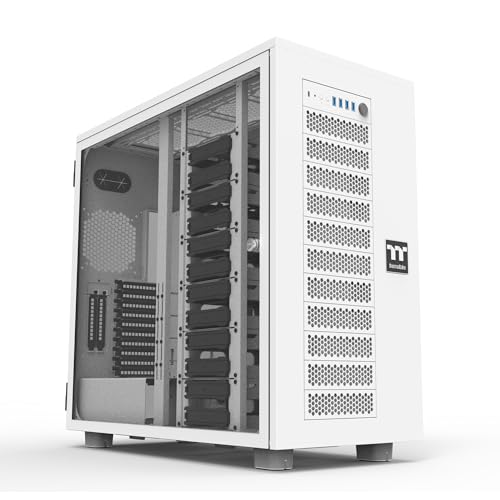
If you’re a gamer or a content creator looking to build a powerful workstation, the Thermaltake AX700 Snow TG Super Tower Case is an ideal choice. It supports various motherboard sizes, including SSI-CEB and ATX, giving you flexibility in your build. With cooling options for up to 18 fans and radiators up to 560mm, you’ll keep your system cool under pressure. The case also accommodates multi-GPU setups with 8+2 PCIe slots and a GPU brace for stability. Plus, you can store up to 18 drives, ensuring ample space for all your data. Expand your setup further with the AX100 Pedestal!
Best For: Gamers and content creators seeking a versatile and powerful workstation with ample cooling and expansion options.
Pros:
- Versatile Compatibility: Supports a wide range of motherboard sizes, including SSI-CEB and various ATX formats.
- Exceptional Cooling Support: Capable of housing up to 18 fans and accommodating large radiators for optimal thermal performance.
- Ample Storage Capacity: Offers space for up to 18 HDDs, ensuring you have plenty of room for your games and projects.
Cons:
- Size and Weight: Being a super tower case, it may be cumbersome and difficult to move or fit in smaller spaces.
- Additional Costs: The AX100 Pedestal for further expansion is sold separately, adding to the overall cost of the build.
- Complex Assembly: The extensive features and options may require a more advanced understanding of PC building for optimal setup.
DARKROCK EC2 Black ATX Mid Tower PC Case

The DARKROCK EC2 Black ATX Mid Tower PC Case stands out with its tempered glass side panel, making it an excellent choice for gamers and PC builders who want to showcase their hardware. This case supports ATX, M-ATX, and ITX motherboards, accommodating graphics cards up to 340mm. Its design features a meshed front panel for ideal airflow and Type-C connectivity for modern devices. You can install up to 8 x 120mm cooling fans and a 360mm radiator, ensuring your system stays cool. With a customer rating of 4.5 stars, this case combines functionality and style seamlessly.
Best For: Gamers and PC builders looking for a stylish case that offers excellent cooling capabilities and showcases their hardware through a tempered glass side panel.
Pros:
- Ample Cooling Options: Supports up to 8 x 120mm fans and a 360mm radiator for optimal airflow.
- Modern Connectivity: Features Type-C ports for compatibility with the latest devices.
- Versatile Compatibility: Accommodates various motherboard sizes including ATX, M-ATX, and ITX.
Cons:
- Weight: At 12.27 pounds, it may be heavier compared to other cases on the market.
- Limited Pre-Installed Fans: Only one fan comes pre-installed, requiring additional purchases for optimal cooling.
- Potential Dust Accumulation: Although it has magnetic dust filters, the open design may still allow dust entry over time.
SilverStone ALTA D1 Full Tower Modular Workstation Chassis

For professionals in high-performance computing fields, the SilverStone ALTA D1 Full Tower Modular Workstation Chassis stands out with its robust design and extensive compatibility. Crafted from high-grade steel, this mega-tower chassis supports specialized motherboards and offers up to 11 expansion slots for multiple GPUs. You’ll appreciate the modular cages for customizable installations and ample drive bays for your storage needs. The cooling options are impressive too, accommodating up to three 360mm radiators or multiple fans. Weighing 54.9 pounds, it’s a sturdy choice for serious builders seeking performance and flexibility in their workstation setup.
Best For: Professionals and enthusiasts in high-performance computing who require a robust and flexible workstation chassis.
Pros:
- Extensive Compatibility: Supports specialized motherboards and up to 11 expansion slots for multiple GPUs, catering to demanding computational tasks.
- Modular Design: Features customizable modular cages and ample drive bays to optimize component installation based on individual needs.
- Superior Cooling Options: Capable of accommodating up to three 360mm radiators or multiple fans, ensuring efficient thermal management.
Cons:
- Weight: At 54.9 pounds, it may be cumbersome to move or install in tight spaces.
- Limited USB Ports: Only 4 x USB 2.0 ports may not suffice for users with numerous peripherals.
- Price Point: As a high-end workstation chassis, it may be more expensive compared to standard cases, making it less accessible for casual users.
Thermaltake Tower 600 Mid-Tower ATX Case (CA-1Z1-00MFWN-00)

Designed for enthusiasts and professionals alike, the Thermaltake Tower 600 Mid-Tower ATX Case stands out with its distinctive octagonal shape and three removable tempered glass panels, making it a fantastic choice for those who appreciate both aesthetics and functionality. This case supports various motherboard sizes, offers ample cooling options for up to nine fans, and features hidden-connector motherboard support for a clean look. With rotational PCIe slots, you can flexibly install your GPU in multiple configurations. Plus, its sleek color options and optional horizontal display stand make it an eye-catching centerpiece for any setup.
Best For: Enthusiasts and professionals seeking a stylish, functional case with versatile cooling and configuration options.
Pros:
- Distinctive design with a unique octagonal shape and removable tempered glass panels for easy access and aesthetic appeal.
- Ample cooling support for up to nine fans and compatibility with large radiators, ensuring optimal thermal performance.
- Flexibility in GPU installation with rotational PCIe slots, accommodating various configurations to suit different setups.
Cons:
- Weighty design at 9.70 kg (21.39 lbs), which may be cumbersome for some users when moving or transporting.
- Limited clearance for CPU coolers and GPUs with power cover, potentially restricting high-performance components.
- Potentially complex assembly due to multiple removable panels and unique features, which may not be beginner-friendly.
CORSAIR 4000D Frame Modular Mid-Tower ATX PC Case

If you’re a PC enthusiast seeking a balance between aesthetics and functionality, the CORSAIR 4000D Frame Modular Mid-Tower ATX PC Case is an excellent choice. Its high airflow design features the InfiniRail Fan Mounting System and supports dual 360mm radiators. You’ll appreciate the FRAME Modular Case System, allowing easy upgrades like an aluminum motherboard tray and extra USB ports. Plus, the 3D Y-Pattern Airflow Panel guarantees minimal restriction for ideal cooling. With a cable management solution that keeps your build clean, you can focus on performance without sacrificing style. This case truly embodies customization and efficiency for any setup.
Best For: PC enthusiasts seeking a customizable and high-performance case for their gaming or workstation builds.
Pros:
- High airflow design with the InfiniRail Fan Mounting System supports optimal cooling efficiency.
- Versatile modular system allows easy upgrades and customization options for enhanced functionality.
- Clean cable management solutions keep the build organized and visually appealing.
Cons:
- Limited space for large components may restrict some users with extensive hardware needs.
- No pre-installed fans included, which could lead to additional costs for cooling solutions.
- White color option may require more maintenance to keep clean compared to darker colors.
H1 HYXN ATX PC Case with 7 PWM ARGB Fans

The H1 HYXN ATX PC Case is an excellent choice for gamers and PC enthusiasts seeking a blend of style and performance. With seven pre-installed PWM ARGB fans, it guarantees ideal cooling and airflow, thanks to its dual-chamber design. You’ll appreciate the tempered glass panels that not only enhance durability but also add a sleek touch to your setup. This mid-tower case supports various motherboard sizes and accommodates GPUs up to 400mm. Plus, its user-friendly layout makes installation a breeze. With a 30-day return policy and solid customer support, you can rest easy knowing you’re making a smart investment.
Best For: Gamers and PC enthusiasts looking for a stylish mid-tower case with excellent cooling performance.
Pros:
- Pre-installed with 7 PWM ARGB fans for optimal airflow and aesthetics.
- Dual-chamber design allows for better organization and easier installation.
- Supports a wide range of motherboard sizes and large GPUs, accommodating various build preferences.
Cons:
- Limited space for storage options with only 1 HDD and 2 SSD mounts.
- The weight of 11 pounds may be cumbersome for some users when moving the case.
- Requires careful dust management despite having dust filters, as it may still accumulate dust over time.
Factors to Consider When Choosing Modular Workstation Cases
When you’re choosing a modular workstation case, there are several key factors to keep in mind. Consider the size and dimensions to guarantee it fits your space, along with cooling options and expansion slot capacity for future upgrades. Don’t forget about cable management features and the overall material quality, as these can impact your setup’s longevity and performance.
Size and Dimensions
Choosing the right size and dimensions for your modular workstation case is essential, as it directly impacts compatibility with various components. You’ll find cases designed for different motherboard sizes, from Mini ITX to ATX, typically ranging from 6.7 x 6.7 inches to 12 x 9.6 inches. Make sure you check internal space for component clearance, especially for GPUs, as some cases support lengths up to 400mm while others are limited to 280mm. Weight also matters; cases can weigh between 11 to 54.9 pounds, affecting portability and installation ease. Finally, consider the overall footprint for workspace efficiency—mid-tower cases are often more compact than full towers, influencing your office or studio layout considerably.
Cooling Options Available
While selecting a modular workstation case, considering your cooling options is essential for maintaining ideal performance. Look for cases that support multiple radiator configurations, as they can accommodate large radiators—up to 420mm in the front and 360mm on top—boosting your cooling capacity. Many models come with pre-installed fans designed for maximum airflow, and some even allow daisy-chain connections to simplify setup and reduce cable clutter. The ability to mount multiple fans—sometimes up to 18—enables you to customize airflow extensively, vital for keeping temperatures stable in high-performance builds. Advanced airflow designs with perforated panels and enhanced layouts further improve cooling efficiency, ensuring compatibility with various cooling solutions, whether you prefer air coolers or liquid systems.
Expansion Slot Capacity
Expansion slot capacity is an important factor to take into account in modular workstation cases, as it directly impacts your ability to enhance system performance. The number of PCIe slots typically ranges from 7 to 11, giving you the flexibility to add multiple graphics cards or expansion cards tailored to your specific tasks. When selecting a case, consider the layout and spacing of these slots, as compatibility with larger GPUs is vital. Look for cases designed with modularity in mind, allowing for reconfiguration or additional slots based on your evolving hardware needs. Additionally, make sure the case supports dual PSU configurations, which can boost overall power availability for demanding setups featuring multiple expansion cards.
Cable Management Features
Effective cable management is essential in modular workstation cases, as it not only enhances aesthetics but also improves airflow and cooling efficiency. Look for features like wide channels, hooks, and straps that let you easily route and conceal cables. Many cases include internal side panels that serve as cable covers, keeping your setup clean while maintaining airflow. Designs incorporating Velcro straps and zip ties further organize your cables, reducing clutter around components. Additionally, cases with multiple routing paths accommodate various cable lengths and types, preventing excessive bending or strain. Proper cable management not only elevates the visual appeal of your workstation but also guarantees ideal cooling by minimizing obstructions within the case.
Material Quality and Durability
When choosing modular workstation cases, material quality and durability play an important role in ensuring your setup stands the test of time. Opt for cases made from high-grade steel for robust construction that can endure wear and tear. If aesthetics matter, consider tempered glass, which not only looks good but also provides strength to protect your components. Pay attention to the thickness of the metal, as thicker materials enhance structural integrity. Durable modular designs make future upgrades easier, extending your case’s lifespan. Additionally, look for features like dust filters and heat-resistant components, which are vital for maintaining ideal performance and ensuring that your workstation remains functional and reliable over the years.
Compatibility With Components
Choosing the right modular workstation case requires careful consideration of compatibility with your components to make certain everything fits seamlessly. Start by making sure the case supports your specific motherboard form factors, like ATX, Micro ATX, or Mini ITX. This ensures proper fit and connectivity. Next, check the GPU length compatibility, as many cases have limits on graphics card sizes that could impact your choice. Don’t forget to review the power supply unit (PSU) length limitations to avoid installation issues. Look for cases with adequate mounting options for cooling solutions, including various radiator sizes and fan configurations. Finally, assess the availability of drive bays and expansion slots, as these features determine how many storage devices and additional components you can install.
Aesthetic and Design Appeal
While functionality is essential, the aesthetic appeal of modular workstation cases plays a significant role in creating a visually stunning setup. Features like tempered glass panels not only showcase your internal components but also enhance RGB lighting effects, making your workstation pop. Consider designs with perforated panels and optimized airflow channels; they maintain a sleek look while promoting efficient cooling. Modular components, such as customizable drive bays and adjustable fan mounts, let you tailor the interior layout to fit your style. Don’t overlook color options and finishes—sleek matte or glossy surfaces can elevate the overall appearance. Finally, an effective cable management system keeps your cables organized and hidden, contributing to a clean, professional look that complements your aesthetic vision.
