
A mini PC can free up desk space without giving up the connections a creative setup needs. Thunderbolt is especially useful for fast external drives, compatible docks, and high-resolution displays—but port specifications matter as much as processor speed.
These six models cover a range of budgets and workloads, from everyday design and photo editing to more demanding multitasking. Here’s how to choose one that fits your software, peripherals, and upgrade plans.
Best 6 Mini PCs with Thunderbolt for Creators Picks for 2026
Best for Multi-Display Editing
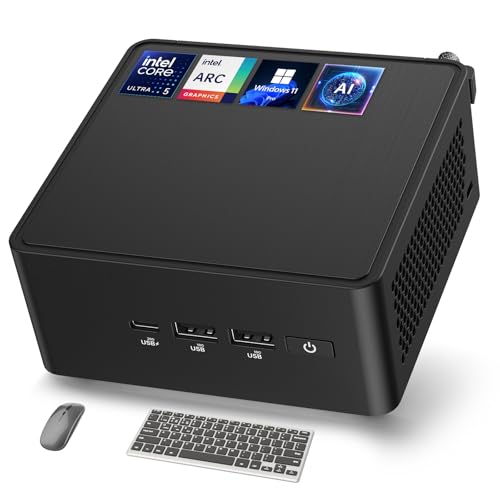
- Core Ultra 5 125H and Intel Arc graphics
- Two Thunderbolt 4 ports; up to four 4K HDR displays
- 16GB DDR5 RAM and 512GB SSD
Best For: Multi-display creative desks
Best for Networked Workspaces

- Core Ultra 7-258V processor
- Thunderbolt 4 with up to 100W power input
- Four-display support and dual 2.5G LAN
Best For: Networked, multi-monitor workstations
Best for Quiet Workspaces

- Fanless Core i7-1265U system
- 16GB DDR4 RAM and 1TB PCIe 4.0 SSD
- Two Thunderbolt 4 ports and 2.5G LAN
Best For: Quiet desks and storage-heavy projects
Compact Office Pick
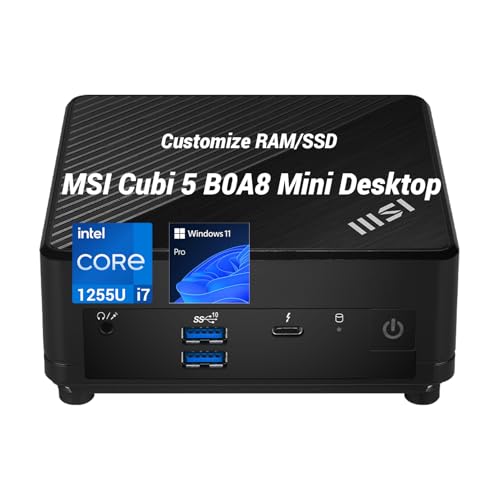
- Core i7-1255U with Iris Xe graphics
- Thunderbolt 4 plus HDMI and DisplayPort
- 0.66L chassis with VESA mounting
Best For: Compact multi-monitor creative desks
High-Spec Renewed Pick

- Core Ultra 9 285H and 64GB DDR5
- Dual Thunderbolt 4; up to four 4K displays
- Renewed with 90-day limited warranty
Best For: Memory-heavy creative multitasking
Multi-Display Starter

- Core i5-13420H processor
- Two HDMI and two Thunderbolt ports
- Verify conflicting RAM and SSD specifications
Best For: Everyday creative work across multiple screens
Best for Multi-Display Editing – ASUS NUC 14 Pro AI
Among mini pcs with thunderbolt for creators, the ASUS NUC 14 Pro AI suits a desk with several displays and external drives. Its Core Ultra 5 125H, Intel Arc graphics, 16GB DDR5 RAM, and 512GB SSD provide a practical starting configuration for editing and multitasking.
Best For: Creators who want a compact, ready-to-use Windows PC with flexible display and peripheral connections.
Pros:
- Two Thunderbolt 4 ports, two HDMI 2.1 ports, and support for up to four 4K HDR displays.
- Core Ultra 5 125H with 14 cores and 18 threads, plus integrated Intel Arc graphics.
- 2.5G Ethernet and an included VESA mount help keep a connected workspace tidy.
Cons:
- The included 512GB SSD may fill quickly with large project files.
- Integrated graphics may not suit workflows that require a dedicated GPU.
This is the strongest fit here for a creator prioritizing multiple monitors and varied ports; plan for external or upgraded storage if your projects are large.
Best for Networked Workspaces – MSI Cubi NUC AI+ Barebones
For buyers comparing mini pcs with thunderbolt for creators, the MSI Cubi NUC AI+ stands out for its Core Ultra 7-258V, Thunderbolt 4, and dual 2.5G LAN. Its barebones designation makes checking the installed configuration especially important before purchase.
Best For: Creators building a compact, multi-monitor workstation that benefits from two wired network connections.
Pros:
- Thunderbolt 4 supports up to 100W power-delivery input.
- Supports up to four displays through HDMI and Thunderbolt 4 connections.
- Dual 2.5G LAN offers options for network segmentation or redundancy.
Cons:
- The barebones listing does not clearly establish whether storage or an operating system is included.
- Its supplied specifications do not detail graphics performance for demanding creative applications.
Choose this model for its display and networking flexibility, but confirm exactly what comes installed before budgeting for the complete workstation.
Best for Quiet Workspaces – TOPGRO K3 Fanless Mini PC
The TOPGRO K3 is a fanless option among mini pcs with thunderbolt for creators. It pairs a Core i7-1265U with 16GB DDR4 RAM, a 1TB PCIe 4.0 SSD, and Windows 11 Pro for a compact setup that does not need a separate storage or OS purchase to get started.
Best For: Creators who value fanless operation, a roomy included SSD, and Thunderbolt connectivity in a small desktop.
Pros:
- Fanless metal-case design avoids fan noise at the workstation.
- Includes a 1TB PCIe 4.0 SSD, 16GB RAM, and Windows 11 Pro.
- Lists two Thunderbolt 4 ports, 2.5G LAN, and up to 8K UHD output.
Cons:
- Integrated Intel Iris Xe graphics are not a substitute for a dedicated GPU in graphics-heavy workflows.
- DDR4 memory is less current than the DDR5 configuration of the ASUS model.
Its appeal is a quiet, ready-to-use desktop with substantial included storage. For sustained, demanding renders, weigh the fanless design and integrated graphics against your workload.
Compact Office Pick – MSI Cubi i7 Mini PC
Among mini pcs with thunderbolt for creators, this MSI Cubi suits a space-conscious desk where external drives and multiple displays matter. Its Core i7-1255U, Iris Xe graphics, and Thunderbolt 4 port make it a practical choice for everyday creative work alongside office tasks.
Best For: Creators who want a compact Windows 11 Pro workstation for multitasking and multi-monitor work.
Pros:
- Thunderbolt 4, HDMI 2.0b, and DisplayPort 1.4 support up to three independent displays.
- Configurable DDR4 RAM and PCIe NVMe SSD storage let buyers match the setup to their workload.
- Small 0.66L chassis includes a VESA mounting option.
Cons:
- Intel Iris Xe is integrated graphics, not a dedicated GPU.
- The seller opens the original seal for upgrades; upgraded RAM and SSD have separate coverage from the remaining components.
Check the selected memory and storage configuration before ordering. This is strongest as a tidy, display-flexible desk PC rather than a dedicated graphics workstation.
High-Spec Renewed Pick – ASUS NUC 15 Pro+ Ultra 9
For shoppers comparing mini pcs with thunderbolt for creators, this renewed ASUS NUC 15 Pro+ offers the most ambitious listed configuration here: a Core Ultra 9 285H, Intel Arc 140T graphics, 64GB DDR5 RAM, and a 1TB PCIe SSD. Dual Thunderbolt 4 ports give it room for fast peripherals and display connections.
Best For: Creators seeking substantial memory, broad display support, and a compact PC for demanding multitasking.
Pros:
- 64GB DDR5 RAM and a 1TB PCIe SSD in the listed configuration.
- Dual Thunderbolt 4 and HDMI 2.1 support up to four 4K HDR displays or one 8K display.
- Tool-free access for memory and storage upgrades, plus VESA mount compatibility.
Cons:
- This is a renewed unit with a listed 90-day limited warranty.
- Intel Arc 140T graphics are integrated; the notes do not list a separate graphics card.
Its memory, ports, and display options stand out for a small editing desk. Weigh those strengths against the renewed condition and shorter listed warranty.
Multi-Display Starter – ASUS NUC 13 Pro Slim i5
Among mini pcs with thunderbolt for creators, the ASUS NUC 13 Pro Slim is worth a look if your priority is connecting screens and peripherals without a large desktop tower. Its Core i5-13420H and integrated graphics suit general productivity and lighter creative workflows.
Best For: Creators building a compact, multi-monitor workspace for everyday tasks.
Pros:
- Two HDMI 2.1 ports and two Thunderbolt ports provide flexible display connections.
- Core i5-13420H processor boosts up to 4.6GHz.
- Wi-Fi 6E, Bluetooth 5.3, and RJ-45 networking cover common desk connections.
Cons:
- Graphics are integrated rather than dedicated.
- The supplied listing conflicts on installed RAM, SSD capacity, and maximum memory; verify the exact configuration before purchase.
Its main appeal is a flexible four-display setup in a slim PC. Confirm the shipped specifications, especially memory and storage, before planning a creative workflow around it.
How We Picked the Best Mini PCs with Thunderbolt for Creators
We focused on compact systems marketed with Thunderbolt connectivity and compared their processors, memory, storage, display support, and practical fit for creative work. The selection spans entry-level configurations, higher-memory systems, and a barebones-style listing. Product titles do not establish every port’s capabilities, so confirm the exact model number, Thunderbolt version, included components, and seller configuration before ordering. These recommendations are based on listed specifications, not hands-on performance testing.
Quick Comparison
For a ready-to-use starting point, the ASUS NUC 14 Pro AI pairs a Core Ultra 5 processor with 16GB of RAM and a 512GB SSD. The ASUS NUC 13 Pro Slim offers a more modest 256GB SSD, making external or upgraded storage worth considering. The MSI Cubi with an i7-1255U comes in seller-dependent memory and storage configurations; check the exact option in your cart.
At the higher end, the ASUS NUC 15 Pro+ listing combines a Core Ultra 9, 64GB of RAM, and a 1TB SSD. The MSI Cubi NUC AI+ lists a Core Ultra 7-258V, 32GB of memory, and Thunderbolt 4, but its “barebones” label makes included storage, operating system, and other components important to verify. The fanless TOPGRO K3 may appeal where noise is a priority; check its specific port list for Thunderbolt before treating it as a Thunderbolt-equipped option.
Key Buying Factors for Mini PCs with Thunderbolt for Creators
Ports and Display Setup
Check how many Thunderbolt ports the exact unit has and whether they support the dock, external SSD, capture device, or display arrangement you plan to use. A USB-C-shaped port is not necessarily Thunderbolt. Display claims can also depend on resolution, refresh rate, cable, dock, and which outputs are used simultaneously.
Memory, Storage, and Graphics
For photo editing and lighter design work, 16GB of RAM is a reasonable starting point; larger files and heavy multitasking can benefit from 32GB or more. A 256GB SSD can fill quickly with applications, media caches, and active projects, so budget for more internal capacity or fast external storage. These small PCs use integrated graphics; check your editing software’s GPU requirements before choosing one for effects-heavy video, complex 3D, or GPU rendering.
Configuration and Noise
Confirm what is installed rather than relying on a model-family name. Memory and SSD capacity may vary by seller, while a barebones listing may require additional purchases. If you record audio near your computer, consider fan noise as well as advertised performance; fanless operation avoids fan noise but does not guarantee sustained speed under a long workload.
Who Should Buy Which Mini PCs with Thunderbolt for Creators?
Choose the NUC 14 Pro AI for a balanced, listed 16GB/512GB setup, or the NUC 15 Pro+ if your projects call for the listed 64GB of memory. Consider the Cubi NUC AI+ if its Thunderbolt 4 connection and configuration suit your setup, after confirming what the box includes. The NUC 13 Pro Slim and configurable i7 Cubi are worth comparing when price and available configurations matter most. Pick the TOPGRO K3 primarily for its fanless design—and only if its verified ports meet your connectivity needs.
