
A mini PC with dedicated RTX graphics can save desk space without limiting you to integrated graphics. The right choice depends on more than the GPU name: cooling, memory, ports, and upgrade options all affect how well a compact system fits your setup.
These 10 picks span RTX 20-, 40-, and 50-series configurations, from older budget-minded hardware to newer gaming and creator systems. Here’s how to compare them before you buy.
Best 10 Mini PCs with Rtx Graphics Picks for 2026
Desktop-GPU Pick

- 145W desktop RTX 5060 with 8GB GDDR7
- 16-core Ryzen 9, 32GB RAM, 1TB SSD
- 5GbE, Wi-Fi 7, and quad-4K support
Best For: Compact gaming and creation with a desktop RTX GPU
Higher-Tier Graphics Pick

- Mobile RTX 5070 Ti with 12GB GDDR7
- Core Ultra 9 and 32GB DDR5
- 3L chassis with tool-free upgrade access
Best For: Gaming and creation in a compact, upgrade-accessible PC
Expansion Pick

- Core i9-14900HX and RTX 5070 8GB
- 32GB DDR5 and 1TB SSD listed
- Second M.2 slot, SD slot, and Wi-Fi 7
Best For: CPU-heavy multitasking with dedicated graphics and SSD expansion
Flexible-Placement Pick
- Mobile RTX 5060 with 8GB GDDR7
- 3L chassis fits vertically or horizontally
- 16GB DDR5 with tool-free upgrade access
Best For: Compact RTX gaming with flexible desk placement
Best RTX 4060 Pick

- Core i9-13900HX and RTX 4060 mobile GPU
- 32GB DDR5 RAM and 1TB PCIe 4.0 SSD
- Wi-Fi 6E, 2.5GbE, and fan-speed control
Best For: RTX 4060 gaming with ample starting memory
Premium Graphics Pick
- RTX 5080 mobile GPU with 16GB GDDR7
- Core Ultra 9 290HX Plus and 32GB RAM
- 3-liter chassis with tool-free upgrade access
Best For: High-end gaming and creation in a compact desktop
RTX 4070 Upgrade Pick
- Core i9-13900HX and RTX 4070 with 8GB GDDR6
- 32GB DDR5 RAM and 1TB PCIe 4.0 SSD
- Dual 4K/60Hz outputs and 2.5GbE
Best For: RTX 4070 gaming with dual-monitor support
Compact Connectivity Pick

- RTX 2060 6GB in a compact chassis
- 32GB RAM and 1TB SSD included
- Dual Thunderbolt 4 and 2.5GbE
Best For: Small desks and multi-display setups
High-Spec Multitasking Pick
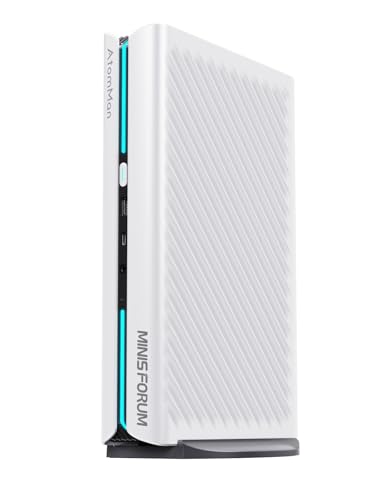
- RTX 5060 8GB graphics
- 16-core Ryzen 9 and 32GB DDR5
- Four-display support and 5GbE
Best For: Gaming and demanding multi-monitor work
RTX 4060 Gaming Pick

- RTX 4060 8GB graphics
- 16GB DDR5 and 1TB SSD
- Verify conflicting CPU description
Best For: RTX 4060 gaming with Windows 11 Pro
Desktop-GPU Pick – MINISFORUM G1 Pro
Among mini pcs with rtx graphics, the MINISFORUM G1 Pro stands out for its 145W desktop GeForce RTX 5060 rather than a mobile GPU. It pairs that 8GB GDDR7 card with a 16-core Ryzen 9 8945HX, 32GB of DDR5, and a 1TB SSD in a 3.8L chassis.
Best For: Buyers who want a compact gaming and creation PC with a desktop RTX GPU and extensive display connectivity.
Pros:
- 145W RTX 5060 supports ray tracing and DLSS 4 Multi Frame Generation.
- Cooling system is specified for sustained CPU and GPU loads.
- 5Gb Ethernet, Wi-Fi 7, and outputs for up to four 4K displays.
Cons:
- The 3.8L chassis is larger than the 3L ROG NUC options in this roundup.
- The listed graphics memory is 8GB, which may limit demanding GPU workloads.
If sustained GPU power and multiple monitors matter more than the smallest footprint, the G1 Pro makes a compelling choice. Check its physical dimensions against your desk space before buying.
For shoppers comparing mini pcs with rtx graphics, this ROG NUC 16 pairs a mobile GeForce RTX 5070 Ti with 12GB of GDDR7 and an Intel Core Ultra 9 290HX Plus. Its 3L enclosure can sit vertically or horizontally, making it easier to place in a crowded setup.
Best For: Gamers and creators seeking the listed RTX 5070 Ti mobile GPU in a compact, upgrade-accessible PC.
Pros:
- RTX 5070 Ti mobile GPU has 12GB of graphics memory.
- Includes 32GB of DDR5 RAM, Wi-Fi 7, and Thunderbolt 4.
- Thumb screws provide tool-free access for memory and storage upgrades.
Cons:
- Uses a mobile GPU, not a desktop RTX 5070 Ti.
- The listed 380W power consumption is worth factoring into a compact setup.
This is the higher-tier GPU option of the two supplied ROG NUC 16 configurations. Its flexible placement and accessible internals add practical value beyond the graphics specification.
The AtomMan G7 Pro is one of the mini pcs with rtx graphics to consider if CPU-heavy work and storage expansion share priority with gaming. Its listed configuration combines a Core i9-14900HX, GeForce RTX 5070 8GB, 32GB of DDR5, and a 1TB SSD.
Best For: Multitaskers who want a powerful listed CPU, dedicated RTX graphics, and room for an additional SSD.
Pros:
- 24-core, 32-thread Core i9-14900HX suits demanding multitasking.
- RTX 5070 graphics support ray tracing and DLSS 4.
- Includes Wi-Fi 7, Bluetooth 5.4, an SD card slot, and a second M.2 SSD slot.
Cons:
- Display connectivity is described as two outputs: HDMI 2.1 and USB4.
- The supplied notes alternately call the system G7 Pro and G7 Ti and conflict on total SSD capacity; verify the exact listing before ordering.
The G7 Pro has an appealing mix of processing power and expansion. Because the supplied specifications contain naming and capacity inconsistencies, confirm the configuration and upgrade limits with the seller.
Among mini pcs with rtx graphics, the ROG NUC 16 Ultra 7 offers a 3L format that works vertically or horizontally. It combines an Intel Core Ultra 7 270HX Plus with a mobile GeForce RTX 5060 8GB, and the supplied configuration includes 16GB of DDR5.
Best For: Buyers who want RTX gaming capabilities in a compact PC with flexible placement and accessible upgrades.
Pros:
- Mobile RTX 5060 supports NVIDIA DLSS.
- Thumb screws allow tool-free memory and storage access.
- Wi-Fi 7, Thunderbolt 4, and seven listed USB ports support a connected desk setup.
Cons:
- Ships with 16GB RAM, less than the 32GB listed for the other products here.
- Uses a mobile RTX 5060 rather than a desktop card.
This configuration suits buyers who value a small, adaptable chassis and plan to upgrade memory if their workload grows. Check whether its mobile-GPU specification meets your gaming or editing needs.
Best RTX 4060 Pick – TOPGRO T1-Pro
Among mini pcs with rtx graphics, the TOPGRO T1-Pro pairs a Core i9-13900HX with an RTX 4060 mobile GPU for gaming and creative work in a compact desktop. It comes with 32GB of DDR5 memory, a 1TB PCIe 4.0 SSD, and Windows 11 Pro.
Best For: Buyers who want an RTX 4060 mini PC with generous starting memory and storage.
Pros:
- RTX 4060 mobile GPU supports ray tracing and DLSS 3.
- 32GB DDR5 RAM and a 1TB PCIe 4.0 SSD come installed.
- Wi-Fi 6E, 2.5GbE, and HDMI 2.0 plus DisplayPort 1.4 cover common connectivity needs.
- Dedicated buttons control RGB lighting and fan speed.
Cons:
- The RTX 4060 is the mobile version, not a desktop graphics card.
- The listed HDMI and DisplayPort outputs are rated for 4K at 60Hz.
The T1-Pro is a practical choice if you want a ready-to-use configuration and direct cooling controls. Its RTX 4060 mobile GPU also makes the graphics tier clear when comparing it with higher-spec options.
Premium Graphics Pick – ASUS ROG NUC 16
The ASUS ROG NUC 16 targets buyers comparing mini pcs with rtx graphics at the high end. Its Core Ultra 9 290HX Plus and RTX 5080 mobile GPU with 16GB of GDDR7 memory are paired with 32GB RAM and a 1TB SSD in a 3-liter chassis.
Best For: Gamers and creators seeking the strongest listed GPU in this roundup while retaining a compact PC.
Pros:
- RTX 5080 mobile GPU has 16GB of dedicated graphics memory.
- Three fans and dual vapor chambers provide a dedicated cooling design.
- Tool-free access simplifies memory and storage upgrades.
- Wi-Fi 7, Thunderbolt 4, and multiple display connections offer flexible setup options.
Cons:
- Its 3-liter chassis and 7.1-pound listed weight may be less convenient for buyers prioritizing the smallest, lightest setup.
- The supplied specifications identify the RTX 5080 as a mobile GPU, not a desktop card.
This is the performance-focused option of the three based on its listed graphics hardware. Check its dimensions against your available desk space before choosing it for a tight setup.
RTX 4070 Upgrade Pick – TOPGRO T1-MAX
The TOPGRO T1-MAX sits between the listed RTX 4060 and RTX 5080 systems for shoppers considering mini pcs with rtx graphics. It combines a Core i9-13900HX and an RTX 4070 with 8GB GDDR6, plus 32GB DDR5 RAM and a 1TB PCIe 4.0 SSD.
Best For: Buyers who want an RTX 4070 mini PC with dual-display connections and room for storage expansion.
Pros:
- RTX 4070 with 8GB GDDR6 supports ray tracing and AI-assisted graphics features.
- 32GB DDR5 RAM and a 1TB PCIe 4.0 SSD come installed.
- HDMI 2.0 and DisplayPort 1.4 support two 4K displays at 60Hz.
- Includes 2.5GbE, Wi-Fi 6E, and a one-touch full-speed fan control.
Cons:
- The RGB light bar offers on/off control rather than the broader color adjustment described for the T1-Pro.
- The listed display outputs top out at 4K at 60Hz.
Choose the T1-MAX if its RTX 4070 specification is the step up you want without giving up the T1-Pro’s Core i9 class or starting memory and storage. Its straightforward fan and lighting buttons keep setup controls simple.
Compact Connectivity Pick – Intel NUC 11 Phantom Canyon
Among mini pcs with rtx graphics, the Intel NUC 11 Phantom Canyon stands out for fitting an RTX 2060 6GB into an approximately 8 x 5.5 x 1.6-inch chassis. This configuration includes a Core i7-1165G7, 32GB of RAM, a 1TB SSD, and Windows 11 Pro.
Best For: Buyers who want a small RTX-equipped desktop with plenty of monitor and peripheral connections.
Pros:
- Dedicated RTX 2060 graphics in a compact chassis.
- 32GB of RAM and a 1TB SSD are included.
- Two Thunderbolt 4 ports, six USB 3.1 ports, 2.5GbE, and support for up to four 4K displays.
Cons:
- The RTX 2060 and PCIe 3.0 SSD are older-generation components than those in some alternatives here.
- Additional 2.5-inch storage is not included.
Choose this NUC when desk space and port selection matter most; compare its older GPU against newer RTX options if graphics performance is your priority.
High-Spec Multitasking Pick – MINISFORUM G1 Pro
For shoppers comparing mini pcs with rtx graphics for gaming and demanding productivity work, the MINISFORUM G1 Pro pairs an RTX 5060 8GB with a 16-core Ryzen 9 8945HX. It also includes 32GB DDR5 memory and a 1TB PCIe 4.0 SSD.
Best For: Buyers who need dedicated graphics, substantial CPU resources, and a multi-monitor workspace.
Pros:
- RTX 5060 8GB and a 16-core, 32-thread processor.
- Two HDMI and three DisplayPort outputs, with support for four displays at once.
- 5GbE, Wi-Fi 7, and an additional M.2 2280 PCIe 4.0 storage slot.
Cons:
- The supplied details identify the operating system only as “OS,” so confirm what comes installed.
- Despite five video outputs, the stated simultaneous-display limit is four.
The G1 Pro offers the strongest listed CPU core count and networking specifications in this group. Check the operating-system configuration before ordering.
RTX 4060 Gaming Pick – TOPGRO T1-Pro
The TOPGRO T1-Pro is an option among mini pcs with rtx graphics if you want an RTX 4060 8GB alongside a Core i7-13800H. This configuration lists 16GB DDR5 RAM, a 1TB PCIe 4.0 SSD, Windows 11 Pro, and adjustable RGB lighting.
Best For: Buyers seeking an RTX 4060 gaming mini PC with included Windows 11 Pro.
Pros:
- Dedicated RTX 4060 graphics with 8GB GDDR6 memory.
- Core i7-13800H, 1TB SSD, and DDR5 RAM.
- Wi-Fi 6E, 2.5GbE, and adjustable lighting.
Cons:
- Its 16GB of included RAM is less than the 32GB supplied with the other two listed configurations.
- The notes conflict on the processor tier: one bullet says Core i9-13800H, while the title and detailed specifications say Core i7-13800H.
The T1-Pro offers a straightforward RTX 4060 setup, but verify the processor specification with the seller before purchasing.
How We Picked These Mini PCs with Rtx Graphics
We focused on the listed GPU and CPU configurations, installed RAM and storage, connectivity, and the practical trade-offs of fitting gaming hardware into a small chassis. The selection includes different performance tiers and price points rather than treating every RTX badge as equivalent. Specifications in listings are a starting point, not proof of real-world frame rates or sustained performance; check independent tests for the exact configuration you plan to buy.
Quick Comparison
Start with the graphics tier. The Intel NUC 11 with RTX 2060 is the oldest option here and makes the most sense if its price reflects that. The TOPGRO RTX 4060 configurations and ROG NUC 16 RTX 5060 offer entry points for buyers seeking newer RTX gaming hardware; compare their RAM and CPUs as well as their GPUs. The TOPGRO RTX 4070, MINISFORUM G1 Pro RTX 5060, AtomMan RTX 5070, and ROG NUC 16 RTX 5070 Ti or RTX 5080 configurations give shoppers more performance tiers to consider. Do not assume desktop-card performance from a familiar GPU name: compact systems can differ substantially in power limits and cooling.
Key Buying Factors for Mini PCs with Rtx Graphics
GPU Configuration and Cooling
Match the GPU to your games, target resolution, or creative software. Look for benchmarks of the exact mini PC, including sustained performance, temperatures, and fan noise. If available, check the GPU’s stated power limit; two systems with similarly named graphics can perform differently.
RAM, Storage, and Upgrade Access
Several listed systems ship with 32GB of RAM and a 1TB SSD, while one TOPGRO RTX 4060 configuration lists 16GB. Check whether memory is replaceable, whether a second SSD fits, and what upgrades the warranty permits. For large games or video projects, storage expansion may matter sooner than the bundled drive’s speed.
Ports, Displays, and Total Cost
Verify the exact video outputs and their supported resolution and refresh rate for your monitor setup. Check USB, networking, Wi-Fi, and power-adapter requirements too. Listings can vary by configuration, so confirm what is included before ordering. Factor in any needed monitor, peripherals, memory, or storage upgrades when comparing prices.
Who Should Buy Which Mini PCs with Rtx Graphics?
For a lower-cost entry, compare the older RTX 2060 NUC against discounted RTX 4060 systems rather than buying solely on size. For a compact gaming PC with 32GB already installed, look at the listed RTX 4060 and RTX 5060 configurations, then use exact-model benchmarks to break ties. Buyers prioritizing higher-end gaming or GPU-heavy creative work should compare the RTX 5070, 5070 Ti, and 5080 options on verified performance, noise, and price. If you need multiple displays or fast wired networking, confirm those specific ports on the configuration you choose—especially when comparing similarly named models.
