
Two M.2 slots can make a small PC much more flexible: keep your operating system on one drive and add storage for games, media, backups, or virtual machines on another. But slot count alone does not tell you what drives will fit or how fast they will run.
These seven picks range from everyday desktops to gaming systems, storage-focused boxes, and fanless firewalls. Use the buying guide below to match the hardware to your workload and verify the expansion options before ordering.
Best 7 Mini PCs with Dual M2 Slots Picks for 2026
Best for Gaming and AI
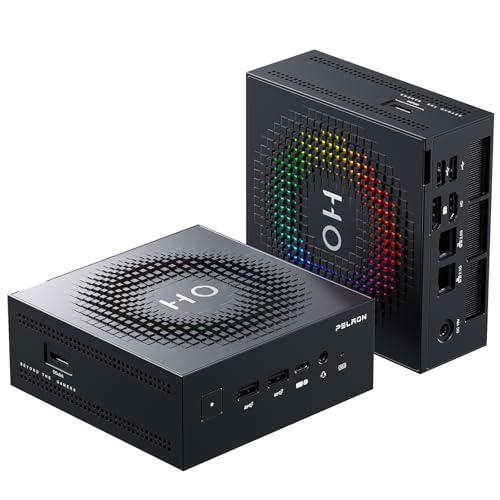
- Two PCIe 4.0 M.2 slots; 1TB installed
- Radeon 890M graphics and OCuLink
- Soldered 24GB memory
Best For: Compact gaming, creative work, and local AI
Best for Home Office

- 256GB SSD plus a second M.2 slot
- Three 4K@60Hz display connections
- Dual 2.5GbE; 8GB RAM included
Best For: Everyday office work and multi-monitor desks
Best for Heavy Multitasking

- Three M.2 2280 slots
- 64GB DDR5 and Core Ultra 9 285H
- Verify conflicting SSD capacity claims
Best For: Multi-drive creative and power-user setups
Best for Network Storage

- Six M.2 slots; listed up to 24TB
- Dual 2.5G Ethernet and Wi-Fi 6
- Confirm included SSD configuration
Best For: Compact NAS and backup-server builds
Best Fanless Firewall
oaknode Four-Port 2.5GbE Mini PC

- Four Intel i226-V 2.5GbE ports
- Dual M.2 NVMe plus dual SATA
- Quiet fanless enclosure
Best For: Silent home-lab routers and firewalls
Best for 10GbE Networking
Montvfieto Fanless Firewall Mini PC

- Two 10G BASE-T and two 2.5GbE ports
- Dual M.2 NVMe slots
- Barebones fanless design
Best For: High-bandwidth routers and NAS projects
Best for Gaming and AI – PELADN HO5 Ryzen AI 9 HX 370
Among mini pcs with dual m2 slots, the PELADN HO5 stands out if you want room for a second SSD alongside strong integrated graphics. It comes with a 1TB PCIe 4.0 NVMe drive and has a second M.2 2280 slot for expanding your game or project library.
Best For: Buyers who want a compact gaming, creative, or local-AI desktop with straightforward storage expansion.
Pros:
- Ryzen AI 9 HX 370, Radeon 890M graphics, and 24GB LPDDR5X suit demanding workloads.
- Two PCIe 4.0 x4 M.2 slots support up to 8TB total, according to the listing.
- OCuLink for an external GPU, triple-display output, and dual 2.5GbE add flexibility.
Cons:
- The 24GB LPDDR5X memory is soldered, so it cannot be upgraded.
- An external GPU and any additional SSD are separate purchases.
The HO5 is the performance-focused pick here: its second SSD slot is useful now, while OCuLink leaves an upgrade path if integrated graphics no longer meet your needs.
Best for Home Office – N5 Ryzen 3 5400U Mini PC
The N5 is a practical choice among mini pcs with dual m2 slots for everyday work rather than gaming. Its installed 256GB NVMe drive handles the starting setup, while a second M.2 2280 PCIe 3.0 x4 slot lets you add storage without replacing that drive.
Best For: Home offices and small-business desks that need additional SSD capacity, multiple screens, and wired networking.
Pros:
- Ryzen 3 5400U with 8GB DDR4 covers browsing, documents, and streaming.
- Supports three 4K@60Hz displays through HDMI, DisplayPort, and USB-C.
- Dual 2.5GbE ports and Wake-on-LAN support networked or unattended setups.
Cons:
- The included 8GB RAM and 256GB SSD are modest starting capacities.
- Wi-Fi 5 is an older wireless standard than those offered by some alternatives here.
Choose the N5 for its office-friendly ports and easy storage growth, not for demanding graphics work. Budget for a second SSD if your files will quickly outgrow 256GB.
Best for Heavy Multitasking – GMKtec EVO-T1 Core Ultra 9
If two drives are not enough, the GMKtec EVO-T1 offers three M.2 2280 slots, making it a higher-capacity option in a roundup of mini pcs with dual m2 slots. Its Core Ultra 9 285H and 64GB DDR5 also make it well suited to memory-intensive multitasking.
Best For: Creators and power users who need several SSDs, ample installed RAM, and extensive display connectivity.
Pros:
- Three M.2 2280 slots provide more storage flexibility than a dual-slot design.
- Core Ultra 9 285H, 64GB DDR5, and Intel Arc 140T support demanding desktop tasks.
- OCuLink offers an external-GPU option, while the listed display outputs support up to four screens.
Cons:
- The supplied notes conflict on installed SSD capacity and maximum storage; verify both before buying.
- Intel Arc integrated graphics may not meet the needs of buyers seeking a dedicated GPU without an eGPU setup.
The EVO-T1 makes the most sense when you will use its third drive slot and substantial RAM. Check the seller’s current storage configuration rather than relying on the conflicting capacity figures in the listing.
Best for Network Storage – Beelink ME Mini N95 NAS
The Beelink ME Mini goes well beyond the usual pair of drives: it has six M.2 slots, making it the storage-first choice among mini pcs with dual m2 slots and their higher-capacity alternatives. Its compact design and dual 2.5G Ethernet ports are geared toward a home NAS or small-office file server.
Best For: Buyers building compact network storage, a backup server, or a light-duty media server.
Pros:
- Six M.2 slots support up to 24TB total storage, according to the listing.
- Dual 2.5G LAN and Wi-Fi 6 provide wired and wireless connection options.
- Compact cube design and 12GB LPDDR5 suit a space-conscious storage setup.
Cons:
- The Intel N95 is aimed at light productivity and NAS tasks, not demanding gaming or editing.
- The notes are inconsistent about included storage, so confirm the SSD configuration before ordering.
Pick this model when drive count matters more than CPU horsepower. Before checkout, confirm which SSDs, if any, are included so you can budget for the storage your NAS needs.
Best for Expansion – MINISFORUM MS-A2 Ryzen 7 7745HX
Among mini pcs with dual m2 slots, the MINISFORUM MS-A2 goes further with three M.2 NVMe slots. Its Ryzen 7 7745HX, DDR5 support, and PCIe x16 expansion make it a strong candidate for a compact workstation or storage-heavy home lab.
Best For: Buyers who want substantial SSD capacity, fast networking, and room for add-in hardware.
Pros:
- Three M.2 NVMe slots support more drives than a typical dual-slot setup.
- Ryzen 7 7745HX provides eight cores and 16 threads.
- Dual 10G SFP+ and dual 2.5G LAN ports offer flexible wired connectivity.
- PCIe x16 slot provides an additional expansion path.
Cons:
- Ships without RAM, SSD, or operating system.
- Integrated Radeon 610M graphics may not suit buyers seeking a dedicated GPU out of the box.
The MS-A2 is the most expandable option here, but budget for the memory, storage, and software needed to make this barebones system usable.
Best Fanless Firewall – oaknode Four-Port 2.5GbE Mini PC
For shoppers comparing mini pcs with dual m2 slots for network duty, this oaknode appliance pairs two M.2 NVMe slots with four Intel i226-V 2.5GbE ports. Its fanless enclosure is aimed at quiet, always-on router and firewall setups.
Best For: Home labs needing a silent multiport firewall with flexible local storage.
Pros:
- Four 2.5GbE ports suit routing and firewall projects.
- Dual M.2 NVMe slots and dual SATA interfaces allow multiple storage configurations.
- Passive cooling avoids fan noise.
- Supports features including PXE boot and Wake-on-LAN.
Cons:
- Ships without RAM or SSD.
- Listing details conflict on the processor and maximum supported RAM; confirm specifications before ordering.
Choose this model primarily for its port count and storage options, and verify the exact hardware configuration before purchasing components.
Best for 10GbE Networking – Montvfieto Fanless Firewall Mini PC
This Montvfieto appliance stands out among mini pcs with dual m2 slots by combining two NVMe positions with two 10G BASE-T and two 2.5GbE ports. The fanless design targets compact routing, NAS, and virtualization projects where wired bandwidth matters.
Best For: Network builders who need 10GbE connectivity and two internal NVMe drives.
Pros:
- Two 10G BASE-T ports and two 2.5GbE ports support mixed-speed networks.
- Dual M.2 NVMe slots provide space for two SSDs.
- Fanless cooling avoids moving-part noise.
- Listed compatibility includes Proxmox, OPNsense, pfSense, and TrueNAS.
Cons:
- Ships without RAM or SSD.
- Single DDR5 SO-DIMM slot limits memory configuration flexibility.
- Title and specifications disagree on the processor model; verify the CPU before buying.
Its network ports are the main draw, but the conflicting CPU information makes a seller specification check especially important.
How We Picked the Best Mini PCs with Dual M2 Slots
We focused on systems advertised with at least two M.2 slots, then compared their intended uses, processors, memory, networking, and other expansion options. The lineup includes conventional desktops as well as NAS and firewall appliances: the best choice depends less on the highest specification and more on whether its ports, cooling, and storage layout suit your job. Listed configurations can vary, so treat slot counts and drive support as specifications to confirm with the seller rather than guarantees for every version.
Quick Comparison: Match the PC to the Job
- Everyday desktop: The Ryzen 3 5400U N5 pairs modest hardware with dual 2.5GbE; check whether its included 8GB of RAM and 256GB SSD meet your needs.
- Gaming and demanding desktop work: The PELADN HO5 brings Ryzen AI 9 HX 370 and Radeon 890M graphics. The GMKtec Ultra 9 285H offers three advertised M.2 slots and OCuLink for buyers prioritizing expansion.
- Storage server: The Beelink ME Mini N95 advertises six M.2 slots, making it the storage-focused option rather than a gaming pick.
- Workstation or fast network lab: The MINISFORUM MS-A2 lists three M.2 SSD positions, PCIe x16 expansion, dual 10G SFP+ ports, and dual 2.5GbE.
- Firewall or router: The fanless J6413 model emphasizes four 2.5GbE ports; the fanless N305 model adds two advertised 10G ports alongside two 2.5GbE ports.
Key Buying Factors for Mini PCs with Dual M.2 Slots
Check What Each Slot Actually Supports
Not every M.2 connector accepts the same drive. Confirm the supported sizes, NVMe versus SATA compatibility, PCIe generation and lane allocation, and whether any slot shares bandwidth with another port. Also check whether a drive is preinstalled, whether both slots are accessible, and whether the system includes mounting hardware. If you plan to fill several slots, look for guidance on drive cooling.
Size the Rest of the System for Your Workload
A second SSD will not compensate for insufficient RAM or a slow processor. Prioritize graphics capability for games, memory capacity for virtual machines, and network-port speed for NAS or routing duties. Check whether RAM is replaceable: soldered LPDDR memory can limit future upgrades. Fanless boxes avoid fan noise but may need careful placement under sustained load.
Plan for Software and Total Cost
Verify the supplied operating system—or whether one is included at all—and confirm compatibility with any hypervisor, firewall software, or NAS platform you intend to install. Budget separately for extra SSDs, RAM where applicable, and any network equipment needed to take advantage of 10G ports.
Who Should Buy Which Mini PCs with Dual M2 Slots?
Choose the N5 for lighter desktop tasks, the HO5 if integrated graphics matter, or the GMKtec if you want more advertised M.2 expansion in a performance-oriented PC. Pick the ME Mini for an SSD-heavy home NAS and the MS-A2 for a more expandable workstation or network lab. For a dedicated router or firewall, start with the J6413 if four 2.5GbE ports suffice; consider the N305 when your setup can use its 10G connections. Before checkout, verify the exact listing’s slot wiring, drive limits, memory configuration, and warranty.
