
Three 4K monitors can make a compact desk remarkably productive—but a “triple 4K” claim does not tell you which ports to use or what refresh rates to expect.
These five mini PCs span budget-friendly configurations and roomier options. The guide below helps you match their memory, storage, and display connections to your actual setup.
Best 5 Mini PCs for Triple 4K Monitor Setup Picks for 2026
Practical Home-Office Pick
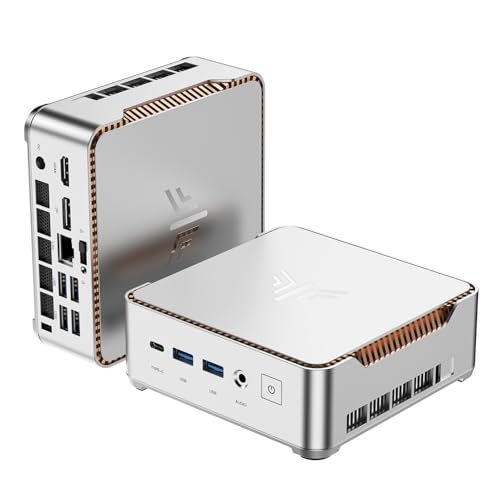
- Triple 4K at 60Hz via HDMI, DP, and USB-C
- Ryzen 4300U with 8GB LPDDR4
- 512GB SSD; storage expandable to 4TB
Best For: Three-screen home-office work
Expandable Multitasking Pick

- Advertised triple 4K at up to 144Hz
- Ryzen 5 7430U and 16GB upgradeable RAM
- Storage expansion up to 8TB
Best For: Growing multi-monitor workloads
Dual-Network Office Pick

- Triple 4K via HDMI, DP, and Type-C
- Dual gigabit Ethernet plus Wi-Fi 6
- 8GB LPDDR5; two M.2 storage slots
Best For: Three-display offices needing dual LAN
Best for Storage

- HDMI, DisplayPort, and USB-C outputs
- 1TB SSD and 16GB RAM included
- 2.5GbE Ethernet; dual M.2 slots
Best For: Three-screen office setups needing more built-in storage
Best for Office Dashboards
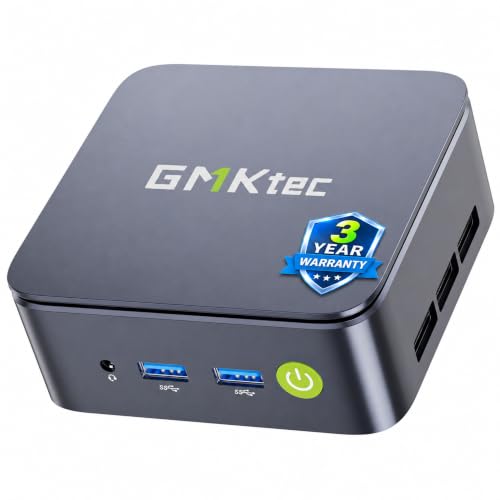
- Listed triple 4K@60Hz output
- 16GB dual-channel RAM; 512GB SSD
- 2.5GbE Ethernet and dual M.2 slots
Best For: Three-monitor productivity dashboards and office work
Practical Home-Office Pick – KAMRUI Pinova P2
For a mini pcs for triple 4k monitor setup search, the KAMRUI Pinova P2 is a practical option for spreadsheets, browser windows, and presentations across three screens. Its HDMI 2.0, DisplayPort 1.4, and video-capable USB-C ports are specified for triple 4K at 60Hz.
Best For: Home-office users who want three 4K screens and room to add storage.
Pros:
- Ryzen 4300U processor with four cores and eight threads for everyday multitasking.
- Three distinct display outputs support a straightforward triple-monitor connection.
- 512GB SSD installed, with two M.2 slots supporting up to 4TB total storage.
Cons:
- 8GB LPDDR4 memory may be limiting for heavier multitasking.
- The video-capable USB-C port is needed for the third display.
The P2 makes sense when display connectivity matters more than a large starting memory capacity. Check your third monitor’s USB-C video connection or plan for an appropriate adapter.
Expandable Multitasking Pick – Blackview MP100
Among mini pcs for triple 4k monitor setup options, the Blackview MP100 offers more starting memory and expansion room than the other models here. Its HDMI, DisplayPort 1.4, and full-featured USB-C outputs are advertised to support three 4K displays at up to 144Hz.
Best For: Multitaskers who need three monitor connections, upgradeable RAM, and substantial local storage.
Pros:
- Ryzen 5 7430U has six cores and twelve threads, paired with 16GB of installed DDR4 RAM.
- RAM is upgradeable to 64GB; an extra M.2 slot and 2.5-inch bay support storage expansion up to 8TB.
- Includes Wi-Fi 6, Bluetooth 5.2, and a stated three-year warranty.
Cons:
- The RGB lighting may not suit every workspace.
- The 512GB installed SSD is well below the advertised maximum expansion capacity.
This is the strongest fit of the three for users expecting their memory or storage needs to grow. Treat the advertised 4K/144Hz capability as a specification to match against your monitors, cables, and chosen ports before buying.
Dual-Network Office Pick – Glorlin AT100
The Glorlin AT100 is worth considering for a mini pcs for triple 4k monitor setup when wired networking is also a priority. It supports three 4K outputs through HDMI 2.1, DisplayPort 1.4, and a full-featured Type-C port, alongside two gigabit Ethernet ports.
Best For: Office desks, front desks, or kiosks needing three displays and two wired network connections.
Pros:
- Triple 4K output provides separate screen space for documents, browser windows, and video calls.
- Dual gigabit Ethernet, Wi-Fi 6, and Bluetooth 5.3 offer flexible connectivity.
- Two M.2 2280 slots support up to 4TB total storage; a VESA mount is included.
Cons:
- 8GB LPDDR5 is listed as the maximum memory capacity, limiting RAM upgrades.
- The installed 256GB SSD may require an early storage upgrade.
Choose the AT100 for its port mix and compact placement options rather than for memory headroom. The supplied specifications confirm triple 4K output but do not state a refresh rate, so verify that detail if it matters to your setup.
Best for Storage – GMKtec G10 with 1TB SSD
If you’re comparing mini pcs for triple 4k monitor setup, this GMKtec G10 pairs HDMI, DisplayPort, and USB-C display outputs with a roomy 1TB SSD. Its Ryzen 5 3500U and 16GB RAM suit office multitasking, video playback, and light gaming.
Best For: Three-screen workstations that need generous storage out of the box.
Pros:
- Three display outputs: HDMI, DisplayPort, and USB-C.
- 1TB SSD included, with two M.2 2280 slots for expansion.
- 2.5GbE Ethernet and full-function USB-C add connection options.
Cons:
- Ryzen 5 3500U and Vega 8 are better suited to light gaming than demanding games.
- Wi-Fi 5 is less current than newer wireless standards.
Choose this configuration over the 512GB G10 if local file space matters. For three 4K screens, check the resolution and refresh-rate requirements of each output and your USB-C monitor or adapter before buying.
Best for Office Dashboards – GMKtec G10 with 512GB SSD
For mini pcs for triple 4k monitor setup, this GMKtec G10 offers three 4K@60Hz display outputs through HDMI, DisplayPort, and USB-C. Its Ryzen 5 3500U, 16GB dual-channel RAM, and 512GB SSD make it a practical fit for multi-window office work.
Best For: Productivity dashboards, trading screens, and other three-monitor office layouts.
Pros:
- Listed support for three 4K@60Hz displays.
- 16GB dual-channel RAM and a 512GB PCIe SSD come installed.
- 2.5GbE Ethernet and two M.2 2280 slots support wired workstations and storage expansion.
Cons:
- 512GB of included storage is less than the other G10 configuration here.
- Vega 8 graphics are positioned for casual gaming, not demanding gaming workloads.
This is the more explicitly specified pick for three 4K@60Hz monitors. It makes sense if 512GB is enough to start, with a second M.2 slot available if your storage needs grow.
How We Picked the Best Mini PCs for Triple 4K Monitor Setup
We focused on the five selected mini PCs advertised for triple 4K output, then compared their listed processors, RAM, storage, and distinguishing features. A triple-display claim is a starting point, not proof that all three screens will run at 4K and 60Hz simultaneously. Confirm the exact specifications for the configuration you buy, especially if high refresh rates are essential.
Quick Comparison
- Blackview MP100: Ryzen 7430U, 16GB RAM, and a 512GB SSD. Its listed three-year warranty and storage expansion make it worth considering if support and future capacity matter.
- GMKtec G10, 1TB: Ryzen 5 3500U and 16GB RAM, with the most included storage of these five listings.
- GMKtec G10, 512GB: The same listed processor and RAM capacity as the 1TB G10, with less included storage; compare current prices before choosing.
- KAMRUI Pinova P2: Ryzen 4300U, 8GB RAM, and 512GB storage for a lighter-use configuration.
- Glorlin AT100: Core 3 304, 8GB RAM, and 256GB storage; its listed dual LAN may appeal to buyers who need two wired network connections.
Key Buying Factors for Mini PCs for Triple 4K Monitor Setup
Ports, Refresh Rates, and Cables
Count independent video outputs, not just USB-C sockets. Check whether USB-C supports video, which HDMI or DisplayPort versions are fitted, and the maximum resolution and refresh rate available from each port when all three are active. Some configurations may require a USB-C-to-DisplayPort cable or adapter. Match cables and monitor inputs to the stated port capabilities; do not assume a dock adds independent display support.
Memory and Storage
For spreadsheets, browser tabs, video calls, and other everyday work spread across three screens, 16GB RAM offers more breathing room than 8GB. Storage capacity affects how much you can keep locally, not whether three monitors connect. A 256GB SSD may fill quickly, while 512GB or 1TB is more comfortable for large files. Check whether RAM and storage can be upgraded before relying on that option.
Workload and Desk Fit
Driving three desktops is different from editing 4K footage, gaming across three displays, or running demanding graphics software. These compact systems are better evaluated first as productivity PCs; check application requirements separately for heavier workloads. Also allow room for three video cables, power, networking, and ventilation behind or under your desk.
Who Should Buy Which Mini PCs for Triple 4K Monitor Setup?
Start with the Blackview MP100 if you want 16GB RAM and value its listed warranty and expansion options. Choose the 1TB GMKtec G10 if included storage is the priority; consider the 512GB version when its price makes more sense. The KAMRUI Pinova P2 suits lighter multitasking with 512GB storage, while the Glorlin AT100 is the one to examine if dual LAN is useful and 256GB is enough. Whichever you choose, verify simultaneous triple-4K output, refresh rates, and the required connections before ordering.
