
A mini PC can make a quiet, space-saving Plex server, but the right choice depends on whether your clients direct-play files or need the server to transcode them.
These 10 options span Intel and AMD systems, with differences in internal drive space, networking, memory, and storage. Use the guide below to match those trade-offs to your library and household.
Best 10 Mini PCs for Plex Servers Picks for 2026
Best for a Simple Setup
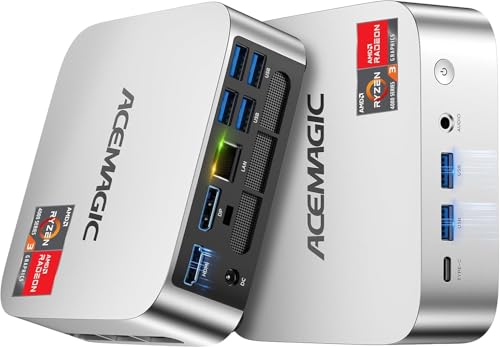
- Four-core, eight-thread Ryzen 7330U
- 16GB memory; SSD expansion up to 2TB
- Gigabit Ethernet and ample USB ports
Best For: A compact Plex setup with a modest library
Best for Network Flexibility

- Four-core, eight-thread Ryzen 5300U
- Dual 2.5GbE Ethernet ports
- Upgrade RAM and add a second M.2 SSD
Best For: A Plex setup needing flexible wired networking
Best for Built-In Drive Bays

- Two bays for 2.5-inch or 3.5-inch SATA drives
- Three M.2 2280 PCIe 3.0 SSD slots
- Dual LAN and server-friendly wake options
Best For: A Plex library housed in internal drives
Best for an Always-On Homelab
GMKtec G11 Ryzen Embedded R2514

- Processor designed for 24/7 operation
- Dual 2.5GbE Ethernet ports
- 16GB dual-channel DDR4; two M.2 slots
Best For: A Plex server alongside other homelab services
Best for Continuous Operation

- 8-core, 12-thread Core i3-12300HE
- Cooling designed for extended use
- 256GB SSD calls for more media storage
Best For: Always-on Plex use with expandable storage
Best for Storage Expansion

- Second NVMe slot for another SSD
- Dual 2.5GbE wired ports
- 16GB RAM, expandable to 64GB
Best For: Plex setups needing an internal SSD upgrade
Best for a Networked Home Lab
GMKtec G11 Ryzen Embedded Mini PC
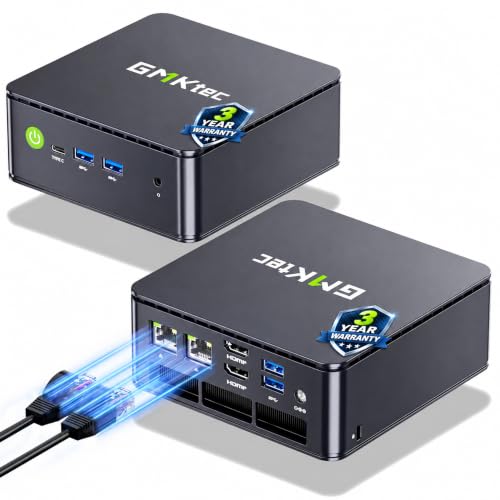
- Ryzen Embedded CPU for continuous workloads
- Dual 2.5GbE ports
- 512GB SSD needs expansion for large libraries
Best For: Plex alongside home-lab network services
Best with Extra Features
GMKtec G11 Ryzen Embedded Mini PC

- Ryzen Embedded R2514, four cores and eight threads
- Dual 2.5GbE Ethernet ports
- 16GB dual-channel RAM; 256GB SSD
Best For: Plex setups that also need home-lab networking flexibility
Best for Internal Storage
Blackview MP100 Ryzen 5 Mini PC

- Ryzen 5 7430U with six cores and 12 threads
- Extra M.2 slot and 2.5-inch SATA bay
- 16GB RAM and 512GB SSD included
Best For: Locally stored Plex libraries needing internal drive expansion
Best for Dual-SSD Libraries

- Ryzen 5 3500U and 16GB dual-channel RAM
- Two M.2 2280 PCIe 3.0 slots
- 2.5GbE wired Ethernet
Best For: SSD-based Plex libraries with a 2.5GbE network
Best for a Simple Setup – ACEMAGIC K1 Ryzen 7330U
Among mini pcs for plex servers, the ACEMAGIC K1 is a compact choice if you want a Windows 11 Pro machine with enough room for the app and a starter media library. Its four-core, eight-thread Ryzen 7330U, 16GB of memory, and Gigabit Ethernet provide a practical foundation for a home setup.
Best For: A straightforward Plex setup with a modest library and minimal desktop clutter.
Pros:
- Ryzen 7330U has four cores and eight threads.
- Includes 16GB memory and a 256GB M.2 SSD, with SSD expansion supported up to 2TB.
- Gigabit Ethernet, six USB-A ports, and a USB-C port offer useful connection options.
Cons:
- LPDDR4 memory is not expandable.
- The included 256GB SSD leaves limited space for a larger media library.
The K1 makes sense when you value an easy-to-place server and plan storage around its stated 2TB expansion limit. The supplied specifications do not establish how many simultaneous Plex transcodes it can handle.
Best for Network Flexibility – BOSGAME E5 Ryzen 5300U
The BOSGAME E5 stands out among mini pcs for plex servers if you also want a flexible wired-networking box. Its Ryzen 3 5300U has four cores and eight threads, while dual 2.5GbE ports and a spare M.2 SSD slot make it easier to build around network storage or add local media capacity.
Best For: Plex users who want dual high-speed Ethernet ports and room to upgrade memory and SSD storage.
Pros:
- Dual 2.5GbE ports suit more involved home-network setups.
- An extra M.2 2280 NVMe slot supports an additional SSD of up to 2TB.
- Two SODIMM slots allow memory expansion beyond the installed 8GB, up to 64GB.
Cons:
- The included 8GB RAM and 256GB SSD may call for upgrades as your setup grows.
- No internal 2.5-inch or 3.5-inch hard-drive bays are listed.
Choose the E5 for its upgrade path and networking rather than an assumed transcoding advantage: the supplied specifications do not quantify its Plex transcoding capacity.
Best for Built-In Drive Bays – Beelink ME Pro N95
If your priority is keeping media drives inside the machine, the Beelink ME Pro is one of the more storage-focused mini pcs for plex servers in this group. It pairs an Intel N95 with two bays for 2.5-inch or 3.5-inch SATA drives and three M.2 2280 SSD slots; the supplied notes explicitly list Plex among the home media systems you can install.
Best For: A self-contained Plex library that needs internal hard-drive bays as well as SSD slots.
Pros:
- Two SATA drive bays accommodate 2.5-inch or 3.5-inch drives, with stated support up to 30TB per drive.
- Three M.2 2280 PCIe 3.0 SSD slots offer additional storage expansion.
- Dual LAN, Wake on LAN, RTC Wake, and auto power-on support server-oriented setups.
Cons:
- The included SSD is only 128GB; media drives are not listed as included.
- Installed 12GB LPDDR5 is also the stated maximum memory capacity.
The ME Pro’s drive layout is its strongest reason to buy. Its four-core, four-thread N95 may warrant a closer look at your playback needs, since the supplied notes do not specify simultaneous Plex transcoding performance.
Best for an Always-On Homelab – GMKtec G11 Ryzen Embedded R2514
For shoppers comparing mini pcs for plex servers that can also serve as homelab machines, the GMKtec G11 puts networking first. Its Ryzen Embedded R2514 is described as designed for continuous 24/7 operation, and the chassis includes dual 2.5GbE ports, 16GB of dual-channel DDR4, and two M.2 2280 PCIe 3.0 SSD slots.
Best For: An always-on Plex and homelab setup built around fast wired networking and M.2 storage.
Pros:
- Ryzen Embedded R2514 platform is designed for continuous operation.
- Dual 2.5GbE ports provide options for a more capable network setup.
- Includes 16GB dual-channel DDR4 and has two M.2 2280 SSD slots.
Cons:
- No internal 2.5-inch or 3.5-inch drive bays are listed.
- The supplied notes do not state Plex-specific transcoding capacity.
The G11 is worth considering when Plex is one service in a broader server setup. Plan how you will connect or house a large media library before choosing it over a model with hard-drive bays.
Best for Continuous Operation – GEEKOM IT12 Intel Mini PC
Among mini pcs for plex servers, the GEEKOM IT12 stands out if you want an Intel-based machine designed for continuous operation. Its Core i3-12300HE has 8 cores and 12 threads, and the included 16GB RAM gives you a practical starting point for a dedicated server.
Best For: An always-on Plex setup where dependable operation and wired networking matter more than a large preinstalled media drive.
Pros:
- Embedded-class processor is designed for long-running use.
- IceBlast cooling and a full-copper heat module help manage heat during extended operation.
- 2.5Gbps LAN and expandable RAM provide room for a growing setup.
Cons:
- The included 256GB SSD is small for a substantial media library.
- The supplied specifications do not establish how many simultaneous Plex transcodes it can handle.
The IT12 is a strong candidate for an always-on server, but plan for additional media storage and assess transcoding needs separately before buying.
Best for Storage Expansion – BOSGAME E5 Ryzen Mini PC
If you are comparing mini pcs for plex servers, the BOSGAME E5 offers a useful combination of a Ryzen 3 5300U, 16GB RAM, and a 512GB NVMe SSD. Its second M.2 slot makes adding a separate drive straightforward without replacing the included system drive.
Best For: A compact Plex server that also benefits from dual 2.5GbE networking and an easy internal SSD upgrade.
Pros:
- Empty second M.2 2280 NVMe slot supports additional internal storage.
- Two 2.5GbE ports offer flexible wired-network connections.
- Dual SODIMM slots support memory expansion up to 64GB.
Cons:
- The included 512GB SSD may fill quickly with media.
- The supplied details do not specify Plex hardware-transcoding capability or stream capacity.
The E5 makes sense when storage expandability and networking flexibility are priorities. Check your playback and transcoding requirements before relying on it for multiple remote viewers.
Best for a Networked Home Lab – GMKtec G11 Ryzen Embedded Mini PC
For shoppers considering mini pcs for plex servers alongside other home-lab duties, the GMKtec G11 pairs a Ryzen Embedded R2514 with 16GB of dual-channel RAM and a 512GB M.2 SSD. Its dual 2.5GbE ports are especially relevant if the machine will share space with NAS or network services.
Best For: A wired home-lab setup that combines a Plex server with other lightweight server or networking tasks.
Pros:
- Ryzen Embedded R2514 is designed for continuous workloads.
- Two 2.5GbE ports provide flexible network connectivity.
- 16GB dual-channel RAM and a 512GB SSD are included.
Cons:
- 512GB of included storage is limited for a large media collection.
- H.265/HEVC encoding support does not, by itself, establish Plex transcoding performance.
The G11 is appealing if Plex is one service in a broader always-on home lab. Budget for media storage and verify that its transcoding support matches your clients and Plex configuration.
Best with Extra Features – GMKtec G11 Ryzen Embedded Mini PC
Among mini pcs for plex servers, the GMKtec G11 stands out if your setup also needs networking duties. Its Ryzen Embedded R2514 has four cores and eight threads, while 16GB of dual-channel RAM and a 256GB PCIe M.2 SSD provide a starting point for the server OS and apps.
Best For: A Plex host that may also serve as a home-lab or networking box.
Pros:
- Ryzen Embedded R2514 is designed for continuous-operation workloads.
- Dual 2.5GbE ports offer flexibility for wired network setups.
- 16GB of dual-channel RAM supports multitasking.
Cons:
- The included 256GB SSD leaves limited room for a media library.
- The supplied specifications do not establish how many simultaneous Plex transcodes it can handle.
Choose it for its wired connectivity and server-oriented processor, but plan separate or additional storage for a sizable library. Its listed H.265/HEVC encoding support is useful context, not a guarantee of Plex hardware-transcoding performance.
Best for Internal Storage – Blackview MP100 Ryzen 5 Mini PC
For shoppers comparing mini pcs for plex servers, the Blackview MP100 offers a straightforward way to grow a locally stored media library. It pairs a six-core, 12-thread Ryzen 5 7430U with 16GB of RAM and a 512GB NVMe SSD, plus an extra M.2 slot and a 2.5-inch SATA drive bay.
Best For: A Plex library that needs room for internal storage expansion.
Pros:
- Extra M.2 and 2.5-inch SATA bays provide two storage expansion options.
- RAM is listed as upgradeable from 16GB to 64GB.
- The supplied listing includes a three-year warranty.
Cons:
- Additional drives are needed to use the advertised expansion capacity.
- No supported Plex hardware-transcoding capacity is specified.
The MP100 is the practical pick here when keeping drives inside the mini PC matters most. Its Ryzen CPU offers resources for other tasks alongside Plex, but size any transcoding plans against verified software and codec support rather than the general 4K display claims.
Best for Dual-SSD Libraries – GMKtec G10 Ryzen 5 Mini PC
The GMKtec G10 is worth considering among mini pcs for plex servers if you prefer SSD-based storage and a fast wired connection. Its Ryzen 5 3500U, 16GB of dual-channel RAM, and 512GB SSD make a starting configuration; two M.2 2280 PCIe 3.0 slots leave room for a second drive.
Best For: A compact Plex setup built around internal SSDs and 2.5GbE Ethernet.
Pros:
- Two M.2 2280 slots support SSD storage expansion.
- 2.5GbE Ethernet provides a fast wired-network option.
- 16GB dual-channel RAM is included, with memory expansion listed.
Cons:
- Adding a second SSD costs extra.
- The notes do not specify Plex hardware-transcoding capabilities or stream counts.
Pick the G10 when dual M.2 storage and 2.5GbE suit your library plans. Its Radeon Vega 8 graphics are listed for video playback, but that alone does not establish how well it will handle Plex transcoding.
How We Picked These Mini PCs for Plex Servers
We focused on the practical parts of a Plex setup: processor and graphics capabilities, memory, room for media drives, wired networking, and the included SSD. The selected listings include several closely related GMKtec G11 configurations, so we treat their storage differences as configuration choices rather than assuming they are distinct performance tiers.
Specifications alone cannot establish how many simultaneous transcodes a PC will handle. Results depend on the source file, output resolution, subtitles, operating system, and whether hardware acceleration is available and enabled. Verify the exact CPU, ports, and drive support on the configuration you buy.
Quick Comparison
For a library you want to keep inside the server, start with the Beelink ME Pro and its advertised two hard-drive bays; confirm supported drive sizes and whether drives are included. For a compact Intel-based setup, the GEEKOM IT12 is worth comparing, particularly if hardware-assisted transcoding matters to you. The GMKtec G10 lists a 2.5GbE port, a useful feature when the server regularly transfers large files over a compatible network.
The AMD-based ACEMAGIC K1, BOSGAME E5 models, Blackview MP100, and GMKtec G10 and G11 models offer alternatives for direct-play-focused libraries or setups using separate storage. Do not assume similarly named models have identical SSD capacities: the E5 and G11 listings here include different configurations.
Key Buying Factors for Mini PCs for Plex Servers
Direct Play Versus Transcoding
If your playback devices support your files’ video, audio, and subtitle formats, Plex can often direct-play them with little processing. Transcoding is more demanding, especially for multiple viewers or 4K sources. Check Plex’s current hardware-transcoding requirements, supported graphics hardware, and subscription rules before buying specifically for that feature. An Intel processor alone is not a guarantee that your particular setup will use hardware acceleration.
Media Storage and Expansion
The included 128GB to 512GB SSD capacities in these listings are better suited to an operating system, Plex metadata, and a modest library than to a large film collection. Decide whether you need internal hard-drive bays, a USB-connected drive, or network-attached storage. Check physical drive fit, power requirements, and port speeds; keep a separate backup of media you cannot replace.
Network, Memory, and Everyday Use
Prefer wired Ethernet for a server that streams to several rooms. A 2.5GbE connection helps only when the rest of the network supports it and your workload needs the bandwidth. The listed 16GB configurations offer comfortable headroom for Plex alongside routine background tasks; compare upgradeability if you plan to add other services.
Who Should Buy Which Mini PCs for Plex Servers?
Choose the Beelink ME Pro if internal media-drive bays are your priority. Consider the GEEKOM IT12 if you want to investigate an Intel hardware-transcoding setup. Look at the GMKtec G10 for its listed 2.5GbE connection. For mostly direct-play streaming, compare the ACEMAGIC K1, BOSGAME E5, Blackview MP100, and GMKtec G11 configurations by price, storage, and ports. If reliable multi-user transcoding is essential, confirm performance for your actual files before committing to any of these Mini PCs for Plex Servers.
