
A mini PC can make a capable NAS server without taking over a desk or closet. The right choice depends less on peak processor speed than on how many drives you need, how you’ll connect them, and whether you want to install memory, storage, and an operating system yourself.
These 10 picks cover compact SSD-focused systems and larger multi-bay options. Use the guide below to narrow them down by capacity, network speed, setup effort, and room to grow.
Best 10 Mini PCs for Nas Server Picks for 2026
Flexible Drive Mix

- Three M.2 SSD slots plus two SATA bays
- Intel N150 with 16GB LPDDR5
- Dual RJ45 and server-friendly boot options
Best For: Mixed SSD and hard-drive home NAS builds
All-Flash Storage

- Six M.2 NVMe slots; up to 24TB stated capacity
- Dual 2.5GbE networking
- 12GB LPDDR5 and 64GB eMMC
Best For: Compact all-SSD home storage
Fast Dual-LAN Option
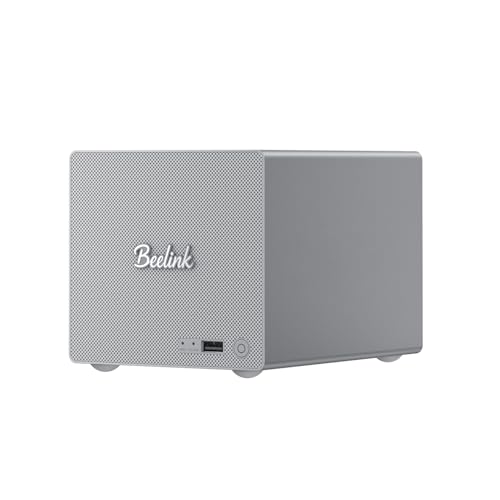
- 1TB SSD and 16GB LPDDR5 included
- Three M.2 slots plus two SATA bays
- 5GbE and 2.5GbE Ethernet ports
Best For: Mixed-drive NAS builds needing faster wired ports
High-Capacity Powerhouse

- Five SATA bays; up to 174TB stated capacity
- 10GbE plus 5GbE networking
- Ryzen 7 255; RAM expandable to 96GB
Best For: Large, multi-user storage builds
Ready-to-Use Starter

- Intel N95 with 12GB LPDDR5
- Preinstalled 1TB SSD
- Dual 2.5Gbps Ethernet
Best For: A compact home file server with desktop versatility
DIY Multi-Bay Powerhouse
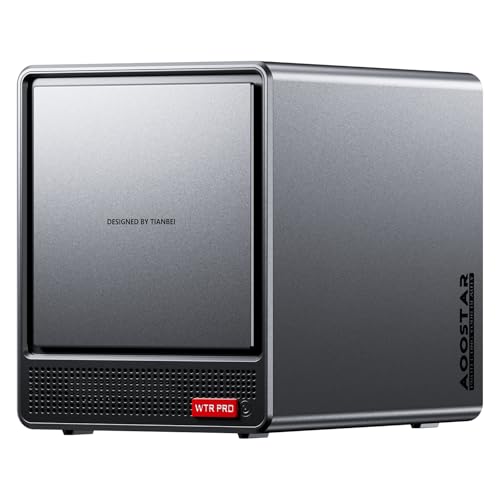
- Four HDD bays plus two M.2 slots
- Ryzen 7 5825U, 8 cores/16 threads
- Barebones: no RAM, SSD, or OS
Best For: A customizable multi-drive NAS and home lab
Best with Extra Features

- Six M.2 NVMe SSD slots
- Dual 2.5G LAN ports
- No operating system included
Best For: Compact, SSD-based home NAS setups
Easiest NAS Starting Point

- OpenMediaVault preinstalled
- Four NVMe SSD positions
- Dual 2.5GbE networking
Best For: A compact NAS with a software head start
Best for Custom HDD Builds
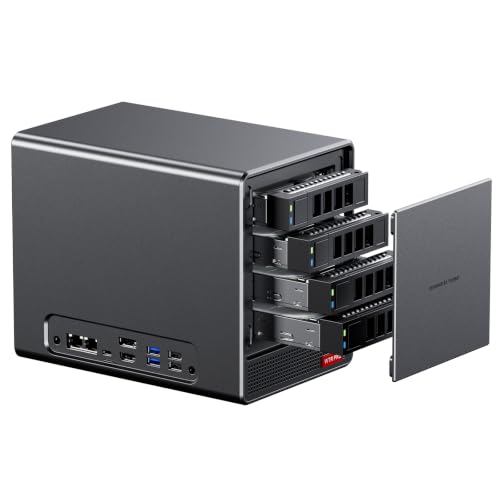
- Four SATA bays plus two M.2 slots
- Ryzen 7 5825U with 8 cores
- Barebone: add RAM, drives, and OS
Best For: Custom NAS builds using SATA hard drives
Flexible Drive Mix – Beelink ME Pro N150
Among mini pcs for nas server use, this Beelink ME Pro stands out for mixing SSDs with full-size hard drives. Its Intel N150, 16GB LPDDR5 memory, and support for systems including Linux, TrueNAS, and Proxmox give you a practical starting point for a home storage build.
Best For: Home NAS builders who want both M.2 SSD slots and two SATA drive bays.
Pros:
- Three M.2 2280 PCIe 3.0 slots support up to 4TB each.
- Two bays accept 2.5-inch or 3.5-inch SATA drives, with stated support for up to 30TB per drive.
- Dual RJ45 ports and support for Wake on LAN, automatic boot, and PXE boot suit server setups.
Cons:
- Memory is listed with a 16GB maximum, limiting RAM expansion.
- The supplied port list does not specify Ethernet speeds; check them before planning a faster network.
The mix of drive formats is the main reason to choose this model. Confirm the exact included storage configuration before buying, since the supplied title and slot-capacity details do not clearly establish what drives ship installed.
If your search for mini pcs for nas server use centers on SSD capacity rather than hard-drive bays, the Beelink ME Mini is worth a look. It pairs an Intel N95 and 12GB LPDDR5 with six M.2 NVMe slots, each rated for up to 4TB.
Best For: Compact, all-flash home storage and media-library setups.
Pros:
- Six M.2 NVMe slots support 2230, 2242, and 2280 drives, with up to 24TB stated total capacity.
- Dual 2.5GbE ports offer useful connectivity for a networked storage build.
- Built-in 64GB eMMC provides a separate storage device from the six NVMe slots.
Cons:
- No SATA hard-drive bays are listed, so it is not the right fit for an existing HDD collection.
- 12GB LPDDR5 is listed as the maximum RAM capacity.
This is the more specialized choice for an SSD-based NAS. The notes cite support for FNOS, Unraid, and TrueNAS, but plan your drive purchases and preferred OS setup before committing.
For shoppers comparing mini pcs for nas server use, this ME Pro configuration combines a preinstalled 1TB SSD with room to add both NVMe and SATA storage. Its Intel N150 and 16GB LPDDR5 suit a compact home NAS or media-center build.
Best For: Buyers who want an included SSD, two HDD bays, and faster-than-2.5GbE networking.
Pros:
- Includes a 1TB M.2 PCIe SSD.
- Supports up to three M.2 SSDs and two 2.5-inch or 3.5-inch SATA drives.
- Provides one 5Gbps Ethernet port and one 2.5Gbps Ethernet port.
- Includes Wi-Fi 6 and Bluetooth 5.4 for wireless peripherals and connectivity.
Cons:
- 16GB is the listed maximum RAM capacity.
- Additional SSDs and SATA drives are not identified as included.
Its included SSD and specified Ethernet speeds make this listing easier to assess than a bare storage chassis. The advertised 7.5Gbps link aggregation depends on a compatible network setup and should not be treated as a guaranteed speed for one transfer.
The MINISFORUM N5 Air is the largest-scale option here for readers looking at mini pcs for nas server duties. Its five SATA bays, three M.2 NVMe slots, and eight-core Ryzen 7 255 make it better suited to substantial storage and multiple users than a basic two-bay setup.
Best For: Multi-user NAS builds with large hard-drive arrays and demanding connectivity needs.
Pros:
- Five SATA bays offer a stated maximum of up to 174TB, depending on drive configuration.
- 10GbE and 5GbE ports provide high-speed wired network options.
- Two DDR5 SO-DIMM slots support expansion from the included 16GB to a stated 96GB maximum.
- Includes three M.2 NVMe slots and a preinstalled 64GB SSD for MinisCloud OS.
Cons:
- The large stated storage capacity requires adding suitable drives; the included SSD is 64GB.
- Its five-bay desktop format is a bigger commitment than a small two-bay mini PC.
Choose this model when drive count, RAM expansion, and fast networking matter more than keeping the build minimal. Size your HDDs and check your network equipment before counting on its headline capacity or transfer speeds.
Ready-to-Use Starter – Beelink ME Mini N95
For shoppers comparing mini pcs for nas server use, this Beelink ME Mini offers a straightforward starting point: an Intel N95, 12GB LPDDR5 memory, a preinstalled 1TB SSD, and Windows 11 Home.
Best For: A small home file server that also handles everyday desktop or media tasks.
Pros:
- Includes a 1TB SSD, so storage is available out of the box.
- Dual 2.5Gbps Ethernet ports suit a wired NAS or soft-router setup.
- Wi-Fi 6, Bluetooth 5.2, and HDMI add flexibility for desktop use.
Cons:
- Installed memory is listed at its 12GB maximum.
- The supplied listing does not clearly specify multiple internal drive bays or SSD slots.
Choose this configuration for a compact, preconfigured machine rather than a clearly documented multi-drive NAS build; verify its internal storage expansion before purchasing additional drives.
Among mini pcs for nas server projects, the Beelink ME Mini N150 stands out for its six M.2 PCIe 3.0 SSD slots. It pairs a four-core Intel N150 with 12GB LPDDR5 memory and 64GB eMMC storage.
Best For: A compact, SSD-focused home NAS that needs several internal drives.
Pros:
- Six M.2 slots support compatible NVMe SSDs in 2230, 2242, or 2280 sizes, with up to 4TB specified per slot.
- Dual 2.5Gbps Ethernet ports support flexible wired networking.
- Built-in power supply and vertical airflow design simplify a compact installation.
Cons:
- Only 64GB eMMC storage is included; SSDs for a larger NAS setup require separate planning.
- Its stated expansion is M.2 SSD-based, not a set of hard-drive bays.
This is the better fit when drive-slot count matters more than included storage. Budget for the NVMe drives you need and confirm your preferred NAS software setup before building.
If your search for mini pcs for nas server use includes hard-drive bays and heavier home-lab workloads, the AOOSTAR WTR PRO is the most build-it-yourself option here. Its AMD Ryzen 7 5825U has eight cores and 16 threads, alongside four hard-drive bays and two M.2 slots.
Best For: A customizable multi-drive NAS or home lab running several services.
Pros:
- Four hard-drive bays plus two M.2 slots provide separate options for bulk storage and SSDs.
- Supports up to 64GB DDR4 memory and includes dual 2.5Gbps Intel I226V Ethernet ports.
- Eight-core processor is suited to the listing’s suggested virtualization and Docker workloads.
Cons:
- Ships without RAM, SSDs, or an operating system; setup and component costs are additional.
- Its larger multi-bay design is less of a simple, ready-to-use mini PC.
Pick the WTR PRO when you want to choose the memory, drives, and OS yourself. The hardware offers more room for a mixed NAS and home-lab build, but it demands more preparation than the preconfigured Beelink models.
Best with Extra Features – Beelink Me Mini N150
Among mini pcs for nas server use, the Beelink Me Mini stands out for fitting six M.2 NVMe SSD slots into a compact chassis. Its Intel N150, 12GB LPDDR5 memory, and dual 2.5G LAN ports suit a small, SSD-based home storage setup.
Best For: Home users who want compact, all-flash NAS storage with room to add SSDs over time.
Pros:
- Six M.2 slots support 2230, 2242, and 2280 SSDs, with up to 24TB of stated total capacity.
- Dual 2.5G LAN, Wi-Fi 6, and Bluetooth 5.2 offer flexible connectivity.
- Built-in 45W power supply requires just one AC cable.
Cons:
- No operating system is included, so setup requires installing one.
- Storage expansion is through M.2 SSD slots, not drive bays for SATA hard drives.
Choose this model if space-saving SSD storage matters more than a traditional hard-drive bay layout. Budget for the SSDs and the time needed to configure your preferred NAS software.
Easiest NAS Starting Point – youyeetoo Nest Disk N150
If you are comparing mini pcs for nas server use but do not want to start with a blank software install, the youyeetoo Nest Disk comes with OpenMediaVault preinstalled. It pairs an Intel N150 and 12GB LPDDR5 memory with four NVMe SSD positions and dual 2.5GbE networking.
Best For: Buyers who want a compact NAS with its storage-management software already installed.
Pros:
- Preinstalled OpenMediaVault provides a head start on NAS setup.
- Four NVMe SSD positions offer expandable all-flash storage.
- Dual 2.5GbE ports and Wi-Fi 6 support wired and wireless connectivity.
Cons:
- Four SSD positions offer fewer drive slots than six-slot alternatives.
- The supplied 64GB eMMC is system storage; plan for separate NVMe SSDs to build out NAS capacity.
The preinstalled software is the main reason to pick this model. It makes the most sense for a small all-flash NAS rather than a build centered on SATA hard drives.
Best for Custom HDD Builds – AOOSTAR WTR PRO Ryzen 7
For buyers considering mini pcs for nas server builds that need hard-drive bays, the AOOSTAR WTR PRO offers four SATA bays plus two M.2 NVMe slots. Its Ryzen 7 5825U has eight cores and 16 threads, but this barebone version requires you to supply memory, drives, and an operating system.
Best For: DIY home-server builders who want SATA drive bays, SSD slots, and control over the final configuration.
Pros:
- Four SATA bays and two M.2 NVMe slots accommodate mixed storage layouts.
- Two DDR4 slots support up to 64GB of memory.
- Dual 2.5G Intel I226-V LAN ports suit a wired NAS setup.
Cons:
- Barebone package includes no RAM, storage drives, or operating system.
- The seller notes that sustained heavy Linux workloads may require a udev-rule adjustment to avoid SATA speed reductions or CRC errors on certain bays.
This is the most configurable choice of the three, but it also asks the most of the buyer. Price the missing components before purchasing and be prepared to handle the noted Linux SATA power-management setting if it affects your setup.
How We Picked the Best Mini PCs for Nas Server
We focused on practical NAS considerations: drive bays or SSD slots, network ports, included memory and storage, processor class, and whether a system arrives ready to configure or as a barebone kit. The list includes several closely related Beelink ME configurations, so check the exact CPU, SSD capacity, and slot layout before buying. Advertised maximum capacities are not a substitute for checking supported drive sizes and current pricing.
Quick Comparison
For a compact, all-flash setup, the Beelink ME Mini variants emphasize multiple M.2 SSD slots and dual 2.5GbE networking on specified configurations. The youyeetoo Nest Disk is another small N150-based option with dual 2.5GbE. The Beelink ME Pro models offer a different route if you want a two-bay NAS form factor. For more physical drives, compare the five-bay MINISFORUM N5 Air with the AOOSTAR WTR PRO 4+2-bay listings. Those larger systems are better suited to buyers who value expansion over the smallest footprint.
Key Buying Factors for Mini PCs for Nas Server Use
Drive Layout and Capacity
Count usable bays and slots, then decide whether they accept the drives you plan to own. M.2-only storage can be quiet and compact but may cost more per terabyte than hard drives. Multi-bay enclosures leave more room for high-capacity HDDs. Also check whether an included SSD is intended for the operating system or can be used for shared files.
Networking and Workload
A 2.5GbE port is useful for faster local transfers when your switch and client support it; dual ports do not automatically double the speed of one file copy. The N5 Air’s listed 10GbE port offers another upgrade path, but the rest of the network must keep up. Intel N95 and N150 systems make sense for basic file sharing and light services. Ryzen-based models provide more CPU headroom for heavier applications, multiple users, or media tasks, subject to your software and configuration.
What’s Included
Watch for barebone listings: the AOOSTAR options specify no RAM, SSD, or operating system, adding cost and setup work. Preinstalled memory and a small eMMC or SSD can simplify the first boot, but you may still need to buy data drives. Confirm operating-system compatibility, drive cooling, backup options, and power use before committing.
Who Should Buy Which Mini PCs for Nas Server?
Choose a Beelink ME Mini or youyeetoo Nest Disk if you want a small SSD-centric NAS and can live within its slot limits. Consider a Beelink ME Pro if a two-bay layout better matches your drive plan. Pick an AOOSTAR WTR PRO if you want several bays and are comfortable building out a barebone system; consider the MINISFORUM N5 Air when five bays and the listed 10GbE connection matter. Whichever you choose, plan a separate backup: drive redundancy alone will not protect against deletion, theft, or hardware failure.
