
Choosing the right mini PC for a home lab with dual LAN comes down to more than raw CPU speed. Network ports, memory capacity, storage expandability, and cooling all matter when you’re running containers, firewalls, virtualization, or lightweight servers.
This roundup focuses on compact systems that balance performance, connectivity, and value so you can build a reliable lab without giving up too much desk space or power efficiency.
Best 10 Mini PC for Home Lab with Dual Lan Picks for 2026
Best for Home Lab Networking

- Dual 2.5GbE LAN for home lab, NAS, and firewall use
- Ryzen 7 7730U offers strong multitasking and light server performance
- 1TB SSD plus expandable RAM/storage for growth
Best For: Home lab users who want dual LAN, quiet operation, and flexible expandability.
Best for Dual-NIC Labs
Beelink EQi12 Dual LAN Mini PC

- Dual 1GbE ports for lab networking and segmentation
- 24GB LPDDR5 RAM plus 500GB PCIe 4.0 SSD
- Built-in 85W PSU keeps the setup tidy
Best For: Home lab users who need dual LAN and a compact always-on mini PC for networking, media, or service testing.
Best Dual-LAN Home Lab Value
BOSGAME P6 Ryzen 9 6900HX Mini PC

- Dual 1Gbps LAN for router, firewall, and lab builds
- Ryzen 9 6900HX handles VMs and multitasking well
- 24GB LPDDR5X RAM and 1TB PCIe 4.0 SSD add speed
Best For: Homelab users and buyers who need a compact dual-LAN mini PC with strong everyday performance.
Best Dual-LAN Powerhouse
GMKtec M7 Ultra Ryzen 7 PRO 6850U

- Dual 2.5GbE LAN ports for routing and lab use
- Ryzen 7 PRO 6850U with 32GB DDR5 for multitasking
- OCuLink, USB4, and quad-display support add flexibility
Best For: Home lab users who want dual 2.5GbE, strong CPU headroom, and flexible expansion.
Best for Dual-LAN Homelabs

- Dual 2.5G LAN for home lab networking and routing
- Core Ultra 9 185H for VMs, Docker, and local AI
- Quiet compact design with Wi‑Fi 7 and four-display support
Best For: Home lab users who want a compact dual-LAN mini PC with strong CPU performance.
Best for Everyday Use
Glorlin Ryzen 5300U Mini PC with Dual 2.5G LAN
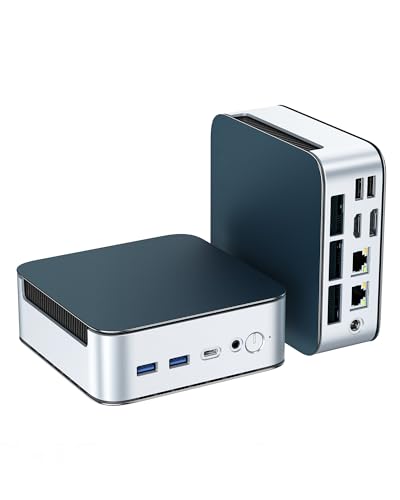
- Dual 2.5G LAN for home lab and routing tasks
- Triple 4K display support for multitasking
- Upgradeable to 64GB RAM and 4TB storage
Best For: Home lab users who want dual 2.5G LAN, compact size, and solid everyday performance.
Best Entry-Level Lab Box

- Compact VESA-mount design for tidy placement
- Good for light VMs, Plex, FTP, and daily use
- Expandable RAM and storage for basic upgrades
Best For: Budget-minded beginners who want a small home-lab starter PC with solid everyday flexibility.
Best Dual LAN Pick
BOSGAME E5 Ryzen 5300U Mini PC

- Dual 2.5GbE LAN is ideal for home lab networking
- Ryzen 5300U with 16GB RAM supports light workloads
- Triple-display output works well for admin or desktop use
Best For: Home lab users who need a compact mini PC with dual LAN for networking projects and light server tasks.
Best Dual-2.5G LAN Pick
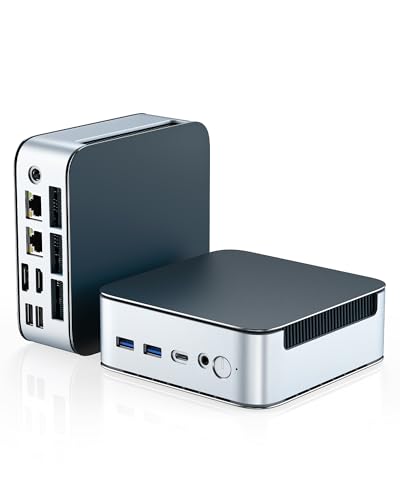
- Dual 2.5G LAN is ideal for home lab networking and routing setups
- Ryzen 3 5300U with 16GB RAM covers everyday multitasking smoothly
- Upgradeable RAM and SSD help it scale with your projects
Best For: Home lab users who want dual 2.5G LAN in a compact, affordable mini PC.
Best for Home Lab Networking – BOSGAME P4 Ultra Mini PC
If you want a mini pc for home lab with dual lan, the BOSGAME P4 Ultra stands out for its pair of 2.5GbE ports, Ryzen 7 7730U performance, and compact size. It has enough CPU headroom for router/firewall duties, NAS light serving, Plex, and general multitasking, while still staying small enough for a desk, shelf, or VESA mount.
Best For: Home lab users who need dual 2.5GbE networking, solid everyday performance, and a quiet compact system for server-style tasks.
Pros:
- Dual 2.5GbE LAN is ideal for pfSense, Untangle, NAS, and link aggregation setups.
- Ryzen 7 7730U with 16GB RAM handles multitasking and light server workloads smoothly.
- 1TB NVMe SSD and expandable memory/storage give it room to grow.
- Triple 4K display support adds flexibility if you also want it as a desktop PC.
Cons:
- Not a fit for demanding AAA gaming or heavy graphics workloads.
- 16GB RAM is decent, but some home lab builds may want an upgrade sooner.
Overall, this is a practical pick if your priority is a mini pc for home lab with dual lan rather than raw gaming power. The BOSGAME P4 Ultra balances networking features, expandability, and quiet operation in a compact machine that can handle both lab duty and everyday use.
Best for Dual-NIC Labs – Beelink EQi12 Dual LAN Mini PC
If you want a compact mini pc for home lab with dual lan, the Beelink EQi12 is built around the right basics: twin 1GbE ports, an Intel Core i3-1220P, and enough RAM/SSD capacity to handle light virtualization, file services, and always-on network tasks without taking up much space.
Best For: Home lab users who need dual LAN, quiet operation, and a small Windows or Linux box for routing, media, or service testing.
Pros:
- Dual 1000M LAN ports make it a practical pick for lab networking, firewall testing, or separate internal/external segments.
- 24GB LPDDR5 RAM and a 500GB PCIe 4.0 SSD provide strong everyday responsiveness for multitasking and services.
- Compact size with built-in 85W power supply helps keep desk and rack-adjacent setups cleaner.
- Dual HDMI, WiFi 6, and Wake On LAN add flexibility for remote management and display use.
Cons:
- Only 1GbE ports, so it is not ideal if your lab needs 2.5GbE or faster networking.
- Integrated graphics and i3-class CPU are fine for light lab work, but not for heavy VM stacks or demanding compute.
- Storage and memory are good out of the box, but power users may still want more expandability than larger mini PCs offer.
This is a smart, practical mini pc for home lab with dual lan if you value quiet operation, compact size, and dependable network I/O over raw performance. It fits well as a service host, router experiment box, or home server for media and file tasks.
Best Dual-LAN Home Lab Value – BOSGAME P6 Ryzen 9 6900HX Mini PC
If you want a mini pc for home lab with dual lan that still has enough muscle for everyday work, the BOSGAME P6 is a strong value pick. Its Ryzen 9 6900HX, dual 1Gbps Ethernet ports, Wi‑Fi 6E, and 1TB PCIe 4.0 SSD make it well suited to firewall builds, small server tasks, virtual machines, and compact desktop use.
Best For: Homelab users, DIY router/firewall builds, and buyers who want strong performance with dual LAN in a compact PC.
Pros:
- Dual 1Gbps LAN ports are ideal for pfSense, OpenWrt, and other networking projects.
- Ryzen 9 6900HX delivers plenty of headroom for multitasking and light VM use.
- 24GB LPDDR5X RAM and a 1TB PCIe 4.0 SSD provide fast, responsive storage and memory.
- Triple 4K display support adds flexibility for a lab desk or home office.
Cons:
- Only 1Gbps Ethernet, so it is not built for multi-gig networking.
- LPDDR5X memory is onboard, so it cannot be upgraded like standard SO-DIMMs.
- Integrated graphics are fine for light gaming, but not for heavy GPU workloads.
This is a practical pick if you need a mini pc for home lab with dual lan and want more processing power than most low-cost network boxes. It balances speed, connectivity, and compact size better than many small-form-factor alternatives.
Best Dual-LAN Powerhouse – GMKtec M7 Ultra Ryzen 7 PRO 6850U
If you want a mini pc for home lab with dual lan that can also pull double duty as a capable everyday desktop, the GMKtec M7 Ultra is a strong pick. Its Ryzen 7 PRO 6850U, dual 2.5GbE Intel i226-V ports, and 32GB of DDR5 make it well suited for routing, virtualization, light server work, and fast multitasking.
Best For: Home lab users who want dual 2.5GbE, plenty of memory, and flexible expansion for networking, VMs, or a compact all-in-one workstation.
Pros:
- Dual Intel i226-V 2.5GbE LAN ports are ideal for firewall, routing, and lab setups
- Ryzen 7 PRO 6850U and 32GB DDR5 provide strong multitasking and VM headroom
- OCuLink, dual USB4, and quad-display support add real expansion flexibility
- Quiet dual-fan cooling and BIOS power modes help tune performance for the task
Cons:
- Higher-end feature set makes it pricier than basic mini PCs
- Gaming-focused extras may be unnecessary if you only need a simple lab box
- Storage upgrades are not included out of the box
For buyers who need a mini pc for home lab with dual lan, this model stands out because it combines networking-friendly hardware with enough CPU and memory to handle more than one role. It is a better fit for users who want one compact system to cover lab tasks, media, and general desktop use.
Best for Dual-LAN Homelabs – GEEKOM IT13 MAX AI Mini PC
The GEEKOM IT13 MAX is a strong mini pc for home lab with dual lan if you want a compact machine that can handle routing, containers, and light virtualization without taking up much space. Its Core Ultra 9 processor, dual 2.5G Ethernet, and Wi‑Fi 7 make it a practical fit for a small lab, while the fast SSD and high-speed LPDDR5 memory help keep VMs and services responsive.
Best For: Home lab users, developers, and power buyers who want dual 2.5G LAN, strong CPU performance, and a small Windows/Linux-ready system.
Pros:
- Dual 2.5G LAN is ideal for homelab networking, firewall, and server-style tasks
- Intel Core Ultra 9 185H gives it plenty of headroom for Docker, VMs, and local AI
- Quiet, compact design works well in offices, shared spaces, and 24/7 setups
- Supports up to four displays for admin dashboards and multitasking
Cons:
- 24GB RAM and 500GB SSD may feel limiting for heavier lab builds
- More expensive than basic mini PCs aimed only at light server duties
For buyers comparing a mini pc for home lab with dual lan, this one stands out for blending strong CPU performance with genuinely useful networking and a polished, ready-to-use package. It is a good pick if you want one box that can serve as a compact lab host, dev machine, and everyday desktop.
Best for Everyday Use – Glorlin Ryzen 5300U Mini PC with Dual 2.5G LAN
If you want a mini pc for home lab with dual lan that still works well for everyday desktop tasks, this Glorlin model is a strong fit. The Ryzen 3 5300U, 16GB of RAM, and 512GB NVMe SSD give it enough speed for light virtualization, media use, and regular productivity, while the twin 2.5G Ethernet ports make it especially appealing for networking-focused setups.
Best For: Home lab users, homelab beginners, and buyers who want dual 2.5G LAN plus triple-display support in a compact system.
Pros:
- Dual 2.5G LAN is ideal for routing, lab networking, and other dual-port use cases
- Triple 4K display support helps with monitoring, multitasking, and workstation setups
- 16GB DDR4 and 512GB NVMe provide a solid out-of-box experience
- Expandable to 64GB RAM and 4TB storage for future growth
Cons:
- Ryzen 3 performance is fine for light lab work, but not heavy VM workloads
- Integrated graphics only, so it is not meant for demanding gaming or GPU tasks
For buyers comparing a mini pc for home lab with dual lan, this one stands out for offering fast twin Ethernet, modern wireless, and decent upgrade headroom without taking up much space. It is a practical choice if your priority is networking flexibility more than raw compute power.
Best Entry-Level Lab Box – Beelink SER3 Ryzen 3 Mini PC
If you want a mini pc for home lab with dual lan, the Beelink SER3 is a practical low-cost starting point for light virtualization, NAS tasks, media serving, and general office use. Its Ryzen 3 3200U chip, 8GB of RAM, and 480GB SSD are enough for basic lab projects, while the compact chassis and dual HDMI make it easy to tuck into a rack shelf or desk setup.
Best For: Beginners building a budget-friendly home lab, media server, or light-duty always-on mini PC.
Pros:
- Compact size with VESA mount support for clean home-lab placement
- Ryzen 3 3200U handles light VMs, Plex/FTP, and everyday multitasking
- 480GB PCIe SSD and expandable memory/storage improve usability
- Dual HDMI, Wi‑Fi 5, Bluetooth 5.0, and four USB 3.2 ports add flexibility
Cons:
- Only one 1000Mbps LAN port, so it does not offer true dual LAN networking
- 2-core/4-thread CPU is not ideal for heavier virtualization loads
- Included 8GB RAM may need an upgrade for serious lab use
For buyers who mainly need an affordable, compact starter box, this SER3 makes sense, but power users looking for a mini pc for home lab with dual lan should compare it carefully against models with two physical NICs and more CPU headroom.
Best for Dual-Network Labs – Getorli Ryzen 7 6800H Mini PC
If you want a mini pc for home lab with dual lan, this Getorli model stands out for its strong Ryzen 7 6800H performance, dual RJ45 ports, and flexible display output. It has enough horsepower for light virtualization, network services, coding, and everyday workstation use, while still staying compact enough for a desk or rack-adjacent setup.
Best For: Home lab users, developers, and power users who want dual Ethernet, fast storage, and solid multitasking in a small PC.
Pros:
- Dual LAN ports make it a practical fit for segmented networks, routing tasks, and lab testing.
- Ryzen 7 6800H with 32GB LPDDR5 offers strong multitasking performance for services and apps.
- 1TB NVMe SSD plus dual M.2 expansion gives you room to grow storage later.
- Triple 4K display support adds flexibility for dashboards and multi-monitor workflows.
Cons:
- LPDDR5 memory is fast, but it is not user-upgradable.
- Not the cheapest option if you only need a basic office mini PC.
- Best suited for moderate home lab workloads rather than heavy server-class virtualization.
Overall, this is a well-rounded mini pc for home lab with dual lan if you want a balance of connectivity, speed, and compact size. It is especially appealing for users who need a small box that can handle network experiments, productivity, and media tasks without feeling underpowered.
Best Dual LAN Pick – BOSGAME E5 Ryzen 5300U Mini PC
If you want a mini pc for home lab with dual lan that stays compact without giving up practical networking features, the BOSGAME E5 is a straightforward option. Its Ryzen 5 5300U chip, 16GB RAM, and 512GB SSD are enough for light virtualization, basic containers, media tasks, and everyday desktop use, while the dual 2.5GbE ports make it especially appealing for network-focused projects.
Best For: Home lab users who want a small, affordable machine with dual 2.5GbE ports for routing, testing, or lightweight server tasks.
Pros:
- Dual 2.5GbE LAN is the standout feature for home lab and networking setups
- Ryzen 5300U, 16GB RAM, and 512GB SSD handle everyday productivity and light lab workloads
- Triple-display support adds flexibility for a compact workstation or admin console
- Includes Wi-Fi 5, Bluetooth 5.0, and a VESA mount for tidy installs
Cons:
- Wi-Fi 5 is dated compared with newer wireless standards
- Not the best choice for heavier virtualization or demanding multi-user server workloads
For shoppers prioritizing networking over raw compute, this mini pc for home lab with dual lan delivers the right mix of ports, size, and value. It makes sense as a compact lab box, entry-level router/firewall test system, or a small always-on desktop.
Best Dual-2.5G LAN Pick – Getorli Ryzen 5300U Mini PC
If you want a mini pc for home lab with dual lan, the Getorli Mini PC stands out for its pair of 2.5G Ethernet ports, Ryzen 3 5300U CPU, and compact footprint. It has enough everyday performance for light virtualization, routing, file sharing, or a practical Windows-based lab setup, while still staying affordable and easy to place on a desk or shelf.
Best For: Home lab users, budget-minded prosumers, and anyone who needs dual 2.5G LAN in a compact mini PC.
Pros:
- Dual 2.5G LAN makes it especially useful for networking tasks and home lab projects
- Ryzen 3 5300U with 16GB RAM handles daily productivity and light multitasking well
- Expandable storage and memory leave room to grow over time
- Triple display support adds flexibility for office or monitoring setups
Cons:
- Not ideal for heavy virtualization or demanding server workloads
- Four-core CPU is modest compared with higher-end mini PCs
- Integrated graphics are fine for light gaming, not intensive 3D work
For buyers prioritizing dual networking over raw horsepower, this is a smart mini pc for home lab with dual lan. It hits the right balance of connectivity, upgradeability, and compact size for small lab builds and general-purpose use.
How We Picked the Best Mini PC for Home Lab with Dual Lan
We focused on systems that make sense for a Mini PC for Home Lab with Dual Lan: at least two Ethernet ports, enough CPU and RAM for real multitasking, and practical expansion options for storage or memory. We also favored models with modern I/O such as USB4, fast SSD support, and Wi-Fi 6 or better for flexible placement.
Because home labs vary, we looked at a mix of entry-level, midrange, and high-performance choices. That helps cover common use cases like Proxmox, Docker, pfSense, small file services, and test environments.
Quick Comparison
For light lab work, lower-power chips can be fine if you mostly run a few containers or routing tasks. For heavier virtualization, choose stronger CPUs, more RAM, and faster NVMe storage. If you expect multiple VMs, look closely at LPDDR5 or DDR5 capacity, dual 2.5G LAN, and thermal design.
In general, the best value comes from a balanced configuration rather than the fastest processor alone. A well-equipped midrange unit often outperforms a cheaper model once storage, memory, and network demands increase.
Key Buying Factors for Mini PC for Home Lab with Dual Lan
Processor and Core Count
For firewalling, containers, and small VM stacks, modern 6- to 8-core processors are a sweet spot. If you plan to run multiple virtual machines or CPU-heavy services, step up to stronger Ryzen or Intel Core Ultra options.
Memory and Storage
Home labs benefit from more RAM than typical office use. Aim for 16GB as a floor, with 32GB or more preferred for virtualization. NVMe SSDs improve boot and application responsiveness, and some labs benefit from a second drive or expansion path for logs and storage.
Network Ports
Dual LAN is the feature that defines this category. Two 2.5G ports are especially useful for routing, segmentation, and separate lab networks. If you only need basic connectivity, gigabit dual LAN can still work, but it leaves less room to grow.
Thermals and Reliability
Small systems can throttle under sustained load if cooling is weak. Look for designs with proven airflow and settings that support long uptime. That matters when a mini PC is expected to run 24/7.
Who Should Buy Which Mini PC for Home Lab with Dual Lan?
Pick a budget dual-LAN mini PC if you’re building a first lab, need a compact firewall box, or want to experiment with containers without spending too much. Choose a midrange Ryzen 7 or Intel Core model if you want better virtualization headroom and smoother multitasking.
If your setup includes multiple VMs, heavier services, or future expansion plans, prioritize higher RAM, faster storage, and stronger cooling over the lowest price. For most buyers, the best Mini PC for Home Lab with Dual Lan is the one that gives you enough memory and network flexibility to grow into, not just enough to start.
