
Choosing the right mini PC for home lab virtualization is about more than raw CPU speed. You also need enough memory headroom, reliable storage options, solid networking, and the right cooling for 24/7 use.
Below, we focus on compact systems that fit common lab roles like Proxmox hosts, firewall appliances, home automation nodes, and small NAS or container servers.
Best 10 Mini PC for Home Lab Virtualization Picks for 2026
Best for Storage-Heavy Labs
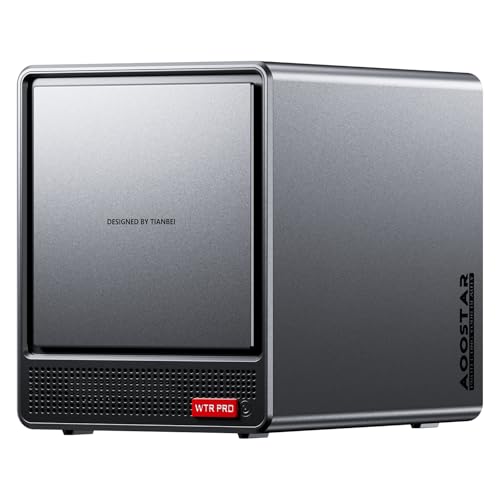
- 8-core Ryzen 7 for VMs, Docker, and multitasking
- 4+2 bays plus dual M.2 for serious storage expansion
- Dual 2.5GbE and virtualization support for lab use
Best For: Home lab users who want one box for virtualization, NAS storage, and always-on services.
Best Firewall NICs
Firewall Mini PC, N100, 4x Intel I226 2.5GbE

- 4x Intel I226 2.5GbE ports for advanced networking
- Fanless Alder Lake-N100 design for silent operation
- Works well with pfSense, OPNsense, and Proxmox
Best For: Home lab users who need a compact firewall/router with strong networking features.
Best for Easy Home Assistant Setup
TK Node Mini PC i3-1215U, 16GB/256GB

- Home Assistant OS preinstalled for fast smart home setup
- i3-1215U and 16GB RAM handle light VMs and containers
- Dual NVMe slots and up to 64GB RAM support upgrades
Best For: Buyers who want a compact, low-friction mini PC for Home Assistant and lighter home lab virtualization.
Best for AI-Ready Power
GEEKOM IT15 Intel Ultra 9 Mini PC

- Strong Intel Ultra 9 285H performance for VMs and multitasking
- 32GB DDR5, 1TB SSD, and USB4 suit a compact home lab
- WiFi 7, 2.5GbE, and quiet cooling support always-on use
Best For: Power users who want a compact mini PC that can handle home lab virtualization, AI tasks, and creative workloads.
Best for Easy Proxmox Setup
TK Node Mini PC with Proxmox and Home Assistant
- Preinstalled Proxmox VE and Home Assistant VM
- Ryzen R2514 with 16GB RAM for light virtualization
- Upgradeable to 64GB RAM and dual NVMe storage
Best For: Users who want a turnkey mini PC for a home lab and Home Assistant with minimal setup.
Best for Legacy I/O

- 14-core / 20-thread Core i9 for VM-friendly performance
- Dual LAN and Wi‑Fi 6 for flexible lab networking
- VGA plus HDMI, DP, and USB-C for mixed display setups
Best For: Home lab users who need strong CPU performance and compatibility with older peripherals.
Best for Home Assistant
- Home Assistant OS preinstalled for fast, local smart-home setup
- 16GB RAM and 512GB SSD provide a usable out-of-box baseline
- Expandable design supports up to 64GB RAM and dual NVMe storage
Best For: Home Assistant users who want a compact, preconfigured mini PC for local automation and modest virtualization tasks.
Best Windows Pro Starter
GEEKOM A5 2026 Ryzen 5 Mini PC

- Upgradeable to 64GB RAM for better VM support
- Windows 11 Pro and six USB ports add versatility
- Compact Ryzen 5 system for light home lab use
Best For: Home lab beginners who want a compact, upgradable mini PC for light virtualization and multitasking.
Best for Home Assistant Automation
- Home Assistant OS preinstalled
- Ryzen R2514 with 4C/8T
- Expandable RAM and dual NVMe storage
Best For: Home Assistant users who want an always-on compact mini PC for automation and light virtualization.
Best for Home Assistant Labs
- Home Assistant OS preinstalled for quick setup
- Ryzen R2514 and 16GB RAM suit light virtualization
- Upgradeable to 64GB RAM and dual NVMe storage
Best For: Home lab users who want a ready-to-run Home Assistant machine that can also handle light virtualization and 24/7 automation.
Best for Storage-Heavy Labs – AOOSTAR WTR PRO R7 5825U NAS
If you want a mini pc for home lab virtualization that can also handle storage, this AOOSTAR WTR PRO is built around an 8-core Ryzen 7 5825U, dual 2.5GbE, and a 4+2 bay layout. It’s a strong fit for running VMs, Docker, NAS services, and routing software on one compact system, especially if you plan to keep it powered on around the clock.
Best For: Home lab builders who want a virtualization box with room for drives, fast networking, and 24/7 service hosting.
Pros:
- Ryzen 7 5825U offers 8 cores / 16 threads for multitasking and multiple VMs
- 4+2 bay design supports high-capacity storage plus dual M.2 SSDs
- Dual 2.5GbE and VT-x/VT-d support make it well-suited for lab networking and virtualization
- Metal chassis, front-to-back airflow, and rear fan help with continuous use
Cons:
- No RAM, SSD, or operating system included
- Bulkier than a typical tiny mini PC due to the multi-bay NAS design
- More machine than casual users need if they only want basic desktop tasks
For buyers comparing a mini pc for home lab virtualization, this model stands out because it combines compute, storage, and networking in one chassis. That makes it especially practical for a compact home server that needs to run reliably and grow with your lab.
Best Firewall NICs – Firewall Mini PC, N100, 4x Intel I226 2.5GbE
If you want a mini pc for home lab virtualization that also doubles as a serious network appliance, this fanless MOGINSOK box stands out for its 4x Intel I226 2.5GbE ports, AES-NI support, and low-power Alder Lake-N platform. It’s a practical fit for pfSense, OPNsense, Proxmox, and other lightweight lab workloads where networking matters as much as compute.
Best For: Home lab users who want a compact firewall/router platform with multiple Intel NICs and solid virtualization-friendly features.
Pros:
- Four Intel I226 2.5GbE ports are ideal for routing, VLANs, and lab network segmentation.
- Fanless N100 platform keeps noise and maintenance to a minimum.
- Supports pfSense, OPNsense, OpenWrt, ESXi, and Proxmox-style lab setups.
- DDR5 and M.2 PCIe SSD support give you room to configure it for your needs.
Cons:
- Only 8GB RAM and 128GB SSD are included, which may be limiting for heavier virtualization.
- N100-class performance is best for networking and light services, not demanding VM clusters.
- May be more firewall-focused than a general-purpose homelab mini PC.
This is a strong choice if your mini pc for home lab virtualization needs lean toward routing, security, and multi-NIC flexibility rather than raw CPU power. It makes the most sense for users building an always-on lab gateway or compact edge appliance.
Best for Easy Home Assistant Setup – TK Node Mini PC i3-1215U, 16GB/256GB
If you want a mini pc for home lab virtualization that also doubles as a ready-to-run smart home hub, the TK Node stands out for convenience. With Home Assistant OS preinstalled, an Intel i3-1215U, and 16GB of RAM, it’s a compact option for light virtualization, containers, and always-on automation without a lot of setup time.
Best For: Buyers who want a small, low-friction system for Home Assistant, Docker, and lighter home lab virtualization tasks.
Pros:
- Home Assistant OS comes preinstalled, which cuts setup time for smart home users.
- Intel Core i3-1215U and 16GB RAM are solid for light VMs, containers, and multitasking.
- Dual NVMe support and up to 64GB RAM give you room to expand later.
- Compact footprint with VESA mount makes it easy to place in a cabinet or rack-adjacent space.
Cons:
- 256GB SSD is modest if you plan to run multiple VMs or store larger lab images.
- It’s better suited to lightweight virtualization than heavy server workloads.
For a mini pc for home lab virtualization, this model is strongest when ease of deployment matters more than raw expansion or compute headroom. It’s a practical pick if you want a small machine that can handle automation, containers, and a modest lab without much fuss.
Best for AI-Ready Power – GEEKOM IT15 Intel Ultra 9 Mini PC
If you want a mini pc for home lab virtualization that also has room for AI work, coding, and heavy multitasking, the GEEKOM IT15 is a strong high-end option. Its Intel Ultra 9 285H, 32GB of DDR5 memory, 1TB Gen 4 SSD, and USB4 connectivity make it a capable compact host for everyday services, test environments, and fast local storage workflows.
Best For: Power users who want a compact mini PC that can double as a home lab machine, productivity workstation, and media/editing box.
Pros:
- Intel Ultra 9 285H with strong CPU, GPU, and NPU performance for demanding workloads
- 32GB DDR5 and 1TB NVMe SSD provide a solid base for VMs, containers, and multitasking
- Dual USB4, dual HDMI, WiFi 7, and 2.5GbE give it flexible, modern connectivity
- Quiet cooling and 24/7-ready design suit always-on desktop or lab use
Cons:
- Overkill if you only need a basic virtualization host
- Higher-spec hardware usually means a higher price than entry-level mini PCs
- Memory and storage are good, but serious lab builders may still want to expand them
For buyers comparing a mini pc for home lab virtualization, the IT15 stands out because it pairs strong modern connectivity with a fast processor and generous starting specs. It is a better fit for people who want one compact machine to handle labs, productivity, and creative work rather than the cheapest possible box.
Best for Easy Proxmox Setup – TK Node Mini PC with Proxmox and Home Assistant
If you want a mini pc for home lab virtualization that is ready to deploy out of the box, the TK Node stands out for its preinstalled Proxmox VE and Home Assistant VM. The Ryzen R2514, 16GB RAM, and 512GB SSD make it a practical starting point for running lightweight VMs, containers, and always-on home automation without a lot of setup work.
Best For: Buyers who want a turnkey Proxmox-based mini PC for a home lab, self-hosting, and Home Assistant.
Pros:
- Proxmox VE and Home Assistant are preinstalled, which cuts setup time significantly.
- Ryzen R2514 with 16GB RAM is solid for light virtualization and daily lab tasks.
- Expandable design supports up to 64GB RAM and dual NVMe storage for future growth.
- Made in the USA with a 2-year warranty and 24/7 operation focus.
Cons:
- 4 cores/8 threads is enough for a starter lab, but not ideal for heavy multi-VM loads.
- 512GB storage may fill up quickly if you run multiple images, containers, or snapshots.
- Higher price than barebones mini PCs because you are paying for the turnkey software setup.
For a mini pc for home lab virtualization, this model is appealing because it reduces friction: you get the platform, a working automation VM, and room to expand later. It is a strong fit if convenience and local control matter more than raw CPU headroom.
Best for Legacy I/O – A2 i9 13900HK Mini PC
If you need a mini pc for home lab virtualization that also plays nicely with older gear, the A2 stands out with its Core i9-13900HK, 32GB of DDR5, dual LAN, and unusually flexible display output. It has enough CPU headroom for multiple VMs, containers, and lab services while still fitting into a compact desktop footprint.
Best For: Buyers who want a high-core-count mini PC for lab workloads, business use, and legacy device compatibility.
Pros:
- Core i9-13900HK with 14 cores and 20 threads for strong multitasking and VM workloads
- Dual 2.5G/1G Ethernet plus Wi‑Fi 6 for flexible lab networking
- VGA, HDMI, DP, and USB-C video outputs support older and modern monitors
- 32GB DDR5 RAM and 1TB NVMe SSD give it a solid out-of-box foundation
Cons:
- Integrated graphics are fine for labs, but not meant for heavy GPU workloads
- VGA and extra legacy features add niche value that many buyers may never use
For a mini pc for home lab virtualization, this model is appealing because it balances strong CPU performance, useful networking, and broad connectivity without taking much desk space. It is especially practical if your lab includes a mix of new and older equipment.
Best for Home Assistant – TK Node Mini PC Ryzen R2514
If you want a mini pc for home lab virtualization that also doubles as a ready-to-run smart home hub, the TK Node is an easy setup option. With Home Assistant OS preinstalled, 16GB of RAM, and a Ryzen R2514 processor, it’s built for always-on automation, light container work, and compact lab deployments.
Best For: Home Assistant users who want a compact, preconfigured mini PC for local automation and modest virtualization tasks.
Pros:
- Home Assistant OS is preinstalled, so setup is faster than a blank mini PC.
- Ryzen R2514, 16GB RAM, and 512GB SSD give it a solid baseline for 24/7 use.
- Dual NVMe expansion and up to 64GB RAM leave room to grow the lab.
- Compact design, VESA mount, and included accessories make deployment easy.
Cons:
- The included 16GB/512GB configuration may feel limited for heavier VM stacks.
- It’s better suited to light-to-moderate virtualization than demanding enterprise workloads.
For buyers who want a mini pc for home lab virtualization without building from scratch, this TK Node stands out for its ready-made Home Assistant setup and expandability. It’s a practical choice if your priority is reliable always-on automation first, with enough hardware headroom for containers and small VMs.
Best Windows Pro Starter – GEEKOM A5 2026 Ryzen 5 Mini PC
The GEEKOM A5 2026 Edition is a practical mini pc for home lab virtualization if you want a compact system with Windows 11 Pro, an AMD Ryzen 5 7430U, and upgradeable memory for light-to-moderate testing. It is a sensible fit for users who need a small desktop that can handle everyday multitasking, basic server roles, and a few virtual machines without taking up much space.
Best For: Home lab beginners and budget-conscious users who want a compact Windows Pro mini PC with room to grow.
Pros:
- Ryzen 5 7430U offers solid general-purpose performance for lightweight virtualization
- 16GB RAM can be expanded up to 64GB for better VM headroom
- 512GB NVMe SSD keeps boot and load times snappy
- Six USB ports and Windows 11 Pro add flexibility for peripherals and lab use
Cons:
- Not ideal for heavy VM stacks or more demanding enterprise workloads
- Single 512GB SSD may fill quickly with multiple virtual machines
- Integrated graphics are fine for utility tasks, not GPU-heavy work
For a mini pc for home lab virtualization, the A5 stands out more for practicality than raw power: it gives you a modern Ryzen chip, upgrade path, and a compact footprint that works well for entry-level labbing, testing, and always-on utility tasks.
Best for Home Assistant Automation – TK Node Mini PC
If you want a mini pc for home lab virtualization that also doubles as a ready-to-run smart home hub, the TK Node is an easy plug-in option. It arrives with Home Assistant OS preinstalled, so you can skip the usual setup hassle and get straight to automation, light-duty containers, and compact lab projects.
Best For: Home Assistant users and tinkerers who want a compact, always-on mini PC for local automation and light virtualization.
Pros:
- Home Assistant OS preinstalled for fast smart home deployment
- AMD Ryzen R2514 with 4 cores and 8 threads for everyday multitasking
- Expandable design with dual SO-DIMM RAM support and dual NVMe slots
- Compact 5″ x 5″ footprint with VESA mount and included accessories
Cons:
- 8GB RAM and 256GB SSD are modest for heavier VM workloads
- Not ideal if you need a high-core-count host for dense virtualization
- Focused more on home automation readiness than raw lab performance
For buyers who value a simple start and reliable 24/7 operation, this is a practical mini pc for home lab virtualization with a clear smart-home angle. It makes more sense for automation, containers, and small services than for running lots of demanding virtual machines.
Best for Home Assistant Labs – TK Node Mini PC Ryzen R2514
If you want a mini pc for home lab virtualization that is already tuned for local automation, the TK Node stands out with Home Assistant OS preinstalled, a Ryzen R2514 CPU, 16GB of RAM, and a 256GB SSD. It is aimed at always-on workloads, so it makes sense for users who want a compact box for containers, light virtualization, and smart home services without much initial setup.
Best For: Home lab users who want a ready-to-run Home Assistant machine that can also handle light virtualization and 24/7 automation.
Pros:
- Home Assistant OS preinstalled for fast, local smart home deployment
- Ryzen R2514 with 16GB RAM is solid for light virtualization and container workloads
- Dual NVMe support and up to 64GB RAM give it useful upgrade room
- Compact, 24/7-ready design with USA assembly and a 2-year warranty
Cons:
- 256GB SSD is modest if you plan to run multiple VMs or large storage workloads
- Not the fastest choice for heavier hypervisor stacks or CPU-intensive labs
For buyers who want a mini pc for home lab virtualization with a strong smart-home focus, this model is convenient and flexible rather than raw-performance first. The preinstalled software and upgrade options make it easy to start small and expand as your lab grows.
How We Picked the Best Mini PC for Home Lab Virtualization
For a Mini PC for Home Lab Virtualization, we prioritized CPU efficiency, RAM expandability, NVMe support, network throughput, and practical port layouts. We also looked for systems that make sense for always-on workloads, not just short benchmark bursts.
Because home labs vary widely, the list includes both low-power options for lightweight services and more capable machines for multi-VM or mixed virtualization setups.
Quick Comparison
Use lower-power fanless systems for routing, DNS, Home Assistant, and small containers. Choose midrange Ryzen or Core i3-class models for balanced Proxmox nodes. Step up to higher-core Intel Core i9 or Ultra 9 systems if you plan to run several VMs, test labs, or compute-heavy services at once.
Key Buying Factors for Mini PC for Home Lab Virtualization
CPU and Core Count
Virtualization benefits from extra cores and strong single-thread performance. Lightweight services can run well on efficient N-series chips, while broader lab use is better served by Ryzen 5-class or higher, or modern Core i5/i7/i9-class processors.
Memory Capacity
RAM is often the first bottleneck in a home lab. Look for 16GB as a practical starting point, 32GB for mixed workloads, and more if you expect multiple VMs or memory-hungry services. Upgradeability matters as much as the shipped configuration.
Storage and Expansion
NVMe SSDs are preferred for fast VM boot times and responsive containers. Dual M.2 slots, extra drive bays, or other expansion options can help if you want to separate OS, VM storage, and backups.
Networking
For a Mini PC for Home Lab Virtualization, dual 2.5GbE ports or multi-NIC designs are especially useful. They make routing, segmentation, and storage traffic easier to manage. If the device will sit behind a main switch, even a single fast NIC may be enough for simpler labs.
Cooling, Noise, and Uptime
Fanless designs can be great for quiet networking or always-on automation, but they are not ideal for sustained heavy VM loads. Actively cooled systems usually offer more headroom for virtualization stress, especially in warm environments.
Who Should Buy Which Mini PC for Home Lab Virtualization?
If you want a compact router or firewall box, pick a fanless mini PC with multiple Intel NICs. If your goal is Home Assistant plus a few containers, an efficient 16GB system is usually enough. For Proxmox labs, testing, or multiple guest machines, favor models with upgradeable RAM, fast NVMe storage, and stronger CPUs. If you want one box to handle virtualization and heavier multitasking, choose the highest-core and best-connected option you can justify.
