
A dedicated firewall PC gives your home lab room to experiment with VLANs, VPNs, and routing without relying on an all-in-one consumer router. The right box depends less on its size than on its ports, processor, and what is actually included.
These 10 options range from basic dual-Gigabit systems to fanless models with four or six 2.5GbE ports. Use the guide below to narrow them down before checking each listing’s exact configuration.
Best 10 Mini PC for Home Lab Firewall Picks for 2026
Quiet All-Rounder

- Four Realtek 2.5GbE ports
- Fanless N100; 8GB RAM, 128GB SSD
- No SR-IOV support
Best For: Quiet routing and lightweight home-lab services
Basic Gigabit Gateway
J1900 Four-Port Firewall Mini PC

- Four Intel i210 Gigabit ports
- Fanless with pfSense pre-installed
- 4GB RAM and 64GB SSD
Best For: Basic wired firewall and multi-WAN setups
Expansion Pick
Glovary J6413 Four-Port 2.5GbE Firewall

- Four Intel i226V 2.5GbE ports
- Two RAM and two NVMe slots
- Two additional SATA slots
Best For: Expandable firewall and multi-VM home labs
Port-Heavy Pick
J6412 Six-Port 2.5GbE Firewall Mini PC

- Six Intel i226-V 2.5GbE ports
- 8GB RAM and 128GB SSD included
- pfSense requires user configuration
Best For: Multi-WAN and physically segmented networks
Ready-to-Configure Pick
Sharevdi J4105 Fanless Firewall Mini PC
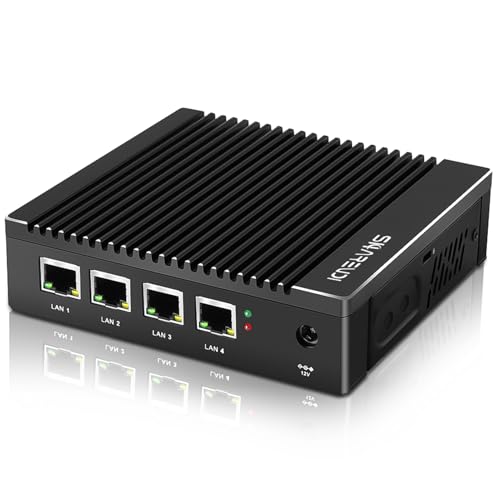
- Four Intel i226-V 2.5GbE ports
- 8GB RAM and 240GB mSATA SSD included
- Fanless with AES-NI support
Best For: A quiet firewall build with memory and storage included
Newer-CPU Pick
MOGINSOK N100 Four-Port Firewall Appliance

- Intel N100 and four 2.5GbE ports
- Fanless with AES-NI and virtualization features
- Confirm included RAM, SSD, and OS
Best For: An N100 firewall and virtualization lab build
Barebones DIY Pick
VNOPN J3710 Fanless Firewall Mini PC

- Four Intel i226 2.5GbE ports
- Fanless with AES-NI support
- No RAM, SSD, or OS included
Best For: A build using separately chosen memory and storage
Best for Storage Flexibility
Glovary J3710 Four-Port Firewall Mini PC

- Four i225V 2.5GbE ports
- 8GB RAM and 128GB SSD included
- mSATA, SATA, and Mini-PCIe connections
Best For: Home labs needing 2.5GbE ports and storage options
Best for Monitor-Back Mounting
VNOPN F12 Four-Port Firewall Mini PC

- Four Intel i226 LAN ports
- VESA bracket included
- Fanless with 8GB RAM and 128GB mSATA SSD
Best For: Space-conscious firewall builds with four LAN connections
Best for Gigabit Networks
EGSMTPC J1900 Fanless Firewall Mini PC

- Four Intel i210 Gigabit ports
- Fanless aluminum chassis
- 4GB RAM and 64GB mSATA SSD included
Best For: Quiet four-port Gigabit firewall projects
Quiet All-Rounder – N100 Fanless Firewall Mini PC
If you want a mini pc for home lab firewall duties that can also host a few lightweight services, this fanless N100 model comes with 8GB RAM, a 128GB SSD, and four 2.5GbE ports. Its RTL8125BG network controllers provide dedicated connections for WAN, LAN, and segmented networks.
Best For: A quiet, ready-to-configure firewall with room for home-lab experiments.
Pros:
- Four 2.5GbE ports support VLAN tagging and link aggregation.
- Fanless N100 design suits silent, continuous operation.
- Includes memory and storage; supports an M.2 NVMe or SATA SSD.
Cons:
- Uses Realtek rather than Intel network controllers.
- SR-IOV is not available, limiting that virtualization option.
It is a versatile choice for routing, VPN work, and modest lab services. Check NIC compatibility with your preferred firewall OS before settling on a configuration.
Basic Gigabit Gateway – J1900 Four-Port Firewall Mini PC
For a mini pc for home lab firewall projects centered on gigabit networking, this J1900 appliance offers four Intel i210 ports, 4GB RAM, and a 64GB mSATA SSD. It arrives with pfSense installed, though you must complete the configuration yourself.
Best For: A straightforward wired firewall or multi-WAN gateway on a gigabit network.
Pros:
- Four Intel i210 Gigabit Ethernet ports allow separate network connections.
- Fanless design keeps the appliance quiet.
- Supports pfSense, OPNsense, and VyOS; pfSense is pre-installed.
Cons:
- Ports top out at 1GbE, unlike the 2.5GbE options here.
- 4GB RAM and a 64GB SSD offer less headroom for additional lab workloads.
Choose it when a dedicated firewall matters more than fast interfaces or extensive expansion. The pre-installed OS saves an installation step, not the work of setting up your network.
Expansion Pick – Glovary J6413 Four-Port 2.5GbE Firewall
This Glovary J6413 is a mini pc for home lab firewall setups that need storage and memory growth alongside four Intel i226V 2.5GbE ports. The listed configuration includes 8GB RAM and a 128GB SSD, with additional slots for future projects.
Best For: A firewall host that may grow into a multi-VM or storage-heavy home lab.
Pros:
- Four Intel i226V 2.5GbE ports suit multi-LAN routing.
- Two DDR4 SO-DIMM slots support up to 64GB RAM.
- Two M.2 NVMe and two SATA 3.0 slots provide substantial storage flexibility.
- Fanless aluminum chassis supports quiet operation.
Cons:
- Four network ports may be insufficient if you need numerous dedicated physical segments.
- The 8GB/128GB configuration may need upgrades to use its expansion potential.
Its strongest case is expandability: you can start with a firewall and add capacity for other lab workloads. If extra physical network ports matter more than storage slots, consider a six-port model instead.
Port-Heavy Pick – J6412 Six-Port 2.5GbE Firewall Mini PC
When a mini pc for home lab firewall use needs several separate physical connections, this J6412 model stands out with six Intel i226-V 2.5GbE ports. It includes 8GB RAM and a 128GB SSD for a starting firewall build, while its fanless aluminum chassis avoids fan noise.
Best For: Multi-WAN routing or several physically separated network segments.
Pros:
- Six 2.5GbE ports offer flexibility for WAN, LAN, and segmented networks.
- J6412 supports AES-NI acceleration for encryption workloads.
- Two DDR4 SO-DIMM slots support up to 32GB RAM.
- Supports pfSense, OPNsense, and VyOS.
Cons:
- pfSense comes pre-installed, but the user must configure it.
- The stated 32GB memory ceiling is lower than the Glovary J6413 model’s 64GB maximum.
Pick this one for its port count rather than maximum memory expansion. Six built-in interfaces make it particularly useful when you want distinct wired paths without adding a USB network adapter.
Ready-to-Configure Pick – Sharevdi J4105 Fanless Firewall Mini PC
If you want a mini pc for home lab firewall experiments without shopping for memory and storage separately, this Sharevdi model includes 8GB DDR4 RAM and a 240GB mSATA SSD. Its four Intel i226-V 2.5GbE ports give you connections for a multi-interface router setup.
Best For: Home lab users who want included hardware for a quiet, dedicated firewall build.
Pros:
- Four Intel i226-V 2.5GbE LAN ports.
- 8GB RAM and 240GB mSATA SSD included.
- Fanless design, AES-NI support, and a VESA mount.
Cons:
- RAM support tops out at 16GB, and HDDs are not supported.
- The J4105 is an older processor than the N100 in this roundup.
The included components reduce setup shopping, but you should still plan to install and configure your preferred firewall software; the notes say it was tested with pfSense and other operating systems, not that a particular firewall installation is included.
Newer-CPU Pick – MOGINSOK N100 Four-Port Firewall Appliance
For a mini pc for home lab firewall use that also leaves room to explore virtualization, the MOGINSOK MGSRN100 pairs an Intel N100 with four Intel i226 2.5GbE ports. The listing title and specifications describe an 8GB DDR5, 128GB SSD configuration, although the bullet copy also describes a barebones version.
Best For: Tinkerers who want an N100-based firewall platform and are comfortable confirming the exact configuration before ordering.
Pros:
- Four Intel i226 2.5GbE network ports and AES-NI support.
- Fanless N100 design with DDR5 memory support.
- Lists VT-x, VT-d, PXE boot, and Wake-on-LAN for lab setups.
Cons:
- Listing details conflict on whether RAM and SSD are included.
- The stated preinstalled operating system refers to a different model number, so the OS should be verified.
This is the most flexible lab-oriented option here on paper, but check the seller’s current RAM, SSD, and OS configuration before buying. The notes also recommend using recent operating-system versions for i226 driver compatibility.
Barebones DIY Pick – VNOPN J3710 Fanless Firewall Mini PC
This VNOPN is a mini pc for home lab firewall builders who already plan to source their own parts. It provides four Intel i226 2.5GbE ports in a fanless chassis, but ships without RAM, storage, or an installed operating system.
Best For: DIY users who want to choose their own DDR3 memory, mSATA SSD, and firewall software.
Pros:
- Four Intel i226 2.5GbE LAN ports.
- Fanless design with AES-NI support.
- VESA mount, two USB 3.0 ports, and VGA and HDMI outputs.
Cons:
- Requires separate RAM, mSATA storage, and OS installation.
- DDR3 RAM capacity is limited to 8GB; HDDs are not supported.
Choose this one for a hands-on, dedicated gateway build rather than a quick setup. Budget for the missing components and check that your chosen firewall OS supports the i226 network controllers.
Best for Storage Flexibility – Glovary J3710 Four-Port Firewall Mini PC
If you want a mini pc for home lab firewall use with room to experiment, this Glovary model combines a quad-core Pentium J3710, four i225V 2.5GbE ports, 8GB of RAM, and a 128GB SSD. Its fanless aluminum chassis suits a quiet network shelf.
Best For: Home lab builders who want four 2.5GbE ports and additional internal storage connections.
Pros:
- Four i225V 2.5GbE ports provide separate physical network connections.
- Includes an mSATA slot, a SATA 3.0 connection with cable, and a Mini-PCIe slot.
- Fanless design and 6.5W-rated processor suit a quiet, compact setup.
Cons:
- Installed 8GB RAM matches the listed maximum, leaving no stated memory upgrade path.
- Uses DDR3L memory rather than a newer memory standard.
Compatibility is listed for OPNsense, Linux, ESXi, and Proxmox, making this a flexible starting point. Choose it primarily for its port count and storage options, not future RAM expansion.
Best for Monitor-Back Mounting – VNOPN F12 Four-Port Firewall Mini PC
For a mini pc for home lab firewall projects where desk space is limited, the VNOPN F12 pairs four Intel i226 LAN ports with a fanless aluminum enclosure and an included VESA bracket. It arrives with 8GB DDR3 RAM and a 128GB mSATA SSD.
Best For: Builders who want a compact, monitor-mounted firewall box with four dedicated LAN connections.
Pros:
- Four Intel i226 LAN ports offer connections for multiple network segments.
- Included VESA bracket supports mounting behind a monitor.
- Fanless chassis avoids fan noise; the J3710 processor is rated at 6.5W TDP.
Cons:
- Installed 8GB RAM is the stated maximum.
- The listing says it does not support an HDD.
The seller reports testing with pfSense, OPNsense, and Linux-based systems. This is a tidy pick if VESA mounting matters more than adding a hard drive later.
Best for Gigabit Networks – EGSMTPC J1900 Fanless Firewall Mini PC
If your mini pc for home lab firewall setup only needs Gigabit Ethernet, this EGSMTPC unit offers four Intel i210 ports and a fanless Celeron J1900 platform. It comes with 4GB DDR3L RAM and a 64GB mSATA SSD for a modest starting configuration.
Best For: Home labs building a quiet, four-port Gigabit firewall without a need for 2.5GbE ports.
Pros:
- Four Intel i210 Gigabit Ethernet ports accommodate multiple wired connections.
- Fanless aluminum chassis runs without fan noise.
- Memory is listed as expandable to 8GB and mSATA storage to 512GB.
- Included VESA bracket provides a mounting option.
Cons:
- Gigabit ports are slower than the 2.5GbE ports on the other two models.
- Ships with less RAM and storage than the other listed configurations.
The listing names pfSense, OPNsense, and OpenWrt among supported firewall systems. Pick it when four reliable wired connections and silent operation matter more than faster Ethernet or higher out-of-box capacity.
How We Picked the Best Mini PC for Home Lab Firewall
We focused on compact systems with multiple wired network ports and configurations relevant to a dedicated firewall or router. The comparison emphasizes listed processor, port count and speed, included RAM and storage, and whether a unit is sold as a barebone. Specifications in product names are a starting point, not a guarantee: verify the seller’s current listing, especially for NIC models, memory, storage, and installed software.
Quick Comparison: Which Configuration Fits?
A dual-Gigabit J1900 box is a straightforward option for a basic WAN-to-LAN setup when Gigabit ports meet your needs. Four-port models give you more physical separation for WAN, LAN, and test networks. If your switches and other equipment support 2.5GbE, the four-port N100 and J6413 configurations offer faster interfaces; the six-port J6412 adds more direct connections. Older J4105 and J3710 models may still suit lighter projects, but compare their price and exact configuration against newer alternatives. Remember that a 2.5GbE port rating does not guarantee equivalent routed, VPN, or inspected throughput.
Key Buying Factors for a Mini PC for Home Lab Firewall
Ports, NICs, and Network Layout
Count the physical networks you want to connect directly, then allow for expansion. Two ports can cover WAN and LAN; four or six are useful for a dedicated lab segment, another WAN connection, or separate management. VLANs can reduce the number of ports you need if your switch supports them. Check the stated controller model—such as Intel i210, i225, or i226—and confirm compatibility with your intended firewall release.
Processor, Memory, and Storage
Basic routing has different demands from VPN encryption, traffic inspection, or multiple services running alongside the firewall. Compare workloads rather than assuming a port count predicts performance. An 8GB RAM and 128GB SSD configuration offers more room than a 4GB and 64GB bundle, but either may be sufficient for a modest installation. A barebone J3710 needs compatible memory and storage purchased separately; confirm which parts, mounting hardware, and power supply are included.
Power, Cooling, and Setup
Fanless designs avoid fan noise, but still need airflow around the case. Check power consumption and heat expectations for an always-on installation. Confirm BIOS options, available installation media, and support for your chosen platform before buying. OPNsense compatibility mentioned in a listing does not necessarily mean OPNsense comes installed or that every feature has been tested.
Who Should Buy Which Mini PC for Home Lab Firewall?
Choose a dual-port J1900 configuration if you want a simple, Gigabit-class learning firewall and do not need separate physical lab interfaces. Pick a four-port 2.5GbE N100 or J6413 configuration when faster connections and a flexible port layout matter; compare included RAM, storage, and price. Consider the six-port J6412 when you specifically need additional physical networks without immediately adding a managed switch. Older J4105 or J3710 units make the most sense when their verified specifications and total cost fit your project. Whichever Mini PC for Home Lab Firewall you choose, match it to your actual internet speed, switch capabilities, and planned services—not just the highest advertised port speed.
