
Finding a mini pc for creators under 1000 means balancing performance, thermals, and upgrade headroom without paying for features you will not use. The best options can handle photo work, light-to-moderate video editing, design apps, and everyday multitasking in a compact footprint.
In this roundup, we focused on mini PCs that offer the strongest value for creative workflows, with attention to CPU speed, integrated graphics, memory capacity, SSD storage, and display support.
Best 10 Mini PC for Creators Under 1000 Picks for 2026
Best for 4-Display Editing

- Ryzen 9 7940HS plus Radeon 780M for creator workloads
- Supports up to four displays via USB4 and HDMI
- 16GB DDR5, 1TB SSD, and 3-year coverage
Best For: Creators and multitaskers who want a compact PC for editing, office work, and multi-monitor setups.
Best for 4K Creators

- Ryzen 7 8745HS delivers desktop-class speed for editing and coding
- USB4, SD card slot, and multi-display support suit creator workflows
- Upgradeable DDR5 RAM and SSD add long-term flexibility
Best For: Creators who need a compact Windows 11 Pro workstation for editing, design, and multi-display productivity.
Best Space-Saving Creator Desktop

- Ryzen R2544 is stronger than many basic entry-level mini PC chips
- 16GB RAM + 256GB SSD keeps everyday creative work moving smoothly
- HDMI, DP, and USB-C make multi-monitor setups easy
Best For: Creators who want a tiny, affordable desktop for light editing, multitasking, and clean desk setups.
Best for Triple-Display Workflows
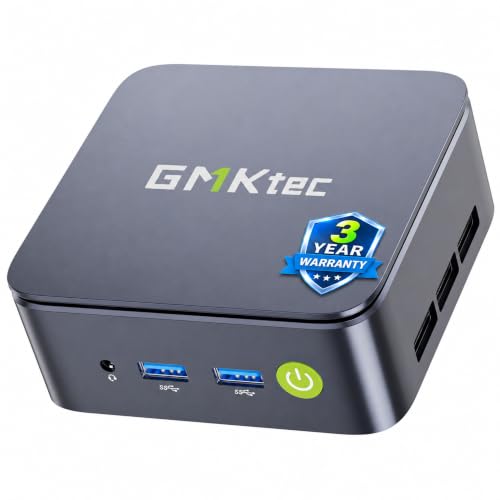
- Triple 4K@60Hz output for multi-monitor creator setups
- Ryzen 5 3500U beats entry-level N-series chips in everyday use
- 2.5GbE LAN and dual-channel 16GB RAM add real utility
Best For: Budget creators and office multitaskers who need a compact, connected desktop.
Best Budget Starter

- 16GB RAM and 256GB SSD for smooth everyday use
- Dual 4K HDMI outputs for a cleaner dual-monitor workflow
- Expandable storage with M.2 and 2.5-inch drive support
Best For: Budget-minded creators who need a compact PC for light editing, planning, and multitasking.
Best for Multitasking
BOSGAME P4 Ultra Ryzen 7 Mini PC

- Ryzen 7 7730U handles everyday creator workloads smoothly
- Triple 4K display support boosts multitasking and editing
- Dual 2.5G LAN and Wi-Fi 6E improve connectivity options
Best For: Creators who want a compact, quiet mini PC for editing, multitasking, and multiple displays.
Best Simple Pick
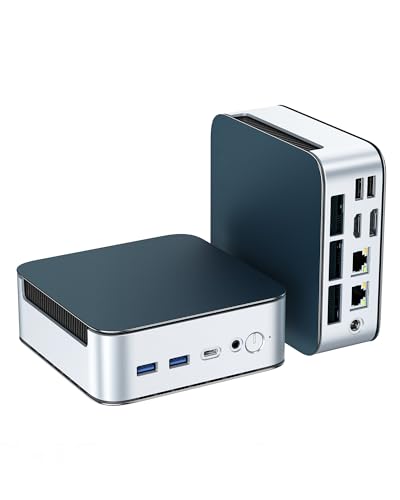
- Triple 4K display support for multi-window creator setups
- 16GB RAM and 512GB NVMe SSD for smooth day-to-day use
- Dual 2.5G LAN, WiFi 6, and upgradeable internals
Best For: Creators and productivity users who need a compact PC with strong multitasking display support.
Best for 4-Display Editing – GEEKOM A7 MAX Ryzen 9 Mini PC
If you want a mini pc for creators under 1000 that can handle editing, multitasking, and a tidy dual- or quad-monitor desk, the GEEKOM A7 MAX is a strong fit. Its Ryzen 9 7940HS, Radeon 780M graphics, 16GB DDR5, and 1TB Gen4 SSD give it the kind of headroom creators need for photo work, 4K timeline editing, and everyday office use.
Best For: Content creators, editors, and power users who want a compact Windows mini PC with strong graphics and multi-display support.
Pros:
- Ryzen 9 7940HS and Radeon 780M deliver solid creator and light gaming performance
- Dual USB4 and dual HDMI outputs support up to four displays
- 16GB DDR5 and 1TB NVMe SSD provide a good starting point with easy upgrade room
- 3-year coverage adds peace of mind for a long-term workspace machine
Cons:
- 16GB RAM may feel tight for heavier professional workloads without an upgrade
- Not the quietest or cheapest option if you only need basic office tasks
- Creators needing top-tier GPU acceleration will still want a dedicated graphics card
For buyers comparing a mini pc for creators under 1000, this model stands out for its balance of CPU power, integrated graphics, and monitor flexibility. It is especially appealing if you want one compact system to cover editing, office work, and light gaming without adding a full tower to your setup.
Best 12-Core Value – KAMRUI P2 Mini PC
The KAMRUI P2 is a strong mini pc for creators under 1000 if you want a compact workstation for light video editing, photo work, multitasking, and everyday productivity. Its Intel i5-12600H, 16GB of RAM, and 512GB SSD give it more headroom than many small systems in this price range, while USB 3.2, Type-C, Wi‑Fi 6, and Bluetooth 5.2 keep the setup flexible.
Best For: Creators who need a compact, affordable desktop for editing, design work, and general content production without stepping into a full tower.
Pros:
- 12-core i5-12600H delivers solid performance for multitasking and creator apps
- 16GB RAM and 512GB SSD are a practical baseline for everyday creative workflows
- Compact design is easy to place on a desk, shelf, or behind a monitor
- Modern connectivity with USB 3.2, Type-C, Wi‑Fi 6, and Bluetooth 5.2
Cons:
- Integrated graphics limit heavier 3D, motion graphics, and GPU-accelerated workloads
- 16GB RAM may feel tight for large creative projects or heavy multitasking
- Storage may need expanding if you keep lots of media files locally
For buyers comparing a mini pc for creators under 1000, the KAMRUI P2 stands out for pairing a strong H-series processor with a simple, space-saving design. It’s a smart pick when you want value and responsiveness more than raw workstation power.
Best for 4K Creators – GEEKOM A8 Ryzen 7 Mini PC
If you want a mini pc for creators under 1000 that can handle real editing work, the GEEKOM A8 is an easy one to shortlist. Its Ryzen 7 8745HS, fast DDR5 memory, and Radeon 780M graphics give it the kind of responsive performance that suits 4K timelines, design apps, and heavy multitasking without taking over your desk.
Best For: Creators who need a compact Windows 11 Pro workstation for editing, design, and multi-display productivity.
Pros:
- Ryzen 7 8745HS with 8 cores and 16 threads for strong creator and multitasking performance
- USB4, dual HDMI, and support for up to four 4K displays or one 8K monitor
- Upgradable DDR5 RAM and PCIe 4.0 SSD for long-term flexibility
- SD card slot and compact 0.5L design for tidy studio setups
Cons:
- 16GB RAM is fine to start, but heavier workflows may benefit from an upgrade
- Integrated graphics are capable, but not a substitute for a discrete GPU in pro 3D work
- Not the cheapest option in the under-$1,000 creator category
For creators who want a compact machine with serious everyday editing muscle, the GEEKOM A8 hits a smart balance of speed, expandability, and connectivity. It stands out as a mini pc for creators under 1000 because it feels workstation-ready without the bulk of a traditional tower.
Best Space-Saving Creator Desktop – KAMRUI Pinova P1 Mini PC
If you want a compact desktop that can handle light creative work without taking over your desk, the KAMRUI Pinova P1 is a practical mini pc for creators under 1000. Its Ryzen R2544 chip, 16GB of RAM, and 256GB SSD give it enough headroom for photo editing, content planning, web work, and everyday multitasking in a tiny footprint.
Best For: Creators, students, and home-office users who need a small, affordable PC for light editing, multi-window workflows, and dual- or triple-display setups.
Pros:
- Ryzen R2544 offers a noticeable step up over common entry-level mini PC chips
- 16GB RAM and 256GB SSD help keep apps and projects responsive
- 4K output via HDMI, DP, and USB-C supports multi-monitor productivity
- Very compact chassis with VESA mount for a cleaner desk setup
Cons:
- Integrated graphics are fine for light creative tasks, not heavy 3D or video work
- 256GB storage may feel tight if you keep large media libraries locally
- WiFi 5 and Bluetooth 4.2 are functional, but not the newest wireless standards
For buyers shopping for a mini pc for creators under 1000, this model makes the most sense as a budget-friendly productivity machine rather than a high-end render box. It’s a smart pick if your workflow is mostly browser tabs, design assets, documents, and moderate editing in a small, tidy setup.
Best for Multi-Monitor Creators – Getorli Ryzen 7 8745HS Mini PC
If you want a mini pc for creators under 1000 that can handle editing, rendering, and a busy multitask workflow, this Getorli model makes a strong case. The Ryzen 7 8745HS and Radeon 780M give it enough headroom for everyday creative work, while USB4, dual 2.5G LAN, and quad 4K display support make it especially useful on a desk full of peripherals and monitors.
Best For: Video editors, streamers, and multitaskers who want compact performance with room for expansion.
Pros:
- Ryzen 7 8745HS with Radeon 780M handles demanding multitasking and light-to-moderate creative work
- Quad 4K display support is ideal for multi-monitor editing and productivity setups
- Dual 2.5G LAN, USB4, WiFi 6, and Bluetooth 5.3 provide a strong connectivity mix
- Upgradeable RAM and storage help it scale with larger projects and libraries
Cons:
- Ships with only 16GB of single-stick RAM, so dual-channel upgrades are recommended
- Integrated graphics are capable, but not a substitute for a dedicated GPU in heavy 3D work
As a mini pc for creators under 1000, this Getorli stands out more for its balanced performance and expansion options than raw graphics power. It is a practical pick if you need a compact workstation that can grow with your workflow.
Best for Triple-Display Workflows – GMKtec G10 Ryzen 5 Mini PC
If you want a compact, affordable mini pc for creators under 1000 that can handle light editing, multitasking, and a busy multi-monitor setup, the GMKtec G10 is a practical pick. Its Ryzen 5 3500U and Vega 8 graphics won’t replace a high-end workstation, but they do offer solid everyday performance, fast storage, and the connectivity creators actually use.
Best For: Budget creators, home-office users, and multitaskers who need triple 4K display support and fast wired networking.
Pros:
- Ryzen 5 3500U and Vega 8 deliver better everyday performance than entry-level N100/N97 systems
- Triple 4K@60Hz output is great for timelines, dashboards, spreadsheets, and multi-window workflows
- 16GB RAM and 512GB SSD come preinstalled, with upgrade room for more memory and storage
- 2.5GbE LAN plus USB-C, DP, and HDMI make it flexible for desk setups and network-heavy tasks
Cons:
- Not ideal for heavy 4K editing, 3D work, or demanding GPU rendering
- WiFi 5 is behind newer WiFi 6/6E systems
- Older Ryzen 5 3500U silicon is capable, but not cutting-edge
For creators who care more about value, monitor support, and smooth multitasking than raw workstation power, this is a smart mini pc for creators under 1000. It hits the sweet spot for everyday productivity and light creative work without taking up much desk space.
Best for Multi-Display Creators – Getorli Ryzen 7 H 255 Mini PC
If you want a mini pc for creators under 1000 that leans hard into multitasking, this Getorli model is built around an 8-core Ryzen 7 H 255, 32GB of DDR5 memory, and a fast 1TB PCIe 4.0 SSD. It’s a strong fit for editing, design work, and mixed productivity setups where responsiveness and display support matter more than flashy extras.
Best For: Creators, traders, and power users who want compact desktop-class performance with quad-display support.
Pros:
- Ryzen 7 H 255 CPU with 8 cores and boost speeds up to 4.9GHz
- 32GB DDR5 RAM plus 1TB PCIe 4.0 SSD for fast load times and smooth multitasking
- Supports up to four independent displays for creative and productivity workflows
- Dual 2.5G LAN, WiFi 6, and USB-C connectivity add flexibility
Cons:
- Not ideal for locally running or deploying large language models
- Integrated graphics are fine for light gaming, not a full workstation GPU replacement
Overall, this is a practical mini pc for creators under 1000 if your priority is CPU speed, memory headroom, and a clean multi-monitor setup. It makes more sense for editing, design, and productivity than for GPU-heavy production work.
Best Budget Starter – KAMRUI AK1PLUS Mini PC
If you want a practical mini pc for creators under 1000 for light editing, content planning, and everyday multitasking, the KAMRUI AK1PLUS is a straightforward value pick. It keeps costs low while still giving you 16GB of RAM, fast SSD storage, and dual 4K monitor support for a more productive desk setup.
Best For: Budget-minded creators, students, and home-office users who need a compact PC for web work, meetings, and light creative tasks.
Pros:
- 16GB RAM and a 256GB SSD help keep everyday apps responsive.
- Dual 4K HDMI outputs are useful for multitasking across two displays.
- Expandable storage supports both M.2 and 2.5-inch drive upgrades.
- Compact, quiet design fits easily on small desks and media setups.
Cons:
- Intel Celeron performance is fine for basics, but not for heavy creative workloads.
- Not ideal for demanding video editing, 3D work, or large batch exports.
For buyers comparing a mini pc for creators under 1000, this model makes the most sense when you value affordability, dual-monitor productivity, and simple upgrade options over raw horsepower. It is better suited to light creator workflows than intensive production work.
Best for Multitasking – BOSGAME P4 Ultra Ryzen 7 Mini PC
If you want a mini pc for creators under 1000 that can handle editing, heavy browser tabs, and a multi-monitor workflow, the BOSGAME P4 Ultra is a strong pick. Its Ryzen 7 7730U, 16GB RAM, and 1TB SSD give it a practical balance of speed and storage for everyday creative work without taking up much desk space.
Best For: Creators and power users who need a compact desktop for light-to-moderate editing, multitasking, and triple-screen setups.
Pros:
- Ryzen 7 7730U delivers solid 8-core/16-thread performance for multitasking and productivity
- Triple 4K display support is great for editors, traders, and workflow-heavy setups
- Dual 2.5G LAN plus Wi-Fi 6E makes it flexible for fast wired and wireless networking
- 1TB SSD and upgradeable memory/storage help it scale with bigger projects
Cons:
- Integrated graphics are fine for creative acceleration, but not ideal for demanding 3D work
- 16GB RAM is workable out of the box, though heavier creators may want to upgrade sooner
Overall, this BOSGAME model is a smart value option if you want a mini pc for creators under 1000 with enough performance for serious multitasking and a tidy triple-monitor desk setup. It is especially appealing if connectivity, storage, and quiet compact design matter as much as raw speed.
Best Simple Pick – Glorlin Ryzen 3 5300U Mini PC
If you want a practical mini pc for creators under 1000 that focuses on multitasking rather than raw workstation power, the Glorlin Ryzen 3 5300U is a smart fit. It pairs 16GB of RAM and a 512GB NVMe SSD with triple 4K display support, making it useful for creators who keep multiple apps, timelines, dashboards, or reference windows open at once.
Best For: Content creators, streamers, and productivity users who want a compact dual-use PC with strong display output and easy upgrade potential.
Pros:
- Triple 4K output via HDMI, DisplayPort, and USB-C for spacious multitasking
- 16GB RAM and 512GB NVMe SSD deliver responsive everyday performance
- Expandable to 64GB memory and 4TB storage for future growth
- Dual 2.5G LAN plus WiFi 6 and Bluetooth 5.3 improve connectivity
Cons:
- Ryzen 3 5300U is better for light creation work than heavy rendering
- Integrated graphics are fine for casual gaming, not demanding 3D workloads
- Compact cooling is efficient, but sustained loads may not match larger systems
For buyers comparing a mini pc for creators under 1000, this Glorlin model stands out more for flexible display support, network speed, and upgrade room than for high-end creative horsepower. That makes it a solid desk-friendly option for editing, streaming, and everyday content workflows where space and connectivity matter.
How We Picked the Best Mini PC for Creators Under 1000
To choose the best Mini PC for Creators Under 1000, we prioritized systems that offer a practical mix of processor performance, at least 16GB of memory, fast SSD storage, and modern connectivity. We also gave extra weight to upgradeability, because creators often benefit from adding more RAM or storage later.
We favored models that can comfortably support common creative tasks such as Adobe Photoshop, Lightroom, Illustrator, DaVinci Resolve light editing, streaming, content planning, and large-browser multitasking. Good port selection, 4K or multi-display support, and reliable wireless/network options were also important.
Quick Comparison
For pure CPU strength, newer Ryzen 7 and Ryzen 9 H-series options are the most attractive picks in this budget. If you need a smoother experience in creative apps that benefit from stronger integrated graphics, systems with Radeon 780M-class graphics stand out. For general office-plus-creation use, midrange Intel Core H-series and Ryzen U-series models can still be excellent value.
If your workflow is mostly photo editing, content management, and light design, you may not need the fastest chip on the list. If you edit video, run several apps at once, or use multiple high-resolution displays, it is smarter to invest in more memory, faster storage, and better cooling.
Key Buying Factors for a Mini PC for Creators Under 1000
Processor and Graphics
Look for modern 6-core to 8-core CPUs as a baseline. For creative work, higher sustained performance matters more than peak boost claims. Integrated graphics are fine for many creator workloads, but stronger iGPUs help with acceleration, display handling, and some editing tasks.
Memory and Storage
16GB RAM is the minimum comfortable starting point, but 32GB is a better long-term choice if you work with large files or keep many apps open. A 1TB NVMe SSD is ideal for creative libraries, project files, and scratch space, and upgrade-friendly designs are a plus.
Ports and Display Support
Creators should check for USB-C video output, HDMI, and support for at least two displays. If you use fast external storage or capture devices, prioritize faster USB standards and enough rear ports to avoid constant swapping.
Thermals and Noise
Compact systems can throttle if cooling is weak. A good Mini PC for Creators Under 1000 should maintain performance during longer exports or batch tasks without becoming excessively loud.
Who Should Buy Which Mini PC for Creators Under 1000?
If you want the best all-around creator performance, choose a higher-end Ryzen 7 or Ryzen 9 system with 16GB to 32GB RAM and 1TB SSD storage. If your work is mostly office tasks, web content, and light creative apps, a value-focused midrange model may be enough and leave room in your budget for a second monitor or external SSD.
If you are editing video regularly, lean toward the fastest CPU and largest memory configuration you can get within budget. If you mainly need a compact workstation for photo editing, design, and multitasking, a balanced system with strong upgrade options is often the smartest buy.
