
Choosing the right mini pc for creators for photo editing comes down to more than raw speed. You need enough memory, fast storage, and reliable graphics support to keep Lightroom, Photoshop, and large image libraries moving smoothly.
This roundup focuses on compact systems that balance performance, expandability, and display flexibility so you can edit efficiently without giving up desk space.
Best 9 Mini PC for Creators for Photo Editing Picks for 2026
Best for Creator Workflows

- Ryzen 7 8745HS + Radeon 780M for strong creative performance
- 16GB DDR5 RAM and 1TB SSD keep editing workflows responsive
- Dual USB4, SD card slot, and multi-display support boost flexibility
Best For: Creators who want a compact, upgradeable mini PC for photo editing and light video work.
Best for AI-Powered Editing

- Core Ultra 9 285H with Arc 140T graphics for fast creative workloads
- 32GB DDR5 RAM and 1TB Gen 4 SSD for smooth multitasking
- WiFi 7, USB4, and quad-display support for a flexible creator setup
Best For: Creators who want a compact workstation for photo editing and light AI-assisted editing.
Best for Multi-Monitor Editing
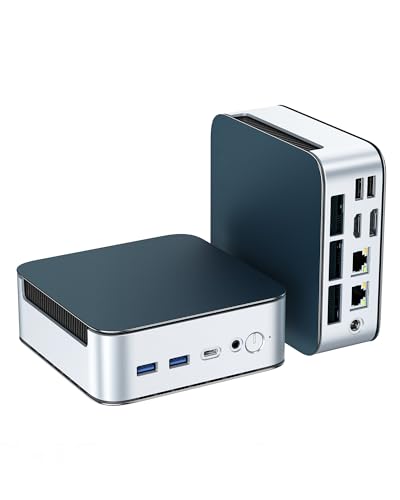
- Triple 4K display support for a cleaner editing setup
- 16GB RAM and 512GB NVMe SSD for responsive everyday use
- Expandable storage and memory for future upgrades
Best For: Creators who want a compact, budget-friendly PC for light photo editing and multi-monitor productivity.
Best AI Workstation

- Ryzen AI 9 HX 370 with Radeon 890M graphics
- 32GB DDR5 RAM and 1TB SSD included
- Dual USB4, dual HDMI 2.1, and Wi‑Fi 7
Best For: Photo editors and creators who want a compact, high-performance Windows mini PC.
Best for Raw Power
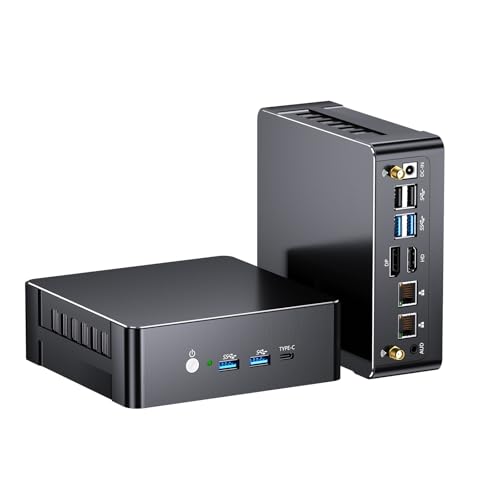
- Core i9-12900H is built for fast editing and multitasking
- 64GB DDR5 RAM and 2TB SSD give strong creative headroom
- Triple-display output suits a multi-panel photo workflow
Best For: Creators who want a compact, high-spec workstation for photo editing and multitasking.
Best for Photo Editing

- Ryzen 9 7940HS for fast editing and multitasking
- Radeon 780M supports light creative and 1080p gaming
- USB4, HDMI, and 1TB SSD fit modern creator setups
Best For: Creators who need a compact, quiet desktop for photo editing and light content work.
Best with Extra Features
GMKtec M6 Ultra Ryzen 7640HS Mini PC

- Strong Ryzen 5 7640HS performance for photo editing
- 32GB DDR5 RAM and 1TB SSD included
- Triple-display support with USB4 and 2.5GbE
Best For: Creators who want a compact, well-connected mini PC for photo editing and multitasking.
Best for Photo Editing Multitaskers

- Strong Ryzen 7 PRO performance for editing workflows
- 32GB DDR5 and 1TB SSD give solid project-room headroom
- Supports four 4K displays plus dual 2.5G LAN
Best For: Photo editors and creators who want a compact, upgrade-friendly desktop for multitasking and multi-monitor work.
Best for Creator Workflows – GEEKOM A8 Mini PC
The GEEKOM A8 is a strong mini pc for creators for photo editing if you want desktop-class speed in a tiny footprint. Its Ryzen 7 8745HS, Radeon 780M graphics, and fast DDR5/PCIe 4.0 storage make it a practical fit for Lightroom, Photoshop, and other multitasking creative apps.
Best For: Creators who need a compact Windows 11 Pro mini PC that can handle photo editing, light-to-moderate video work, and multi-monitor productivity.
Pros:
- Ryzen 7 8745HS and Radeon 780M deliver strong everyday creative performance
- 16GB DDR5 RAM and 1TB NVMe SSD provide fast load times and smooth multitasking
- Dual USB4, SD card slot, and quad-display support are ideal for creator setups
- Upgradable memory and storage help extend its useful lifespan
Cons:
- 16GB RAM is fine for photo editing, but heavy pro workflows may want an upgrade
- Integrated graphics are capable, but not a substitute for a discrete GPU
Overall, the A8 hits a useful sweet spot for a mini pc for creators for photo editing: compact, fast, well-connected, and ready for serious day-to-day creative work without taking over your desk.
Best for AI-Powered Editing – GEEKOM IT15 Mini PC
If you want a mini pc for creators for photo editing that can also handle heavier creative workloads, the GEEKOM IT15 is a strong all-around pick. Its Intel Core Ultra 9 285H, Arc 140T graphics, and fast DDR5 memory give it enough headroom for Photoshop, Lightroom, batch exports, and multitasking with other creative apps open.
Best For: Creators who want a compact workstation for photo editing, light video work, and AI-assisted creative tasks.
Pros:
- Core Ultra 9 285H and Arc 140T graphics provide strong speed for editing and AI tools
- 32GB DDR5 RAM and 1TB Gen 4 SSD support smooth multitasking and fast file access
- WiFi 7, 2.5GbE, and USB4 make it easy to build a modern creator desk setup
- Dual HDMI plus dual USB4 ports support up to four displays for more workspace
Cons:
- More power than many casual editors need, so the price may be overkill for basic use
- Integrated graphics are capable, but not ideal for demanding 3D or high-end GPU workflows
This is a compelling mini pc for creators for photo editing if you want workstation-like responsiveness in a small footprint. It is especially appealing for editors who also do AI-assisted design, large-file multitasking, or want room for future expansion.
Best for Multi-Monitor Editing – Glorlin Ryzen 5300U Mini PC
If you want a mini pc for creators for photo editing that stays compact without giving up workspace, the Glorlin Ryzen 5300U is a sensible pick. It combines 16GB of RAM, a fast NVMe SSD, and support for three 4K displays, so you can keep editing tools, reference images, and file browsers open at once.
Best For: Creators who need a small, affordable desktop for light-to-moderate photo editing, multitasking, and a multi-monitor setup.
Pros:
- Triple 4K output via HDMI, DisplayPort, and USB-C for a flexible editing workspace
- 16GB RAM and 512GB NVMe SSD deliver quick everyday responsiveness
- Dual 2.5G LAN, WiFi 6, and Bluetooth 5.3 add strong connectivity
- Expandable to 64GB RAM and 4TB storage for future growth
Cons:
- Ryzen 3 5300U is fine for light editing, but not ideal for heavy creative workloads
- Integrated graphics are not built for serious GPU-accelerated effects or 3D work
Overall, this is a practical mini pc for creators for photo editing if you value a small footprint, multiple monitors, and easy day-to-day responsiveness over raw rendering power. It makes more sense for Lightroom-style workflows and general creative productivity than for demanding pro-level editing.
Best AI Workstation – GEEKOM A9 Max Mini PC
If you want a mini pc for creators for photo editing that also handles AI tools, the GEEKOM A9 Max is a serious desktop-class option in a tiny footprint. Its Ryzen AI 9 HX 370, fast DDR5 memory, and Radeon 890M graphics give Photoshop, Lightroom, and other creative apps the speed and responsiveness power users expect.
Best For: Photo editors, content creators, and power users who want a compact Windows mini PC with strong AI acceleration and enough graphics muscle for multitasking.
Pros:
- Ryzen AI 9 HX 370 and Radeon 890M deliver strong performance for editing and creative workloads
- 32GB DDR5 RAM and 1TB SSD provide a solid out-of-box setup for large files and multitasking
- Dual USB4, dual HDMI 2.1, and 8K multi-display support are great for creator desks
- Wi‑Fi 7, dual 2.5GbE, and Windows 11 Pro make it ready for modern workflows
Cons:
- More expensive than basic mini PCs
- Overkill if you only need light photo editing or office tasks
- Compact size means less room for easy internal upgrades than a full tower
As a mini pc for creators for photo editing, the A9 Max stands out when you want portable form factor without giving up serious CPU, GPU, and AI headroom. It is especially compelling for creators who edit high-resolution images, run Adobe apps, and keep multiple displays connected.
Best for Raw Power – Thdeukoty i9 Mini PC
If you want a mini pc for creators for photo editing, this Thdeukoty model stands out for its Core i9-12900H CPU, 64GB of DDR5 memory, and fast 2TB SSD. It’s a strong fit for handling large Lightroom catalogs, multitasking across creative apps, and keeping a compact desktop footprint.
Best For: Creators who want high-end CPU performance, lots of memory, and plenty of storage in a tiny Windows 11 Pro machine.
Pros:
- Core i9-12900H offers strong performance for editing, batching, and multitasking
- 64GB DDR5 RAM and 2TB SSD provide generous headroom for photo libraries and apps
- Triple-display support is useful for editing timelines, palettes, and reference work
- WiFi 6E, dual LAN, and USB4 add flexible connectivity for a clean studio setup
Cons:
- Integrated graphics are fine for photo work, but not ideal for heavy 3D or GPU rendering
- Brand recognition and long-term software support may matter more to some buyers
- Not the smallest or simplest option if you only need basic everyday editing
This is a compelling mini pc for creators for photo editing if you value speed, storage, and multitasking over portability-first design. It’s especially appealing for users who want a compact workstation that can grow with a demanding creative workflow.
Best for Photo Editing – GEEKOM A7 MAX Mini PC
If you want a compact workstation that can handle Lightroom, Photoshop, and light video timelines, the GEEKOM A7 MAX is a strong mini pc for creators for photo editing. Its Ryzen 9 7940HS, Radeon 780M graphics, DDR5 memory, and 1TB Gen4 SSD give it the speed and responsiveness most creators need for day-to-day editing and multitasking.
Best For: Creators who want a small, quiet desktop for photo editing, light 4K work, and a multi-monitor setup without adding a full tower.
Pros:
- Ryzen 9 7940HS and Radeon 780M deliver strong creative-app performance in a compact chassis
- 16GB DDR5 and 1TB Gen4 SSD provide fast everyday responsiveness, with easy upgrade headroom
- Dual USB4 plus dual HDMI supports up to four displays for an efficient editing workspace
- Quiet cooling and a 3-year coverage plan add peace of mind for long work sessions
Cons:
- 16GB RAM is usable for photo editing, but heavy multitasking may benefit from an upgrade
- Integrated graphics are good for editing, but not ideal for demanding GPU-accelerated 3D work
Overall, this is a practical mini pc for creators for photo editing if you want desktop-class speed, strong connectivity, and a tidy setup without spending on a bulky workstation.
Best for Multitasking – Getorli Ryzen 7 Mini PC
If you want a mini pc for creators for photo editing, the Getorli Mini PC is built around a Ryzen 7 H 255 chip, 32GB of DDR5 memory, and a fast 1TB PCIe 4.0 SSD. That combination gives you the headroom for large image files, multiple apps, and smoother switching between editing tools without taking up much desk space.
Best For: Creators who need a compact desktop with strong multitasking performance for photo editing, design work, and light video work.
Pros:
- Ryzen 7 H 255 delivers solid 8-core, 16-thread performance for creative workloads
- 32GB DDR5 RAM and 1TB PCIe 4.0 SSD support fast editing and quick project loading
- Dual 2.5G LAN, WiFi 6, and quad-display output make it versatile for a busy workstation
- Compact cooling system is designed to hold performance during long sessions
Cons:
- Integrated graphics are fine for editing, but not ideal for demanding 3D or heavy gaming
- Not recommended for running or deploying large language models locally
- More power than casual users need, so it may be overkill for simple browsing and office tasks
As a mini pc for creators for photo editing, this Getorli model stands out more for speed and multitasking than for portability alone. It is a practical pick if you want a small workstation that can keep up with layered edits, batch work, and a clutter-free desk.
Best with Extra Features – GMKtec M6 Ultra Ryzen 7640HS Mini PC
The GMKtec M6 Ultra is a strong mini pc for creators for photo editing if you want a compact desktop with enough CPU and memory headroom for Lightroom, Photoshop, and heavy browser workflows. The Ryzen 5 7640HS, 32GB DDR5 RAM, and 1TB SSD give it a responsive feel for catalog work, while the triple-display support makes it easier to keep tools, previews, and reference windows open at once.
Best For: Creators who want a small, fast Windows mini PC for photo editing, multitasking, and dual- or triple-monitor setups.
Pros:
- Ryzen 5 7640HS delivers strong everyday editing performance in a compact chassis
- 32GB DDR5 RAM and 1TB SSD are a solid base for large photo libraries and active projects
- Triple-display output helps streamline editing, sorting, and reference workflows
- WiFi 6, 2.5GbE LAN, and USB4 add flexible connectivity for a modern desk setup
Cons:
- Integrated graphics are fine for photo editing, but not ideal for demanding 3D or pro video work
- Storage and memory are good out of the box, but power users may still want to upgrade later
For a mini pc for creators for photo editing, this model stands out more for balance than raw workstation muscle: it is quick, quiet-friendly, and well equipped for a tidy multi-monitor desk. If your workflow is mostly editing, organizing, and exporting still images, the M6 Ultra offers a practical mix of speed and value.
Best for Photo Editing Multitaskers – Getorli Ryzen 7 PRO Mini PC
If you need a mini pc for creators for photo editing, this Getorli model is built around fast Ryzen 7 PRO performance, 32GB of DDR5 memory, and a speedy 1TB PCIe 4.0 SSD. That combination makes it a practical choice for Adobe apps, large RAW libraries, and smoother switching between editing, browsing, and export jobs.
Best For: Photo editors and content creators who want a compact Windows desktop with strong multitasking headroom, upgrade options, and multi-monitor support.
Pros:
- Ryzen 7 PRO 8845HS and Radeon 780M deliver strong everyday editing and preview performance.
- 32GB DDR5 plus a 1TB PCIe 4.0 SSD gives it a good starting point for large photo projects.
- Dual USB4, HDMI 2.1, and DP 1.4 support up to four 4K displays.
- Dual 2.5G LAN and WiFi 6 add flexible, stable connectivity for studio setups.
Cons:
- Integrated graphics are capable, but not ideal for heavy 3D or top-tier GPU workloads.
- Higher-end upgrade potential may be more than some photo-only users actually need.
Overall, this is a compelling mini pc for creators for photo editing if you want desktop-class responsiveness in a small footprint. It balances speed, expandability, and monitor flexibility well for serious editing work without moving into a full tower.
How We Picked the Best Mini PC for Creators for Photo Editing
For a Mini PC for Creators for Photo Editing, we prioritized sustained CPU performance, at least 16GB of RAM, NVMe SSD storage, and modern connectivity for fast peripherals and multi-monitor setups. We also looked at upgrade paths, thermal design, and port selection because these matter when you work with large RAW files and layered edits.
Quick Comparison
In general, Ryzen 7 and Ryzen 9-class systems are the safest all-around choice for photo editing, while Intel Core Ultra and higher-end AI-focused chips can be appealing if you also want strong multitasking and media handling. Systems with 32GB RAM are better for heavier catalogs, large panoramas, or frequent multitasking, while 64GB models are ideal for advanced workflows.
Key Buying Factors for Mini PC for Creators for Photo Editing
CPU Performance
Look for a modern 8-core or better processor with strong single-core speed. Photo editing often benefits from both quick responsiveness and enough multicore power for exports, imports, and batch processing.
Memory and Upgradeability
16GB is workable for lighter editing, but 32GB is the better long-term target. If you regularly use multiple Adobe apps, large catalogs, or high-resolution images, choose a model that can expand further.
Storage Speed and Capacity
An NVMe SSD helps the system boot quickly and keeps scratch disk performance responsive. For creative work, 1TB is a practical starting point, especially if your photo library lives locally.
Graphics and Display Support
Integrated graphics are usually enough for photo editing, but they should still support multiple high-resolution displays and modern output standards. If color-critical work matters, make sure the mini PC can drive the monitor setup you want.
Ports and Connectivity
USB4, fast USB-C, HDMI, DisplayPort, Wi-Fi 6 or Wi-Fi 7, and 2.5GbE can all improve workflow flexibility. These features help with external drives, card readers, cloud syncing, and multi-display editing stations.
Who Should Buy Which Mini PC for Creators for Photo Editing?
If you want the best value, a Ryzen 7-based mini PC with 32GB RAM and a 1TB SSD is usually the sweet spot. If you need the most headroom for future-proofing, choose a Ryzen 9 or Intel Ultra 9 system with stronger memory and connectivity. For lighter editing, a more affordable 16GB option can still do the job if you mainly work with single-image edits and modest file sizes.
Overall, the best choice depends on whether you prioritize speed, expandability, or budget. For most buyers, the safest path is a balanced mini PC with plenty of RAM, fast storage, and enough display output for a clean, productive editing workspace.
