
When it comes to enhancing your laptop experience, having the right mini keyboard can make all the difference. You want something compact yet functional, tailored to your specific needs. From wired options like the Macally Small USB Keyboard to versatile foldable models, there’s a variety of choices out there. Curious about which keyboards stand out and how to choose the perfect one for you? Let’s explore the top contenders.
Macally Small USB Wired Keyboard for Mac and Windows
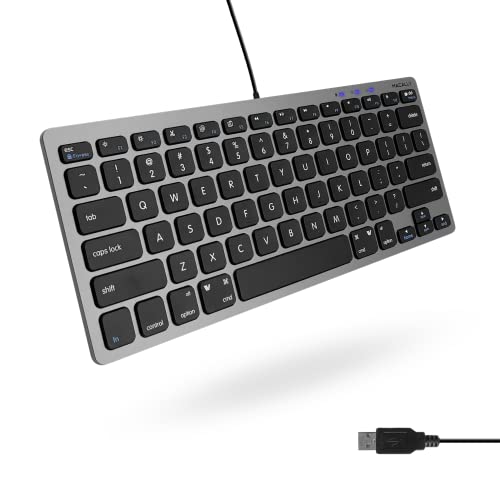
If you’re looking for a compact and versatile keyboard that works seamlessly with both Mac and Windows laptops, the Macally Small USB Wired Keyboard is an excellent choice. With 78 scissor keys and 13 dedicated shortcut keys, it enhances your typing experience while saving valuable desk space. Its true plug-and-play functionality means you can set it up effortlessly, thanks to a 47-inch cable that offers comfortable connectivity. Whether you’re editing documents or controlling your media, the multimedia hotkeys cater to both operating systems. Plus, with a 2-year warranty and lifetime tech support, you’re assured of long-lasting quality and assistance.
Best For: Anyone seeking a compact and efficient keyboard that is compatible with both Mac and Windows systems.
Pros:
- Compact design saves desk space and enhances portability.
- True plug-and-play functionality enables easy setup.
- Includes 13 shortcut keys for Mac and multimedia hotkeys for Windows for added convenience.
Cons:
- Wired connection may limit mobility compared to wireless options.
- Limited key travel may not suit all typing preferences.
- Lacks additional customizable features found in some higher-end keyboards.
ProtoArc Foldable Keyboard and Mouse Combo (XKM01)

The ProtoArc Foldable Keyboard and Mouse Combo (XKM01) is an excellent choice for professionals on the go, offering a true full-size keyboard experience in a compact design. Weighing just 2.02 pounds, it easily fits into your laptop sleeve or bag. The 105-key folding keyboard boasts whisper-quiet scissor switches, ensuring a comfortable typing experience. With its pro-grade mouse featuring adjustable DPI modes, you’ll enjoy enhanced precision. Plus, the hard carrying case includes a stand for your device. Seamlessly switch between three devices, and enjoy impressive battery life with auto-sleep features, making it perfect for remote work or business travel.
Best For: Professionals who require a portable and efficient keyboard and mouse setup for travel and remote work.
Pros:
- Compact and Lightweight: Weighs only 2.02 pounds, easily fitting into laptop sleeves or bags for travel convenience.
- Quiet Typing Experience: Whisper-quiet scissor switches provide a comfortable and focused typing environment.
- Multi-Device Connectivity: Seamlessly switch between three devices with 2.4G and Bluetooth support.
Cons:
- No Adjustable Feet: The keyboard lacks adjustable feet for customizing typing angle.
- No Backlight: Absence of backlighting may be a drawback for users who work in low-light environments.
- Nonstandard Batteries: Uses nonstandard batteries, which may be less convenient for replacements.
TECKNET 2.4G Wireless Mini Compact Keyboard

Looking for a compact and portable keyboard that enhances your laptop experience? The TECKNET 2.4G Wireless Mini Compact Keyboard is your perfect match. Measuring just 11.5 x 4.9 inches and weighing only 6.7 ounces, it’s easy to transport. Enjoy a quiet typing experience with chocolate keycaps and reduced key travel that minimizes finger fatigue. You’ll appreciate the stable connection and impressive battery life of up to 12 months. Plus, with dedicated customer support and a 36-month warranty, you’ll feel confident in your purchase. This keyboard is ideal for both travel and home office setups, making it incredibly versatile.
Best For: Individuals seeking a compact, portable keyboard that offers a quiet typing experience for both travel and home office use.
Pros:
- Compact and lightweight design makes it easy to carry and store.
- Quiet chocolate keycap design provides a comfortable typing experience with minimal noise.
- Impressive battery life of up to 12 months ensures long-term usability without frequent battery changes.
Cons:
- Some users report design flaws, particularly with key layout that may affect usability.
- Batteries are not included, requiring an additional purchase for use.
- Limited compatibility with certain devices may restrict user options.
TECKNET Wireless Keyboard and Mouse Combo

For those who crave a clutter-free workspace, the TECKNET Wireless Keyboard and Mouse Combo is an ideal choice. Its 2.4 GHz wireless technology guarantees a stable connection up to 15 meters away, while the compact design makes it easy to transport. With 12 multimedia hotkeys, you can quickly access music and emails. Enjoy a quiet typing experience, thanks to the ultra-quiet keyboard and mouse. Both devices are durable, designed to withstand over 8 million presses. Plus, they’re compatible with various Windows versions and Android smart TVs, making them a versatile addition to your setup.
Best For: Individuals seeking a wireless, quiet, and compact keyboard and mouse solution for their home or office workspace.
Pros:
- Convenient wireless connectivity with a range of up to 15 meters.
- Durable design capable of enduring over 8 million key presses.
- Quiet operation enhances the typing experience without disturbing others.
Cons:
- Requires 2 AAA batteries that are not included with the purchase.
- Limited to Windows and Android compatibility, excluding other operating systems.
- Compact design may not suit users who prefer larger keyboards or mice.
Fosmon Mini Bluetooth Keyboard with Touchpad (Compatible with Apple TV, PS4, PS5, and More)

Experience seamless control with the Fosmon Mini Bluetooth Keyboard, ideal for anyone who values portability and versatility across multiple devices. This compact keyboard features a QWERTY layout and a responsive touchpad, making it perfect for use with Apple TV, PS4, PS5, and more. With Bluetooth connectivity up to 33 feet, you can easily connect to your smartphone or laptop. The built-in rechargeable battery lasts up to 10 days and charges via USB-C. Weighing just 2.65 ounces, it’s lightweight and easy to carry. Enjoy backlit keys for low-light environments and a tactile typing experience that enhances your productivity.
Best For: Those seeking a portable and versatile keyboard for seamless control across devices like Apple TV, PS4, and smartphones.
Pros:
- Lightweight and compact design, making it easy to carry.
- Backlit keyboard suitable for low-light environments.
- Responsive touchpad for easy cursor navigation.
Cons:
- Potential Bluetooth connectivity issues reported by users.
- Trackpad sensitivity may not meet everyone’s expectations.
- Smaller arrow keys may be inconvenient for some users.
Rii i4 Mini Bluetooth Keyboard with Touchpad

The Rii i4 Mini Bluetooth Keyboard with Touchpad is an ideal choice for those who crave portability without sacrificing functionality. This compact keyboard supports Bluetooth 4.0 and 2.4GHz RF connections, making it compatible with smartphones, tablets, and laptops across various operating systems. With a built-in rechargeable battery, it’s perfect for home theater use, letting you browse and play games from the couch. You can easily switch to Bluetooth mode and enjoy a clutter-free setup. Plus, with a 12-month quality guarantee and 30-day money-back warranty, you can purchase with confidence. The Rii i4 is a versatile accessory for any tech-savvy user.
Best For: The Rii i4 Mini Bluetooth Keyboard with Touchpad is best for users seeking a portable and versatile keyboard solution for their devices, particularly for home theater and gaming.
Pros:
- Compact and lightweight design makes it easy to carry and perfect for travel.
- Built-in rechargeable battery provides convenience for extended use without the need for constant battery replacements.
- Compatibility with multiple operating systems allows seamless connection with a wide range of devices including smartphones, tablets, and PCs.
Cons:
- Touchpad may be less responsive compared to dedicated touchpads on larger keyboards.
- Limited range of Bluetooth connectivity compared to some larger wireless keyboards.
- Requires occasional charging, which may be inconvenient for heavy users.
TECKNET Ergonomic Wireless Keyboard for Laptop

If you’re seeking an ergonomic solution for long typing sessions, the TECKNET Ergonomic Wireless Keyboard is an excellent choice. Its full-size layout and comfortable palm rest, designed at an 8° angle, help prevent wrist strain. Weighing just 2.03 pounds, it’s portable and features a 2.4G wireless connection with a 10m range. You’ll appreciate the noise-reducing keys, which keep your typing quiet. With adjustable feet and eight shortcut keys, it enhances functionality. Compatible with various systems, it even boasts smart power-saving features. Plus, you’ll benefit from a 12-month warranty, ensuring peace of mind with your purchase.
Best For: Those who spend long hours typing and seek a comfortable, quiet keyboard to reduce wrist strain and enhance productivity.
Pros:
- Ergonomic design with a comfortable palm rest and adjustable feet for optimal typing angle.
- Noise-reducing keys that minimize typing sound by up to 90%, creating a quieter work environment.
- Compatible with multiple operating systems and equipped with smart power-saving features to extend battery life.
Cons:
- Some users find the wrist rest to be rigid and uncomfortable.
- Requires 2 AAA batteries, which are not included.
- Best Sellers Rank at #765 may indicate it’s less popular compared to other keyboards on the market.
MCSaite Super Mini Wired Keyboard
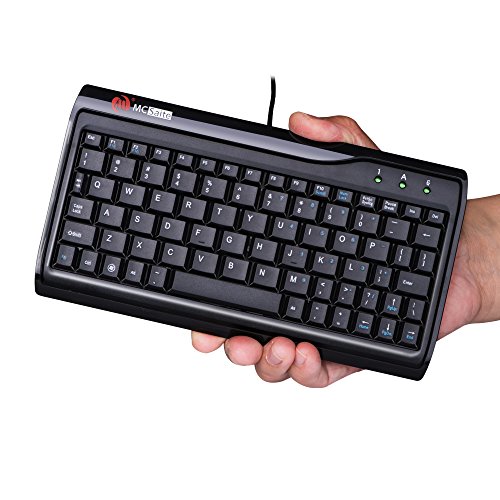
For professionals and on-the-go programmers seeking a compact solution, the MCSaite Super Mini Wired Keyboard stands out with its full-size 78-key layout crammed into a portable design. Measuring just 8.66 x 4.64 inches and weighing only 10.4 ounces, it’s easy to carry. The high-grade PVC construction guarantees durability, while a non-slip mat keeps it stable during use. Although the keys require a bit more pressure to register, you’ll appreciate the laser-engraved keypad’s longevity. Just keep in mind, larger hands might find the layout cramped. It’s perfect for quick tasks but isn’t recommended for extensive typing sessions.
Best For: Professionals and on-the-go programmers needing a compact keyboard solution for quick tasks.
Pros:
- Compact design makes it highly portable and easy to carry.
- Durable construction with a non-slip mat for stable operation.
- Laser-engraved keypad ensures long-lasting key visibility.
Cons:
- Keys require significant pressure to register, which may be uncomfortable for some users.
- Compact layout may feel cramped for individuals with larger hands.
- Unconventional key placement can lead to a confusing typing experience.
SR Mini Wired Keyboard (78 Keys, USB)
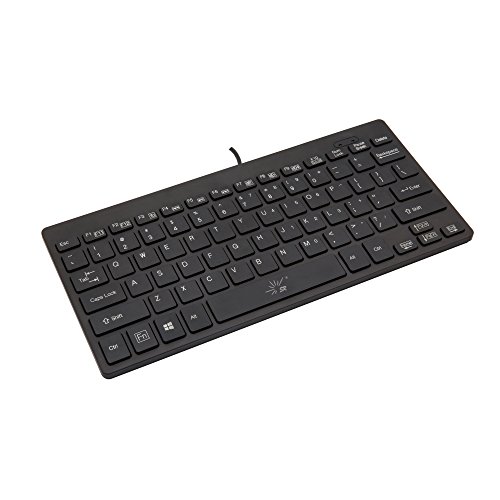
Looking for a compact solution that fits seamlessly into your travel bag? The SR Mini Wired Keyboard is an excellent choice. Weighing just 9.9 ounces and measuring 11 x 5.2 x 0.8 inches, it’s lightweight and portable. With 78 keys, including multimedia functions, it’s perfect for casual tasks. However, be aware of potential key responsiveness issues, especially with the Shift key and space bar. While some users find the layout a bit cramped, it serves well as a temporary replacement for laptops or PCs. Overall, it’s a solid option for those needing a compact keyboard on the go.
Best For: Those seeking a lightweight and compact keyboard for casual use while traveling or as a temporary replacement.
Pros:
- Lightweight and portable design, making it easy to carry.
- Includes multimedia keys for added functionality.
- Suitable for basic tasks and casual use.
Cons:
- Potential key responsiveness issues, particularly with the Shift key and space bar.
- Cramped key layout may require an adjustment period for some users.
- Lacks certain keys (e.g., Print, Insert, F11/F12) which may limit usability.
Lenovo Legion K310 RGB Wired Gaming Keyboard

The Lenovo Legion K310 RGB Wired Gaming Keyboard stands out as an excellent choice for gamers and casual users alike, thanks to its compact design and full-size layout. With ultra-fast reaction times and tactile keys, you’ll enjoy a responsive experience during intense gaming sessions. The dynamic 5-zone RGB illumination adds flair to your setup, while multimedia controls enhance convenience. Built for durability, it withstands 20 million clicks and features water-resistant drains to protect against spills. Weighing just 1.87 pounds, it’s portable enough for tournaments. With a solid rating of 4.5 stars, the K310 offers great value compared to pricier options.
Best For: Gamers and casual users seeking a durable, responsive keyboard with vibrant RGB lighting and multimedia controls.
Pros:
- Solid build quality with a lifespan of 20 million clicks.
- Dynamic 5-zone RGB illumination enhances gaming aesthetics.
- Quiet operation with tactile keys, ideal for intense gaming sessions.
Cons:
- RGB lighting requires software control for customization.
- Lacks USB passthrough for additional device connectivity.
- Some users find the feet less sturdy for prolonged use.
Factors to Consider When Choosing Mini Keyboards for Laptops
When you’re picking a mini keyboard for your laptop, size and weight are essential for portability. You’ll also want to take into account connectivity options and key travel distance to guarantee comfort and compatibility. Plus, think about battery life and build quality, as these factors can really affect your overall experience.
Size and Weight
Choosing a mini keyboard for your laptop means considering its size and weight carefully. Typically, these keyboards measure around 11 to 12.83 inches in length, making them much smaller than standard options, which enhances portability. You’ll find that their weight usually ranges from about 6.7 to 2.02 pounds, allowing you to easily transport them in your laptop bag or even your pocket. The compact designs often feature reduced key travel and lighter materials, contributing to their overall lightness. With thicknesses around 0.75 to 1.1 inches, they fit snugly in tight spaces. This combination of smaller dimensions and lightweight construction makes mini keyboards ideal for travel, remote work, and use in confined workspaces.
Connectivity Options
Several connectivity options are available for mini keyboards, each offering unique advantages depending on your needs. Wired mini keyboards use USB connections, providing plug-and-play functionality for immediate use without the hassle of pairing or battery management. On the other hand, wireless options, like Bluetooth or 2.4 GHz, enhance portability and convenience but may require battery replacements or recharging. Bluetooth models typically have a range of up to 33 feet. Many mini keyboards support multiple connection types, allowing you to switch between devices seamlessly, like using Bluetooth for your tablet and a USB receiver for your laptop. Finally, verify compatibility with your operating system, as some keyboards may only work with specific platforms or need additional drivers to function properly.
Key Travel Distance
Key travel distance plays an essential role in your overall typing experience, especially when using a mini keyboard with your laptop. It refers to how far a key moves when pressed, typically measured in millimeters. Mini keyboards often feature shorter key travel distances, ranging from 1.0 to 1.5 mm, which can mean less finger movement but may sacrifice tactile feedback. For comfortable typing, many users prefer a key travel distance around 2 mm, balancing responsiveness and comfort. If you have larger hands, you might find these shorter distances less ergonomic, leading to discomfort during extended use. Pay attention to key travel distance to guarantee your mini keyboard suits your typing style and comfort needs.
Battery Life
When you’re considering a mini keyboard for your laptop, battery life is a key aspect that can greatly affect your experience. Wireless mini keyboards often offer impressive longevity, with some models lasting up to 12 months on a single set of batteries thanks to energy-saving features. If you prefer rechargeable options, look for those with built-in lithium-ion batteries that provide continuous use for up to 10 days and can last up to 50 days on standby. Designs with auto-sleep modes can also extend battery life considerably. Don’t forget to check the type of batteries each keyboard requires, as specific types can add to maintenance costs. Finally, Bluetooth models generally offer better battery efficiency compared to those relying on 2.4GHz connections.
Build Quality
Build quality plays an essential role in the overall performance and longevity of mini keyboards for laptops. A sturdy construction is vital for ensuring resilience against wear and tear, especially when you’re frequently on the move. Look for keyboards made from high-grade materials like PVC or aluminum hinges, as they can endure extensive use, often exceeding 10,000 folds or a million key presses. Features like non-slip mats and metal plates enhance stability, preventing unwanted movement during typing. Durability testing is also a good indicator of reliability, showcasing a keyboard’s ability to handle on-the-go demands. While lightweight materials improve portability, make sure they don’t compromise the keyboard’s structural integrity or typing experience.
Compatibility Features
Choosing the right mini keyboard for your laptop goes beyond just its build quality; compatibility features are just as important. First, make certain it works with your operating system—be it Windows, macOS, or Chrome OS—to guarantee full functionality. Look for plug-and-play keyboards that don’t require additional software, making setup a breeze. Check for Bluetooth or USB connectivity, as this enhances versatility with other devices like tablets or smart TVs. Consider models with SmartSwitch technology for seamless switching between multiple devices. Finally, keep an eye on battery requirements; some keyboards use standard batteries while others are rechargeable, which can impact your long-term usability. Choosing wisely can greatly enhance your typing experience.
