
Recording detailed soldering, repair, and electronics work requires more than a high-resolution camera. The right microscope camera must keep tiny joints visible, respond smoothly to hand movements, and fit comfortably into a creator’s bench setup.
These 10 microscope soldering cameras for content creators cover autofocus and fixed-focus designs, HDMI displays, 4K recording, flexible stands, and industrial-style camera systems. Use the guide below to narrow the list by image quality, connectivity, working distance, and production needs.
Best 10 Microscope Soldering Cameras for Content Creators Picks for 2026
Best Autofocus Pick
Elikliv EM4K-AF 4K Autofocus Microscope

- AI autofocus with TOF distance sensing
- 4K video and 52MP image capture
- 8-inch display with HDMI/USB outputs
Best For: Creators wanting convenient autofocus and high-resolution soldering footage
Most Versatile Lens Kit
Andonstar AD246S-M 3-Lens Microscope

- Includes soldering, general-purpose, and biological lenses
- 2160P video with HDMI output
- Adjustable boom arm and Windows measurement software
Best For: Creators covering electronics, coins, biology, and educational demonstrations
Best for Live 4K Footage
LINKMICRO LM210S 4K 60FPS Microscope
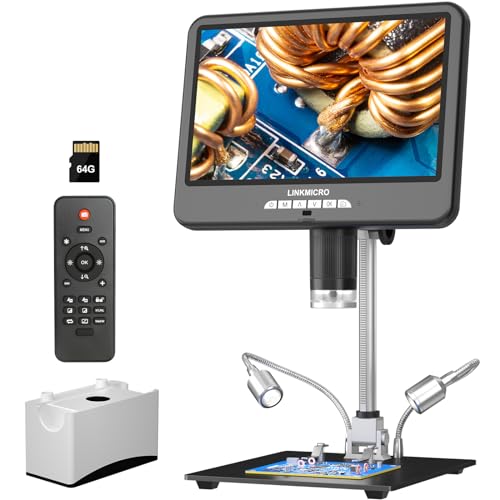
- 4K 60FPS display, recording, and HDMI output
- Built-in microphone for tutorials and live broadcasts
- Tall 12.6-inch stand with 64GB storage
Best For: Creators producing smooth electronics repair videos and live demonstrations
Best 4K Flex-Arm Pick

- 4K 30FPS HDMI video
- Flexible 27.5-inch arm with clamp
- USB capture for Windows and Mac
Best For: Creators filming detailed PCB work and soldering demonstrations
Most Versatile Station

- 2160P HDMI video output
- Three interchangeable lenses
- Includes helping hands and 32GB SD card
Best For: Creators building a multifunctional soldering and inspection workstation
Best Budget Display
Dcorn 7-Inch Digital Microscope

- 7-inch 1080FHD display
- 12MP photos and video recording
- Eight LEDs plus adjustable side lights
Best For: Beginners recording soldering and inspection content on a budget
Best Overall for Video Tutorials
Andonstar AD210S-Pro 4K Microscope

- 4K 60FPS video with integrated microphone
- 64MP photos and HDMI/PC outputs
- 360-degree boom arm with 13-inch working distance
Best For: Creators filming detailed soldering tutorials with narration
Best Budget HDMI/VGA Setup
NICE-POWER 13MP 1080P Microscope

- 1080P HDMI and VGA video output
- 150X lens with up to 1000mm working distance
- Adjustable 56-LED ring light and foldable stand
Best For: Budget-conscious creators making 1080P repair content
Best Autofocus Pick – Elikliv EM4K-AF 4K Autofocus Microscope
For content creators seeking microscope soldering cameras for content creators, the Elikliv EM4K-AF combines autofocus, 4K video, and a built-in 8-inch IPS display. Its TOF sensor helps it refocus quickly, while HDMI and USB outputs support larger-screen viewing and recording workflows.
Best For: Creators who want autofocus convenience, high-resolution demonstrations, and a self-contained microscope for soldering, coin inspection, or watchmaking.
Pros:
- Autofocus uses AI algorithms and a TOF sensor for quick focal adjustments.
- Records 4K UHD video and captures up to 52MP images.
- Includes an 8-inch IPS display, HDMI/USB outputs, controller, and 16GB card.
- Rechargeable battery supports more flexible, on-the-go inspections.
Cons:
- Autofocus and digital magnification may be more than needed for basic bench work.
- The included 16GB card offers less storage than some competing kits.
The EM4K-AF is a strong choice when polished visuals and reduced manual focusing matter. Its freeze and split-screen functions also add useful options for comparisons and tutorial footage.
Most Versatile Lens Kit – Andonstar AD246S-M 3-Lens Microscope
The Andonstar AD246S-M stands out among microscope soldering cameras for content creators because its three interchangeable lenses cover soldering, coins, and biological subjects. It records 2160P video, supports HDMI output, and includes Windows measurement software for more technical demonstrations.
Best For: Creators who switch between electronics repair, collectibles, educational content, and close-up demonstrations.
Pros:
- Three lenses provide distinct views for soldering, general inspection, and slides.
- 2160P recording and HDMI output support clear demonstrations on larger screens.
- Adjustable boom arm provides a broad work envelope for repair projects.
- Includes remote control, adjustable LED brightness, 32GB card, and prepared slides.
Cons:
- Changing lenses and manually adjusting focus adds setup steps.
- Its maximum listed magnification depends on the lens and display setup.
This is a practical all-purpose kit for creators who need variety more than a single specialized view. The lens system and measurement software make it especially useful for educational or comparison-oriented videos.
Best for Live 4K Footage – LINKMICRO LM210S 4K 60FPS Microscope
The LINKMICRO LM210S is built for creators who prioritize smooth, highly detailed footage. As one of the microscope soldering cameras for content creators with 4K at 60FPS, it can display and record simultaneously through its built-in 10.1-inch screen and HDMI connection, while its microphone supports narrated tutorials and live broadcasts.
Best For: Electronics repair channels, live demonstrations, and tutorial production where smooth motion and integrated audio are important.
Pros:
- Supports 4K 60FPS display, recording, and HDMI output.
- Built-in microphone is designed for live broadcasts and tutorial production.
- Tall 12.6-inch stand creates more working distance for PCBs and larger objects.
- Captures up to 64MP images and includes a 64GB memory card.
Cons:
- A 4K 60FPS HDMI workflow requires a compatible HDMI 2.0 monitor.
- The higher-resolution feature set may be excessive for simple inspection tasks.
The LM210S is the most production-focused option in this group. Its smooth frame rate, integrated microphone, tall stand, and generous storage make it well suited to recording hands-on repair content.
Best Flexible Workspace – Andonstar AD109 10.1-Inch Boom Arm Microscope
For creators who need room to work around a project, the Andonstar AD109 pairs a 10.1-inch IPS screen with an extended boom arm. It is a practical choice among microscope soldering cameras for content creators who want unobstructed PCB access, flexible framing, and direct USB-C connectivity to Mac or Windows computers.
Best For: Soldering creators working on large boards or multi-tool setups, plus makers who also film coins and detailed craft work.
Pros:
- 27.56-inch boom arm rotates 360 degrees and tilts up to 170 degrees.
- 1080p video and 12MP photos display on a wide-view 10.1-inch IPS screen.
- Dual LED lighting combines eight built-in LEDs with a 56-LED ring light.
- USB-C connectivity supports plug-and-play use with Mac and Windows.
Cons:
- It offers lower listed resolution than the 4K models in this roundup.
- Its maximum listed magnification is 260x, below the higher-magnification alternatives.
- The remote control requires batteries, which are not included.
The AD109 favors workspace flexibility over maximum resolution. Its long arm, adjustable lighting, and computer compatibility make it a sensible pick for filming practical soldering sessions with plenty of hand movement.
Best 4K Flex-Arm Pick – LM115A-4K
For content creators comparing microscope soldering cameras for content creators, the LM115A-4K stands out for its true 4K 30FPS HDMI video, flexible positioning, and hands-free desktop setup. It is designed to show fine PCB details clearly while also supporting USB connection to Windows and Mac computers for live viewing and capture.
Best For: Creators who want high-resolution soldering footage, a flexible camera position, and HDMI display output.
Pros:
- 4K 30FPS output through HDMI for detailed real-time viewing.
- 360-degree flex arm with a desk clamp and up to 27.5 inches of reach.
- Supports USB connection to Windows and Mac for live viewing, capture, and file transfer.
- Records 4K video and captures 10MP still photos.
Cons:
- It requires an external 4K monitor to take full advantage of the HDMI output.
- The flex-arm clamp needs a suitable desk edge and workspace.
Choose this model when image detail and camera positioning matter most. Its combination of 4K recording, computer connectivity, and a fold-flat stand makes it a practical option for instructional videos and close-up repair demonstrations.
Most Versatile Station – Andonstar AD246S-M Plus
Among microscope soldering cameras for content creators, the Andonstar AD246S-M Plus is a full workstation built around a 7-inch monitor, 2160P video, and three interchangeable lenses. Its included helping hands, tool holder, extension base, and lighting make it particularly useful for creators who want a ready-to-use soldering setup.
Best For: Creators who need one microscope for soldering, coins, general inspection, and biological slides.
Pros:
- Includes three lenses for soldering, general viewing, and biological slides.
- 2160P video with HDMI support for larger-screen viewing.
- Comes with helping hands, tool holder, extension base, soldering mat, and a 32GB SD card.
- Windows software supports measurement, photo capture, and video capture.
Cons:
- Its extensive accessories and multi-lens design may be more setup than a dedicated soldering camera requires.
- The measurement software is specified for Windows PCs.
This is the strongest all-purpose choice in the group. It offers a more complete filming and repair station than a basic microscope, though its larger accessory package makes it better suited to a permanent workbench than a minimalist setup.
Best Budget Display – Dcorn 7-Inch Digital Microscope
The Dcorn is a practical entry point for content creators shopping for microscope soldering cameras for content creators. It combines a 7-inch display, 1080FHD video, 12MP photos, a metal stand, and PC compatibility, giving beginners a straightforward way to record and monitor soldering work.
Best For: Beginners and hobbyist creators who want a larger built-in screen and basic recording features.
Pros:
- 7-inch HD display supports up to 1080FHD video and 12MP photos.
- 10X–1200X stated magnification range suits electronics and general inspection.
- Eight built-in LEDs plus two adjustable side lights improve illumination flexibility.
- Connects to Windows 10 and Mac systems for larger-view access.
Cons:
- It records at up to 1080FHD rather than 4K or 2160P.
- The memory card is not included.
- PC connectivity is described for viewing through standard camera applications rather than dedicated measurement software.
For creators who prioritize a simple setup and a generous built-in screen over maximum video resolution, the Dcorn offers useful value. Its adjustable lighting and metal base also help keep close-up soldering views stable and visible.
Best Overall for Video Tutorials – Andonstar AD210S-Pro 4K Microscope
For content creators comparing microscope soldering cameras for content creators, the Andonstar AD210S-Pro stands out with 4K 60FPS output, integrated audio recording, and a generous working distance. Its included 10.1-inch screen, boom arm, and multiple lighting options make it practical for filming detailed soldering demonstrations.
Best For: Creators who want high-resolution soldering videos with recorded audio and flexible camera positioning.
Pros:
- Records 4K video at 60FPS and captures 64MP photos.
- Integrated microphone supports synchronized audio and video recording.
- Pro boom arm offers 360-degree rotation and up to approximately 13 inches of working distance.
- Includes HDMI and PC outputs, a 64GB SD card, and triple adjustable LED lighting.
Cons:
- Its larger 10.1-inch screen and boom-arm setup may require more workspace.
- It is corded electric rather than battery powered.
The AD210S-Pro is the most content-focused option here, particularly for tutorials where smooth motion, clear detail, and narration matter. It also remains versatile for coins and slides, though its expanded feature set may be more than casual users need.
Best High-Resolution Flexible Stand – NICE-POWER 48MP 4K Microscope
The NICE-POWER 48MP model is a strong option among microscope soldering cameras for content creators who need high-resolution captures and a flexible workstation. It records 4K video, takes 48MP photos, and pairs a 150X C-mount lens with a bright adjustable ring light.
Best For: Electronics repair creators who prioritize detailed still images, adjustable positioning, and strong work lighting.
Pros:
- Supports 4K video recording and 48MP still photos.
- 150X zoom C-mount lens provides up to a 1000mm working distance.
- 56-LED ring light offers adjustable brightness and up to 60,000 lux.
- Foldable stand has four adjustable sections and includes a remote control.
Cons:
- HDMI and Type-C outputs provide 1080P display output, despite 4K recording support.
- The remote-control battery is not included.
- Storage support is limited to a 64GB TF card.
This model offers a useful balance of capture quality, working distance, and stand flexibility. It is especially appealing when you plan to record or photograph repairs, but the 1080P output specification is worth noting for live viewing.
Best Budget HDMI/VGA Setup – NICE-POWER 13MP 1080P Microscope
For creators seeking practical microscope soldering cameras for content creators without stepping up to a higher-resolution system, this NICE-POWER model provides 1080P HDMI and VGA output with a 150X zoom lens. Its adjustable ring light and foldable stand support straightforward electronics-repair recording and live viewing.
Best For: Hobbyists and repair creators who need an affordable 1080P microscope with HDMI and VGA connectivity.
Pros:
- Outputs 1080P video through both HDMI and VGA.
- 150X C-mount zoom lens supports up to a 1000mm working distance.
- 56-LED ring light has adjustable brightness and up to 60,000 lux.
- Foldable, multi-angle stand and HDMI-mode remote control improve usability.
Cons:
- 13MP resolution is lower than the other listed NICE-POWER model.
- The housing is plastic rather than metal.
- The remote-control battery is not included.
This is a sensible choice for basic soldering demonstrations and repair work where 1080P output is sufficient. Its HDMI and VGA compatibility is convenient, but creators seeking sharper stills or 4K recording should consider the higher-resolution alternatives.
How We Picked the Best Microscope Soldering Cameras for Content Creators
We focused on features that affect both soldering performance and video production: resolution, frame rate, screen size, magnification control, working distance, lighting, mounting flexibility, and connection options. Models with HDMI output can provide a low-latency live view, while USB, Type-C, or VGA connectivity may make computer recording and streaming easier. We also considered whether a camera is practical for a compact bench or better suited to a permanent studio setup.
Quick Comparison
| Best For | Look For |
|---|---|
| Fast-moving soldering demonstrations | 4K at 60 frames per second and low-latency HDMI |
| Sharp close-up tutorials | High-resolution imaging, stable focus, and adjustable lighting |
| Flexible bench layouts | Flex arms, C-clamps, or foldable stands |
| Streaming and computer recording | USB, Type-C, HDMI capture compatibility, or VGA output |
| Multi-purpose inspection | Adjustable magnification and a generous working distance |
Key Buying Factors for Microscope Soldering Cameras for Content Creators
Resolution and Frame Rate
4K can preserve fine detail in recorded tutorials and cropped shots, but frame rate matters when showing tweezers, solder, or a hot-air tool in motion. A 60fps mode generally produces smoother footage than 30fps. Check whether the advertised resolution applies to recording, HDMI output, or only still images.
Focus, Magnification, and Working Distance
Autofocus is convenient for demonstrations, but it can hunt when tools pass through the frame. Manual or lockable focus may be preferable for consistent production. High magnification is useful for inspection, yet an adequate working distance is often more important because it leaves room for an iron and both hands.
Connectivity and Recording Workflow
A built-in display provides immediate feedback at the bench. HDMI is useful for an external monitor or capture card, while USB and Type-C connections may simplify computer recording. Confirm the required cables, capture hardware, and supported video formats before buying.
Stand, Lighting, and Ergonomics
A rigid stand helps prevent distracting shake. Flex arms and C-clamps save space but need a sturdy mounting surface. Adjustable LED lighting can reduce shadows, though a ring light may create reflections on solder or glossy components. Look for controls that remain accessible while filming.
Who Should Buy Which Microscope Soldering Cameras for Content Creators?
Choose an autofocus 4K model if you want a straightforward setup for narrated repairs, product demonstrations, and changing subjects. A 4K 60fps HDMI model is better for polished close-up footage with smooth tool movement. Pick a flex-arm or C-clamp design when bench space is limited or the camera must move around different projects.
Creators who record directly to a computer should prioritize dependable HDMI, USB, Type-C, or VGA compatibility over headline magnification numbers. For a dedicated electronics workspace, a larger screen and rigid stand can improve comfort during long sessions. If you also inspect coins, metals, or general components, choose a versatile camera with adjustable magnification and a stable foldable or metal stand.
