
Choosing among microscope soldering cameras for beginners can be difficult when product listings emphasize resolution and magnification but say less about practical repair work. A good beginner setup should make tiny joints easy to see while leaving enough room to position a soldering iron, tweezers, and both hands.
This roundup focuses on accessible digital microscopes with built-in screens, HDMI or camera output, flexible viewing options, and features that support electronics repair, inspection, coin viewing, and other close-up tasks.
Best 10 Microscope Soldering Cameras for Beginners Picks for 2026
Top All-Purpose Pick

- Three interchangeable lenses for soldering, coins, and slides
- 2160P HDMI video with 7-inch monitor and 32GB card
- Expanded station with helping hands, storage, and tool holder
Best For: Beginners wanting a versatile soldering and inspection workstation
Best Large-Workspace Value
JOYALENS JL210 Digital Microscope

- 10.1-inch IPS screen with 12MP imaging and 1080P video
- Large metal stand offers up to 10.2 inches of working distance
- Multiple lights, remote, 32GB card, and prepared slides included
Best For: Beginners needing generous clearance for soldering and coin inspection
Best Autofocus Option

- Autofocus and TOF sensor adjust focus in about two seconds
- 4K video, 52MP imaging, and 8-inch IPS display
- Rechargeable battery with HDMI/USB outputs and smart controller
Best For: Beginners wanting fast focusing and high-resolution inspection
Best Large-Screen Workstation
Andonstar AD249S-M Plus 10.1-inch

- 10.1-inch display with 2160P HDMI video output
- Three lenses cover soldering, general inspection, and slides
- Helping hands, tool holder, storage, mat, and 32GB card included
Best For: Beginners wanting a spacious, multi-purpose soldering station
Best Beginner-Friendly Coin and Soldering Scope
TOMLOV DM9 7-Inch Digital Microscope

- 7-inch screen for comfortable direct viewing
- Stable metal stand and base for light soldering
- 1080p video, 12MP photos, and 16GB storage
Best For: Beginners handling light soldering, coin inspection, and hobby projects
Best Versatile Lens Kit
TOMLOV DM602 Flex HDMI Soldering Microscope

- Three interchangeable lenses for multiple subjects
- Flexible arm and 10.1-inch IPS display
- Heat-resistant mat included for soldering work
Best For: Beginners wanting one expandable setup for soldering and hobbies
Versatile Starter Pick
Andonstar AD210 10.1-Inch Digital Microscope

- Large 10.1-inch IPS display with 12MP photos
- Adjustable working distance for soldering
- Includes lighting, storage, remote, and slide accessories
Best For: Beginners wanting a versatile soldering and inspection microscope
Advanced Angle Pick
TOMLOV TM3K-3D Dual-Lens Microscope
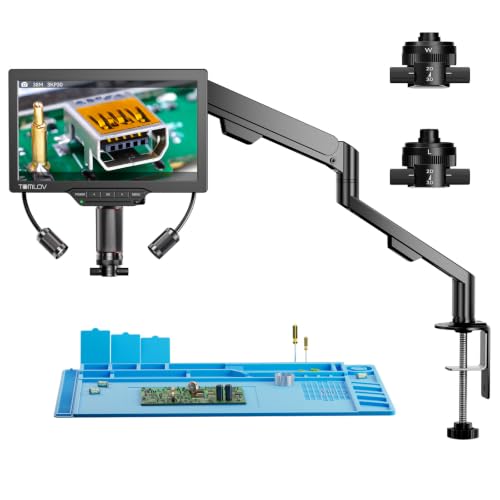
- 3D side-viewing with 360-degree rotation
- Magnetic long-distance and wide-angle lenses
- 3K 7-inch screen with HDMI and USB output
Best For: Learners planning detailed PCB work and multi-angle inspection
Simple Inspection Pick
TOMLOV DM9B 7-Inch Digital Microscope

- Stable metal base with adjustable 8.5-inch stand
- 7-inch screen with 12MP photos and 1080p video
- Multiple LED and gooseneck lighting options
Best For: Beginners focused on coins, close-up inspection, and light soldering
Top All-Purpose Pick – Andonstar AD246S-M Plus
For beginners comparing microscope soldering cameras for beginners, the Andonstar AD246S-M Plus is a comprehensive workstation rather than just a camera. It combines a 7-inch monitor, 2160P HDMI video, three interchangeable lenses, helping hands, a tool holder, and an expanded soldering area.
Best For: Beginners who want one versatile setup for soldering, coin inspection, and basic biological slide viewing.
Pros:
- Three lenses cover soldering, general inspection, and biological slides.
- 2160P video, HDMI output, and a 32GB SD card support viewing and recording.
- Extension base, storage boxes, helping hands, tool holder, and soldering mat create a ready-to-use station.
- Adjustable LED lighting, remote control, and Windows measurement software add convenience.
Cons:
- Manual lens changes and focusing require more setup than an autofocus model.
- The extensive accessory package may be more than a beginner needs for soldering alone.
The AD246S-M Plus stands out when flexibility and included workstation accessories matter most. Its three-lens design makes it a strong long-term choice for beginners who expect to explore more than electronics repair.
Best Large-Workspace Value – JOYALENS JL210 Digital Microscope
The JOYALENS JL210 is a practical option for beginners seeking microscope soldering cameras for beginners with generous clearance beneath the lens. Its large screen, all-metal stand, and broad base make it suitable for electronics repair while retaining useful coin and slide-viewing features.
Best For: Beginners who need a stable, spacious platform for soldering, coin collecting, and general STEM exploration.
Pros:
- 10.1-inch IPS display provides a large viewing area with wide viewing angles.
- Large stand and base provide up to 10.2 inches of working distance for soldering.
- 12MP imaging, 1080P video, remote control, and 32GB storage support documentation.
- Eight LEDs, two gooseneck lights, and bottom illumination help reduce shadows.
Cons:
- It records at 1080P rather than the higher 2160P resolution offered by some alternatives.
- The coin and biological accessories may be unnecessary if your only goal is PCB repair.
With its roomy work area and straightforward all-in-one kit, the JL210 is approachable for first-time users who want room to maneuver tools. It is especially appealing for larger coins and soldering projects that benefit from extra clearance.
Best Autofocus Option – Elikliv EM4K-AF 4K Microscope
For beginners evaluating microscope soldering cameras for beginners, the Elikliv EM4K-AF offers a convenience-focused design. Its autofocus system, TOF sensor, 4K video, and 8-inch display are aimed at reducing manual adjustments during inspection and repair.
Best For: Beginners who prioritize quick focusing, high-resolution viewing, and flexible use for soldering or coin inspection.
Pros:
- Autofocus uses AI algorithms and a TOF sensor to adjust focus quickly.
- 4K UHD video and 52MP imaging provide detailed capture capabilities.
- HDMI and USB outputs support larger-screen viewing, while the 8-inch IPS display works independently.
- Rechargeable battery, remote controller, 16GB card, freeze, and split-screen functions add flexibility.
Cons:
- The 16GB card provides less included storage than the 32GB cards supplied with some competing models.
- Its one-year manufacturer warranty is shorter than the two-year warranty listed for the Andonstar models.
- Autofocus convenience may be less important for users who prefer precise manual control.
The EM4K-AF is a compelling beginner choice when ease of focusing matters more than a large accessory bundle. Its battery and autofocus features also make it attractive for users who want to move the microscope between work areas.
Best Large-Screen Workstation – Andonstar AD249S-M Plus 10.1-inch
The Andonstar AD249S-M Plus is a strong choice for beginners shopping for microscope soldering cameras for beginners who prefer a larger built-in display. It pairs a 10.1-inch monitor with 2160P HDMI output, three lenses, and a purpose-built soldering station with useful organization accessories.
Best For: Beginners who want a large-screen, multi-purpose station for electronics repair, coins, and biological specimens.
Pros:
- 10.1-inch monitor offers a spacious view for soldering and demonstrations.
- Three lenses provide dedicated ranges for soldering, general objects, and biological slides.
- 2160P HDMI video, remote operation, adjustable LEDs, and 32GB recording storage are included.
- Helping hands, tool holder, extension base, storage boxes, soldering mat, and slide kit broaden its usefulness.
Cons:
- Lens swaps and manual focusing add steps for users seeking a simple plug-and-play setup.
- The broad feature set and large station footprint may be excessive for compact workbenches.
- It is corded, so placement depends on access to power.
The AD249S-M Plus makes the most sense when screen size and workstation completeness are high priorities. Its included accessories reduce the need to assemble a separate soldering setup, while the three lenses leave room for other inspection hobbies.
Best Beginner-Friendly Coin and Soldering Scope – TOMLOV DM9 7-Inch Digital Microscope
For beginners comparing microscope soldering cameras for beginners, the TOMLOV DM9 offers a straightforward setup with a built-in 7-inch screen, adjustable stand, LED lighting, and PC connectivity. Its metal base provides a stable platform for inspecting small circuit boards, solder joints, coins, and other detailed objects.
Best For: Beginners who want an easy-to-view digital microscope for light soldering, coin inspection, and general hobby projects.
Pros:
- 7-inch LCD screen supports comfortable direct viewing and shared demonstrations.
- Stable metal base and adjustable 8.5-inch stand help reduce movement during inspection.
- 12MP photos, 1080p video, PC connection, and included 16GB card support documentation.
- Adjustable built-in LEDs and flexible gooseneck lights help illuminate details from different angles.
Cons:
- Its listed 1200x magnification and coin-focused design may be more than needed for simple beginner soldering.
- The supplied notes describe support for light soldering, rather than a dedicated large-work-area soldering arm.
The DM9 is a practical entry point when clear screen viewing and stable positioning matter more than advanced soldering-specific flexibility. It is especially appealing for hobbyists who also want to inspect and record coins, jewelry, and small components.
Best for Large Work Areas – Andonstar AD109 Digital Microscope
Among microscope soldering cameras for beginners, the Andonstar AD109 stands out for its long flexible boom arm and wide 10.1-inch IPS display. The arm can extend up to 27.56 inches, rotate 360 degrees, and tilt across a 170-degree range, giving beginners more room to position tools around a PCB.
Best For: Beginners and electronics hobbyists who need an unobstructed workspace for larger boards, multi-tool setups, or coin inspection.
Pros:
- Long boom arm creates a large, flexible work area for soldering and electronics inspection.
- 10.1-inch IPS screen provides a broad viewing area with 1080p video and 12MP photos.
- Dual LED lighting combines built-in LEDs with a 56-LED ring light and adjustable brightness.
- USB-C connectivity works with Windows and Mac, and the package includes a 32GB SD card.
Cons:
- The extended arm may require more desk space than a compact beginner microscope.
- The wireless remote requires batteries, which are not included.
- Its listed maximum magnification is 260x, lower than some high-magnification alternatives.
The AD109 is a strong choice for beginners who value working clearance and flexible positioning over a compact footprint. Its large screen, lighting options, and computer compatibility also make it useful for demonstrations and shared viewing.
Best Versatile Lens Kit – TOMLOV DM602 Flex HDMI Soldering Microscope
The TOMLOV DM602 Flex is a versatile option for beginners seeking microscope soldering cameras for beginners with room to grow. It combines a flexible arm, 10.1-inch IPS screen, HDMI and USB output, a heat-resistant silicone mat, and three interchangeable lenses for soldering, coin inspection, and other close-up activities.
Best For: Beginners who want one microscope station for soldering, coins, basic exploration, and shared viewing.
Pros:
- Interchangeable lenses cover micro soldering, full coin views, and higher-magnification subjects.
- Flexible arm offers 360-degree base rotation, horizontal extension, and vertical movement.
- Included silicone mat resists heat up to 932°F and provides a ruler and parts compartments.
- 10.1-inch IPS display, HDMI output, USB connectivity, and one-button capture support convenient use.
Cons:
- Its three-lens system may feel more involved than a simple fixed-lens beginner setup.
- The supplied notes list a 12-month warranty, shorter than some competing coverage.
- The broad feature set may be unnecessary for users focused only on basic soldering.
The DM602 Flex offers the most expandable setup of these options, particularly for beginners who expect to explore more than circuit-board repair. The included mat and flexible arm make it a practical workstation, while the extra lenses add versatility for future projects.
Versatile Starter Pick – Andonstar AD210 10.1-Inch Digital Microscope
For beginners comparing microscope soldering cameras for beginners, the Andonstar AD210 is a flexible option with a large 10.1-inch IPS display, adjustable working distance, and a sturdy metal stand. It is designed for electronics repair but also supports coin viewing and biological slides.
Best For: Beginners who want one digital microscope for soldering, coin inspection, and basic specimen viewing.
Pros:
- Large 10.1-inch IPS screen with 1080p video and 12MP photo capture.
- Adjustable 1cm-to-26cm working distance provides useful room for soldering.
- Includes a 32GB memory card, remote control, adjustable LED lighting, and bottom light stage.
- Strong metal stand with a larger base and height up to 12.6 inches.
Cons:
- Its broad accessory set may be more than a beginner needs for soldering alone.
- The relatively large stand can require more workspace than a compact setup.
The AD210 stands out as an all-purpose entry point. Its generous work area and included remote make hands-on electronics work approachable, while the extra lighting and slide accessories add versatility for hobby use.
Advanced Angle Pick – TOMLOV TM3K-3D Dual-Lens Microscope
Among microscope soldering cameras for beginners, the TOMLOV TM3K-3D offers a more advanced approach with 3D side viewing, 360-degree rotation, and a flexible arm. Its dual magnetic lenses and 3K display are useful for inspecting solder joints and components from different angles.
Best For: Beginners with ambitious electronics projects who want flexible viewing and room to grow.
Pros:
- 3D side-viewing and 360-degree rotation help reveal components and solder joints from multiple perspectives.
- Magnetic L and W lenses switch without tools for long-distance soldering or wider subject views.
- 7-inch IPS screen offers 3K UHD imaging, with HDMI and USB display options.
- Articulating arm and adjustable gooseneck spotlight support customized positioning and illumination.
Cons:
- The feature-rich 3D design may feel more complex than necessary for simple beginner repairs.
- The supplied 7-inch screen is smaller than the display on some all-in-one alternatives.
The TM3K-3D is a strong choice when viewing angle matters. Its flexible arm, interchangeable lenses, and targeted lighting give learners more control during detailed PCB work, though the extra features may take some practice to use fully.
Simple Inspection Pick – TOMLOV DM9B 7-Inch Digital Microscope
The TOMLOV DM9B is a straightforward choice for beginners shopping for microscope soldering cameras for beginners. It combines a 7-inch screen, solid metal base, adjustable stand, and built-in lighting for coin inspection, hobby electronics, and light soldering tasks.
Best For: Beginners who prioritize stable viewing, coin inspection, and occasional small electronics work.
Pros:
- Stable metal base and 8.5-inch adjustable stand help reduce shaking during inspection.
- 7-inch LCD screen provides a comfortable direct-viewing experience.
- 12MP camera and 1080p video support documentation and sharing.
- Eight built-in LEDs plus two flexible gooseneck lights allow adjustable illumination.
Cons:
- It is intended for light soldering tasks, so demanding repairs may benefit from a larger work area.
- The included 16GB storage is smaller than the 32GB card supplied with the AD210.
The DM9B keeps the setup practical and approachable. Its black metal base, screen, and flexible lighting are especially useful for coin and surface inspection, while its adjustable stand makes it capable of handling basic soldering projects.
How We Picked These Microscope Soldering Cameras for Beginners
We compared the listed models on the features that matter most at a beginner workbench: image clarity, screen size, focusing control, lens flexibility, working distance, lighting, stability, and connection options. Resolution claims were considered alongside usability, because a sharp camera is less helpful if the stand vibrates or the lens leaves too little room for a soldering tool.
We also included a mix of single-lens and multi-lens designs. A fixed lens can be simpler and more affordable, while interchangeable or dual-lens systems may offer better flexibility for switching between broad inspection and detailed close-up work.
Quick Comparison
- Best overall flexibility: A multi-lens model such as the Andonstar AD249S-M Plus or TOMLOV DM602 Flex can adapt to different inspection distances and workspaces.
- Best for a larger viewing area: The 10.1-inch-screen models are useful when you want a more comfortable shared view of a circuit board.
- Best for compact benches: Seven-inch-screen options take up less room while still providing a direct view without requiring a separate monitor.
- Best for recording or streaming: Prioritize HDMI or other video output, a capable camera, and a stable stand rather than magnification alone.
- Best for hands-on soldering: Look for generous working distance, adjustable lighting, and an arm or stand that does not block access to the board.
Key Buying Factors for Microscope Soldering Cameras for Beginners
Display and Camera Resolution
A built-in LCD screen makes setup straightforward and avoids the need for a computer. Higher-resolution cameras can reveal fine traces and solder bridges more clearly, but lighting, focus accuracy, and lens quality also affect the real-world image. Choose 4K or high-resolution models when documentation or detailed inspection is important; 1080p can be adequate for basic repairs.
Working Distance and Focus
For soldering, distance under the lens is often more important than an extreme magnification number. You need enough clearance to approach the board with an iron. Autofocus is convenient for changing subjects, while manual or fine-focus controls can provide steadier results during delicate work.
Lighting and Viewing Angle
Adjustable LED lighting helps reduce shadows and glare on solder joints. A flexible arm or tilting head can improve comfort, especially when inspecting boards at different angles. A stable base is essential because even small vibrations become distracting at high magnification.
Connectivity and Included Accessories
HDMI output is useful for a larger monitor or capture device, while recording features can help document repairs. Check whether the package includes a remote, measurement tools, anti-glare filters, a protective cover, or a suitable stand. These accessories can affect the total value more than a headline zoom figure.
Who Should Buy Which Microscope Soldering Cameras for Beginners?
Choose a compact seven-inch model if you are starting with occasional repairs, have limited bench space, or want a simple plug-in setup. A 10.1-inch display is better for longer sessions or collaborative viewing. Beginners who expect to inspect different object sizes should consider a multi-lens system, while users focused mainly on circuit-board repair should prioritize working clearance, stable focusing, and unobstructed tool access.
For advanced documentation, teaching, or content creation, select a camera with strong video output and recording support. For casual inspection and coin viewing, a straightforward LCD microscope may deliver better value than paying extra for features you will rarely use. Whichever model you choose, confirm the stand dimensions and available clearance before buying so the microscope fits your actual workspace.
