
If you type for hours, the right keyboard can make a real difference in comfort, speed, and focus. A mechanical keyboard for productivity with wrist rest combines a responsive typing feel with the support many desk setups need.
In this roundup, we focus on practical features that matter for work: key feel, wrist support, connectivity, layout, and long-term comfort.
Best 10 Mechanical Keyboard for Productivity with Wrist Rest Picks for 2026
Ergonomic Wireless Pick
Hexgears X5 Full-Size 108-Key Keyboard
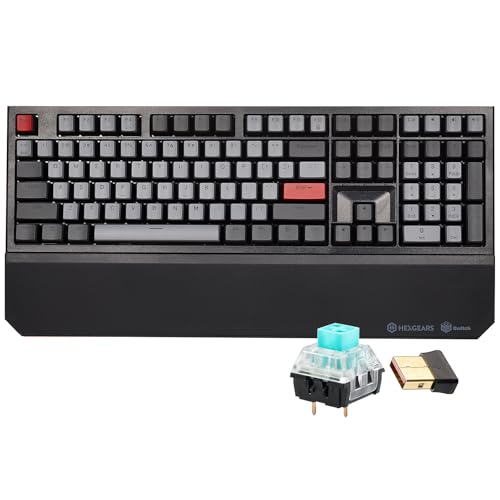
- Detachable wrist rest for added comfort
- Wired USB-C or 2.4 GHz wireless use
- Full-size 108-key layout with NKRO
Best For: People who want a full-size mechanical keyboard with wrist support and wireless flexibility
Premium Workhorse
CORSAIR K70 CORE RGB with Palmrest

- Smooth pre-lubed linear switches
- Magnetic soft-touch palm rest included
- Aluminum top plate for added stability
Best For: Anyone wanting a premium wired keyboard with a wrist rest and smooth typing feel
Desk Comfort Upgrade
Vaydeer Extra-Large Wrist Rest and Stand

- Oversized pad fits full-size keyboards
- Built-in stand and wrist cushion in one
- Memory foam with non-slip silicone base
Best For: Users who want a large ergonomic wrist rest and keyboard stand for an existing full-size board
Retro Typing Pick
AULA F2088 Typewriter-Style Mechanical Keyboard

- Removable magnetic wrist rest included
- Clicky blue switches with tactile feedback
- Aluminum alloy panel and media knob
Best For: Typists who want a retro look, clicky switches, and wrist support
Minimalist Full-Size Pick
Lenovo Legion K500 RGB Mechanical Keyboard

- Detachable palm rest for added comfort
- Full-size 104-key layout with media keys
- Red switches with anti-ghosting and rollover
Best For: People who want a simple full-size mechanical keyboard with palm support
Wireless Comfort Pick
Hexgears X2 TKL with Magnetic Wrist Rest

- Included ergonomic wrist rest
- 2.4GHz wireless plus USB-C wired mode
- Kailh BOX tactile switches rated for 80M presses
Best For: Users who want a compact wireless mechanical keyboard with wrist support
Ergonomic Typing Pick
Adesso EasyTouch 150 Mechanical Keyboard

- Split-key ergonomic shape with integrated palm rest
- Cherry MX Brown switches for quiet tactile typing
- Full-size 104-key layout with Copilot hotkey
Best For: Typists and office users who need ergonomic comfort and a full layout
Wireless Productivity Pick
RK96 96% Wireless Mechanical Keyboard with Wrist Rest

- 96-key layout includes a numpad
- BT 5.0, 2.4G, and USB-C support
- Magnetic wrist rest and USB pass-through
Best For: Desk-conscious typists who still want full-size productivity features
Full-Size Comfort Choice
Redragon K558 Full-Size Mechanical Keyboard with Wrist Rest
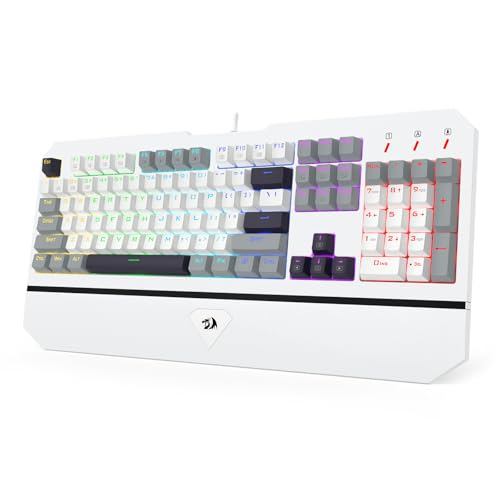
- 104-key layout with numpad
- Big built-in wrist rest for comfort
- Wired linear switches with anti-ghosting
Best For: Typists who want a stable, full-size board for all-day use
Macro-Heavy Workhorse
Redragon K550 RGB Mechanical Keyboard with Wrist Rest

- 12 onboard macro keys for shortcuts
- Aluminum top plate and USB pass-through
- Dedicated media controls with wrist rest
Best For: Users who rely on macros and extra controls for faster work
Ergonomic Wireless Pick – Hexgears X5 Full-Size 108-Key Keyboard
If you want a mechanical keyboard for productivity with wrist rest support and still prefer a full-size layout, the Hexgears X5 is built around comfort and flexibility. It combines wired USB-C and 2.4 GHz wireless modes, a detachable wrist rest, and a 108-key layout that works well for long typing sessions and general desk use.
Best For: Users who want a full-size mechanical keyboard with wireless freedom and built-in wrist support.
Pros:
- Includes a detachable wrist rest for more comfortable long sessions
- Dual-mode connectivity with wired USB and 2.4 GHz wireless
- Full-size 108-key layout with N-key rollover for accurate input
- Durable PBT keycaps and water-resistant design
Cons:
- Clicky Kailh Box switches may be loud for shared workspaces
- Single-color backlighting only, not RGB
- Bulkier full-size design takes up more desk space
The X5 makes sense if you want a productivity-focused keyboard with a comfortable wrist rest and the option to go wireless. It is less about minimalist office styling and more about giving you a capable, full-size mechanical setup for typing and everyday work.
Premium Workhorse – CORSAIR K70 CORE RGB with Palmrest
The CORSAIR K70 CORE RGB is a strong option if you want a mechanical keyboard for productivity with wrist rest support in a sturdy, premium build. Its pre-lubed linear switches, sound dampening, aluminum top plate, and detachable palmrest make it more comfortable for extended typing while still keeping the responsive feel many users want.
Best For: Users who want a refined wired mechanical keyboard with a palmrest, media controls, and a durable build.
Pros:
- Pre-lubed linear switches for smooth keystrokes
- Two layers of sound dampening for a quieter feel
- Magnetic detachable soft-touch palm rest included
- Aluminum top plate adds stability and a premium finish
Cons:
- Wired USB-A connection only
- RGB and iCUE features may be more than some office users need
- Absence of wireless mode limits desk flexibility
This is a practical choice if you want a polished typing experience and prefer linear switches with a wrist rest. It balances comfort and build quality well, though it is best suited to users who do not mind staying wired.
Desk Comfort Upgrade – Vaydeer Extra-Large Wrist Rest and Stand
If your main goal is a mechanical keyboard for productivity with wrist rest support, this Vaydeer model is more of a desk ergonomics upgrade than a keyboard itself. It combines an oversized memory foam wrist pad with an integrated keyboard stand, giving full-size mechanical keyboards a more supported and aligned typing position.
Best For: People who already have a full-size keyboard and want a large ergonomic wrist rest with adjustable tilt.
Pros:
- Extra-large 18.9 x 11-inch surface fits full-size keyboards
- 2-in-1 design combines a stand and wrist cushion
- Two ergonomic angle options for more comfortable typing
- Memory foam and non-slip silicone base add comfort and stability
Cons:
- Does not include a keyboard
- Designed for large full-size boards, so it may be excessive for compact layouts
- Angle-based support may take up more desk depth
This is a smart add-on if wrist comfort is the priority and you want better hand positioning throughout the day. It is not a keyboard purchase, but it can significantly improve the ergonomics of an existing mechanical setup.
Retro Typing Pick – AULA F2088 Typewriter-Style Mechanical Keyboard
The AULA F2088 is a mechanical keyboard for productivity with wrist rest support if you like a more tactile, old-school typing feel. It pairs blue clicky switches, a magnetic wrist rest, and a sturdy aluminum alloy panel with a retro keycap design, making it a comfortable wired option for work and general typing.
Best For: Typists who want a retro-inspired mechanical keyboard with a wrist rest and tactile clicky switches.
Pros:
- Includes a removable magnetic wrist rest
- Blue clicky switches provide crisp tactile feedback
- Media knob and backlight controls add convenience
- Aluminum alloy panel improves durability
Cons:
- Clicky blue switches can be loud in quiet spaces
- Wired USB connection only
- Typewriter-style round keys may not suit everyone
This keyboard is a good fit if you want a more expressive typing experience and appreciate the included wrist support. It leans stylistically bold, but it still offers the practical features needed for day-to-day use.
Minimalist Full-Size Pick – Lenovo Legion K500 RGB Mechanical Keyboard
If you want a mechanical keyboard for productivity with wrist rest support and a simple, full-size layout, the Lenovo Legion K500 keeps things straightforward. Its red mechanical switches, 104-key rollover, and detachable palm rest make it a practical fit for typing-heavy desks that also see occasional gaming.
Best For: Users who want a full-size mechanical board with a detachable palm rest and a clean, no-frills design.
Pros:
- Detachable palm rest adds comfort for longer typing sessions.
- Full-size 104-key layout includes dedicated media keys and a game mode key.
- Red mechanical switches and 100% anti-ghosting support accurate input.
- RGB per-key lighting and a durable braided cable add desk appeal and practicality.
Cons:
- Wired USB connection only.
- Gaming-first styling may feel less office-neutral than simpler productivity keyboards.
The K500 is a solid choice if you value a standard layout, dependable mechanical feel, and an included wrist-support accessory without adding extra complexity to your setup.
Wireless Comfort Pick – Hexgears X2 TKL with Magnetic Wrist Rest
The Hexgears X2 is a strong mechanical keyboard for productivity with wrist rest support if you want a smaller, more flexible setup. Its TKL layout, dual-mode 2.4GHz/USB-C connection, and included ergonomic wrist rest make it useful for both work and long typing sessions.
Best For: Anyone who wants a compact wireless mechanical keyboard with ergonomic wrist support.
Pros:
- Includes an ergonomically designed wrist rest for improved comfort.
- Dual-mode 2.4GHz wireless and USB-C wired support adds flexibility.
- Kailh BOX tactile switches are rated for 80 million keystrokes.
- White backlighting and adjustable feet help with daily use and typing position.
Cons:
- TKL layout removes the numeric keypad.
- White backlighting is more restrained than RGB options.
This model makes sense if comfort and connection flexibility matter more than maximum key count, especially for users who prefer a cleaner desktop footprint.
Ergonomic Typing Pick – Adesso EasyTouch 150 Mechanical Keyboard
If your priority is a mechanical keyboard for productivity with wrist rest support and an ergonomic shape, the Adesso EasyTouch 150 is built for long typing days. Its split-key contoured design, integrated palm rest, and Cherry MX Brown switches are aimed at comfortable, accurate work rather than flashy extras.
Best For: Typists and office users who want ergonomic support, a full-size layout, and quiet tactile switches.
Pros:
- Split-key contoured design promotes a more natural hand and wrist position.
- Integrated palm rest supports wrists during extended typing.
- Cherry MX Brown switches provide quiet tactile feedback.
- Full-size 104-key layout with numeric pad and dedicated Copilot AI hotkey.
Cons:
- Wired USB-A connection only.
- Large ergonomic footprint may take up more desk space.
For productivity-focused buyers, this is the most ergonomic option in the group and the best fit when long-term typing comfort matters more than compactness or wireless convenience.
Wireless Productivity Pick – RK96 96% Wireless Mechanical Keyboard with Wrist Rest
If you want a mechanical keyboard for productivity with wrist rest that still keeps a full numpad and comfortable layout, the RK ROYAL KLUDGE RK96 is built around that brief. The 96-key design preserves most full-size functionality while trimming space, and the magnetic wrist rest plus offset arrow keys make longer work sessions easier to handle.
Best For: Users who want a compact full-function keyboard for office work, spreadsheets, and long typing sessions.
Pros:
- 96-key layout keeps the number pad while saving desk space versus a standard full-size board.
- Three connection modes: Bluetooth 5.0, 2.4GHz wireless, and USB-C wired.
- Hot-swappable PCB makes switch changes easier without soldering.
- Magnetic wrist rest and built-in USB pass-through ports add comfort and convenience.
Cons:
- The wireless feature set may be more than you need if you only want a simple wired office keyboard.
- Its gaming-style design and RGB lighting may not suit a very minimal workspace.
The RK96 stands out as a flexible productivity board because it balances desk efficiency, comfort, and connectivity. If you want a wrist-rest-equipped mechanical keyboard that can move between laptop, PC, and tablet setups, this one covers a lot of bases.
Full-Size Comfort Choice – Redragon K558 Full-Size Mechanical Keyboard with Wrist Rest
The Redragon K558 is a straightforward mechanical keyboard for productivity with wrist rest if you prefer a traditional 104-key layout and a wired connection. Its linear switches, full numpad, and large non-removable wrist rest are aimed at longer typing sessions where comfort and stability matter more than extras.
Best For: People who want a sturdy full-size keyboard for daily typing, office work, and general home use.
Pros:
- 104-key full-size layout includes a number pad for spreadsheets and data entry.
- Big built-in wrist rest and stair-up keycap design support more natural hand positioning.
- 100% anti-ghosting helps ensure every keypress registers during fast typing.
- 11 multimedia shortcuts make common tasks quicker from the keyboard.
Cons:
- It is wired only, so it does not offer wireless flexibility.
- The backlight is not RGB per-key lighting; it uses fixed rainbow backlight modes.
This model makes sense if you want a durable, no-fuss keyboard that leans into comfort and reliable full-size productivity. It is less feature-rich than some competitors, but the large wrist rest and solid build are easy wins for everyday use.
Macro-Heavy Workhorse – Redragon K550 RGB Mechanical Keyboard with Wrist Rest
If your version of a mechanical keyboard for productivity with wrist rest needs extra controls, the Redragon K550 is the most utility-focused option here. It adds 12 onboard macro keys, a USB pass-through port, and dedicated media controls, making it a strong fit for users who like shortcuts close at hand.
Best For: Power users who want a full-size keyboard with macros, media controls, and a wrist rest.
Pros:
- 12 onboard macro keys can be programmed without extra software for quick workflows.
- Aluminum top plate gives the keyboard a sturdy, premium feel on the desk.
- Extra USB pass-through port helps keep peripherals and receivers connected.
- Dedicated media controls and volume scroll bar improve day-to-day convenience.
Cons:
- The 131-key layout is larger and more specialized than a standard full-size board.
- Custom purple switches are clicky, which may be less ideal in quiet environments.
The K550 is a productivity-friendly choice when macros and onboard controls matter as much as typing comfort. If you want a wrist-rest-equipped mechanical keyboard that can streamline repetitive tasks, this one offers the strongest shortcut set of the group.
How We Picked the Best Mechanical Keyboard for Productivity with Wrist Rest
We prioritized models that balance typing comfort, everyday productivity features, and wrist support. That means looking for full-size or efficient compact layouts, reliable switch options, stable build quality, and included or compatible wrist rests. We also considered whether each keyboard is suited to office use, home workspaces, or mixed work-and-play setups.
Quick Comparison
If you want the simplest path, choose a full-size board if you rely on the number pad, a TKL or 96% layout if desk space matters, and a wireless model if you want a cleaner setup. For the best long-session comfort, make sure the wrist rest height matches the keyboard profile so your hands stay in a neutral position.
Key Buying Factors for a Mechanical Keyboard for Productivity with Wrist Rest
Switch Type
Linear switches feel smooth and quietest for many users, tactile switches add a clear bump for typing accuracy, and clicky switches offer strong feedback but can be noisy in shared spaces. For productivity, tactile or quiet linear switches are often the safest choices.
Wrist Rest Design
Look for a wrist rest that is wide enough for your typing posture, has supportive cushioning, and sits at the correct height relative to the keycaps. A detachable or magnetic rest can be useful if you switch between typing styles or need more desk flexibility.
Layout and Size
Full-size keyboards suit spreadsheet work and data entry, while 96%, 90%, and TKL layouts save space without giving up too much functionality. If you want a Mechanical Keyboard for Productivity with Wrist Rest, the best layout is the one that matches your workflow and mouse reach.
Connectivity and Features
Wired keyboards are simple and consistent, while dual-mode and tri-mode options add flexibility for multi-device setups. Extra features like hot-swappable switches, programmable keys, media controls, and dedicated shortcuts can improve efficiency if you use them regularly rather than treating them as extras.
Who Should Buy Which Mechanical Keyboard for Productivity with Wrist Rest?
Choose a full-size keyboard if you need a number pad and frequent shortcut access. Go with a compact or 96% model if you want better ergonomics and more mouse room. Pick a wireless option if desk clutter bothers you, and consider a board with an integrated or bundled wrist rest if comfort is your top priority. If you work long hours, a well-matched wrist rest is often just as important as the switches themselves.
